You’re probably already using one. Sort of.

Yes. Limited User Accounts, also known as Standard (as opposed to Administrator) accounts, are very effective at reducing the potential impact of a virus or spyware.
Unfortunately, in my experience, they’re also effective at reducing what you can do with your computer.
Besides, for all intents and purposes, you’re probably already using one. Sort of.
Become a Patron of Ask Leo! and go ad-free!

Limited user accounts
You can add new accounts to Windows with limited privileges, called Standard accounts, using the Settings app. This can be useful for granting access to people whom you don’t completely trust to be secure. For average users, the “administrator-capable” account set up by default is secure enough as long as you pay attention to UAC prompts.
LUA
The concept behind Limited User Accounts (LUA) is this: you don’t need every privilege on your machine in order to do most day-to-day things. Surfing the web, sending email, writing documents, or balancing your checkbook do not and should not require anything other than the most basic of permissions.
Restricting certain permissions — for example, the ability to write to certain folders — makes it more difficult for malware to do those things. Since a lot of malware relies on those types of operations, it’s an effective strategy.
Even though I have my own frustrations with it, which I’ll discuss below, I do recommend trying it as a step towards increasing the security of your system. I particularly like the idea of families setting up their children’s accounts on a shared computer with LUA.
Setting up LUA
Let’s look at how to set up a LUA, and then I’ll tell you my experience with using them.
You must have one Administrator-capable account on your machine. Typically, it’ll be the one you created when you initially installed or set up Windows.
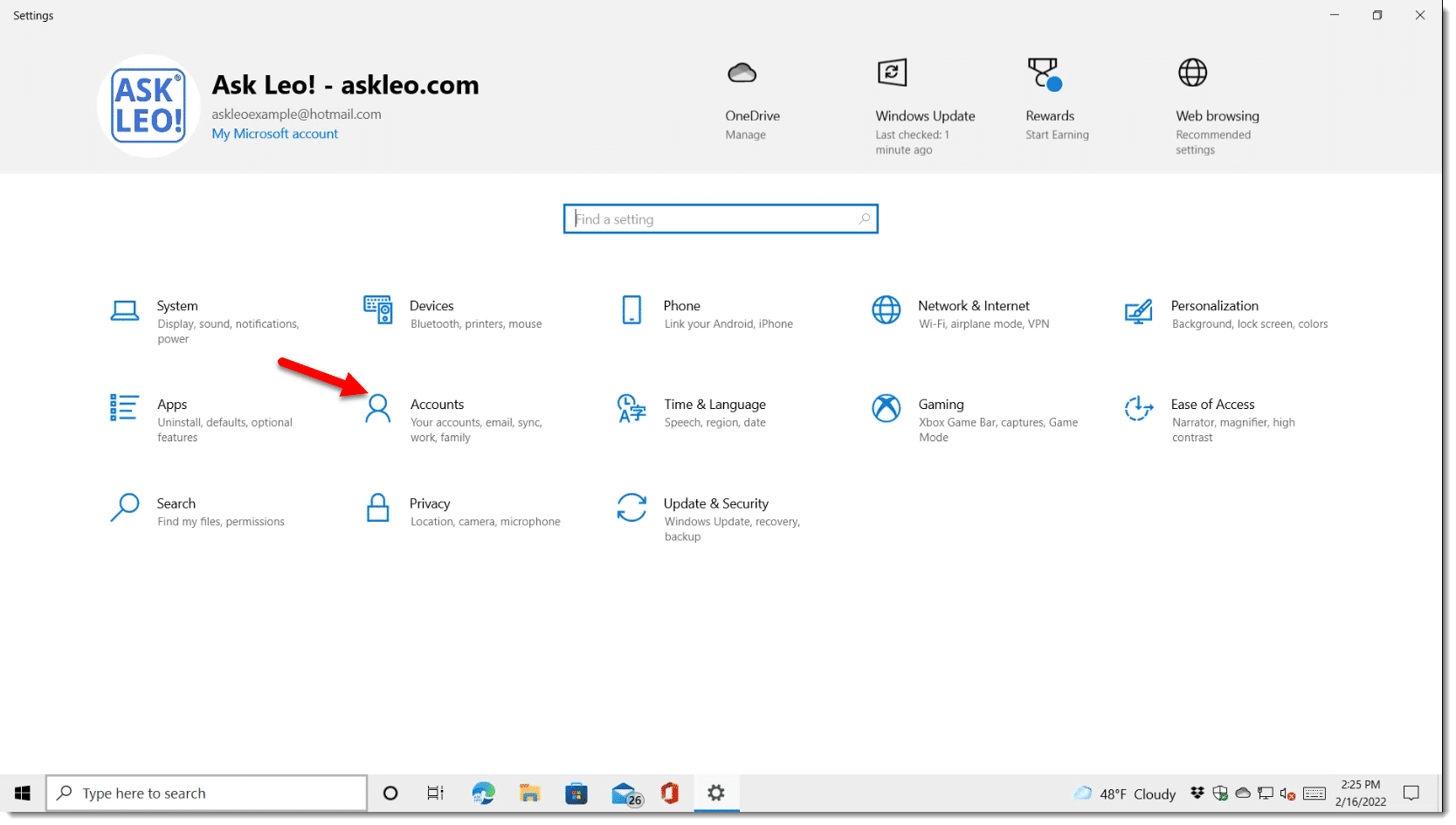
While signed into that account, create a new user account. Start by visiting the Settings App, and clicking on Accounts.
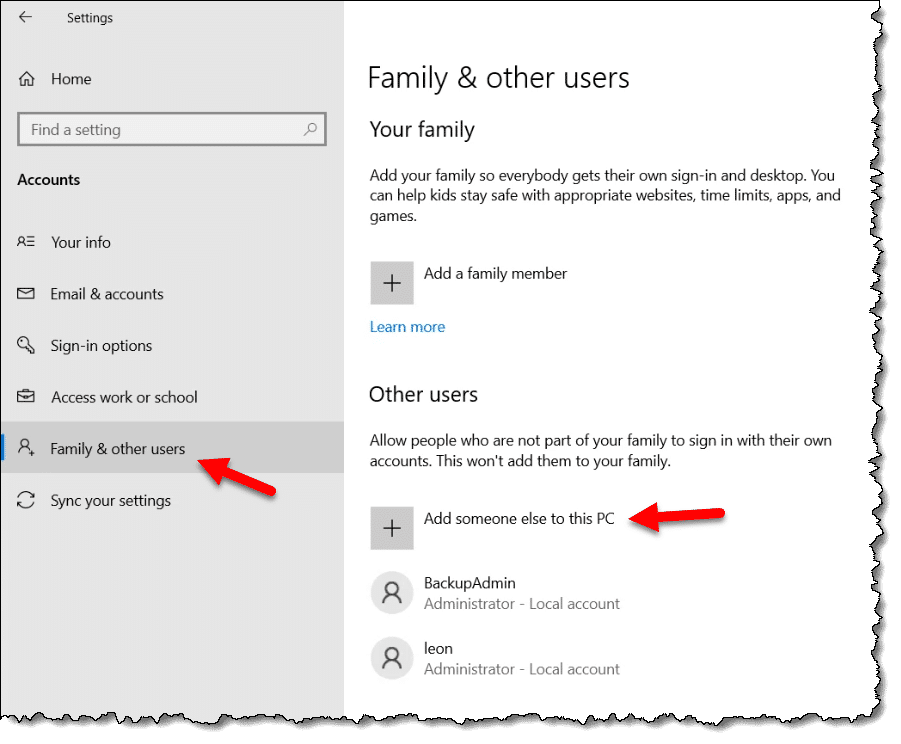
On the resulting page, click on Family & other users, and then Add someone else to this PC.
On the next page, enter the email address of the Microsoft account1 belonging to the new user.
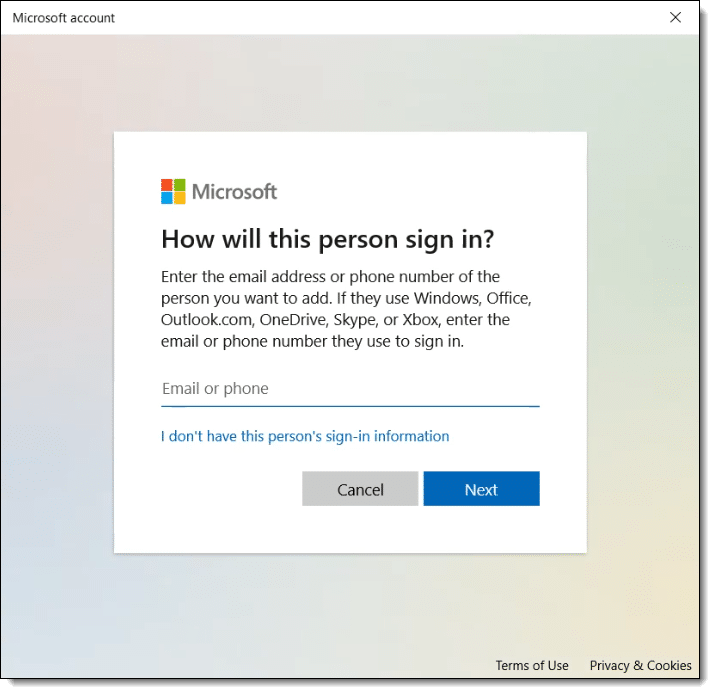
Click on Next, and you’re done. The new account will appear in the list of accounts on the machine.
To confirm that the account is a Standard Account, click on the account and then on Change account type.

You should see it listed as Standard User.
My LUA frustrations
Every time I’ve tried setting up a LUA for my own use, I’ve become frustrated. Eventually, I ended up reverting that account to full administrative privileges.
My frustration is not with LUA itself, but with other software.
I keep running into things I can’t do. For example, installing software is an issue using an LUA. You’ll generally need to run “as” administrator or respond to a UAC prompt with password to complete the install.
There are workarounds. You could temporarily change the Limited account to Administrator just long enough to install whatever needs installing. But there are other complications, and it’s an additional, cumbersome step to what’s already a complicated process.
There is a fundamental conflict here: you want to prevent installation of malware while allowing the installation of trusted applications. Unfortunately, there’s no easy way for your computer to distinguish between malware and an application you trust, so LUAs must put up a barrier to both, usually in the form of a User Account Control (UAC) prompt — those boxes that ask if you’re sure you want this software to make changes to your computer.
A more fundamental problem is that while some applications need it, too many demand administrative privileges when they don’t. As a result, you can’t install or run them from a LUA.
Besides, you’re already limited
Do you ever try to do something and get a notification that you have to be the Administrator to take that action? We think the account we create when we set up our computer is an Administrator account. It’s often the only account on the machine — how could it not have Administrator privileges?
It’s not. Not really.
I think of that account as administrator-capable.
Even though you’re logged into what you consider to be, and everyone calls, an administrator account, you’re really running with limited privileges.
That means if you attempt to do something that requires administrative privileges, you’ll2 be faced with a UAC prompt asking you to confirm you really want to do what you’re trying to do.
- Administrator-capable accounts need only click OK in order to proceed.
- Standard (LUA) accounts also get a UAC prompt, but it requires an administrator’s password before you can click OK.
That’s 90% of the difference: whether or not you need to specify a password. Give the kids their own LUA account, but don’t give them the administrator password, and they can’t do administrator things like downloading apps. Using your own administrator-capable account, all you need do is click OK.
As long as you pay attention to the UAC prompts and don’t OK anything you don’t expect, you’re as safe as an LUA.
About security software
The good news here relates to your question about security software.
This software is installed at the system level and works on the entire machine, regardless of what user you are signed in as or even whether you’re signed in at all.
Similarly, Windows Update runs regardless of the accounts you have on your machine.
Do this
Unless you have people using your computer that you don’t trust, do nothing. Use your administrator-capable account and pay attention to UAC prompts.
If you have kids or other individuals using your computer that you don’t feel comfortable trusting, give them their own LUA account, and you’ll know they can’t do much damage.
Subscribe to Confident Computing and get free unlimited access to my weekly newsletter! Less frustration and more confidence, solutions, answers, and tips in your inbox every week.
Podcast audio

Related Video


Footnotes & References
1: This can be a non-Microsoft account or a local account as well, but that’s beyond the scope of this article.
2: Usually. Sometimes the operation will fail, and you’ll need to explicitly run as administrator.


Windows Vista finally has a practical LUA implementation, many many years overdue, and linux has always had it. The implementation in Ubuntu is really quite elegant. Everyone is defaulted to a power user account, and if you’d like to perform a root-level task, you’re simply asked for your password.
The Mac is much like Ubuntu in this regard, and I agree, it’s perhaps the most elegant compromise.
What I *don’t* know is how often that requirement (administrative access) pops up in what would otherwise be “normal” work. That’s what’s most frustrating about XP’s LUA.
I prefer the way MacOS and Linux distributions do it. It requires a password for their UAC equivalent. That way the account is administrator capable for anyone who knows the password. Windows sort of does that. If you have a non-administrator capable machine, it asks for a password, but with Windows, it just doesn’t work as well as MacOS or Linux. You’d think with Microsoft’s resources, they would do it better.
I think the problem Microsoft is fixing with “administrator capable” accounts is that administrative rights are required more often than on Linux or Mac, in my experience. Thus requiring that password would get very tiring very quick. I also believe the “more often” is most often a result of poorly designed (or overly aggressive) third party software.
It’s probably because of the Registry. Windows requires UAC approval for any program that makes changes to the registry and that includes many utility programs, The registry has always seemed like a dinosaur, big, but velnerable and fragile.
“Windows requires UAC approval for any program that makes changes to the registry” — this is not true. The registry has a complete permissions/access/security mechanism, very much like the file system. Programs make registry changes all the time without invoking UAC.
It’s when programs try to make changes in protected areas (registry or file system), or access protected functionality that UAC kicks in.
>> What I *don’t* know is how often that requirement (administrative access) pops up in what would otherwise be “normal” work.
Anecdotally, I read that this was one of the biggest complaints about the early RC’s for Vista..that even in trivial tasks like deleting a file from your desktop, Vista would password-prompt you (not once, not twice, but) *three* times. However, Microsoft has corrected this in later RCs, and supposedly trimmed down the number of tasks that require entering a password.
I have added a Limited account to the computer that I most use for Web Wandering and intend to use that account only for that purpose. Is this sensible?
In early 2006, I found a reference to a small program on Microsoft’s website called DropMyRights. It’s used with user setup desktop shortcuts to fire-up DropMyRights which then starts ups another program (such as Internet Exporer, Firefox, Outlook Express) with LimitedUser rights (non-Administrator). I’ve been using it for the 3 programs above for most of 2006. When I look at the security setting of any of these DropMyRights invoked programs using ProcessExplorer (from SysInternals), …right-click application name > Properties > Security tab > BUILTIN/Administrators setting: it shows “Deny,Owner” rather than “Owner”. I think that for WinXP, this is a pretty good compromise. I can logon with Administrator rights, but then fire up some programs such as browsers and email with LimitedUser rights. I think that this protects me pretty well! I get the benefits of the need for Administrator rights with many applications as well as the protection of LimitedUser rights with my Internet facing applications. I keep my standard desktop icons for browsers, etc. for WindowsUpdate and other such work.
I have windows vista and I have asked Dell, as well as my IP. how can seperate two users in email. Right now my wife’s email comes in my acct. and if she sends it goes out in my name not hers.
I believe many people are not aware that it is possible to run an application in a LUA with administrator rights (provided you have the password). The feature is called “Run as…” and is accessible through right-click in Explorer on the program you want to execute. It will only be valid for the current session and is an excellent way of quickly getting things installed or configured without the hassle of temporarily elevating permission rights. It is even possible to setup a shortcut or program to always run as a different account (although I wouldn’t recommend that as a design, it’s a compromise for the exceptions).
I have setup my system exactly as described and since I don’t use games (which are the ones that are most fiddly about permission rights) everything works fine without hickups or hassles. Admin accounts is ONLY for installation of new programs.
I DO wonder how protected I am with this scheme. Knowing a little about how permissions work with NTFS, I can’t figure how a virus could bypass this. Of course there is a way because enterprises get viruses just as anybody else (albeit not as often) and in a corporate environment LUA is exactly the norm. So how do viruses do it? If they can’t get write access to the registry, how do they make themselves executable on system restarts?
I can’t change the security settings from medium to medium high. Is this normal in a limited user account? and when I change try to change these settings I always get “explorer.exe is not responding” or smoething like that when I close or apply the setting. Is something wrong with Windows in my PC?
I use all three levels of XP accounts
Admin for Updates, installs, and SW that requires Admin priv.
Limited for regular day to day stuff and some of the SW can be run with “Run As Admin account” such as FTP Voyager
Guest, I setup the Guest account log into it once and then use the Run As to access the “Guest Account” web browser,
but, I’ve recently bumped up against a problem with the Guest account User Profile not being retained and can’t seem to find a solution anywhere except “it’s supposed to do that…” but I know it works as I have set up the Guest account to use for web browsing on 4 previous machines 2 with XP Pro and 2 with XP home and the settings are retained in the Guest Profile, I have tried to setup another XP Pro machine and at every log off the profile is deleted which is not good because all Firefox browser add-ons & settings / customizations etc. are also removed the method I use (because I have software that requires I always be logged in as Admin. to use it), is to setup the Guest account and log into it once then “net user Guest ‘password'” and then change the browser shortcut in my admin account to “Run with different credentials” and use the “Guest browser” from within the Admin. & or Limited account is there some registry entry or group policy setting that’s preventing the Guest profile from being retained?
I find my LUA such a pain: example: I downloaded a new font. However, I can only use that new font if I am using Word while logged in as the administrator. I couldn’t install the new font while logged in as the LU so had to log in as administrator. I can’t figure out how to either allow LU to get full rights to Fonts folder or copy Fonts folder and tell Word where to find it. ARGH! Any ideas?
I have XP Home. I haven’t been able to grant myself administrative privileges on the guest account. Apparently it’s not a part of the Home version. When in Guest there is no AOL client, that is there is no way to reach the internet. You can’t download the client without the admin privileges. Then I tried moving the AOL folder from the C:\ drive to the “shared” folder. This didn’t work either. So I gave up and surf the net via the owner’s administrative account. Frustrated.
I use Windows 7 on my personal laptop where User Account Control has been revamped compared to previous versions. I log onto a limited account for nearly 99% of my activities. Whenever I need to use the administrator privileges it is just a simple task to type in my admin password. It Works great. I have had to login to my admin account twice in two years I recommend this setup to most of my customers because it is the best way to prevent viruses and malware. I also force my family members to use my computer under a guest account.
However we do have a family PC running Windows XP. Under Windows XP the user account control can be a pain constantly requiring you to log out of one account and log into another for the simplest of things. Only the most untrustworthy of family members access our family computer as a limited user and the rest run as administrator.
I am a self computer educated user and have followed the precaution of logging in as limited user for many years now and strongly recommend it. Note, limited user and not guest log in. Gave up guest log in fairly quickly as it was causing too many problems.
Initially, I did run in to occasional problems but found a work around fairly easily. As for installing programs, most accepted “run as… “, in some cases I had to take a temp. admin priviledge(must remember to return to limited user, did forget at times) and only on rare occassions had to log in to admin. ac for installation.
Now that I use windows 7, most of these are no longer problems- windows automatically ask for “run as”
I agree with Leo. I have tried the Standard level Windows account, and UAC got in the way far too much for my liking.
In my GNU/Linux distribution, when I need to do something that requires administrative (root) privileges, I open a terminal window, and perform the task by preceding the command with ‘sudo …’. There are also GUI apps that require Admin (root) permissions, and they simply pop up a dialog asking for my password. Since I am a member of the sudoers group, my login password suffices.
The Windows UAC dialog appears to serve a similar purpose, but until Windows 10/11 has been far too cumbersome to be practical. I prefer a different approach to control/prevent malware from installing itself onto or making changes to my computer:
I sign in with a password-less Microsoft account. I use [Windows] Microsoft Devender as my security suite. In Microsoft Defeder, I have enabled Ransomware protection. Controlled Folder Access is the feature that Microsoft Defender uses to protect your computer from ransomware. The description in the Ransomware protection dialog, under Controlled folder access is “Protects files, folders, and memory areas on your device from unauthorized changes by unfriendly applications”.
For about a week or two after enabling Ransomware protection, I got a lot of notifications from Controlled folder access that some access attempt had been blocked. Each time I got such a notification, I accessed Block history from the Ransomware protection screen and checked the top item (all blocked events are listed separately, with the most recent at the top). When I expand the event listing to view its details, the executable that attempted the access was listed along with the path to the protected folder for which the attempt was blocked. When I recognize the executable attempting the access, I click the ‘Actions’ button near the bottom-right corner of the event listing to allow future access. When I don’t know what the executable is, I copy its name (not the entire line) and search for it on the Internet. On the few occasions I have not recognized the name of an executable, they have been components of Window Update or some other Windows feature/function/service, etc. Now, the only time I get these notifications is when I install some new application to try out. As long as I do not get complacent about enabling access to these access block events, I should remain safe from ransomware, or any other form of malware that attempts to make changes to my computer, unless of course some black hatter finds a way to circumvent Controlled folder access (I hope not, at least for a very long time) :).
As far as I’m concerned, Controlled folder access may be one of the best protections Microsoft has provided to users. There is one caveat. Even if you have not enabled Ransomware protection, in Microsoft Defender’s Security at a glance screen, Virus and threat protection will report “No action needed”. In the Virus and threat protection screen, Ransomware protection (bottom-left) will also report “No action needed”. However, when you click on Manage ransomware protection, in the Ransomware protection screen under Controlled folder access, the feature is not turned on by default. IIRC, I learned about Windows Defender’s Ransomware Protection feature in an item from a ZDNet newsletter I subscribe to. In my opinion, these ‘No action needed’ statements are very misleading. For a feature such as Controlled folder access which is not enabled by default, Microsoft Defender should report something like ‘Advanced feature(s) available, but not enabled’ provided the advanced feature has not been enabled, then when/if the user enables the feature, it should then report ‘No action needed’.
My2Cents,
Ernie
One of the first things I learned about computer security was to set up a limited user account, and use it as much as possible. The main exceptions are the occasions when I install, update, or delete a software; then I use the administrator-capable account.
One welcome change is that nowadays, I can also update my anti-malware definitions in the limited user account. The User Account Control will not even pop up. That was often not possible in earlier days.
What Windows needs to add is a white listing option, so we can keep a safer standard account, and still use our trusted apps without entering a password every time. I know, wishful thinking.