Yes, I wouldn’t expect that rename to work. There are simply too many places, such as within the system registry, that have recorded the fact that things are on “C:”. If you rename C: to D:, the system wouldn’t be able to find them.
What you’re looking for is partitioning software.
And there’s a good chance you already have what you need.
Become a Patron of Ask Leo! and go ad-free!
Combining C: and D:
I’ve actually heard lots of arguments one way or the other on how to best partition a hard disk. My general feeling is that the pros and cons of one over the other are typically small, and thus I opt for simplicity: I create only one partition per hard disk.
Let’s start by showing you how to take all of the space allocated to your D: drive, and add it to your C: drive making your C: partition bigger and removing D: completely.
Pre-requisites:
- C: and D: are two different partitions on the same hard disk. If C: and D: are on different physical drives, what I’m about to describe won’t work.
- C: and D: are adjacent to one another on the hard disk. This will become apparent when we look at the Disk Management tool.
- You have backed up. In particular, if there’s anything you want to save on the D: drive, back it up now. What we’re going to do will erase what’s there now, completely. It’s always a good idea to back up prior to playing with disk partitions, since when something goes wrong it can go very, very wrong.
Fire up “Computer Management”. Right click on the icon for “My Computer“, “Computer” or “This PC“, depending on your version of Windows;
or right click on the Windows 8.1 desktop start menu and click on “Computer Management” (or run “compmgmt.msc” via the command line or Start-Run).
Click on Disk Management in the left hand pane:
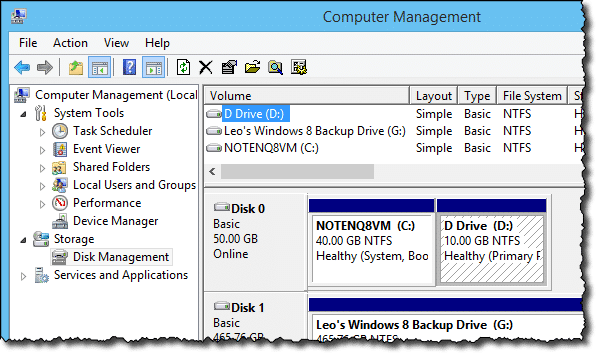
Right click on the D: drive to get a menu of possible actions:
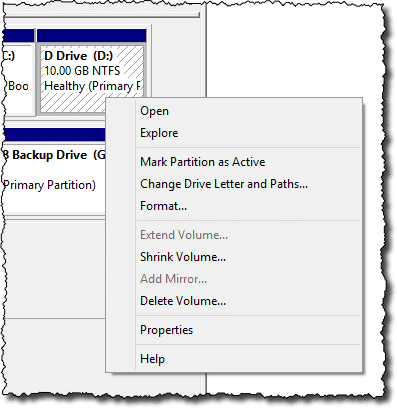
Be absolutely sure that you have all the data you want currently on D: backed up somewhere, and then click on Delete Volume…
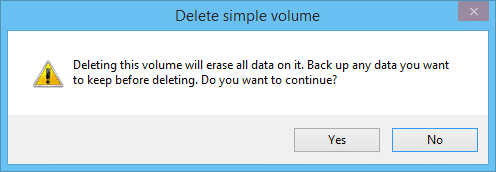
Confirm that, indeed, you have backed up the data and click on Yes.
The partition is deleted, and marked as “Unallocated space”:
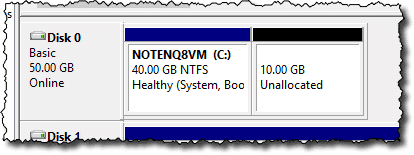
The next step is to allocate that space to the C: drive.
This time, right click on C: to get that menu of actions:
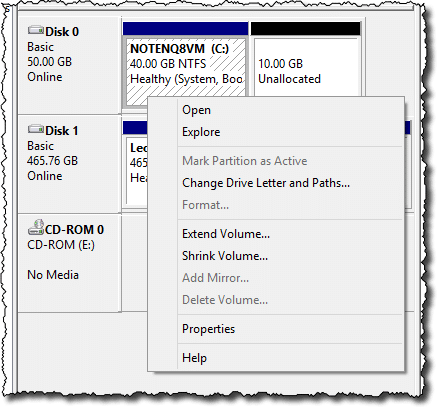
And click on Extend Volume…. This will begin the “Extend Volume Wizard”. The first page of the wizard is a simple explanation, so you can click Next.
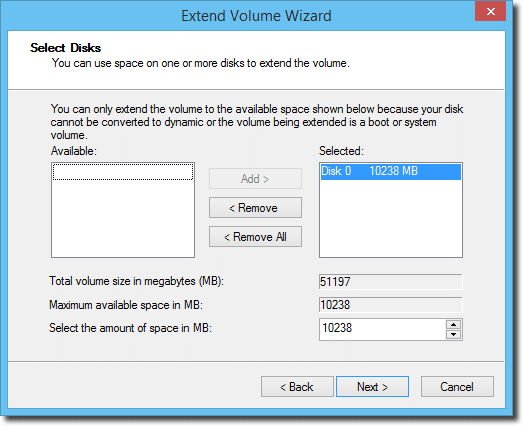
You can, if you like, adjust the amount of free space to be added to the C: drive, but the default is to add all of it. Since that’s what we want to do, click Next, and Next again on the subsequent confirmation dialog.
The result is a single drive C: that has expanded to encompass the space formerly occupied by D:.
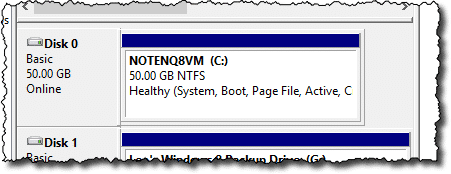
You can now copy any of the data that you had saved from the former D: drive onto new locations in C:.
Using some, but not all, of D:
The instructions above apply to the simple scenario where C: and D: are adjacent and we want to add all of D:’s space to C:. That’s probably the most common layout, and a common desired result, not to mention my recommendation.
But if you want to preserve the D: drive and just make it smaller, things get more complex quickly, and Windows’ Disk Management tool isn’t the easiest way to accomplish it. You can do it, but I believe it takes a scenario like this (once again, assuming C: and D: are adjacent, as pictured above):
- Determine how big you want the resulting D: drive to be.
- Resize the existing D: so that the free space left after it is the size you want the final D: drive to be.
- Format that free space as another drive E: (or F:, or whatever drive letter is available).
- If D: isn’t empty, copy its contents to that new E: drive.
- Delete the D: partition, which should leave “Unallocated space” between C: and E:.
- Expand the C: drive to absorb the unallocated space.
- Remove the assignment of E: as the drive letter of that new partition and assign it the letter D:.
Doable, but complex.
It’s a tad easier using partition- management tools like Paragon Partition Manager or EaseUS Partition Master. (EaseUS has a free version.) These tools will let you perform the operation in a couple of somewhat easier steps.
- Make the D: partition smaller
- Move D: to the end of the drive so that the resulting free space is adjacent to C:
- Make the C: partition bigger
Two final caveats
The mechanics of combining partitions is at least conceptually simple on the surface, and relatively easy to do.
However,
If you already have software installed on that second D: partition and you remove it, as in my first example, you’ll need to reinstall it after the change, or it’ll be looking for things on a drive that no longer exists. Similarly, software that was configured to access data on that other partition will also need to be reconfigured as needed.
And I must stress the importance of backing up.
You must back up before playing with partitions. The cost of failure when re-partitioning a hard disk is very high, and includes losing everything. I’m not saying that it’s likely: most tools have good reputations and for the most part work well. But in the off chance that something goes wrong, you’ll most definitely want to have a comprehensive image backup to recover from.


I would suggest simply deleting the second partition and increasing the size of the first into the new space.
That works if you don’t mind losing any data on that second partition.
I believe that’s a destructive resize. Meaning that the data on the partitions is lost. These utilities do it while preserving your data.
Yes, as zac123 just mentioned: go to download.com and get “EASEUS Partition Manager Home Edition”. It’s free. I just did it about an hour ago, for the same problem; it was the way my daughter’s Acer computer came, with 70GB split evenly between C and D drives. C was full, D was empty. What you have to do is: use the slider to make the D smaller. It puts the chunk of free space after D. then move the D space to the end, so the free space is between C and D. Then increase the C space and it’ll take that empty chunk. Sorry if that sounds confusing but when you see the utility you’ll understand.. Believe me, it was soooo easy. !! (whew! I’ll tell ya, I was so scared!)
try this site for a free trial of partition magic http://www.soft32.com/download_151.html
Followed zac123’s advice and downloaded EASEUS Partition Manager and followed Tracy’s instructions for it and it worked perfectly. I took 25GB from the D drive and added it to the C drive. This is a problem that has been causing problems with my computer for more than 2 years. Now all is good. The process took more than an hour but everything worked like it was suppose to. I haven’t seen my computer run this fast since I bought it.
I used a program which is free for personal use: http://www.partitionwizard.com/free-partition-manager.html
I used it to move partitions and to resize a partition. It worked perfectly and the user interface is very intuitive.
I have the exact same problem. I feel like the simplest thing would be for more things to be saved on the D drive, but it seems impossible?
24-Feb-2011
Easeus saved our day. We paid out for Paragon Hard Disk Manager 2011 Suite, and wasted 5 hours trying to install it only for it to say ‘corrupted download’ each time. In fact, it was the software at the end of their emailed link which was flakey, and so in the 6th hour we downloaded from a different part of their site – which installed fine.
However… I personally found the software underwhelming.
All we wanted to do was make a C: drive partition bigger, and the D: drive partition smaller. To begin with, the HDM prog seemed cute and easy to use. Then we realised that in fact it was maybe more a case of cute graphics covering a confusing, counter-intuitive app.
There seemed to be no way to simply shrink D, resize C – and when we exited the Wizard, we were confronted with lots of jargon and messages saying more or less ‘not possible – period’ but with no clear explanation why. In short, a badly designed app especially given home users are meant to be able to use it.
After reading this forum (thanks!) I hesitantly tried the free app from EASEUS – thank you, thank you, thank you – within seconds (literally) of downloading the app, I worked out how to grab hold of one side of the D graphic and shrunk it, grabbed hold of one side of the C graphic and enlarged it, said Apply and…
.. I now have a perfect machine, with no space problem.
If there was some way to get my USD50 back from Paragon and donate it to the EASEUS guys, I would.
The moral of the story – don’t be fooled by international offices and fancy websites!
I just want to say i read this article and downloaded the free program partitionwizard in one of the above comments and it wouldnt work, said it was overlapping and there was a bug, then i downloaded EaseUS and it worked fine. They were very similar, so they both will probably work. Saved all my data, made the c drive larger and the d drive smaller and only took maybe 10 minutes, including downloading the program and all! Thanks for the help guys.
First thing I do with new computer is create D: partition. I keep data as separate as possible from the OS environment. Helps with backup routines, defragging. D:\whatever is much quicker to navigate to than c:\users\name\………………………………………….etc. Yes I come from DOS days, but one reason people lose files is because they do not understand where their files are actually saved except to say it is in ‘my documents’, whichever ‘documents’ folder and wherever it may be.
I also assign virtual drives using DOS subst command to major directories in the D: partition. Makes for meaningful data structure which in turn makes for knowing what documents etc I have and what I should still be writing.
My computer did not come with a disk for installing Windows 7. There is a “restore” folder on the D: partition that allows me to restore Windows 7 the way it was when I bought the computer. If I moved it to the c: partition or saved it to another HD, CD, DVD, or flash drive, I am not sure I could use it to restore Windows 7. Any advice on this would be helpful.
Do NOT attempt to alter/move/delete the restore partition unless you permanently want to remove the ability to restore to factory settings. It must reside exactly where it is to function properly. The space it occupies is usually relatively small. If that little amount of space makes a difference, it’s definitely time to get a bigger hard drive or an external one.
Actually it takes over 12GB. Thank you for your response. I will take your advice and leave it as it is.
My approach for restore/recovery partitions like that is to create an image backup of them first. I have yet to actually need/use one. More importantly relying on its presence is dangerous in and of itself, since if the hard disk dies then the recovery partitions die with it.
I have a Dell laptop that started the same way. I cannot imagine what they were thinking. Some programs only install in C. I used partition magic, but only because I had not read this column yet!
I came across this little program, and it works very well. http://www.disk-partition.com/
Good advice. Over the years, I’ve found that the third parties utilities make this process a lot easier and smoother than using Windows itself. While I’ve found the free version of EASEUS Partition Master to be quite nice, I recently stumbled upon AOMEI Partition Assistant which is just as nice and it adds a sweet feature: Aligning solid state drives. It tells you if the drive is properly aligned and if it isn’t you can easily align it. Frankly you can’t go wrong with either of these, as well as Paragon Partition Master. But as so many have noted, always back up your drives before you manipulate partitions.
I have used Easeus Partition Master for many years.
It is straight forward and reliable. It seems to be structured to prevent a major disaster.
I recommend it strongly.
I have always used a D drive, the main reason is if you redirect (right click, Properties) the my documents, my music and my videos to folders on D drive you don’t have any issues when you go to re-image the C drive and you have less space for the data backup when necessary. The C drive is always the smallest drive on my system and only for program files.
One of the complicating factors with the latest technology, is that C: might be a small SSD, and D: is a spinning drive. That means you can’t repartition. If the SSD gets almost full, you need to create an image, replace it with a larger SSD, restore the image, and expand the partition. Macrium Reflect to the rescue!
Interesting. I don’t fancy ripping drives apart into different partitions too.
I used to have something similar.
I wanted to transfer any program not needed for starting the system to an external drive.
Just copied everything (program files), except the program data files to the external drive, opened the registry editor (it’s an index only, you know) and changed all the drive letters of the programs concerned into the new drive’s letter (except the lines pointing to the program data folder).
As I only activate the external drive upon start up the advantage is an extremely fast starting operating system.
Don’t do this if you’re not confident you can do it.
My Fujitsu laptop came partitioned as follows: C drive=75gb D drive=448gb.
My C drive filled up very quickly as everything I saved and downloaded went straight to C drive.
I decided to make some new folders in D drive and did this: My Documents, My Pictures, My Videos and My Music all had a new folder in D drive as well as C drive.
I do have to transfer everything that defaults to C drive into my D drive, which is a real nuisance, but at least this is an amateurs way of coping with a situation.
Can I default new downloads straight to D drive and not to C?
You can typically set the default download folder in your browser, yes. How depends on which browser you use.
i follow what you have given above in my laptop the extend volume is hidden . i would like to take space from C drive .because i dont have any other d or e drive all my datas are stored in C drive .i have taken back up and now i am trying to make d drive and e drive
i deleted the partition and it is showing it as freespace not unallocated and cant be merged with c and if i try to crete a new volume with that free space it is showing error please help me solve this problem
thank you
You may need to run a different partition manager, such as the free tool from Easus.
My C: drive is full and I have 1.52 TB free space on my D: drive, so I want to get the free space from D: to C: but the D: is on disk 0 and C: is on disk 1. So i can’t do this, is there anything else I can do?
If they are actual different physical disks you can’t change the sizes by partition. Leo has an article about a great way to really analyze your disk space. Do this analysis and you may actually find easy ways to move your data around efficiently: http://askleo.com/wheres_my_disk_space_going/
Hi there, I wanted to utilise D drive as my C was almost full. I used MiniTool Wizard to create a new volume but still my C drive hasnt been extended and ‘Extending’ isnt an option when I go into Disk Management on my Netbook as it is ‘greyed out’ what else do i need to do to increase C drives capacity? This is frying my brain, Im not techi….pls help!
This empty partition D instead of a large C drive which we desire is even more important with the transition to Solid State SSD drives. It’s funny how for a while – we all got big capacity mechanical drives cheap and now for speed and lower power we are shrinking our drives a bit to have solid state hard drives at a reasonable price. Your solution and your explanations are comforting to tackle the problem with images from Windows 7/8 and focus on exactly what is needed to fix the D drive that sits empty. Partitioning software is not needed, just a simple explanation like you show. It’s funny that Microsoft points people to 3rd party partitioning software and the solution is so easy. THANK YOU!
I have a 1 TB hdd that was partitioned for 10 gb for the boot (C:) and the rest was drive D. I resized C, because it was filling up to, 100gb. After the partition the size was correct but C was still full to bursting. Are there any residual files that need removing or anything after a resize? I can’t see what is taking up all the space that should now be there.
This article shows you how to find what files are taking up your disk space:
http://askleo.com/wheres_my_disk_space_going/
I am working on windows server. I have 15 physical drives. 8 logical partition. want to allocate more space to H partition.
What is solution in this case where physical drives are different (If C: and D: are on different physical drives)?
i cant see //extendid prtion when i right click on c plz help
Partitions are not made visible via right click. You probably want to run Disk Manager, but it really depends on exactly what you’re trying to accomplish, or what OS version you;re running – neither of which you’ve provided.
Dear Sir,
I have made 3 partition in my dell laptop running on windows 8.1 are as follows C=350, E=50 & F=50 now i want to merge OR join E drive space to C drive to make C drive space larger, so pls let me know how can i delete E drive space & merge with C drive. Please send instruction to my email id:{email address removed}@hotmail.com will be helpful.
thanks
avinash
This is a nice easy fix I can do everything you suggest for d but when I right click on c it only lets me delete volume not extend c and d are both on disk 0 and they are next to each other in disk manager as shown I can’t download anything as my disk is full someone only gave c drive 40gb any suggestions
Have you deleted and unallocated the d: drive as unallocated. If not, copy all of the files from the d: drive. If you’ve followed the most important procedure in the article and backed up your computer, it would still be a good idea to make an additional copy of the files in accordance with Murphy’s Law. (For the half a dozen of you who don’t know Murphy’s Law it states: “Anything that can go wrong, will go wrong.”)
i did as you said and deleted the d drive as told. It shows up as Free Space and not as Unallocated. After that i right clicked on the c drive option and find that the extend option is not selectable…please help. Others have also faced this same issue but they have not received any solution.
That usually means either you are not running a Windows version that has the extend feature, or that there is another partition in the way. In either case a tool like Easeus Partition Manager can usually do what you need.
Is it possible to to extract some space fom one drive and add that one to C drive.Lyk 20GB extracted from E then add that to C drive.
If the space is on the same physical drive, yes. If it’s a different physical drive, then no.
I have the same issue. I was able to shrink D volume which is then shown as unallocated. But unable to expand C as when I right click on C, as expand volume is not highlighted. It is grayed out. Please help anyone.
As quite a few people have already stated. My d drive came up as free space, not unalocated. There is an option to delete partition, will they s then make it unalocated so I can proceed to expand c drive. Tia
Every thing is possible but c: right click options “Extend Volume ” option is disabled . How can I enable that option first :(
.
That usually happens because there is an existing partition next to the C: partition. You need to move that partition first – that usually takes a tool like EaseUS Partition Manager or others and isn’t easily done from within Windows alone.
You can try a program like EaseUS Partition Master. It has more options than Windows built-in Disk Management.
hello Leo ,
I did as you mentioned firstly via disk management but I stuck with a problem, I deleted the D drive and it shows up as free space but on clicking C drive I don’t get access to extend volume option nor I can manage to get D drive again. Even though I tried to create it via wizard but it finishes up showing no more space for disk, please help m
Hello Leo,
I have encountered exactly the same problem as ‘Sreya’ had…. I freed 5 GB space from E drive but it is showing that this space can only be returned back to E drive and not C drive. Moreover no unallocated space is being shown there. All the space I shrinked, got transformed into Free Space.
Note:- All my drives are in NTFS system.
In order to join the space in the d: partition to c:, deleting the data is not enough. You’d have to unallocate the D: partition. In Windows disk management, right click on the partition and choose “Delete volume”. other programs you might have to choose a similarly named option such as Unallocate.
Thanks Leo.
I had used the “EaseUS Partition Master 10.8” software to re-distribute the partition, and it worked really well without any loss of data.
Now, please tell me if I uninstalled the software, will it affect my partition or not…???
Are the partitions re-distributed by me, Permanent…???
Changes made to the partitions remain. If you uninstall Partition Master, it won’t affect your partitioning.
Uninstalling the partition manager will not change the partitions.
Hello Leo, I too have a small and full C drive (60GB) and a large and almost empty D drive (Windows 8). Microsoft kindly took control of my PC (I am not very technically competent) to help re-distribute the space when I was unable to update to Windows 10, but ended up saying they couldn’t help because the C drive is ‘active’. As other people have said I noticed the ‘Extend’ option was greyed out.
Is there anyway round this, for example would the software previously referred to in the thread help in this instance?
EaseUS Partition Master or Aomei Partition Assistant (free versions) allow you partition disks which Windows built in disk partitioning can’t handle, because the will partition after a restart if necessary. No guarantees, but those have worked for me.
When I tried to download Aomei Partition Assistant it said something about it being not valid or whatever with the red danger x and I had no choice but to delete it, and I can’t find EaseUS’s free version or trial version.
http://www.partition-tool.com/personal.htm
I tried using your procedure Leo but found a gotcha. In my situation, the C drive was completely full and D had just a few files that were easily removed. However, because my paging space allocation was set to ‘system managed’, Windows was using the D drive for paging and so the partition could not be deleted(the option was grayed out). I realized this once I change my folder view option to include system files and found a pagefile on the D drive. So I went into Advanced system settings to relocate the page file but of course the C drive was full so changed the setting to ‘no page file’ temporarily. Once I rebooted I was able to go back into Disk Management to delete the D partition and extend the C partition as you described . When completed I went back into Advanced system settings to turn paging back on for C drive. All is well now. Thanks for getting me started.
The C: drive will NOT let me “Extend” despite having 300GB of unallocated space on the same disk space. The “Extend” option is grayed out?! So what do I do?!
What if I want to do this, but my two drives C: and D: are on separate disks.. is this still possible?
No. (OK, OK – VERY technically yes, it’s possible to make a drive letter span two physical disks. I don’t think you can “grow” an existing partition to do it, though. Besides, you really REALLY don’t want to – it doubles the risk of catastrophic failure, for example. If *either* drive fails, ALL data is lost.)
I recently tried Easeus (free version) and was not impressed. Making a good first impression is important to me, and I was disappointed right off the bat by the occasional poor use of the English language exhibited in various places of the program. Nevertheless, I took the software out for a spin and really don’t think it was particularly good. Yes, it did successfully accomplish the partitioning I wanted, but I didn’t think it was particularly user-friendly. So I then downloaded and burned a GParted live cd. I booted from that cd and found the interface better and more intuitive than Easeus. GParted successfully partitioned my drives. And the fact that this occurs via a live cd and that there’s nothing to download and install on my system makes GParted a keeper.
Interesting. Perhaps it’s gotten (much) better but my impression is that GParted has always been way too geeky for average folks, particularly when performing advanced or complex operations. If you found it otherwise, that’s fantastic. (For those following along, GParted is the partition manager included in most Linux distributions.)
There was not a clickable option to expand after I deleted my d dive as suggested. downloaded the free easeus software but not a clue as to how to use it! Any help you can give me? I also have an E drive I want to combine with my C drive as well. thanks
my laptop is not showing an extend volume option when i right click on the c drive…..what shall i do?
You might consider trying a third party program like Aomei Partition Assistant or EaseUS Partition Master. They are more powerful than the built-in Windows Disk Manager and often work when Disk Manager doesn’t.
I deleted my D drive but the space is marked as free space and not unallocated space; the system is not showing option to extend C drive( showing to shrink my C drive but not to extend)
I do not have a D: drive; but have C, E, F and G. I tried to do the above operation on my E drive, but the ‘delete volume’ option is disabled. It is only for this drive. For other drives, this option is available.
What the F…??
I started doing step by step as suggested in the article. I removed all data from my D drive and then deleted the volume through disc management. Now i right click on C drive to extend it, and the word “Extend Volume” is not highlighted & clickable. How do I use my Unallocated space Now?
When Windows disk management can’t handle what you want to do, the free EaseUS Partition Master usually works. I find EaseUS Partition Master easier to use than the Windows Disk Management for most tasks. It combines all the steps into a few process.
https://www.easeus.com/partition-manager/epm-free.html
Leo
I read what is on this page, but I will be back to follow instructions on how to expand my computer memory(a problem I have had for the past couple of years) after I check to make sure my D: drive has been saved or backed up.
Disk space (C:, D: etc) is not referred to as memory. Memory means RAM – the stuff that goes away when you turn off your computer.
Stumbled on this tutorial and it’s such a big help… Thank you. I don’t need to download any software for this task and following your very detailed instruction is quite easy… I owe you one.
the free space is allocated from the D drive after some work but
now the C drive’s extend volume is grey how to extend it?
You need to make sure that there is no partition following the C: partition. Otherwise you may need to use a tool more powerful than that included with Windows.
No solution that work in free versions of portion software that allows me to extend volume on disk C to un allocated space I. External D drive
You cannot “extend” an internal drive onto an external one.
I cant click on extend volume, its marked grey while other options have black letters.
Windows 10 -I tried your method but “delete volume” is grayed out as is another selection, I really wished it had worked. So I downloaded the EaseUS Free Partition Manager and though it let me shrink D it wouldn’t let me extend C saying “Your disk (disk 1) is almost bull so adjustment operation cannot be executed. To ensure data security and better computer performance, it is recommended to clean up disk space or change a new disk with larger capacity.” I cleaned up the disk before I started. My PC C: has 118 GB with 11.6 GB free and my D: has 910 free and totally useless. I really need some help. It’s so full the taskbar, window key, left/right clicking aren’t working when it starts up.
I’d get a USB hard drive and copy off some files from c: and d:.
It looks like you aren’t backing up. I’d perform a system image backup as soon as I get the drive.
How D I Back Up my Computer
I use a 1TB hard drive, 1.81TB portable drive and a 256 GB thumb drive. I use these to do graphic work on, store music, photos, I have no movies on my pc. I had made an image backup but will make a new one. There’s almost nothing in C: drive except program folders {as far as I know) which they don’t let me install onto external drives. I wondered if having to have 32 and 64 bit might be taking up room or when copying files from older computers into new ones might be taking too much of the older PC. In C: drive I have Program Files, Program Files (x86) and Program Data, mostly all the same software folders.
How are you trying to install Windows on an external drive?
Windows can be installed to an external drive from an .iso file using software like Rufus, but you’ll need a valid Windows license to activate it.
It’s generally not a good idea to install Windows on an external drive. This article talks of the downsides of installing programs on an external drive. Windows is a program with several included programs. It’s even more sensitive to problems than aplication programs. On the other hand a live versin of Windows can be useful as a troubleshooting tool.
Can I install programs on an external drive?
I meant windows won’t let me install programs (like my Affinity graphic programs or things like EaseUS partiton etc. ) on an external drive. I thought they may not take up so much room. I tried to make an image back up, had to leave it running all night and it doesn’t show up on my thumb drive, but the drive says it’s full now, so back to the drawing board.
I’ve got the update image back up an external drive finally. And Zipped and copied the few files on D: to another drive.
Didn’t realize this but I see that C: and D: aren’t adjacent to one another on the hard disk for some reason; D: says Disk 0 and C: has three partitions on Disk 1 which are 260 MB (EFI system partition), 118.47 GB NTFS (boot, crash dump, basic data partition) 511MB (recovery partition). I This is a refurbished computer but I would have though it was reset before I got it. I suppose I need to look for a way to move D to C or is it better to move C to do? I’m sorry I didn’t notice the non adjacent thing.
Disk 0 and Disk 1 imply that they are different physical disks.
This means I have to uninstall/reinstall my programs to from C: to D:? I would think Microsoft won’t let me fiddle with their programs.
Partition management programs like EaseUS Partition Master can merge non-adjacent partitions. I use it.
Only if they’re on the same physical drive.
That’s why I said partitions.
I’d like to make sure that I have everything straight. Since my C and D drives are on separate 0 and 1 drives, they can’t or shouldn’t be combined? I think this means if I want programs in D I will have to reinstall them directly there, right?
Generally, it’s best to clean up the c: drive as much as possible. You can install some programs on the d: drive, but if you get the c: drive cleaned up, you’d save a lot of work.
This article explains how to install programs on the d: drive, but it also explains how to avoid having to do it.
How do I install programs on a drive other than C:?
Major sources of disk hogging are old Windows Update files and Restore Points.
This article explains how to use Disk Cleanup.
Using Disk Cleanup in Windows 10 — Including what to clean up. (The article says Windows 10 but it applies to all versions of Windows.)
The other major source of wasted disk space is old Restore Points.
A friend asked me to install a larger HDD as hers was full. I ran Disk Cleanup and deleted 90 GB of restore points (That was 15 years ago and that was 75% of her HDD).
Run Disk Cleanup (press the Windows key, type CLEAN, and click Disk Cleanup when it appears).
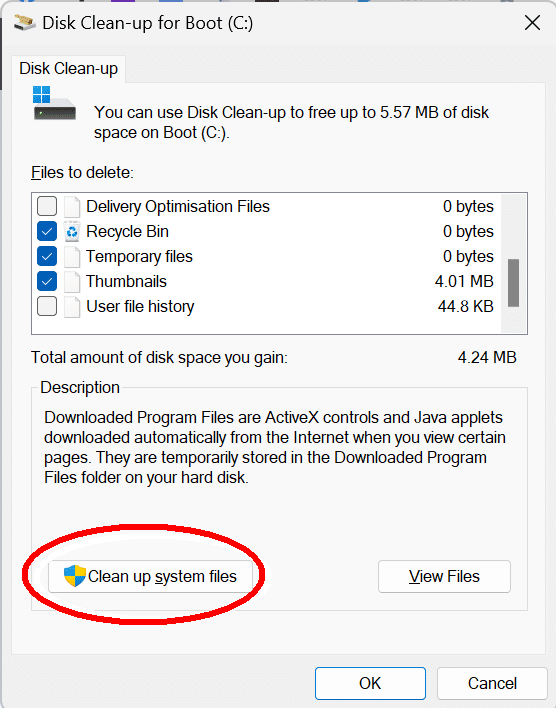
Click “Clean up system files”
Click the “More options” tab.
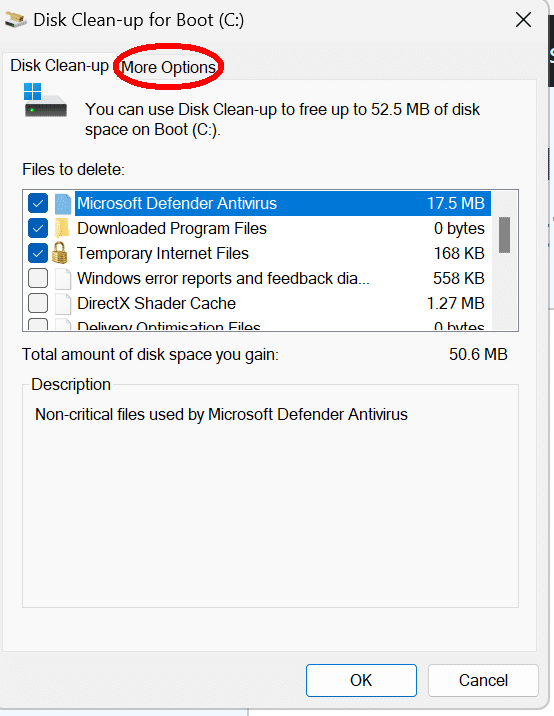
Click “Clean System Restore” and confirm you want to delete all but the last System Restore Point.
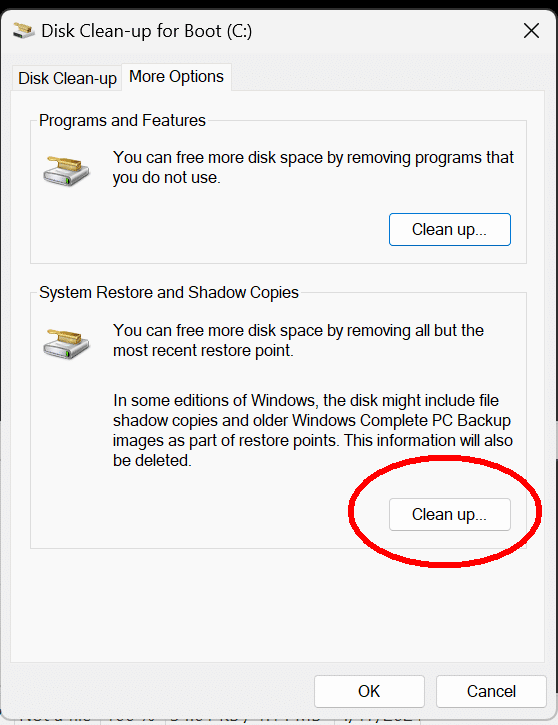
You can reduce the space occupied by System Restore Points
How To Reduce System Restore Disk Space Usagece System Restore Disk Space Usage
Separate drives means that no, you can’t combine partitions.(*) That means to move a program you typically need to reinstall it, yes.
(*) For the pedants: yes, there’s a way using NTFS to connect two physical drives into one logical drive — striping I believe it’s called — but it is NOT NOT NOT recommended. It double the risk of failure and data loss.)
I’ll read through those articles. I usually use the clean up once a month (recycle once a week) but there isn’t a clean up system file option and it didn’t come up in search. Is there another way to get to it?
When I look in programs and features, I have about 30 “programs” but 18 of them are Microsoft. Seven of which are Microsoft visual C++. I get conflicting answers about deleting MS stuff. I get doubles of everything because of the x64 x86 issue. If I could delete some of those I’d think it would clear up some space. Thoughts?