Depending on what you need to look at, it can be easy or hard.

Honestly, the answer to this turns out to be frustrating — more frustrating than ever in the 19 years since this question was originally asked.
Monitoring network usage on your PC? Not that hard.
Monitoring anything else? Well, that gets complicated.
Become a Patron of Ask Leo! and go ad-free!

Monitoring your home network
Monitoring a single PC’s network usage is relatively easy using Windows’ own Resource Monitor. To monitor the traffic across an entire home network is more challenging. It either requires a better-than-average router or a fairly obtuse network reconfiguration and some geeky tools.
One PC
Let’s start out with the good news. The ability to monitor your network (and a lot of other items) is built in to Windows in the form of the Resource Monitor tool.
How Do I Monitor Network Activity in Windows? provides an overview of this tool and the information it can provide.
Your most pragmatic solution may be to use Resource Monitor to examine each of the PCs connected to your network, but based on how you’ve asked your question, I realize you’ve probably already identified the problematic computer and user.
Network monitoring
Unfortunately, actually monitoring the aggregate traffic on your home network typically requires an advanced (and sometimes pricey) router. The router acts as the single point of contact for all devices sharing your internet, and is really the only device with all the information you’re looking for.
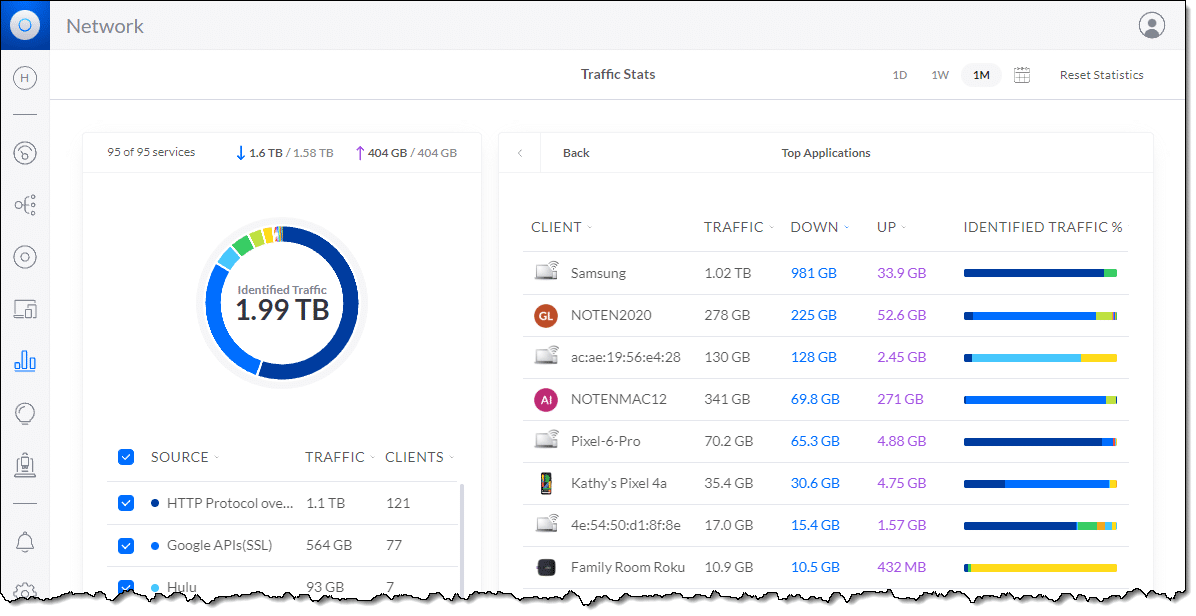
I say “unfortunately” because most consumer-grade (or ISP-provided) routers don’t have the ability to provide this information. The frustration I alluded to earlier is simply that since we’re connecting ever more devices to our internet connection, you’d think router manufacturers would make this more accessible in general. Understanding who the heck is using your internet connection, and how, seems more important than ever.
Check the documentation that came with your router to see if it provides any sort of reporting or analytic information at all. Don’t be surprised if it’s obtuse or difficult to set up.
And don’t be surprised if it’s not present at all.
Network monitoring software
There are free tools out there that are designed to allow a PC to monitor the network traffic it sees. WireShark is one highly regarded example that’s been around for years. The problem with most of these tools (and certainly WireShark, at least the last time I tried it) is that they’re exceptionally technical in nature.
But there’s a more fundamental problem: your PC connected to a random place on your local network will not see all the network traffic. As I discuss in my hub/switch/router article, networks are now smart enough to not blast traffic everywhere, but rather to quickly learn where individual devices are and route traffic over only those connections needed to get from point A to point B. That means your PC over at point C doesn’t have access to all the information to get you the analysis you want.
There is one possible hack, but… well, it ain’t pretty.
If this is your network, conceptually:
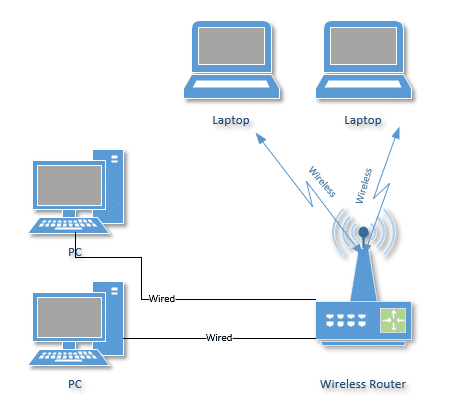
Then you could re-architect the network to something along these lines.
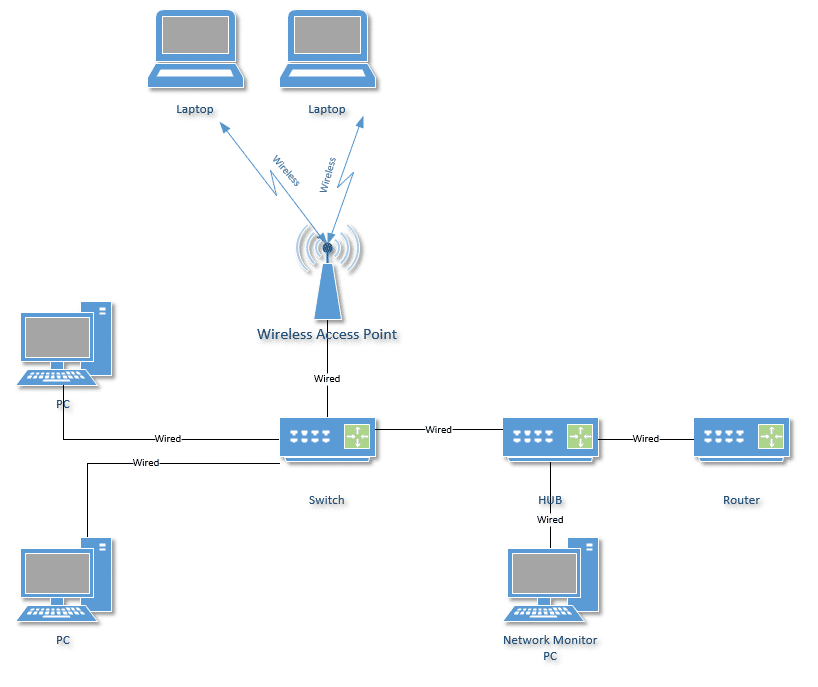
It is more complex, but the concept is simple: this configuration forces all traffic through a hub (not a switch) as it travels to and from the router. The additional PC connected to the hub is able to view all traffic, so tools like WireShark can be used to analyze what’s happening.
Do this
Honestly, it’s probably just easier to talk to your kids. Failing that, seeing if your router has logging/analysis capability, or perhaps replacing it with one that does, might be the next step. (I’d be interested in recommendations for routers that will do this at an affordable price. I’ve not found any.)
Of course, if you’re feeling adventuresome, WireShark and a hub should also get you what you’re looking for with a bit of effort.
Not feeling adventuresome, but interested in more? Subscribe to Confident Computing! Less frustration and more confidence, solutions, answers, and tips in your inbox every week.
Podcast audio

Related Video


Bandwidth Controler Manager.
http://bandwidthcontroller.com/index.html
Try it. Works fine.
Can you please tell me how to monitor howmuch internet, mail and so on… bandwidth rather than the lan bandwidth on individual PCs
I must say I am highly impressed. I happened on this site while looking for a monitoring tool, and this provided exactly what I was looking for. Informative and highly useful! My thanks!
How can I use http://bandwidthcontroller.com/index.html
to monitor softwares such as Kazaa?
thc
Instead of physically unplugging the router connection belonging to the person who you think needs to spend more time “in the real world”, you might be able (depending on your router) to allow connections during a particular time period only.
Searching a whole day for this tool on internet!
And now it seems already been installed, perfect!!
But i have a bigger problem…
I’m a student and i share the internet connection with 40 other students..
One of them started downloading big files and we all where thrown on smalband.
I don’t know who but this tool might be usefull to identified the student.
But that’s only when he / she is in my workgroup, otherwise i can’t monitor him / her
IS there any solution for this, without synchronizing everybody’s computer on the same network…?
Hi, this looks very helpful but ever time i try and add a computer for example \\max it say: Unable to connect to machine. anyidea on how to over come this?
Thanks Si
GPL alternative for Linux and other POSIX oses:
http://skurz0.homelinux.net/go/projects/netload
source code available. It allows you to see who uses the bandwith in the local network.
Hi, this looks very helpful but ever time i try and add a computer for example \\max it say: Unable to connect to machine. anyidea on how to over come this?
yea i face the same thing
I visited a web page that showed percent of bandwith used at the top. I would like to add something like that to my site, but have been looking for hours and now am posting here. Do I need to have a router that logs that info ? I don’t.
Of special note is the Select Counters from Computer option in the Add Counters dialog above. Perfmon allows you to monitor the performance of another Windows XP, 2000 or NT computer remotely, across your LAN. This means, for example, if someone on your network is hogging all the bandwidth then you can monitor each machine remotely in real time to see just who that might be HOW DO THIS WORK?
Thanks, very descriptive and helpful information that you posted.
I have found the perfect tool for controlling my kids time on the computer. It’s called “Enuff”. You can control exactly how much time on the computer and when and who, and even what, and it can all be controlled from your machine over a network. You pay for it once, but it really works well and is simple to use.
If you use DD-WRT as the firmware on your router then you can set up QoS (Quality of Service). See: http://www.dd-wrt.com/wiki/index.php/Quality_of_Service
I was having a problem with my son “hogging” all of our bandwidth with World of Warcraft, and his Xbox 360 live account, so I used QoS to limit the amount of bandwidth his computer and Xbox can use when there is a large load on my router.
DD-WRT is easy to setup on a Linksys WRT54G, or a Netgear WGR614L.
I followed the instructions but all i see is the network card (intel[R] Pro….) and the other option aswell. That network card is my one and i cannot see any other computers even though there are 2 other computers connected to the same router. Plz help
I am using XP with SP3,on running perfmon…under PERFORMANCE OBJECT no drop down is available….why so?
please sent me how to manage bandwith size
You need a bandwidth monitoring software.
I recommend “WFilter”, which can monitor email/web/bandwidth/ftp/messenger.
You can also deploy a network appliance from eTelemetry called Metron SE on your home or office network…
http://www.etelemetry.com/products/metronse.aspx
Hello, I was also having the issue that only the computer I was using perfmon on was available for monitoring despite multiple computers connected to the router. I was hoping for some advice on how to get the others to appear. Please, and thank you.
Well I have 5 computers on my home network and I would like to check how much bandwidth each computer is using how do I add them to the counter list so I can monitor their bandwidth usage
hi there Mr Leo i have a small home network and i want to monitor all the activities and i also want to remotely control the pcs in my network please give me a solution im using DSL and a TP LINK TL-sf 1005D 5 port fast ethernet switch please solve my problem i will be waiting for ur advice THANKS
You would be pleased to use this software : CCProxy.
It allows you to :: monitor , control bandwidth , allow user control through password , watch logs and many more features
Well I have 5 computers on my home network and I would like to check how much bandwidth each computer is using how do I add them to the counter list so I can monitor their bandwidth usage
You said: “In all honesty if this were my situation I’d just make sure the router was in arms-reach of my desk, and the cables well labeled. Then I’d physically unplug the connection for any computers who’s users I felt needed to spend more time in the “real world”.”
What if the other computers use a wireless connection?
@SomeGuy- There are some options to view wireless bandwidth. Check into options for your router if you are tech savy enough to install the software. You typically need a Linksys WRT-54G (or variant of) router for the most compatibility for the software thats out there and free. Look up Tomato Firmware or DD-WRT for more information. Both of those software companies will inform you which router they are compatible with. The Tomato software has the capability to set specific computers to levels of priority, including bandwidth allocation. Hope this helps.
Hi Mr Leo…
i have a Netcomm NB6plus W modem and is shared with my 3 housemates who have their own laptop,, they all watching movies online and comsuming all bandwidth and whenever i need to connect to internet, it takes a time…
can yu please help me how can i control their bandwidth so everyone can use the internet connection withoout distrubing.,,
cheers
Hi. i have a Zyxel wireless access point. I have about 5 computers sharing one internet connection. Is there a way I can monitor the bandwidth usage of all 5 computers without buying a server or installing a 3rd apart software apart from what the AP offers?
Hi,
How to check data speed bw two IP’s in diffrent gatways in wan.
like 10.30.65.24 and 10.2.70.60.
any help is appreciated.
“Perfmon allows you to monitor the performance of another Windows XP, 2000 or NT computer remotely, across your LAN. This means, for example, if someone on your network is hogging all the bandwidth then you can monitor each machine remotely in real time to see just who that might be.”
U did not elaborate how, my neigbhor requested to share my internet connection, (though i tried my best to convince him to buy one himself) anyhow now i really want to know how much of the bandwidth or rather percentage he is using….coz sometimes the speed sucks
In my case, the monitoring needs were somewhat simpler. I use Rogers wireless (Rocket Hub) at the cottage. You pay for what you use in steps – 3 gig cap, then 5 gig, then 10 gig. After that it’s $$ per extra gig. I wanted to know my total usage (daily up/down as well as monthly). I found a free tool, NetWorx, at http://www.softperfect.com/products/networx/
It is configurable and shows usage (and other stats) in a clear format (actually several clear formats). I can track my daily usage and it will alert me when I get to 80% of whatever monthly cap I specify. Did I mention it’s free?
i have a gigaset modem with antina and netgear router there have upto 30 pc at my workgroup now i want to manage the bandwidth properly bcoz somebody always use facebook and youtube 4 this reason we suffering problem to our mail.pls help
A cheap and great way monitor and control bandwidth usage of computers connected to your SOHO is with the use of a linksys wrt router running dd-wrt firmware. You can set the speed on each port on the device. The upload and download graphs are realtime and easy to read for those who want to monitor. Remember also that QoS can be used on most home routers to prioritize applications that needs bandwidth. Hope these tips help.
Hello! Thanks for the tip!
Is it possible to monitor other users if I’m not the server PC? I would like to monitor other users bandwidth usage and they are connected to the same network I am, can that be done with Perfmon? I try to do it following your steps but it keeps saying that its unable to connect to machine…
I’m 15, alright?
I have a laptop just like nearly everyone in my school. My are complete freaks, to be honest, i hate them. They allowed me to have a internet connection for a week, then they disabled it entirely. Four months later, i still spend all my time on the laptop. I have installed tons of movies, music, games, animes. If i need something, I can use my USB and get what i want.
My point is that you shouldn’t underestimate us. My parents blocked me from the router so i get bored of my laptop and go on it less, i now go on it more than ever knowing it really, really pisses them off.
Mikrotik makes routers that monitor and control network access that are not expensive.