No, but kind of, yes.

Yes and no, and probably not in the way you’re imagining it.
You can do something similar to password-protecting it using Windows security features, but success depends on using the computer the “right” way. I don’t recommend it. If you have something you want to password-protect to keep secure, I recommend a different approach.
Become a Patron of Ask Leo! and go ad-free!

Protecting a folder
Windows folder security can control access based on user accounts, but it’s complex and limited. For better security, use encryption tools like VeraCrypt or Cryptomator. These create password-protected virtual drives, keeping your data secure.
The Windows way
Windows allows you to place restrictions on who can do what with a folder or file. In Windows File Explorer, right-click on a folder. Click on Properties and then click on the Security tab.
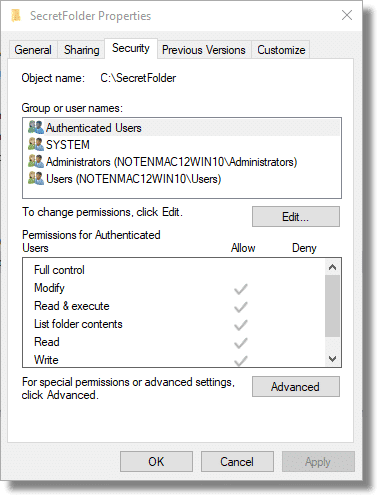
Here you can see the security properties of a folder on my machine titled SecretFolder.
You can control who has access to that folder. By default, any “Authenticated Users” — users with login accounts on this machine — can examine the contents of that folder. I can remove that and further restrict access on an account-by-account basis.
It’s powerful but also complex.
The problem is it’s based on Windows user accounts. If you give your own account full access to the folder, as I assume you would, then anyone who can log in to the machine as you can access the folder. There’s no real password; it’s your ability to log in to Windows using the correct credentials that gives access.
For many who use Windows in what I’d call “the Windows way” — different login accounts for different users and always logging out when you’re not using the machine — that might be enough.1 For example, in a corporate environment, this might be the recommended approach.
I prefer a different approach: encryption. There are two options I’d consider.
VeraCrypt
For many years, my approach was to use the free open-source tool VeraCrypt to create an encrypted volume.
An encrypted volume is a single file on your computer’s hard drive. If someone looks at the file, they have no way to view its contents.
Once you “mount” the file using VeraCrypt, supplying the correct passphrase to unlock it, the contents of the file appear as another drive on your system.
For example, I might have a file “C:\Users\askle\secretstuff.vc”. There’s nothing you can do with that file without VeraCrypt and the passphrase to the file. Since I know the passphrase, I can mount it using VeraCrypt, and suddenly a new drive appears — say drive “P:”. That drive contains all my protected files. I can change them, update them, delete them, or do whatever I want with them. Once I’m done, I can hide them all again by unmounting the VeraCrypt drive.
It’s both simple and elegant.
It’s also not tied to Windows user accounts or anything else. You can copy your encrypted file to another machine and mount it with VeraCrypt. You can even mount it on Macs and Linux machines.
Cryptomator
Cryptomator works similarly to the process I just outlined for VeraCrypt except that each file is encrypted separately. Rather than a single encrypted volume, you’ll have many individually encrypted files and folders. When you “mount” the encrypted folder — once again specifying a passphrase to unlock it — the unencrypted version of that folder appears as an additional drive on your system.
Cryptomator is designed for encrypting files placed in cloud storage. Encrypting them individually allows them to be uploaded to cloud storage systems individually rather than needing to upload an entire volume every time any file changes.
But there’s nothing that says you need to use it in conjunction with cloud storage.
For example, I might have a folder “C:\Users\askle\SecretFolder” on my machine. Its contents appear as randomly named files and folders, each containing only random, encrypted data. When I mount that folder using Cryptomator and specify the correct passphrase, a new drive appears on my machine — say drive “P:” again. That drive contains all the unencrypted files and folders within SecretFolder. I can change them, update them, delete them, or do whatever I want with them. Once I’m done, I can hide them all again by simply unmounting the folder in Cryptomator.
Do this
Encryption is the answer. Password protection isn’t enough. Solutions like VeraCrypt, Cryptomator, and others are the safest ways to ensure your data remains secure.
My newsletter might be the answer, too! Subscribe to Confident Computing! Less frustration and more confidence, solutions, answers, and tips in your inbox every week.
Podcast audio

Related Video


Footnotes & References
1: I’d probably want to add Bitlocker or Windows’ own file encryption so the file is actually encrypted on disk, and only decrypt-able by the login account that encrypted it.


I was under the (perhaps erroneous?) impression that zip folders (as natively handled by Windows Exp!orer) can be encrypted, and thereby password protected?
If one has installed WinZip, this encryption might even be AES!
Was just working on a related article. Windows doesn’t appear to be able to create passworded zips, but it’ll open them. Other tools like WinZip, 7-Zip and the like can be used to create them. And yes, AES appears to be standard/common.
I use Cryptomator and VeraCrypt, and I also use encrypted zip files. I use 7Zip to encrypt them and Windows can open them with a password. Windows File Explorer treats the .zip file as a folder. One advantage of .zip files over VeraCrypt is that the size is dynamic. With VeraCrypt, you have to estimate how big you want the container. If you assign more than you need, that’s wasted disk space. If you don’t assign enough, you either have to create a second VeraCrypt container of create a bigger container to move the files from the old container, the new files, and room to expand.
Can we be sure all the methods mentioned (VeraCrypt, Cryptomator, Zip) will not leave behind unencrypted work space?
Those tools: yes. The applications you use: no way to know. Some could leave temp files in unencrypted locations as an example.
That’s one thing using whole disk encryption protects against.
Once long ago (20 years?) I used encryption on a hard drive with taxes and family info for a deceased relative. Then I got a new computer, put all my old drives in the new one and passed the old computer on to a family member. Then when I went to look at the encrypted files much later, I could no longer access them! Somehow that encryption was tied to the old computer.
I managed to find old copies of some files on backup drives in the safe, but some of it was lost forever. Makes me very leery of encryption now.
It’s not tied to the computer. You just need the encryption program that was installed on the computer.
That’s one reason to use .zip encryption. It’s been around a few decades. There are several programs that can handle them, including 7Zip, WinRAR, WiZIP, and even Windows File Explorer can open them.
BitLocker is tied to the computer/login account. You can protect against this by saving the key.
Other encryption tools use a password or passphrase and should be computer-independant.
He didn’t mention that it was Bitlocker. They said it was over 20 years ago. Bitlocker has only been around for 16 years.
I use a free program called Wise Folder Hider. Google it to find out if it is for you.
It works for me.
How about Microsoft Personal Vault? It’s encrypted and requires you to enter your fingerprint to access it, even from within your own account. Besides, it’s stored in the Cloud and therefore is not linked to a specific computer. I was thinking of using it as an additional ‘secure location’ for my files, in addition to an external hard drive, following a bad experience when my ‘backup’ drive suddenly became inaccessible.
I find AskLeo extremely useful and informative and would really value your opinion on MS Vault before I promote it to ‘primary backup’.