Volts and amps combine to confuse you.

Yes — with a couple of caveats, of course.
If it’s not made specifically for your particular computer, getting the right power supply is important and involves matching voltage, amperage, and polarity.
Each has different constraints.
Become a Patron of Ask Leo! and go ad-free!

Volts & Amps & Compatibility
In general, for power supplies or chargers:
- The output voltage must match.
- The output amperage must match or be greater than that required by the device being charged or powered.
- The polarity of the output connection must be correct.
- The input line voltage (wall or “mains” power) must be supported but is unrelated to compatibility with the device being charged or powered.
Voltage
The voltage provided by your charger must match that expected by the device being charged.
When replacing a charger, this is easy to determine: it’ll be listed somewhere on the old charger. In your case, the old charger supplied 19 volts, so your replacement must also be 19 volts.
It’s very important to get the right voltage. Some devices are tolerant of variations and work just fine. Others, unfortunately, are not tolerant at all. Depending on how different the supplied voltage is from what’s required, the device may simply fail, it may work “kind of”, or it may appear to work at the cost of a much shorter lifespan.
If the voltage is off by enough, it can damage your device.
And here’s the problem: there’s no way to say what’s enough or too much. It varies from device to device. Some may tolerate a wide range of input voltages, while others are extremely sensitive to even the smallest error.
Sidestep all those unknowns and make sure to get exactly the right voltage from the start.
Amperage
The amperage provided by your charger must match or exceed what the device being charged requires.
| Power Supply or Charger Amperage Rating | Result |
| Greater than the device’s requirement |
|
| Matches the device’s requirement |
|
| Less than needed by the device |
|
The amperage rating of a charger or power supply is the maximum it can supply. A device being charged will only take as much amperage as it requires. If your device needs 0.5 amps to charge, and your charger is rated at 1.0 amps, only 0.5 amps will be used.
The problem, of course, is the reverse: if your device needs 1.0 amps, but your charger is rated at only 0.5 amps, then any of several problems could result:
- Charging may not work at all.
- The device may charge extremely slowly.
- The power supply may overheat.
- The device being charged may be damaged.
Thus, as long as you replace your power supply with one capable of providing as much or more amps than the previous, you’ll be fine. In other words, there is nothing wrong with having a charger capable of providing more amps than needed.
Polarity
The polarity of the connection between your charger and device must be correct.
Most power supplies provide their output on two wires: one labeled (+) or positive, and the other (-) or negative. Which wire is which is referred to as polarity.
Polarity must match.
Here’s the catch: just because the physical plug fits into your device does not mean that the polarity is correct.
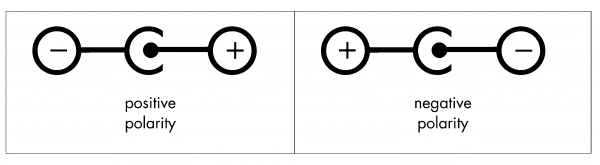
Particularly when it comes to popular circular power connectors, make sure the expectations match. If the device expects the center connector to be positive and the outer ring to be negative, your power supply’s connector must match. There’s no getting around this.
Failure to get it right at best just doesn’t work, but at worst can damage the device.
Look carefully for indicators on both the power supply and the device.
The good news here is that there are some standards where the polarity is always correct. USB power supplies, for example, are the same no matter what.
Related

Why Does My Phone Charge Slowly on Some Chargers?
Why do some chargers work faster or slower than others? We'll take a look at some basic electrical concepts to understand what to look for in a charger.Input voltage
Input voltage — aka “mains” or line-voltage — is, of course, critical. Plug a device expecting 110 volts into a 220-volt socket, and you’ll probably see sparks followed by darkness as the circuit breaker trips.1 You’re also likely to damage the device.
Most of the time.
When it comes to modern power supplies, however, almost anything works.
If you look closely at the small print on many power supplies, you’ll see they’re rated for anything from 100 to 250 volts. This means most can work worldwide with nothing more than an adapter to account for the physical plug differences — no voltage transformer needed.
Check your power supplies before you travel, of course, but it’s very, very convenient.
The input voltage and amperage ratings are unrelated to the charger’s compatibility with your device. What matters for your device are the output voltage and amperage ratings.
Do this
Pay careful attention to the specifications of any replacement power supply you intend to use. The rules above matter, and sticking to them will ensure that you don’t damage your device.
Interested in more answers like this one? Subscribe to Confident Computing! Less frustration and more confidence, solutions, answers, and tips in your inbox every week.
Podcast audio

Related Video


Footnotes & References
1: Ask me how I know. 


Interesting analogy for volts vs amps. I’d always heard the water hose comparison, voltage is the water pressure, amperage is the amount of water flowing through the hose.
Your water analogy is incomplete: voltage is the water pressure, and amperage is the SIZE of the hose. A small hose under a lot of pressure will get you wet; a huge hose, even under low pressure, can wash you away. But none of that has to do with the volts pushed to and amps drawn from a computer, really.
Just be careful with some laptops. I know that with my Dell laptops, if the chip in the charger goes bad (the chip that tells the Dell laptop that this charger is the correct charger for the computer), it will no longer charge the battery, and the laptop will draw less power (or amps – but Amps times Volts gives you Watts – or power) – thus slower laptop. Their reasoning, is so you don’t plug a charger in that isn’t rated for your laptop and damage it, but it forces you to only buy the correct Dell chargers, and when that chip goes, even if the charger is working – you no longer can charge, and you have a slower system (even my USB ports wouldn’t produce the correct power output when the Dell isn’t able to read the charger’s chip.)
You mentioned “most” are DC currents. I think you should caveat that with most “U.S.” I may have missed it, but I didn’t see that mentioned.
01-May-2012
Very good explanation. Two other problems arise, though. The TYPE of voltage. While most chargers are DC, some are AC or pulsating DC, which just will NOT work place of the correct one. AC chargers are usually represented by a tilde (~), and pulsating DC chargers are indicated by a solid line over a dotted line, kind of like highway dividers where there’s no passing in one direction.
The other problem is size of the coaxial connector, and the combinations are nearly endless. There is the I.D. or Inside Diameter, which is what size the pin will fit into, and then there is the O.D. or Outside Diameter, which is the outside ring that plugs into the device to be charged.
Nothing more frustrating than to spend $10 – $25 on a replacement charger and find that it doesn’t fit at all. And often, none of the adapter fittings work, either.
Dell Laptops have that center pin, I forget what the interface is called, but it makes it likely that other chargers won’t work. I bought a higher amp Dell charger to replace my busted one, and it works great, but I had a Dell parts expert guide me to the right choice
Leo, what are the voltage and amperage ratings of a USB 2.0 port on a PC? I’m looking to purchase a USB recharger that plugs into the wall for use with a MP3 player when traveling without a PC. Do the rules you list in the Summary section apply to a USB wall recharger? (By the way, does the voltage and amperage output for each USB port decrease when you are using more than one USB ports at the same time? And are the power ratings for a USB 3.0 port different from a USB 2.0 port?) Thanks…
01-May-2012
“Amperage
Many people are confused by amperage ratings and what they mean when it comes to power supplies and replacements.
One easy way to look at it is this:
Voltage is provided by (or pushed) by the power supply.
Amperage is taken by (or pulled) by the device being powered.”
– facepalm –
[rant]
Oh Leo, you’re a great IT guy but not so hot at getting electronics across to beginners. I could agree with your definition of Voltage – the ‘push’ on the electrons that tries to make them move and make a current, but not your definition of Current. The load / laptop / whatever does NOT pull – it lets the current through; faster if the resistance is low, slower if it’s high. Current is how fast the electrons (that carry the charge) are moving.
[/rant]
But I thoroughly agree with your working rules; get the voltage exactly right, and only substitute a higher current power pack where a lower current one used to be.
And if you use a different size plug you’ll be sorreee…
01-May-2012
I am an electronics guy and am with Leo on this one. Andrew’s comments are more about the internals of a device being run but the question was about the current rating of a charger.
The device being uses wants to let xx amps through it and wants to take it from the charger. If the charger cannot supply enough of the current that the device wants, if may decide that it doesn’t have enough to run. That is where the pull analogy comes from.
For Mr. Keir. I prefer to think of current as volumn and voltage as pressure. An example being a water pipe with a pressure/voltage of 10psi and a diameter(volumn)/current of 1 inch allows so much water through. Increase the volumn/current to 2 inches and it lets 4 times as much volumn through. aka available wattage. ( I think I got that right) Its been a long time….
Leo, I agree with your analogy re power supplies. However, your statement that voltage is constant is not correct. If you load up a power supply, you will have losses in the wire that connects the supply (wall wart) to the device. Engineers like to refer to this as I^2R (I squared R) losses. The losses increase a the square of the current so a doubling in load will more than quadruple the I^2R losses in the wire. These losses cause a voltage drop in the connecting wire so that the voltage seen at the load drops when the current increases.
As you said, if you get a supply rated at the same voltage as the one being replaced and with a current rating at least equal to your device’s requirements you will be fine with respect to I^2R because these losses will already be accounted for in the design of the power supply. I just couldn’t resist picking a nit. :-)
Peter
01-May-2012
I’m not sure your answer about current rating is truly “exact”. When you refer to replacing a charger with equal voltage with equal or greater current rating you are “sort of correct’ -BUT — the issue of current is a bit fuzzy. IF you want to run the device off the charger it MUST have a current rating equal #or greater# – however if you want to CHARGE a battery a lower current is permissable! The HIGHER the current rating of the CHARGER the faster the battery will charge.
CORRECT!
I do some support work at our company and frequently have laptops (we use Dell) at my desk for installing software. When a Dell charger was going to be discarded, I grabbed it so that I wouldn’t need to bug people to also bring their charger.
One day, I happened to be working on a large laptop (it comes with a much higher current charger) and plugged it in to the one on my desk. I was pleasantly surprised to get a warning on the screen warning me that the power supply had a lower current rating than the proper one and that the computer may not charge well while running.
It ran well but only minimally charged until I turned it off.
Chargers come in many qualities. A 19V charger with lower quality may have 21-22V when no current is drawn. However, a charger intended for brand A with 1.6 Amp will have about 19V at full charge and operation simultaneously. With the battery charged, it will have about 19.5-20.5V output fed to a laptop and the battery will continue charging at a negligible trickle rate. When a more powerful charger with 2.5 Amp rating is used, intended for laptop B, with higher power consumption, its output with the laptop A maybe as high as 20-21V with full current drawn and higher after charging finishes. This will cause a higher charge to a battery, even after it is completely full and shorten its life and may even cause an explosion. The chargers are PWM regulated, and ideally such problems would be avoided, but to keep costs down, regulation is not 100% and compromises against costs are made. Exceptionally good chargers are not common and these cost very high. At home, I use a variable Voltage and current supply to monitor and adjust charging curve against time to match aging characteristics of the battery. Travelling, I use chargers with a display and Voltage adjustment slider to prevent overcharging at high levels for my two laptops.
Your explanation is correct. However would still like to know whether an original charger supplied with a new laptop does charging such that the charging current decreases as the battery attains its full voltage. I have a sony fz series. The ac adapter has an output voltage of 19.5 volts, 3.9 amps. The battery is li ion 11.1 volts, 4800 mAh. I have a regulated series power supply 0 to 30 volts adjustable to 19.5 volts and can supply 0 to 5 amps. Can I use this safely after setting the correct voltage.
YES.
What is generally referred to as a charger is not really the charger. It is a power supply to the computer that powers the charger built into the computer.
Lithium ion batteries are extremely touchy about how they get charged or discharged with errors leading to fires. That is why you don’t see them for general use like the old NiCad rechargeables or the newer Nickle Metal Hydride. The charger has to know the exact limits of the Li ion battery to charge it well and stay in the safe range. In like manner, the item pulling power from the battery has to have circuits to be sure it stays in the safe range so it does not start a fire.
Thank you! This article provided me with exactly the info I needed (with a bunch of device-specific USB chargers at 5V, choose the one with the highest amperage to charge them universally), from a trustworthy source, in exactly the amount of technical detail needed for someone with only vague memories of highschool physics.
I’m a bit miffed at google for not ranking this higher in the search results.
My tomtom worked fine until I used wrong in car charger.Now it won’t start even after mains charge and resets.The charger is input DC=12v. Output DC=10.5v fuse 5A PositiveCentre pin. Tomtom label 5v DC 2A positive pin.Have I “cooked” the battery or worse?
03-Apr-2013
I am looking for an external battery pack for my laptop. I have seen they all say 19 volts but my laptop charger says 19.5volts=2A. Can i use the battery pack?
Thanks.
13-Apr-2013
Hi Leo … I need help I have laptop
19 V …2.15 A…is required power supply
now my new adapter is 19 V …1.58 A
it is ok to use that adapter to my laptop?..
It’s OK to use, but it may not charge as quickly, or if you’re using the laptop, it may not charge at all.
Hi Leo,
Can you please help me with this question. I am about to buy a jumper battery from cobra.com called jumperpack. It soppoused to have a usb port with 2.1 amps. My question is can I charge my laptop that takes 19.5 volts at 4.6 amps ? providing that I have the right connection or adapter to go from a usb to my laptop charge connector. I am a truck and bus technician and use my laptop in order to do diagnostics so sometimes I am in a road test and all of a sudden it is a longer road test and my battery runs low and sometimes the bus or truck does not a 12 v power supply for my inverter TRIPP 400 watts. so It would be great that I can provide power to my laptop just to finish my job may be 30 minutes to an hour sometimes. would the 5 volts provide enough power to my laptop ?
Thanks a lot
No. USB puts out 5 volts only and that’s definitely not appropriate for laptop re-charging.
You stated that USB provides 5Vout. You also stated that the power supply output voltage must equal the voltage of the device that you’ll be charging (or at least that’s how I interpreted what your article stated). So, does that mean that the batteries in our USB powered device has a voltage of 5V (i.e. USB voltage input to device = 5V and device battery that needs to be charged =5V)?
No. There is very often circuitry in the devices that convert as appropriate.
Leo, thank you, your article presents the required information in a way that is easy for those of us that haven’t had the benefit of technical training to comprehend and apply to our particular situation. I think many of us go through the joy of either upgrading or replacing our PC’s on a regular basis and there is just a lack of consistency in the power adapters on the PC’s on the market so we generally have to face acquiring a new back up adaptor to support travel. A great concise article thanks again.
So my power hungry smartphone’s charger has an output of 5V @ 1.2 amps, I got a power bank for it that has a matching voltage, but the output is 1 amp, or 2.1 amps. Charging from the 1 amp seems to do fine just takes slightly longer to charge. The 2.1 amp just kills the power bank faster with the same charge time as the wall charger that came with the phone.
pls I need help my Xbox 360 AC adaptor burned out by high voltage my question is that if it has affected my Xbox too
pls reply as soon as possible
Hard to say. I’d get a new powersupply and see.
hi,
i have a shaver power adapter from the US that i took to Europe, and plugged it right in….a few mns later…Pfffff (smoke) from the transformer.
im now back in the US, and the transformer is gone. i.e. when i test is. no juice in the output adapter.
the original adapter says 4.85v 800mA. i cannot find ANY adapters with the same voltage.
the nearest i found is 5v 0.8A.
Will this 0.15v difference fry my shaver or will it work?
thoughts?
thanks
read all the article , one doubt.
As mentioned earlier “Amperage is taken by (or pulled) by the device being powered”
lot of cases we experience when the ampere in the power supply is more the device regulator or related component get faulty or burned out .
one example ‘ go for a simple device mention power rating 12 v 1 amp . if we give a supply of 12 v 3 amp device get faulty “
Hi. This is a very helpful article, but I have this scenario:
My power bank’s rated power input is 5V , 1A. But when I am using a 5V 1A charger, the charger heats up fast. (And smells foul when I am very near it) When I tried using a 0.7 A charger, the heat is moderate, and on a 0.5A charger, the temperature is normal. What should I use then?
P.S. All chargers mentioned are in good condition. The USB cables used are the same for every chargers tested.
You really need to look at the device requirements (in this case your power bank – I guess). It is always possible that you have a “lemon” if your charger heats up fast.
I am assuming that the “power bank” is the device you’re attempting to charge. I could be wrong.
It is my understanding that the volts you are trying to input should be the same or less than the device you are charging. While the amps should be the same or they can be slightly higher than the device you are charging.
I would just state the obvious, use the charger that has a normal temperature as long as it is not damaging the device you are charging. The fact that you’ve charged a device with .5A tells me that the device you’re trying to charge will not blowup and the requirement of that device requires at least .5A. But again, without knowing what your charging exactly it can vary with what device you are actually charging. I would recommend you either look for the fine print or google your device’s input power requirements.
I hope this helps. Does anyone else have anything to add?
I have an interesting question.
I have a Nintendo 3ds that requires 4.6 Volts and 900 mA (you might as well say 1 amp). Older Nintendo DS’s required 5 Volts so I was ok cutting the charger cable and making my own USB charger out of it so I can either charge it in the wall or with a portable charger.
I had a vision about just buying an official Nintendo car adapter charger and then making a new cable that was USB to a cigarette lighter socket as a way to try to still use a portable charger.
Of course I was excited to do it. My thought was that if the Nintendo car adapter charger steps 12 volts down to 4.6 Volts at 900 mA, then this new cable should step 5 volts down to 4.6 at 900 mA. But it did not work.
I got to doing a little more research regarding USB ports and cables have different amperage capabilities. For example USB 3.0 does 900mA, while USB 2.0 does something like 500mA.
Unfortunately the gauge of the USB 2.0 cable is really a high number (meaning that the wires are few and small). I’m thinking I should redo my cable and use a USB 3.0 cable because I think it may be able to handle the Voltage.
When I took my multimeter and took a reading on the output of the car adapter from a 5V charger, it was reading 4.14V or 3.8V, and the Nintendo 3DS charger light would blink.
Am I getting this concept wrong? Or is a special cable an impossible vision because the car adapter will only work if it is getting 12V and not 5V?
I have a USB 3.0 cable, but if it is an exercise in futility then I’m just wasting money on a fantasy.
If I knew what kind of resistor I can buy to solder in with a wire that would be about my only option.
Thanks in advance,
Gene
You have some right to be scared away from replacing a charger that is directly connected to a lithium ion battery other than the correct one but that is usually almost always impossible. Power tool batteries tend to be directly connected to a charger but they are made to only fit the custom charger for it.
On a computer, the thing that plugs into the wall is not actually the charger for the battery. It is just the power supply to power the charger. The actual charger is a group of circuitry inside the computer.
Old article, however the specs between the old and new charger don’t add up, the new charger if indeed it is 60 Watt would have a maximum amperage of 3 amps not 4.7 amps, whilst this does not necessarily render it unsuitable (Dell often has both 60 W and 90 W chargers available for some models of the same laptop) It may be unsuitable as is the case with other Dell laptops that require a 90 Watt charger. Not certain with Sony. Another issue for some laptops is that although the specs maybe exactly the same Voltage / Amperage it still may not charge the laptop due to specialised circuitry
Excellent article! Any suggestion on how I would determine the polarity that’s required on a device? I have an iClever ic-T01 “laptop” which is no longer made, and I have an appropriate charger that has reversible tips. But there’s no indication on the device what the polarity should be. I contacted iClever, and they don’t even know since they no longer make it. I have a multimeter, but don’t know how I would go about testing it. Thanks!
P.S. Am I right that guessing the wrong way will be bad, not just ineffective?
The wrong way can be bad. You don’t happen to have an old charger, do you? That would be one way. I guess I shouldn’t be surprised that there’s no polarity indication. If you opened it up perhaps you can determine from the internal connections, but not sure you want to go that far. A little research shows that it’s 5 volts? I can’t take responsibility for the results, but … I’d just try it. In my experience 5v rarely does damage if reversed. Again, in my experience, it’s more common that the outer ring be negative, and the center pin be positive, so I’d start with that. But … no guarantees I’m afraid.
Thanks much! Yes, on the back it did list the volts/amps: DC 5v 2.0A max. Just not the polarity. I fear it’s likely “dead” anyway, as I read reports from others that leaving it uncharged for a long period resulted in the battery being unable to charge. So, I’ll give it a shot.
There must be a trade-off with using a charger that has a higher amperage rating than the intended device… With my rudimentary understanding of electricity I can only assume the resistor components of the device would produce more heat. Is this correct? If so, the question than becomes how long can a device handle the increased load before overheating and frying resistors and other internal components? How much more can the amperage supplied be from the manufacturer specifications before problems arise?? I’m most interested in how this applies to small handheld electronics like cellphones and charging banks that typically require 5V but amps ranging from 0.5 to 2. Any insights? Thanks!
A higher amperage doesn’t produce more heat or supply more current to the machine. It simply has the capability of supplying more current if called upon to do so, and it can even run cooler as it has to do less work to supply the needed charge.
Actually a charger with MORE amperage capacity than is needed often tends to run cooler … to oversimplify, it doesn’t have to work as hard as it was designed to.
This is a reverse of that question. I bought a higher amperage battery than the original for my wireless landline phone. It died after a short time and I realized that if you have a battery which requires more amps than the charger can supply, it will only charge up to the number of amps which the charger puts out and wear out the battery quicker. I suppose using a higher amperage charger would work but the phone uses a charging station, not a plug-in charger so now I buy batteries with the original amperage and they last longer.
Batteries don’t “require” more amperage, they just charge more slowly (or sometimes not at all) if the power supply can’t provide the ideal amperage. I’m sure that the battery wearing out is unrelated to the under-powered charger.
Great article well written well explained spot on as for the nit pickers my basis is in the telecomunication side of electronics where things can get realy weird if they want to nit pick on that subjet transistor theory will give you a headache to remember lol. But for the target audience and people like me who needed a little memory jog this article is ideal and your analogies are far better than mine the water and hosepipe. well done m8 kudos to you and thank you.
HI leo sir,
I have a cctv power supply 12Volt 10a for 8 camera in the output 12Volt an 1a per ports,
when i using its power supply more then 90mtrs. wire it give 12volt but amp. is give down,
So please suggest me what should i do for resolve or add any small circuit end wire
Using heavier gauge cable might work, as thicker wires reduce resistance, or preferably, use a longer AC power extension cord.
Thank you so much for this explanation!
I almost bought a new charger but you saved me that money.
Thanks for that. I was told by a couple of people that the same ampage was important but seems not the case as long as it is not less. I just can’t undersatand why the machine worked in the shop and when I got it home a couple of hours later it did’t work!!
I have a 12V 700ma specified item I was using a 12V 1000ma power supply for (240V), but it would get incredibly hot to touch. I feared it would melt when on for a long period on hot days. How can this be? Would getting a higher ma rating, far beyond the specified rating be a ‘cooler’ option?
Thanks for dumbing this down!!
All I can say is maybe. Honestly I think just using a different power supply would change things. Some just tend to run hot. If it’s too hot to touch, however, then stop using it.
I’m closing comments on this article since so many people are simply asking questions that are clearly answered by the article.
Read the article. It’ll tell you what you need to know.
It’s similar to using a charger with a higher amperage. The wattage is directly proportional to the amperage because the output voltage all power supply units is appropriate to the connector, and as with a charger the motherboard or peripheral card draws as much amperage as it needs.
https://askleo.com/same-voltage-but-different-amperage/