Your TV can make an excellent display.
If you have an old (as in pre-digital) television, the answer is that you probably can’t, and if you can, you probably shouldn’t. The results will be less than ideal. They just didn’t make those old TVs for the kind of display our computers expect.
However, if your TV is relatively new — almost any “flat” TV will do — and your computer is also relatively current, you’ll probably be able to do exactly what you have in mind, just like the shows you’re watching on TV.
Become a Patron of Ask Leo! and go ad-free!

Your TV as a second display
Particularly if both your computer and your television have HDMI connections, your TV can make a great second display. Just connect them, and they should work. If your computer or TV has different connections, then there may be additional options, albeit with different impact on image quality.
Connections
The ideal connection for most computer-to-television usage is HDMI (High-Definition Multimedia Interface).
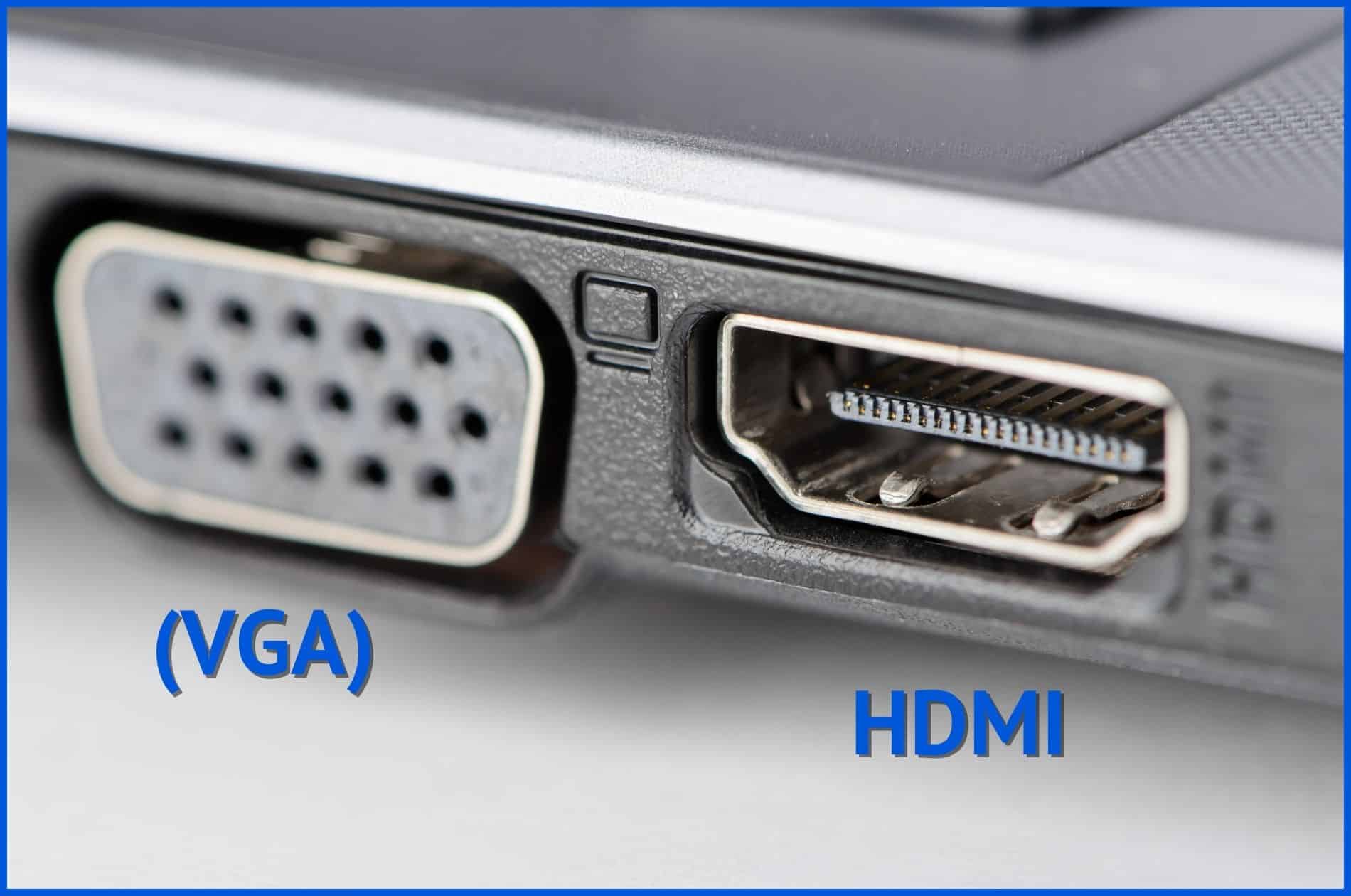
If you have an HDMI output on your computer — as many do these days, especially laptops — and your TV has an HDMI input — once again, as many do — then you’re good to go. Get an HDMI cable to connect them. Make sure to select the correct input on the TV and the correct output on the computer. It should just work.
HDMI is preferable for a variety of reasons.
- The display device (the TV, in our example) can inform the computer of the optimal resolution to use.
- HDMI includes both video and audio, so you can use your TV’s speakers if you like.
- It’s a single cable.
Alternate connections
If either your computer or your television doesn’t support HDMI, you’ll need to look at alternatives. These include, in decreasing order of popularity and/or video quality:
- DisplayPort is a digital video and data connection that perhaps exceeds HDMI in overall capability (we can use it for things other than audio and video, like connecting other peripherals such as external drives), but isn’t nearly as ubiquitous. HDMI/Displayport converters work if one side of your intended connection supports HDMI.
- DVI (Digital Visual Interface) is a video-only interface.
- VGA (Video Graphics Array) is an old analog interface you might recall from older computers and computer monitors.
- S-Video (Separate Video) is a higher-resolution analog interface that was common for some time.
- Component video is an analog interface that uses separate connections for each of the primary colors: red, green, and blue.
There are often conversions between the various alternative connections as well. While DisplayPort to HDMI might be a simple cable, other conversions may require a device of some sort to perform the signal conversion. You’ll get better results if you can avoid conversion.
Resolution
Resolution is the number of pixels or dots displayed on a computer screen. It’s measured as a count of the number of pixels across (horizontal) by the number down (vertical).
Computers and computer screens can be set to a wide variety of different resolutions, depending on the graphics hardware used. Televisions, on the other hand, have a fairly fixed set of resolutions:1
- SD: Standard Definition, 640 × 480.
- 720HD: High Definition, 1280 × 720.
- 1080HD: High Definition, 1920 × 1080.
- 4K: Ultra High Definition, 3840 × 2160.
Older, analog television was roughly equivalent to a digital resolution of 486 × 440.
When using a digital television, you’ll want to set your computer’s output resolution to one of those — preferably the highest-quality resolution supported.
A note about overscan
One of the artifacts of analog television is the concept of overscan. Analog signals included information that was slightly off the edges of the screen. Most TV video was encoded to avoid displaying something that would end up off the edge. Most analog TVs had both vertical and horizontal adjustments to control how much of the image was included in the visible area.
Then came digital.
On computers, it’s simple: an image, be it video or still, is characterized by its resolution, as discussed above. A 1080p high-definition video, for example, is exactly 1920 pixels wide and 1080 pixels high. Computer monitors display a fixed number of pixels as well; the display I’m using right now has exactly 3840 by 1600 pixels.
Digital televisions, however, occasionally carry the concept of overscan forward. The result is that, depending on many factors, you might only be seeing 1900 × 1060 pixels of your 1920 × 1080 high-definition video: 10 pixels might be “lost” off of each edge. When watching a television show, this might not matter, but when using that TV as a computer display, it could mean some portion of items, such as your taskbar, goes off the edge of the screen.
If this happens, there are really only two alternatives:
- If your TV has a width and height adjustment, see if you can get it to display the full image of whatever you’re looking at.
- Adjust Windows to a display at a smaller resolution. This doesn’t always work, and is highly dependent on the video card used in your computer.
The good news is that most current televisions assume everything is digital and display every pixel without reverting to overscan.
Selecting the display
Since Windows 7, you can type Windows Key + P for Presentation Mode, which will bring up a menu of options for what gets displayed where. Options include:
-
Adjusting how two displays relate to each other in Windows 10. (Screenshot: askleo.com) PC screen only: Your second “external” display is not used.
- Duplicate: Your primary and secondary displays show the same thing. This is called mirroring. When selected, the resolution of one or the other will be adjusted so that both display the same number of pixels.
- Extend: Your primary and secondary displays are independent and together, they form a single contiguous virtual desktop. This way, you can display different items on each screen, such as your desktop on one and a video on the other.
- Second screen only: Your primary display is turned off and only the secondary one is used.
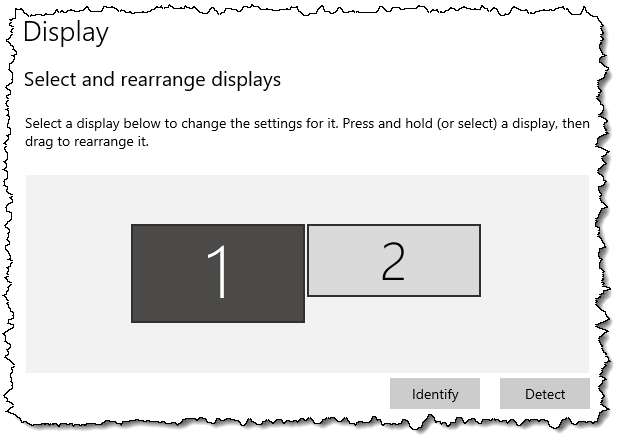
Once you have your TV successfully connected as a second screen on your computer, this setting gives you all the flexibility you need to control what you see where.
Do this
Try it. If you have a TV with an HDMI input and your computer has an HDMI output, connect them up and have a look. You may find that the larger television display becomes your favorite.
Try this, too: subscribe to Confident Computing! Less frustration and more confidence, solutions, answers, and tips in your inbox every week.
Podcast audio

Related Video


Footnotes & References
1: Naturally, life can’t really be this simple, but for all practical purposes, when it comes to consumer television, those are the numbers you’ll encounter.

Hi, I am having trouble connecting my Toshiba Laptop Satellite U205-S5057 to my TV. I am running on windows vista and I have updated my display drivers to the latest version. I have no s-video port but I have a vga port. I purchased a cable(not a converter box or unit) which converts the vga to s-video. I tried connecting the laptop to the tv using this cable and all I get on the tv are horizontal lines. I have pressed the function key with f5 to switch between monitors and I have also tried messing around with the display settings and still not working. Can someone please help me with this matter. Thanks
Hey, I have an S-video cable hooked from my toshiba satelite laptop to my sylvania t.v. that has an s-video hook up in the back, will it display on any channell or does the t.v. have to be on aux? i can’f find my remoto to get it to that channel. nothing is showing anyway. help?
Hey all i hope someone can help me i am running windows xp pro on my ibm t 43 laptop and trying to use my tv as a secondary moniter i have gone into display and set it up restarted my lappy and when it started up the windows start up screen showed and then nothing after stert up when i click on identify a 2 appears on my screen showing it is connected and that is the only time anything is displayed. nothing when i start a game or a movie in any player. Hope somone can help me please i have searched for an hour and found nothing to help me 🙁
If a TV has a S-VHS input, then it is possible that the TV will be able to support a resolution up to 800×600. It may even be possible to use 1024×768, but the refresh rate might be so bad, that it would be hard on the eyes. It all depends on the TV. I have an old Sony Wega that works fine in 800×600 mode. It’s hard to look at after a while, but I use it mainly for watching movies & recorded TV.
For a desktop solution, I highly reccomend an “All in Wonder” video card. You can use a TV as a second display, plus it has a tuner & video inputs, so you can hook up a camcorder or VCR. Newer versions have digital video capabilities. A TV will never be a readable substitute for a computer monitor, but at 640×480, or 800×600, it’s not too bad from a distance.
I’m trying to connect my Dell/HP laptops through S-Video-VGA cable to my TV. But I can’t see any video as the laptop doesn’t seem to identify the TV.
I tried the same thing on s Sony TV & it worked. Right after that (with Extended Display setting already applied) I connected the laptop to my (non-Sony) TV & it worked. I restarted my Laptop & tried again & it was gone. Somehow my laptop doesn’t seem to identify my TV & doesn’t let me extend the screen to TV. But if that setting has been checked in through the Sony TV, it works. Can you help me solve this puzzle? Is there anything I can do to make my (non-Sony) TV work with the Laptop.
Hi, I could attach my brand new 32″ LCD TV to my PC via an DVI-HDMI cable. The second desktop is great but the application windows are slightly but annoyingly enough vibrating. How could I eliminate this?
—–BEGIN PGP SIGNED MESSAGE—–
Hash: SHA1
Nine times out of 10 that’s a refresh rate issue. Not sure what your TV
supports, but when this happens with CRT monitors increasing the refresh rate
helps. This article discusses:
http://ask-leo.com/the_images_on_my_screen_seem_to_shimmer_or_flicker_and_give_me_a_headache_is_there_anything_i_can_do.html
Leo
—–BEGIN PGP SIGNATURE—–
Version: GnuPG v1.4.7 (MingW32)
iD8DBQFG6CifCMEe9B/8oqERAuk/AJ9jv4OjLumcNS3QaX/qWXA2I7otAwCfdcTF
6VEPex+UvuCeIPCILp2yWcE=
=jC1n
—–END PGP SIGNATURE—–
I wasnt to connect my AMD/ATI-SLI PC to my Analog Television so me and Mom can see better with the 27 inch TV-screen. I have two X1300 ATI Video Cards installed on the MBD and am hoping to play games using the TV instead of and/or in addition to the 15″ CRT monitor we have beren using. Being on a fixed budget prohibits our purchase of a new HD Digital Television any time real soon, but hope to do so when finances allow. Do you have any info and or pointers, or “secrets” that might help us? We will appreciate any help you might give us.
Thank you,
K. Arthur & Nana
I have a 30″ widescreen Phillips HDTV… I tried hooking it up via a S-Video cable, but all I get is the video no audio. What have I done wrong???
—–BEGIN PGP SIGNED MESSAGE—–
Hash: SHA1
Daniel: S-Video carries only video, not audio. You need to
run a separate audio cable.
Leo
—–BEGIN PGP SIGNATURE—–
Version: GnuPG v1.4.7 (MingW32)
iD8DBQFHs+LgCMEe9B/8oqERAqvMAJ9Tsvb0/sZMyRHiotQreGYUvnNGtACdHm6y
TOjwbw41/qx/tfpPbts0/tg=
=Aoir
—–END PGP SIGNATURE—–
I have a 2003 Samsung Tube style TV and want to use it as my computer monitor for watching movies. My computer(Compaq Presario SR1011NX) only has a VGA outlet for the monitor and my TV only accepts RCA inputs for Video or Audio. Is it possible to hook the two up with an adapter cable? I bought what looks like a VGA to RCA adapter, but when I hooked it up nothing happened. Does it matter that the cable packaging says Connection Cable YUV 3 RCA Plugs to 15 pin HDD Plug? The packaging picture shows only DVD to Projector. What should I do?
On my XP laptop, after I connect the S-video and audio cables, I then have to go into control panel/display/settings/advanced/monitors and change the display monitor there. Then the picture comes up on the TV. On my Vista laptop, it does it automatically.
there is another option if u only want to watch movies downstairs from your computer which is upstairs in the office: streaming.
anyway, I have ati radeon 9200 le(kinda old) and I heard that the extra pin from the s-viqdeo output are actually composite, but I would still buy an s-video cable and an adaptor for better quality
I have a tv in my PC. I can watch now every channel live in my PC in a full screen by the software named satellite-tv-player. Satellite-TV-player (http://www.satellite-tv-player.com) is very easy to use; I use it with ease and it works all the time no problems. I guess this is the official player, the new ability to play live channels in full screen. I watch my favorite Channel Live CNN & NFL Sports through this software. Channel selection is very good. It is simply great; it also seems to be very good on my Vista Ultimate system. I have tried many players claiming to be top of the line but none of them deliver as much content as does satellite TV player. The price is very reasonable for all the stuff you can watch.
Hi Leo,
I’ve done what you said. I’ve purchased an adapter which is VGA to S-vid and RCA (so it supports either). I connect my laptop up to my TV (CRT – not digital) and it doesn’t see the image. I’ve successfully used an external monitor with my laptop (through the VGA port in my laptop) as a primary monitor and secondary monitor. I’ve also successfully got sound through the headphone-out on the laptop.
What am I doing wrong? Is it to do with my video or graphics card?
Thanks a lot mate.
Cheers,
Andrew (from Melbourne – Australia)
hey leo. now my moniter is busted and im using my tv as my moniter. but the resoulution sucks and the words are small and although the screen is big in size, the display os bigger and i cant work like this. plzzzz helpp.
Get a new monitor.
08-Jan-2009
I have what I need to do this and have for a long time. I’m also not worried about the quality, my analog tubed sets are from the early 80s and I like obsolete video and audio formats. My computer monitors are LCD, but I don’t have to move a 19″ set very often so the weight isn’t a big deal.
I notice that most of the comments are around ten years old, a lot has changed since then. And even with a DTV converter, a good digital signal is the key to a good analog picture.
When I use my Windows display options to “project” my computer images to my TV via my S-video cable (as in showing a powerpoint to a classroom) the image is too large for any TV I use and shifted to the right. Using the various controls within the display menus doesn’t seem to help the problem.
Hi Leo,
I have succesfully conected my mac laptop to the tv with full colour and it looks as fine as you would expect. However when I connect my PC with Radeon 9550 card via the s-video output into the scart input to the tv I cant get any colour. Even though I’m using the same AV channel (Y/C) as I use when I connect the laptop. Any suggestions from you as to how I can resolve this would be very welcome indeed.
HEY FRIENDS FIRST OF ALL UNINSTALL YOUR GRAPHICS DRIVER AND NOW YOUR COMPUTER WILL SHOW RESOLUTIONS OF 640 x 480 TO 2000 x 480 .NOW YOUR TV IS READY AS A MONITOR
hi leo ive got a hp compaq laptop i connected it to my tv it work fine then some settings came up somthing about do i want mirror or not i changed it so i could just see it on my tv well i fault i did but i didnt now every time a attach the lead from my tv to my laptop both screens go blank can u please help me
I have a Dell laptop and I want to use my LCD as my monitor but each time that I get to connect them together, the TV turns blue, so I closed the laptop and works for 15 or so seconds and then, oviouslly, the laptop turned off and that is my issue, I have one cable connected to both items, the RGB-PC
Thanks
Hi Leo,
I have a spny vaio laptop with a 4-pin s-video output and I would like to play dvds from my laptop and display them on my tv. now my tv is a little bit older because it has teh s-video ouput as well but not the s-video input. I know there is a small peice i need to purchase and it may be called the rca (female) but I might be wrong. I kind of know what im doing but i do not know the names of the cord i need to buy. I know i need three things: s-video cable, s-video input rca female thing, and a audio-video cable.
please help!
and thanks!
LP
ATI’s Radeon X1950 PRO video card includes composite, s-video, and component video connections for analog signals.
Hi i have a problem I dont have a s-video on the back of my computer but my tv does how do I hook it up?
Hi Can i get support of readily available units to connect mt CPU output for CRT monitor to my normal color TV set
Guys, you will love this…. your digibox that you use 4 watching freeview t.v.? check the back to see if it has an rs323 input, I have a cheap one from the supermarket, cost 15 pound and my laptop plugs straight in with a cable that cost 3 pound!
I bought a vga /svideo hook up for my dell lap top but i cannot get it to reognive the new hardware because i want to connect my laptop to my new tv. but it wont even register
I have a VGA to green, blue, red connection to high def TV but no image appears on my TV i get purple and green blocks every few seconds how can i get this to work if i can get it to work ??
Hi,
I have a Philips 50PF9630A Plasma TV and I am trying to use it as my monitor for my computer. I am having trouble getting the computer to use the entire display. It currently stretches the length of the TV but there is unused space height wise. I am using a DVI to HDMI cable to connect the computer to the TV. I have got this to work before by using a program to adjust the display settings of my computer but I can not find that program or know which settings to choose. Any ideas?
Thanks!
I bought an vga to hdmi cable so I can use my tv to wacth show off the internet from my laptop. Can’t get it to work. Help?
To use a tv as a secondary monitor you must go to control panel/appearance and personalistaion/adjust screen resolution. There should be an image representing two monitors. right click the number two box, then attach. then click apply, and your tv should display your desktop background and icons
the sound of My tv plasma start fade (back and for), I can’t listen well my tv shows, my games with PS3 and or PC/
Can I fix the tv sound, what do you sugest to me?
My son has just hooked up the computer to his hd tv with success, and he also has his xbox 360 hooked up-everything looks ok but the keyboard wont work and I know it was working before-why wont it register?
Very good article. I was thinking of doing that, buying a new HD TV (say 32 inches) and using it as both a TV and a computer monitor. Your article does not have a date so I do not know how recent it is. Would you mind updating your article to include the new HD TV available. Most of then, at least in the 27 to 32 inches range include a PC input in addition to the regular TV signal input.
I am interested on knowing how much the computer signal would be “degraded” in those new TV sets.
Thanks
i hooked my pc to my tv with d hdmi-dvi cord but under settings it doesn’t have a box number 2 what is wrong?
i have a new pc with windows7, my hd tv, 42 in. flat screen tv is approx. 30ft away. what do i need to connect the two? there are several hookups on the back of my tv.
Very good article. I was thinking of doing that, buying a new HD TV (say 32 inches) and using it as both a TV and a computer monitor. Your article does not have a date so I do not know how recent it is. Would you mind updating your article to include the new HD TV available. Most of then, at least in the 27 to 32 inches range include a PC input in addition to the regular TV signal input.
I am interested on knowing how much the computer signal would be “degraded” in those new TV sets.
Thanks.
I have got a 32″ samsung lcd tv for the bedroom and i plugged my macbook into through hdmi and got 1080p from the computer and i could read emails perfectly and i put photos on it from the computer perfect colour and detail most plasma’s and lcd’s can plug a computer into and it looks great for slide shows or presertations and it does look good on plasma screen but you can burn in the plasma screen
Dear community help if you can,
I have a new windows 7 tower, with an empty HDMI output. My current monitor is a regular large widescreen, that doesn’t require a HDMI cored. In my room I have my 42″ 1080p TV with a free HDMI input. Is there a way to have my TV as the dual monitor or just as a mirror monitor for my computer??? I’d prefer to get sound out of the tv but if thats not possible I don’t care. Can anyone tell me my options???
04-Aug-2011
Hi Leo,
I have a 10′ Dell Inspiron mini laptop and a 73″ Mitsubishi TV. I am trying to hook up my Dell to the TV and have been unsuccesful. I have the HDMI outlet on the TV and Dell. I know the “connection’ is there, as the Dell makes a sound when the HDMI is plugged in. I have tried using FN and F1, FN and F5, i have also tried going to properties, and changing the resolution and pixel- still no luck, only a blue screen appears on the TV. I have double checked the HDMI option is correctly selected on the TV. Not sure what else to do, the “tech people” i.e. employees at Fry’s and Target have said it is possible to make this work, obvisously I am missing something! Please help, I really do appreciate you taking the time. Thank you, Jade
I have an old IBM think pad with a ATI Mobility Radeon 9600 card. The lowest resolution i can set my laptop to is 800 by 600. Will the picture quality still be terrible? I also noticed you had mentioned that video playback is decent, however you only mentioned dvds. Will the quality still be decent for streaming videos or a video taken with a digital camera?
14-Oct-2011
I have my laptop hooked up to a tv as well quality is poor of course but a big issue I have is that I can’t get any sound from my tv witch makes no sense because it has connecting video and audio cables and I can’t find anything in the audio settings to provide sound
I have a TV that I wanna use as a Second Monitor, is it possible that I can connect using a Ethernet Cable? I don’t wanna use wired cables as the distance between the TV and the Monitor would be around 60feet. It would be great if you could help, Thank you.:)
28-Jan-2012
Hi Leo
I have been researching on how to connect my laptop to my two LCD TVs one is an Alba 19 inch the other is 32 inch bush.
My laptop is hp which I bought over the internet.
I accidentally stuck my thumb nail in the groove where the laptop screen joins up with the casing, now I have colored lines down the middle of the screen. Just recently, I lost half a screen to these colored lines.
I have now managed to hook up my laptop to the Alba TV with a vga cable. From reading your articles, I am beginning to realize that it is the resolution on my TV; the colors do not match the colors with my laptop. Have you any solutions on how to correct this. The other TV Bush I have hdmi cable with a vga connector at the other end which plugs into to the laptop. When I hook up laptop to this TV I get no signal
Thank you Mrs L A Gibb
My latest laptop has USB-C which can also be converted to an HDMI signal.
TV’s generally have all sorts of adjustments to make moving video look better. Some of them attack the image in ways that are detrimental to computer use.
The big culprit is “sharpness” It modifies the brightness of pixels near where there are changes to emphasize the change. On high contrast graphics that computers are generally putting out, it trashes the ultimately sharp image it is getting. You want to lower it to nothing so that it doesn’t try to modify the image.
You also want to run through your computer’s screen adjustment program to get the contrast, and brightness to show all that the computer can display. Again, these are usually massaged for making moving video look better.
I do this all the time when I am catching up on TV shows I missed. Instead of watching the episode online on my 15″ laptop screen, I hook up my 42″ TV to my laptop and watch on the TV via HDMI. Looks exactly like the original broadcast.
As previously directly discussed with you, Leo, I have a computer attached to a 65 inch TV used as its PRIMARY (and only) monitor. This article is old enough that people were just using a TV as a secondary monitor, as with a laptop which already has an internal primary monitor. My only problem (I am connecting with HDMI) initially was that edges of the image were off the screen both vertically and horizontally. Since my television didn’t have an old-fashioned “gain” control like old CRT (cathode ray tube) monitors, I didn’t know how fix this. It turned out that I was using the wrong screen resolution. Windows 10 actually showed full “4K” resolution as the “suggested” option. I switched from the resolution I had been using to 4K, and the problem was instantly solved. So, not only can a TV be used as a secondary monitor, it functions just fine in the primary role as well, and is about the only practical way to acquire a monitor this large.
Hi Leo,
How do I connect my PS4 and PC to the same monitor and still have the PC affecting the FPS and graphics so I may have better game play than only using the PS4?
Thank you,
Tommy
Ideally the monitor has more than one input. Most do these days.
There is another interface that has come out after the original article was written: USB-C. It’s essentially Display Port on steroids, much faster and more versatile. On my 5-year-old Lenovo, that is the only other port besides the USB 2&3 ports. I use a USB-C hub which has an HDMI output and an Ethernet port, in addition to USB3 ports.
Great article. I learned something new today. But Leo, how can we do it wirelessly? Many people (not me though) connect almost everything without wires or cables. Wireless keyboard, wireless mouse, wireless printer, possibly wireless speakers too. Is a wireless monitor or second monitor possible? Or possibly pass the wired video and audio signal back through a hub, switch, or router to other ports in a wired home?
This depends mostly on the TV, and I’m not aware of any that have a wireless option, or an option do to it via its internet connection.
There are devices, I believe, that boil down to wireless HDMI cables — basically two dongles — but I have no experience with them. My experience with wireless cable replacements in general has been very poor. (For example I’ve used wireless USB cables, and it was … not pleasant.)
I was hoping there was some kind of a box with an antenna (like the kind on a wireless router) and an HDMI port. Set the box near/behind the TV and plug an HDMI cable into the box and the other end into the TV’s HDMI port. Have a similar box (or an antenna dongle) that could plug into the HDMI port on a PC. Audio and video signal would then travel over the air between the two antennas.
Another thought… I use Hauppauge’s WinTV. I have the Hauppauge box connected to my switch and the cable TV coax in my cool basement. I can watch TV on any of the 3 wired PC’s in my house. Seems like there’d be a similar type of box I could plug my PC’s HDMI cable into it. Plug a network cable from the box into a network wall jack and have the PC’s video and audio transmitted through my switch to another wired device (RJ45 to HDMI adapter). When I wired my home, I put in 2 network jacks in all my wall boxes.
Who said there isn’t? They do exist.
https://www.amazon.com/s?k=wireledd+hdmi
Replying to David’s inquiry, look into Miracast technology, which sends the picture by WiFi between devices that support it.