Where else you need to look.

There are many different softwares installed on my Windows. And I find that many of them keep updating themselves automatically from the internet. These are like Avast Antivirus (program updates apart from the virus def files updates), Adobe Flash, JREs etc.
My question is, all these downloads, do they keep adding to the older installation (and eating into my disk space) or do they replace the older installation? And what about Windows updates like the IE updates — where there are options to roll back to previous versions?
Yes.
No.
Maybe.
I don’t mean to be flippant, but the reality is exactly that: some updates are cumulative, some are replacements, and others … well, others, you get to decide.
Let’s look at some of those scenarios.
Become a Patron of Ask Leo! and go ad-free!

Different updates have different impacts on disk space.
- Some updates accumulate. Windows is one good example.
- Some updates replace. Most software works this way.
If you’re facing disk space issues, software updates are rarely at issue. There are other approaches to diagnose what is happening.
If I could turn back time…
If you can roll back an update, it’s almost certain that the files the update replaced are still on your machine.
And, yes, that implies that over time, this updated software is slowly taking up more and more disk space.
Windows is a great example.
In Windows 10, run the Settings app, click on Update & Security, and then View update history. On the resulting page, click on Uninstall updates and you’ll be presented with a list of all the updates that can be uninstalled or reverted.
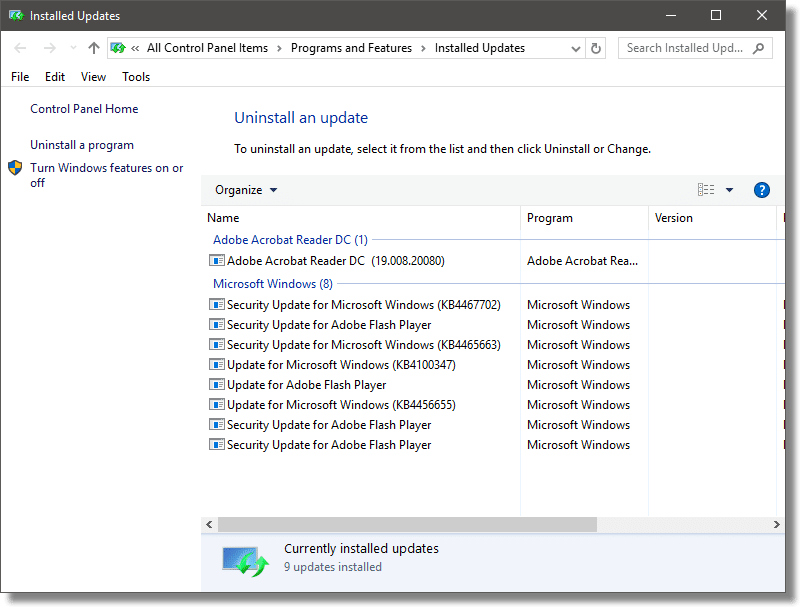
Depending on your situation, it could be a lengthy list. In almost every case, the fact that you can uninstall the update implies that the files representing the pre-update state are still stored on your machine, so they can be reinstalled in case you want to uninstall a current one.
You can safely remove these old updates using the Windows Disk Cleanup tool to clean up system files.
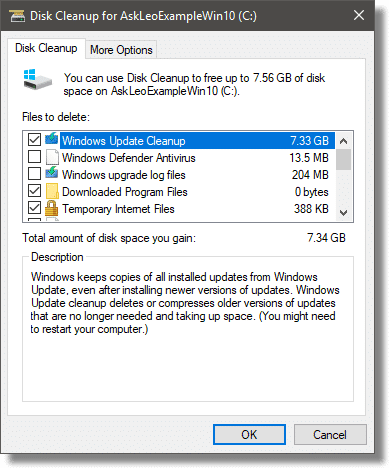
Just make sure you’re OK with no longer being able to revert or uninstall your currently installed set of Windows updates.
There’s no time like the present
As I alluded to earlier, not all updates are created equal.
For example, your anti-malware tool should be updating its database daily. Would you ever want to roll back to the previous days’ database of malware? That seems exceptionally unlikely.
As a result, the update process is a true replacement — each day’s malware database update replaces that of the previous day. Aside from the difference in size between the two versions of the database (it’s generally likely that each day’s is slightly larger, simply because new malware has been found and definitions added), there’s really no appreciable cumulative growth in size.
Software manufacturers typically choose to have their updates operate the same way. Each new version of software ‘X’ very likely replaces the version it supersedes. At the end of the update process, the new files are in place and the old files have been removed.
I’ll go so far as to say that most software updates work this way, and that it’s Windows and some Microsoft products that are the exceptions by providing the ability to roll back an update at all.
But this is a choice made by software designers. Most choose to replace previous versions completely, thus not adding dramatically to the disk space used. Others may offer the ability to roll back individual updates, which of necessity means that the old files are preserved somewhere.
Do you really need to care?
Probably not.
If you’re running low on disk space, there are much easier ways to get more disk space than chasing after accumulated updates.
Get a disk space display tool (there are several) and see what’s taking up so much space. There’s a good chance you’ll find it’s not updates at all, but more mundane things like caches, temporary files, and a host of other random things that are easily identified as being large, and quickly dealt with to recover space.
It might even be your own doing! The last time I ran into a problem, I discovered several large video files I’d forgotten to remove.
If you’re not running low on disk space, then there’s not really any point to trying to spend time on it.
Do this
Subscribe to Confident Computing! Less frustration and more confidence, solutions, answers, and tips in your inbox every week.
I'll see you there!


Good way to reclaim disk space is to delete your old system restore points– Go to system – shut if OFF. Reboot and go back to system turn it ON and create a restore point!!
Good point. I once regained over 50 GB for someone by deleting all but the last 2 restore points. And then I set the restore points to be limited to 5GB. I set the limit by clicking on the Start Icon and typing: “restore point”, clicking on “Create a Restore Point” and then clicking “Configure”. I then moved the slider to about 5 GB and clicked OK.
I think many people don’t understand the relatively small amount of disk space programs take up. I checked and all of my programs take up only 16 GB on my hard drive. (About the size of the smallest USB flash drive you can buy nowadays.) Those are the contents of the program files. Programs store information in the App Data folders. Mine occupies about 8 GB. So a total of 24 GB on a modern machine for all my programs is quite insignificant. If you have a smaller SSD, it might be a bit more overhead percentage, but the updates would constitute a small part of that program overhead. If you are running low on disk space and you can’t find any more things to delete, you can get a pair of external HDDs and move all of your videos, music and pictures over to those. I say a pair because you need a backup copy of everything.
I recently learned a salutary lesson. I set Malwarebytes to do a rootkit scan including the within archives option. It took nearly two days. One thing I noticed was that it was processing files in Windows/servicing/LCU for most of that time. When it finished, I checked and there were several big folders in there – research indicated that these had something to do with Windows Update! Selecting the system files option in Disk Cleanup reduced this number to one. Tried again and it cut the time to six hours.