
Time for my most common yet most annoying answer ever.
It depends.
I’ll describe what the Visual C++ redistributables are all about, and why the safest thing to do is nothing.
Become a Patron of Ask Leo! and go ad-free!

Visual C++ redistributables are software packages provided by Microsoft that other programs can use. Those programs either install the redistributables they need, or ask you to do so. When programs are updated or uninstalled, they typically do not uninstall the redistributables, and there’s no easy way to know which ones your machine requires.
Visual C++ Redistributables
C++ is one of several languages programmers use to create software.
Visual C++ is Microsoft’s implementation of that programming language. This includes the tools to convert (or “compile”) the code that programmers write in C++ into the “.exe”, “.dll”, and other files understood by Windows.
Programmers who write software in Microsoft Visual C++ make use of what are called “standard libraries”. These are collections of pre-written software allowing them to avoid rewriting common sequences of code. Instead, they use this collection of pre-written and thoroughly tested software.
For example, say a program includes a function to convert a string of characters to all upper case (“all upper case” would be converted to “ALL UPPER CASE” by this function). Rather than requiring every program needing this function to write it from scratch, the standard library includes such a function, ready to go.
They’re termed “redistributable” because they are Microsoft software which is allowed to be distributed, or “re-distributed”, by others. When you install a program, the setup program may have the option of installing the Visual C++ Redistributable if it’s not present. On the other hand, if you have five programs all using the same Visual C++ Redistributable, there need be only one copy installed.
Versions upon versions
There are multiple different versions of Visual C++ Redistributable. Unfortunately, newer ones don’t supersede older ones. For example, the Visual C++ 2015 Redistributable doesn’t automatically replace the Visual C++ 2010 Redistributable. Both may be needed.
Much like the .NET Framework, you can end up with more than one version on your machine.
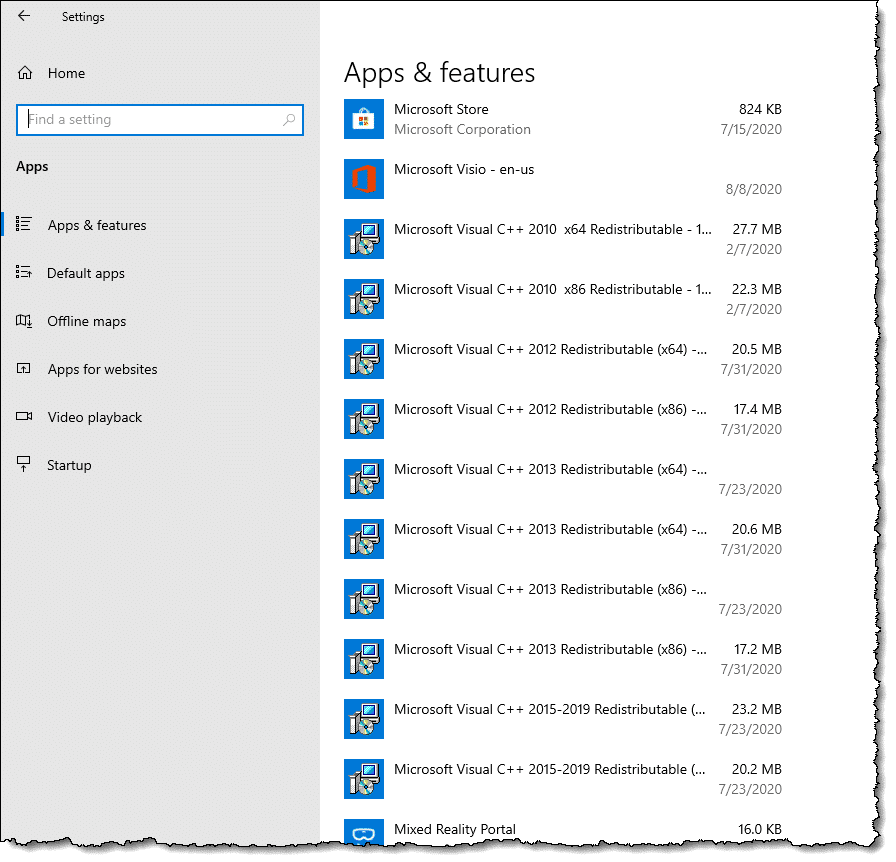
You can see which are installed on your machine by visiting “Apps & features” in the Settings app and scrolling down the list1. As you can see in the image above, my machine has ten instances of Microsoft Visual C++ Redistributables, including 2010 ,2012, 2013, and 2015-2019 versions, in a mixture of x86 (32 bit) and x64 (64 bit) editions.
This is not uncommon.
Do you need them?
I have no idea if you need them. I have no idea if you need just one or two or all of the several versions possibly installed on your machine.
I mentioned above that “it depends” — and what it depends on is the software installed on your machine. If the software installed on your machine needs them, you need them. If it doesn’t, you might not.
Unfortunately, there’s no easy way for you to tell which programs on your machine require which versions of the redistributables — or if any do. In an ideal world, uninstalling the last software package requiring a particular version of the redistributables would also uninstall it. Generally, that’s not the case. If you uninstall software using a redistributable, you may be left with an unnecessary redistributable on your machine, with no way to tell if that’s the case.
Leaving them all in place is by far the safest thing to do.
Is it worth it?
Is it worth the time and risk to remove them?
My position is no. In my experience, they won’t give you back nearly as much disk space as you expect, and they’re not impacting system performance if they’re not being used.
If you’re in a disk space crunch, approach the problem by seeing what’s using the most space. You’ll get more space more quickly if you approach it by looking for the space hogs first. While it might seem like multiple Visual C++ Redistributables add up to a lot of space, in practice, they don’t — at least not in comparison to other things on your machine.
If you’re not running low on disk space, I wouldn’t spend any time on it.
When you remove components designed to be shared, there’s always a risk of breaking something. There’s no simple way to be sure no program on your machine needs them.
The one true way
There is one way guaranteed to leave you with only the Visual C++ Redistributables you need.
- Back up.
- Reinstall Windows from scratch.
- Reinstall the applications you use from scratch.
- Restore your data from backups (or wherever else convenient).
This will leave your machine with only the redistributables you need, installed by the applications you use.
And after all that, you may find you’re right back where you started.
In my opinion, it’s just not worth it.
Do this
Subscribe to Confident Computing! Less frustration and more confidence, solutions, answers, and tips in your inbox every week.
I'll see you there!
Podcast audio

Related Video


Footnotes & References
1: Older versions of Windows list them in the Add/Remove programs section of Control Panel.

A simple (though not foolproof) way of checking if a file is needed or used is to rename it. I put “XX” infront of the file in question, e.g. rename ‘msfile01’ to ‘XXmsfile01’. If after a few days or weeks of using your computer there have been no problems it might indicate that the file is not being used and could be deleted. If there are problems simply remove the ‘XX’ and your files are back as they were.
Good freaking idea! I am very comfortable operating computers. But I still have brain Frys like the best of em :P.
“Music Is My Religion”
A few years ago when I was clueless about computers I decided to clean things up. Took my friendly geek hours to fix things up. Nowadays it’s smarter just to get a bigger hard drive and you are set up for a long, long time.
If it’s not broken don’t fix it.
I have been burned by removing the Visual C++ Redistributables along with other “crapware” on a new Windows computer. It turns out it was needed by two different CD/DVD burning programs. There was NO warning when the software was removed that it was needed by another application. Each application failed to startup with an initialization error that was totally useless in terms of pinpointing the problem.
I like the previous idea of renaming the folder where the software you are considering resides. After a while, if this doesn’t break anything, then rename the folder back and uninstall the software normally. BUT, in my case, this would not have helped as I very rarely use the software that broke.
So let me get this straight:
USUALLY, if it’s on my machine, it’s because there is software that needs it. As opposed to crap that MS places on my machine simply because I MIGHT have need of it someday in the future?
I can live with that. I’ve got plenty of hard drive space. My only issue is putting up with stuff that someone else thinks I might need, when I don’t. (I use Revo Uninstaller to remove unnecessary remnants from a de-installation.)
I deleted that visualc++ and had to reinstall windows xp cuz it totally wrecked my pc.
I have been having problems with HotMail. Slow, cursor misbehaves, and lots of connection problems. Last night I removed all the Windows Live aps and installed Chrome. Now HotMail is much more responsive and the connection issues have vanished. It was not a disk space issue. It was a performance issue. Maybe other readers have had the same experience with the Windows Live programs.
I don’t actively use it, but I had issues with a Visual C++ Redistributable update wanting to install over and over and over. I e-mailed MS and got free (!!!) advice about what to do.
And, I was advised NOT to uninstall any versions I found lurking about as my system could go kerflunk depending on various bullstuff.
For me, this is a strong argument for reinstalling windows every six to twelve months. It resets all your installed software so you can start again and be sure only the parts you (or windows) need are installed.
Might sound like a lot of work, but with either two drives (or a partitioned drive) you can keep data on one drive and windows and applications on another. Makes reformatting nothing more than an evening’s work.
What? I freak out about having to reinstall once every 4/5 years. All the garbage that gets installed by MickeySoft plus the detritus that various programs use… sometimes I think I should go back to a stone tablet, a mallet and chisel.
Personally I keep data on a separate physical drive. Used to use a partitioned drive until things went haywire with a drive slowly starting to drive. Once bitten, twice shy is me.
Having now a Win 10 box operating system in on SSD and data on standard platter type. Works for Me.
I install the latest version of Windows 10, make sure its up to date. Then install just my must have apps (things like Steam, VLC, GoG Galaxy and all the other game launchers/stores, latest GPU driver at time etc). Then use control panel to create a system image that I save to a external drive.
That way if I ever need to blow the OS away. I just restore to that image. Got a install that’s fresh with just the apps I always install first. So it’s ready to go.
If you use a lot of popular free apps, you can go to ninite.com and select the programs you want. Doing that downloads a ninite.exe installer. Every time you run ninite.exe, it checks which programs need to be updated and updates them. If you save that program along with your backups, you can run it on your newly refreshed system of install them on a different computer. That saves a lot of time. Some of the popular programs it can download are VLC, Firefox, Chrome, Thunderbird, Libre and Oppen Office, TeamViewer and about 100 more. And they strip out any PUPs which may be included with some freeware.
Thank you for the article describing what the C++ Redistributables do. I have some knowledge of C++ programming but not a lot and I was confused why anything needed updating since C++ programs are compiled to CPU instructions, but now I understand.
Anyone worried about running out of disk space should get more disk space, rather than risk deleting something ‘mysterious’ (to them) but vital. External hard drives are large, cheap, readily available and easy to install and use. Just go to your nearest computer store, spend some money, and plug it in
07-Jan-2012
Leo, I hear you loud and strong. I am from New Zealand and on a benefit, what Americans call welfare.
So money is tight for me… but I still managed to squirrel away enough money to buy a SSD and it has been the single most beneficial addition to any computer… from pressing the power button to being at the log in screen… 14 seconds on a Win 10 machine.
My previous Win 7 machine ended up taking about 2 to 2 1/2 minutes. That. Is. A. Huge. Difference.
to be honest… I do not mind that there are 5.8 billion different Microsoft Visual C++ bla bla bla Redistributable bla bla blas on my machine for the last 425 years, but my ocd can no longer tolerate opening the programs list and seeing them all taking up visual space lol. Is there not a single bundle that can be downloaded which includes all the versions so that it appears as a single item on the “Installed” list. I understand their necessity but if this acted like a regular program and just installed any updates to the one package each time, then I wouldnt have to scratch through the skin on my forehead any more.
I believe they are all independent libraries because they are only installed when they are needed. Including them all in one file would, in many cases, take up more space than only installing the libraries as needed.
Even though they have similar names, it is indeed best to think of them as separate and unrelated. Naturally reality is much more complicated than that, but this is the net result.
Why hasn’t someone written an app that tells us explicitly which redistributables are needed for which apps?
Ultimately because the information that the app would need isn’t really there in a reliable fashion. The cost of failure would be high, and the benefit very low. (Seriously, there’s nothing wrong with leaving them alone.)
@JmjmNZ
What you are saying is true, except for hard drives being cheap. The price went up to double or more due to the flooding in Thailand, and many people may need a temporary solution until the prices come down in a few to several months from now.
*** Update -The prices are down again.
I understand more about Microsoft Visual C++ redistributables & the fact I need to keep them but why the need for both 86x & 64x versions of each update. I’m running a 64 bit operating system (if that matters)
@VicTheChic
A 64 bit computer is capable of running both 64 bit and 32 bit (x86) applications. Therefore you need the distributables for both.
Hello Leo, just wanted to leave a message about the ad in this page. I use Adblock Plus and that ad, the look and feel of it, is amazing.
I am not being facetious, I have that adblocker to block big blinking eye catching banners, popups and I only hope the ads of tomorrow will take cues from yours.
“Do you need them? I have no idea if you need them. I have no idea if you need just one or both.”
If you don’t know why are u wasting my time reading this?
I am basic. I do not have an iphone nor do I intend to get one. I do not want programs on my little laptop that enable such items as they serve no purpose for me and I need the space for college. Does anyone know the programs I can delete to maximize space and eliminate “sharing” my laptop with any other devices.
Your explanation of visual C was was clear and to the point , thank you . I’m an old man without much tech savey but I understood what you were saying .
I found a bunch of these things in my programes list and was shocked . After reading what you had to say , I’M just gonna leave em alone .
Thanks again Leo .
Hi,
I needed info on the necessity of having the Visual C++ 2005 Redistributables and saw the invitation to sign up for your newsletter (and get the ‘Slow Computer’ report). However…
Your Newsletter signup is NOT working for me… When I tried my email address, twice the page fell over and I had to restart the process.. I never received any confirmation email in my account… yet on my third attempt, I got the message “Different Address Needed You cannot subscribe to this list with the email address you entered. Please correct any mistakes in the address and try to subscribe again. If you see this message again, please use a different email address to subscribe.”
Of course, I will not provide my other email address, as I have known of some sites in the past that try to get All the email addresses from a person and then turn them around to mailing lists.
If you can add me, well and good; if not, well and good… Please let me know…
Thank you, Steve
Re Microsoft Visual C++ Redistributable.
I had two seemingly identical versions of this program (Microsoft Visual C++ 2008 Redistributable – x64 9.0.30729.6161), one took 600KB of space and the other takes 782KB. I uninstalled the first one before I read your warning not to do so. Since they are both the same version of the program, albeit with a slightly different size, can I assume that the second program is exactly the same as the first and will replace it if needed? Or should I attempt to reinstall the first one?
Thank you.
Even if they are the same size, it might break something if removed. It generally better not to mess with duplicate system files.
http://ask-leo.com/is_it_safe_to_delete_duplicate_files.html
It’s difficult to say. It’s almost certain that they are not identical. Whether or not you need to attempt to reinstall the one that you deleted it is unclear. Typically if there is going to be a problem it will be a relatively severe problem in that a program will not run.
Thanks for the article Leo. I was just wondering though… Do all windows platforms have this issue with Microsoft Visual C++ ? Or does one version have less of a problem? Also curious if Macs have these kind of issues? Or are they free from problems such as these? I know they don’t have virus problems, but what about tons of unnecessary (but maybe necessary) files like windows based computers? I have grown accustom to PCs and am kind of stuck using them as all my work, files, programs and data are PC based. But I’m kind of tired of all the time and labor trying to keep my computer running well. The maintenance time needed to keep it running efficiently has grown out of hand. Buying a new hard-drive, upgrading to the latest OS or just a newer computer seems like a foolish move if the problem never really goes away. The fight still continues, just with a larger playing field. Will technology ever really be efficient?
This particular problem is not related to any particular version of Windows. It’s really more about Windows software and how Windows software is architected. My experience on Apple is that they attempt to share less code than Windows programs originally tried to do.
I have removed all of the C++ using the windows Programs and Features from my W10 machine … after a restart (with no issues) I have been running various programs to see if they require any version of C++ … so far nothing … I am sure something needs it, but I have downloaded the redistributable versions from Microsoft just in case …
I needed more informations about visual c++. can you people send me the email to me all about microsoft visual c++.
Nope. Go look on the Microsoft web site – they have plenty of information. 🙂
You sound too lazy or too unconcerned to look up tech things or solve problems…so why have this site? I will avoid it from now on.
I invest my time in ways that I believe will best serve my readers.
Hey Steve, I’d say he answered the question just fine. Further more, you should just avoid computers. PERIOD. =P
I’d say Sam and Steve are the same person, have you bothered to read Leo’s ‘about’ or ‘blog’ pages? ( FYI Leo I 100% agree with the getting up early BS lol )
lol this particular quote jumped out at me >>> “And when you do need to reach out for help, I want you to be able to ask the right questions in the right way, so you’ll get the answers you need. That’s where sneaking in some education comes in.”
Just like my teachers would do to me at school and my mum at home, and just like I do now. I work in SEO and yes I could easily just fix my clients SEO problems and give ‘vague’ instructions so I hold all the power ( and the money ) most of my clients are 50+ and just want the problems fixed ASAP but I still always try and make them learn something, even if it’s minimal to most tech savy people but to them it creates confidence, that their brains are still switched ON and even though they are 50+ they just mastered something a 20 year old probably can’t even do > which in turn makes them VERY happy < these clients will stay with me for years.
From personal experience clients who don't stick around ask the same questions over and over after I've already explained (in email) the solution to their problem 6 times, either they don't care, don't read or listen or would rather pay someone to over charge them and think for them – these people are unfortunately just lazy ( and no not too busy, half my clients are CEO's ) They would have been the kids at school who cheated on all their tests or paid someone else to do it for them, after college/ Uni if they even could be bothered showing up they'd be in a job that they are now incompetent of doing, constantly paranoid someone in their team who knows how to actually do their job will take their position – so these people ( that never really tried at anything ) then turn into the worst type of person – f$ckw.ts lol no, – 'Micro Managers'
If you put all the pieces of a jig-saw puzzle together for someone else, what's the point? What does the other person walk away with? Nothing.
I’ve got numerous upgraded versions of C++ on my system, seem every time I install or reinstall a newer version is installed. I also have several versions of C++ 2005, 2010. 2012 and 2015, I have 10 different X86, that’s 32 bit versions and 11 X64 64 bit versions. I under stand the necessity for having both a 32bit (X64) and a 64 bit (X64) but do I really need so many different updated version on one machine?
BUT dose a particular program need C++ 2008 Redistributable X86.9.30729.17 or will it work with C++ 2008 Redistributable X86.30729.6161 the latest version
“I have no idea if you need them. I have no idea if you need just one or both.”
The why did you write this article? It’s useless. Do you REALLY get paid to write this stuff?
Poorly, I’m afraid. I wrote the article so that people wouldn’t feel bad about being confused themselves, and to advise them to take the safer step of leaving well enough alone by leaving the various versions installed. People have been known to bork their systems by randomly deleting things that it turns out they need.
Thanks for taking the time to give some sort of answer. You gave enough information of what they do and the risks involved of deleting them, so, I am taking your advice and leaving well alone.
Well Barbara If Leo tells you ” Yes delete that software” and you do and it all f$cks up – you’ll come screaming back to complain.
If Leo tells you “No it’s probably not a good idea to delete that software” and you don’t but your computer still f$cks up – you’ll come back to complain.
So he gave you Switzerland because he’s not a magician and can not teleport into your computer room ( well it has been 2 years maybe you can now Leo? lol ) and of course – you came back and complained. If you’re not tech savy that’s ok but maybe just try explaining this to Leo in a professional manner with manners – you’d be surprised at how far being nice will get you 😉
Transporter is still under development, I’m afraid.
Scotty is working on it.
can a virus ad like unibluespeedupmy compmputer be let in by any of these so called helpful new programs from any so called software providers.if so where is their security,it is impossible to get rid of these immbedded speedup so.licitation programs. thankyou for tour resonse
Those virus-like programs, called foistware or PUPs (
potentiallyunwanted programs), are bundled by the distributors of those freeware programs for a fee. It’s not anything they would want to block. The best protection against foistware is to read every screen carefully when you install a program, even paid ones as some vendors will go for the few cents they get for bundling foistware. Make sure you are only agreeing to install the software you want to install.https://askleo.com/how-do-i-remove-pups-foistware-drive-bys-toolbars-and-other-annoying-things-i-never-wanted/
“I have no idea if you need them. I have no idea if you need just one or both.
In this case, it depends on the software on your machine. If the software that you’ve installed on your machine needs them … well, then you need them. If it doesn’t, then you might not.
But given that they only appear on your machine if software that uses them is present1, I would expect that you probably do need them. Both.
And leaving them in place is by far the safest thing to do.”
Leo “has been playing with computers since he was required to take a programming class in 1976. An 18 year career as a programmer at Microsoft soon followed. ”
With 18 years as a programmer at MSFT, I would expect a more definitive answer than the above. I would suspect that you would need them if you were a software developer.
I truly wish it were that simple.
From Microsoft Visual C website
“The Microsoft Visual C++ 2005 Redistributable Package (x86) installs runtime components of Visual C++ Libraries required to run applications developed with Visual C++ on a computer that does not have Visual C++ 2005 installed.”
So if you’re not a software developer and you don’t run or plan to run applications developed with Visual C++, you don’t need them.
As long as you KNOW which of your applications have been developed with Visual C++. They were put there for a reason, after all, typically by installing something that was developed with MSVC++.
When Leo says “I have no idea if you need them. “, he means you personally, not computer users in general. He doesn’t know what is on your machine. Some programs you have installed might require those. The only sure way to know would be to remove or rename those libraries and see if things stop working. If you do that, however, you might mess things up. It’s just not worth worrying about. Computer hard drives are so huge now, the space saved by removing them would be insignificant.
What if there different years on them? Doyou need them all? ( Say 2oo8, 2o1o, 2o15 …)
All I can say is “maybe”. It’s very possible some software you have requires specific versions.
can i uninstall all visual c++ 2005 – 2013 redistributable x64 to x86? what will be effect on my dell laptop windows 7?
The answer is a definite maybe. It all depends on whether you have any applications which use it.
Please read the article you just commented on. THere’s no way to know the effect.
I would like remove the VC++ 2005 redistributable because of Qualys Scan. Everytime i uninstall and reboot it, in the next day it shows up again. We have SQL Servers , .nets softs, Visual Studio in that server. We need to get rid of that becasue it is a level 5 vulnerability. Any ideas how to uninstall it. Thanks
Chances are you have other software that requires it. Unfortunately I have no way to tell you what that software might be.
Great info Leo, good article, much appreciated. Anyways, I am here because I am wondering if I need to reinstall MVSC++ 2005 x64.
I bought a Dell laptop with Win 7 x64 Premium 2 years ago, and I did a free upgrade to Win 10 before the cutoff, so now I have Win 10 Premium x64. Fast-forward about 6 months later (approx 6 months ago), apparently Windows Update installed a Win 7 update on my machine that had Win 10 on it. This COMPLETELY screwed my computer up to the point that I was forced to do a complete re-install of Win 10. Before I did it, it asked me if I wanted to save a list of installed programs ad I said “yes.” One of the programs listed was MS Visual C++2005 x64 redistributable. But, after I did the re-install, it was not re-installed.
My question is whether or not I need it now. Is there a website or some other info source I can use to see if I need any of the MVSC++ for any of my programs?
I’ve just completed reading the messages regarding Microsoft Visual C Redistributable. I have 3 versions of 2008 and one version for 2010. I also see there’s a download for a 2013 version available. My question would be: is there an advantage to adding the 2013 version?
Only if you install a software package that needs it. If you don’t, then there’s no reason to do so.
My laptop had win 7 premium x64 had 2005 MSVC++ installed. I upgraded to win 10 x64 premium and the 2005 MSVC++ was still there. However, I had to do a complete reinstall of my win 10 and the 2005 MSVC++ did not reinstall.
Should I reinstall it or not?
Should I get a newer version of it? (ie MSVC++ 2008 or 2012, …etc)
I wouldn’t do a thing until one of the programs you use stops working because it’s not there. You may not need it at all. There’s no way to easily know.
Concerning newer versions. They are not upgrades. They are run-time libraries, each made to work with a different version of C++.
hi I have more than one of the same Visual C++ Redistributable programs on my computer the only differences that I can see are the last 11numbers. Same year and everything. Can any of them be uninstalled?
Read the article you are commenting on.
As stated in the article: I would not. They’re likely there for a reason.
OK after reading your articular how do i get back 2013 redistributable x64 to x86.., AvG, sum-mink or other .., which Ive just uninstalled !……….?
because i don’t have the AVG installed ?
Hi, I use the Driver Booster program which tells me that there are updates for the Microsoft redistributable programs on my computer but though I can find updates on the internet I’m not sure whether they are appropriate. Does Microsoft have a redistributable update utility which will check my computer and download any updates I need please? Thank you
I don’t recommend driver boosting type programs at all: https://askleo.com/how_and_when_should_i_update_drivers/
Hey, I deleted about three of the six redistributables (starting with the old ones-2005 first) that were on my windows 10 pro and there wasn’t any bad effects. Now that I read your forum, I’m glad that I left the rest. The purpose that i deleted them, someone online advised that it was a good way to remove those nasty windows notification messages. I was able to remove some of the notifications (not specifically from removing the redistributables) but by other measures, but I still get balloons that pop up from time to time in the right bottom corner of my desk top. Additionally, my login display has message that it wants me to install the latest update of windows when I don’t want to get involved with updates as my computer runs fine, I don’t need their automatic updates. I am still searching for how to completely delete and stop permanently all update messages and balloons, but I have not completely solved the problem yet, even though I applied a handful of online fixes so far.
When I deleted the 2005 redistributable everything was OK, but when I got rid of the 2008 one I started to get much more spam in my emails.
Those two things are completely unrelated to one another.
Ya I don’t wanna delete them all but I have 4 that are not from microsoft and the place that is listed doesn’t exist or can’t be found the problem is they are not running on an asigned licence and mypc has to do a repair every time I start it,so where do I go for drivers or do I delete these 4.
There’s really no way to say. I’d have to have a LOT more information about the specifics here. These aren’t “drivers” by the way, they’re just software used by other applications on your machine. I’d also have to know how you got C++ Redistributables that aren’t from Microsoft – it’s Microsoft that makes them.
ok I will dig further and get back to you
The standard response is ridiculous. If you cannot determine which program installed it… how can you be certain it is not a hack or virus of somekind?
Hackers use the same code techniques as non-hackers. Are they seriously suggesting that there is no cause for alarm?
When the Windows Registry became a place where code written in another character (kanji, cyrillic, martian) set could be secretly installed, hidden, made untouchable, made unviewable, then triggered, and deployed, executed, run freely over everything on the computer, executing in so many ways that there would be no way to stop it or prevent future intrusions, I think the story was the same. TRUST THE PROGRAMS.
When the anti-virus and antispyware companies decided to not detect programs which had been categorized as malicious and exposed (and maybe removed), BUT WHEN BRANDED AND SOLD as parenting programs the programs where permitted to remain hidden. EVEN WHEN THOSE PROGRAMS FIRST STEP WAS TO DISABLE THE ANTIVIRUS AND SPYWARE PROGRAMS, those companies allowed it. NORTON was even advertised as a program which would protect the secretly stolen data.
BUT it never stopped even there, they advertised to stalkers and jealous partners. Once again giving the keys to EVERYTHING over to irresponsible programming.
SO WOULD SOMEONE TELL ME AGAIN WHY THE RIDICULOUS ANSWER IS quite clearly a script. Same response re[peated over and over even where the question is different.
Microsoft sold out when it came to SECURITY for all computer users, and these are the tactics which attempt to convince to you ignore their involvement.
The structure of the Local and Roaming Data folders is a similar nightmare of hundreds of empty folders. Folders which if you open them, promptly move their contents to another directory, (and sometimes right back again).
Ever wonder why you don’t find tools for deciphering the registry hooks and all the connections which exist for WHAT PURPOSE?
Ever wonder why the Registry permits YES to be No and No To Be Yes sometimes? There is a massive level of deception which can be performed by the Registry. It’s why a computer cannot be locked down or secured.
There is NO SECURITY IN COMPUTERS. And it’s ridiculous responses like YOU NEED THEM ALL … MAYBE that enable the hackers and prevent the honest folks from having security.
This is the first time I have managed to find a description of the purpose, usefulness (or not) and the why’s and wherefore’s of Microsoft Visual C++, etc., in plain and comprehensible language that anyone over the age of six could understand. Thank you, Leo.
If you’re merely concerned with seemingly random Visual C++ redistributable files junking up the root of your C drive for no apparent reason, they’re safe to remove, as per the following link: https://support.microsoft.com/en-au/help/950683/vcredist-from-vc-2008-installs-temporary-files-in-root-directory
Anything beyond those particular files, unless you know what you’re doing, you’re probably best leaving them alone (if you’re on this site, you probably don’t have sufficient knowledge to safely remove them. Sorry).
I’m at the point where I am reckless and don’t really care if I destroy my laptop. I have a controlling ex-husband who would register my electronics (computer, laptop and phones) as his and enroll them in Enterprise, using my birth year as the name of the company. This would give him access to all my browsing activity, emails, etc. He, of course, denied knowing anything about computers even though he was administrative captain for CDF’s inmate program. DARPA would show up there at his place of employment so he had the opportunity to pick their brains – and he IS an opportunist. Anyway, I have tried to unenroll my computer but didn’t work. I assume he has it tied to my Microsoft and Google accounts (two separate Enterprise programs) and my phones are no different. How do I get out from under all this surveillance once and for all? Especially in light of the fact that he didn’t do it to see if I’m being unfaithful – he was doing it to see how much I knew about his deceptive activities. Can someone please help me? This has been going on for YEARS and I am at the end of a very tight rope.
Reinstalling Windows and all of your programs from scratch is the only 100% sure way to get rid of what he’s installed on your computer. I’d also open a new Microsoft (outlook.com) account for this machine to be sure he has no access to it. And change the passwords on all of your accounts, email, Facebook Amazon etc. check that the recovery email accounts and phone numbers are all yours.
Take a system image backup before reinstalling to restore your personal files.
How Do I Remove Malware (See the section “Surrender”)
Laptop and smartphones are computers.
Turn off remote access?
Absolutely BRILLIANTLY answered, Leo, thank you!
I cannot tell you how many times this question has come up in my mind going back many years. Now I have the perspective.
Keep up the excellent work!
Dorian
Suggestion: Save and archive any VC++ redistributables that you download because you may not be able to get them later – at least not from a trustworthy site. They go back to 2005 and there are different versions for 32 and 64-bit computers. Also save any .Net (Dot-Net) installers.
hello! I am glad I looked up what this software is because I was tempted to delete them. My question is why are the 4 C++Redistributables that are downloaded on my computer dated before I purchased the computer? That really bothered me because it made me think that I might have a returned laptop. i am curious because that doesn’t make sense… does it??
thank you for your time and all of your useful knowledge!!
The dates on those files are the date they were created or last updated, not the dates they were downloaded to your computer.
Some of the pre-installed software probably needs them. Nothing to worry about.
Thanks Leo!
Yeah, the backward compatibility is the reason why Windows uses all these libraries. Functions could be easily included in programs that uses them.
Now, instead of saving space by sharing libraries, there are tons of unused library files while barely anybody uses C++ today. Programmers can add their function definitions into their own code, no library needed. As uses go through the explorer, even after a new install of Windows, its a mess.
Getting rid of libraries would especially allow for clean deleting of programs.
The whole registry can also be dumped, as it also often does not delete clean and is a great source of errors. The OS just isn’t up to date.
AI! Maybe AI could really help by determining those parts of programs or files which are needed, dump the rest, store this separate from the Program Files and this way we keep Windows clean.
Today, my directory structure read horrible and looks like a major mess. Even my more modern Android system seems like a big mess. What Android does do properly is offer a list of Apps. It can install them, delete them, re-install them and manage Apps as well. Just the very basic stuff is screwed with the registry and with the shared libraries.
Maybe time that Microsoft develops a modern OS, as Win10 is just a continuation of very old architectures. And indeed, this could force a split with the old. Today, they could create something new, with clarity and an intuitional logic to it. Every file should include a ‘why’ text and every program a repository-list of its own directory. It is not relevant for humans to know how something will look like once in RAM, but humans go through the directory structure and it is a mess. While everybody has a Personal Computer, like my elderly parents, and I, and we are considered fine managers of our own computers – and they just keep on getting messier and messier. Let’s ask Microsoft to trash the old and start again, from scratch, intuition-based. How to ask such a thing?
….
Well, ask Leo (!) …. 😉
But again, thanks Leo for your explanation above, I went crazy about the mess as I am trying to ‘administer’ my own laptop. What a mess it is, and how sad that this seems intended.
– John
I think people underestimate the complexity of the problem being solved. I totally understand why we landed where we did on these things.
And, IMO, Microsoft will never “dump” Windows and start over. That would mean throwing away backwards compatibility completely and convincing over a billion installations to move to a completely new OS. Not gonna happen.
Question to Leo
Using Windows 7 , if I list some FOLDERS / FILES in libraries ..,
do I still have to index (same files) ? ( say to get same (best) results
Thanks for any help on this question
Sorry, I don’t understand your question, or how it relates to the article?
The question were all the Visual C programs necessary. We got no answer, just a lot of words sounds like political speak. With a similar result leaves us uninformed.
A previous computer kept getting Visual C installs along with other unrequested auto update’s until my hard drive was maxed and the commercial repair shop said the only solution was replace the compute.
Once this one is finished I” by a Chrome Book.
The solution is never get a new computer. It sounds like you took your computer to an incompetent repair person.
I highly doubt the Visual C files were the culprit. I’d run Disk Cleanup (built in to Windows) and remove temporary and other unnecessary files. System Restore files are a major culprit.
To clean these run Disk Cleanup.
Click the “Clean up system files” button
Click the “More Options” tab
Under “System Restore and Shadow Copies” click the “Clean-up” button
Confirm that you want to remove all but the latest System Restore point.
Also run Tree Size Free to see it there are any large files you don’t need or can move to an external drive.
As for a Chromebook, many people are concerned about the amount of data Google stores on their users. This may or may not be a problem for you.
If you want to switch from Windows, Linux is a good alternative. One advantage of Linux is that you can install it on your existing computer without having to buy a new one.
Microsoft Visual C++ Redistributable didn’t spark joy so I uninstalled all 20 or so just to see what would happen. And also Visual Basic 5.0 (wth?) and an XNA 4.0 redistributable, for good measure. The short answer is that you’ll be fine, mostly. Buuuut, you do have to count on some programs not working as expected or not starting at all. Reinstalling those programs should also install the required redistributable.
My first clue that something wasn’t working as expected was when my mouse suddenly started smooth scrolling (ugh) and SetPoint wouldn’t start (which usually fixes this kind of thing). After reinstalling SetPoint, I now have only one Microsoft Visual C++ 2008 Redistributable. Yay.
I fully expect a lot more programs (probably games) to not work, but I’ll live.
The actual solution would be for MS to implement some kind of dependency management so that when no program depends on the redist, and you didn’t manually install is for some reason, the redist will be automatically removed.