Have you ever gotten so frustrated with your computer that you just start randomly pounding on the keyboard… or perhaps a particular key?
Yeah, me too.
That is often the source of the problem. No, Windows isn’t “getting even” with you, though it might seem that way. It thinks you’ve asked it to do something.
Become a Patron of Ask Leo! and go ad-free!

Sticky Keys, Filter Keys, and Toggle Keys are Windows features that modify keyboard behavior. They all have corresponding shortcut sequences to turn on — which can be done accidentally. You can disable this possibility by changing the corresponding “Allow the shortcut key” options in the Settings app.
Windows ease of access
 Windows includes what are known as “accessibility options” — also referred to as “ease of access” settings — designed to make the computer more usable by those with various physical challenges.
Several of those options relate to the keyboard, and are fairly easily enabled.
Perhaps too easily. 
For example, hitting the Shift key five times in a row.
Sticky Keys
Sticky Keys is a feature that makes the Shift, Alt, Ctrl, and Windows keys toggle instead of needing to be held down. Press and release the Shift key, and Shift is on. Press and release it again, Shift is off. It can seem like it’s “stuck” if you don’t realize what’s happening.
Sticky Keys is enabled in two ways: in the settings app, or by pressing and releasing the Shift key five times in a row.
Let’s say you’re frustrated with your computer and start hitting the Shift key (or in my case, alternately pounding on both Shift keys). When the Shift key is pressed five times in a row, Windows assumes you’re asking for Sticky Keys. Windows does present a confirmation dialog, but that’s easy to miss if you’re still pounding your keys and happen to hit Return.
Filter Keys & Toggle Keys
Maybe you’re not that violent. Perhaps you’re just lost in thought as your finger slowly descends on the Shift key. Eight seconds later, Windows thinks you’ve asked for something called “Filter Keys”. Filter Keys is a way to ignore brief or accidentally-repeated keystrokes.
If you’ve held down the Num Lock key for five seconds, Windows will ask you about something called “Toggle Keys”, which beeps a tone whenever you press Caps Lock, Scroll Lock, or Num Lock.
To be fair, Windows does ask before turning on these features, but if you hit Return by mistake and the feature gets turned on, it can be frustrating to try to get anything done if you don’t realize what happened.
Which, of course, can lead to more keyboard-pounding.
Ease of access settings
The good news is, these features are easy to turn off. It’s also easy to turn off the detection that got you into trouble in the first place.
In the Settings app, search for “ease of access” and click on Ease of Access keyboard settings when it appears. (In prior versions of Windows, look in Control Panel, Accessibility Options).
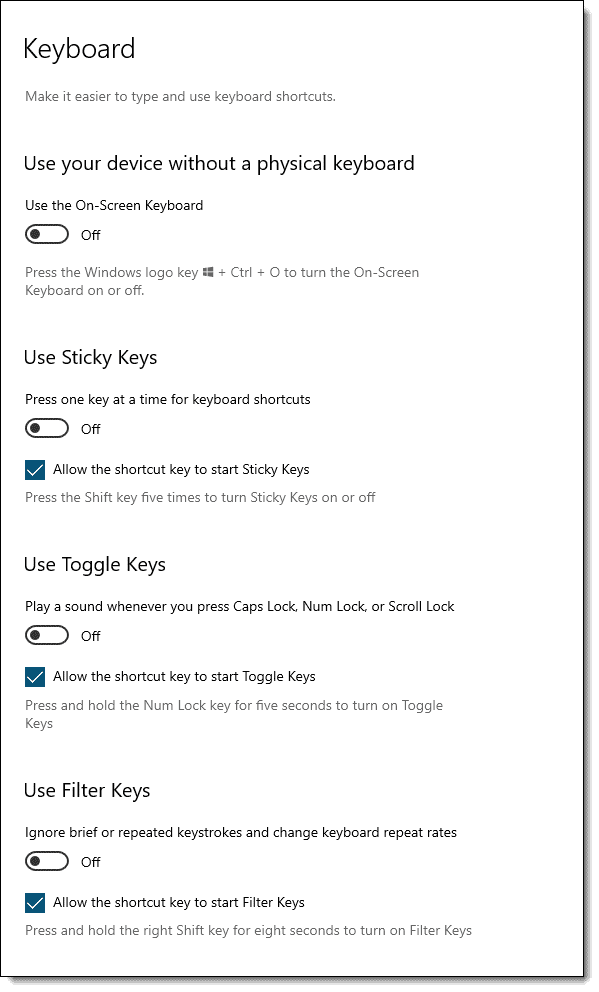
Here you can turn off (or on, if you like) each of the three features: Sticky Keys, Toggle Keys, and Filter keys.
More importantly, though, each feature has a corresponding checkbox (checked by default), controlling whether or not the corresponding shortcut key sequence is enabled.
Uncheck “Allow the shortcut key to start Sticky Keys” setting, and you can pound the Shift key all you like without effect.
At least until the keyboard breaks.
Do this
Subscribe to Confident Computing! Less frustration and more confidence, solutions, answers, and tips in your inbox every week.
I'll see you there!
Podcast audio

Related Video


Well, i’ve turned Sticky Keys off and even removed it by Add / Remove Programs, Windows Components. Its now stopped working in Windows itself, but when i play a game like Counter-Strike or Hitman, i have Shift assigned as duck and the bloody pc still beeps at me as i hold the shift key down!!!
How the hell do you get rid of Stick Keys for good, its a real pain in the ass!
To get rid of StickyKeys for good go to Control Panel – Accessibility Options – Keyboard – StickyKeys – Settings and uncheck the box called “Keyboard shortcut” which if checked monitors for shift pressed five times.
There is a similar box to be unchecked in FilterKeys section which monitors pressing shift for 8 seconds.
I have windows XP on my laptop and the filter keys immediately pops up. I also notice that the Numlock key stays ON and I cannot disable it. Do you think this is still related to the sticky keys or probably a bad keyboard?
I’m thinking bad keyboard. Sounds like the numlock key is literally stuck.
I just got the solution…it took me about 5 minutes. Go into the StickyKeys settings and check the “Turn off StickyKeys if 2 keys are pressed at once” Apply the changes then hit 2 keys of your choice. Now disable the damn thing altogether. Enjoy.
everytime i press any key,i hear a beep,at first i didnt mind the noise,but then it got worse,its so annoying,i dont know how to turn it off,ive been to control panel>accessibility options>filter keys>settings>beep when key is pressed box.it is unchecked but still makes that annoying beep,i am about ready to pull my hair out,can you please help?i would greatly appreciate any help!!!!!
What version of Windows?
I’m still having trouble with it filter keys is off everything is off i am running windows 8 but ether way holding down both shift keys still isn’t working holding down the right shift doesn’t seem to fix it but i could hold down s and type a bunch of s’s but if i let go and hit shift it still continues to type lower case s’s, How can I fix this
One possibility is that you have some dirt stuck in the key. And it might just be a broken keyboard. They can go bad. A quick test would be to borrow and try a different one.
RE: the Fn key…
Hit Fn+Num Lock. That’s what worked on my Dell Inspiron 2600 with XP.
well this is my proble Shift + 2 = @ BUT I GET THIS ” AND VISSA VESSA when I click Shift + ; to get ” I get @ can some body tell me what is the problem.
Hey go to languages section in control panel and then change the keyboard language to English(US), i think you currently have it as English(UK) change it to English(US)… Hope it works, it did worked for me!!
Victor, you’ve got your keyboard set to ‘UK’ instead of ‘US’, you can fix it from regional settings in control panel.
Hello,
My computer mouse was stuck and wasn’t moving. I attempted to fix it with the control setting on windows, but that didn’t work. So I got frustrated and pressed too many keys on the keyboard. I think I pressed the shift key a couple times or held down on it for a couple of seconds. Now my keyboard is not working, there are sounds when I try to hit ANYTHING on the keyboard and my mouse is not working either. The only time something does happen when I hit the keyboard, is when I hit the function button and F3 at the same time, and that just refreshes the page. Please help.
Sounds like what the article above addresses. Have you rebooted since? That would be my other suggestion.
alright, i think i too held down the shift key too long while in excel making a formula and now my keyboard is locked up, although it types the numbers as characters as if the shift key is held down, but it does not type any other characters. The real problem is that i rebooted trying to fix it and my boot up screen is password protected and the key board is still not entering any characters, so i can’t log on to fix the problem.
Help!!
I JUST had the same problem with this on my laptop. I was using Excel 2003. And when I checked for those ”StickyKeys”, they appeared as if they were not in use.
HOWEVER, I solved it by clicking that button that has the window’s logo once. That’s it. I don’t know if it was some weird glitch or I just got very lucky, or if that is the legitimate solution for whatever the heck I did that made excel act like I was pressing down shift the entire time, but it worked for me. I would recommend trying it once…. and if doesn’t work then maybe click it twice fast?
Sounds like your keyboard might be broken. I assume you’ve actually powered the machine down? That can often reset a keyboard problem.
I was working in a word document and held the left mouse key along with another shift or cntrl or alt on the keyboard down for a few seconds and windows popped up a dialog that I just disregarded by selecting ‘ok’. Now my computer is acting weird. When i am in a word document, I select with the mouse a point in the file and the behavior that i see is that word is highlighting from the beginning of the document to the point in the file that i clicked on with the mouse. Do you have any suggestions on how i can undo what i didn’t know that i did?
That actually sounds almost exactly like what’s described in the article you just commented on. Did those steps not help?
Hi there,
|Everytime I press shift, |I am getting this: ||||. How do |I get rid of it|?
|Thanks!
Sam
That sure looks like a hardware problem to me. I’d borrow another keyboard and swap it out. See if that helps.
There is a bug in the Microsoft mice that have the extra buttons that cause the computer to go to SHIFT LOCK if you press an arrow key wheile clicking button 4/5 on the mouse (which is very easy to accidently do). It has been there since 2003 and not been fixed yet! (see Microsoft article 266140)
I live in a very humid area of the world and it seems as though this has caused a short in my keyboard – specifically the ‘alt’. The laptop thinks that I am pressing my alt key repeatedly. This is very frustrating as whenever I am in a window and trying to type, the laptop bring down all sorts of various menus from the menu bar. It’s taking me a ling time just to write this. I have slowed down the repeat key option in the control panel / keyboard window and have even tried blow-drying my key board on a low temp. These things help temporarily, but the problem persists… Is there an option to just turn off the ‘alt’ key? Thank you for your help!
Hi, I’d just like to thank you for posting this helpful article. Its saturday morning, and I’m in work trying to get some stuff done. i was using excel, and it was behaving as if a phantom shift key was somehow depressed. i couldnt use auto-filters, and it made using outlook a pain in the ass as well. terribly frustrating. i took a stab through google and found this. problem solved. thanx!
To put sticky keys off:
1. Check if Control Panel-Accessibility options-‘Use sticky keys’ is ON. If yes turn it off.
2.Then go to Settings-Options.
Turn off ‘Press modifier key twice to lock’
Turn on ‘Turn sticky keys off if 2 keys are ‘pressed at once
And then press any 2 keys simulataneously.
The problem goes…and then you can turn off the use shortcut to avoid this in future
my0 space0 key0 keeps0 putting0 a0 00 in0 front 0so0 when0 ever 0I 0type 0a0 space0 a 00 gets 0inserted.0 How 0do0 i 0stop0 this. 0alse0 all0 my0 number0 keys0 are 0being0 stupid. 0If0 i0 press 0five0 a0 fifty0 four0 appears.0 help
My first suggestion would be to try a different keyboard. Borrow one if you have to, just to make sure, or rule out, that the keyboard itself is the problem.
Just got some good advice for the filterkeys problem (holding down the shift key for 8 seconds produces all capitals and >>> for period). Hold down BOTH shift keys to turn it off. Worked for me! Good Luck
Microsoft HAS to know that MORE people do NOT use this feature than do. I hope they fix this annoyance in the future. I just got finished dealing with it and had come to this page seeking a solution. Thanks Leo for being out there for us.
My solution ended up being pressing the OTHER shift-key once turned off the “STUCK CAPS” effect. To clarify, I was stuck in the “sticky keys” mode with the shift constantly on. I turned off the “use shortcut” as Leo suggested and tried other things. Finally, I simply tried pressing the left shift-key once (holding the right one down as I thought for a second was what got me into the mess) and it appeared to toggle the “sticky keys” back to normal mode.
Again, this is an annoyance more than a help for most people who use the system. If Microsoft can do anything, they should make the “annoyance” for the fewer rather than the bulk of the users. Better yet, fix the damned problem so the regular user does not have to search the web begging others who have figured out how to deal with the people to show them.
Again, thanks Leo for being out here.
I got the all caps and> for period problem after I held down the shift key for a while, and then selected cancel when the filter keys option came up. I tried removing the key and making sure that the key was not sticking. I made sure caps loc was off. I made sure in control panel>>accessibility options that all filter keys, sticky keys, etc. were off, and I still had the problem. I even tried turning each option off and on again and it would not go away. I disabled the shortcut for these filters too. Finally, I fixed the problem by holding down the left shift key for while instead of the right. Go figure.
Great write up, my wife/kids computer had this irritating Sticky Keys issue. I went through all the steps to cut it off… yet it still kept coming on. I then discovered the chunk of Granola jamming the right shift key down… unchecked all of the shortcut keys so it never gets cut again and all is good! Nice article and find… although the food stuck shift key is a new twist. ;)
this 8 seccond shift holding has troubled me many times. specialy if you accidently turn it on, i was not able to turn it off. now i know how to do that. thanks everyone.
that information window that open with ok, cancel and setting buttons does not work or at least it does not have enough information how to use that function. few times when i have clicked cancel filter keys have still turned on, then i have hold shift down another 8 seconds and then clicked ok to make it go off. well after that didnt work i have restarted my computer. that is use full function when you know how to use it, but pain in the ass when you have no idea what it is all about.
Thank you all! A combination of these suggestions fixed my annoying keyboard/mouse problems when sticky keys turned itself on. I did not even hit ok…just the X to get rid of the dialog box! But it was automatically turned on regardless. MS really should make it easier to turn these options off…at the very least! Because unchecking these boxes did not turn it off for me. I had to check and uncheck a bunch of stuff and then hold both of the shift keys down simultaneously before it actually reset. Among other random things I did while I was freaking out trying to turn these options off. And the current default should not be what it is (with shortcuts to these options turned on) but rather that a person should have to go into the options and select them instead. I mean, the majority of PC users are not going to be using these sticky, filter, and toggle key options. What were they thinking?! How annoying!! Again, thank you, thank you, thank you!
Leo,
Could you help witha keyboard problem I have. I’ve looked at the articleabove but don’t see the answer.
I recently had to wipe my hard drive after some fatal error messages. I now don’t appear to be able to use the @ key – when I press the shift button and the @ key I get ” (Not on this computer but another one!)
Grateful for any suggestions as I can’t get downloads as I can’t specify e mail account without @ key.
My first reaction would be to try another keyboard. It’s odd that only that one key would be affected that way.
Thanks for responding, Leo.
I tried different keyboard but it is the same so I assume it is a prog fault? When I had to wipe the hard disk I wonder if the keyboard is now set to a different language? I tried to check in control panel but got lost.
I’ve checked every single key and find that the only keys that it affetcs are the
@ g kerr,
Have you tried pressing the ” key to see if you get @.
If you get @ by doing that it means your keyboard is set up as an american keyboard.
I’m with Loi on this one … it seems like a configuration issue. Check out Control Panel, Regional and Language options, Languages, Details, Settings, and make sure that they keyboard selected matches what you have.
Right here’s the thing. My shift key simply won’t work. I’ve tried all this ‘sticky keys’ business but it’s just not helping. I’ve taken the key out and cleaned it and it is still not working. Neither of the shift keys work and I am going to get very angry. Please help. Gracis
I would try another keyboard.
Leo, Found your site via google search. I, too,have a keyboard problem which I suspect is caused by the Microsoft accessibility program.
Below are the problems that appear on my laptop. Have you ever seen this happen, and how can I cure it? I have unchecked all the shortcut boxes as you recommend but it still keeps happening with frustrating regularity. Microsoft support could not offer a solution.
Left shift key + letter a key results in a Capital A but also lights up the caps lock.
Left shift key + quotation mark key results in
This “feels” like a couple of lines crossed within the keyboard itself. I don’t know how old the laptop is, but I’d have the keyboard checked out – or contact the manufacturer if it’s still under warrenty. If you can, plug in an external keyboard and see how that behaves.
I would start by trying another keyboard.
ok i do feel a little stupid now.. i found out the problem was that i had skype binded to mute when i pressed m and i guess when u have a key binded with skype it makes it so u cant type that letter at all… :P
Thanks for posting that! That’s actually a very good thing for people having similar problems to be aware of … several programs allow you to configure system-wide hotkeys that can then interfere with normal usage of that same key.
Okay, I found this searching for MY problem. I have a Sony laptop (mistake #1). The “m” key seems to be stuck…when I boot up, I have to hit space-m-space-m-space-m over and over to get rid of a black screen w/ blinking cursor and a loud beeping noise. Then, when the machine boots up, the first time I try and click on a desktop Icon w/ the mouse, all the icons start blinking rapidly followed by the same loud beeping noise (w/ the volume up, of course). I have to then click back to the desktop to make that stop. Then I can’t type an “m” at all. It just won’t work. The “m” key, either lower or upper case, is completely inoperable. NO ONE has been able to tell me what to do to fix it. Help! (And don’t say “get another keyboard”…that’s just a workaround and I want my problem fixed.)
Well, it does sound like a hardware so getting a new keyboard is an appropriate response. In a laptop that’s a pain, I know, but you may not have another option.
You could try *carefully* popping off the m key from the keyboard and seeing if there’s something stuck in there that’s keeping it from workinf properly. It should then pop back on. Naturally, this could cause more harm than good if you’re not sure about it, so only do this if you are. If you have a repair technician available to look at the machine, that might be a safer alternative.
Good luck!
Well, by “get another keyboard”, I meant an EXTERNAL keyboard, which is what I’ve done as a workaround. Thanks for the advice.
i was wonderin if you can help me, the at key on my keyboard will not work ,the key im talking about is the one that you use for email adress e.g. bobthornton(AT)hotmail.com, the actual key is working when i dont hold the tab key down and the tab is ok but i have to hold down the tab to use the AT key and when i do nothing happens.this means that i cant enter my email adress anywhere except when it is allready in the adress history box
i have windows xp and please advise my shift key is not working rest all are working fine i tried uncheking sticky keys and all other stuff..
Is is both, or just one? I would try borrowing another keyboard. It sounds like the keyboard itself, perhaps.
I had my two shift keys not working, and the XP short cuts, too (windows_key+e = explore, etc).
All the short cuts they were opening the start button menu.
I connected a PS/2 keyboard and all working normally.
I disconnected my normal keyboard (creative wireless 8000) three times, but no joy.
All the accessibility options not selected.
I selected the Use Stickykeys and I did the next test.
On the notepad, I hit the shift, I release it, I hit any letter (a for example), and bingo! I had A on the notepad!
What was happening on my PC? My keyboard wasn
For anyone who has their SHIFT key stuck on, causing you to highlight text when clicking on it (such as in a word processor), just unplug the keyboard and plug it in again.
It worked for me.
NO! Please don’t do that with the power on. On some computers you can damage your keyboard. It’s also likely that your keyboard won’t work again until you reboot. Rebooting (including turning off the power) will do everything that unplugging would have.
NM I fixed it (Im sorry to bother you I should have waited and tryed mroe things its seems both of the keyboards i tryed had the shift key stuck literaly so im using this 3rd one and the lesson learned is take time and calm down dont hit sensative equipment)
first of all, i am on a presario x1000 laptop with windows xp home edition. for some reason, my shift, alt, ctr, and the windows keys dont work. ive tried messing around with stick keys, ive turned it off ive changed the settings, ive tried evrything. also when i follow the directions of sticky keys, like how ur supposed to type shift then a letter to get a capital letter this is what i get kl12sdff56
see i cant get anything. please email me some help at thisisntzach at hotmail.com remember i cant press shift so i couldnt put the at symbol. pleeeeeease help my mom is mad
Offhand is sounds like a broken keyboard. I would plug in an external keyboard, and if that works properly, that pretty much nails it.
Hello, I have a Toshiba Satellite P25-S507 Laptop, and the SHIFT key is broken, I mean is loose, I would like to know if can I buy only the plastic key? and where can I buy. Thank you. Leo
You’ll need to check with Toshiba, I think.
contril panel >accessibility option>stiky keys>setting>turn stiky keys off
As I found on in this forum “Pressing both shift keys at the same time will turn off all caps”. I didn’t have to hold for 5 seconds, just press both at the same time. I also noticed the problem only occurs if you’re in the middle of typing a document or email and you hold the shift key for 8 seconds. Thanks for the advice Leslie.
when i hit shift “N” my key board types “NB” automatically….
it only happens with my left shift key and not the right one….i have looked at sticky key function with no luck…please HELP…thanks
Sounds like a bad keyboard. Try borrowing another to confirm.
Shift Key Problem Resolved
I had I weird problem with my keyboard. It happened after I had that Filterred Shift Key window from windows XP coming up because I was pressing since a while the shift key button. Since I was thinking about something else, I am not quite sure what I have done. I just wanted this window who just came-up to get out my sight. But after that, I coudn’t help myself but think about this pop-up window; all the letters were writing fine when I was using them, they were all normal except the special keys such as @ ~ { }. It was like I was holding the shift key all the time for those. When I was clicking on an Icone on the Desktop, Windows was selecting all the icones. If I was opening a icone, Windows was starting all the icones of that window.
To resolve this problem, I went in Control Panel [Press right click to open a window instead of opening as we normally do] -> System -> Hardware -> Device Manager -> Keyboards -> [Select your keyboard],{new window come up} -> Select Driver Tabs -> Update Driver -> Install from a list or specified (Advanced) -> Select your current keyboard. After the installation, Windows reboot, so make sure all your works are saved. After reboot, my keyboard was fine again, and I could finally forget about this pop-up window “Filterred Shift Key” and come to what I was thinking.
Hope this help !!
this xp irritant (well it is irritating for me) always comes up when i happen to be thinking of the right words to say, and my pinky is pressing on the Shift key for more than 8 seconds. The stupid Filter Key menu comes up.
No matter what you check or uncheck in the stupid thing, my caps lock becomes reversed. The only way to get my keyboard working normally again is by restarting my computer. Good thing Ms didn’t create a “memory” for this utility or else even a restart won’t help. But it has interrupted my work and that is a big time irritant. Why not put the default button somewhere else, like the useless Pause/Break key? Duh…
A few days ago my shift keys would mysteriously stop working for hours at a time, which wouldn’t let me type characters like the question mark, exclamation mark, and percent sign. Now, they won’t work at all… I have to press the caps button to even get capital letters. It’s been really irritating, because I NEED those characters. I have no idea why the shift keys won’t work, but it’s a laptop keyboard.
It does sound like a hardware problem. You might try plugging in an external keyboard for a while and see if the problem is there as well.
Ashley!!! Yo the man!!! I followed your proposed solution and it worked!!! I’m just hoping that it would never come back! I’m still open to the possibility of a virus infection. I’ll be observing my laptop and do some research about this. I’ll let you guys know if ever i found out something ! Ciao!
Sadly after 10 minutes it came back. So I researched more and found this.
http://magicsynthesis.com/download/disablestupidkeys.reg
Its a registry editor file to totally remove the stickykey option from your machine. hope this solves it. I guess I just have a bad keyboard or something that’s why it is activting itself every now and then. I’ll keep you guys posted.
this isnt working, my shift key will not work anywhere.. i tried re installing it but im stuck with the same problems, i turned off all sticky key stuff but nothing works.. help1
Have you tried another keyboard?
Ok, i tried the other key board and look: OSBHAKJSF it works! BUT, this keyboards cord is WAY too short. i have to put it on y lap, plus its a keyboard for Macs so the alt and control buttons dont work the same.. im really bummed, my other keyboard was the best.. i spilt a lot of water on it esterday, could that have done some damage?
Yes spilling water on it could certainly damage it. If it was just water, you might let it dry for a few days and try again. You could get lucky :-).
If stickykeys stays on even though it says it is off in the assecibility panel, just unplug, and then reconnect your keyboard
I finally figured this out… when your Shift key locks… hold down the right-hand shift button and then press the CAPS lock key… this should stop it…. I had written to HP and they told me it wasn’t possible and that my keyboard was defective…
A Quick workaround to this problem is to use the On-Screen Keyboard which is a Graphical Keyboard located at Start-All Programs-Accessories-Accessibility-On-Screen Keyboard. This would help you if happen to be in the middle of a project and if the shift key isnt working like it should.
Key might be broken. Try an external keyboard and see if that works. If so – take the laptop in for repair.
my cat sat on my keyboard. now I, J, K, L, M, O, and some of the numbers on the right are not working. Sticky keys and all other options theretofore are off.
Any suggestions?
Thank you.
try blowing it out with compressed air
Try another keyboard – it sounds like yours might well have been broken.
If the problem happens with the replacement keyboard, then no, I would not suspect the keyboard as the problem. Unfortunately in your case, if the steps in the article didn’t help I’m stumped.
I had this problem too. I think I might have had something stuck in my keyboard that originally turned on the sticky keys. I cleaned the keyboard with compressed air but still couldn’t get it to stop acting as if the Shift Key was pressed. I unchecked all the boxes in the accessability options in control panel…still no help, UNTIL I followed the suggestion to try an external keyboard! For some reason, after I connected the external, the problem “fixed itself” and now my notebook keyboard is also working correctly…go figure!
Ok So I Had This Problem,
Lmao It Was Driving Me Crazy..
When Ure Computer Acts Like Shift Key Is Held In All The Time..
ive Found No Other Way But This one.. And Trust ME Its A Hard Way Around It.
Simply Un Prlug Ure Keyboard.. Then Plug It Back In..
Lol Sorted Not hard At All.. :)
hope I Could Be Of Help.
Found another blog that said to press both shift keys at the same time. This worked for me.
It is frustrating that XP has been out for 5 years and MS still can’t fix the “Cancel” button on filterKeys to work correctly.
my S key is stuck for some reasons. it’s not stuck because it has dirt or something..it just goes sssssss when you are not doing anything on the keyboard. it irritates the hell out of me because it’ll start highlighting whatever that begins with S on my desktop and the desktop icons go crazssysss snow sit’ cosming agsains. si it a virus? pls help!
—–BEGIN PGP SIGNED MESSAGE—–
Hash: SHA1
I’m not sure why everyone immediately assumes a virus when individual
keys start acting up like that.
MUCH more likely is that your keyboard is broken, has a loose connection
within it, or – even though you can’t see it – some dirt. Try another
keyboard. (If on a laptop, plug in an external keyboard and see if it
works any better.)
Leo
—–BEGIN PGP SIGNATURE—–
Version: GnuPG v1.4.6 (MingW32)
iD8DBQFF5JgLCMEe9B/8oqERAvq5AJ9I+O4UFW+sdaAt1vn1aqeq7eKubgCdHri/
EFUmRKqoYYbbyfdf3QZ6ZCY=
=SzjV
—–END PGP SIGNATURE—–
or hold down Ctrl + Alt + Shift
System – HP dv1000 – XP
Probelm –
Had stuck shift problem for a while -> tried everything Leo’s article suggested along with comments from others -> no result -> added an external keyboard and tried pressing duble shift -> it worked -> for the time being….
Now everytime I press any of the four key to the right of left shift key (zxcv) or left of right shift key (m,./) or space the stuck shift gets activated again on my laptop …. I tried this with an external keyboard but there is not problem with that.
Has anyone experienced such a thing? I have some testing background so I captured some of these scenarios as well –
1. The pressing of two shift keys does not activate the left shift on my laptop (external KB is fine)
2. If I have pressed any of these keys (zxcvm,./) or space the above mentioned solutions will not work… I have to press some other key first in order to use external KB
3. You can also use onscreen keyboard to get rid of this … press any key other than mentioned above and deselect on onscreen KB (again this wont work otherwise)
Also realized than you can use
my D key is stuck in my sony vaio notebook everytym if i wanna use the letter ‘d’ i hav to copy and paste it.
sometimes without typin the letter the letter’d’ keeps goin on and on ………….. its frustrating when i browse through the net or using word
HELP ME out guyz………………………
—–BEGIN PGP SIGNED MESSAGE—–
Hash: SHA1
Sounds like you need to get your keyboard repaired if the key is physically
stuck, but that seems too obvious – what am I missing about your question?
Leo
—–BEGIN PGP SIGNATURE—–
Version: GnuPG v1.4.6 (MingW32)
iD8DBQFGlto/CMEe9B/8oqERAt8rAJ9GczvZy8eL66l/UzYJJHY/zgumpQCdHItl
20DU2olyLKD+kHMQ1z85wNg=
=tNkL
—–END PGP SIGNATURE—–
For some reason, whenever I type the letter “a” it results in 2-3 “a-s” appearing instead of just 1. Any ideas?
Dirty or broken keyboard?
EDITED…
Hello,
I have a rather annoying problem with my left Shift key. Opposite to most of the posters, my problem is about a “shortcut”. My keyboard has these buttons on the Upper Left Corner, from which one of them access my E-Mail Web Site.
Tonight all of a sudden (I don’t know if I accidentally pressed a combination of keys or what not) when I press my Left Shift Key, it would now work as if I was pressing that “Take me to my E-Mail Web Site – Button”, it works both ways now at the same time:
1. As an upper casing key for letters and symbols: “A,B,C,D… ! @ # $… etc”.
2. As my E-Mail Web Site button.
This is rather annoying, because if I’m working on Word, Excel, on Full Screen in a Game or what not, it will minimize EVERYTHING and take me to my E-Mail Web Site.
I tried uninstalling the Keyboard driver and reinstalling it, unplugging it, using a restoring point, turning my computer off, etc. Nothing seems to take my Shift Key back to normal…
Can anyone please tell me how to fix this problem? I know there’s another Shift Key on the right side, but I just want to know the root cause of this.
Thanks.
Due too liquid spill ; many different key problems have occured. For example hittin ‘.’ would reslut in this situation : .,,,,,,,,,,,,,,
Many other keys are malfunctionning but know my main problem is the page dwn button … it is really annoying, as if i was always pressing that button. Does annyonne know what I should doo ?
—–BEGIN PGP SIGNED MESSAGE—–
Hash: SHA1
Replace your keyboard.
Leo
—–BEGIN PGP SIGNATURE—–
Version: GnuPG v1.4.7 (MingW32)
iD8DBQFH0YjCCMEe9B/8oqERAtRFAJ9Jr51WqVONHVsn7MlrQAplEOe4LgCcC6Ev
gf8Q4JMq3kTIvDINorZG2yQ=
=gnrl
—–END PGP SIGNATURE—–
|I have a problem with my right shift key, everytime |I try to use it letter it drops a line if front of the letter. |I can’t figure out how to turn it off, but it interfers terribly with entering passwords and such, can anyone help|?
—–BEGIN PGP SIGNED MESSAGE—–
Hash: SHA1
That sounds like a keyboard hardware issue. I’d get/try
another one.
Leo
—–BEGIN PGP SIGNATURE—–
Version: GnuPG v1.4.7 (MingW32)
iD8DBQFITLL8CMEe9B/8oqERAty1AJ0ZSmgjpr0lWoSVD5i200tjDWAnvwCfUzUc
GLr/nC6+KuH0tvCQdpCDfFs=
=6oEM
—–END PGP SIGNATURE—–
See if you check check your laptop documentation. I know on my laptop there was a “feature” to turn some of the keys into a number pad that would come on at random and was relatively simple (but not easy to remember) to shut it off. Good luck.
Thanks this really helped. It was my cat that started the whole thing! he decided to lie on top of the laptop because it was warm ;)
Just press the Left Shift key for about 8 seconds!
Yes, it seems to be a cat thing! Mine shifted backward onto Right Shift key in a moment of indecision in transition from counter to my lap and suddenly I was lost in cyberspace. Restarting the computer worked but knowing the Left Shift cancel trick will outsmart her and be much faster next time. Thanks!
none of these solutions worked for me,i’m using vista and a few days ago my shift keys stopped working, i had to open msn messenger and copy and paste my email address here, its very frustrating, please help me, i tried to change from vista back to xp but apparently you can’t do that, i’m having nothing but trouble with vista.
11-Jan-2009
not sure what do to now. My shift key appears to be “on” when i try to type numbers or symbols, but off for letters. I am using XP with SP3.
fraser, my bet is that you have both the shift key locked (with either sticky keys or some other way mentioned on this site) AND caps lock on… Caps lock and shift would cause the letters to be lower case (they cancel each other out), but shift would cause the numbers to be the corresponding symbols.
I have a PC with windows XP but my problem is that somehow my shift key combination of Shift +2 or +3 have now different signs. It now shows double quotes and the pound sign respectively. There are other combination errors too. And I don’t know how to correct them to the default settings. Tried everything. Help. On screen keyboard through accessibility option, too, shows the erratic key combination
To unlock Shift Key : First verify that Control Panel Accessibilities to Sticky keys and the like are turned off. Second press and hold down left shift key. DONE
Same thing happened to me when I accidently held my shift key too long. Difficult to navigate w/some keyboard features inop & w/”sticky keys” & “filter keys” enabled. I wound up using “system restore” to an earlier restore point by navigating w/a partial mouse and lt/rt/up/dn keys. It worked.
i have a Toshiba Laptop ,& my capS lock is stuck ……. i always have to push ShifT to make them litte again …. its anoyying & Sometimes my backSpace doesnt work . Can SOmeone HELp me!!!??? >:( ,im 13 o_O
05-Jun-2009
To turn off the toggle keys (or whichever one you can turn on by accidentally holding down the right shif key too long) just press both shift keys simultaneously.
I have a Dell w/ Windows XP. I cannot type numbers. It’s as though the shift key is held down. It types lower case letters when the CAPS LOCK is on, and vice versa. I’ve tried rebooting, I’ve unchecked all the boxes for sticky keys and toggle keys, and even held down both shift keys (many times…once for 20 minutes!) It still doesn’t work and i’m ready to throw the laptop against the wall! It’s not like I can replace the keyboard on a laptop! HELP!
To all those still struggling…
Often ‘Sticky Keys’ is hard to disable, it says it’s not on when it quite clearly is. The solution is to press any two alphabetic keys simultaneously – Hey Presto! normal service is resumed :)
Thank you thank you thank you.
I’ve tried so many things to fix this issue, but yours was finally the answer. Much better than closing everything and restarting my computer everytime this happened. I will try to be nicer to my keboard too!
I need help!!! I read the article but I have no answer for my problema…
I have a DELL inspiron, brand new (bought it 3 months ago) and I have a problem with my keyboard (which came up yesterday)… everytime I hit CAPS LOCK to change between lower and uppercase , I can’t continue writing!! It kind of gets blocked, so I have to click in order to continue typing…
HELP PLEASE!!!
i have a sony vaio laptop with windows vista in my laptop now suddenly i notice my shift key has stoped functioning. now yr suggestion of Start -> Settings -> Control Panel -> Accessibility Options is also not helping as i dont have accessibility options in my control panel kindly help pleaseeee……….
This happened to me when I held down the right shift key longer than 8 seconds. The solution was easy: Hold down the left shift key for 8 seconds. I believe it has to do with filterkeys.
Yeah, the sticky keys button doesnt turn it off for some reason. I had to resort to surfing the web for one definitive answer and that was to hold down both shift keys for a couple of second and the problem went away. WTG Microsoft! No single answer for 1 problem…and a possibly broken radio button!
Thanks to Steve above, I had enabled, and thought I had disabled stickey keys with my right shift key, I took Steve’s advice and held down the Left Shift key for more than 8 secs, no message came up but it did disable the stickey key feature
YES!! I couldn’t type numbers. “123” was always “!@#”. Holding the left shift for more than 8 seconds gets everything back to normal. WHEW!!
Thanks Bill you helped me.
By holding the left shift for more than 5 seconds got everything back to normal. But the thing with my computer was that my left shift was already broken, I didn’t know what to do!!! Then I went to Key Board on Screen and press the left shift more than 5 second, then everything went back to normal. :D thanks.
Hi Leo. I followed your instructions but I think my problem is down to a different source. Sticky keys are not on, which I know because firstly, I followed your instructions and secondly, windows keeps asking me if I want to turn StickyKeys on. My laptop’s shift key just seems to be constantly switched on. I can’t type properly, my passwords aren’t being accepted because they’re being input in upper case. I just don’t know what to do. I’d reinstall windows but I don’t know if that will help. Please if you can help out, I’d be so grateful if you did. I’m a college student and this is taking a toll on my work
17-Feb-2010
I just have the same problem. Luckly I could solve it easily this way:
When you get the window asking to click “OK”, “CANCEL” and “SETTINGS”, click on “SETTINGS” and uncheck “sticky keys” on the new window and voila!!!
I had the same problem, but “Use StickyKeys” was unchecked, so I couldn’t resolve it that way. Pressing my left key twice in quick succession seem to clear the problem away…
By holding the left shift key for 8 seconds, it turned it off. I tried that after making the control panel changes suggested.
The left side of my right shift key doesn’t pop back up after I press it down after getting [edited] at vista and hammering on my keyboard, any help?
14-May-2010
i figured out my shift key problem, after resting my wrists firmly on my laptop for a long period of time, playing games and whatever, i realize my shift key is stuck, it had nothing to do with sticky keys, nor hold shift, but the underneath of my shift had been jammed due to the amount of pressure i had been putting on my laptop keyboard. in otherwords, in order to reverse this effect u have to pry the top half of your laptop upwards, this may help those of you with the same problem, searching for random solutions on the internet telling me my sticky keys was on or ly caps lock was on, really got me stressed and frusterated.
can you please email me? my shift keys will not make a capital letter when i am typing. in order to make a capital letter i have to hit the cap lock button, make the letter, then unlock the cap lock button to continue typing. very annoying!!! yet the shift button is still making all the other symbols and punctuation marks! can’t figure it out, tried some suggestions in the comment sections and nothing is working. can you help?
20-Oct-2010
hi, I am having a problem using both of my shift keys, I have to hold down the shift key twice and type the letter twice for my letter to capitalize. The first time I press the shift key it does not capitalize.
Example: kK bB
I have already replaced the keyboard thinking that was the problem but I now think it must be a setting that was changed. Please help
Hi
I had shift key problem and has been solved.
I tries a key log software and thought that I had turned it off. But it was running in the background. I realized that it was running by accident. After I uninstalled it my shift key works fine now. the key logging software is Desktop Shark. In addition takes a lot of CPU’s time. I feel really bad about it.
I would be happy if this could be of help to you who are experiencing shift key issues.
Good luck
Crc
Hi, I recently purchased a Toshiba Satellite Pro and It’s been working perfectly for a few months, but a few days ago I turned the Laptop on and a few of the keys completely stopped working, for example whenever I try to press z nothing shows up. The 4 arrows have also stopped working. That seems to be all, I’ve tried cleaning under the keys, Turning Sticky Keys on and then off and I’ve turned the laptop off to see if that helps and It’s just playing up.
If you know whats happened and how I could possible repair it, could you tell me. Many Thanks.
18-Dec-2010
Dell Latitude E6410, both shift keys stopped working. No characters can be selected. what should i do/ urgent reply, please///
19-Jan-2011
I tryed everything you said and I even looked at some of the user comments that have simular problems to mine.
I had the beeping noises and everytime i clicked the sreen it highlighted everything, the zoom function on the mouse refreshed the page and the shift key was stuck. oh and the numberpad on the right side didnt work apart from the enter.
oh it still dosnt.
^I switched off after turning off every stickykeys and stuff in the dialogue box, the keyboard works fine but cant seem to get the right side numbers to.. oh the beeping is still there. help meeeeeeeee
Press the start key, the four flag thingy next to alt, and fn. and type in, On-Screen keyboard. Then, if this is what i think it is, the “Shift” key should be a different color, then if it is, click the shift key. That’s what fixed mine!
PS. this may not work…im only 12….
Help. It seems the keyboard filter keeps coming on while I am using Facebook. All I want to do is type a message to a friend. It is worse than a manual typewriter. You have to press really hard to get even one letter typed. I have tried to change the filter setting repeatedly. This is not happening elsewhere on my computer.
Thanks!
02-Nov-2011
The keyboard is fine when I exit Facebook. This problem just appeared 3 days ago when accidentally holding the shift key down too long. I cancel the filter key and it just comes back on…..only when using Facebook. How do I get the filter key to stay off?
Hello,
My keyboard is acting as if the shift key is being held down. I cannot type any numbers. It’s basically the problem that has been answered, however, I have rebooted my computer and now I cannot re-enter my user, because my password has numbers in it. Since my shift key is ‘being held down’ I cant type these numbers. I would most appreciate a solution. Thank you very much.
21-Dec-2011
I have a problem with keyboard when I press shift + 3
the pound sign does not appear instead it shows #
18-Jan-2012
hello , when i press left shift+z it doesn’t works but when i press right shift +z it works i have checked that my left shift and right shift both works but for some specific keys … any solution ?
@Adam
That sounds like a keyboard problem. A good trouble shooting step would be to plug in another keyboard and see if that works.
This article has more:
Broken Keyboard
Awesome. Thanks!! This was the best, easy answer (I looked on Yahoo and some other site that came up on the Bing search list, but yours was the best answer.)
hello i am having a problem with my left shift key only it will not work with numbers at all it works perfectly fine with letters and such my right shift key works fine with everything its just the left it happend randomly when i was playing an online game and i noticed i could not use some of my abilities its really frustrating me.. thx!
hi i cant use either of my shift buttons since i hade to restore my emachines nav51 it was working before i reset it but i cant restore the shift key for some strange reason all my buttons work but the shift ones
Please help me, show me what I need to do to fix my shift key.I can’t get into my laptop, because I can’t get it to work to use the @, for my email address to get into it, to get to my account.
There are a few possibilities. It could be a hardware problem. You might want to try a USB keyboard or another USB keyboard if you are already using one. Sometimes compressed air can help if something is stuck under the key.
HELLO I ACCIDENTLY TURNED ON SOME STICKY KEY SETTINGS AND NOW WHENEVER I MOVE CURSOR BACK AND FRONT USING BACK AND FORWARD KEYS THE TEXT IS SELECTING PLEASE TEL ME HOW TO CHANGE THIS SETTING
I have the same left Shift key problem. I enables by itself as if it was hold down at random. All accessibility options are off.
Any ideas ?
@Tommy
There are a few possibilities. It could be a hardware problem. You might want to try a USB keyboard or another USB keyboard if you are already using one. Sometimes compressed air can help if something is stuck under the key. I have that problem my self. In my case it’s a defective finger :-) It sometimes accidentally hits the shift lock key.
When I turned on my laptop and started typing it would not type the letter p unless I hold down the fn key and then press p if I just press the p and “*” come up. What do I do. all my keys are all messed up. and some of the keys that have the different puncuations also don’t work they are mixed u*
Sounds like a broken keyboard to me. Try plugging in an external USB keyboard and see if that works properly.
I have a toshiba laptop with windows 7 and everytime I’m typing and press the letter f on the keyboard it goes to the beginning of the sentance and continues my word at the beginning. I’ve tried touchfreeze, disableing pointer precision etc. and nothing seems to work. Do you have any suggestions?
Have you tried using a different keyboard. It might just be a broken keyboard.
I have a problem with my laptop keyboard always pressing down the “\” key\\. i\ve completley\ removed th\e bu\tton from the\ keyboard (yes i completel\y\ broke it off), and i also uninstalled the driver. Sti\ll nothi\ng. Mu\\\\\\\\\\\\\\\\\\\\\\ st use on screen keyboard to be able to ty\pe an\\\\\ y\thi\ng . Any suggesions? Thank you.
Have you tried plugging in a different keyboard? It sounds like a faulty keyboard to me.
Hey my ctrl key have just stucked, sticky key is turned off, but still it is stucked, can anyone plz help me… it would be very helpful, because i am not able to play CS and whenever i open some folder it opens in a new tab.
Sounds like it might be a faulty keyboard or maybe something lodged under the Ctrl key.
Pls what might be the cause of Hp system (Laptop) turn off automatically once u press the caps lock. i removed the entirely keyboard, plug external usb keyboard, the problems remains the same, i change the keyboard, the problem remains, i use on screen keyboard, the problem still remain, i reset the system to defaults, still the same, in fact i even formatted (reload) new operating system, still the same. I carefully checked, the keyboard is not touching the board, pls what is the solution to this particular problem? Please, anyone can be of help. Thanks
sir, my laptop beeps continuously during start up, when i press shift and enter key it stops,. sometimes my mouse cursor is also not working and it automatically scrolls down but when i press shift key it starts working.what is the problem i cant understand. sir pls help
SIR
WHEN I TYPE LETTETR ON KEY BOARD GETTING SPREAD LIKE THIS ////////////////////////// EVERWHERE WHAT IS SOLUTION FOR THIS
Try turning your computer off and cleaning your keyboard. Use compressed air. You might have something stuck down in there.
so after reading and trying multiple things on this site…also throwing it on the floor just to be sure..i’m still having issues. I have multiple things unchecked when it comes to the keyboard..and it will type letters that are not “hot keys” i assume. i have disabled the keyboard and used the on screen one and it is still doing the same thing, so i assume it is a computer thing. i am just baffled at what it could be.
It could be the keyboard itself. Keyboards are notorious for either getting too dirty to work, or simply breaking. Have you tried another keyboard to see what happens?
HELP I’ve just got my laptop back from repair its acer aspire v, the keyboard was replaced and working fine, then 24 hours after getting it back both the shift keys start playing up the one one the left hand side brings up asterisk dash open bracket and some other symbols not only that it bring up chrome help or word help depending on which program i am using, now the second shift key on the right hand side turns on caps lock and deletes everything, now I’ve played with the settings and when i mess around with the filter keys, the keys work for a few seconds and then go back again, I’ve uninstalled the drivers and everything, can you shed some light on this please i have windows 8 on, an the rest of they keyboard is fine.
Thanks Charlie
Since it was newly installed, I’d bring it back to the guy that fixed it and have him fix it. If you’ve paid him, he’s responsible for giving you something that works.
Hi Leo,
Every time during the first login of Windows XP (cold boot) I have to press the password characters real hard for it to get entered into the password space on the screen; even during hitting “Enter” key. This is happening even when I try to log in as an administrator.
However, after my first login, even if I am on hotstandby or screen has been logged off, I can get back entering my password normally. I am having Windows XP with SP2.
Please help to resolve my issue.
Best regards,
Xlsior
I’m a quadriplegic and use sticky keys all the time it’s one of the best things Microsoft ever did for someone in my condition! I just upgraded to Windows 10 from Windows 7 and now in most cases I have to hit the key I want held down twice instead of just once. For example, to minimize a window I used to be able to hit the Windows key once + down arrow, now I have to hit the Windows key twice + down arrow and then hit the Windows key once more.
Do you know of any way to put it back so I can just hit it once?
when i try to type with my keyboard the letters K J P O I U L and M the letters are shifted into the blue numbers on the letter key it does this to what i type
th5s 5s 35fe can i get some help im using a acer
Sounds like this article: https://askleo.com/why_do_i_have_to_hold_down_the_fn_key_to_get_normal_letter/
Sigh… I wish this was my problem. My keys are sticky due to a kid throwing a ball in the house, hitting a glass of juice clear across the table, some of which landing on my laptop chiclet keyboard (should have been far enough away that it shouldn’t have been a problem … didn’t count on a ball being thrown). I’ve tried cleaning under with a damp small brush (actually meant to clean the spaces between your teeth (instead of floss) and it works great immediately after but a short time later gets stuck again.
Thankfully most times I use a wireless keyboard, but when I’m travelling I don’t always want to pull out the keyboard. Not sure if it’s possible to remove the chiclet keys without breaking them to properly clean them.
Thank you! My CAPS LOCK key was stuck in reverse and the answer was to hit the SHIFT key 5 times. It had apparently gotten stuck in STICKY KEYS mode.
Hey Leo, my PC is not signing in. Seems like the shift key is stuck. The problem is that I can’t even sign in to change the settings of sticky keys, toggle keys etc because my pc(it’s keyboard) is not even letting me type ky password correctly so I can’t open my pc. The notification of sticky key that appeared in your video keeps appearing on my screen even if i cancel it. What should i do please help?