By the way, could this be what I think it is? The neighbor setting up an unprotected network with the same name as mine in the hope that my computer would connect to his net if mine happened to be down?
This is a very interesting scenario. On the surface, it certainly feels like your neighbor is up to something. Exactly what is difficult to say, but I think you’re wise to be very cautious.
While I wouldn’t call it “blocking” the neighbor’s wireless network, here are the steps I would take.
Become a Patron of Ask Leo! and go ad-free!
Rename and protect
You’ve already taken the first steps.
Step 1 is to rename your wireless access point. Exactly how you do that will vary, depending on what brand/model of access point or router you happen to be using, but it typically requires going into the administrative interface for the device and changing the SSID, or network name.
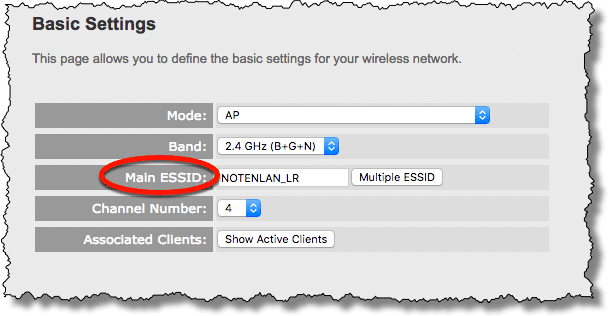
Step 2 is to make sure your wireless access point has WPA2 enabled, with a good password. Once again, exactly how you set this will vary based on your specific device.
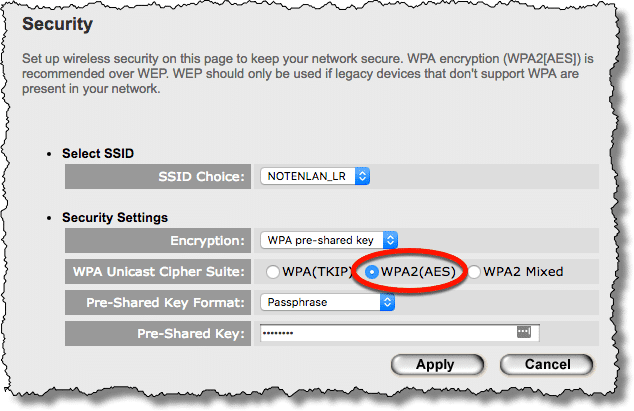
This should make it impossible for anyone without your specific wireless password to connect to your network.
Control your own access
The next step I would take would be to make sure you connect only to your preferred connections. Again, it sounds like you may already have done this.
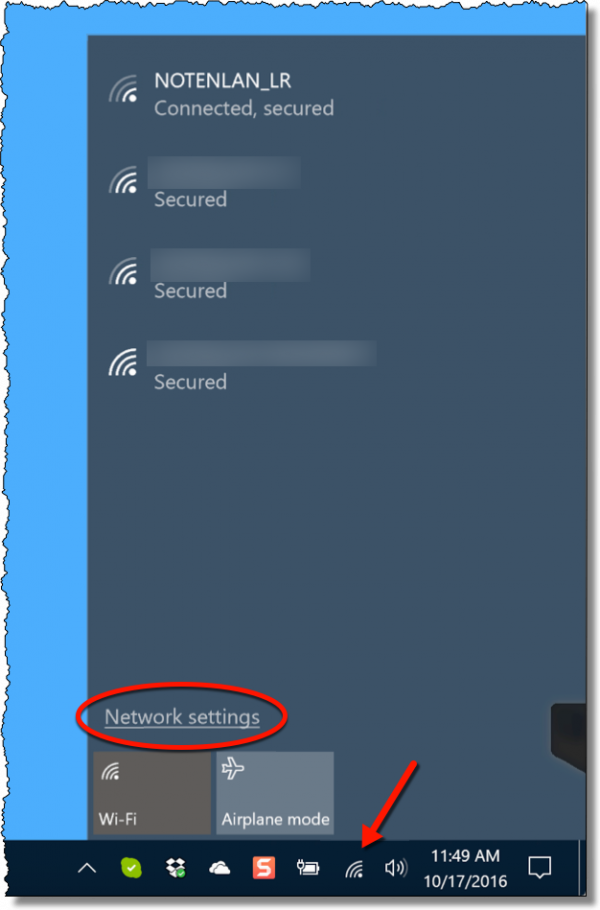
Click on the wireless network icon in your taskbar, and then on Network settings.
In the resulting Settings app, click on Manage known networks.
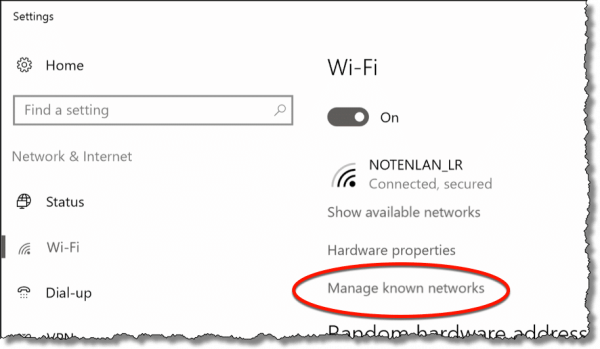
This is a list of wireless access points you’ve connected to in the past, which will be remembered and connected to automatically in the future.
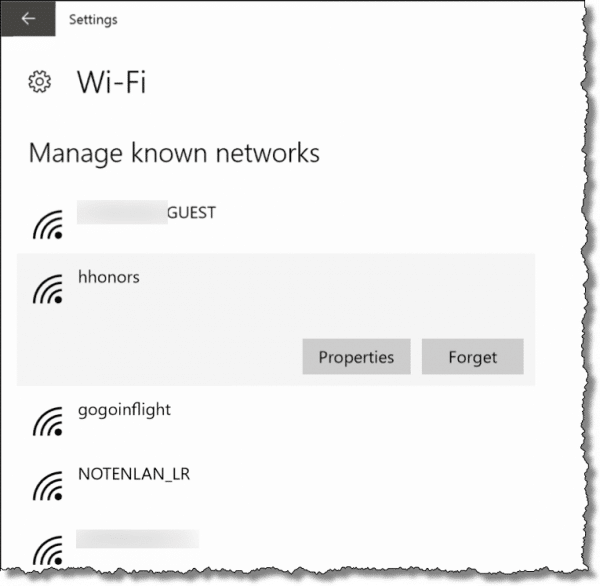
Scan through this list, click on any you don’t want to connect to automatically, and click on Forget to remove them from the list.
Assuming your neighbor’s access point is listed, you can remove it. Once removed, you won’t connect automatically. At worst, you’ll be prompted when a network is recognized as available, and of course you can then say “No” and choose a different access point you trust.
Possible confusion remains
My assumption is that a known network is known by at least two characteristics:
- Its SSID or name
- Its encryption
By this, I mean I’m assuming that two networks with the same name are still considered different networks if they use different encryption, or one uses none at all.
I also suspect your neighbor can continue to cause trouble by renaming his access point the same as yours to simply confuse either your computer or yourself when it comes time to connect to your wireless network. It would be easy for you to connect to the wrong one, for example, without thinking.
So there’s one additional change that, while not adding a lot of real security, would at least confirm your neighbor’s bad intentions, if compromised.
Configure your access point to stop broadcasting the SSID (aka network name), and then change the SSID. Unfortunately, exactly how this is done depends on your specific access point.
The downside here is that Windows won’t automatically detect your network; you’ll have to configure it manually; fortunately you should only need to do this once. Go to the “Network and Sharing Center” (there’s a link near the bottom of the Wi-Fi setting page, not shown), click on “Set Up a Connection or Network“, and then click on “Manually connect to a wireless network”.
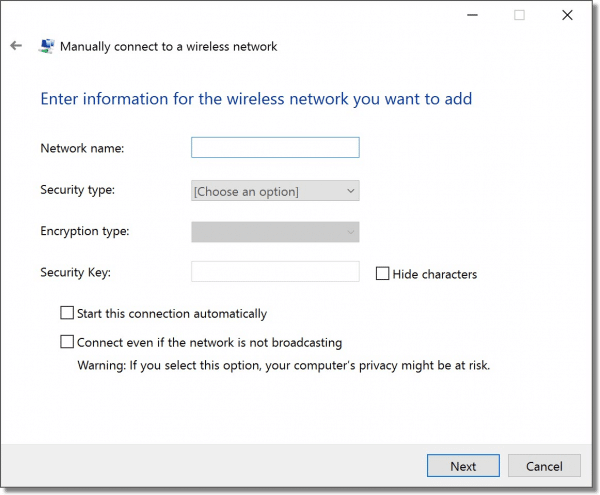
Fill in the information about your wireless network, including its name and the network password. (“Start this connection automatically” is what it sounds like, if the network is available your machine will connect to it automatically. “Connect even if the network is not broadcasting” I suggest leaving off. While it’s generally benign it actually causes your machine to broadcast the network name that it’s looking for, allowing others to discover your otherwise hidden SSID.)
This prevents your neighbor from seeing your new network name – at least from seeing it easily. That’s why I say it’s not absolutely secure. If your neighbor is technically savvy enough to sniff your wireless packets, the SSID can still be viewed. But if another open access point appears with your new, “hidden” network name, you’ll know your neighbor is up to no good.
At that point, I’d seriously consider shutting down your wireless connection completely, and as inconvenient as it may be, go wired-only, at least for a while.
Do this
Subscribe to Confident Computing! Less frustration and more confidence, solutions, answers, and tips in your inbox every week.
I'll see you there!


A very timely acticle. I have just upgraded to
wireless, and right off experienced an
unprotected wireless network that overpowered my
system. I am not that familiar yet with Wireless Networks, WEP,or WPA .Could you go into some detail on WEP or WPA in another article.
Is their any third party ‘blocking utility’ available that would protect you from this.
My service provider was of no help.
Thank’s for a very informative article.
Did you find a satisfactory way of dealing with the problem you had above … I know it’s 12 years later, but am having the same problem with all my new devices picking up the ‘stranger’ network. /any help appreciated. thanks, Donna
I would also like to add to the article an important point that was missed. When setting up your passphrase with WPA, it’s so important that you have a ‘Strong’ password. I graduated last year with a networking degree and one of the things we did in our wireless class was to break into WEP and also WPA. In fact, I think WPA can be easier at times to break into. The way we did this was a dictionary attack. There are plenty of articles on the net using linux on how to do this. So make that passphrase strong, and you shouldn’t have many problems.
Regarding the disabling of SSID broadcast…
You can change the SSID prior to disabling the broadcast, allow your system(s) to detect it and configure the connection, and then disable the broadcast. This is a lot easier than manually configuring it when renaming it after disabling SSID broadcast.
Of course, it does leave a window of opportunity for your neighbor (and others) to see the new SSID, so you need to weigh the convenience versus the security.
Thanks for the thorough explanation and the advice. Sounds like a good idea to hide the SSID -I just need to check if the router allows it (but since I’m about to get a faster one, I’ll pick one that does). As I live in an apartment block and there are a couple dozen diferent signals appearing on the wireless detector, if mine goes anonimous then I cannot see how the said neighbor can easily pick anything up in the middle of all the others.
Sounds like a “For Sale” sign might be necessary in the near future???
I’m curious as to why you didn’t recommend limiting the MAC addresses that the router would allow to connect?
I’m curious as to why you didn’t recommend limiting the MAC addresses that the router would allow to connect?
The issue isn’t with their own router, so this would be ineffective
If I remember correctly from my classes, the tools we used was able to view the MAC addresses of all the computers that are attached to a network. Once you have that, there are another set of tools you can use to spoof your own MAC address. Once you have spoofed your own MAC, you then have the rights to login to the network; provided you have used the other tools correctly to get the WPA passphrase. Again, I can’t stress enough a Strong Passphrase.
Isn’t there an issue with wireless networks that are deleted from the preferred networks window, again re-appearing in the same window at some point in the future? Seems I’ve seen that before. Right now I’ve not seen a way to restrict these adjacent wireless networks from being discovered by a wireless laptop. And that can be a pain sometimes for the very issue the original poster was writing about.
One thing you can do is to make sure that your “absolute” preferred network, is at the very top of this list, as that will be the first one that your wireless device will attempt to connect to –
One other note, is most wireless setups will default to running on channel 6 for their wireless communications frequency. I’d go in and change from the default 6 to channel 11. You have to do that within your wireless router and laptop wireless adapter. If the guys neighbor is running ch6 and your original poster changes his setup to run on ch 11, that may help with his wireless always attemtping to connect to the neighbors network.
OK, pretend I’m really thick and explain something to me in easy-to-understand words:
What is the problem with having a neighbor with this unsecured wi-fi? Isn’t it the neighbor who is at risk by doing what he’s doing, and not the person above?
Thanks.
If the neighbor is technically savvy, he could sniff your network traffic if you connect through his access point.
(And yes, if it’s an accident, it’s the neighbor at risk of being snooped by whoever can connect.)
This neighbors intentions were probably far more nefarious and possibly illegal. He was hoping that your computer would connect to his wireless device. He could then use that connection to monitor the traffic that was passing through it. I cam see no other reason for the neighbor to name his network the same as yours.
It’s interesting that the neighbor is assumed to be technically savvy enough to intentionally try to access the OP’s system. I know many intelligent people who have great difficulty with basic network configuration. My initial thought was that said neighbor did not previously have his own internet connection and had been utilizing the OP’s network. Then in a befuddled attempt to try and make a new system work, he simply renamed his network to that which he had been using. Perhaps I’m being Pollyannaish, but I’ve seen enough people do wacky things that it’s a possibility.
REF: How can I block neighboring wireless networks?
Would you have an answer for VISTA 32 bit ? the wireless properties dialog box is different…
Thanks
Good subject…!
I was also wondering about how i can block out my neighbors WiFi signal.
I must admit that i don’t have a wireless signal at my house & i sometimes use my neighbors
unprotected ‘linksys’ signal. I want to have access to that network when i need to use it
(for email, banking, etc) but i also want to prevent my son (who is 13) from accessing the network because he
has dabbled in looking at inappropriate stuff on our family desktop (i have already used netanny & cybersitter
to try to discourage him from looking at inappropriate content, but he always finds a way around it, so i’ve
realized that completely restricting his access to my neighbor’s wireless signal is the only sure way to remedy
this problem). Is there a way for me to use my neighbor’s signal when i want to… & also to be able to restrict
it when my son is alone at home? Thanks for your advice. I run windows VISta on all the family computers.
I have a slightly different situation. i want to set up my computer so that it is unable to detect an incoming signal from a neighbors network.
for example, lets say i have a content filter, but if my kid connects to my neighbors unsecured network from his laptop he can bypass it. .. so what i need is to configure his machine so that when he opens his network connection center he cant even see the neighbors signal ..
if you have any suggestion please feel free to email me. thanks
sorry, let me add, the laptop needs to be able to recognize other networks at school, coffee shops, etc. i’m just looking for a way to prevent windows from detecting one specific network. from the way i understood your article, if unchecking the box to recognize non-preferred networks would not be ideal for this reason. i hope i’m not confusing the issue
When you speak of sniffing, can the neighbour actually view or guess what you are viewing on or doing on the internet if you connect to his wireless network?
10-Jan-2010
Can you explain how to do this with Windows 7? Everytime my computer brings up the neighboring networks and my own, but I would rather just see my own. Thanks!
beings they have their network open they prolly dont have a password on the administration of the router so try changing the name of the router yourself lol
look up default router passwords also
I need to know if I can prevent my kids from connecting to the neighbors wifi. we have a content filter on our router but if they connect to neighbors there is no filter. I would just like to block this one wifi network so my kids cannot connect to it
03-Jul-2010
From another board:
“What I have done:
– add your neighbors network as a preferred network to the computer and in the wireless configuration, select WEP protection and enter a WEP key. When the kids try to connect to the network it will simply time out because your computer will try and secure the connection using the WEP key you entered but it will fail since it is actually a non-secure network. I have three kids 17, 15, and 12 and they were connecting to the neighbors network to get around my security but this little setting has resolved that issue. The problem will be if they are very computer savvy they may figure it out.”
Can someone please give me some tips: My mum wants to buy me a touch screen phone but she does not want it to have WiFi in case i use it all the time and not focus on my studies.Is there a way to prevent me from connecting to my house wireless network?
22-Nov-2010
Hi
I have same your problem, but I need a solution in Windows 7, I’m trying to find wireless network tab in network connection properties but noway..
so I need to help me.
Another question:
My neighbor has a wireless card and him trying to access to my computer by using my wireless card, additionally I can see his computer name in my wireless connection list, so how I can block his computer to access to my computer.
Many thanks
Let’s turn this around. If I was at home, connected to my home network via an ethernet cable but my wifi was switched on, is it technically possible for my laptop to connect ‘accidentally’ (without my knowledge or active intervention) to an open SSID (e.g. a neighbor) and then for a host on that network to get access to anything on my laptop or network? I really don’t think so, but I don’t know whether there are any superduper vulnerabilities.
24-May-2011
“The one caveat is that if you connect to it once on purpose, then it’s possible that Windows may automatically connect again in the future”
This is one of the reasons I am transitioning to Linux. I find Windows trying to do too many things for me and they are not always in my interest. I no longer consider Windows acceptable for doing proprietary design work.
If you do articles in Linux or start a separate blog, I will add you to my Patreon support.
Can my roommate “steal” wi-fi from my desk top computer? How can this be prevented. So many issues now with her. Quit job for no reason, lazy. All she wants to do is be on her laptop! Please help.
@Charlotte
Yes. She can definitely “steal” wifi if you do not have it
secured and password protected from her. Assuming, as a
roommate, she is sharing your living quarters she might also
be able to use your internet connection without the wireless
simply by plugging into it with a LAN wire.
Here is an article on securing your router:
Securing Your Router
Very interesting back in nineteen-o-dot, but these windows/settings don’t exist in windows 7
There is also the possibility that the “contorted” name of your network is the default used by your internet company… unless you actively changed it yourself. Many companies will use the name of the type of router they use when they set up a new customer. It’s likely the default. So if you are both using the same service it’s possible that your neighbor didn’t do anything more nefarious than than call their phone company and expect the techs to set them up correctly.
I’ve seen many SSIDs which are the name of the router and its model number or ISP name. For example a couple I have available right now are EasyBox-806732 and Unitymedia WiFiHotspot among others. One is a router make and model; the other is an ISP name.
Router manufacturers do indeed use standard SSIDs (and passwords), but I’ve never known an ISP to do so on a preconfigured router. The standard practice is to attach a sticker with the SSID and password to the router – and the SSID and password is not the same for each and every customer. That said, if you say you’ve encountered instances of ISPs doing this, I’ll stand corrected.
In the case of those ISP SSIDs, it could be that the router manufacturers “branded” the SSID for the ISP as the number of routers those companies buy is in the millions.
In my area, Bell Canada use bellxxxxxx of Fibexxxxx. and Videotron use VIDEOTRONxxxx as default network names. The xxxxx may be any combination of leters and digits.
I’m pretty sure I am connected to my own router as I have to reboot it occasionally and my PC connection stops until it has finished it’s reboot cycle.
Just for fun, my son named our network “Avon & Somerset Police Van #7” and the neighbours were asking for ages why a police van kept appearing on their list of connections and coming up with all sorts of conspiracy theories.
I was looking for some free wi-fi somewhere when I was away from home and found the “FBI Van.” It was unsecured.
Oh, yeah, this was in Canada. Now if it had said CSIS or CSEC …
Calling their network FBI Van might have been a lame attempt to protect their network against leeches through fear ;-)
I named mine “virus quarantine”. I think that it would mean someone at least thinking twice before snooping.
It sure seems like someone is doing the wifi equivalent of phishing and wanting you to connect for nefarious purposes.
It sounds like a mischievous teen on a slippery slope to hell.
PERSONALLY, I would first talk to your neighbour and then, if there is further reason to be suspicious, then notify the police. NOT that they can DO anything now but fraud departments like to keep track of anything like this, even if just for statistical reasons.
I would also let your router manufacturer know, thereby raising their awareness as to what changes may need to be made on product security.
Not a lawyer, but, I would assume that, if the neighbor changed his network name to the new and hidden network name, that you go call the police and swear out a warrant for his arrest.
I wonder if the neighbor named his network the same as yours so you would try to log on and give him your password.
Whatever you do, don’t do it using the wi-fi. Take that offline when you change your settings.
The likely reason isn’t as nefarious as you think. Somebody wanted to save money and decided to siphon your wifi. If you can identify them as well as I seem to perceive, have a talk with them AND their provider.
I’ve seen it, the person was shut down by the other person and had to get their own service.
I do not relay on wireless at all, it’s Ethernet cabled all the way. I built a conduit for my TV line between rooms and it’s also capable of running Ethernet lines. I took the antenna off my gateway as well (if it were a rental it would go back on to return but I have a few of my own for backup).
I use wired ethernet for all devices that can use it, but it seems to me that it might be impractical to turn off WiFi for things like tablets and phones? For the phone, I get that I can use the data plan, but it’s limiting in a big way and super expensive. Thethering to it with the iPad would cause the same issue once you blast through your data cap. Not that I haven’t thought about it but a search for a “lightning connector to ethernet adapter” did not yield results. Thoughts?
The last idea would seem to be the best .Boldbegin The wired connectionBoldend, it gives you speed and security from this kind of access. Broadcasting of ssid is said to be non issue. Whether you broadcast or not, there are enough software, that could easily with brutal force , would reveal the id.One more thing, if you use avast antivirus , by checking customized option and install the necessary , there is availability of network scan. It will check and report if there is any vulnerability in your router connection. You could see and get recommendation there itself to what you have to change.
I prefer avast, as it is providing all protections, even for bad add ons in the free version.
Normally, changing the router admin admin password password to some difficult username and password , would stop those brutal force attacks on router. Please do not forget to take a print of your user name and password otherwise, you have to reset the router, which may require further configuration.
Keep in mind that any wireless network can be hacked by someone smart enough with the right tools but for the simple nosy neighbor, adding MAC address filtering (enabling your wireless access list on your private network) in the router settings can help deter access to your wireless network. It does take some additional steps when you want to add a new device to your network but once completed, you shouldn’t have any problems. As always, keep a current back up of your router config file should you have to restore it at a later time. MAC address filtering is an added layer of security. Even if your neighbor’s kid gets your wifi password from your kid so that they can try to play games on the network, if the neighbor’s device MAC address isn’t listed on your wifi access list they will not be able to connect to anything. The filtering blocks the connection of any unknown device.
Several years back, I acquired a discarded modem/router, to experiment with.
On booting it, I discovered that its WiFi SSID was the street number and street name of its original owner!
my neighbors are blocking my new computer, tv, and phone, What should I do
How do you know they are doing this. If you have proof, you might do well to notify the police.
I really needed this site..but i am still confused..when it says I will see a list of Network Providers besides my own name, even with Discovery off, are these networks on my network and using it? Also, why can’t I completely delete a connection-such as Local Area Network 1, or duplicate wireless access points? I can disable them but not delete? Confusing….!
Every wireless network within range your computer shows up on that list. Those aren’t on your network. They are just networks available to join if you know the correct login information. They are in a way similar to radio stations which are broadcasting their information so you can tune in if you want. The difference is you can’t tune in to most of them because they require a password. You can’t delete them because they are not on your network, and unless you deliberately log on to them, you are not on theirs.
I know hardly anything about technology… however what is possibly picking up on my devices… whether I get a new phone (different carries with different numbers) someone is completely taking over my cell phone services… can you give me any suggestions
I’d have to know exactly what you mean by “taking over”. It could mean many things.
(Mainly for those who came here with the OP’s question.)
Change your router’s settings to not broadcast your SSID.
Then change your SSID to a unique name not easily guessed, like a secure password.
In an Administrator Command Prompt terminal, type:
netsh wlan add filter permission=allow networktype=infrastructure ssid=”My network’s SSID”
netsh wlan add filter permission=denyall networktype=infrastructure
(Obviously replace “My network’s SSID” with your real SSID, keeping double-quotes around the name if there are any spaces or special characters in the name.)
If you have multiple access points at different locations, simply add them to the whitelist by following the first command above again. The first command allows your network to be seen. The second command makes all unknown networks invisible, such as your neighbor’s.