I’ve seen ’em too. You really start to wonder what the program is, and before you can even reach for your mouse, it’s gone. Or even if you do manage to click on it, it disappears from view.
There are several techniques I use to track these guys down. Not all work in all cases, but between them all I can usually figure it out pretty quickly.
I’ll share a couple of places to look, and I also want to mention one technique that’s perhaps not all that obvious, but actually quite handy.
Become a Patron of Ask Leo! and go ad-free!
Auto-Start
I’ll start with the relatively obvious: check what’s starting when you login. What’s all this stuff running after I boot Windows? covers several of the techniques you can use to examine your system and identify all of the different programs and utilities that start each time you boot or log in.
You’ll probably be surprised at how much there is. With that alone you may be able to say “oh yeah, that’s it” when you stumble on something you didn’t realize was starting on login.
Process Explorer
My next approach would be to use Process Explorer. Process Explorer actually highlights processes as they start and stop, leaving them highlighted on its display for a few seconds after they exit.
The only “trick” here is that you’ll need to add Process Explorer to your start-up programs, and hopefully in a position where it starts and is running before the event you’re attempting to diagnose.
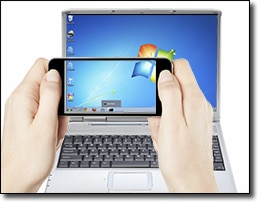 Grab a camera … or phone
I picked up this next trick from reading Fred Langa’s old LangaList1: grab your video camera or smartphone and take a video of the screen as the item pops up and disappears.
Now, watch that video in slow motion, or even frame by frame. You may now be able to read the text in the task bar button, and use that as a clue to return to some of the techniques above. (This technique works great for error messages and blue screens that occasionally fly by as well.)
Process Tracking
Finally you can enable something called “process tracking”. This will create a log of all processes that come and go on your machine. You may get overwhelmed with data, but the answer is almost certainly in the results. This article – How can I track what programs come and go on my machine? has the details.


You might also run Autoruns v8.22 also from SysInternals. It will show you what is started when you boot up. Most likely the thing that flashed is a program at start up rather then a service or something
hi i kee getting an internet explorer page comin up in my taskbar,with various websites. topfind.biz plus lot of others. i have used spybot search and destroy and spyhunter but they do not remove it my antivirus does not find any thing, i am using blueyonder pcguard, could you advise me as to what could be causing this kindest regards mr james guy
Sure sounds like spyware/malware of some sort that apparently your other scanners aren’t catching. I’d look into Microsoft Defender as the next step, and also make sure that the databases used by your existing programs are up to date.
When I try to install Directx9 I get internal error that says it can not find dxupdate.cpp and psheets.cpp files. What does this mean? How can I fix?
before i get on line the explorer sign keeps popping up and i keep deleting it and it still pops up. what do i do. how do i keep my homepage maximise also
A websitepage for Virus Heat popped up unwanted and has placed an icon blinking in my task bar. If you click on it it takes you to their website and I can’t get rid of it in my task bar. It regularly pops up a stupid warning so it can try and get you to buy their product. I have defender, adaware, avast..nothing works any suggestions
If the icon is a little gray square, it is Adobe Reader checking for updates. You can disable that, so it stops checking for updates. I had to be pretty quick to get the pointer over the icon to read what it was doing LOL!
here’s what I did to my XP machines (All 4 of them)
using the Task Manager:
1> create a shortcut to “Taskmgr.exe” in “startup”
2> set it to show the “processes” tab
3> set it to run in “normal window”
every time the pc is started the Task Manager pops up showing all running & loading processes and all the ones that load/unload can be seen also for that split second also.
Hello Leo,
A simple solution would be to install a screen capture program like BBFlashBack FreePlayer and have it running a few times to record the monitor/screen. Next they can google research the offending program. Autoruns and process explorer can be overwhelming to some users. BBFlashback is a free program and does not install malware, greyware etc., etc. It works better than trying to catch the offending program by tapping the “prt sc” key multiple times.
Just a tool I use myself sometimes on clients PC’s.
Tony
From time to time something accesses my hard disk for a long time. I check task manager and it does not really show anything. I have tried process explorer but can not see what is accessing the drive. I think what is accessing the drive is just Google Chrome browser updating or Norton AntiVirus updating, but who knows? I wish whenever a program, like the above, runs it would show something in the notification area so I would know what is running in back ground.
Does tapping the “Print Screen” key capture enough info to be useful?
I keep IrfanView handy where an Edit, Paste lets me see the Clipboard graphic.
If you tap it at the right time and it captures the image you want, sure.
I’ve had trouble sometimes with Print Screen trying to click at the right moment. In a case like that, you can video the whole process with your phone, that was you can run it in slow motion and pause it to get the message.