When closed shouldn’t mean off.

It’s probably not the internet that’s stopping; it’s the entire computer.
The default configuration for most laptops is to go into standby or hibernation when the laptop lid is closed. Some people may want it to stay on when the lid closes so as to be able to, say, start a large download, close the lid and walk away.
Fortunately, it’s a setting you can control in Windows.
Become a Patron of Ask Leo! and go ad-free!

Keep your laptop running with the lid closed
- Right-click the Start button.
- Click on Settings.
- Type “lid” in the search field.
- Click “Change what closing the lid does” when it appears.
- Set “When I close the lid” to “Do nothing” for “Plugged in.”
- Click “Save changes” to apply.
Windows and your computer
Windows includes a fairly robust (if somewhat confusing) array of power management options. The examples below are from Windows 11, but similar settings are available in Windows 10.
Unfortunately, I can’t show you Windows 10 screenshots because I don’t have a laptop running Windows 10. The version of Windows 10 I have is on a desktop, and Windows knows that it doesn’t have a lid (among other things).
Finally, note that not all settings may be available across all laptops. These settings are highly dependent on the specific machine, the UEFI/BIOS, and the drivers for the machine. Sometimes, for reasons unknown, manufacturers elect not to expose all the options.
The lid
Run the Settings app (right-click on the Start button and click on Settings), and type the word “lid” into the search field.

Click on Change what closing the lid does when it appears.
This will open Control Panel on the appropriate settings page.
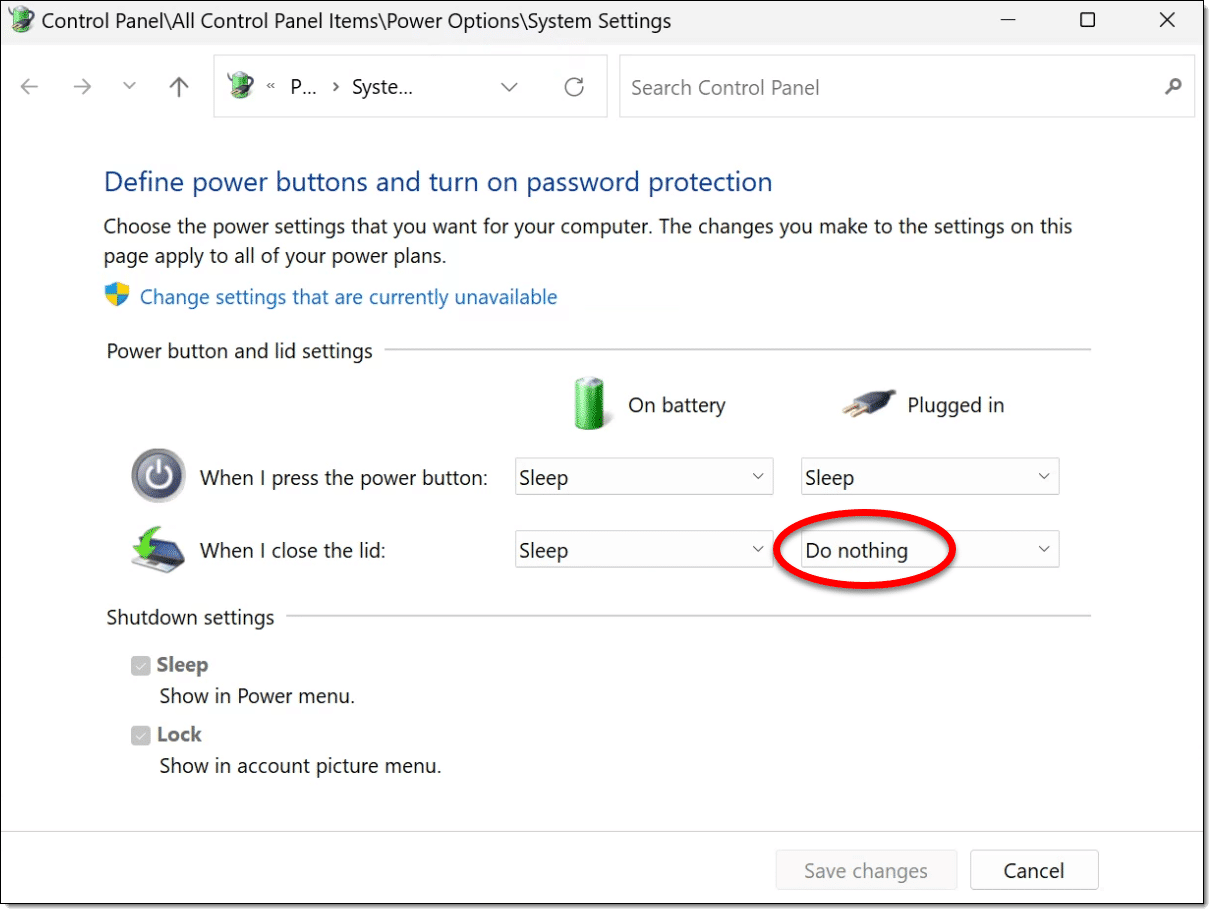
Change the “When I close the lid” setting for “Plugged in” to “Do nothing.”
Click Save changes and your laptop will now keep running with the lid closed. The example above is from my own laptop, and that’s exactly what I do.
Do this
How you set this is, of course, up to you. My philosophy is that if I want a plugged-in computer to shut down, sleep, or hibernate, I’ll do it myself.
When it’s running on battery power, however, going to sleep makes more sense. I often set it to go to sleep on lid close when traveling, as it allows me to quickly stash my laptop in my bag and have it resume from where I left off when I open it again later.
Open that laptop and subscribe to Confident Computing! Less frustration and more confidence, solutions, answers, and tips in your inbox every week.
Podcast audio

Related Video


“I often set it to go to sleep on lid close when traveling, as it allows me to quickly stash my laptop in my bag and have it resume from where I left off when I open it again later.”
I understand that Windows 11 may be better at this but experience has taught me that with Win10 and before, not to put a laptop in sleep mode in an enclosed bag. You are risking overheating & damage.
On both my laptop PCs, in Control Panel, under ‘Control Panel > Hardware and Sound > Power Options > System Settings’, in the ‘Plugged in’ list (at the right), for the “When I close the lid:” option I have “Do nothing” selected so when I close the lid with the computer plugged in, it keeps running.
I found an app named “LidLock” on CNet that, when it;s running, activates the lock screen when I close the laptop’s lid. It just feels right to have it that way. If anyone else wants this app, go to https://download.cnet.com/lid-lock/3055-2094_4-76464070.html to download it.
If you get it, to set it up, choose/create a folder to keep it in. I chose ‘C:\Users\\Apps’ because a long time ago I found the need to have a place to store apps I use that don’t need to be installed with a Windows (*.msi) installer, so I put LidLock there. You can choose any folder you have access to. When you’ve put it where you want it, in File Explorer, click on it to start it up. There will be an icon in the carat menu by the notifications area. You can drag it to the task bar over near the clock so it’s always visible if you want (I did). To finish setting it up, ALT+Click it’s icon (in the notification area/carat menu) and select ‘Autorun’ in it’s context menu. Now it starts with Windows and any time you close your laptop’s lid the lock screen will activate.
I hope this helps others,
Ernie (Oldster)