Vet your visitors before inviting them in.
I was somewhat taken aback by this question. It’s a perfectly good question, and one that more people should be asking more often.
My reaction was due to the lack of a good answer.
It turns out it’s fairly difficult to tell whether or not a download is about to play havoc with your system, particularly before you download it.
But it’s getting better.
Become a Patron of Ask Leo! and go ad-free!

In order to be scannable by your anti-malware tool, a questionable file must be able to be read by the tool. That means the file needs to be in the process of downloading, or already be downloaded, to your computer. The best way to avoid a problem is to only download from sites and companies you trust, never download illegal software, scan your downloads as soon as you can, and of course back up regularly in case the worst happens. Always be skeptical.
What anti-malware tools do
Anti-malware scanners look at the contents of the files on your system to see if they have what appear to be viruses or not. The files don’t have to be installed or running; they just have to be accessible to the scanner. You can and should scan that file before you run it.
But the files do have to be on your system, or (in some rare cases) in the process of being downloaded.
Before you download? There’s effectively no solution. You have to download it in order to be able to scan it yourself.
What to do?
So, what do you do? What do I do, for that matter?
Our best defense is to fall back on common sense and best practices for avoiding malware in the first place.
- Only download from sites you trust. Knowing who to trust is a difficult problem. My recommendation is to avoid downloading from third parties. If a piece of software is created by XYZ corporation, download it directly from XYZ corporation’s website. If it’s available directly from the creator, there’s no reason to get it anywhere else. Avoid download sites if at all possible.
- Only download from companies you trust. Even if you do download directly from the creator’s website, not all creators are ethical or above-board. If you’ve not heard of the company before, it’s worth a search to see if other people have experienced problems. A lot of free software is “free” because it’s loaded with PUPs, for example. It might be legal, but it can certainly be annoying.
- Never download illegal software. You shouldn’t anyway — because it’s illegal — but even if that doesn’t stop you, the risks should. Illegal software is lucrative because it’s free or dirt cheap. Malware creators know this and often use it as an opportunity to distribute their wares.
- Scan your download. This is the easy one. Anti-malware tools can easily and quickly scan a downloaded file and tell you whether or not it contains any known viruses. Make sure to keep your virus program, and its database, up to date.
- Back up. Even though you may trust what you’ve just downloaded, prepare for the worst anyway. Assume that what you’re about to install will cause your machine to crash and become unbootable. Would you lose important data? Then you better make sure it’s backed up first.
It’s getting a little better
I recently downloaded an update to a (legitimate) program I use, and received the following warning:
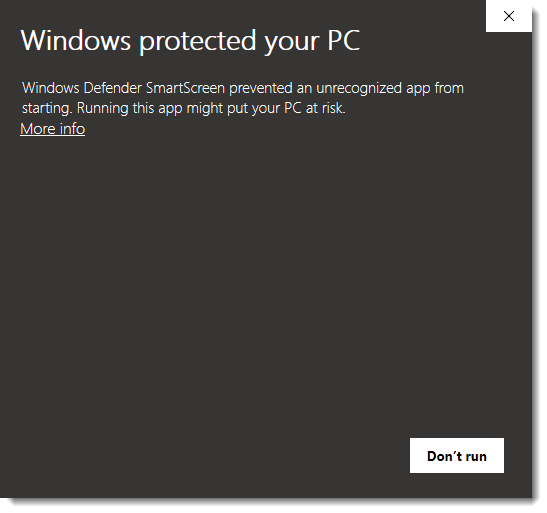
That was Windows Defender warning me that it didn’t “recognize” the application I was about to run.
That doesn’t mean it’s malware or that there’s anything wrong with it at all — it just means that Windows Defender (meaning Microsoft) was unfamiliar with the vendor, or perhaps the software wasn’t digitally signed. All it really means is to take a breath and consider whether you recognize and trust the application and its vendor. (In this case, you can click “More info” which will expose a “Run anyway” button, which is what I used.)
Other security tools use a more aggressive form of application white-listing, meaning only applications that have been somehow pre-vetted and confirmed not to be malicious are allowed to run.
The best advice? Skepticism
In some ways, it’s not surprising malware is as common as it is. Absolute prevention is difficult at best. Even with the best tools, people often actively circumventing warnings and other blocks to download whatever they (apparently desperately) want.
Most remedies are nothing more than damage control once malware arrives.
The best defense is you. You are both the weakest link and the strongest hope for your own security. Be skeptical, take the time, and make the effort to choose your downloads with care.Do this
Subscribe to Confident Computing! Less frustration and more confidence, solutions, answers, and tips in your inbox every week.
I'll see you there!
Podcast audio

Video Narration


“….download it from the XYZ corp website.”
One point. A fair number of devs will have their programs hosted by a download site such as tucows. A link to a thirdparty site from the author’s website can be as trusted.
I have been using a program called Sandboxie http://www.sandboxie.com for years. I generally test all new programs in a sandbox, but especially those I have the slightest doubts about. It takes just a second or two to set up a test sandbox, and scan with AV/AS programs. (I also use Jotti and virustotal from time to time). Even if I install a program with malware in the sandbox, I can just delete the sandbox and there is no impact on my operating system. In fact I run almost every program sandboxed. might add that there are ways to get data out of the sandbox, unlike virtual machines. I was last infected using DOS in 1987.
Yes. Sandboxie is a great program. Also sandbox your browser to visit a site you have suspicions about.
I forgot to mention…you can always do a web search for the name of the .exe program, like abcd.exe and add a comma followed by virus, spyware, rogue, malware to see if anything bad about the program turns up in the search results.
I use Avira and it’s notified me when a file might contain a virus before it’s opened. It’s worked on .exe and zip files. Now I didn’t open any of them to check, but a beep and a virus screen and came up asking me what I wanted to do with this file. Never had a .com or .bat beep yet.
I use free Returnil to “screen” all applications (.exe’s) before I run them “for real.” By turning on Returnil everything that happpens thereafter happens only in memory. Nothing can be written to the C: drive.
I run or install the application, see what happens, and if I like it enough I then reboot (to turn off Returnil) and run or install the program on my hard drive.
Great article on “exe’s” ~being able to tell if they are “safe” or not..Leo,could you expand,explain how to set up a “sandbox”-so that us newbie geeks can quickly,and safely check downloaded programs/apps…before they are “run”,or opened,and installed to the hdd,thus preventing infected files from wreaking havoc on us.I understand that a “sandbox” thoroughly filters a application/program-sort of like running the app. through a sieve…is this accurate?? Would appreciate any feedback.Keep up the GeeK~~Brianisbeecube@yahoo
Like Howiem (May 19, 2009, post), I also thought smart-ip.net no longer had the online virus scan as I received a 404 page not found when going to the link. However, the link in ipodboy’s post (July 22, 2008) works if one deletes the period which was apparently mistakenly underlined and thus included in the link. Try http://smart-ip.net/en/tools/virus-scan without the period at the end.
(I discovered this by checking “Tools” and then “Scan file for viruses” under “Tools” at the home page — http://smart-ip.net/en/ — and then comparing what I had found with what I had tried previously.)
This on-line file scanner is still available ten years later, as of April 2019. It has the unusual facility of being able to test a file through its download link, thus achieving Leo’s Holy Grail of enabling us to test files before downloading them to our computers. Just right-click on the download link or button, copy the url, paste it into the scanner, and it will do the rest. A brilliant idea!
After seeing this, I went back to Virus Total, an old standby: https://www.virustotal.com. I found that it too now offers this service and in addition, like Jotti, gives a list of results from multiple scanners, and thus a very high level of confidence in the result.
Visiting unfamiliar websites and especially downloading I always do on a Virtual OS. I use both Oracle Virtualbox and MS Virtual PC. Then I scan for malware within the virtual and install the program for testing, always on the virtual. If everything checks out I can them move the software program to a shared folder on the real hard drive, but only after testing.
I’ve always scanned any downloaded files for viruses and malware. But I have encountered a number of applications I have wanted to install just download an installer executable which is clear of malware, but when executing the installer, it downloads the files of the application to be installed. Is there any way to test the safety of these downloaded files?
Other than security software that tries to scan as downloads happen, I’m not aware of a way. The best thing is to always download from reputable sources, and if you’re not sure, don’t download.
Thanks for the reply Leo. I haven’t found any security software that checks as a download happens. It seems to be a common place way to download apps these days.
Hi Leo,
I just wanted to bring this to your attention regarding scanning a file before it is downloaded.
I use a Firefox add on named VT Zilla. The program scans the item before it it downloaded. After downloading to my desktop I then right click it and scan it with both Avast Free Antivirus and Malwarebytes Free Antivirus before I install the program. Let me know what you think about VT Zilla.
I don’t understand how an add-on can scan something before it’s downloaded. The file would have to be on your machine — i.e. downloaded — for the extension to be able to do its job. The only way it could work perhaps is if the add on works in conjunction with some kind of online service.
Before, I would download many programs with the idea that would benefit the system, cleaning, defragmenting, etc. But after having two pc with errors and corrupted files, I have gotten to the conclusion that those are worthless to the less. Now that I got a new Dell Inspiron and installed a Windows 10 on my laptop, I have made a resolution to no download anything, and let Windows solve anything that’s needed. What do you think? Am I right?
Leo generally dis-recommends programs designed to optimize your computer. Often, optimization software causes more harm than good.
What’s the Best Registry Cleaner
In my opinion that’s exactly correct for 99% of folks. The only time I download additional tools is when I’m facing a specific problem and research shows that the tool is the right solution.
Unfortunately a recent Windows 10 update (?March 2019) notified me with an error message that it was not compatible with Sandboxie and I had to uninstall it to complete the update.
Hopefully Sandboxie will update so you can use it again.
What if I download the file directly from my iPhone? I made the video myself, added it to drive from my iPhone, and then opened drive on my computer and tried to download it. It says the file is too large (it’s a ten-minute video I made on iMovie and downloaded to Photos) for a virus scan, and I’m wondering if it’s safe to download it anyway without a scan, since I know exactly where it comes from and I made it myself. Could a virus pop up out of nowhere, or is it safe since I didn’t download it from the internet? If it’s not safe, is there a way to download the video onto my computer? I am trying to send it to people but it is too big for email, text, Photo sharing, etc., so my hope is to get it onto drive and send a drive link to my friends. People have sent my drive links to videos over ten minutes in the past, so I’m trying to do that.
If you created it yourself, it’s safe. You can upload it to iDrive, Dropbox, OneDrive, Google Drive or other sharing site and send a link.
I actually do use download sites — I generally use them as specialized search engines, to see what programs are “out there” to do what I need or want done.
Having found a promising program, I then leave that download site, and go directly to the site of the program’s creator, and download or purchase it from there.
Only extremely rarely do I actually download software from download sites — usually, because a program I want turns out to be no longer produced, and is therefore available nowhere else.