Programs do seem to come and go at times. When you’re diagnosing performance or security issues, understanding what’s coming and going can be important. Sometimes, it can just explain a flashing item in the task bar.
Fortunately, there is a fairly simple way to trace what’s happening.
Become a Patron of Ask Leo! and go ad-free!
Auditing
Windows includes several auditing options, which can collect a list of activities over time. You can then view these in the Event Viewer. One of those auditing options is tracking every time that a program starts.
Now, let’s be clear about something: even on a machine that appears to be doing absolutely nothing, Windows and the applications on it may be very busy. In other words, there may be a lot of programs that are more or less constantly coming and going, starting and stopping, and just generally doing whatever it is that they do.
As a result, process tracking with the auditing tools can slow your machine down a lot. You won’t want to have it on all the time.
But it can be a very useful tool to turn on for “a while” just to see what’s happening.
Enable process auditing
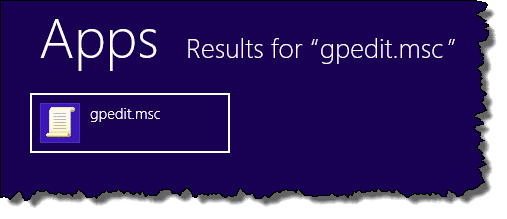
To turn on process auditing, run gpedit.msc, the Group Policy Editor1. You can type that into the Run box on the Start menu of Windows versions that have it, enter it as a command in a Windows Command Prompt, or just start typing gpedit.msc at the Windows 8 Start screen and click it when it appears in the search results.
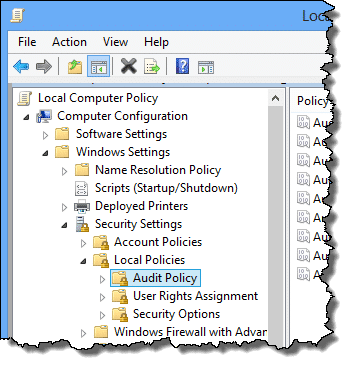
In the left pane (expanded below for readability):
- In Computer Configuration, expand Windows Settings (by clicking the triangle or boxed plus sign to its left).
- Expand Security Settings.
- Expand Local Policies.
- Click Audit Policy.
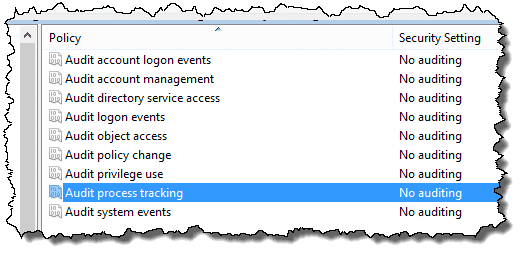
In the right pane, double-click Audit process tracking:
In the resulting dialog box, check the box labelled Success under Audit these attempts:.
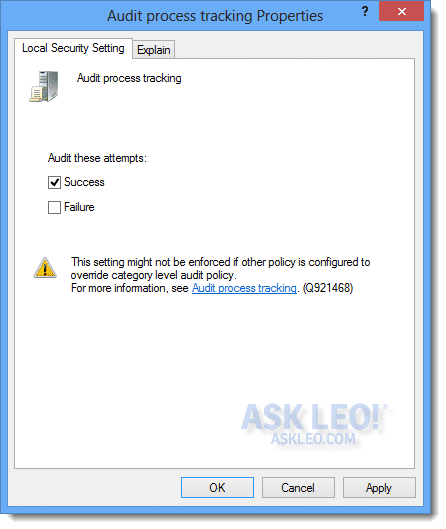
Click OK and close gpedit.msc.
Run your scenario
Now, run the scenario that concerns you. If it’s a start-up issue, then reboot. Otherwise, do (or wait for) whatever it is that you’re attempting to diagnose.
Don’t be at all surprised if your machine runs slower. As I mentioned above, process tracking can absolutely have a negative impact on performance.
Examine Event Viewer logs
Now, fire up the Event Viewer (Start, Run, and eventvwr will do it. Or type eventvwr at the Windows 8 Start screen and click the icon when it appears.)
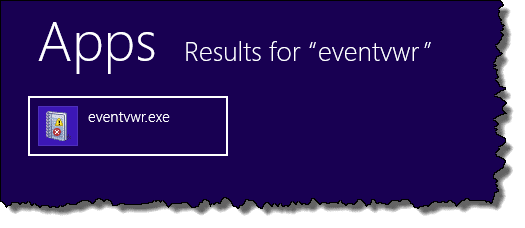
You might want to move the Event Viewer window and perhaps expand it to make the items within easier to see.
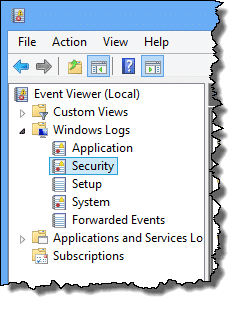
Expand the Windows Logs item in the left pane. Click Security underneath it:
In the upper center pane, you should see a number of Audit Success events with a Task Category of either Process Created or Process Terminated. Click one of those and select the Details tab in the lower center pane (here, I’ve also made the lower pane larger by dragging the divider up):
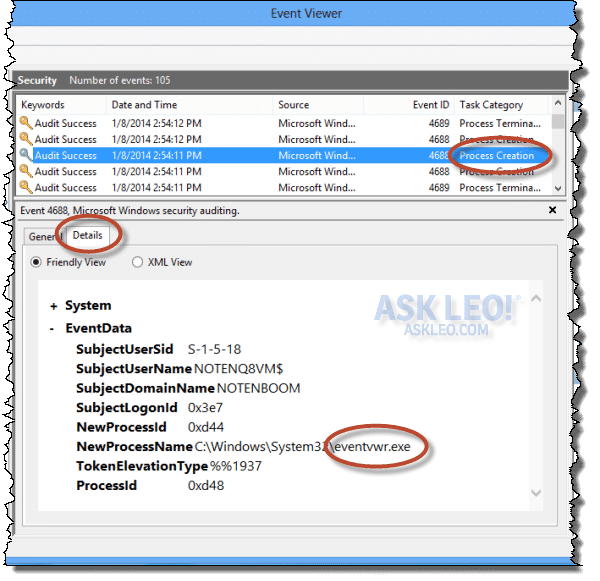
You can scroll up and down in the upper pane, watching the lower pane to see what programs have been created or terminated. Hopefully, you’ll find the answer to your question there.
Did I mention there will be lots of programs starting and stopping? This is the nature of a complex operating system like Windows and the complex applications we install. You may need to do a little research to determine what some of the applications are, but a process of elimination will hopefully let you narrow down your list of suspects quickly.
Turn it off!
Don’t forget to to turn process tracking off when you’re done. Simply repeat the process that you used to turn it on, but this time, uncheck the Success checkbox for Audit these attempts that you had checked earlier.


I tried to do the first step, but gpedit.msc does not exist on my computer. Would it go by another name. I hve win xp home.
Please see the footnote on the updated article.
Thank you for this article! It solved a major headache for me. I do not use Outlook, only Thunderbird, so I deleted the massive pst file that was hogging my disk, from a time when I experimented with Outlook a long time ago. Outlook promptly started popping up every 20 minutes or so, saying that it couldn’t find the pst file. Outlook didn’t show up in task manager and I tried Process Monitor, which only told me it’s parent was svchost, which didn’t help. But running this audit identified that svchost was first being called by Funambol, which I had experimented with when I tried out Outlook. Once I knew that, I uninstalled Funambol and the problem disappeared. Thanks!
One of the first things I use when troubleshooting a clients machine is check out what’s starting on that machine. One of the tools in my usb toolkit makes this very easy. It’s called Ultra Virus Killer and one of it’s functions is to show all possible startup entries on one screen. It does much more, but this is what I use it for the most. If anyone wants to check it out and maybe add it to their toolkit: http://www.carifred.com/uvk/
Thanks! I appreciate your sharing the information Chrispm84!
Does this procedure give you info that you wouldn’t get if you just ran msconfig?
Absolutely. msconfig just shows you some (not all even) of what gets started automatically. This process actually gives you a list of programs *as they come and go*. If a program runs 5 times while you’re auditing, for example, and for any reason, you’ll see five entries.
Don’t forget about autoruns and process explorer. For the latter, right clicking on a running process will bring up tons of additional information.
IMHO, these two should be your first stop for performance issues. Autoruns is great at finding pesky left-overs from past installs, for instance, as well as all those updates and fast starts software vendors force on us (are you listening, google and adobe?) Process explorer is great at helping one see what’s behind the various svchost processes.
I ran across a Free program for monitoring the different processes and apps as they run called “What’s my computer doing”. It gives a real time scrolling rundown of everything going on. It also gives the time of action, whether it was 2 secs. ago or 2 min ago. Handy to have in the toolbox.
It can be found at ” http://what-s-my-computer-doing.software.informer.com/download/ “
You mentioned you know of no simple/easy replacement. for gpedit.msc. In Windows10, I was able to run a small .cmd batch file to enable gpedit.
Open Notepad or other text editor.
Copy the following:
pushd “%~dp0″
dir /b %SystemRoot%\servicing\Packages\Microsoft-Windows-GroupPolicy-ClientExtensions-Package~3*.mum >List.txt
dir /b %SystemRoot%\servicing\Packages\Microsoft-Windows-GroupPolicy-ClientTools-Package~3*.mum >>List.txt
for /f %%i in (‘findstr /i . List.txt 2^>nul’) do dism /online /norestart /add-package:”%SystemRoot%\servicing\Packages\%%i”
pause
Save that file as enable_gpedit.cmd and double click to run it.
There must be much more to it than that. Is that CMD or PowerShell? (Doesn’t seem to work in the former, and doesn’t look like the latter.) Oh, and WordPress messed up the quotes. Where did you find this?
I can’t remember where I found it. It was several months ago, and I just saved the file. Somehow it works for me. I noticed that I had name mine enable_gpedit.bat. That might work for you.
I believe it’s legal because it’s accomplished by Windows commands and no external programs.