The recent forced switch-over to the Outlook.com user interface left many long-time Hotmail users upset and dissatisfied. Many are considering leaving Outlook.com behind, except that this would mean abandoning their Hotmail.com email address.
Fortunately, it’s very easy to automatically forward Hotmail messages or any email that comes into your Outlook.com account to another email provider.
Become a Patron of Ask Leo! and go ad-free!
Setting up the forward
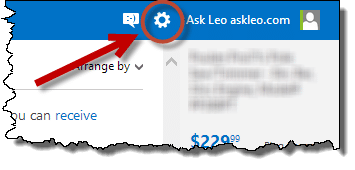
Login to your Outlook.com account and click the gear icon in the upper right:
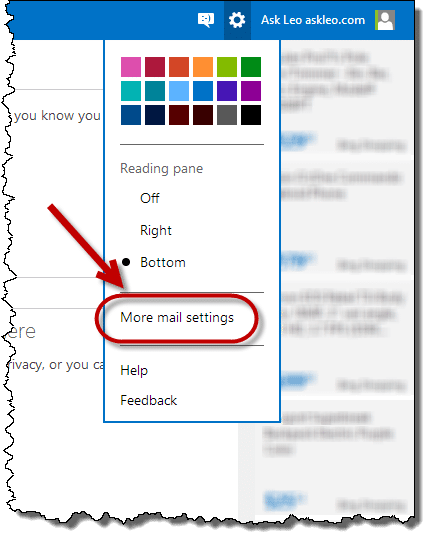
Then, click More mail settings:
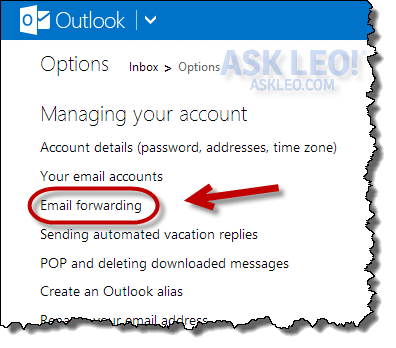
This will take you to the Options page. On the left, underneath “Managing your account”, click Email forwarding:
On the resulting page, there are several important bits of information to pay attention to:
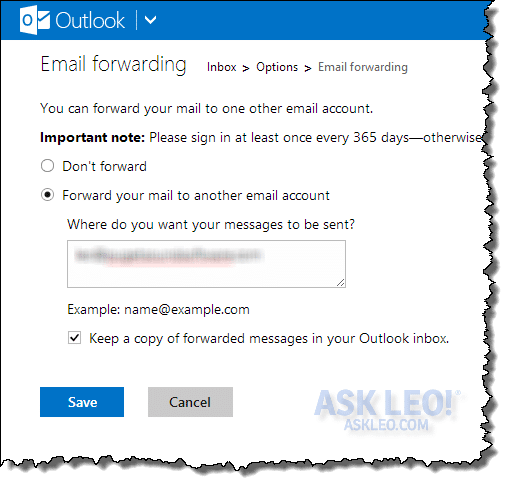
Specifically:
- Select “Forward your mail to another email account.”
- Enter the email address where you want all your Outlook.com (and Hotmail) email to be forwarded.
- Select whether you want to keep the forwarded email in your Outlook.com inbox or not. If you’re not sure, I recommend checking this as a form of backup for your email, if nothing else.
Click Save.
Your email is now being forwarded.1
When you return to your inbox, you will now see a notification at the bottom of the screen:

The message reads: “Your mail is being forwarded to another email address. To stop forwarding your mail, go to Options.” This is to remind you that your email is being forwarded elsewhere and to give you the option to change your mind.
This is also a security measure: if your account is ever hacked this notifies you if the hacker set up email forwarding without your permission.
Login regularly anyway
Even though you’re now forwarding your email to a different email account on a different provider, it’s critical that you still login to your Outlook.com account periodically. Quoting the Email forwarding page that we used above:
Important note: Please sign in at least once every 365 days. Otherwise, your account looks inactive and could be deleted.
You must retain control and ownership of your Outlook.com/Hotmail account in order for forwarding to continue. That means you must login periodically or Microsoft may assume that the account has been abandoned.


Hi Leo,
I don’t want all my mail forwarded. I just want to know how to forward messages now and then. Is this possible in the new Outlook?
Thank you!
Irena
In that case, you can forward them manually.
Tried this with my hotmail ==> to gmail and never received a piece of mail……I assume it should be forwarded to my Inbox, although checked all over and no mail. Hotmail showed no mail for a number of days, so I assumed all was ok…..but..not so! Thanks…..
Make sure to check the spam folder on the receiving side. Also triple check that you entered the correct email address. I was very surprised that Outlook.com didn’t require some kind of validation/verification as they have in the past.
I have had the same problem,
i have double checked the e-mail address four times and it is correct,
it say it is being forwarded but i have checked the other outlook account and i does not appear there,
does it take long or is the process meant to be immediate?
It should be immediate. Check the spam folder on the receiving end.
Hi – Instead of forwarding mail, why not try having gmail fetch it. That’s what I do for my hotmail and yahoo accounts. I take it a step further and use Postbox on my pc to get everything and I never have to logon to the website to get my email. Simple to set up, see previous articles on AskLeo.com
hi leo!
my id was hacked and all my emails were forward to some other id.i wasnt able to send and recieve any email.is there any way to get back all my mails recieved last week?
thanks
Farhan,
Once you are hacked your options are limited. Here’s Leo’s article on the steps to take to secure your account.
http://askleo.com/email_hacked_7_things_you_need_to_do_now/
Unfortunately, unless you can find them in the deleted folder, there is no way to get those back.
If they’re not in your inbox, and not in your sent mail, then no, I know of no way.
To answer Irena, at the very top right of your e-mail is options” in blue ink. If you click that a drop down will open and FORWARD is in the list. Click forward and your format will change and a list of preferred e-mail addresses will open on left side. Select address, then click send and its on the way.
Tip: once you are in forward mode you can add a title, erase old addresses, and do any editing you see fit.l
Is it possible to only forward mail from certain e-mail addresses?
The generic answer is yes, but the specific answer REALLY depends on exactly what it is you have and are trying to accomplish.
Say I was trying to forward mail from Sony Entertainment on my old Email address, to my newer one which I use daily. How would I go about setting it up? I don’t want anything other than mails from Sony to be forwarded.
Guessing that Sony Entertainment is a newsletter of some sort. Your best bet would be to look for their subscription options. It will either be a link at the bottom of the newsletter (like it is with the Ask Leo! newsletter) or it will be inside your online user account. Go in there and change the address where you want to receive information, and they’ll take care of the rest.
Can you please build on the answer?
I also want to forward emails from Hotmail to Gmail, however, only for a few specific id’s. Any help will be appreciated!
Very Gooooooooood and SImple instruction i like it sir
Kep it up Sir Leo
I set up a new hotmail account and did the mail forwarding and it is not forwarding it to the new one. Instead my emails that I am using as a test are going to the junk folder in the old account? Any suggestions
You rock! After pulling my hair out for an hour trying on the receiving side to “pull in” my hotmail (the method all the other guys were posting), I found you. Just a couple clicks and it was done!! AWESOME!
My Outlokk/Hotmail is forwarding to my G-Mail even though I have clicked DO NOT FORWARD. Any ideas please
You should also check that the Gmail account is not picking up your outlook.com email as POP3 or IMAP. In other words, it can also go the other way.
Ok This is a step backward in terms of technology. This is the main reason why I dont use the new outlook.com/live.com/hotmail.com I used to be able to forward certain important email to my work email which I monitor constantly. now this forward feature has less functionality to limit it usefulness. Gmail it is, then Microsoft.
Leo, i remember [way back when] that my hotmail account would die if i didn’t sign in every 30 days, so i upgraded to the paid version.
Is that 30 day limit now 365 days ? (now being 2014/9/4, btw). thanks
I thought it was 90 days or perhaps 180.
Hey thanks for this because it helped me but I don’t want my outlook emails to be forwarded to my hotmail account so how do I undo this?
You may not be able to any longer. You may find this article interesting: http://ask-leo.com/how_can_i_switch_back_to_the_old_hotmail_from_outlookcom.html
I read your instructions, even wrote down the steps, to FORWARD AN EMAIL – but your instructions are not the same as whatt shows up on my computer: the ‘gear’ symbol lead to OPTION then a whole page of options where I found ‘Email Forward’ then I clicked on FORWARD YOUR EMAIL…. and I entered the EMAIL address of the person who is/was supposed to receive the Email I’m trying to forward….. Well, that is where I am confused….. and don’t know what to do…? How do I forward the particular Email that I want to forward?
If you just want to forward a single message this article doesn’t relate at all. This article is about forwarding ALL your mail as it comes in, automatically.
To forward a single message, just look for the “Actions” menu item on the screen when you’re looking at the message. Forward is one of the actions.
hi
im having a lot of problems with seearching in outlook.com, keeps on coming with the following message
We can’t connect to Outlook.com at the moment. Please try again later.
or this one
Something happened at our end. Please refresh your browser or close it and sign in again.
please help
That sounds exactly like what it says is it: a problem at their end and not yours. If that’s the case there’s nothing you can do other than try again later. You might try clearing your browser’s cache, but I’m not particularly hopeful. https://go.askleo.com/clearcache
Hi , Leo
Can I forward my Hotmail Email Accounts mails to two other email account.
Not directly. You can forward from Hotmail to A and then from A to B. Or you could use POP3 pickup from both A and B to “fetch” rather than forward the mail.
i have tried to follow your instructions re setting-up a recovery code [your ask leo of about mid september2014] the instructions from my hotmail/outlook account page ; do NOT seem to be the same as yours….[[[[ i wonder if the fact that my hotmail/outlook.com account is u k based; creates this difference ]]]] i will attempt to create a visual copy of what comes up thank you
Not only might the UK hotmail be a bit different – but the interface changes rapidly over time. The process will probably be much the same, but you may need to search and read the pages to find what you need .
I have had the same problem,
i have double checked the e-mail address four times,
does it take long or is the process meant to be immediate?
I just wanna ask if I put forwarder on my mail what sender sees.
Depends on how you have it set up. The sender will see absolutely nothing if you simply forward and read the emails. If you reply they could see any number of things. For instance, if you have it set to reply from the new email, then they will see that.
Hi Leo,
Thanks for the above explanation.
But I just checked in outlook and I cant see option of ‘more mail settings’
So I cant make the use of auto forwarding in outlook.
I f possible please guide me here.
–
Thanks
Saravjeet Singh
Why did they have to change something that was working very well. Before I could read one of my emails, click on actions, click on forward, click on
as many contacts as I wanted to and hit send and it was sent. Now what?
Thanks for a good article—I wish I would have come across it before setting up forwarding from the new and “improved” (i.e. NOT improved) outlook.com—as I just found out about an hour ago, I had a typo in my gmail address when I entered it.
Since there is no verification on hotmail’s end, that meant that for the next day, I kept checking and wondering why I wasn’t getting any emails forwarded, and also no emails in the outlook.com inbox…because they were all going to a nonexistent address and being trashed.
Since I didn’t check the “keep copy on server” box in hotmail / outlook.com I lost a day’s worth of emails and I have no idea if there was anything important in there.
Moral is, as Leo says, make ABSOLUTELY sure that the forwarding email address is correct!! and also check the “keep a copy on server” box, at least until you know forwarding is working.
There is absolutely no verification step, so you may end up just dumping your outlook.com emails into the ether with no way to get them back, as I did (I contacted microsoft support via chat, and 2 techs simply hung up on the chat rather when I wrote a 2-line description of my problem…I’d dump microsoft in a second if it didn’t mean needing to redo all of the online accounts I use my old hotmail address with :(
My wife recently got a renewal letter from Microsoft regarding retaining her Outlook.com account. If she forwards mail from Outlook to gmail, will she have to re-subscribe to the Microsoft email service?
Make sure that email’s not a scam. MOST ARE. (If it asks you to reply with your password – it’s a scam.)
If you want the forward to keep working then the original Microsoft account must be kept active, yes. All that should take is periodically logging into it every so often.
Thanks for the info.
I had everything set up like you describe here to forward my mail from my Hotmail to GMail account and it worked perfectly fine until recently Microsoft changed the look of Hotmail to something that has word (Preview) at the end, and … now nothing gets forwarded.
Is there some other setting that I’m missing besides what you described here?
Hi Leo, wow a Dutch surname you have!!, lol. I know how to forward e-mails but now with this new system I have trouble to attach a picture to my e-mail with this one way system now. could you please let me know how to do this, thank you!!
Hi Leo
I do not have the settings logo near my name only at the bottom and I can’t forward my emails on a permanent basis, I have got married and have a new outlook email address.
Please help
Things have changed since this article was written