I hear about attempted account theft often. I hear about successful account hacks more often than I would like. I also hear about account loss for a variety of other reasons as well — again, more often than I would like.
Here’s the problem: most people don’t back up their online Outlook.com account. All their email is stored in exactly and only one place: in that account, stored online on Microsoft’s servers. Remember: if it’s only in one place, it’s not backed up.
And when the online account is hacked or lost for any reason, all that email disappears, often forever.
Backing up your Outlook.com account — or any online email account, for that matter — is critical if you want to avoid the possibility of losing everything.
Become a Patron of Ask Leo! and go ad-free!
How to back up Outlook.com
The concept here is very simple: if your email is stored in one and only one place — Microsoft’s servers — you need to take steps to make a copy in some other place.
The simplest way is to use your PC.
Using an email program that runs on your PC, downloads your email to your PC, and keeps that email on your PC, you’ll create a second copy of your email. In fact, if you’re backing up your PC regularly, as you should be, you’ll be creating additional backups of the email that’s been downloaded to it.
There are many different email programs that could be used.
I’ll briefly review two: Windows Mail (included in Windows 10) and Thunderbird.
Windows Mail

Windows Mail — or just “Mail” in the Windows 10 interface — is currently the only desktop email program supported by Microsoft other than Outlook (not Outlook.com), which comes with Microsoft Office. It’s included with every copy of Windows 10.
Particularly given Windows 10’s near insistence that you sign in to Windows itself using your Microsoft account — typically your Outlook.com account — it’s no surprise that setting up Mail to access your Microsoft account is pretty easy.
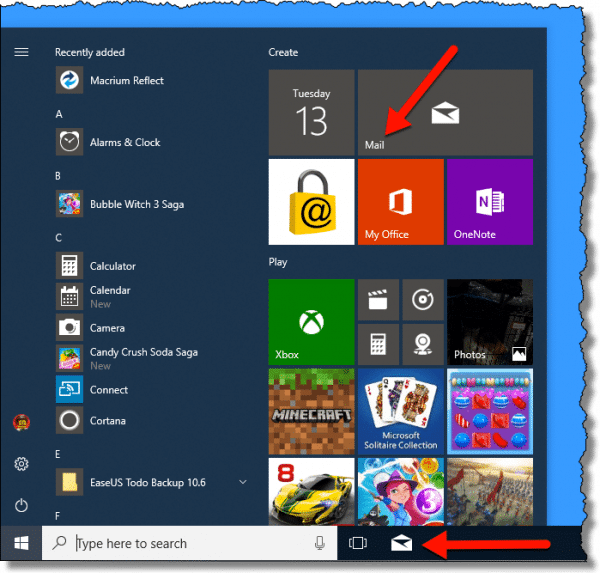
Click on the Mail icon in the taskbar, or the Mail tile in the Start menu.
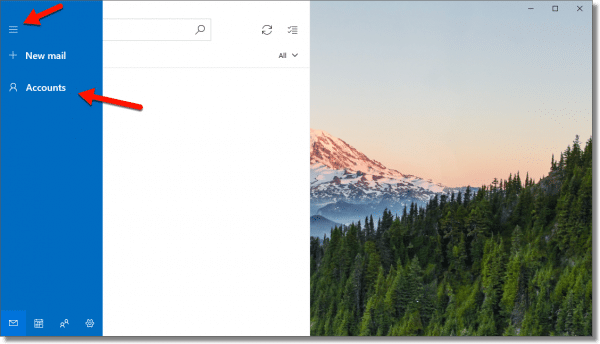
The program may automatically ask you to add an account, but if it does not, click on the Accounts menu item on the left (you may need to click the “hamburger icon” at the top left to fully expose the menu).
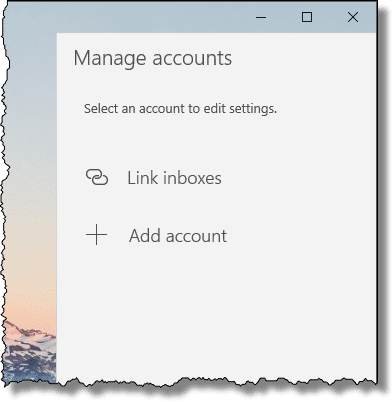
This will expose the Manage Accounts interface on the right. Click Add account.
This will open a ‘Choose an account’ dialog.
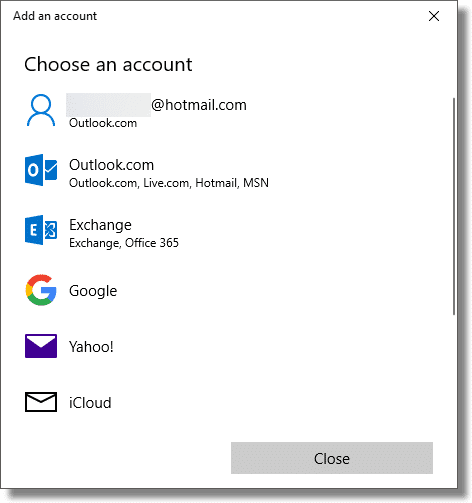
Notice that if you log in to Windows using a Microsoft account, that account may be listed at the top. Otherwise, or if you’re adding an additional Outlook.com account to this program, click Outlook.com to enter the credentials for the account.1
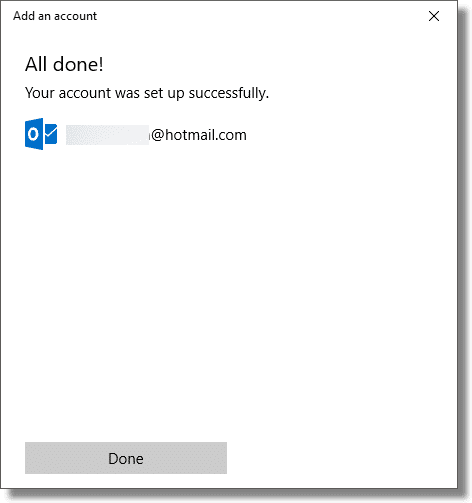
Once you’ve done so, you’re done!
Where’s my email?
Mail will begin downloading a copy of your email immediately. While it’s not intended that you access the files directly, for the terminally curious, you’ll find a collection of “.eml” (email) files somewhere in sub-folders of:
C:\Users\<username>\AppData
Note that “AppData” is a hidden folder.
I have to say “somewhere” because the folder structure is complex and appears to change from time to time as Windows 10 and the Mail app get updated. Think of this less as a specific definition of where the files are, and more of a general guide on where to start looking. While “.eml” files are a semi-standard email format, your contacts — automatically stored in the “People” app — are apparently in a proprietary format somewhere else within “AppData”.
But as I said, you don’t actually need to look, as it’s all handled by the Mail app. All you need do is use that app from time to time. More on that in the “Backing up” section below.
Thunderbird
Thunderbird is a free, powerful, open-source email client. I prefer Thunderbird for a variety of reasons, but it can be a little more daunting to set up. My article Back Up Your Email Using Thunderbird has fairly complete step-by-step instructions for both email and contacts.
In a nutshell, the steps are:
- Download and install Thunderbird.
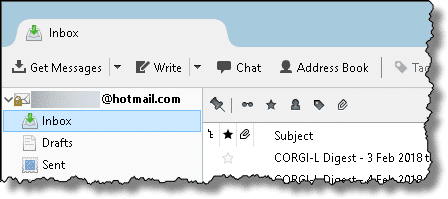
- Add an account, configuring it with your Outlook.com or Microsoft account credentials. Thunderbird’s default settings, once it detects what kind of account you have, are generally sufficient.
- View your email as Thunderbird downloads it.
Where Thunderbird (and most other email programs) comes up short is with contacts. While Thunderbird has a perfectly fine contact management system, there’s no automatic connection or synchronization with the contacts you have stored in your online Outlook.com account.
What this means is that in order to back up your Outlook.com contacts, you’ll need to manually export them and save that exported file somewhere on your PC. Again, Back Up Your Email Using Thunderbird has an overview of the steps required to do so.
Caveat: Aside from a few rather obvious fields, such as name, email address, etc., there is no standardization of what is included with a “contact”. That’s one of the reasons there’s no consistent synchronization between mail programs and online services. Additional information, like notes, pictures, and more detailed fields supported by one may not be recognized by another. Transferring contacts from one program or service to another almost always involves some frustrating amount of data loss. Since our goal here is backing up, then information should2 be preserved when restoring it to the same program.
Where’s my email?
Thunderbird stores all of the information it saves into a profile. That profile is placed in a single folder on your machine and contains all of your email, contacts, account configuration, and more.
Generally, you’ll find your profile folder in a somewhat randomly named subfolder in:
C:\Users\<username>\AppData\Roaming\Thunderbird\Profiles
You can find out more about Thunderbird profile storage locations in this support article.
Backing up
Now that you’ve connected a desktop email program to your online account, there’s one very important final step you need to remember.
Run the program once in a while.
If the program is never run, it’ll never download your email, and your email won’t be backed up. If you run the program periodically — perhaps every week, as I do — and just let it run for a while, it’ll also download all the updates since the last time it was run.
That’s the bare minimum, as it creates a second copy of your email on your PC. Should the online account ever go away, you’ll always have your local copy.
Even better, if you regularly back up your PC as I recommend, you’ll have additional copies — backups — as part of that process.
Using your desktop email program
There’s nothing wrong with using the desktop email program to access your email if you like. You might find it more responsive or feature-rich than the online Outlook.com interface. The connection we’ve made to download your email will also upload the email you send into your Sent mail folder online.
In fact, using your desktop email program is a good way to ensure that it’s run “every so often”, as described above, to make sure your email gets backed up.
Do this
Subscribe to Confident Computing! Less frustration and more confidence, solutions, answers, and tips in your inbox every week.
I'll see you there!


when will microsoft let people start using seriously secure passwords? i went to sign up for live but refused to after seeing all the constraints, esp how SHORT i had to make my password to please microsoft. by contrast, yahoo allows for a very long, very mixed and very secure account password. thanks lou!
I use Seamonkey email program, a cousin of Thunderbird. To save emails I just right click on them an save them as HTML files. To back up account settings and contacts I just hunt down the profile folder and along with my emails burn them of on a CD-RW. When the CD-RW gets full I make 2 copies on CD-Rs, format the CD-RW and start over again. This is my backup procedure for all my documents and any thing else I want to save.
Hey Leo
Hi Leo,
I found this article really useful but I don’t actually see the “sync” option in my WLM program-I’ve looked for it everywhere….I am using Version 2011 (15.4.3508.1109)-I just don’t see Sync anywhere-can you please talk me through how to ensure my WLM is snyc’ing with the web based hotmail….many thanks!
07-Feb-2011
Hi again,
I can actually see that my WL Contacts are syn’d with the web-based Contacts-I deleted one from the web, and it got deleted from my WL program too-it was a “test” so no crucial data went amiss! but I just thought to test it out myself-I have 709 contacts in WL Contacts as well as on the web….I’m slowly learning how the 2 are connected-a bit of a mystery as I don’t think I understand the distinction between web based Hotmail and web based Windows Live…or is there one?
Best,
Psych13
Two years later this advice still helps. I just needed to archive my account now, before Hotmail.com forces me to migrate to Outlook.com.
I don’t know, if you updated the DL-link for Windows Live Mail yourself, but anyway it led me to the new program “Windows Essentials” (btw. also available for Win XP). I could select to use only ‘Mail’ when installing the package, then I logged into it, using my hotmail account and voilà! I had it all there in no time. Using the Synch button took some more time, because it then is obviously not only downloading, but also comparing. It shows very nicely the progress, doing folder by folder (I have about 20 folders defined myself).
Everything was stored in C:Dokumente und Einstellungen\Lokale EinstellungenAnwendungsdatenMicrosoft
The folders ‘Lokale Einstellungen’, and ‘Anwendungsdaten’ are Systemfolders. You can see them only, if you (in XP) select Extras-Folderoptions-View-show content of system folders
Thanks Guys
I don’t want my Windows Live Mail to be synced to my computer. What can I do so it won’t be synced to my computer? Please help.
My contacts arrived nicely in WLM, but Send/Receive is greyed out. F5 does nothing.
MailStore is an excellent email backup program, and the basic is FREE, I used it for years, can find old emails from way back
.lpi I have picture left over from LivePix (that is no more), how can I open them, and save as say jpeg or similar
I disagree with the comments about not being able to back up folders and files for Outlook. One only needs to back up the .pst and .ost files. They can be found here on your computer:
C:/Users/{your name}/My Documents/Outlook Files/
Here you’ll find the .pst and .ost files needed for backups. I back mine up monthly and only once needed them ….. when I built my computer a couple of years ago. I went from using XP to 7 and needed to do a clean install. Since I had the .pst and .ost files backed up – I simply restored them to the appropriate location (shown above) and I was back in business.
Remember that most people coming to this article are talking about Outlook.com, which is completely unrelated to the Outlook that is part of Microsoft Office.
Disagree: The default setting of the MS-Outlook 2016 (part of MS-Office 365 ) on my Surface Pro 4 is on the path C:\Users\username\AppData\Local\Microsoft\Outlook
ALL e-mail programs that I’ve encountered (including MS-Outlook, Outlook express, Evolution, Thunderbird, Pegasus Mail, Windows Mail…) insist on using obscure locations to store local copies of e-mails. This is a seriously flawed practice as the authors of these programs will tell users that they the user are responsible for backup of information that has been hidden away. It also makes it hard for even reasonably technically competent people to migrate their e-mail information from one machine to another.
I always make a point of putting .PST files into a high level & obvious folder like C:\Mail
You saved the day!!! Thank you thank you!
Hi, I’m grateful for this article, I’ve been using Hotmail/Outlook.com for many years and I’ve actually been too nervous to set up a non-web client for it having seen someone else’s machine where, as you describe above, the POP3 style where all the messages disappeared from the server and moved to the local machine. From the way you describe the Windows Live Mail client, I take it that there is no chance that the same thing can happen using that?
Even with IMAP settings there are ways that you could delete out and lose your email from your computer. But it is actually possible to lose all your email from your Hotmail account as well. So the only real solution to protect important information is to have it in more than one place. In other words. Download a copy from Hotmail to your computer… and backup your computer.
Hi! Almost all my messages are organized in FOLDERS on Outlook.com and only few are in the INBOX. How would I download the messages organized into folders? My desktop client is Thunderbird. Please help. Thank you.
Leo, you are a GEM :)
Hi Leo, phew…thank you so much, I thought I lost all my Hotmail emails for good x
I continuum confused, how can I export my contact from https://blu180.mail.live.com to my computer???
Thank you
I have a selected folder on my MS outlook365. Com email account that I need to copy to a jump drive. How do I do that?
im using a computer that a friend give me and here no es the program.and i need use my yahoo. every days.
If you are talking about an email program, you can get Thunderbird of Windows Live Mail free.
https://askleo.com/back-email-using-thunderbird/
please help me get my e- mail back I am 73 years old – please help
Here are a couple of articles on Ask Leo! on email account recovery.
http://ask-leo.com/would_you_please_recover_my_password_my_account_has_been_hacked_or_ive_forgotten_it.html
If this is a Hotmail, MSN.com, Live.com or Outlook.com account, then this article discusses recovery options for the various ways that these accounts can be lost or compromised: http://askleo.com/what_are_my_lost_hotmail_account_and_password_recovery_options/
Thank you very much :)
it’s just what I’m looking for.
When I scan from my Hp printer, I choose pdf to file to save, yet Windows live always comes up to send it out, so I have to
delete it both the sign in and e-mail it has attached it to. I would rather send it from my Hotmail/Outlook mailbox? Anyway to
stop this?
Veronica
I have always (since 2003) used web-based hotmail/outlook.com for emails and so have thousands which I’d like to keep (preferably in searchable form). I realise that outlook.com is rigorously maintained but I understand that it is advisable to back up just in case. I came across the article above but apparently Windows Live Mail is no longer supported. In that case should do basically the same thing but using different software, e.g. Thunderbird? As I am on a Mac could I use the Mac Mail client that comes with the operating system? Or buy Outlook?
One issue which I don’t; really understand is how do I assess how much memory I’d need to store all those emails and can I store them on an external hard drive. I can’t even figure out how to count them let alone see how much memory they are taking up.
Thanks for any advice!
You could use any mail client that you like. Thunderbird is a great choice.
Oulook.com/Gmail typically indicate how much space the mail is taking up. (It’s not “memory”, it’s disk space you care about). Most hard disks are WAY WAY WAY larger than the email you may have collected. Any email program that supports POP3 or preferably IMAP will do the trick. I tend to prefer Thunderbird.
Dear Leo,
Since the early 90’s, and until February 2017, my complete email messages were automatically downloaded and stored in my PC upon logging in, and were available to view whether I was online or not. Synchronization was occurring automatically upon starting the email program (originally “Outlook Express, then Hotmail, Windows Live and then Outlook live).
Ever since the original purchase and setup of my Windows 3.1 machine with Internet Explorer, I never did anything to setup anything regarding email. Things worked fine automatically through the progression to Windows 98 and Windows XP. On my newer machines I have Windows 7 and 10, but neither stores the messages on the PC. Only the machine running on Windows XP downloaded the complete email messages (including attachments) until last February (2017). The Microsoft people are unable (or unwilling…?) to help.
My email messages are “somewhere” in Microsoft’s data archives. Is there a way to download them en-mass and store them on the hard disc of any of my machines? (preferably the “XP”). I want to avoid “opening” an account with Microsoft (as Windows 10 seems to demand).
Thanks and advance for your consideration,
Keep up the Good work,
Michael P.
PS: Incidentally, email addresses are not necessarily unique. About 4,5 years ago I accidentally identified at least two others, totally unrelated to me, using mine. They caused me no obvious trouble. They were using different passwords. I don’t understand how it works it but I suspect the reason…
You can use an email program like Thunderbird to download your emails in bulk. You would set it up to access your existing email account via the IMAP protocol which keeps your emails synchronized between the email service provider and all of your computers and devices. Since you have a Microsoft email account, the examples in the article should apply in your case.
https://askleo.com/back-email-using-thunderbird/
Your email account is already a Microsoft account, so you should be able to use that account to log into Windows 10, or set up Windows to log on without being connected to your Microsoft account.
https://askleo.com/how-do-i-switch-back-to-a-local-account-sign-in-for-windows-10/
It must have been necessary to set up Outlook Express on your older machines, as it requires entering your email address and password in order to be able to access your email account.
Email addresses are unique. There must have been some difference which you hadn’t noticed. Otherwise, you would have been receiving each others’ emails
Email addresses ARE unique. There was something else going on.
You already have a Microsoft account – the email address you posted here IS a Microsoft account. You don’t need to open any additional.
You should be able to install Thunderbird on your PC, and have it access your Microsoft email and download it all to your PC.
The way to do this is to use “em Client” at “http://www.emclient.com/” . Super product. There is a free version.
I tried Microsoft Live Mail which installed and configured nicely, but after 2 days it did not complete the sync process (my hotmail account is large).
(I monitored the log file and it was still working after 2 days!). Also, Microsoft Live Mail is no longer supported.
I chatted with Microsoft support about Office 365 as an option and they said office 365 was slower at sync’ing than Microsoft Live Mail.
I downloaded and installed “em Client” in minutes. Configured in seconds. It sync’ed thousands of emails in 5 minutes including a complex folder tree.
Made an additional backup on my local computer using em Client in a few seconds (backup can easily be redirected anywhere like any cloud location).
Hope this helps others as it seems that Microsoft and many other sites have no real solution to backingup hotmail. How Microsoft offers a great, mature product like hotmail without backup is amazing to me (in fairness, it does have a backup means to backup contacts).
A related problem is the case where all your e-mails are stored locally on a PC and you want to be able to access older e-mails from another device (e.g tablet, laptop, smart phone) &/or location.
I had an e-mail archive that came to 6GB all the e-mails stored in a Thunderbird folder structure.
The problem was how to move these into an on-line account. I’m sure that there are paid services that will make promises about quality of service but most unpaid IMAP servers (like Gmail & Outlook.com) are not geared up for a large volume of e-mails & folders that need to be synchronised by uploading them into the cloud account. The result was a painfully slow exercise over several weeks (part-time) of copying the offline folders one-by-one into the on-line store. Because folders containing many e-mails did not always synchronize successfully this exercise was made more painful by the need to confirm that all the e-mails had been copied across for each folder…
Any suggestions on a better way to do this?
I use GMail for that. 6 GB is only 1/3 of the 19 GB storage Gmail allows. If you set it up as an IMAP account and copy those emails into those folders, you can upload those emails and folders back to Google’s email servers.
https://askleo.com/what_is_imap_and_how_can_it_help_me_manage_my_email/
This post concerns Hotmail / Outlook Live only:
I’ve been researching this (backing up hotmail) for a couple of days. I didn’t try Thunderbird because I have enough browsers and programs as it is. Windows 10 “Mail” is of no use, at least the EML file mentioned in this article was no where to be found. Yes, I set explorer to view both “Hidden Files and Folders” and “Protected OS Files”, (Don’t forget to re-tick this setting) still no files to be found.
While looking for an unrelated setting in Outlook Live (hotmail), I found the magic bullet in Settings (the gear upper right)/View full settings/General/Privacy and Data. Only two options in there, but one is “Export Mailbox”. It states that the process may take up to four days and that you will get an email with a link to to download the content of your mailbox. It only took two days, but I received a link and was able to download a *.PST file, which is an Outlook archive file and can be viewed or imported by several 3rd party readers.
I hope this helps,
Newton
Can confirm the above ‘Export Mailbox’ solution from Newton works but only if your Hotmail/Outlook account has been “upgraded” to the new look Outlook.com. A lot of people hate the new look Outlook (they started migrating accounts a couple of years ago) so unless they’ve been forced on to it, probably won’t want to activate the change over.
I’ve a few Hotmail/Outlook accounts, my oldest one still hasn’t been pushed on to the new look Outlook and this ‘Export Mailbox’ setting is no where to be found in any of the settings.
If you really want to backup your emails and are still on the old look Outlook, you’ll need to click on the ‘Try the beta’ slider at the top of the page under the bell icon. This changes your account over to the new look version, then you can follow the steps set out by Newton above.
Just be advised, once you click this slider it’s very possible that you’ll be stuck with the new look. Some accounts still show the slider after it’s clicked (so you could go back to the old look), for others it just disappears completely.
Thanks, Bumblefoot.
For some reason, the Beta was forced on me. I resisted it for the longest time, then I checked my mail one day, and the new version was what opened.
Newton
I don’t believe it was the Beta you were upgraded to. Beta releases are test versions offered to volunteers to test out and find bugs. People are being gradually migrated to the latest version of the webmail page but it is an official version and eventually the old interface will disappear completely. The only options are to learn to live with the changes or find an email provider which has an interface you like. For example Gmail, and others can fetch emails from another account and display it on their page.
I found this article about a year ago and was pleased to see that the Win 10 Mail app offered an easy way to back up my outlook.com email. I was backing up my Gmail in a completely different way until recently, when that method stopped working. So I thought I’d see if Win 10 Mail can connect to a Gmail account, which I believe it can.
Before doing that, though, I wanted to check for myself that my outlook.com messages were really being stored locally on my PC as .EML files. I’ve hunted in several locations, including the one given in this article, and in several alternatives found in other articles. None have contained any .EML files. I’ve also seen in a couple of places that “If Windows 10 Mail is using IMAP it won’t save email to your PC”. This, too, seems to contradict what Leo says in this article. I tried to look at the settings for my outlook.com account in my Win 10 Mail app, but there are no details – only sync options or to delete the account. So it appears to be hiding what underlying protocol it’s using.
I’m wondering if this is this all because things have moved on since the article was written and Win 10 Mail no longer stores local copies of email. Perhaps I’d be better off resorting to Thunderbird where, presumably, I’ll have much more visibility and control of the settings.
IMAP saves the emails to your computer. Finding where they are stored is another story. email programs have their own way and location where they store emails.
For example in MS Office Outlook:
Where is my Outlook “PST” file located?