As Microsoft updates its mail offering, some of its features are moving or changing.
As I’ve mentioned before, if you have a Hotmail (or Outlook.com, as it’s now called) account, you should expect change. Change happens. Sometimes, it’s small and other times, it’s quite dramatic – such as how you change your password.
I’ll walk through the steps to change your password in the current (as of this writing) design.
Become a Patron of Ask Leo! and go ad-free!
Login to Outlook.com
There are probably other ways to get to this, but the most familiar is to simply login to your email online using Outlook.com.
Yes, you must be able to login to change your password.
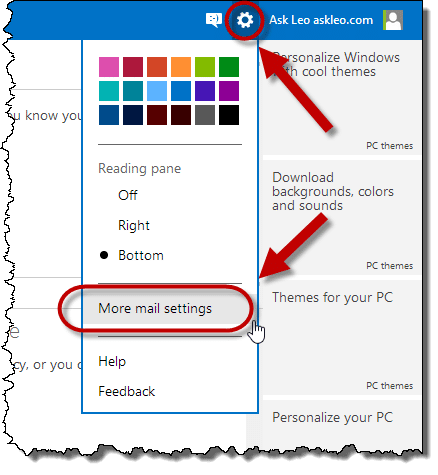
Start by clicking the gear icon near the upper right. Then, click More mail settings from the drop-down menu.
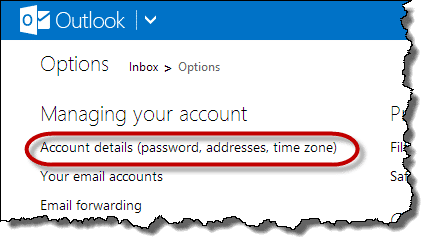
On the resulting page, under Managing your account, click Account details (password, aliases, time zone):
For security, you may be asked for your password again. Once you’ve entered it correctly, the Overview page opens.
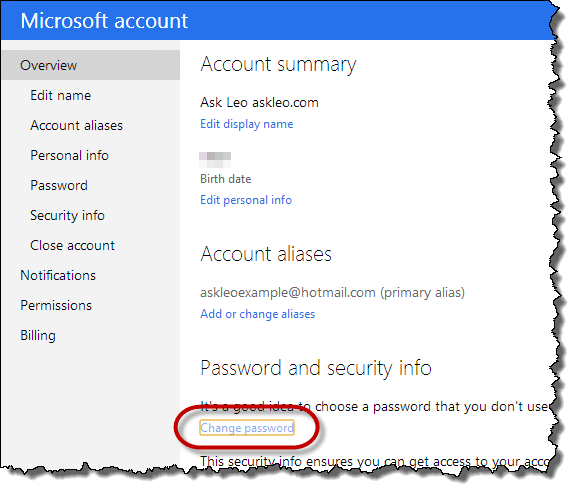
Look for the Password and Security Info section and click the Change password link. This takes you through the steps to change your password.
Important: You’ve changed your Microsoft account password
It’s important to realize that your Hotmail or your Outlook.com account (or actually any of several different Microsoft-offered email accounts) are actually your Microsoft account.
In other words, if you changed this password, you’ve just changed the password associated with SkyDrive, Skype (if you’re using your Microsoft account for that), and many other Microsoft services that uses this email address to login.


Can’t reset password…get stuck at location question, too many incorrect attempt…I wait over a week between attempt. no alternate email… who can I contact to reset password..
Brian
i know my password an windowsID,but can”t sign in,well i change my window live hotmail password???
18-Dec-2010
perfect, i had my hotmail account phished and with the help of this guy ive sorted it out, i think??
Perfect. I had a feeling I was hacked and needed to change my password urgently! By the way Chelsea, this is not outdated because I used this technique on July 9th. :) Thank you.
Hi,
How can I change my windows life hotmail password? Everytime I tryed to change it I get an error meessage telling that: “The password is incorrect. Please try again.” The password is the good one, I do not understand, please help.
Regards,
Marie
14-Jul-2011
greeting’s… i have this dilemma ,,, i have a msn account i created over 8 years ago..and until about a month a go i never had a problem with it …i got to log in now and it says ‘ ur account might have been hacked’..go to the revovery process…problem is i can not remember what name and details i gave at the time..beacuse i was new to the net , i was wary of ‘privacy’…i DID have it written down..but i have moved home 5 times since then.. and have lost the details..masn tech support keeps reffering me back to the recovery process.. EVEN after i have typed to them 10 TIMES…what i am typing to you now.. this is very frustrating… i did however manage to remember 2 contacts on the account..and the secret pet’s name question ……can anyone help me with this ? .cheers and thnx Pete : )
14-Jul-2011
i can,t acees my hotmail live account if you send me insructions i won,t be able to receive them cause i can, get into my profile i think it is my password but i,msure i,m entering the right password
@Wanda
If you are using the correct name and password, not being able to access your email account may be a sign of your account having been hacked. In your situation I’d open up a new email account, as you may not be able to get your old account back. I recommend GMail as it seems to be less hacked than Hotmail, and choose a good password.
I’ve lost my Hotmail password, can you help get it back?
Creating good passwords
I don’t seem to have an Options menu, as shown on the sample next to a circled blue question mark, so I can’t proceed any further to the next step
@Anna
It’s way up at the top of the screen, on the right.
If you still can’t find it try deleting out all the numbers at the end of the URL in the address bar until you get down to mail/
and then type in options.aspx
So it looks like this:
[…bunch of code].mail.live.com/#!/mail/options.aspx
hit enter and you should get to the options page.
Now to access “options” click on your name and click the last option. Then click on password.
I get into my account go to change password and it just comes up incorrect password no matter what word I put in
26-Oct-2012
thank you for your reply but I put my password in correct then it asks me for new password that is when it goes wrong I put my password in then new password and repeat it and all I get is incorrect yet I know its right as Im still using it but need to change it its driving me mad thank you
If you are using Windows 8, and you change your Windows Account (HotMail/Outlook.com) password, this may also change the Windows Login password on your computer if you’ve associated your Windows account with your computer login. This is just something to be aware of.
The only permanence is change. If (when?) these instructions become out of date, searching help for “change password” often helps
I’ve always considered it somewhat strange that the Hotmail password associated with Redmond Mags (& other associated “1105 Media”) hasn’t migrated with changes to the Mail/SkyDrive/Skype pwd…I’m wondering if that’s been the experience of others that access both sides of the 1Soft realm?
I am currently using IE 10. Good! Windows 8.0, Ah, not so good yet, still feeling my way around; I go back and use Windows 7 when I get confused, which happens quite often. I use Hotmail for both outgoing and incoming email. Well this is Good, very good! But, now I am encountering a whole ‘new’ dilemma – MSN is now requesting that if I want to send an email, that I use OUTLOOK 2010. It is also asking me in a whole bunch of following screen’s and questions that I must click this, do this, do that, enter this, establish an enterprise(?) protocol to connect to some unknown server; and etc., etc., on and on it goes. I know absolutely nothing about OUTLOOK 2010. I’m really not interested in using outlook 2010, unless it is absolutely necessary and if that is the case; where and to whom can I turn for a set of detailed instructions? [The following may be deleted, but I felt that it may aid you, if you respond to my current predicament: I use Verizon as my portal to the MSN network. I am on the low end of the Broadband (under 4mps) scale, and landline only – FiOS nor Comcast not available in this area and probably never will be. If you need more information please let me know; I’m not that knowledgeable with regards to some of the terminology used for the internet. Thank you, Very much, James Colby
As for your occasional confusion with Windows 8, I suggest you try Classic Shell, With that installed your Windows 8 will perform almost identically to windows 7.
I don’t understand how you are getting a request from MSN to use Outlook 2010. You should be able to access it through the outlook.com website or any email program. Are you sure they are requesting you use Outlook 2010 and not outlook.com which is the new Website which replaces HotMail.com, mail.MSN and mail.live.com etc?
How do Outlook, Outlook Express, and Outlook.com relate?
I have not forgotten my password, it just suddenly showed up as “wrong password” when I tried to log in. However it showed the correct number of dots, I.e. I confirmed that my password was correct. I take it that hotmail has changed to outlook. However they have frozen my account and have stolen access to my correspondence. How do I set it back please, and how do I sue them for theft.? Anyone?
If you are absolutely certain that you are typing the password correctly – then your account has been hacked. So you should sue the hackers… good luck finding them. Here’s a great article on how to retrieve a hacked email account: http://ask-leo.com/hotmail_says_my_password_is_incorrect_but_i_know_its_right_what_do_i_do.html
The number of dots is often NOT a representation of how many characters are in a password – so don’t make that assumption. More likely your account has been hacked. You can try the options outlined in this article: http://askleo.com/how_do_i_contact_customer_service_for_outlookcom/ – I’m not a lawyer but I don’t think you have any legal leg to stand on – part of the terms of service that you agreed to when you created your account prevents Microsoft from being held liable for pretty much anything. This is why it’s so critical to backup your online accounts. If this is the only place you have copies of important information then you are not backed up and you risk losing it all – forever.
My odd situation has not been addressed. I can log into my hotmail account, just as I have for years. I can log out. I can log back in. And out. And in. And read my mail, and delete items, and reply, and everything else you’d expect to be able to do. Every day. Thus, I know my current password is fine, and nobody has changed it out from under me. HOWEVER, while I’m logged in, I try to change my password by clicking on “Account Settings” and then “Change Password”, and then I type in the same exact current “Current Password” I use to log in every day, and then I choose a nice “New Password” and retype the new password in “Reenter password”, and then click “Save”. THE RESULT is that the same (cleared) Change Your Password page comes up, but the exact text “The password is incorrect. Please try again.” shows up in RED just above “Current Password” and below “Microsoft Account” (which shows my correct account name below it). I tried this a month ago, and I tried again today, multiple times. Same result. And I can still log out and in and out and in using the same Current Password, and read my email, etc. (I think this is the same problem Gabrielle Spain was trying to describe two years ago, fwiw.) Any ideas appreciated. Thanks!
Here’s a few things to try. Put in a recovery email (which is a good idea anyway) and then retrieve your password to the recovery email.
It might be that some weird code is auto-inserting into either one of the password fields. One of my favorite helpers is Notepad. It’s very good at creating plain text. So open up Notepad. Type in your password. Now use copy/paste to log into Hotmail. If it works… then go to the change password page and use copy/paste again. That will at least prove that no typos or auto-fill is causing the problem.
How can passwords be retrieved and remembered?
I use and recommend LastPass: http://askleo.com/lastpass_securely_keep_track_of_multiple_passwords_on_multiple_devices/
i just want to change my hotmail password. suddenly i am getting junk mail from myself which to me, means someone is messing around with my hotmail account again. since 1997 you would thing microsoft would have this worked out by now. but the problem is i need a code that is sent to another hotmail account which also requires a code this time sent by cell phone to a number that i had years ago. there is no option to change it. i searched and according to microsoft if i use internet explorer, which i hate but was willing to do so it says i can do something called InPrivate Browsing. i follow steps 1 and 2 but don’t see what they are talking about because it’s doesn’t appear as they say. http://windows.microsoft.com/en-ca/internet-explorer/ie-security-privacy-settings#ie=ie-11 i am using windows 8.1 and generally use chrome because it’s faster than internet explorer and i don’t have any issues as i do with the former (like when i am on facebook and it wants to send secure info, yes or no, i never know what to pick so i use chrome). so, i saw info you had about the code but it was dated from 2009. it’s 2014 and hotmail/outlook does not appear as you show it at the top of this page. so, how do i change it. and yes, i tried, really all i could do was give feedback, to get help from microsoft but they are useless.
“i am getting junk mail from myself which to me, means someone is messing around with my hotmail account again” – that is not necessarily true. Yes, a hacked account is one possibility, but it’s also very common to get spam from yourself without that being the case. Spammers regularly spoof the From: address.
Hello,
I have a hotmail account. I used the above steps to change my password (very helpful) except when I clock on ‘change password’ it tells me that I’ve requested my security information to be changed, and that they are going to send an email to me in 28 days? I need to change my password now as a virus got into my hotmail and is sending emails to everyone in my contacts list. I don’t know how to stop it. Is there anyway to override the 28 day waiting period?
Not that I’m aware of. That, in itself, is some kind of security feature for other types of compromises.
I’d like to change my password, however, after I log in correctly, and after I enter the sms code correctly and it takes me to the correct page, it asks for the old password, then for the new password twice (so far so good), THEN it tells me that my password is wrong (when I just used it to log in and I’ve typed it very carefully). What does that mean? I’m authenticated by being allowed to have access to my account, then I’m authenticated again through my cell phone, only to be told that my password is wrong. What gives?
Thanks in advance.
I have tried for half an hour and still can’t change my password because I am asked a question about a code which I don’t have. why is it so hard now to change your password when it used to be so easy and it is recommended you change your password about once a month?
The bad news is that without the additional information, Hotmail probably won’t allow you to change your email address. The good news is there’s really no advantage in regularly changing your email password.
http://askleo.com/is_a_periodic_password_change_a_good_thing/
It would be interesting to open a conversation between people who have had their accounts hacked and lost everything, and those who are having problems with security features. See who really has the worse problem. Unfortunately we can never have a conversation with people whose accounts have not been hacked because of the security – because we will never know.
I agree connie. The ‘irony’ is that while MS don’t want to issue and re-issue ad nauseam new emails, they force us to do this because security is so often breached or cannot be guaranteed because WE CANNOT CHANGE OUR PASSWORDS!!!!
I have two hotmail accounts, call them “old” and “new” which are linked. I log in to “new” and try to change password. Now the form comes up but it always refers only to account “old”. It sends security code to “old”, and I can change password on “old”, but I cannot make the process look at “new” account to change it’s password.
I can still log in to my hotmail account but attempting to change my password takes me to the place where I am told to change my security info instead of to the page you reference in your incorrect instructions and puts me in a 30 day waiting period. I’ve been through this before with my alternate email account and Microsoft will just keep doing this to me, bouncing me back and forth, asking me to enter the code, but NEVER allowing me to change my password, WTF is wrong???????????????????
Leo,i had email on sunday night and monday morningbit was all gone.I think it is windows 7,it was set up 13yrs ago,so idea of password and im not at all computer savvy.Someone else set up the email account for me..
My problem is i cant do anything on center link or receive any job alerts,messages from America,our only way for them to contact us,anything i have given to businesses as contact.Just absolutly so annoyed,dont know what to do,and no money for any one to look at it.What do i do it is urgent?!!!!
The major problem of my email is!!!!!!!!!!!!!!!!! I”m always sign out every time and when I open it is authomatically sing in what is this???????????????????????? How do I change my password or how do I delete my account because its giving me a big head ache really. I hate hotmail
I forgot my Hotmail password how do I change it
Ask Leo! cannot recover hacked accounts, lost or forgotten passwords. Please see this article for more information on your options:
http://askleo.com/what_are_my_lost_hotmail_account_and_password_recovery_options/
On my iPad, suddenly and for no apparent reason, the wretched thing announced that my password was incorrect and would not let me send emails. I had just sent an email successfully hours before, and not made any changes. So, I went into settings and re-entered the password. I entered other passwords, which the computer helpfully told me were wrong. Then I entered the original password in. The iPad accepted this and gave me an encouraging check mark. I sent a test email. Would not go–error message said the password was incorrect. So, I thought I would change the password. Went to outlook.com, where it opened my inbox immediately. Could not get out of the inbox or find any way to get to settings in this program. There is no gear icon, as you say to press. How do I solve this problem? I don’t care what the password is, but the horrid machine must recognize it.
I am using a cell phone to get into my email. I want to change the password but there is no gear or profile pic to click. There is an options but nothing there to get to account info like changing password or security questions or your alternate email account. Dont have a pc to try from there. And dont use the outlook (mine use to be hotmail account) app incase someone got a hold of my fone. Would you know how i can get into my account info using my cell phone. Thanks!
Hotmail is by far the most frustrating, crappiest thing to ever be invented on a computer, the many many many problems it has this password change should be simple but it just keeps saying ‘will reset in 30 days’ , that doesn’t help me when someone knows my password….probably will cost me the relationship with loved ones
Leo I forgot my outlook password on my android phone.What do I do to reset a new password?
I’d go to the outlook.com website on a computer and when it asks your password, click on “Forgot my password”, and hopefully, you’ve set up and alternate email address or phone number where you can have a link to rest your password sent.
Use a web browser to change it online, and then enter your new password on your phone.
I know this website provides quality based content and other stuff, is there any other website which presents these kinds of information in quality?
Here is an article which lists Leo’s remmendations:
http://ask-leo.com/what_are_some_good_tech_newsletters.html
Most, if not all, of them also have websites with compiter tips and advice.
I cant download apps in my window phone 8 cause i have forgotten my hotmail password plz help
The Outlook.com website has a link to reset your password. This article discusses recovery options for the various ways that these accounts can be lost or compromised: http://askleo.com/what_are_my_lost_hotmail_account_and_password_recovery_options/
Windows live is considered hotmail. I have email addresses at both domains and when you open them on the PC they both say hotmail in the header. Go with whichever you prefer @live or @hotmail.
Hi,
I change the password on my Microsoft account yesterday because I could not remember it. All went well and it accepted the new password. Now I’m having a problem with my hotmail account: I get a pop up window asking to put in the password and when I type in the new password it tells me “unable to verify account name or password”. Don’t know what to do next…. Any suggestions?
Thank you.
How are you accessing Hotmail? Via the outlook.com web site or using a desktop email program?