I’d actually suggest that you seriously reconsider closing your account.
Closing your account will not stop spam that looks like it came from the account; hackers often fake the “From:” address whether or not the account exists.
Closing your account will not stop your contacts from “being bothered”; if they had even brief access to your contact list, the spammers have probably already made a copy.
Closing your account is not guaranteed to cause emails sent to it to bounce back to the sender; bounce messages are optional, and many services choose not to send them, to reduce spam.
Closing your account may not even be possible if it’s been hacked, and you don’t have access to it yourself.
All that being said, if you still want to close it, I’ll walk you through the steps; it’s not really that hard.
Become a Patron of Ask Leo! and go ad-free!
You must be able to log in
You must be able to log in to your account in order to close it. If that were not the case, anyone could close the account.
If you want to close your account because you think it has been hacked, or you can’t log in to close your account, the article Email Hacked? 7 Things You Need to do NOW has the steps that you need to try to take in order to regain access to the account.
I have to say “try”, because once you’ve lost access to a hacked account, there is no guarantee that you can get it back. That’s one of the “costs” of using a free email account like Hotmail or Outlook.com.
Even if you don’t want it back – you just want to close it so the hacker stops using it – the steps that you need to take to prove ownership are exactly the same steps that would recover the account. Thus, if you can’t recover the account, you won’t be able to prove that you are authorized to close it.
Closing the account
Log in to your account via Outlook.com.
Click your account name in the upper right.
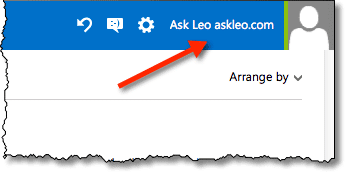
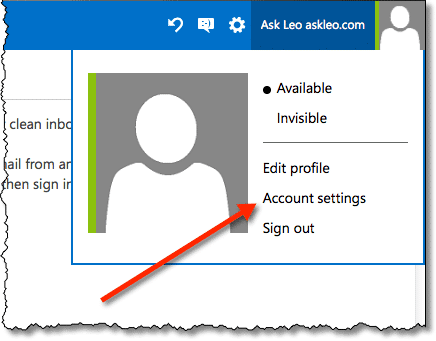
Click the Account settings item.
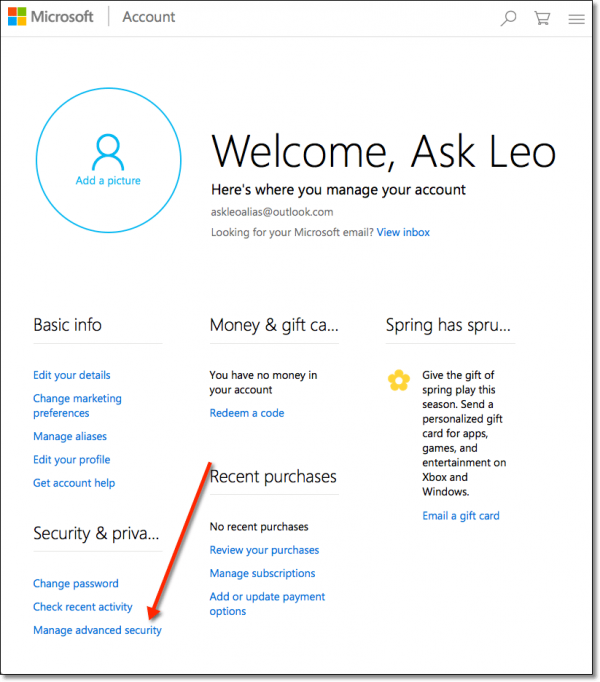
This will transition you to your “Microsoft Account” account page. On that page, click on Manage advanced security.
At this point, you may be asked to confirm that you are the rightful account owner, by entering a code that will be sent to your choice of alternate email address or phone number.
Once verified, you’ll be taken to the “Security Settings” page. Scroll down to the bottom of that page, and you’ll find the link that you’re looking for.
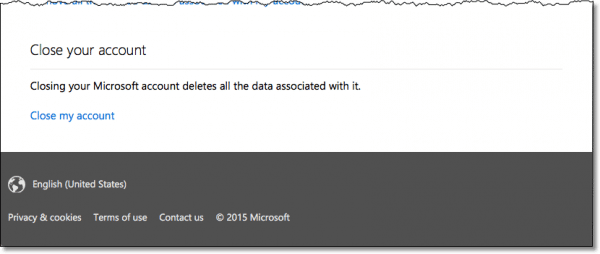
This will take you to a page with information explaining what closing will do, and will likely ask you for your password again, to confirm that you are the rightful owner of the account.
Click Next to begin the process.
What it means to close your Outlook.com or Hotmail account
Read the information that is presented on that confirmation screen carefully.
Your Outlook.com or Hotmail account is your Microsoft account. When you close this account, you will lose all access to all services associated with it.
- You’ll lose all of your email and contacts.
- You’ll lose all of the entries made in your calendar.
- You’ll lose everything you may have placed in OneDrive.
- You’ll lose access to Office 365, if you have it.
- You’ll lose access to your XBox Live account, if it uses this Microsoft account’s email address.
- You’ll lose your ability to log in to Skype with this account.
You may even lose your ability to log in to your Windows 8 (or later) PC, if this account is used for that purpose.
Make absolutely certain that this is what you want to do before you do it.
Alternatives to closing
If you can’t login to your account, and your attempts to recover access have failed there is nothing you can do. The account is no longer yours.
- If someone else has access to it, then they are they new account owner, and they can do anything they want with it. That’s simply the grim reality.
- If no one else has access to it, then the account will eventually eventually be deleted for inactivity. How long “eventually” is varies, but it’s often somewhere between three months and a year.
If you’ve regained access, or you need to keep the account open because you use other Microsoft services with that account, then you have two options:
- Ignore email on this account completely and use it only for those other services. I don’t recommend this approach, because it’s very likely that you will get important notifications via email for those other services. If you ignore email, you will miss those.
- What I recommend you do instead is to secure your account (following the instructions in Email Hacked? 7 Things You Need to do NOW ), and then start managing your spam, by simply marking anything that is spam as spam or junk. Eventually the email system will learn what is and is not spam to you, and route it to the spam folder automatically.
Do this
Subscribe to Confident Computing! Less frustration and more confidence, solutions, answers, and tips in your inbox every week.
I'll see you there!


How do I close the MSN part of my hotmail account? as I use MSN on a different email account which I use more often and so there’s no need for me to have 2 MSN’s.
My MSN account is $9.95/month. That is shy I want to close it. I’d also like to close my Norton accounts (another $9.00/month). I feel that are alternative (read less costly) otions. Please advise…
Ernie
I am having hard time to close my account same thing with my gf her email wont close too and said about billing account but we dont have it
In response to “why bother closing it at all?”: I needed to close my account so that people who still send to my hotmail address have their messages bounce, instead of having them assume I got their emails, and become angry at me when I do not reply.
29-Jan-2009
A way to avoid the “we sent it to your (old) address” issue is to set the old account to be read by the new account (Gmail does that well). You can even search on emails that you get that go to the old account so you can send a note to those people to delete that email address and use your new one. This trick works particularly well for weaning people off of an old ISP provided address before you change providers.
It did not work. The next windows that pups up says “Impossible to close your account… One or other paying services or a Microsoft Points account are linked to your account. To close your account, you need to close and cancel the other services…” Can someone help me with this?
06-Feb-2009
In response to your last post, it’s not that simple as “stop paying for and close whatever paid service you have associated with that account first?” If you search the web, you can see that many have had problems with this same issue and it often has nothing to do with subscribing to an actual paid service. Just FYI.
I’m trying to close my windows live and hotmail account because I already have another windows live account. But i can’t i followed the steps and it saids that I have to close my microsoft email account first. the thing is that i’m using the same email address and password for both. I did not know I would have issues for that.And it didnt say either. I would stop using it but I get so much mail and I have a profile for windows live that I want to get rid of. Can yu please help me?
i have another account now and i want to dlete my other account i followed your steps but,it isnt working it juyst cums up saying sorry canot close this account:@,how do i delet the account,it should be simple as pressing delete but people make it hard:@……
I’ve not logged into my windows live HOTMAIL account for 120 PLUS days now. I’m worried about the few who don’t have my new email address. When WILL they get a bounce back?! Stupid hotmail. Waited 120 days! Still no bounce back
23-Feb-2009
the steps were very simple and precise, but i was unable to terminate my account because i am not the primary account.
Leo, I followed ALL your instructions on how to close out my hotmail/windowslive.com e-mail account…however, when I got to the bottom of the page on”close account”, I entered my password, but there was NO MORE to the page….NO PLACE to click CONFIRM! so, what do I do when I get to the end and enter my P.W.? where do i go to “confirm” that this is what i wish to do?
thank you,
” a Bit Confused?!?”
somebady stole my email and password so i need close my account email
I followed your instructions to the point: “View and edit your personal information”. When I clicked on that, I got the Hotmail….Log in window??
Leo,
Thanks for the help. I followed your step by step instuctions and was successful in closing an old hotmail account. Cheers!
Thanks for the talk through bit. It really helped alot. i was confused but when i saw it i started following it and it worked. Ta. Very usefull.
thank you so much because someone tryed to get into my accout and it haddent be right since that till i closed it thanks again
I want to delete my childs hotmail account…I know how to close it but she can go to it at any time within 270 days and reopen it.
21-Apr-2009
I was trying to close account with hotmail. But I cant, because I got email from hotmail. They said Close my windows live account one or more paid services or a microsofts points is linked to my account. To close this account make sure each service is canceled and my microsoft poins account is closed.
There is a microsoft email account windows live homtail associated with my account so cant closed my windows live account immeditately. To close youw inswos live account, I need to close your miscsoft email account first, after a period of inactivity my windows live will be automatically be closed.
I did try to delete/remove my billing and account managing and personal information details etc, but it’s not working as it show edit/view click shown but not remove click shown. Hope you can help me to immeditately to close account with hotmail. Thanks
Regards,
Maria
I don’t know if you really want to close your Hotmail account. I have a couple of accounts that I wanted to close but I checked them monthly to see if any of my contacts hadn’t gotten wind of my new email address. I now have an address that I haven’t actively used on Yahoo for about 8 years and I still get an occasional email from people who knew me when. I got one last week. So I suggest getting a new address and checking your old email address for stragglers about once a month.
i tried closing this, but it said to close my email account. Which I did. So then I went back to the home page, logged on, went to the options and then ‘more options’. But I couldnt find the ‘manage your account’. It’s kind of weird. I have a stalker and he knows my hotmail… i really need to close it! HELP!
Someone hacked into my Hotmail account and was sending viral emails out to everyone in my contact list. I did go in and change my password and secret question, but I would feel better if I could just get rid of it completely. I tried your above method but it said I would lose my ability to log in to any MSN sites that I have used. So if I keep my email account open, how do I prevent this from happening again? Thanks–Becky
You might also read this article: My Windows Live Hotmail contact list has been hacked, how do I recover?
01-Jun-2009
Hi Leo, I uninstalled live MSN Messenger now I am unable to close hotmail is there anything I can do to get rid of it. Live MSN was causing problems to my PC. Thanks-Lois
The way to CLOSE an account for good has changed again. When you log into Window Live Mail, you will see your name in the top right hand corner. You need to click on your name and then click ‘View your Account’, then you will see on the next page under ‘additional options’, ‘close account.
Hi, i want to know how to delete msn off my mobile. I’ve tried deleting my account but it won’t let me and i think it’s because i have msn on my mobile. Can you please tell me how to delete msn off my mobile phone? thanks
Thanks soooooo much for putting this on here because something kept giving people viruses off my account and it annoyed people. Thanks ever so much
i dont use account much any more so i want to close it. i followed the steps and when i got to the part about, “click on View and edit your personal information” it was not there. can you help me please.
I want to ask, after I delete my hotmail account and my account will be deleted in all web, in my friend’s contact, forums that i have been make/use or not????
17-Sep-2009
I am trying to close this account that I have, but I can’t, I don’t know why? it says always that I have to close my window live account before to close hotmail, and how do I do that? I never joined! If it work that way. How could I do for close it….Help!! thank you for you time.
Dolce
so if my friends want email to my account that i have been deleted it can enter or not? if yes, so the new person that use my old account can read my email?
hi i want to ask how do i get my account back??
i have read the information but i didn’t understand….??
HOW??
thanks leo it really worked for me
heidi
Today I opened an account at [email address removed] and immediately changed my mind about having the account open. I followed the instructions about closing the account but it is still recognizing me; and I unchecked the box that said remember me. I have identity theft issues and am concerned because of the sharing factors and in fact, tried opening this account because I am having trouble receiving and sending with my yahoo account at the same address, riverockhill.
Hi…I’m trying to close my windows live hotmail account and CAN’T!!! Help please!! I have followed your instructions and to no avail!! I get the message that i have a microsoft email account? I don’t!! has my email been hacked?
Should i just not log in at this point? Thanks for any help you can send my way.
I just got an email from the “Windows Live Hotmail Team” last Friday stating that they were shutting down some accounts and mine was on that list. Now my friends are getting an email saying to please send $1500 right away to my sick cousin in England…I don’t have any relatives in England…I have always trusted Hotmail but not anymore, nor ever again. My advice: STOP USING HOTMAIL IMMEDIATELY!
26-Oct-2009
Your steps dont work – clearly msn is trying to force people not to close their account – first they hide the close account option then when you actually find it is sends you on a loop saying you cant close live id until hotmail is closed, but hotmail says cant close until some other non existed billed accounts are closed – and NOWHERE is there any support from MSN to close your account – even if you pull up the close account help screen they have left mail off the options. MSN is scamming like all the other disreputable web crooks – greed over morals
01-Nov-2009
I have already closed my hotmail account and yet it is still being used
I have already closed the hotmail account as the anonymous emails are being investigated
As I’ve stated in multiple placed spammers don’t need the account to be open to make it look like email comes from that email address. “From: spoofing” is trivial.
Sir: I tried the steps you gave to us to delete my MSN-outllok.com-hotmail.com email account and I never received the Close Account option. I logged in to outlook.com, I clicked on the account name in the upper right hand corner, I clicked on account settings and that is where I didn’t get the close account function you said I’d get. Please verify if you may have skipped a step or let me know what I did wrong. I followed the steps to the letter. It must be something you left out.
Thank You Very Much,
Chaplain D. DeRamus
Cancel this account. I’ve been hacked and got no help so close this account now
I am not Hotmail. I cannot close your account.
Are you unwilling to recognize that there are very many Outlook users who are very frustrated with Microsoft’s deliberate atttempts to make cancelling an account next to impossible? I am one of those frustrated Outlook users! I want to cancel my account because I am fed up with Microsoft’s constant intimidation to provide them with a phone number. Why don’t I just cancel my account? I’d be overjoyed to, but I can’t access my account unless I give them a phone number first. May Microsoft rot in hell!
i have the same problem as Rodger DeRamus.When going through the steps it does not bring you to a page that says “close account”. This is very frustrating and since i can not close this account it it giving me problems when using icloud. Please tell me what to do someone has to have a answe it seems alot of people have this problem
Hello.
Thanks for your help in closing my hotmail account.
Like many others before, when I follow your steps and get to the Name> Account settings, at the bottom there is no “Close Account” link, instead there is a “Marketing preferences” one.
I didn’t succeed to find the close account precious link elsewhere.
Anyone knows of a doable option?
Thanks in advance.
Saul
I have the same problem, i dont have at the bottom of the page “close account” Did you manage to find a way out?? did you close the account??
Thanks in advance.
I am trying to close my Hotmail account. It won’t let me because I do not have a security code and never had one. Therefore I can’t proceed.
at do I do other than throwing my computer out. It is very frustrating.
Abandon the account. Just stop using it. NEVER log into it again. Eventually it’ll go away.
Is there a way to close my account today, and not in 60 days?
I created the account today, attempting to update media player. Big mistake, it’s changed my computers password to match the hotmail password without my consent (totally unacceptable) and I’m already seeing new spam. I fear the hotmail account is easily hacked, I would like it closed now. I do not need to wait 60 days, I just created it a few hours ago.
Is there a work-around to the 60 day “cooling off” period?
Not that I’m aware of.
I received the following message, but I did not ask to close account, is this a scam, as I do not want to click in the link says “cancel request’ and get scammed nor if it is true and get my account closed for no reason, please help!
————–
Dear Valued User,
Our records indicate that you recently made a request to terminate your account.
We will process your request shortly
You will loose all your emails associated with your account
If you have no knowledge about the request process,kindly cancel the request below.
Cancel Request
Thank You
Microsoft Outlook ©2014
It’s definitely a scam. First of all a legitimate email from a reputable company would address you by name, not as “valued customer”. Also a reputable company wouldn’t have typos in their emails. You can’t “loose” your account. The proper word is “lose”. And finally never click on a link in an email you receive from a supposed company. Always type the URL (web address) into the address bar of your browser.
Leo, you said:
“Abandon the account. Just stop using it. NEVER log into it again. Eventually it’ll go away.”
I will try this route, to abandon the account as if it never existed, as I understand from reading comments elsewhere, if you try to close your Outlook account, you are endangering losing your Hotmail account as well. Will it really eventually go away? How long? After a few months?
Thanks.
i have followed your video instructions and when i click on account settings i am taken to a page that looks nothing like the page you were taken to. What the heck is going on?
the “close account” option no longer appears
Just explore a little and you’ll find it. They’ve moved it to Security & privacy -> Change password & more. I’ve updated the article with the additional, single, step.
i have waited 30, 60, 90 days for this system to let me close my account…..its all because of an old email address that i cant close either because i dont remember the friggen password……what do i do?
i tried closing but cannot as at the bottom i dont find this field close account. it just redirects me to another page sazing that did zou request to chng the securitxz information, although i did not give any security information when i created this account.
pls inform me how i can close this account.
thanks
m kumar
https://account.live.com/closeaccount.aspx
try to follow the link. although I did this but the “mark for closure” is disable.
Thank you very much!!!
Your help was all I needed!!!
I’m trying to close my live account but the “Mark for Closure is disable” how can i close it?
What happens if anther user takes that outlook name and starts receiving Emails to stuff you previously signed up to?
Unfortunately, any email sent to that address after it’s opened by the new user will go to them. For that reason, I keep my old email addresses alive. Even if I only get 1 email in 5 years from an old friend, it’s worth checking on it at least once in a month or two. I know that probably comes with a lot of Spam. Kind like raking leaves to look for something you may or may not have lost.
Exactly what you think: they start getting that email. It’s one reason I recommend not actually closing the account, just ignoring it and periodically logging in to keep it active.
I just got my OK from Windows to log back into my outlook account after 30 days after being locked out. After requesting to delete this “outlook” account, they will merely lock me out again and ignore my request. This has been going on for over a year. I declare that I’ve been hacked but Windows is the culprit as they exploit all your contacts also. When they asked for an alternate email address, they won’t accept one with no contacts in that address book. If that alternate has contacts, then those contacts willl receive mail/spam from this giant botnet (Windows) instead. Try to call the customer support number at Windows concerning hackers and when you ask to have this email account deleted, they will put you on hold till you give up or they will just hang up on you.
This will be my last Windows device ever.
March 16, 2015
Must recant my previous entry. Windows allowed me to delete my Outllook account. I did the usual, going to “my account” and following the prompts. The deletion is scheduled for two months from now so I must not log in again for that to take effect. I’m happy with this as they’ve converted me into a Windows hater and I will utilize Gmail and Comcast for my email needs. Hurry up Ubuntu.
I think your on drugs or….this is really old! because there was no place that said Close Account Forgive the comment if I am wrong but I do not believe this is easy as easy as you have said.May 2015
Things change really fast on the internet. Sometimes you have to really look to find options. Lots of drop down menus, these days, look like lines or dots somewhere on the page.
I really want to delete my Hotmail account because I have to many different emails and this one is the one I use the least. I tried going through all the steps given but where it said to go to change password and more or the close account option I don’t have neither of those options. I do have the change password but it does not say change password and more it just says change password. Please help its really annoying ive tried so many different ways for the past 5 hours
Microsoft has changed their Outlook.com website since that article was written. If you want to get to the delete account page, follow the instructions in this article. When you get to the More security setting page which contains the link for setting up the recovery code, scroll down to the bottom and you’ll see the Close my account link. Click on that and follow the instructions.
https://askleo.com/recover-your-microsoft-account-later-by-setting-up-a-recovery-code-now/
I would to close all msn accounts
Closing an MSN account should be the same thing as closing your Hotmail/Outlook.com account. As closing a Hotmail account is actually closing a Microsoft account.
leo i want to close my hotmail account too for good cause too much spam on emails i been getting and these emails i receive are from paypal saying i sent money i didnt i dont have paypal account at all im sick of spam
Just follow the instructions in this article.
leo i tried all these steps they still wont close my hotmail account and now there not accepting emails even
Ignore the account, never login to it, and eventually it’ll be closed automatically.
Hello! Can you help me? I wanna facebook profile, but I can’t make it. Where I can make it? With outlook or? Can you make some video where you explainig how you making facebook profile? Please! PS Thank you! :)
Open a Facebook account and you’ll have created a Facebook profile. Your profile is the personal information you choose to supply to Facebook.
As Mark said, create a Facebook account. Go to Facebook.com in your web browser and create new.
I have four facebooks. and I would like to you know, delete them? So what do you say if you will help me to delete all of my Facebooks
You are going to have to delete them yourself. Simply take the time to read the instructions and you’ll be able to figure it out.
I got my email from hotmail .com and then I go to Facebook and when I put my password it says that I cannot enter I am like omg why I can not enter ?!?!?so please help me so I can delete all my Facebook so I can build a new one.
i did all this its been 2 months and nothing its still there
Closing Hotmail is like The Observer Effect. The act of checking to see of your account is open will keep it open.
https://en.wikipedia.org/wiki/Observer_effect_%28physics%29
Leo: I have read all your replies on the subject I am interested in and no one asked the questions I have. I have three outlook accounts and Windows 10. The reason I have 3 accounts is because I started receiving a tremendous amount of spam. Apparently MS or someone I had responded to, sold my email address. So, I opened another account and then another and now have three including the original or at least current account I am using. With that background, here are the questions:
1. Can I close two of the accounts using the procedure you outlined in this article without affecting the one account I wish to keep using?
2. I checked in on my oldest email account with Outlook and had 527 spam messages and I guess I “reactivated” that account without knowing it. Now whenever I use my preferred account, any reply I receive is actually showing up in the current account as a CC. Apparently my accounts are cross linked. I wish to discontinue the cross link because if I reply to the newest email, the reply shows both email addresses in the reply. This is confusing to my recipients and results in their using my old address. or at least, sending replies to both email accounts!
3.Although I have configured Windows 10 to open without signing in to Microsoft, my current email address is embedded in my computer and was once used, along with my password to open Windows 10.. So the question here is if I delete the other two addresses and one of them that is associated with my Windows 10 computer, will it impact my login on Windows 10?
Thanks Leo for the service you provide.
LM
1. One account has nothing to do with the other accounts, so closing one or two would in no way affect the others.
2. As for a CC appearing in your email, check in your principal account’s settings to see if there is any reference to the account being CCed.
3. It’s not clear what you mean by your “current email address is embedded in my computer”. If your computer is not connected to your Microsoft mail account, closing your old email account shouldn’t cause any problems.
In case you want to check if you really are disconnected from your Microsoft mail account, you can follow the instructions for disconnecting in this article.
https://askleo.com/how-do-i-go-back-to-a-regular-account-after-updating-to-windows-8-1/
1. Yes, as long as you do it carefully. (i.e. login to the account you want to close, and then close it)
2. Any cross linking would be the result of explicit settings in one or the other of the accounts. Check for the “Reply To” setting specifically.
3. Possibly, yes.
Honestly, my recommendation stands: DON’T BOTHER closing the accounts. Just ignore the ones you no longer want to use. Fix the cross-linking if you like, and possibly the Windows 10 login issue, but … why close the account if simply ignoring it will have the same effect on you?
Thanks for the help this website is sooo easy to learn from nice tutorial.
I’m sorry to say Leo, but some of the arguments you mention to reconsider are rubbish.
You CAN use Skype without a Hotmail account// MSN account.
Indeed, Microsoft does require an email address to be coupled to Skype, but it doesn’t need to be an MSN/ Hotmail/ Outlook address. So you’re spreading FUD.
I’m not pointing fingers (frankly I don’t care), and although I understand you’re trying people to think before they act, but supplying nonsense information is NOT helpful.
You’re not really building credibility or creating trust with this kind of Redmond favoured FUD…
Believe it of not, if you open a Skype account without a Hotmail/MSN account, you’ve opened a Microsoft account. You many not have a Hotmail/Outlook.com email address, but nevertheless it’s a Microsoft account.
This is not how you close your Hotmail account. It has changed and this tutorial is wrong. You have to go to a web page called close your Hotmail account and it will make you enter a security code that you have to get from them. The screenshot that shows us we have to go to the manage security settings is not really on that page that Askloe showed us. Thank the gods for google or I would still be looking for that manage security link that does not exsist.
Thanks for pointing this out. Things change so rapidly in the IT world that articles continually need to be updated. When readers point these things out, it helps keep things up to date.
my reasion for closing the account is everry mail I ger, the Hotmail says that it is suspicious and it is equally so the mails sent by me. I have been the Head of India’s CBII ( USA FBI). I myself can detect, which mail to open and which to blcok. There was no problem from 2004 to 2013. But for rthe last two years I had to change my password and now even that is accepted nor am I able to add new password, instead of the old ones. This is the real reason. It is better to loose all information and contacts and not be able to open my Hotmail I hope somebody, who matters will see this EMail, insstead of a robotic reply.
Jogoinder singh Indian Police Service ( Retd)
Former Director, CBI, Cental Bureau Of Investigation, India
With the added security measures recommended cannot access emails unless next to phone AT HOME.
I take my iPad with me? I am away more often than not!
Not really the state of the Art!
Can you guarantee that after a period of non-use I will be free of hotmail?
Guarantee? Nothing is guaranteed. However if you simply avoid it, don’t log into it, don’t ever even look at it … isn’t that essentially the same thing?
Hi,
I have an Hotmail account and by mistakes I opened an outlook account at the same email address,
Can you please inform me how can I delete the outlook and keep the Hotmail account as it was.
Manny thanks
I have an msn account that I do not use anymore as I use another hotmail address.
Will my closing the msn account affect the other hotmail address?
Thanks so much,
Anita
If they are completely separate logins, then no.
It won’t affect the other account, unless you have one set up as an alias of the other.
Thank you so much for your quick and helpful reply!
Anita
I have been trying to get change of my old hotmail account to my gmail but having trouble doing so please help
Here are a couple of articles on changing email service providers. Essentially, it’s just a matter of opening a new email account and informing all of your contacts, but these articles explain some important details people often overlook.
https://askleo.com/how_do_i_change_my_email_address/
https://askleo.com/wrong-way-change-email-address/
You don’t “change the account”, per se. You create the new Gmail account, and then start using it everywhere you use email. If other services have your email address then you need to go to all those other services and change your hotmail address to your new gmail one. Or am I missing something? If so, please clarify in detail what’s not working.
I keep telling everyone but nobody listens..I dont have the account settings box and no user name just the blank photo box…thanks for the help…
Hello:
This was the easiest way to close my Hotmail account.
Best advise.
A BIG THANK YOU.
I feel like this question has been answered, but I need a specific answer to a specific question within those that have been asked. Both my email addresses are Hotmail, they both come into the same email box. If I login with one and ask for it to be deleted, will the other one stay intact? They are both registered to the same name and address. My old address just receives junk associated with when I was using that address, but now I use the other one for everything.
If they both go into the same email box online at outlook.com, then they are a single account. I would expect deleting either to delete both.
Will you PLEASE close my email account. All I get is trash, junk and porn. DO NOT WANT HOTMAIL ANYMORE!!!!!!!
We are not Microsoft. We are not Hotmail. We cannot close your account. Please read the article you just commented on.
I have read all these options and am going to go with “waiting it out and letting it wither from disuse”. Hotmail used to be like an old friend but now (post-Outlook) it is an old friend with dementia: slow, clunky, and at every log-in a yellow drop down bar shows up with the message “a website is slowing down your activity – what do you want to do? And whether I click “ignore” or “disable” the result is the same – nothing. The yellow bar disappears without any further ability to ask it questions. Hotmail has morphed into a big time-waster :-(
First thing to do would be to clear your browser cache. It might be just that simple: https://askleo.com/whats_a_browser_cache_how_do_i_clear_it_and_why_would_i_want_to/
I want to block my msn id immediately and permanently.Help me.I myself is trying to block but it not happen.
What is is you’re attempting to accomplish with a “block” that simply ignoring the account forever wouldn’t accomplish?
please close my account as from as from today . my email is {removed} due to hacking by junk mail box unappriotate sexual behaviour.
constantly daily basis.
Read the article you are commenting on. It answers your question. And never post your email address publicly.