Deleting and reinstalling is a common approach to dealing with problems — unless you’re using Edge.

This question comes up for various and quite legitimate reasons.
The thinking is that when Microsoft’s Edge web browser misbehaves for some reason, it could be damaged, infected, or something else. In the case of most applications, one approach would be to uninstall and then reinstall the application in question.
Unfortunately, Microsoft Edge isn’t most applications.
Become a Patron of Ask Leo! and go ad-free!

Fixing Edge
To fix Microsoft Edge issues, disable add-ons, scan for malware, and use system-repair tools like SFC and DISM. If problems persist, consider using a different browser or reinstalling Windows, as Edge can’t be uninstalled like regular applications.
Edge, or no?
Before we panic, though, most problems that look like they’re caused by Edge are not at all.
Malware may attack or use Edge, but it doesn’t necessarily damage it. The malware itself is the damage. Poorly written browser add-ons can also manifest as problems within Edge.
In these cases, “fixing” Edge won’t help; you need to get to the root of the problem. Thus we start with two different approaches not directly involving the browser itself: we disable add-ons and then scan for malware.
Disable all add-ons
Add-ons or extensions are the most common cause of browser problems. Click on the “puzzle piece” icon in the Edge toolbar.
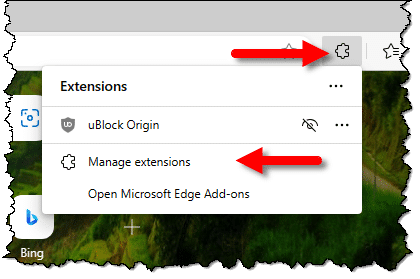
Then click on Manage extensions.

Disable all the extensions and see if the problem you’re experiencing goes away. If it does, then re-enable them one by one to see which is the culprit. If the problem doesn’t go away, re-enable them all if you like.
Scan for malware
Next, scan your system for malware. Exactly how you do this will depend on your anti-malware solution.
If you’re running Windows Security (my most common recommendation), then in the Virus & Treat protection tab, click on Scan options (not shown here), and perform a full scan of your computer.
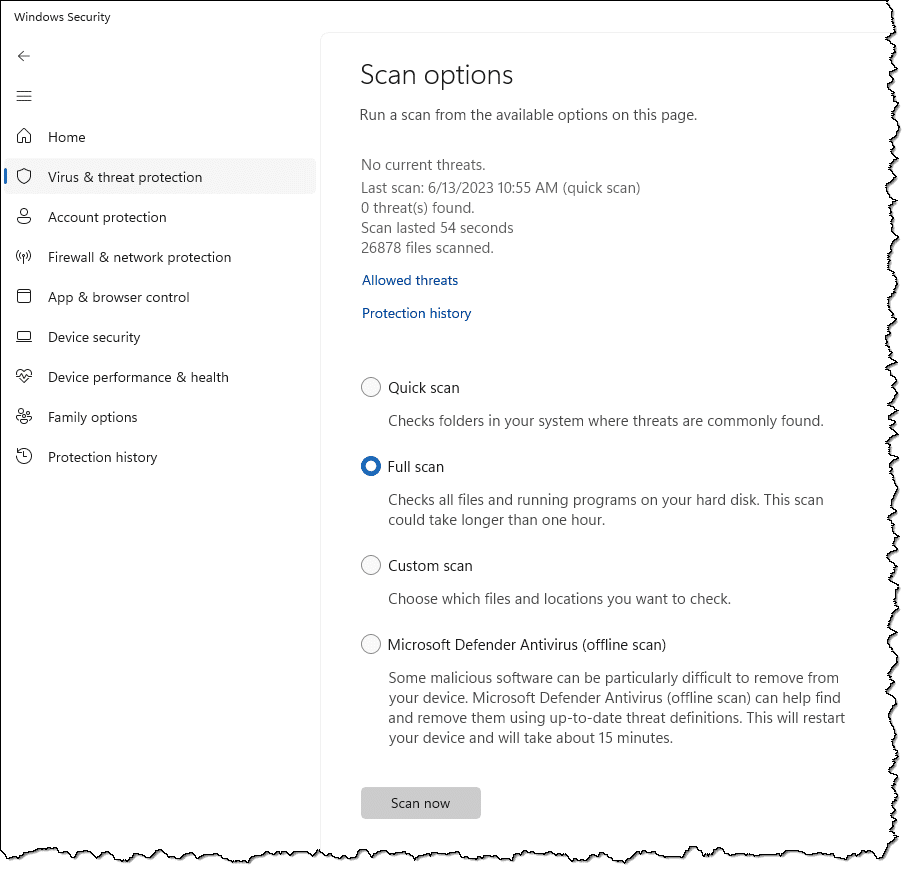
If that removes malware, then see if the browser problem you’re experiencing has also been eliminated.
If not, it’s time to fix Edge itself.
Repairing Edge
As I covered in a previous article, Edge isn’t something you can uninstall, so the traditional uninstall-and-reinstall approach isn’t available to us.
Run SFC, the system file checker. SFC will detect and repair system files that have gone missing or somehow become corrupt, including those that comprise Edge.
Run DISM, the Deployment Image Servicing and Management command. DISM is a tool I’ve not spent much time with, but particularly if SFC doesn’t resolve your issue, it’s the next tool in our arsenal.
Make sure Windows is up to date. This will include Edge itself. When they’re not about critical security updates, the majority of the fixes on Windows Update are about fixing crashes.
Other solutions
Another useful approach and diagnostic tool is to use a different web browser, such as Chrome, Firefox, or others, even if only temporarily. This will quickly determine if the problem is specific to Edge. If the problem goes away, a simple solution is to keep using that other browser.
If the problem is serious enough and you need to use Edge, then a complete reinstall of Windows might be called for, albeit a very extreme solution.
Finally, do remember that if the problem happens only on certain websites, it may not be a browser issue at all. It could be a problem related to those specific sites.
Do this
If you’re experiencing problems with Edge, the diagnostic process can involve several different steps, outlined above. Follow them carefully and hopefully your issues will be resolved.
Subscribe to Confident Computing! Less frustration and more confidence, solutions, answers, and tips in your inbox every week.
Podcast audio

Related Video


