They’re not evil.

Cookies aren’t as evil as most stories — and some security tools — might have you believe.
A cookie is nothing more than some information a website saves on your computer. The next time you visit that site, your browser then sends it back to that same website.
Seriously. That’s it. That’s all. That’s a cookie.
It’s what some sites use cookies for that has some people concerned, and why you might care about things like deleting cookies.
Become a Patron of Ask Leo! and go ad-free!

Cookies
Cookies work by letting websites save data on your computer that is then sent back to them the next time you visit. In most browsers, CTRL+SHIFT+DEL opens a dialog allowing you to clear cookies and more. Browsers also have several cookie-related settings (best found by using search within the settings pages). While cookies can be used to track you, it’s generally not something to be concerned about.
Cookies
It really is that simple: a cookie is nothing more than some data a website can store on your computer.
What that data contains is entirely up to the website.
Most importantly, the data is shared only with that website.
It works like this:
- You visit some website, say reallybigbookstore.com.
- Your browser requests a page from reallybigbookstore.com.
- Reallybigbookstore.com responds with the page to be displayed and some extra data. That data, a cookie, could be anything. I’ll use “customer=12345” as my example.
- Your browser stores two pieces of information: “reallybigbookstore.com” and “customer=12345”, and displays the page.
- You browse around, you leave, you do other things.
- Sometime later, you return to the site, this time to a page you bookmarked: “reallybigbookstore.com/tech_books.html”.
- Your browser contacts the reallybigbookstore.com server, requesting “tech_books.html”. It also sends the cookie with that request. In my example, that means “customer=12345” is sent from your browser to the reallybigbookstore.com server.
- The server does whatever the server does with the cookie — in my example, it might acknowledge that you’re the same customer as before — and delivers the page to the browser to be displayed.
One important thing here is that only cookies sent to you by reallybigbookstore.com will be sent to reallybigbookstore.com. This prevents one site from seeing the data that might be kept by another.
Example: preventing endless logins
Cookies can be used for many things, like welcoming a returning customer, but the simplest case is just remembering who you are from page to page.
For your sake.
Every page you visit on the internet is, in a way, completely stand-alone. When you log in to a site like Amazon or Outlook.com, there’s no inherent mechanism to pass along to the next page you visit on the same site that you are in fact logged in.
Without some method of remembering who you are, you’d need to log in over and over for each different page on the site you wanted to see. You’d be faced with a never-ending series of login screens between content pages.
As you can see in the example, simply storing a bit of data identifying you as a user is one way sites can keep track and not force you to log in to every page. For security purposes, the data stored is rarely as obvious as “user=12345”, but contains enough information for the server to know who you are, the fact that you’ve logged in, and that you’re authorized to see the next page.
Example: tracking cookies
Much has been made about tracking cookies, but there’s nothing at all technically different between cookies “tracking” you and cookies keeping you from having to log in over and over again.
Here’s the scenario:
- You visit some website, say reallybigbookstore.com.
- The site contains advertisements provided by a large advertising network. I’ll use “doubleclick.net” for my example.
- The advertisements shown on reallybigbookstore.com come from the doubleclick.net servers.
- The doubleclick.net server can leave cookies on your machine just like any other website.
So far, you’ve visited a single site, and the advertising network it uses has been allowed to leave a cookie on your machine. Maybe that cookie contains “aduser=12345”, though again, it’s rarely that simple.
Now you keep on browsing:
- You visit some other website, say somerandomservice.com.
- Somerandomservice.com also uses doubleclick.net to display ads.
- Once again, the advertisements shown on somerandomservice.com come from doubleclick.net servers.
- The last time you were shown an ad by doubleclick.net it left a cookie, and that cookie is now included when the ad it fetched.
The advertising network now has the data to know your computer visited both reallybigbookstore.com and somerandomservice.com, and, as long as the pages you saw had ads, how often you visit each, and what pages you visited while you were there.
Multiply that by all the sites you visit and all the different advertising networks, and you can imagine a lot of back-end data analysis that discovers really interesting patterns of people visiting different sites around the internet.
Third-party cookies
As I said above, the doubleclick.net cookies were sent back to the server they came from — the doubleclick.net server — even though the page you requested was from somerandomservice.com.
Many browsers make a distinction between cookies for the sites you actually requested (somerandomservice.com), and the sites subsequently referenced as part of displaying the page (doubleclick.net). The latter are called “third-party cookies.”
You are the first party, the site you’re visiting is the second party, and all the other sites used as part of displaying a page from that site are third parties.
Most browsers allow you to turn off third-party cookies, meaning the cookies created by third-party requests such as advertising networks are simply not created at all, or are never sent.
Managing cookies: Edge
To delete cookies in the Microsoft Edge browser, type CTRL+SHIFT+DEL1. This will bring up the “Clear browsing data” dialog box.
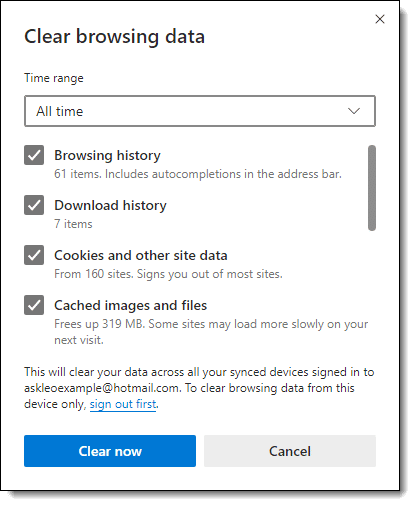
As you can see,” Cookies and other site data” is one of the items you can delete.
To view the browser settings relating to cookies, search settings for “cookies”.

As you can see above, among several other settings, there’s an option to disable third-party cookies. This is currently turned off, allowing third-party cookies.
Managing cookies: FireFox
To delete cookies in FireFox, type CTRL+SHIFT+DEL. This will bring up the “Clear Recent History” dialog.
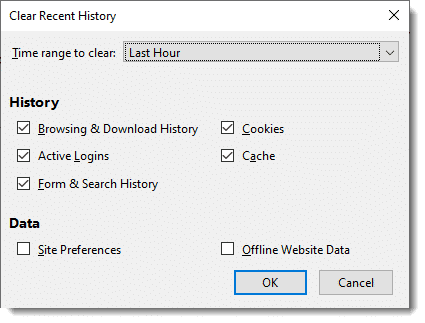
As with Edge, you can select not only what to delete, including cookies, but also a specific timeframe.
To view the browser options for cookies, click the hamburger menu in the upper right of the Firefox window, click on Settings, and then click on Privacy & Security in the left-hand pane. Scroll down to find “Cookies and Site Data”.
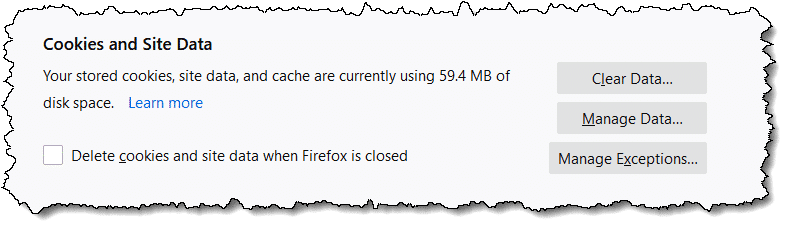
You can also search Firefox’s settings for “cookies” to expose a few more options.
Managing cookies: Google Chrome
To delete cookies in Google Chrome, type CTRL+SHIFT+DEL. This will bring up the “Clear browsing data” dialog box.
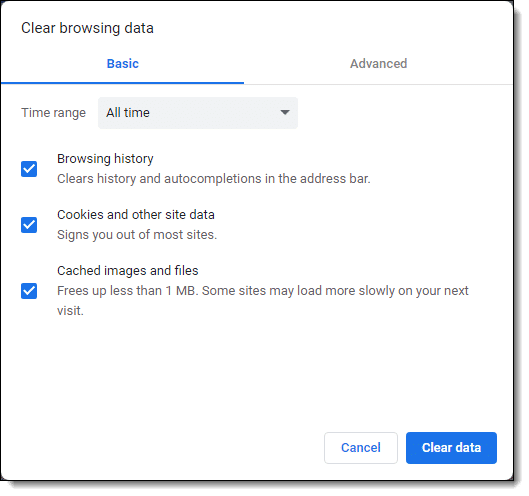
As you can see, much like Edge and Firefox, one of the many items you can choose to delete is the collection of cookies, and you can specify a timeframe. You can also click on the Advanced tab to expose a few more things you can clear.
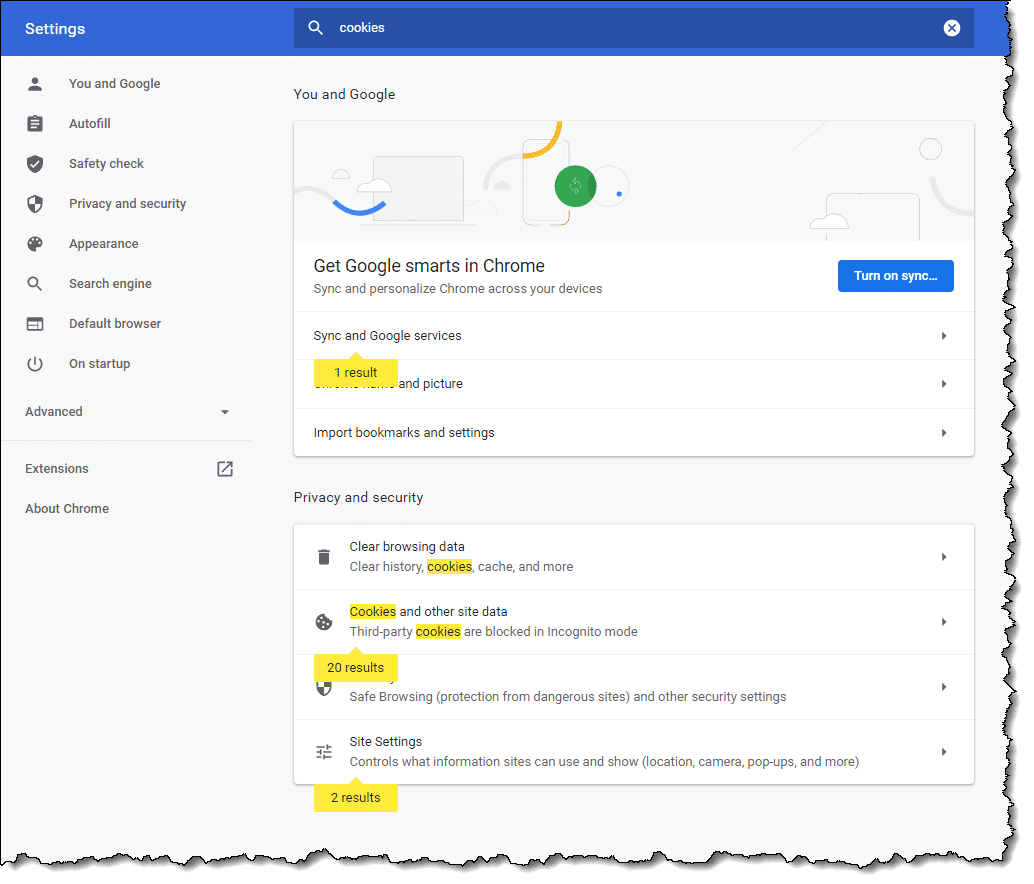
To view the browser settings relating to cookies, search settings for “cookies”.
OMG! They’re tracking me!
No, they’re not.
Well, they are, but … no, they’re not.
Here’s my position: they don’t care about you specifically. No one cares what Leo Notenboom does. You and I just aren’t that important or interesting to track as individuals.
What’s much more interesting is aggregate data: the data saying things like 75% percent of the reallybigbookstore.com visitors also visit somerandomservice.com. Or data showing people visiting this page frequently are likely to respond to these advertisements.
This type of tracking can also be used to perhaps prevent people whose online behavior appears to be similar to that of men from being shown advertisements designed for women.
You get the idea. They don’t track at the individual level, but they use the data en masse to do things like provide more highly targeted and interesting ads or perform market research.
That’s not to say that cookies can’t be misused; they can.
It’s just that it’s typically a lot more work than it’s worth.
Unfortunately, some anti-spyware tools flag tracking cookies — often any tracking cookie — as a form of malware. I simply and emphatically disagree. Flagging tracking cookies in that manner causes unwarranted confusion and concern, and certainly doesn’t make you any safer.
What should your settings be?
In my opinion, the default settings across all browsers are just fine.
I know some people feel differently. If that’s you, you might want to spend a little time diving into your browser’s cookie settings.
Do this
Subscribe to Confident Computing! Less frustration and more confidence, solutions, answers, and tips in your inbox every week.
I'll see you there!
Podcast audio

Related Video


Footnotes & References
1: Hold down the CTRL and SHIFT keys and type the DEL or Delete key.


A shortcut to get to the Clear History menu in most browsers, including Chrome, Firefox, IE and Opera is crtl+shift+delete.
is it important to delete cookies?or im i suppose to delete cookies?
That kinda depends on who you ask and how paranoid they or you are. My belief is that no, you need not delete cookies unless you’ve encountered a specific situation where you feel you need or want to. Most of the time you’ll never encounter such a situation.
That’s what I do anyway.
The flip side is that it’s typically safe to delete ’em. A bit of an inconvenience results, as outlined in the article, but that’s about the extent of it.
Hi Leo, I’ve deleted the temporary cookies, but there is a list showing of the sites that I’ve searched under C:Documents and Settings. How do I get rid of it?
My father in law is coming to spend a couple of weeks with us this summer. He likes computers, and I really don’t want him to see that we occasionally look at the porn sites. Thanks, from A nice married lady who sometimes surfs out of bounds
Make sure you clear all temporary internet files in IE’s options dialog. You may also want to visit Start, Settings, Taskbar and Start menu, Start Menu tab, Customize button, and then possibly the Advanced tab if there is one, to Clear the list of recently viewed documents.
I am trying to get rid of the drop down box on sites like Google and Yahoo. It shows me everything I have ever searched and I am sick of starting to type a word to search under and a list of 100 words starting with the same letter pops up because I have searched those things in the past.
I have deleted all of the cookies I can find. I have also deleted all temporary internet files.
What else can I do? Is it even cookies I should be looking at….maybe I am out to lunch?
Kari, that sort of information wouldn’t (or at least shouldn’t) be stored in cookies or temporary internet files as it is more related to the settings/functionality of your browser and not information from the sites themselves. However, since you cleared everything else out, you may still want to clear out your browser’s History log. Just for good measure.
As for your current problem, in Internet Explorer, there is an “Auto Complete” function. Turning this function off will likely solve some of your troubles. The following site has instructions on how to disable Auto Complete, or even just parts of it:
http://www.helpbytes.co.uk/acomp.php
by the sound of it you need to disable autocomplete on “Forms”.. though I’d also recommend disabling it on “Usernames & Passwords” if it’s enabled. Those are the sort of things that shouldn’t be stored as it defeats the purpose of even having passwords. (*rolls eyes* “Thanks again Microsoft” … sorry, personal pet peeve :-)). You may want to disable everything depending on your preference, but keep in mind you’ll be typing out a *lot* of full website addresses if you do ;-).
I have little computer knowledge when it comes to terminology and certain functions of the computer. I was just wondering if by deleting cookies it will make my computer run a little faster. I also get alot of freeze ups where it says internet explorer has encountered a problem and must close. I then have to start all over again and it is very annoying. This happens several times daily. I also even get another box that comes up when it freezes up. I will hit ctrl,alt, and delete and it will say program not responding and will have to click end program and then start again. Excuse my ignorance, as I am at a beginner skill level right now, but was wondering if this has anything to do with cookies or do I have to bring it to a professional and have it cleaned out. Thanks for your time.
Sincerely,
Walter
Cookies are typically very benign, and don’t impact performace much. (Issues with cookies usually revolve around privacy, and even that’s typically overblown in the press.) – I would first make sure that you’re following the recommendations in this article: http://ask-leo.com/how_do_i_keep_my_computer_safe_on_the_internet.html – much of what you describe can be caused by malware of various forms.
I have a problem searching for certain sites. I’ll type in my banks website or even something other than that… but if I dont type it correctly it says page not found and sends me to a porno site. Im sick of it! I dont go to that site but its embeded in my computer. Im not sure how to go about getting it out of my system. It used to be that if I typed something wrong or that site no longer existed, then it would send me to google or something on the lines of that. BUT NOT ANYMORE! Please tell me how to get this to stop.
—–BEGIN PGP SIGNED MESSAGE—–
Hash: SHA1
Sounds like you have spyware.
http://ask-leo.com/spyware_how_do_i_remove_and_avoid_spyware.html
Leo
—–BEGIN PGP SIGNATURE—–
Version: GnuPG v1.4.7 (MingW32)
iD8DBQFHhP1HCMEe9B/8oqERAuidAJ4ui7FOR9Tzw2Wji2CkKa2HyOlxIACfQhOX
n6yRrQGEnL7bjO3oqDKa97w=
=enQ1
—–END PGP SIGNATURE—–
How do I free up memory when I try to print something and it says I’m out of memory.
I am running out of space on my computer. Will deleting cookies help this.
i accidentally deleted cookies, how do i get it back?
Deleted cookies can’t be restored. When you visit the site again, they will place a new cookie.
Well, sometimes I delete my temporary internet files for ”reasons”. So today I went into them and they’re all gone. I only have 3 temporary internet files in there. I visited some websites, still the same 3. I did a system restore, still the same 3 files. If someone in my family goes into them and sees that there’s only 3, they’ll find out that I go on ”stuff” and end up deleting the Temp internet files. Why am I not receiving these files and how can I receive them again?
We are sorry, but the system was unable to process your request because your web browser did not behave as expected. Cookies are required by this website in order to ensure a seamless user experience.
Please make sure your browser has cookies enabled before continuing on your journey.
it gives me that what I have to do???
22-Nov-2009
I wanted an automated way of finding and deleting certain temporary internet files, so I can do it periodically. So, I wrote the following script in biterscripting that will delete selected temporary internet files.
# DeleteTIF.txt
# TIF=Temporary Internet Files
# Deletes all TIF containing the search term.
var str searchterm
var str dir
set $dir=”C:UsersUserNameAppDataLocalMicrosoftWindowsTemporary Internet Files”
var str list
lf -r -n -g “*” $dir > $list
while ($list > “”)
do
var str file
lex “1” $list > $file
var str content
cat $file > $content
if ( { sen (“^”+$searchterm+”^”) $content } > 0 )
do
system del (“””+$file+”””) 2>> “C:/DeleteTIF.err.txt”
echo “Deleted file ” $file >> “C:/DeleteTIF.out.txt”
done
endif
done
Copy and paste the above script in file C:/Scripts/DeleteTIF.txt, start biterscripting (http://www.biterscripting.com ), enter the following command.
script “C:/Scripts/DeleteTIF.txt” searchterm(“ad_client”)
It will delete all TIF that contain the word ad_client (used by search engines to track a user’s internet activity). Then, I put the following command in my task scheduler.
“C:biterScriptingbiterScripting.exe” “C:/Scripts/DeleteTIF.txt” searchterm(“ad_client”)
That ensured that the selected TIF are deleted every day.
That did it for me.
You can try it – just make sure you use correct path to your TIF in place of “C:UsersUserNameAppDataLocalMicrosoftWindowsTemporary Internet Files” in the script – use double quotes around that path.
Can I select what cookies I want to be deleted?
05-Jan-2010
I was trying to upgrade my cell phone through ATT on the internet. Every time I clicked on the phone I wanted, it would take me back to my home page. I did call ATT to see if they could do it for me, but they didn’t have the same options as the internet did, but the person from ATT told me because I was unable to process my upgrade was because I needed to clear my cookies. I’ve tired to remove it, and I’ve followed your steps, but it doesn’t show the same as you are saying it. Oh and I just downloaded STOPzilla and it says I have infections and the infection name is “Cookies.” I have 25 infection’s from cookies. What do I need to do?
I find it much easier & simpler to use “ccleaner” which is free and does a fine job.
You can set it to keep cookies, like log-in and remove the rest.
http://www.piriform.com/ccleaner/download
Can you edit the contents of the cookies with, say, Notepad? I’ll presume they’re stored where I can find and access them.
08-Dec-2012
Has the time come that you have answered all the questions? A few months ago, i made a remark about defragging hard drives being old news and now we are onto Cookies, to me also old news, but not to the new computer users. Do you feel like your readers are running out of questions and you would get a lot of repeat questions, from people not using your search box at the top? ( I will not ask this again about old news, any more and accept it has to happen to new readers, which makes sense).
08-Dec-2012
For Chrome browser, in the content settings page, (Settings/ Show advanced settings/ content settings) click on “All cookies and site data” and it will take you to a page where you can delete selected cookies. In no time at all you can collect hundreds of cookies. Some of the cookies are good, you do not have to enter your user name when logging into a site. But a lot of the cookies are junk and not needed. So I delete these cookies to keep the number within a reasonable number of cookies.
I don’t want to appear paranoid but I don’t think this is a coincidence. Yesterday I googled GPS units with US and Europe maps. This morning an email from Garmin awaited me with a “no postage” offer for any purchases from their on-line store.
I changed the settings to look exactly like your example & pressed OK. When I went back to check it was still showing the same settings, it had reverted back to
Firefox will remember History, instead of what I checked, which was ‘Use Custom Settings for History’ Any idea what’s going on here? Why didn’t it save my settings?
Also, I have a problem. After deleting some cookies, I can no longer log in to YouTube! The message is telling me that the site will not open. I can view stuff, but cannot add anything to my lists or make comments unless I am logged in….As I am a beginner, not sure what to do next….Please can you help?
Thanks
Sylvia
@Sylvia
I don’t know what could be causing Firefox to revert to the old settings, but can tell you what’s probably happening with YouTube. When you log in to a Youtube the login information is stored in a cookie. When you delete the cookie, you are no longer automatically logged on when you go to that site. You now have to click on the Sign in button in the top right of the YouTube page. In order to be able to do this you may have to press F5 to reload the page, or if that doesn’t work you may have to clear the Browser cache.
What’s a browser cache, how do I “clear” it, and why would I want to?
I have a set of pictures to run after not using computer for a short amount of time. It shows all my pictures an random order. The problem is that the cookies come up as a very small picture from the site I went to at one time. Shows name of site and small picture. Sometimes three at a time. Extremely good pictures then interrupted by these small inserts. When I look at my pictures they are no where to be found, so I assume it is a cookie. Was told there is no reason to remove cookies. Can I please have your opinion.
I’m afraid you have it all mixed up. You can’t see cookies, for the most part. They are a small piece of code that runs on your computer. It seems like what you are seeing is probably an icon of some sort.
You also have one more thing to straighten out before you can figure out what is going on – and that is the difference between what is online (out somewhere on the internet) and what is saved locally on your computer. Try to straighten that out and ask your question again and someone here may be able to help you.
Thank you Connie. Thank you for your reply as I will look into now. Always thought they came from internet. I see your point. Have a great day. Fred
I read the article but didn’t see a specific on this: blocking cookies from only certain websites. I see the tools box and I have thoughts but I am not sure. I don’t want a website called “SaturdayNightOnline” knowing what browser I am using nor my personal information, like my email and such. They are affiliated with “iHeartRadio” which I would also not want them knowing my information because one website is likely the other. How can I prevent them from knowing my internet/online origin and/or email? Thank you.
If you use stealth or private browsing mode, no cookies will be stored in your browser. The websites you visit would still be able to see what browser you’re using, but any cookies will be deleted after closing the browser tab.
There is no “block specific cookies” built in to most browsers. It takes a 3rd party add on, and I don’t have a recommendation.
My ultimate recommendation is that if you don’t like what a site is doing, don’t visit that site. There are too many things besides cookies that could be just as bad or just as benign. (FWIW I consider the scenario you outline pretty benign.)
wheel log into facebook there is message Cookies are not enabled on your browser. Please enable cookies in your browser preferences to continue. by useing google chrome
i do every thing but still same problem —- plz advice
In Chrome, click on the hamburger, 3 horizontal lines, icon and click “Settings”. Scroll down to the bottom of the page and click on “Show advanced settings”. Under where it says “Privacy” click on the “Content settings” button. Make sure the “Allow local data to be set (recommended)” button is ticked. And finally click “Finished”
Hi Leo, I’m not sure how I did it, but it appears that I blocked YouTube from being allowed to store cookies and now it will not let me log in. When prompted, I chose to answer “the same” for all cookie requests from YouTube. I went into internet options and chose to allow third party cookies, but this did not help. I lowered the security status and that didn’t work either. Help! Thanks!
Yesterday I was running CC Cleaner and when it got to cookies it froze and now I can’t get chrome installed on my computer. I have been at it for over 15 hours. I have done a restore that didn’t help. I have installed and uninstalled 6 times and doesn’t work. What happens is that it leaves a shortcut with nothing in it. I am at my wit’s end. Any suggestions?
does facebook have access to my deleted cookies?
No. Once deleted, websites have no access.
If i visit one site often, and we all know cookies have exp date, when will my cookie renew and will it renew? For exmple if one cookie has date until 2017 and i visit that page at the same date when cookie ahould have expired, will then cookie be renewed with new date of expire?
It varies, but typically cookies are reset on each visit.
What is ooyala cookies and why do i have it?
Ooyala is a service which delivers targeted ads in videos. They use cookies to track some of the sites you’ve visited for that purpose. There’s no harm in either keeping or deleting those cookies.
So they only target ads in videos or they can be responsible for example suggesting pages on facebook?
Facebook itself will suggest ads and other pages. I guess a better answer is that ad companies can target what ever they want.
After the GDPR, I was reading about internet cookies and I came across a blog in which they have shared tips on how you can delete cookies automatically when you close your browser, that was really helpful but I’m concern that is it possible? I means there is an option I also saw on my chrome browser but they really delete all the cookies automatically?
For reference here is the article link: https://www.purevpn.com/blog/how-to-delete-cookies-at-browser-exit/
Sure, you can delete cookies on shutdown. The problem is then that you’ll need to login to every site again every time you shutdown and restart your browser. Give it a try and you can decide if it’s too annoying for you or not. :-)
I think you’ll get those GDPR pop-ups if you delete your cookies as cookies are how a website know who visited the website and which options they chose.
Up above, you use “Somerandomservice.com” without a space.
Correct. And?
You can’t use a space in a URL and Leo owns the somerandomservice.com URL so I guess he knows what he’s talking about.
Why is it that whenever I visit a site I regularly go to, every time I am asked if I want to accept cookies? As I usually click ‘Yes’ surely the cookies should remember this and not keep asking!
First, blame the GDPR (https://gdpr-info.eu/) for the question at all.
Second: yes. A cookie is generally used to remember that you said yes to cookies. Something might be erasing the cookie. And each site you visit will have its own question, and its own cookie.
That’s an idiotic EU law which all websites in the world use because otherwise their websites wouldn’t be allow to be viewed in the EU. It a useless privacy law. And unfortunately, many websites don’t seem to set a cookie to inform them not to ask again.
I have my Edge browser set to delete all cookies on exit. I do this because some news sites I like to visit keep track of whether I’ve exceeded their free articles limit & then ask for a paid subscription. By deleting their cookies I restart the counter tracked in their cookies.
But I have a question/problem. Edge allows you to set which cookies to keep (by setting their URLs). I use LastPass so I add the following (lastpass.com, loglogin.lastpass.com & pollserver.lastpass.com) to the keep list so I don’t have to login to LastPass every time I open Edge. I’m not sure which one actually tracks the login so I add all three from my active cookies list when Edge is open. The problem is after I close Edge, those URLs in the keep list are gone in Edge settings so I still need to login to Lastpass every time I start Edge. Any suggestions?
That’s because of a setting in LastPass itself. It has nothing to do with cookies.
Click the LastPass icon in your browser
Click “Account options”
Click “Extension preferences”
Under “Security”, make sure the boxes before
“Log out when all browsers are closed”
“Log out after this many minutes of inactivity”
are unchecked.
I’ve found that it still sometimes logs me off.
Thx Mark. Those 2 boxes were unchecked already. I checked them, then unchecked them & hit save. Don’t know if it will do any good but can’t hurt.
As I said, it sometimes logs me out too even though I have those unchecked. LastPass also has the option to have it remember your password on that computer. I’m very hesitant to have it save the master password, but if you stay logged in all the time, I guess it’s no safer than having LastPass remember your password.
In Google chrome browser, just last month it seems to have stopped blocking third party cookies. I check the cookies daily before I turn off my computer and delete the cookies I do not need. Otherwise I seem to collect lots of cookies. Some reacurring junk cookies I place the names in the delete when closing browser list. Others I put in the block cookies list. But everyday I get lots of cookies with strange names for sites I do not visit. Is there a problem with the current Google Chrome browser? Is there a way to set some cookies not to be deleted and then be able to delete all cookies, leaving the ones in the not to delete list?
Not that I’m aware of. Make sure that a browser extension isn’t interfering.