How to burn the bridge.

Many people are concerned about Facebook for a variety of reasons, and are seriously considering deleting their Facebook account completely.
I’ll walk you through some simple steps to do it, pointing out a couple of issues that can cancel your deletion, and a couple of important things to know before you do it.
Become a Patron of Ask Leo! and go ad-free!

Deleting your Facebook account
- Sign in to Facebook using the account you want to delete. (Required)
- Go to Facebook Settings and “Your Facebook information”
- Click on “Delete account” and “Continue”
- Review what you’re about to lose and consider alternatives.
- Click on “Delete account”
- DO NOT sign in to Facebook for at least two weeks, preferably longer
You must be able to sign in
If you’ve lost access to your account and want to delete it, you cannot.
I can’t stress that point enough.
Think about it: if you could delete an account you couldn’t sign in to, then anyone could delete any account.
Signing in proves you are the account owner and have the right to delete it.
If you can’t sign in, the first thing you should do is regain access. Once you’ve done so, come back here to delete the account.
Deactivation
Note: Deactivation is not the same as deletion.
Deactivation “turns off” your account but does not remove your data. Someone can still tag you in photos, and much of your information may still be visible, either publicly or to other Facebook members.
The idea behind deactivation is that someday you’ll come back and want all your old stuff to be restored.
Naturally, Facebook points you at deactivation rather than account deletion. Visit the Facebook Settings page and click on Your Facebook information. You’ll see the option to deactivate or delete your account. (You may need to scroll down to see it.)
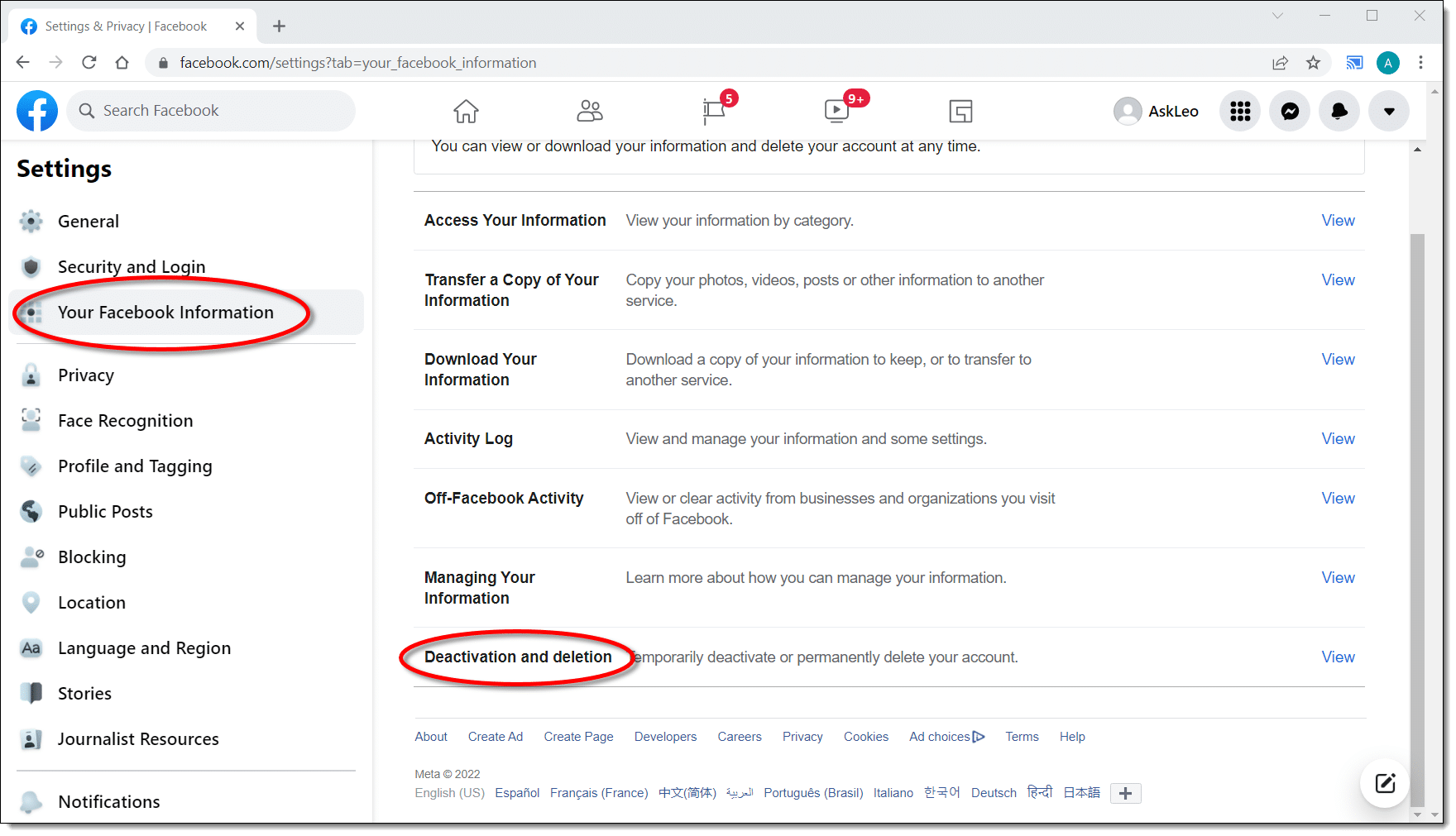
Clicking on View will give you the choice, with deactivation being the default.
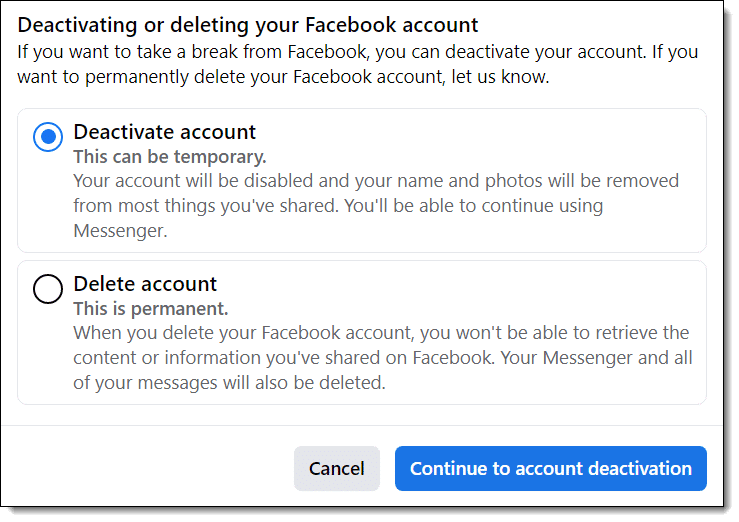
However, if you’re absolutely positive you want a solution that says “I’m never coming back“, this is not what you want.
You want to delete your Facebook account.
Deletion prep
First, delete all the ties you’ve created to your Facebook account from outside Facebook.
If you’ve ever used the “log in using Facebook” option on other websites or services, those logins will stop working once your Facebook account no longer exists. Go to each of those sites and change how you log in before you delete your Facebook account.
Are you using a Facebook application on your mobile phone? Delete it first, from all your devices.
Using Facebook Messenger? Delete that too, from all your devices.
As we’ll see in a moment, any still-existing outside connections to Facebook can cause your account deletion to be canceled.
Deletion
In the dialog above, click on Delete account, then click on the Continue button.
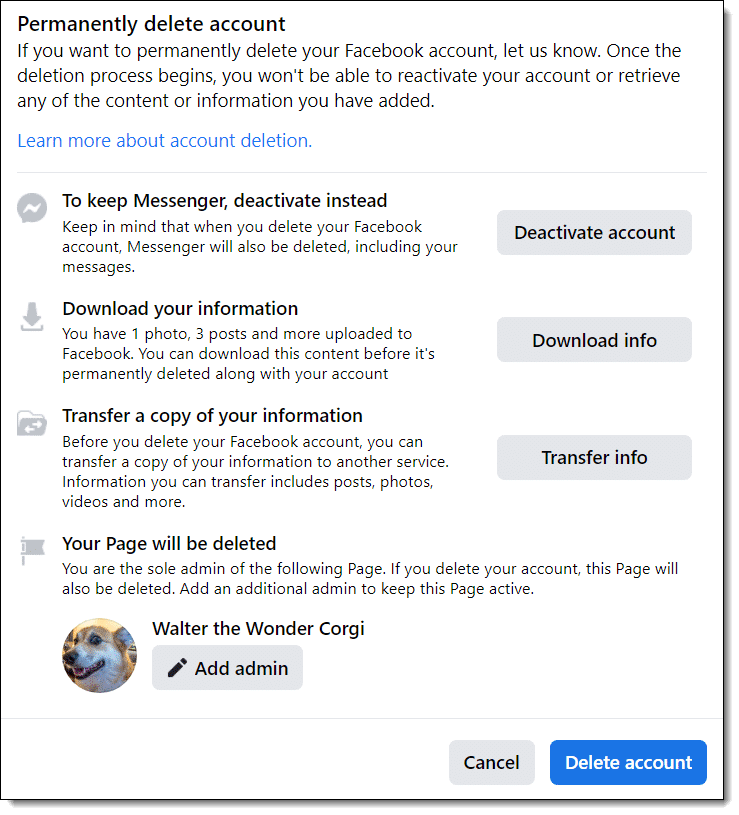
Pay careful attention to the delete dialog that appears. This details more ramifications of deleting your account and includes alternatives that may be preferable depending on your situation.
I would recommend choosing to “Download your information” to ensure you lose nothing posted on Facebook and nowhere else.
When you’re absolutely certain, click on Delete account.
Don’t sign in again
After the process is complete, you might be tempted to sign in to the account to make sure it’s really gone. Don’t do that.
It’s also common to accidentally sign in to the account, either on your computer or via one of the connected apps I mentioned above. Don’t do that either.
Don’t try to sign in to your account for at least two weeks.
I’d wait longer.
If you sign in within two weeks, you may cancel the deletion. If any of those external Facebook applications sign in again, I believe you also risk cancelling your account deletion.
After 14 days, the deletion is permanent. If you change your mind and want a Facebook account again, you’ll need to create a new one.
Do this
I personally don’t see any reason to delete Facebook accounts. If you don’t like it, don’t like using it, or whatever, then simply don’t sign in. Remove any content you don’t want people to find, make the account private if you like, but otherwise just pretend it’s been deleted.
That way, you can always change your mind.
Permanent deletion is permanent; there’s no going back.
Instead of Facebook, how about subscribing to Confident Computing? Less frustration and more confidence, solutions, answers, and tips in your inbox every week.
Podcast audio

Related Video


Chris Pirillo hit the nail on the head. Blaming Facebook for violating your privacy is like spray painting personal stuff on a wall and blaming the wall for betraying your privacy. Facebook doesn’t betray your privacy, YOU betray your own privacy by posting on Facebook.
Yes, but most people are not wise enough to see this logic (for being responsible.) I apply this logic not only to my Facebook activities but everything of my utterance, digital or otherwise and beyond.
I had deactivated my account but followed your link only to find a request to log in and then find that my account had been reactivated! There does not seem to be any way to delete it. I have no other connections to Facebook by the way,
I tried using the link to delete facebook. My account had alrady been deactivated for over a month. This link required I log back in and logging in simply reactivated my account! I still have no idea how to delete my account. “Go to this link” and “follow the instructions there” aren’t really helpful at all.
The difference between deactivation and deletion seems to be lost on some. The instructions that Leo provided may reactivate a deactivated account for two weeks but after that, the account will be gone and cannot be reactivated again. There seems to be no way around the 2 week period but at least the account will be gone for good after that.
IT WORKS! And, your account will be deactivated for the 2 week waiting period. Here’s the email I received from FB after using the link Leo provided:
“We have received a request to permanently delete your account. Your account has been deactivated from the site and will be permanently deleted within 14 days.”
This does work to delete your Facebook account. The reason i know is, i had two Facebook accounts, I deleted one of them because i did not use it that much. All info is gone it did take 14 or so days to be deleted.
If you search through Facebooks help or faq you will find the info on how to delete your account.
For anyone “seriously considering deleting” but not yet there, it pays to also consider that, at it’s root, FB is a money making proposition first and foremost, not a social sevice. This became clearer to me when I recently declined Facebook’s demand that I link my FB Profile Info to “Pages that reflect your interests.” The result of my refusal was that FB “wiped out” most of my information because I wouldn’t link it. Links are the money making medium for FB. So, to Facebook, I say “knock yourself out,” but don’t expect to use my personal info to make you money. And especially, DON’T FORCE ME THERE. I’ll vote with my feet. Thank you very much Leo for the guidance. I’m outa there.
If a friend who uses my pc logs into his account am I in danger?
26-May-2010
If the King(owner) of FB, is not keeping his word now, then should we not expect the he might go even further in the future? The nature of man throughout history, I’m sorry, doesn’t change much unless a bolt of lightning hit’s him and a voice from heaven calls down to him repent.==How often does that happen?==
So if he (the guru of FB) is reportedly not keeping his word to former buisness partners- (many of which are taking him to court or have already), and violated the trust of FB users for the sake of riches, shall we not deem FB a high security risk?
Can he not, let us say, sell us off to maliscious tricksters That are capable of untold horrors?
I’m speaking of us, the less savy users and more vulnerable security minded. I do not as yet have the apptitude and time to read and implement all of the great advice in your column. Yes I can Read lol but have’nt the skill and time yet to secure my computer. and impliment all the safety measures. I believe this is the same case for many of your sheep.
I Love your columns and hold yet the Idea that you are not coruptable, and would not be afraid of rocking the boat so to speak, if neccessary, by speaking out more firmly against this moral issue. Is there not more chance of risk then you hint too?
You claim that it is the nature of us who make us unsecure. I do agree. But have we all evolved already from stupidity? Becuase I did’nt get my diploma yet. So should not an upright teacher as yourself just steer all of us to safer waters? Or am I speaking out of place?
My concern is; if an enemy is amongst us should your advice be more of a safer route steering us clear away?
Yes you gave us great instruction but yet some of us have yet still for it to become part of our routine. I would dare to say that for the sake of your newer students and more vulnerable readers you would mention at least a few of the problematic senarios that a person like the proprieter of FB could enginear up for us.
Conjecture can be enlightining, fun and interesting. So could you play out some senarios for us, that are possible for the scrupolous who hold that kind of possition of power and resources?
My question is as follows: Is the possibilities of foul play by FB, limited to just what we have seen and heard already?
I heard that Facebook accounts were on the market for sale bundled up per 1000 acoounts at a time. Who and what could get a hold of these, and what evil could befall us?
Would it not be better that you say I’m keeping “my facebook account” but I am of course armored and weaponed up and a highly trained Jedi.
Thank you again for your love Leo.
Hey everyone we must donate also to the teacher lest he fall to comprimization. I made up that last word. I think.
Heck I wanted to put in emoticons but thats how un-savy I am still. Wait I just got it. (=>
Yours truly
Paranoyia inc.
Personally in the digital age… with so many sites like Facebook and robots scouting around ferreting out the places you go and what you see and do I feel that Privacy on the Internet is impossible. Impossible -that is- IF you use REAL information. I don’t have anything to hide BUT I am a very private person and do NOT like my personal information shared. Since I know at some point SOMEONE will use Spokeo, or some other info gathering tool I am careful. I also religiously take the following steps:
– I have a “throw away” e-mail acct for online signups with vendors i do NOT know enough about or trust yet.
– I do not post my full name WITH my address or phone on ANY form in a public place without using SSL technology. (secure socket layers) look for the Https://
– If possible I use a VPN (virtual private network) tunnel which hides my IP in public wifi’s
– I encrypt any info that is sensitive on my computers (bank info password lists etc.)
– ( I also always back EVERYTHING up. multiple times on multiple types of media – esp. music
(the music is worth many times my computers!!)
– and last but NOT least – when i close an account i FIRST use MIS-Info!
(misinformation).
If you are going to DELETE an FB profile…and you FEAR (like I sometimes wonder) that somehow that information MIGHT still be out there hanging around someday and you don’t WANT it to be there? Why not FIRST update it with the WRONG information… -leave it for a couple weeks and THEN delete it!! This way, Even if the info is ressurected somehow (say by an angry boyfriend looking to come back and find you) it will be the wrong home address and phone number.
– OH and by the way… just in case you THOUGHT everything was deleted… there is something called a WAYBACK machine. I have found domain pictures and information including phone numbers for domains I had back in 1994!!
IT’s a robotic web archival service!
It takes PICTURES of websites – even personal ones! and KEEPS them forever!
Its a good idea since it keeps government sites honest etc. but Whoa! things you didn’t know…
To follow up my previous comment. I went back into Facebook – which meant reactivating my account – then logged out before following Leo’s link. This now took me to the deletion page and I have successfully deleted my account – provided I do not log in again for 2 weeks! Thanks Leo.
all very wise, and like one poster the solution is not to sign up in the first place. But what about the arch privacy thief, Google, forced to reduce the time they hold data from 23 years following massive legal challenge by the EU. Leo, you have a Google custom search at the top of your page.
Thanks for the info regarding CLOSING the Facebook account. I hate that social site, & didn’t have my account for very long after hearing many horror stories. I have since forwarded the link to a friend who also wants to CLOSE and not just deactivate the account!
I have seen a tv show on this very subject on abc tv in australia there is a video link here.its a real eye opener.
http://www.abc.net.au/news/video/2010/05/26/2909495.htm
HELLO, YOUR PAGE IS HELPFUL. ALTHOUGH I CANNOTFIND THE ANSWER THAT I AM LOOKING FOR ANYWHERE! SOMEONE HACKED MY FACEBOOK ACCOUNT CHANGED MY PASSWORD AND CHANGED MY PASSWORD AND SECURITY QUESTION ON MY EMAIL THAT IS LINKED TO TMY FACEBOOK. I UNDERSTAND I CANNOT EVER GET BACK INTO MY EMAIL, WHICH IS WHATEVER. BUT I WANT TO PERMANTLY DELETE MY FACEBOOK ACCOUNT SO THAT I CAN START A NEW ONE SO I DONT HAVE 2 FACEBOOK ACCOUNTS UNDER MY NAME! PLEASE HELP!!!
@Peach
This article explains how to recover a hacked Facebook account. You should be able to change the password if you have access to the original email address you used to set up the account, unless that was also hacked. If that was also hacked, I would suspect it was someone who you know that hacked the accounts.
http://ask-leo.com/how_do_i_recover_my_facebook_log_in_password.html
Reading articles such as yours has really opened my eyes! I was once (foolishly) very active on the internet and have started limiting what is readily available to others. I left a number of groups on Facebook a while ago, not realizing that my posts would remain.
If I delete my account, will that also delete my posts on group walls? Furthermore, will it completely remove my information from Facebook’s servers? If not, what is the easiest way to go about doing these things?
21-Dec-2011
I occasionally wonder about such situations and similar such as when one is told that “all the information about you has been removed”.
What about all the earlier Backups?
In my working career on computers, we backed up the computers at the end of each working day, on an incremental basis.
These tapes were re-used on the same day of the following week.
At the end of each month (apart grom the “Final Month” below”, we did a Full Backup, the tapes being re-used in the same month of the following year.
At the end of the Final Month each year, we did a Full Backup.
In the 15 years of doing so, NONE of those YEARLY Backup Tapes were re-used, as some contracts required the data to be retained for 20 years from generally the agreed Delivery/Handover Date of the project.
Thus such information theoretically could be available for around 25 years after it had apparently been deleted from the “present-day” working files.
I don’t know the situation with Facebook and similar operations – BUT it does make me wary of what I do post on the internet, on all types of system.
Regarding my local Hard Disks, I remove them from the PC being discarded, keeping those HDDs at home, as being relatively safer than any re-formatting.
An overall way to delete any account is to simply violate their rules. It’s somewhat crude and crass, but it works. Community rules, TOC, minor copyright issues [and repeated many times], are good for quick results. This may require you to post real naughty photos, or use foul words. But I’ve seen it used several times, and works quickly and effectively. If you can live with short-term shame, you will be deleted. Bet on it.
I never thought you could delete your Facebook account until a friend told me how. Thanks, Leo, for sharing this info. It’s been over 2 months now and I still get emails from FB reminding me that so & so wants to be a friend. They really hate it when you leave them and I hated the way they hid the info on how to delete an account vs deactivating it. AND, the reason I did delete my account was because they changed my privacy settings twice and that angered me beyond belief. Plus, I hear they are using “face recognition” software and although I have nothing to hide, I think that is beyond intrusive. I don’t trust that site for anything.
To all of you reading this article: please remember, deleting your account only removes public access to it, all the data remains on their servers for at least 2 years and can be accessed by everybody with which FB has an contract for data sharing, and the government. And by data i mean absolutely everything you have put or done in your account. Nothing is actually deleted.
This is for Gigi Duru and for Alex Dow:
Granting all (or most) of what you say —
1. Not being a user of Facebook, I don’t know what’s in their User Agreement. However, unless it clearly says otherwise, deleting your account would certainly, by implication, revoke any consent to “share” the deleted information with anybody. Never mind “anybody with which FB has a contract for data sharing” — unless that User Agreement clearly spells out that deleted user accounts are fair game, I can’t see how they can legitimately share that data without your consent. Any consent you had previously given was revoked when you deleted the account, unless your User Agreement says otherwise (a good reason, by the bye, to read your User Agreement)!
2. a. Yes, the Government “can”. b. However, they need a Warrant, which means they also need a good reason. c. This in turn means that unless you’re doing something really, REALLY nasty, you’re just Not That Interesting. After all, there are THOUSANDS of people on Facebook! (Tens of thousands? Hundreds of thousands? Millions? Anyway, Far Too Many for the Government bother with Lil’ Ol’ You.)
Although not a heavy user of Facebook, I have recently posted some political comments. Googling my name in quotation marks brought up the first few lines of these remarks, even though clicking the link did not show them, I assume due to privacy options previously selected. They have asked me for further personal information which I am not going to supply to them, so I am unable to use my account anymore. Oh well!
ANYTHING posted online could be copied by anybody forever.
Hello Leo, first of all great articles!
I am not sure if you know the question to this answer and i hope you won’t find it out of place.
I was wondering if you could see which videos your facebook friends watched on facebook or is it private?
Thank you :)
Not available.
Leo, help. So it seems that I have 2 FB accounts under the same email address and name. Since a recent phone upgrade I am
Being logged only into the 1 with 3 friends etc. I can’t get back into my active one. Can you help?
Jeff
Each Facebook account has it’s own email address, so you can’t have two with the same. That “other” account must have a different email address — at least as it’s primary. If it has a mobile number try logging in with that.
I deleted my account but later realized I was using many apps using Facebook login. Now, the link is broken and I wish to delete my account from other websites too. Is there any easy way to do it or do I need to contact each website individually?
To delete your account with several websites, you’d have to go to each website individually and close them or change your login with them. There’s no way to do it in bulk. Each website is owned by a different company and each manages their websites individually and only in a few cases have worked together to have a unified log-in across websites.
I mistakenly used my Email address and phone number to open two Facebook accounts and I need to terminate one “the newest account ” without loosing the first original account.. I did so and its past one month now.. But still I can’t gain access to the first original account.. I’m been told that my Email address is been used on another account.. How long do I have to wait to fully have access to the account and how do I go about it..
Facebook only allows you to open one email account with each email address. Your email address is the login identifier. Something else must have happened.
Each website individually, I’m afraid.
my husband do not want me to have face book page my page is under kisha Jackson but I do not know my user id our my password to deactivate it
We cannot recover hacked accounts, lost or forgotten passwords. Please see these articles for more information on your options.
https://askleo.com/how_do_i_recover_my_facebook_log_in_password/ and/or
https://askleo.com/how-do-i-recover-my-hacked-facebook-account/
Unfortunately, if you no longer have access to the recovery email account or phone number, your account may be lost forever. It’s important to always keep these up to date on your account.
A One-step Way to Lose Your Account … Forever
I need to permanently delete my facebook account, I didn’t log in with an email address but my user name and I have changed my password quite a number of times but I could not log in for years now but I want the account deleted. what do I do?
Unless you can log in to your Facebook account, there’s no way to delete it.
How Do I Recover My Facebook Logon Password
How Do I Recover My Hacked Facebook Account?
If you don’t have access to the recovery email accounts or phone number, your account might be unrecoverable:
A One-step Way to Lose Your Account … Forever