Ebooks, which is short for “electronic books”, are books that you download and read on your computer. The “download” part is fairly straightforward, but it’s difficult to give one set of instructions that works for all users. And, to be fair, sometimes publishers make it harder than they need to as well.
Let’s see if we can’t cut through some of the confusion.
Become a Patron of Ask Leo! and go ad-free!
First Things First
In order to be able to read a PDF file, you must have a PDF reading program installed on your computer. Depending on your machine, you may already have one:
- In Windows 8 the “Reader” app is included
- On most Macs the “Preview” application is included
In addition, there are several third party PDF reading programs that you can download and install:
- Adobe Reader is the most “official” PDF reading program available on most platforms.
- Foxit Reader is a small, fast Adobe alternative for Windows.
In all cases, beware of and avoid additional offerings that you do not need; you only need the free PDF reading application.
In my personal experience, the applications that are included with the operating system are minimal, and I almost always end up installing a more fully-featured application. In recent years that’s the Adobe product.
Web Page Downloads
In this scenario, the publisher has directed you to a web page that has a link to a PDF. They may have sent you an email, but in this scenario, the information in that email is simply a link to a web page. More commonly, after you’ve purchased your ebook, the publisher’s shopping cart will simply take you to a page with something that says “click here to download”.
Here’s an example from my own online store, after purchasing a copy of Backing Up 101:
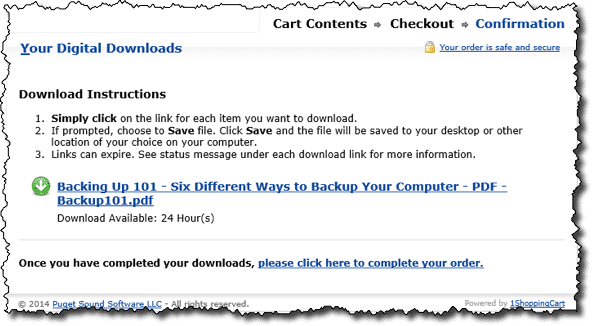
Now, depending on where you’re purchasing your ebook, your link may look different – it may look like a normal text link that says “click here”, it may be a graphic button, or it may look like a full URL beginning with “https://”.
I recommend you don’t just click – I know it sounds backwards, but rather than just clicking on that button or link, you should right-click – that is, click with the right mouse button instead of the normal left button. (Mac users shift+click instead). This will bring up a popup menu:
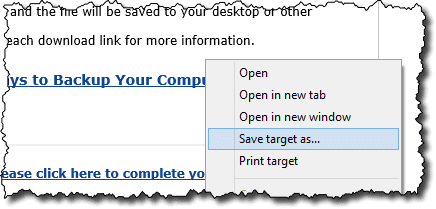
Don’t worry if your menu looks a little different – it varies, depending on the internet browser you’re using, and possibly on other software you have installed. The thing to look for is “Save Target As…“, “Save Link As…“, or similar terminology.
Click on Save Target As…. That will bring up a dialog much like this:
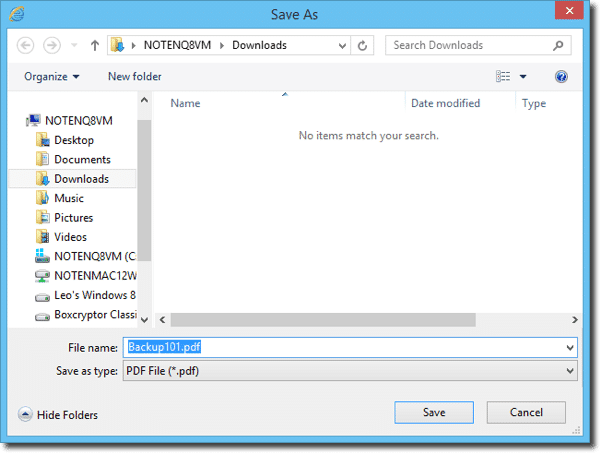
If you know the folder that you want to keep your ebook in, then simply navigate there and press Save. If you’re not sure where to put the ebook, I recommend your My Documents folder, or perhaps the Downloads folder as shown above.
In most browsers, you’ll then get some kind of completion message or dialog box. In Internet Explorer you’ll see something like this:

At this point, you can click on Open, and your PDF reader will open and display your ebook on screen.
Email Links
This is the case where the publisher sends you a simple link directly to the ebook’s PDF file somewhere on the web:
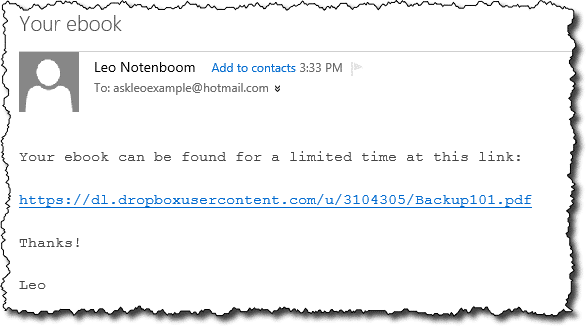
What happens next depends on how you access your email.
In many, if not most email programs the right click and “Save Target As…” approach we used above just works. Try that first.
If not, simply click the link in the email. Chances are the email program will then ask you if you want to Open or Save (or Save As…) the file. Always choose Save, and save the file to a folder on your machine. Again, where you save them is up to you – your My Documents or Downloads folders are always candidates.
In the off chance that the email program doesn’t ask you, and simply downloads the document and then immediately opens it in your PDF reader, you have a couple of options:
- Look for a “Save Copy As…” option in the PDF reader that opened – typically in the File menu. Not all readers have this, but it’s a convenient way to quickly save a copy in a location you choose.
- Close the reading program, determine where your email program downloads things – often a temporary folder of some sort – and then use Windows Explorer to copy the file to your desired location.
Email Attachments
Sometimes ebook sellers will send you your ebook in an email, as an attachment.
There are several problems with this approach. Often books are large enough that they trigger size limits along the way and fail to get delivered to you at all. Even if they do, spam filters will often prevent the mail from showing up in your inbox.
If you don’t get the email that you were promised, check your filtered spam – it may be there. If the email didn’t even make it that far, your only recourse is to contact the publisher.
Assuming you do get the email, you should see your ebook presented as an attachment:
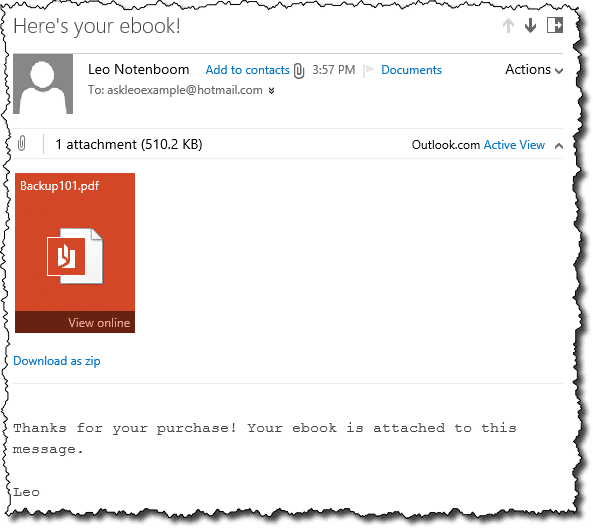
Once again, exactly what you see will vary depending on what email program you are using.
What to do next will also depend on that program. Options include:
- Clicking (or CTRL+Clicking) on the attachment may pop up a “Save As…” dialog that will allow you to specify where the file is to be placed.
- Clicking on the attachment may open the file in your PDF reader.
- There may be a separate “Save Attachments…” option on a menu – often the File menu.
- There may be an option to view the file online, as shown above. (Outlook.com uses Word Online to view PDFs, Gmail displays the PDF in a floating window, other email services may have other options.)
- There may be additional download options.
Returning to your ebook
Most all of the examples above download your PDF ebook to a specific folder on your machine, often your My Documents folder, or your Downloads folder.
Generally, you can choose any folder you like, depending on how you want to organize the documents you intend to save.
When the time comes that you want to open and read your downloaded ebook, simply open Windows Explorer (aka File Explorer in Windows 8), and navigate to that folder:
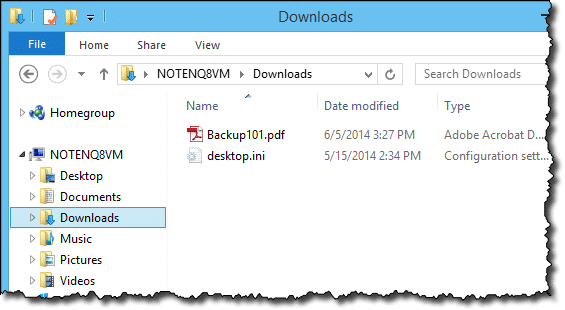
Then just double-click on the pdf file to open it in your PDF reading program:
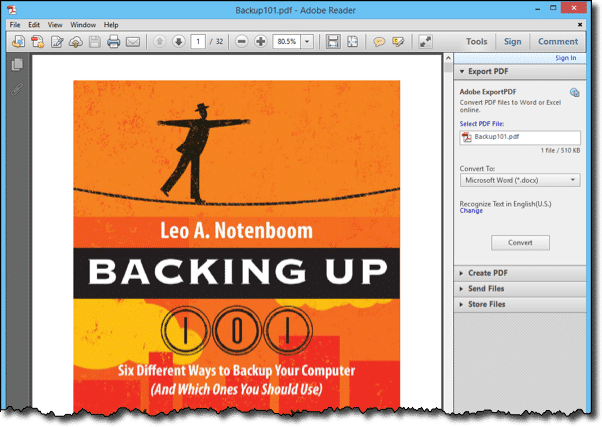
Happy Reading!


I recently ordered an ebook for crown molding and was unable to download it. Would you kindly help me. Thanks
Did you follow the steps in this article? How did it not work? What part of the process failed? Any error messages?
Can I then save the book to a CD? Or are there “things” which will prohibit that? With possibilities of a “crash”, I would like to have them / it, more secure.
Thanks
Better hurry, I have a feeling that CD-R’s and DVD-R’s won’t be around long. On my aunt’s new Imac, the drive is optional and $75 more (USB). By the way, how long do blank disks last in storage, I bought a 100 of them last year. I may not use them for years to come.
Sure. You can burn a PDF to CD.
I have tried, and tried, to download e-books in adobe format. All I keep getting asked is whether my computer is registered to allow this. I have Adobe Reader 9 already installaed but I just keep going in loops to try to access anything that allows me to download. I even contacted Adobe customer service – the person was in Mumbai, India and suggested I go to the Adobe chat room to see how I can do it – they didn’;t have any technical services there! Boy, what a frustration but thank goodness for Sony Reader – that’s a cinch!
I believe it is Adobe Digital Editions rather than Adobe Reader that requires registration of your computer. There is a link to register. If you don’t register you can only read on this one computer.
First thing is email your questions to the person you purchased the ebook from…they might be able to tell you exactly what you need to do to open it.
can down load but request password to save where do i get password
Syd
20-Nov-2009
how do i copy protected pdf file on the internet?
12-Mar-2010
Can I download an eBook on other devices apart from my desktop, eg iPad, Kindle etc?
01-Apr-2010
It depends on the device and format. Everything on the Kindle, for example, is technically an electonic book (ebook), but in their proprietary format.
I bought an eBook through eCampus.com and I downloaded it and everything but all that comes up is a code that I don’t know what to do with. I tried your method that you’ve shown in the article above but it didn’t work. All I get is the code. What do i do?
adventures of huckleberry finn
25-Jul-2010
Huckleberry Finn is downloadable from Gutenberg.org, along with thousands of other, older books that have passed copyright. Best of all, they are free.
My university’s library has many E-books on the database. But you have to be connected to the internet (the library’s database) to read them, and even then, the reading is not easy, because I have to zoom in just to see a section of the page.
Is there any way to save the E-book as a PDF or atleast make the E-book read-able offline as a webpage?
Thanks
More than likely, however, the ebooks are protected and it is intended that you read them in only on campus. In that case saving it to your computer is much more difficult, and would be an infringement of copyright laws. Can’t help ya there.
Best is simply to ask your librarian for assistance. He/she would know both the rules in place on the ebooks, and the methods of accessing them.
28-Feb-2011
@Jack
If Adobe isn’t unable to open a PDF sent by email, it’s not because Adobe doesn’t open emailed PDF attachments, as millions of PDFs are sent by email. Most likely the PDF was damaged in the sending or was defective in some other way. Try to have the PDF re-sent.
Your explaination was very thorough but I think it is directed to Windows users. I have as ASUS which has an Android OS. Can you advise if you can taylor your instruction for users such as myself?
I Have purchased an eBook, but when I open it, the screen displays “eBook file protected!” How can I open and read my books ?
@Marike
You’d have to be more specific about which website you bought the eBook from, and which format was the eBook file (the letters after the dot)?
Hi
I just purchased an ebook that came as an attachment in an email. The directions instructed me to download EPUB and for that I needed a Nook or Kindle. I downloaded the free Nook ap from B&N, but the book has not downloaded. It now says I’ve exceed the two clicks and the book has been disabled. I contacted the publisher, but have not heard back.
Like you, I would hesitate to recommend a software program, but for ebooks I find (from long personal experience) that the program called Calibre does just about everything you would want to do with ebooks. It is free, gets updated regularly etc and I have nothing to do with the author.
It will read all formats of ebook, convert from one format to another, send formats to tablets connected to, edit ebooks PC etc etc.
Once I have the ebook downloaded in pdf format can I read my book on another device? Ex: sometimes sitting at my laptop gets uncomfortable and I’d like to move to the desktop because of its larger screen.
You should be able to just copy the file, yes.
Thanks for another Very Good article, Leo.
I always use Save or SaveAs for anything I download so I can scan it before opening it.
I was using the Foxit Reader until a couple of years ago I begin to have problems with it on my XP pc.
So I asked for suggestions of another PDF Viewer on a FIDO BBS and someone suggested PDF XChange made by Tracker Software.
So I went to http://www.tracker-software.com and downloaded it.
I’m still using it.
You might consider adding it to Your list of PDF Viewers.
Thanks a bunch!
I got this for my grandson and have tried everything to get the eBook but still can’t open it please help
What did you get, where did you get it from, what steps exactly did you try, and what errors, exactly, resulted?
I have just bought a new iPad. I downloaded 3 free books from the iBook site. When I open iBooks I get a blank white screen. There were book titles behind this screen but in trying to open them they have disappeared. Can you please get me up and reading?
I read this article and tried everything but I can’t open my ebook. I received the link in an email and clicked it download. It’s my first ebook. So unfortunately I turned my computer off after it was done. Didn’t know to save it so I would be able to actually read it. I know it’s on my computer because I made sure to wait for it. Any help would be greatly appreciated!
How do I get Wi-Fi onto my kindle. I have tried some of the instructions that are shown on the internet but nothing seems to be working. Is my kindle too old for all of this new high tech. The Kindle that I have is Kindle 7? Purchased it about two years ago.
Any help and step-by-step instructions would be greatly appreciated. Thanks. also thank you for all of the above info. Very helpful. Vera
What’s to keep someone who has downloaded my PDF-file ebook from changing the book or editing the book, copyrighted or not, if the person has ADOBE ACROBAT? If you own ACROBAT, can’t you just change ANY PDF FILE, ebook or not? Then, having changed the book and adding their name as author, SELL the PIRATED book as their own, then accuse me of copying “their” book and violating “their” copyright?
What you describe is possible, though a lot of work. Same is true of any format, when you think about it. Including paper.
That’s why it helps to register a copyright which you can use to prove you created it. There a few ways to do that, but I won’t go into it here because I am not an expert in that field.
Dear Sir,
I recently ordered an ebook from Google. I made the payment, money got debited from my account, however I did not receive my ebook, neither did I get any indication as to when I will receive it.
I am worried.
Kindly help me out.
Thanks and regards
From Google? You’ll need to return to the online store where you purchased it and contact their customer support for assistance.