From your description, I’m going to assume you mean that all this is happening within Internet Explorer, though similar features are present in other browsers (as well as other applications).
It’s easy to accidentally hide menus and toolbars.
I’ll examine those, and show you how to get your toolbar, menu, or whatever it is that you’re missing back.
Become a Patron of Ask Leo! and go ad-free!
The big surprise: F11
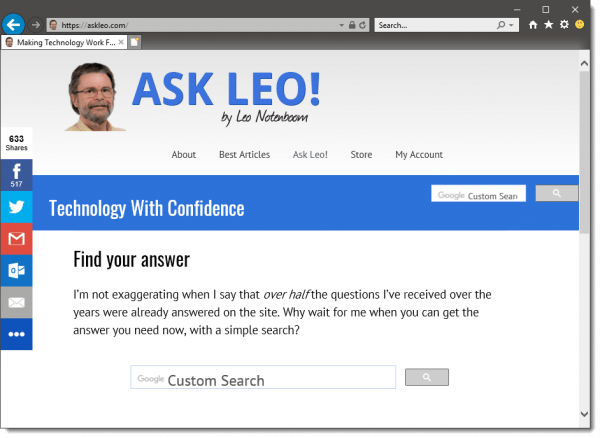
A lot of people get bit by this one. Here’s Internet Explorer (showing the current contents of https://askleo.com), displaying its menu and toolbar as normal:
And here it is after pressing F11, accidentally or otherwise:
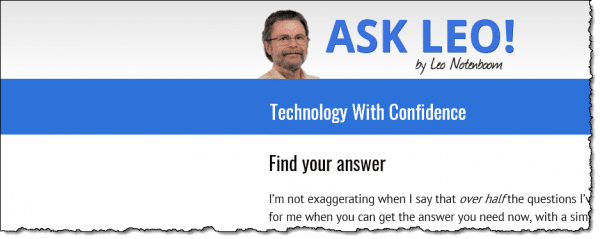
F11 instructs Internet Explorer to a) go full-screen, and b) hide all the menu bars, toolbars, and window frames.
If you find yourself in this situation unexpectedly, just press F11 again, and it should return to normal.
F11 works the same way in Edge, Google Chrome and Mozilla Firefox, meaning that if you suddenly find yourself full-screen and with no address or menu bar in those browsers, try hitting F11.
In fact, F11 has become enough of a pseudo-standard that if you find yourself in this same predicament in any application, give it a try.
The Internet Explorer Menu Bar
The by-now-familiar File, Edit, etc. menu bar may default to being hidden in IE, as you can see from the “before” image above; but it’s easy to get back.
Approach #1: press and release the ALT key.
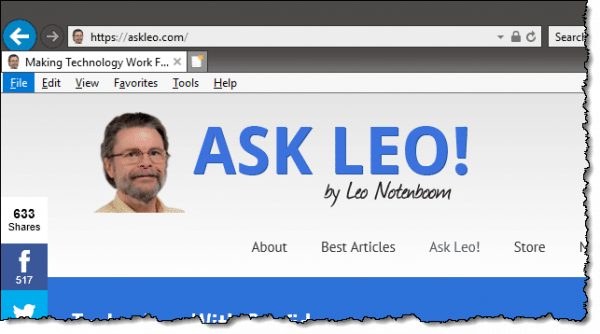
This will make the menu toolbar appear temporarily, and you can use the keyboard or mouse to access it normally, after which it goes back into hiding. This works when you’re in the full-screen F11 mode above, too.
I did call it a “toolbar”, and that’s the key to making it appear all the time.
Approach #2: right-click in an empty area next to the tabs, or on the Favorites button, and you’ll see a dropdown menu, one item of which is “Menu bar”. Make sure that’s checked, and the menu toolbar will reappear. Now it won’t go away when you use it.
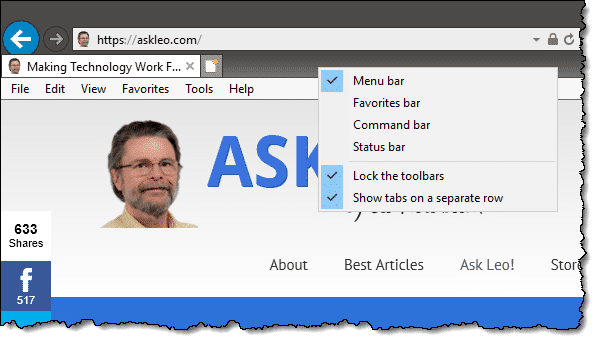
That popup menu has options for several different toolbars you might want to display.
Mozilla Firefox has this same functionality. Google Chrome no longer has a menu bar, per se, but instead relies on the vertical ellipsis (three dots) on the far right of the address bar.
Do this
Subscribe to Confident Computing! Less frustration and more confidence, solutions, answers, and tips in your inbox every week.
I'll see you there!


this also works in Google chrome and Firefox and other browsers as well thanks for awesome tips Leo and happy thanksgiving.
Great tip! Thanks for sharing this solution. This is a commonly asked question and your tutorial is perfect – short, sweet, and to the point (plus screen shots are always helpful).
For more shortcut tricks in IE, visit http://windows.microsoft.com/en-US/Windows7/Keyboard-shortcuts
Cheers,
Cassandra
IE Outreach Team
Either IE 9 Beta does not have a traditional Menu Bar or I cannot find it. I really miss it. Can you help me restore it, or create a new one?
Thanks,
John
Petaluma, CA
Never mind about my not finding the File Menu on IE 9 Beta. I found it…by pressing F11…the tip you gave first, naturally.
Ouch,
John Hess
Petaluma, CA
I don`t want to waste space with the file menu up there all the time and if I need it for one thing or the other I just press “alt” and it appears till I press it again and it is gone again in IE 8.
Ouch. What were they thinking? I teach Seniors computer classes and I guarantee they accidentally do this one … and then panic. Also, I used the ‘alt’ suggestion to temporarily show the menu bar again and it does not work for me.
F11 and ALT don’t work. Right click don’t have option to choose menu toolbar, and only show: restore, minimize and nView option. Please help
My laptop has wireless button and when I turn it on it doesn’t come any option on toolbar what should I do?
Thanks worked great, not after hitting f11 as that went to the ‘even more full screen’ but after rt. clicking on favorites then making certain menu bar was clicked returned it auto..
Thanks
Lee
Yes this got my tool bar, and menu bar both back up for me.
I looked all in my books I have on using a PC, and found nothing that was of any use for me.
Thanks for this information, and I do appreciate you posting this for us who need it. 🙂
my icon for my email is gone on my tool bar, how can i get it back
Thank you, Leo, it worked for me. It worked in Firefox. I was cleaning the dust off my laptop and suddenly everything was gone, tabs, toolbars … The only thing that would come up was yahoo and that was full screen. I found Ask Leo and tried several buttons and having no solutions, but then f11 worked suddenly. Thank you, thank you Leo.
Thanks so much. I got it back and was able to fix something else that was a major problem. I can also finally clean up my cookies file. It’s a disaster. Many thanks, Leo!
thanx F11 worked….
Thank You! My computer got a “bug” and it came back from the shop with a different tool bar. I was not able to find how to print stuff with the new bar. I’ve had an aggrivating 7 months! And then today you pulled up and within minutes my familiar tool bar is back AND I just printed this article using it! You are a blessing to my personal harmony!!!
F11 works in Firefox and Chrome and in most other browsers.
I tried it all. F 11 just made the screen jump around a bit, right click on favorites onny brought uphowing navigation bar size of icons, default office home mobile and customize (the icons offered by msn). Ineed to get to the tool click on to get to internet options to fix a problem. Can I just download a more appropriate task bar that has what I need.
You just saved the day for me…F11 was the culprit!
Thanks, F11 got back menu options. Even Microsoft Support site did not mention about this. It only said click “Menu Bar” option.
Thank you!!! For knowing exactly what I was meaning and not giving a high tech answer.
I was looking all over for the “Tools” tab, couldn’t find it, was going nuts.
Thanks!
Leo, I was wondering, after you delete your history on the places you visited, how do you get them back?
Once you’ve deleted the history it’s usually gone for ever. Otherwise, there would be a lot of people complaining that they can’t really delete their history.
Generally you don’t – you deleted them. (Forensic professionals can sometimes recover some of it using undelete software and intimate knowledge of how things are stored, but that’s not at all guaranteed.)
How do you look at your cookies, I used to get a whole list of the history and now all I get is just some boxes to click on and it doesn’t come up with the whole list any more. Is this something new? Or did someone touch or click on the cookies to not make me able to see the history pages. Thanks
Depends on the browser you’re using, but most all let you look. IE 11 made it hard. Internet Options – Browsing History – Settings – View Files in the General tab, and then use the search to search for “cookie” – seems to do the trick.
Thanks for the tip – F11 worked a treat
file edit help toolbar not on computer. windows 7 64bit using explorer and google chrome and tried all options given f11 etc and nothing. No right click option on existing toolbar with favourites on. No spanner just three horizontal lines top right. I NEED MY FILE SAVE AS OPTION. Aaarghh!!!!
any help please would be welcome (without the use of programming language)
Tony
menu bar has dissappeared at the top of my screen. There is no bar to click on. f11 doesn’t work either. I’ve tried several things to no avail. Someone said click on the gold star at the left of ur screen 4 ur favorites icon to come up, I don’t have a gold star. Very frustrated!! help
tool & menu bar gone, but everything you have suggested doesn’t work for me. some of the things I’m told to click on , I don’t even have. and when I click on the alt or curl button theres nothing Help.
Thank you so much for writing this! I found myself with this problem after a toddler pressed various unknown buttons on my laptop. I wasn’t sure how to describe the problem let alone what the solution was. I’m very grateful to have stumbled upon this very helpful site! You do a really good job of explaining things in a simple manner, and I found the pictures very helpful when following along.
Thank you, Leo. I didn’t want to have to ask my son for assistance. Again. I am looking forward to passing this on.
That was a wonderful and simple fix. Most appreciated.
How do you right click, if you have a laptop? I would like my toolbar back..
Depends on the laptop. Typically there’s a right button to click with. Sometimes clicking with two fingers at the same time does it. I believe SHIFT+click will also simulate right-click.
Just out of curiosity, after reading your comment, I tried the shift+click with a couple of scenarios, and it didn’t work as a right click. In some cases, it works like a normal left click, in others, it does different things. In IE it opens a link in another window and did nothing when I shift+clicked on the IE toolbar.
We just updated to Windows 10 at work. My outlook didnt work so the tech had to reload Office…In Outlook I dont have a menu bar to be able to adjust the “view” or any other tools . Is there a way to get the menu bar back in outlook??
Hello
When I downloaded Windows 10 I lost my AOL tool bar.
I have no Idea how to get It back and all of the problems
that the people above me here. I have the same problem
to.
I mean all of them are gone and I need those they really help me out.
I thank you and I hope you can help me PLEASE
Judy Greene
Your information on the fix for the menu was right on target!!! It worked the first time and I got my Menu Bar Back!!
Thanks for your help!!! Saved me a lot of time!!! Keep up the fine JOB!!!!
Thank you, Leo. Got my toolbar back. It’s taking me forever to work with Windows 10. Another question. I like to play games on Pogo. It wants me to use Internet Explorer, NOT Edge. Trying to switch my browser to it is difficult. Any easy way to do it?
Thanks, again, for my toolbar, and in advance, for the answer to this question.
Arlene
Leo, I have a new computer and Windows 10. I can’t find my toolbars or menu bar. My alt key doesn’t seem to work and I wanted to find my history. As you can see, i’m just up the creek without a paddle. Please help me out.
Thanks Leo, you rock. support all other positive comments above
cheers
LEO, GOOD MORNING, SORRY ALL CAPS, BUT I AM SO STRESSED, AND I HAVE NO IDEA HOW TO EXPLAIN ALL OF WHAT I THINK I DID, FIRST OF ALL, I HAVE A TOSHIBA LAPTOP, OUR USUAL PROGRAMS WE USE AND THAT HAVE BEEN STORED IN THIS COMPUTER ARE, INTERNET EXPLORER, (that blue E), and of course Toshiba, when opening the computer to read news, play games, facebook etc, I HAVE A BLANK PAGE FOR INTERNET EXPLORER, I think I messed up, when I went to Microsoft, or Microsoft Edge, completely by a mistake, don’t know how I even got there, ok, so I put my name, etc on there, but I DID NOT SIGN UP FOR AN ACCOUNT, so why is Microsoft taking over my computer, and where did my Internet Explorer, and all of the things that go with it go, oh, oh, wait, and the computer continues to tell me that, I’m offline, Leo, please, I am so dumb, and not even computer savvy, I go to places on this laptop that a 5yr old shouldn’t be on, Oh my goodness, please help me, and my games won’t work.
Good Morning Leo, I just submitted a comment, just about two seconds ago, please let me know if it was not received, and I will submit, another one, the comment was pertaining to my laptop, Internet Explorer, has left the building, blank white page, and Microsoft has taken over, I am not computer savvy at all Leo, and I have been trying for a couple of days, hours, to try and fix this situation, Well, I think, I have really messed it up, only because I have no idea what I’m doing, I am so happy I have found this website, Leo, if you have patience of Job, this would be great, I also, somehow have Microsoft showing up, and Internet Explorer has disappeared, my computer, tells me that I have no connection, Every time I go to Facebook, and try to play on my WSOP, Poker Tournaments, it stops working, no pointing of the mouse, no nothing, I want and need to get rid of Microsoft, plus the symbol is in the upper right corner of my computer, and also a lot of unwanted items have been added onto my login bar, Thank you Leo, I know I will be a handful, please help me as I have no idea, what I’m doing, with all my regards and respect!
Thank you Leo. I resolved putting back the Menu bar, File, Edit, View….. in Internet Explorer. I just press F11 on the top of Keyboard as you instructed.
I can’t believe other sites tell you to download this and that, or to type this or that, and your instructions were just a click.
WHAT DID YOU TO GET YOUR MENU BAR BACK AT TOP
Sounds like she read the article and did as recommended: Pressed F11
Leo,
Thank you so much! I was at my wits end without the File, Edit,….. toolbar. You’re terrific.
I can’t get my tools view files etc. bar and I lost my favorites two days ago please someone help?
Without knowing which browser you are using, it’s impossible to to help.
how do I get this computer to print the menu bar has disappeared how do I get it back
I CAN RETRIEVE MY TOOL BAR BUT I CANNOT KEEP IT ONLINE IT JUST DISAPPEARS WHAT DO I DO TO KEEP IT ONLINE?
Thanks, Leo. After spending at least an hour trying to retrieve my toolbars, I luckily found your site. You made if simple.
Thank you very much for helping me restore my missing menu bar. Painless
Thank You!!!!! 🙂
Amazing. After reading through dozens of articles about restoring the top of the screen so I can switch between tabs, with no luck, it was as simple as pressing F11.
Thank you
Thank you so much – this was perfect!!!
Thank you, Leo. I like people like you that are willing to post helpful instructions on the internet. Not only helpful, but very easy to follow instructions. My computer crashed a few days ago and that put me through a little bit of stress getting it repaired. My menu toolbar disappeared as well of course and I had completely forgotten how to recover it. I’m all set now thanks to your simple and easy instructions.
-Thanks
William
Related to the question posed is a problem I keep encountering with my FireFox browser: Every so often my settings disappear and the browser loses my customizations. The theme disappears, all sorts of things are misplaced. My FireFox profile appears to be intact. I’ve got the latest FF 65.0.2. Inevitably, I have to copy a backup of my profile to my Firefox profile directory to restore it. But I’d sure love to know why the profile goes wacko in the first place so I can prevent it from happening at all.
Thanks Leo,
This time is no different to any other time.
Your tips techniques & comments work EVERY time.
F11 it was! Thank you so much for the tip.
Leo – You are a guardian angel….. I retrieved file with your simple
directions… Do you have a book of problem solving? Have a
blessed holiday.
Many if not most Ask Leo! articles are about problem solving. You can use the search field on any askleo.com page and search for an answer. If you can’t find the answer after a couple of searches, you can Ask Leo a question.
F11 doesn’t work on Google Chrome on my laptop pc. It adjusts my screen’s brightness.
I have a new computer and it does not have the tool bar, which I need to open and view files for html. I can do open with ctrl+O but cannot get view. Any insights?
You may need to hold down an “Fn” key on your keyboard to get F11 to work the way you expect. (There’s also often a setting to change the default for using Fn.)
Many laptops come with the default of having the function keys perform the Fn functions (the icons shown above the Function key number). Laptops allow you to change this, but unfortunately, I can’t explain how because they are different for different laptops. You should be able to google your laptop name + change Fn key default.
my chrome display only covers about 70 per cent of my screen
Are you unable to resize (click and hold on an edge and drag it), or maximize (click the maximize icon to take it full-screen) it?
I want to thank Leo very much for the help. After 3 different websites and lots of different technical advice that didn’t work for me, Leo said “Try hitting F11. Wow, reeealy. It was just that easy. Thank you again!
hey i hope you can help me my Task Bar no longer shows up when using edge browser only. is there a way to bring it back
Could it be this: https://askleo.com/my_taskbar_is_missing_and_i_have_no_start_button_what_do_i_do/ ?
Or this: https://askleo.com/how_do_i_get_my_menu_and_toolbar_back_in_internet_explorer/ ?
Thank you. F11 works. So easy.
THANK you for making it so easy, straightforward… Happy 2022
OMG! I have ‘lost’ my menu bar after shutting down quite a few times now. THIS answer is the quickest and easiest method and the most understandable way to follow on getting my menu bar back. Thank you so much for your invaluable help.