What you need is called a “signature”.
What’s a signature? It’s the title, company, phone number, fax number, email address, pithy quote, legal disclaimer, website URL, list of website URLs, call to action, and/or dashed line that many people put at the bottom of every message that they send.
Sometimes, their signature even includes their name.
Become a Patron of Ask Leo! and go ad-free!
My signature
|
I have a keyboard macro that automatically types the following for me: Leo A. Notenboom ---------------- https://askleo.com/about - Ask Leo! https://biz.askleo.com - Ask Leo! On Business http://leonotenboom.com - Everything else |
That’s the standard signature I place at the bottom of many of my emails.
While a keyboard macro or other shortcut is one way to do so, many email programs have the ability to set up a signature automatically.
Signatures in Outlook.com
In Outlook.com Options, under Writing, Formatting, Font and signature is an option to define the signature you’d like.
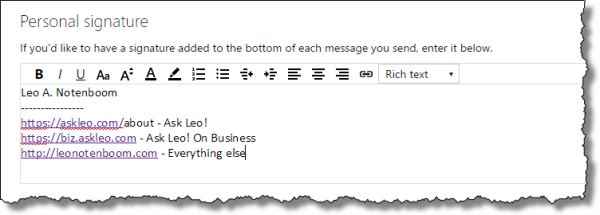
Just type your signature as you’d like it to appear at the end of every message you compose.
Signatures in Outlook
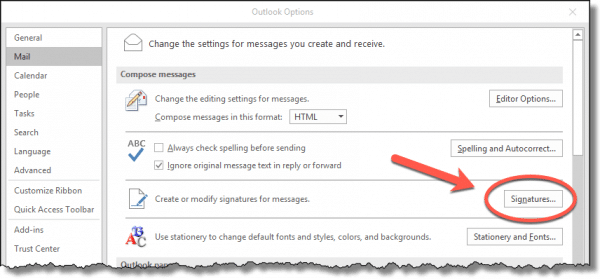
In Microsoft Office’s Outlook (2016 in this case), in File, Options, Mail, click on the Signatures… button.
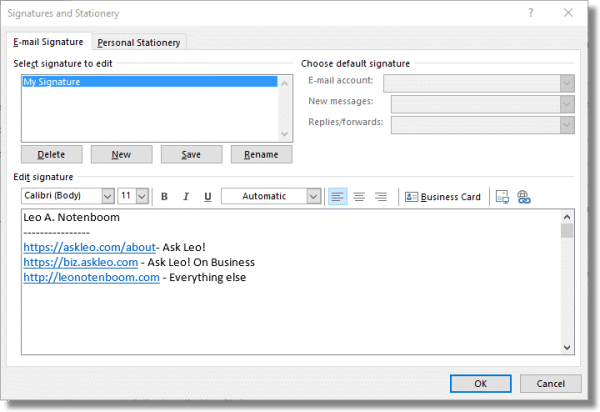
This will bring up an interface for adding, editing and managing multiple signatures.
Signatures in Thunderbird
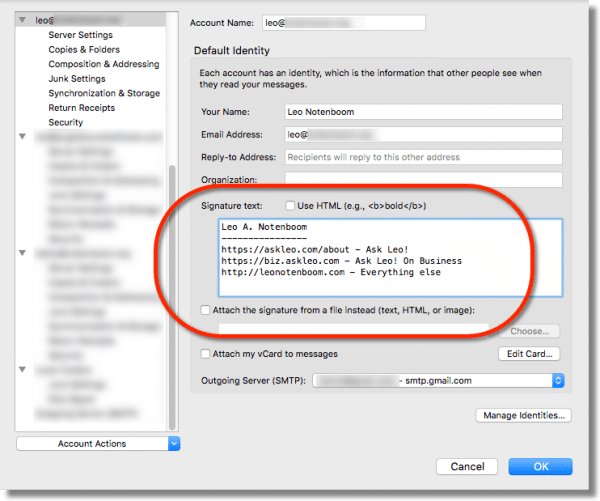
Thunderbird maintains signatures in the settings for each account. In Tools, Account Settings, click on any account in the left-hand pane, and the right-hand pane will include the settings for a signature.
Signatures
Signatures are a great way to make composing your email a little easier, and are often recommended as a acceptable way to promote a business or cause. My only caveat is this: keep them short and simple – especially when you email to discussion lists. Long signatures can easily get in the way of your message and unnecessarily clutter up message archives.
But do include your name.

I have a problem with inserting a signature manually with Outlook 2002. This works fine with Outlook 2000. When I try to manually insert the signature the only choice it offers me is my network name and not my electronic signature. I am sure that the electronic signature is there and it inserts when set to auto but not when I try to manually insert.
What is the message that is at the bottom of emails that I receive called…. sometimes have a notification that the person is using virus protection or advertises yahoo… what is that called and how can I set something up like that?
Derek
I don’t use outlook or thunderbird. I have a Shaw email. So how do I add a signature to that?
If that’s a web interface, you’ll have to ask Shaw.
A signature, as described in the article you just commented on.
I think Derek is referring to a message automatically placed at the bottom of emails such as this one:
No virus found in this message.
Checked by AVG – http://www.avg.com
Version: 10.0.1424 / Virus Database: 2425/5020 – Release Date: 05/24/12
or this one:
This email is free from viruses and malware because avast! Antivirus protection is active.
You can simply add that as your signature. (Which shows you exactly how much you should believe those types of messages -> not at all.)
That’s why I always set my antivirus to NOT add that kind of “certification” on outgoing messages. I let it add the message on incoming messages.
You can download “Phrase Express” and use the free version. You can have multiple signatures and even add famous quotes. It can be used with any mail client even web mail. After you set up the signature you assign a shortcut key to insert it whenever you need it.
I am experiencing the same thing that Judy Bush in the first response is. When I go to manually insert a signature the only thing that is available is my alias and not the signature. The signature is normal when in the auto mode.
Thanks,
Troy
Hi,
I to am at a loss with this in 2003. As with other users, it comes up fine automatically… but I don’t ALWAYS want it to come up if replying. I could manually insert in older versions of Outlook. (2000 I think)
The best I can do in 2003 is to go into options, open the signature file and cut and paste it into my message.
There has to be an easier way.
Can anyone help?
Is there a way to have Outlook insert stored information into a signature, for example the name you entered when you installed Office? I’m thinking of a department signature that everybody in the group would copy to their PC, and without individual modification it would insert their own name above the dept info.
How do you get an icon or .gif to appear automatically with your signature?
I tried to print this article on email signatures, as I do with something that requires enough steps that I need the printout right in front of me so I don’t skip something. However, in Print Preview only the title showed, no text. I’ve printed other instructions from other Ask Leo questions, no problem. I tried a Save As, got only the title. Would appreciate a little help, please. Thanks.
A coworker has Microsoft Outlook 2003 SP2 small business edition. When inserting a signature in a new message, you should be able to just go to INSERT then SIGNATURE then pick which one you want. On her computer, when she goes to INSERT, there is NO SIGNATURE option. Is there a problem with her version? Do you suggest anything? Thanks.
A slightly different topic, I would like to insert a recipients entire address (Name, Street, City, etc.) from a Contact list entry into the body if my email messages. Is this possible? I currently go to the contact entry, copy (using the copy command from the menu), Paste Special into the body of my email message as either unformatted or Unicode formatted text (either seems to give an identical result) then format the result by removing the field identifiers.
I use gmail ,could you direct me how to get my name and tiltle at the bottom of my email, noting that i do not use microsoft office out look. Thank you
@Aboahmad
In the Gmail web interface, there are also options to have a signature. Click on the gear icon on the upper right, make sure the General tab is selected (it usually is by default) and scroll down to signature and fill in whatever you want to appear on all your emails sent from Gmail.
I’m using Windows 7. Outlook Express is not saving the signature imported from Pictures. The Outlook Express tabs do not feature Tools > Options > Signature as did Windows XP. How do I save the signature?
I now recommend that you move to a different email program.
I’d strongly suggest you read this article for more information: Why Outlook Express Must Die.
All the existing articles on Ask Leo! about Outlook Express can be found here: Outlook Express
18-Dec-2011
@John
I’m curious… Win7 doesn’t support or provide Outlook Express. So you can’t be running it on a Win7 machine. Do you mean Outlook?
Here’s an article about that:
Outlook Express
Nit: Rather than a row of dashes, you’re supposed to precede your signature with a line consisting of solely “dash dash space”. That way, any standards-compliant email (or news) program will know that anything following is a signature, and may treat it differently.
I use the similar technique in Gmail. My all emails go with a signature. But thank you for sharing the info. Many new marketers will get benefit from this.
Is it possible to insert a reproduction of my actual signature at the end of emails?
This can be accomplished with some email programs. This is how to do it in Thunderbird.
1. Create an image file (transparent .gif or with a white background) of your signature. (You can also create an html file containing text and a link to an image, but it would take too long to explain how to do that)
2. In Thunderbird, on the left pane, right click on the account you want to add the signature to, and select Settings.
3. Check the box which says “Attach the signature form a file instead (text, html or image),
4. Click choose
5. Navigate to where your image is located and double click on it.
6. Click OK, and you’re done
Other email programs would probably work similarly.
You could do this using a graphic. Basically, take a picture of your signature, crop it, etc., and then insert it as an image.
If your email program supports rich text and images in signatures, sure. You’ll need an appropriately sized jpg or png image (picture) of your signature.
I have MS Outlook 2003. I use the Signature Feature for every email. BUT, when the signature is more than one line MS Word puts a carriage return in. This space DOES NOT show in the Signature Edit Box in Options. Has anyone else experienced this. It drives me nuts. Any info would be appreciated.
There are some schools of wisdom which suggest that in an ongoing conversation, the signature should not appear after each and every reply. As a result, it is possible to find a setting in programs like Thunderbird or Outlook, which automatically insert a signature in a completely new email but not in a Reply. For your very first reply you’d click Insert > Signature, then not insert it for following replies as the conversation continues.
If I missed the answer, I apologize; I did read everything. I want to add my name and a short quote to the bottom of my emails created on my android phone and have not been able to find a menu or button for that. I did discover a while ago how to do it on my desktop browser, but only recently came across a quote worth adopting as my own. :)
Depends entirely on the email application you’re using on your phone.
Please, how can one edit the E-mail account under Choose default signature? I need it asap.
That depends on which email program or webmail interface you use.
I want to use my yahoo mail, but I use my outlook mail to open it, which could not edit in order to change it to my yahoo mail.
nothing tells me HOW to edit a signature or erase a signiture and add a new onr
Actually that’s pretty much exactly what the article you just commented on covers. What’s missing?
Does inserting signatures on 2007 microsoft documents require any of the above-stated skill?
Nancy
Depends on what you mean by “2007 microsoft documents”. Word? No you just add them yourself. Outlook? Yes. Something else? Depends on the specifics.