Here’s the scenario: you have an existing connection to the internet that is connected to a router of some sort, which in turn connects to your other computers via ethernet or built-in wireless access point.
You want to extend your wireless range by adding another wireless access point (WAP).
Sounds easy, and it can be. However, there are a couple of “gotcha’s” along the way.
Become a Patron of Ask Leo! and go ad-free!
Routers and access points
The first point of confusion is simply this: routers and wireless access points are two different devices.
If you have a “wireless router”, a router that provides wireless connectivity, what you really have is two separate devices in a single box:
|
Two devices, one box, very convenient.
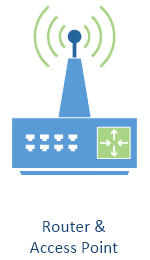
We often refer to these two devices packaged together as a “wireless router”, or just “the router”, or even as “the access point”, which blurs the distinction between the two.
The gotcha is that not only do not all routers come with wireless access points, but sometimes what you really want is a wireless access point without a router.
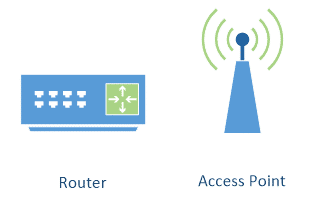
That’s the situation we’re in here.
Adding an access point
You almost certainly have a router of some sort, particularly if you share a single internet connection among multiple devices. It handles all the communication to and from the internet, distributing it among the various computers and devices you connect to it. Whether or not it already includes wireless capability is actually irrelevant. One network, one router.
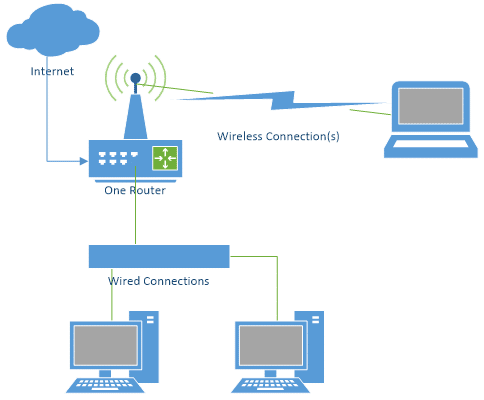
The simplest approach to adding a wireless access point is to add only a wireless access point, and not another router.
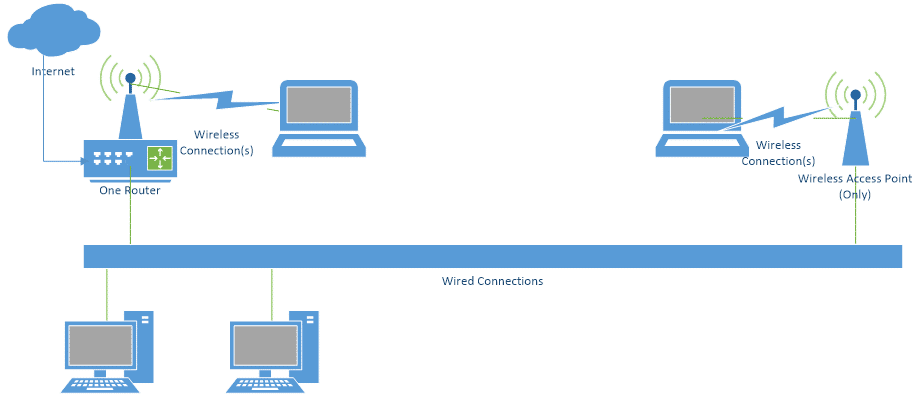
Unfortunately, searching most online stores for ‘wireless access points’ will return you a list of wireless access points and – you guessed it – routers that include wireless access points.
It often takes a close reading of the specifications to understand exactly what it is you’re getting. If the description includes terms like “router”, “wireless router”, “NAT”, or “DMZ”, these are all indications that what you’re looking at is actually a router.
However, if it says “wireless access point”, perhaps with terms such as “bridge” or “repeater”, then it’s very likely you’re looking at something that – perhaps among a few other things – can be used as only a wireless access point.
A router in the hand…
Sometimes you already have an additional wireless router you’d like to use as if it were simply an access point.
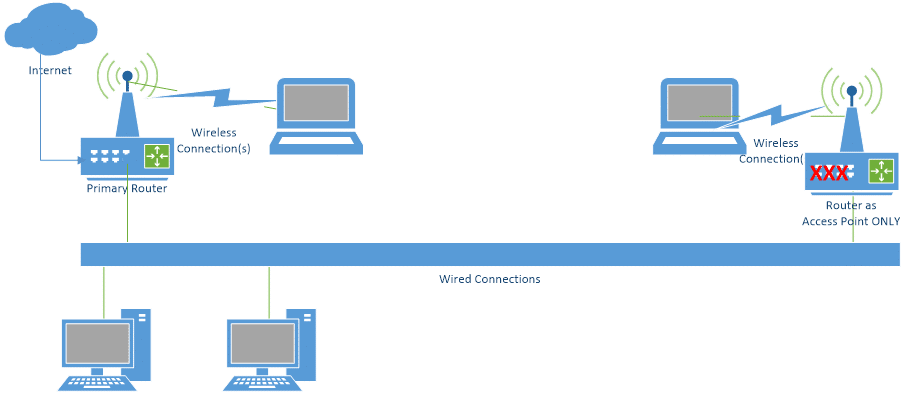
The best I can say here is that it could work, but it’s not guaranteed. It’s also not necessarily easy.
The most important thing is to make sure the wireless router is not actually “routing”. Typically, that means making sure it’s not attempting to perform network address translation, known as NAT, or providing DHCP services.
NAT is the technique that lets multiple machines on one side of your router share a single internet connection, and, most importantly, a single internet IP address as well. The router does this by using DHCP to hand out local IP addresses to each machine on your local network, and translating between those addresses and the “real” internet IP address when the local computers access the internet.
If NAT is turned on at both the main router, and the router you’re attempting to use as a wireless access point, all wireless devices go through two levels of NAT to access the internet. Not only is that adding unnecessary overhead, but it can introduce some real problems. NAT “protects” the “local” devices from the remote devices … in this case, the wireless access point will “protect” the wireless machines from the rest of your local network. In effect, it’ll make them inaccessible.
Unfortunately, exactly how you prevent your wireless router from actually routing varies based on the specific brand and model. Check your documentation for NAT or for providing DHCP services to connected clients, and turn that off on the router you want to use only as an access point.
It might work.
It might be easier just to get a dedicated wireless access point.
Do this
Subscribe to Confident Computing! Less frustration and more confidence, solutions, answers, and tips in your inbox every week.
I'll see you there!
Podcast audio

More for Patrons of Ask Leo!
Silver-level patrons have access to this related video from The Ask Leo! Video Library.
 Getting Your Wireless Access Point to Work With Your Router

In order to turn off NAT, your wireless router’s documentation may refer to this as “Bridging Mode”.
Ok…I think I understand what you are saying, but how to do it step by step is another. I have a router connected to the internet with 3 wired connections..all the computers have Windows XP either home or Professional. I have two wireless laptops– (win xp prof) and one with Win98SE–they both work fine on the internet. However I can’t get them to print to a shared printer on one of the computers attached to the router, and I can’t network either of them with my wired computers. I have searched for an answer, and you are the only one who has given me a clue to the problem. Now can you help me one step further, by explaining or pointing me to a site that can take me step by step through the process. I have a Linksys router and a Dell True Mobile 1150 series wireless.
Ok…I think I understand what you are saying, but how to do it step by step is another. I have a router connected to the internet with 3 wired connections..all the computers have Windows XP either home or Professional. I have a wireless laptop (win xp prof) and one with Win98SE–they both work fine on the internet. However I can’t get them to print to a shared printer on one of the computers attached to the router, and I can’t network either of them with my wired computers. I have searched for an answer, and you are the only one who has given me a clue to the problem. Now can you help me one step further, by explaining or pointing me to a site that can take me step by step through the process. I have a Linksys router and a Dell True Mobile 1150 series wireless.
Ok…I think I understand what you are saying, but how to do it step by step is another. I have a router connected to the internet with 3 wired connections..all the computers have Windows XP either home or Professional. I have a wireless laptop (win xp prof) and one with Win98SE–they both work fine on the internet. However I can’t get them to print to a shared printer on one of the computers attached to the router, and I can’t network either of them with my wired computers. I have searched for an answer, and you are the only one who has given me a clue to the problem. Now can you help me one step further, by explaining or pointing me to a site that can take me step by step through the process. I have a Linksys router and a Dell True Mobile 1150 series wireless.
I too have the problem of not getting my wireless laptop to print. I have a Dell pc w/98se and xp student and teacher edition on the Toshiba 350M laptop. Where do I find the site to turn off the NAT access point, and do I need to do it on both computers? I liked your article but why make people write to you to find this out, when you could have put it in the article. I have a SBC router and SBC DSL.
Thank you any help you can give me.I’ve been trying for months on how to get this to work.
Linda A.
p.s. and what or where is “Bridging Mode”?
I don’t put it in because it’s different for every brand of router – so you’ll have to check with the documentation that came with the the router or access point. And it’s something you do to the access point, so you only to it once.
Bridging mode is a technique that allows you to be connected to two networks at the same time, and act as a “bridge” between them. Most users do not need it.
I have purchased a Hub and a wireless access point on friends advice but find I can’t network my second desktop computer or Laptop. Have I got to purchase a Router ?
Hi can someone please help me with my problem.
I have a wireless router (Netgear) at one corner of my house. Each host on my private network talks to the router directly and can connect to the Internet independently. I want to expand its signal coverage by adding a wirless access point (A D-Link wireless router). The thing is I want the access point and the wirless router to communicate wirelessly. The D-Link and Netgear are somewhat within line-of-sight. Is this possible? I have done everyting else correctly. I am familiar with NAT and have configured the D-Link in the following way
1. Disabled DHCP
2. Left the WAN fields blank
3. Entered values in the LAN fields to match my existing private network
4. Entered the SSID the same as that entered for the Netgear.
I tried doing all this and somehow things got messed up. Laptops on the existing network (with Netgear) could not connect to the Internet etc
Forgive my ignoranc, but is a wireless access point the same thing as a wireless router? (or vice versa)
Not. A wireless access point is really just a network connection, nothing more. A wireless router is a router that also happens to have an access point build in.
Hi,
I have a BT Voyager Wireless Router & I want to extend the wireless area. I heard Wireless Access Point would help. My questions:
1. Is there any compatibility issue so I have to buy any particular access point or any access point would do the job?
2. What am I supposed to configure at the access point?
3. Will I connect it to any of the 4 ports of the wireless router?
Quick answer would help me a lot.
Thanks,
Vedat
Hi I have a problem. I have a wifi router that also has ethernet ports. I connected my pc with the router through the ethernet. I connected my laptop to the router through wifi. Can I create a network between these 2? Is it possible?
Sounds to me like you already have :-). Not sure what you’re asking.
I bought a Netgear wireless router and connected two computers to it through the cable ports (wired connections) and two more computers are wireless.
The two computers with cables are on the network and can share the printer, but the two wireless computers can’t connect to or “see” the network. I ran the wizard and whet through all the troubleshooting steps, but the Local Area Connection is still disabled.
Suggestions?
Check to see in your Wireless AP/Router has “Wi-Fi Client isolation” or a LAN/Wi-Fi isolation and deactivate it. This setting prevents Wi-Fi clients from being able to communicate with each other over the network, alternatively, that the LAN (Ethernet) is isolated from the Wi-Fi network segment. Hope this helps
I have DSL interenet router.and one access point. I have get connectivity properly in on this bedroom. but another upstaire bedroom i can’t. so i want to connect another wireless access point. can i able to connect this access point and how i can configure it?
New to this site but can help people who want to print through their wireless laptop.
1. get the IP address of the system to which the Printer is connected if it is shared through a system connected to Router (Dont forget to share the printer)
2. In the wireless laptop please use the search option and search for “computers on the network” (Option in Windows XP). Enter the IP address of the system which is connected to the router and printer both. You will find the system you are looking for. double click the system appeared in the search box. You will find the shared printer. Install the drivers and you are all set to print wireless.
i use wireless router and use two laptops which both work one laptop is far from wireless router and signal level is very low and i have bought 2 d-link acces point to extend range can some one help how i can connect them up
I have kind of the same question. How do I get my wireless access points (linksys 4 port routers)to work with my existing router (2wire router configured within an internal network — block of addresses 192.168.x.1 — 192.168.x.255 that are routed to a static ip)? Note: I want the wireless router to be able provide internet services but not internal network services (the wireless would be for visitors). Please help!!
hi leo
i have a cable isp into a linksys wireless router and my desktop pc connected to port 1 of 4 on that router internet access is fine. my laptop works wirelessly into this router no problem. question?
how do i add/allow a access point (wireless router 2) to see my linksys router and therefore stream of the desktop pc
have a linksys wireless/wired router….can connect to internet wireless through it to access internet, but cannot access shared files or printers using it…checked ip address, gateway address, workgroup name, all correct, stoped the firewall on all cpus involved with connect to printer, no go…something about permissions…have all xp machines except 1 win 98…bothe computer involved with sharing are xp machines…but no luck…what next?
Hi
I’ve got a cable modem cannecting by wire to a DLink DI604 router. This in turn is connected to my PC by wire. All working fine & get the net. I also have a WAG302 access point connected to the wired router.
The router is doing just fine assigning IP addresses to the PC & the AP. I also have an xbox360 with which I want to communicate wirelessly via the AP. So here’s the problem..
The xbox can see the AP & it can see it. in the log on the AP I can see that it’s authenticated the device.
In turn, the router sees that there is a new device and lists the mac address of the xbox, but in the log on the router the DHCP server has not leased an IP to it.
I’m guessing that the AP is not passing the xbox through to the router, or if it is, the router isn’t seeing that it needs to assign it an IP. I’ve tried fixing static IP’s and everything & I just can’t get the xbox to connect to the pc :(
Any ideas?
Thanks!
I am trying to connect a printer directly to a wireless router for print sharing capability. I use a laptop that is wirelessly connected to a Linksys WRTP54G Router, I also have a Brother mfc-420cn printer that can connect with both USB-Cables and CAT-5 cables. I would like to be able to print from my laptop anywhere in my house without buying any new equipment. If this is posible please let me know.
Thank You,
Lowell Williams
Leo – my problem is: currently HAVE wireless connection [e.g., icon shows “excellent” signal strength, status “connected,” etc.], BUT cannot access the internet from laptop. using: verizon dsl and broadband modem with a belkin 4-port router attached to a dell winxp desktop. the laptop is a winxp compaq presario with internal/built-in wireless connectivity [broadcom 802.11b/g wlan]. sadly, when clicking IE on the laptop, it just says CANNOT CONNECT BLAH BLAH. the long way around this is to physically attach the laptop to the desktop’s router/modem and that works, but clearly defeats the purpose of sharing the internet dsl access and having home networking–ridiculous. P L E A S E H E L P. thx- mla
I have a home pc connected to the internet thru my wireless broadband router that I use for my laptop. How do I print wirelessly from my laptop thru my PC to the printer? Also how do I put my two computers on a shareable network?
Hi leo
i have a belkin 54gb router which is setup and running the internet to my laptop wirelessly. i also have a d-link dwl-g700ap wireless access ppint that i whish to configue too connect to my router so that i can connect it too my xbox so that i may connect too xbox live. but i can’t connect to the online setup wizard as my internet browser say that the connection too 192.168.0.50
timed out or could not be connected. how can i set it up i’ve tried connecting it too my laptop and my router what should i do now?
I have kind of the same question. How do I get my wireless access points (linksys WRT54g)to work with my existing router (2wire gateway 1701 configured within an internal network — block of addresses 192.168.x.1 — 192.168.x.255 that are routed to a static ip)? Note: I want the wireless router to be able provide internet services but not internal network services (the wireless would be for visitors, i.e. cafe hotspot). Thank you.
I have a related problem I am trying to add an Netgear access point that has a default IP address of 192.168.0.231 But my router is Actiontec and the DHCP range from the router is 192.168.1.2 – 192.168.1.254. How can I install the Netgear AP by using an IP that is in my router’s range.
You should be able to access the router at that IP, and then reconfigure the IP it uses.
i have bought anew netgear adsl wirless router. Do i have to change some settings to in it to make my printer work wirless i think i have changed all the corect settings in the pcs but it wont print it keeps saying printer is nt ready help thanks danny
I have a Belkin N1 wireless router, that I belive, I can use it as an acces point also.
Is it posible to connect my belkin as an acces point to a hot spot.
y have a library one block away from my belkin.
How do I do that?
Do I need a big antenna or some kind of buster?
thank you.
Leo – my problem is: currently HAVE wireless connection [e.g., icon shows “excellent” signal strength, status “connected,” etc.], BUT cannot access the internet from laptop. using: verizon dsl and broadband modem with a belkin 4-port router attached to a dell winxp desktop. the laptop is a winxp compaq presario with internal/built-in wireless connectivity [broadcom 802.11b/g wlan]. sadly, when clicking IE on the laptop, it just says CANNOT CONNECT BLAH BLAH. the long way around this is to physically attach the laptop to the desktop’s router/modem and that works, but clearly defeats the purpose of sharing the internet dsl access and having home networking–ridiculous.
I’m acctully trying to setup excatly what you said in your artical. I hooked a wireless access point to a router, by a RJ 45 cable now when I turn off the DHCP in the wireless acess point the computers connected to it don’t get a IP address. The DHCP of the first router is not getting past the wireless access point. 2 computers are on the wireied router. 1 computer is connected by wire to the wireless access point, and 2 wireless laptops. My wireless access point is a Bufflo router/access point it has a switch to set it up as a access point. Now as router mode the 2 laptops and 1 desktop get a ip address and can connect to the computer. Now I set the buffalo to a wireless access point, none of the computers can get a ip address, so they can’t connect to the network at all, not even the internet.
(all 5 computers are up to date with no virses)
I tried to be very clear on this problem, becuse I need to know how to get this fixed, thank you for anyone who reads this.
my desktop using a belkin f5d7001 is having trouble connecting to my netgear router. it says they are connected but when i try to connect to the internet it stops when it gets to the initialising dsl modem and comes up with unable establish dsl connection. what can i do about this
—–BEGIN PGP SIGNED MESSAGE—–
Hash: SHA1
Unless your DSL modem has wireless capability, then yes, you’ll most likely
need to purchase a router.
Leo
—–BEGIN PGP SIGNATURE—–
Version: GnuPG v1.4.6 (MingW32)
iD8DBQFGezzWCMEe9B/8oqERAo+8AJ9cGb3W0HKI0c4gQCkqoZGQ22X39gCcDeUk
jCCIAHH1RydaS9JWApve4bM=
=4u+M
—–END PGP SIGNATURE—–
I am trying something a little different and YES I have turned OFF NAT and DHCP as you suggested in the article but no help with this problem,
…. curious as to not having a problem when it was turned on..??
I have an Access Point connected as a wireless device about 150 feet from my router in another building.
My computer is connected to the wireless AP and everything works..
But when I add a voip adapter between the wireless AP and the computer, nothing works.
Without the voip device in the line everything works fine. Could you help?
Thanks
This is an excellent article about DSL. However,
satellite DSL should be considered as an alternative, particulary in rural areas without regular DSL access.
http://www.1-satellite-tv-facts.com/Satellite-DSL.html
Hi Leo! Great article
I actually have a pretty specific question…I use an encore wireless router and I just purchased an Edimax access point, now here’s the deal…
I want to use it to “enhance” the wireless signal to make it go to the other side of my house (1 story only), I wanted to use the universal repeater mode so I had to downgrade it…what I’ve done is basically detect my wi-fi connection and make the edimax enhance it but it seems there is no luck…
When checking on my notebook for the actual connections I am able to see that the MAC address (or SSID I believe) is the same one than the one from my original router, not the Edimax…
Am I mistaken or the MAC address shown should be the one from the Edimax?
————————————
I tried to configure it as an AP+WDS and I get “connected” but I don’t have any data transfer (I can’t do anything), so…if you have any clue on this it would be awesome and a great help
Thx for your time!
Best regards
I am using a linksys/cisco wireless router WRT310N, connected to my DSL modem. Because I have a large home, I connected a linksys/cisco WRT54G2, via a RJ45, to a LAN port on the back of the WRT310N to act as an access point (AP). It all works great except, I can only connect one device at a time to the AP. I set it up with static IP, and turned DHCP off. It works that way, and I can connect one device. How do I configure the AP to connect multiple devices at a time?
Thanks, Mitch
Hi Leo
I was hoping to run this by you, because no matter how many people I ask, whether it’s manufacturers, or computer shops, etc, I keep getting different opinions.
I currently have a network set up that consits of a Billion VOIP Router that sits in my office, and is lan cabled or wireless. This has a switch box that runs off it. There is a cable that is lanned down to my house underground that is approximately 35 metres away. In the house I have another switch box that connects up to the office so that we can use the internet down here via lan.
What I’m hoping to do is make the house wireless off the existing internet connection which is administered through the Router up in the office, but don’t know what to do.
A wireless extender is out of the question as we live on acerage and then 2 storey home, so the range is not suffice, so I was thinking that maybe an Access Point in the house to give me wireless connectivity to my laptops and still lan for the bedroom computers would be fantastic.
I don’t know where to plug the Access Point into if I go that way, does it go into the switch box down in the house, or does it get plugged into a lan point?
Your help would be so appreciated.
Thanks
Lisa
01-Mar-2010
Here’s what I’ve got – in a home office, a cable modem and a wireless router. Computer hard-wired into router, printer and laptop, wireless.
Now, I want to add a couple of audio/video devices in the living room -they’re made to be hard-wired, they have ethernet connections. I don’t want to run cable, can I plug these devices into an access point, and the router will “see” the access point?
17-Mar-2010
once upon a time one wifi cellphone device add my network.i was removed the device from my network.but i dont know reconnect the removed device to my network.so,please tell how to reconncet the wifi device (cellphone). or how to connect the wireless device to my router
We have a wireless LAN that works fine and provides internet. I want to add a secondary router as an access point so the LAN printer plugged in to it can be accessed on the network as well. Its a Belkin. I have set it to be as an access point only w IP address 192.168.2.2. It is not visible. Before I had set it to be as an access point only it conflicted with the internet provision, presumably bc both routers we trying to source the internet.
I have linksys wireless wag120n adsl router its working internet fine and i have one more cisco wap4410n waireless acces point without the wire how can a get the internet in accesspoint please hel me (I have to bridging )?????
my isp brought a dte to my office and i connected it to my wireless router which is feeding the wired PCs and the laptops. i then extended the network with a cable to another bulding and set up an access point there. and two other repeaters. the problem is that i can recieve the becons from the access point,i can get connected but i can’t access the internet from the AP. but i can access the internet from my office wireless router.
I installed an access point to strength the signal from my wireless router/DSL.
the new access point cannot access the internet wirelessly from my wireless router unless I connect it with RJ-45 Ethernet cable?
if I try without cable I can see the address on my internet browser tab flash rapidly without being able to connect wirelessly?
30-Aug-2011
Thanks for a nice article.
Now I’ve a question for our scenario. We some people are sharing the single DSL Internet line through switch/router in a building. Now if some one insert at access point in his apartment a wireless device with DHCP enabled, the other users are not able to connect to the Internet. So the questions are,
How to trace who has done this?
How to avoid this problem? To add complexity we don’t know the username /password for DSL router where the Internet line is coming, so cannot make any changes there.
Hope I’ve made my questions clear.
I’m trying to see if there is anything to do, regarding my connection. My modem at my house is set at the front of the house where my tv is connected. My office is on the complete other side of the house. I don’t want to run cables through the roof or along the floor. I was wondering can i have a wireless access point on my office desk and used it like it was a modem/router and connect a CAT5 cable from the WAP to my internet socket at the back of my PC??
During my off hours i like to play BF3, which requires decent connection. I currently have PCi wireless card on board my motherboard. I am not happy with the lag I get from this card. Hence my question regarding the WAP?
18-Dec-2011
That was my issue…i had NAT enabled on one of my 3 access points causing “limited connectivity” i asume on a random daily basis. I have now disabled NAT (as well as DHCP which was already disabled) on all access points just leaving DHCP and NAT enabled on the main router—connecting to the net
Thanks Leo :)
Cheers
Simon
Dear Sir,
I have environment of wireless mesh network of and each AP has dual radio,my laptop connected to AP-1 with ip address 192.168.2.1 and it can ping the AP-2 and AP-3 having ip address 10.0.0.2 and 10.0.0.5.Now second radio of my AP-3 connected to internet but laptop connected to AP-1 can not get the internet connection.
Can you suggest me the solution how get internet connection on laptop.
I have a home pc connected to the internet thru my Verizon MIFI wireless that I use for my laptop. How do I print wirelessly from my laptop thru my PC to the printer?
Now there are many 3-In-One networking devices – software configurable as Router, Range Extender, or Access Point. I just installed an Asus RT-N12D1 as a Range Extender. Setup was easy with the provided setup utility. As a bonus, its signal strength / range was greater than my prior range extender.
I think this article is incomplete. Simply stating that router and access points are two very different things but not really explaining the major difference is really doing a disservice to readers. Most of comments I see are many years old, so I am guessing this article was written long ago. Many mentioned not being able to networked or print. The mostly likely cause is the device (a printer or another device) attempting to connect to is connected to another router even though it may have the same security settings. A router essentially creates another network. devices connected to different routers can have identical IP addresses and they would not care because they are on separate networks. That is also the reason why they cannot see devices from another router (or network). Most of later model routers can be configured as access points. To switch between the two modes can be as easy as selecting a radio button in the configuration. Different manufacturers have different way of doing this. Just consult the manual and be sure any secondary routers are all set to the access point (or AP) mode.
An excellent article, Leo, which has again prompted much interest.
I hope I’m not confusing this issue by adding something about a “hotspot”.
Here in the UK most properties involve an electrical wiring system known as a “ring main”. This involves running power cables from the electrical distribution point to numerous power sockets around the property and back to the distribution point. In other words, a ring main.
There are many proprietary hotspots available which involve plugging a wireless extender into a power socket and running a wired connection from the standard broadband wireless router to the wireless extender. A hotspot is then plugged into any other power socket in the property and will immediately start sending out a wireless signal with a unique SSID. This, by the way, can be changed if required. Each device wanting to connect to the hotspot would normally require inputting a one-time wireless key to connect to the Internet. The only proviso is that the power sockets need to be on the same ring main. In a large property the electrical wiring system sometimes involves a separate ring main on each floor. In this case, and as far as I’m aware, there’s no way to bridge two ring mains.
Leo, I don’t know if you can help me here because I’m not sure I can describe the issue succinctly in enought detail without being too verbose. We have a cable connection with a combined modem/router and access point at home. The access point functionality is not good, so we have disabled it, keeping the DHCP in the cable router box. We need to maintain both 5G and 2.4G networks, because some devices are picky, the Kindles and the Dyson gear for example will only connect to 2.4, as will a lot of the other domestic equipment, so we have added two access points on the cabled network, with different SSIDs, to provide both 5G and 2.4G networks and the ability to choose where to connect.
The problem seems to be that some things on the 2.4G access point refuse to talk to devices on the 5G access point, even though they share a common router and subnet. A typical example is that apps on the iPads to control devices on the network don’t work if the iPad is connected to the 5G access point and the devices are on the 2.4G one because it seems to think they are on ‘different networks’. Also when you auto configure a new device, like an Alexa controller, it only detects devices on the same access point that it’s connected to.
Computers can all see each other regardless of what access point or cable they are on.
Either the access points are keeping some type of IP packet local to their devices and not sharing it back through the networks, or the device configuaration software and the apps are being ‘artifically stupid’ and saying that they’re not on the same network because they don’t connect to the same SSID, and they’re not going to do it. What do you think?
Is your access point truly and ONLY an access point? What you describe could be the result of having a router in the way.
Thanks this was really useful!
One point that I have not seen mentioned is that a router normally has several LAN ports as well as a WAN port and a wireless port. My understanding is that the LAN and wireless ports communicate transparently and NAT only takes place between them and the WAN port. If this is correct, and as the WAN port is normally an ASDL or fibre port; so not of interest, NAT should not be an issue and any of the LAN ports can be connected back to the master router to use a ‘spare’ router as an AP. As mentioned in the original article the ‘spare’ router’s DHCP must be disabled.
Okay I have a school network that i’m trying to setup so the students can have WiFi with no budget. We connected 5 Asus routers (in series) together one feeding internet of the next how can i communicate with the next four routers after the first one.
Routers in series is a recipe for disaster. What you probably want is a single router, with connections fanned out to switches and/or wireless access points.
Does anyone know if you can ask your IP provider to extend the cable/fiber to your house if there is a connection point close by- if you offer to pay for it?
You can phone your provider and ask them. Every provider would have a different policy.
Oh, I’m sure money talks, but I’m also certain that it’ll be incredibly costly to do so.
leo i have a home 2 stories where have installed 2 wired access points my internet comes to a cable modem i want to setup my wireless network but i dont know how to un nat this router AirPort-Extreme so as i can us this as basement access point please can you advise if it possible and bow do i setup the network
The AirPort is an Apple product, yes? Not something I have experience with. I’d be tempted instead to get a dedicate access point that’s not also a router, and connect it via a cable. You might head over to the forums over at https://macmost.com to see if they can help.
I have a 2 Linksys Maxstream routers both with MU-MIMO (1-EA9500 & 1-EA7500) and would like to connect them together as a Router & Access point setup so I can extend better coverage into another part of the apartment since most of our walls are very thick and made of concrete & steel without having to purchase additional hardware. The question I have is, will the original Main router still control any devices that are connecting to it through the access point wifi, Such as Device prioritization, Parental Controls or wifi scheduling ?
Best Regards
Jim
If it’s a router, all the main router would be able to see is the router plugged into it and you wouldn’t be able to see the devices connected to the attached router. It your router can be changed to function as an access point, then yes. I have a TP-Link pocket wireless router with that function. I don’t believe many routers have that capability.
It depends on your exact configuration, but yes, each router will continue to control the devices that are directly connected to that router.