Yes, we can adjust the amount of disk space System Restore will use.
But that adjustment comes at a price.
Become a Patron of Ask Leo! and go ad-free!
My caveat on System Restore
I need to be clear on something: I don’t like System Restore.
In my experience, it’s proven unreliable, and to this day I don’t believe it can be counted on.
Also, we need to very clear: System Restore is not a substitute for backing up. System Restore will not restore everything. Specifically, if you lose data files and expect System Restore to recover them, you’re in for a rude surprise.
System Restore is best thought of as a backup of your system registry and maybe a little bit more. While it might save a few more things, that’s the safest way to think of it.
System Restore and disks
System Restore works by saving a copy of whatever it saves to some pre-allocated space on disk. Each time a new restore point is created, it’s placed in this space, and when that space fills up, the oldest restore points are removed to create room.
You can adjust that pre-allocated space and make it smaller, but the price is that your system will then save fewer restore points; you won’t be able to restore as far back as you could before.
In Windows 10, click on the Start button and search for “System Protection”. Click on Create a restore point when it appears in the search results. Make sure the System Protection tab is selected, and click on Configure. (In older versions of Windows, right-click on My Computer, click on Properties, and then click on the System Restore tab.)
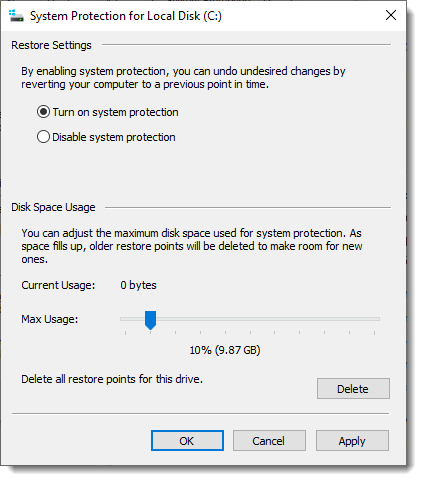
Make sure the “Restore Settings” is set to “Turn on system protection” to enable System Restore.
Under Disk Space Usage, you can adjust the slider to increase or decrease the amount of space taken up by restore points. In the example above, I’ve set it to 10% of the 100GB drive.
If you turn System Restore off, no disk space will be used.
After making any changes, click on OK or Apply to have those changes take effect.
What I do
You can probably guess what I do.
I turn System Restore off completely and rely on my nightly backups to protect me. Should I encounter a problem, a restore to one of those previous backup images does the trick.
As an added benefit, restore points take up no space on my hard disk.
If you’re uncomfortable with no System Restore at all — and I’ll admit it’s convenient when it works — then simply set the Disk Space Usage lower.
Unfortunately, it’s not easy to determine just how large a restore point will be. You can make a very rough guess by creating a restore point and then returning to the configuration dialog shown above and noting in “Current Usage” how much space that restore point uses. Not all restore points will be this size, but it’s a start.
Do this
Subscribe to Confident Computing! Less frustration and more confidence, solutions, answers, and tips in your inbox every week.
I'll see you there!


A friend once asked me if I could help her clean her system drive because it was completely full. I found that her System Restore files were occupying 76 GB out of 128 GB on her drive (that was a few years ago when 100 GB was a fairly large drive). I cleared out most of the restore points and allocated 2 GB available for System Restore. I limit mine to 3 GB which is probably enough for 3 or 4 Restore Points. If your Registry needs to be restored, you probably wouldn’t need to roll back more than that. If that doesn’t work, I have my System Image and Incremental backups to fall back on which is much better anyway. Actually, I haven’t used System Restore since XP but I figure it might be faster than a backup restore if it’s only a registry problem.
This works for XP but not for Vista in vista os system restore size has to be changed using “shadowstorage” and is quite complex. With the size of Hard drives today and the fact that system restore is set for 15% of the size of the hard drive this can become very large.
As you say above, you can zero system restore by turning it off and then on again. Remember to create a new restore point afterward.
I have also just been through the above processes trying to do a System Restore to get a vital program running.
I also had the same message “Your computer cannot be restored to ..”.
The answer is to boot in SAFE MODE, just keep tapping F8 when it starts rebooting. Then do your System Restore. Then it will work. Phew.
Incidentally, the program was TNT Express Shipper V5.02 used to create consignment notes to ship goods around.
One day I came in and cranked it up and had the message “ActiveX can’t create the object (429)”. I spent 6 days looking through forums and asking my IT team.
No luck, and I am no dummy at fixing pooters.
Finally I had to resort to System Restore.
I almost went nuts when I couldn’t even do that.
A Google search found one forum that advised to boot in Safe Mode, and then Restore and it WORKED.
Cheers. Si
By using “Disc Clean-up”, and selecting “More Options”, and then deleting the shadow copies, it cleans up a TON of disc space (in Vista).
With regard to Karl’s and Polyanna’s problem, Sytem Restore will often fail due top Anti Virus programs. Security programs such as Norton and Kaspersky Internet Security, protect their own program files to prevent viruses from attacking them. e.g in Kaspersky, this is known as “self defence”. If you turn off this protection in the settings of the secuity program, you will normally find that restore will then work. Don’t forget to turn it back on! I have tried using the safe mode method that Simon mentions, but it is not always reliable
check this post to alter the size for system restore in vista
http://tandt-u.blogspot.com/2009/01/change-amount-of-space-used-for-system.html
I remove (using Disc Cleanup), all but the most recent system restore point (every week)…
That would work. I find it easier, and free from any need to do any intervention, to simply set the size limit for my restore points to 3 GB which in my case is enough for 3 or 4 restore points.
Leo – I’ve used Windows Restore a few times on my Windows 7. I find it easier than grabbing files from my EaseUS Todo backup. Now I have a Windows 10. I tried using System Restore just to make sure it worked. It failed. I read somewhere that System Restore uses Volume Shadow Service. In my “Services” I noticed the Volume Shadow Service was off (Manual start). If I want to use System Restore, should I set Volume Shadow Service to Automatic (or maybe Automatic – delayed Start)? I don’t remember turning it on or off before, so I wonder why it is off now.For some reason, I always thought Volume Shadow Service had something to do with “File History” which I do not use. I use other programs (EaseUS Todo and Carbonite) to make backup copies of my files. If Volume Shadow Service enables “File History”, can I explicitly tell it NOT to make copies of my documents?
Thanks – David
My understanding is that VSS is used primarily by backup programs like EaseUS Todo and Macrium Reflect so as to be able to back up files that are in use.
I see no harm in setting it to automatic and seeing what happens. That should not automatically enable File History — that’s something you’d have to do in settings.