Spammers do it; why not you?

Have you ever gotten a piece of email without being listed as a recipient?
Your email address wasn’t present on either the To: line or the CC: (carbon copy) line, but somehow you got it anyway.
What you didn’t see was what’s called the blind carbon copy line, or BCC:, which allows the sender to specify one or more email addresses to get it without their names appearing on it.
Why “carbon” and what’s this about being blind?
Become a Patron of Ask Leo! and go ad-free!

Hiding email recipients with BCC
The BCC or Blind Carbon Copy feature of most email interfaces and programs can be used to send an email to someone without their name or email address being exposed. It’s a useful tool in many situations, but it can also be abused. BCC is often somewhat hidden by your email interface, so be sure to look for it in order to use it.
Carbon paper
The term “carbon copy” dates from the pre-photocopy typewriter days, when the way to make a second copy was to insert a sheet of carbon paper between two sheets of typewriter paper. When the typewriter struck an image of a letter on the top sheet, it would also press an image through the carbon paper onto the second page.1
In today’s digital age, the term simply means any copy of a document or email sent to someone besides the primary recipient(s) listed without exposing who else got it.
It’s common courtesy on business correspondence to let the recipient know who else is getting the document by listing them after a CC: somewhere on the document. Email, of course, does this automatically with the CC: field into which you enter email addresses. Everyone who gets the email can see who was CC’ed.
Blind Carbon Copy, or BCC, simply means that someone else gets a copy of an email without being shown as a recipient. No one receiving the email can tell who, if anyone, was BCC’ed.
Finding and using BCC
Here’s the rub: how you access the blind carbon copy function depends on your email client or interface.
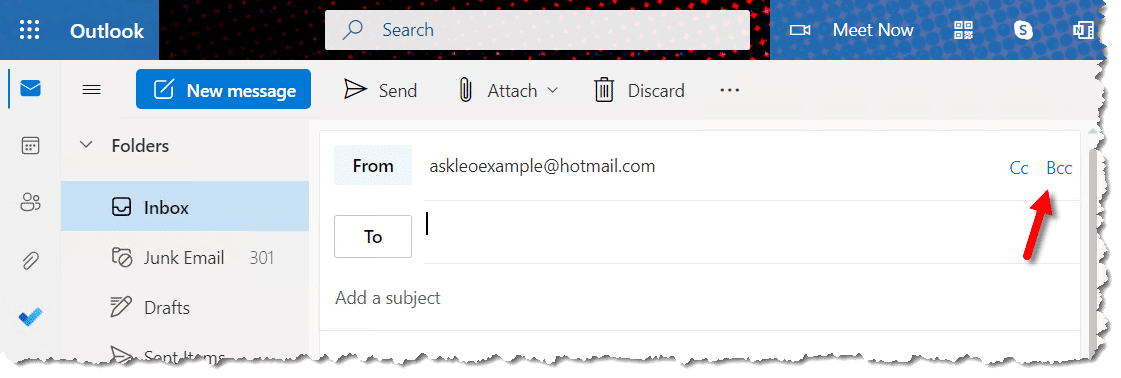
In Outlook.com and Gmail.com, it’s in the upper right of the compose window.

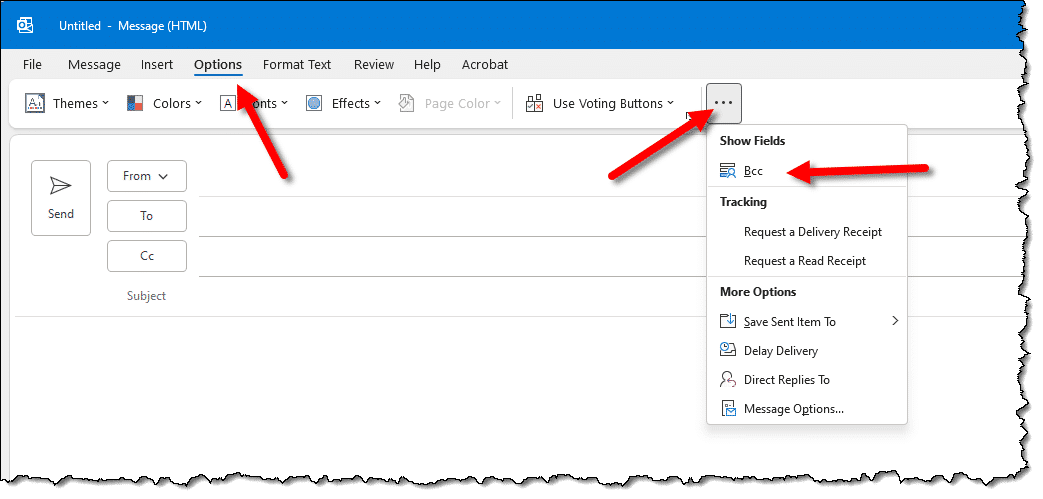
In Microsoft Office’s Outlook desktop email program,2 there is a BCC: field that’s not visible by default. When you compose a message, hit the Options menu, and then the ellipsis at the far right of the menu, and under “Show Fields” you should find an item labeled BCC: field, which will turn it on.
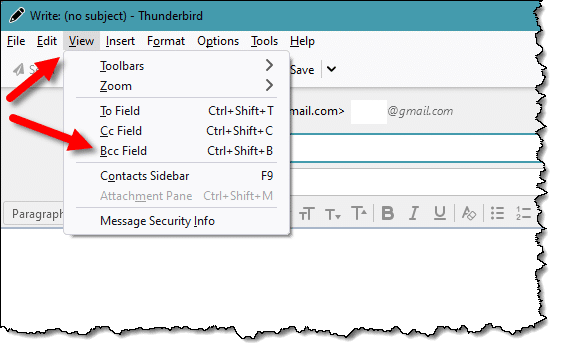
In Thunderbird, while composing a message you’ll find it on the View menu.
If you use another email interface or program, check the online help or support options to find the BCC setting.
Do this
BCC: can be a courtesy if used correctly. If you’re sending email to many people, you can reduce the size of the message and the To: or CC: headers that people might have to wade through by BCC’ing your message to them. It’s also an appropriate way to respect the privacy of those you want to get your message because it doesn’t expose their email addresses to all who receive the message.
It can also be rude to BCC: what someone might think is a personal message to others, as the primary recipient will not know that the people BCC’ed are privy to that information.
Use BCC responsibly.
Podcast audio

Related Video


Footnotes & References
1: With a powerful enough keystroke or electric typewriter, we could create multiple pages this way, all stacked on top of one another with carbon paper between each. Legibility suffered, sometimes greatly, as more copies were attempted.
2: Outlook.com and Outlook the desktop email program are completely unrelated, but they do share one trait in common: they change frequently. If you don’t find your situation matches what’s shown here, keep looking. It’s in there somewhere.


please,tell me ,how i do hide my email addres
on my sent masegess? i wornt to hide it from my sent masseges.
You can try the technique’s here: http://ask-leo.com/archives/000097.html but it’s difficult (and some would say unethical) to *completely* hide your from address. There are anonymous email services out there, if that’s what you’re looking for. Try googling for that if so.
You probably already know this, but what should a
person do to send a BCC if their e-mail doesn’t
show BCC in the TO field? ANSWER: Usually your
e-mail will have a CC blank. In this space, list
the outgoing e-mails with a parenthesis “(”
before the first and a “)” after the last e-mail.
I learned this when I had an account with JUNO.
Their outgoing mail has no BCC.
ALSO, when attempting to send e-mail to
UNDISCLOSED-RECIPIENTS, many e-mails REQUIRE a
domain. Thusly, you must address the e-mail to
UNDISCLOSED-RECIPIENTS@yahoo.com, or the domain
you are e-mailing from. Naturally, you’ll get a
‘unknown’ e-mail back saying it couldn’t be
delivered. However, all of the ‘OTHER’ e-mails
will be delivered.
Keep others from knowing who SENT the e-mail?
Try:
http://www.anonymizer.com/
http://eng.mafiamail.ru/
http://www.usmessage.net/index.html?1017
The solution to a personalized message without a long Cc list is to use a mail merge program like PC iMail (http://www.prosoftapps.com/pcimail). It will let you add mail merge fields such as “Dear [FirstName]” and will insert each recipient’s name in the message, and it will also send the message individually to each recipient for a personalized touch.
The other issue these days is the limitations many ISPs place on the number of messages that can be sent in a given time period. My ISP limits me to 25 messages per minute, and so PC iMail’s time delay feature helps out by letting me specify the number of messages that will be sent for a given time interval (e.g. Send 20 messages every 60 seconds).
Hello,
there is a webpage, http://www.emailhide.org, that encrypts your email address in a secure manner. All you nedd to do is type in your email address and is returned html code with a link with your encrypted email. I’ve tried and now i use it everytime. There’s also a automatic gen for webmasters. Check it out.
05-Feb-2009
If i need to send out a message to a lot of people, but i want them to only see their own name on the email, as if i personally sent it to just them and not 25 other people as well, how would i do this in Microsoft Outlook?
28-May-2009
Or use the Mail Merge feature of your email program. It’s very easy in Outlook and Thunderbird has a plug-in for that.
I have gmail and I’ve tried everything in the book to prevent my mail recipients to see other’s addresses, but it won’t work. I use the BCC feature but the addresses still show. I know this because I tried sending a message to multiple recipients, where I put one of my other mails in the TO box and the rest in the BCC box. That’s when I found that the addresses were displayed.
Thank you very much for your help.
01-Jul-2009
Put your own address in the Bcc field and you will see what you are sending out looks like.
this article describes how to hide email ids of recipients from other recipients. i was wondering if there is a way to have the individual recipient’s id alone in the ‘to’ space for every recipient, without other ids being visible to him/her.
22-Dec-2009
You can do a mail merge with Outlook 2003 and 2007, under Tools, that sends the same message to a group of people and doesn’t reveal the other recipients. You can even address each recipient by name in the body of the message. However, I have Outlook 2002 so I have to start the merge in Word, using a folder within my Outlook contacts as a souce of e-mail addresses. Instructions are at http://www.howto-outlook.com/howto/mailmerge.htm.
IF i forward an e mail how do i send it with out the usual list of e mail addresses of former recipients showing, think I know what I mean….Terry
05-Apr-2010
There are several other situations when it’s right to use BCC. If you’re sending something to a rather miscellaneous bunch of people who don’t necessarily know each other or have any connection except via yourself, you protect each recipient’s privacy. You prevent the use of indiscriminate reply-to-all that could be embarrassing to you or others (Reply-to-all does not extend to BCCs of the initial message). And you prevent your recipients’ addresses being re-used or sold for commercial purposes.
When sending email in Outlook 2007, I do not want the recipients email address to show but I do want the recipients to know who all received the email. How do I do that?
@Jim
If I understand correctly what you want, you can send using BCC and include a list of the names in the body of the email.
AFTER it has been sent? No. You lose all control of an email after it’s been sent.
I want to sent e mail to two different people and want to hide cc mail from the primary recipient whereas to display the primary recipient’s e mail address to the person to whom cc mail is sent
If you place the address of the person you want to hide in the BCC field and the address of the person you want visible in the To field, it would do as you described.
how i can send particular email to say 2000 email recipient.
is there any software that enables me to do so.??
That’s difficult to do without being labeled as a spammer. Here are two articles that will help you:
https://askleo.com/am-i-sending-spam/
http://ask-leo.com/how_do_i_send_email_to_a_lot_of_people_at_once.html
hello sir,
i want to know how to hide the attachments to the receiver.the receiver don,t see the attachments.please tell me sir
Attachments can’t be hidden from the recipient. The purpose of attachments are for people to be able to see them and open them. If you don’t want them to see the attachment, don’t send it to them.
If I use the BCC field how do I know I sent a message to a dozen people.
In many email programs and webmail interfaces the BCCs show up in the sent mail folder version of the email. If yours doesn’t have that option, you can use Thunderbird which makes it very easy.
http://ask-leo.com/how_do_i_find_the_list_of_bcced_recipients_in_outgoing_email.html
Unless your email programs shows you when you look at the message in your sent mail (some do, some don’t), then you don’t.
I want to send an email to a relatively large (270) list of people who have previously received an email on the same topic. Their addresses were all listed in the CC line in my Gmail. I want to send this message to them privately without re-exposing their emails if they are protective.
How do I convert a list of cc’s to bcc’s for this purpose using gmail? Thanks!
Thanks!
You would have to copy paste them from the CC line to the BCC line, and then make sure to remove them from CC.
In addition to what Leo said, you’d have to break the list into several mailings, or it’s likely your email service provider won’t send to such a large list of recipients due to spam prevention considerations. Alternatively you can use a mailing list service like mailchimp.com which is free for small mailing lists.
https://askleo.com/why-does-email-i-send-to-a-large-contact-list-bounce-so-often/
So I used the Bcc feature in Yahoo Mail, but separated the addresses with semi colons instead of commas, will all of the recipients received the mail?
As long as you didn’t get an error, I would expect so.
how can i be able to hide a mail address that i want the response of the mail i sent to go to?
in other words how can i hide a REPLY-TO email in a message.
You cannot. The email program being used needs to know where to send the reply, that means it’s visible one way or another to the individual using it.
In order to prevent BCC addresses to be exposed to Spammers, using BCC is the way that was available in Yahoo. After listing addresses in BCC there was the word HIDE that that was clicked to hide the BCC addresses, that word hide is no longer present, so how do I Hide the addresses now.
Any addresses included as BCC should be hidden automatically. That’s what BCC is for.
I remember using copy paper. (But I’m not “old;” — instead, I’m “retro.” Which is kinda cool!
I also remember using carbonless copy paper. This had no carbon page; instead, chemicals on the back of the “original” page interacted woth other chemicals on the “copy” page to prooduce a yellow copy. I could always tell when this was used — the chemicals irritated my fingers slighty.
Those are still in use. One org I volunteer for uses them for handwritten forms in the field.
On one of my freelance jobs, the payment receipt I sign produces a carbonless copy.
The essential difference between an recipient address in the To: field and a recipient address in the CC: field is the recipient in the CC: field is labeled as CC’ed. Other than that, the emails are handled similarly. It lets the recipients know that the person CC’ed isn’t the main recipient and it lets the main recipient know who received a copy of the email.
In my version of Thunderbird (91.9.1 (64-bit)), the CC and BCC links are visible in the email composition window.
I don’t send many emails, but when I do, I usually send my message to one specific individual or organization. I have known how and when to CC:/BCC: since I first started using email (circa Windows 3.1), so when/if an occasion arises in which I need to send a message to more than one recipient, I’ll know which to use and how to handle letting my recipient(s) know the message is also going out to others.