What you’re seeing is Windows’ “User Account Control”, or UAC. The basic premise is that before software does anything that could potentially install malicious software or otherwise harm your computer, the system asks you first.
The knee-jerk reaction is, “If you’re not sure, say no”. The problem is, there are most definitely times and situations where “Yes” is the correct answer.
There are some things you can keep in mind that will let you be a little more sure a little more often, and as a result, allow you to make a more informed decision.
Become a Patron of Ask Leo! and go ad-free!
Administrator, but not
Most people believe their accounts are administrator accounts, or have been designated as administrator accounts. Unless you’re signing in using the normally hidden account actually named “Administrator”, that’s actually not true.
Your account generally has “administrator privileges“, but is not actually running as an administrator all the time.
There are things you cannot do, places you cannot store things, and operations you cannot complete until or unless your account has been temporarily “elevated” to full administrative access.
If a program attempts to do something that requires full administrative access, the UAC dialog appears.
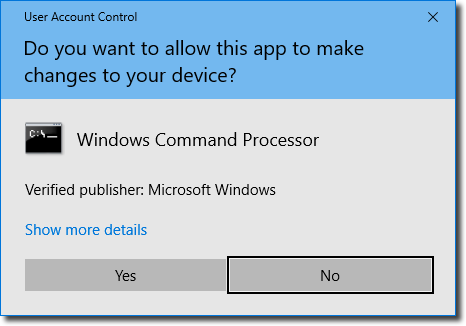
When you respond “Yes”, the program requesting it is granted true, full, administrative access to your machine. It can do anything.
Why this matters
Malware loves being able to do “anything”.
Malware often relies on administrative access in order to install itself in your system, or do whatever damage it’s intent on doing. UAC prevents that from happening until you say “Yes”, presumably after confirming that whatever is being asked for is not malware, and in fact something that appropriately requires administrative access.
When to say “Yes”
The most obvious case where you want to say “yes” is when you actually are installing software, which legitimately requires administrative access. Setup programs commonly write into protected areas of your hard disk, as well as the registry.
Another good example of when “yes” is appropriate are software updates. Much like an install, updates require the same elevated level of access to write things where normal day-to-day operations shouldn’t be writing things.
When to say “No”
At the other end of the spectrum, a clear case for “no” is if you’re surfing the web and the notification comes out of nowhere. That’s a big red flag that something sinister might be going on. It’s also a clear case for the “if you’re not sure, say no” default answer.
In reality, that “if you’re not sure” is the crux of matter.
If you’re doing something that might need special access to your machine — for instance, adding or modifying the software installed on your machine — then it’s reasonable to expect a UAC notification and respond with a “yes”. The bottom line is, you’re expecting it.
When it’s not expected, it’s time to look more closely.
The program requesting elevated privileges will be identified in the UAC message. This isn’t 100% fool-proof, since malware can call itself whatever it likes, but it’s a good sanity check. If you get the notification unexpectedly, look at the program requesting access, and say to yourself, “Oh yeah, that makes sense”, and allow it.
Saying “no” can also be a diagnostic tool. If you get an unexpected notification and say “no”, and then something you expected to work fails, you’ve got more data with which to make a decision. You might elect to re-run whatever made the request and say “yes” this time.
Every-day operation
It’s important to remember that normal day-to-day operations shouldn’t generally require administrative access. Web surfing, emailing, writing documents, etc. just shouldn’t result in a UAC notification.
It’s only when you’re doing something that is about to make a modification to your system — like installing software — that UAC normally pops up.
If you’re seeing it at other times, you weren’t expecting it, and you’re not really sure why it’s asking, say “no.” At least say “no” until you can determine more clearly why it’s asking…
…because sometimes the “why” is something you don’t want at all: malware.
Do this
Subscribe to Confident Computing! Less frustration and more confidence, solutions, answers, and tips in your inbox every week.
I'll see you there!


I use StartupMonitor to notify me whenever a program tries to add itself to my machine in Win XP. It seems to serve a similar purpose to the User Account Control.
When I run a regular program, I get UAC and have to say Yes. This program runs from the internet to get current data. Is their a way to list programs you know are good, and not trigger the UAC?
Thanks
~Jack
I’ve noticed that sometimes certain programs need to access system files and will fail otherwise, even if they’re not modifying it. (One example is a hardware diagnostic tool. Another example is a Windows 9x game that spits out an error about not being able to access a DLL file.)
Good article. It expands the spectrum for making a more informed decision about verifying an operation. I get lots of UAC notices. My knee jerk is to say yes (I don’t want to be delayed) but now I will test a few UAC notices.