That “strip”, as you call it, is the Windows taskbar.
Most folks don’t realize it’s really a special window, of sorts. And as a window, you can resize or even move it.
Sometimes people are even surprised when that happens by accident.
Become a Patron of Ask Leo! and go ad-free!
Locked or Not?
Since it can happen by accident, Windows includes the ability to lock the taskbar.
Start by right-clicking on the taskbar. Look for the setting “Lock the taskbar”.
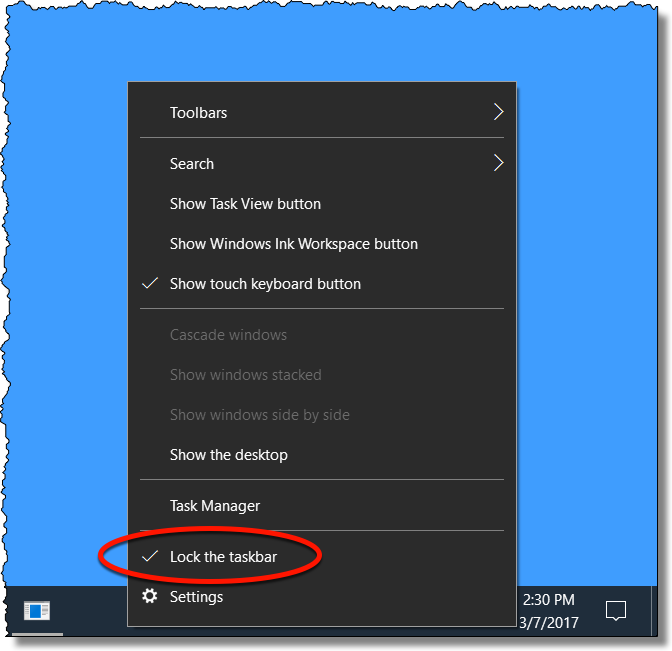
If it’s checked, your taskbar is locked and you will not be able to resize or move it. If you want to make a change, make sure it’s unchecked.
Size Matters
Resizing the taskbar is now pretty much like any other window, except that:
- The border you’ll click on will be invisible
- The resize will happen in steps.
To start, make sure your taskbar is unlocked.
Hover your mouse over the top edge of the taskbar, where the mouse pointer turns into a double arrow.
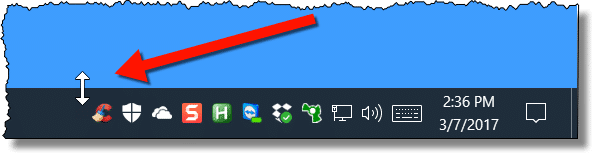
This indicates that this is a resizeable window.
Left-click the mouse and hold the mouse button down. Drag the mouse up, and the taskbar will, once your mouse reaches high enough, jump to double the size.
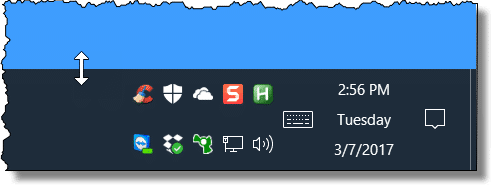
You can go even larger if you like.

Location, location, location
We normally think of the taskbar being along the bottom of the screen, but it doesn’t have to be. Particularly on wide screens, you might prefer to have it on the left.
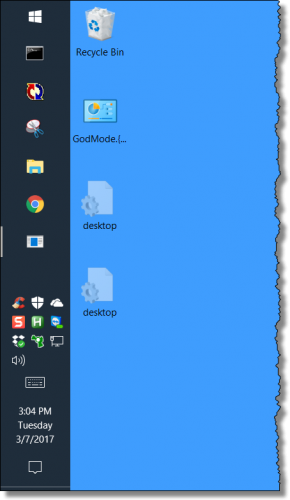 While it remains unlocked, just click and hold on any empty area in the taskbar and drag it to whichever side of the screen you’d like.
Lock’er Down
Finally, when you have the taskbar where you want it, and the size you want it, be sure to right-click on it and make sure that Lock the taskbar is checked once again.
Based on what I hear, it’s fairly common that the taskbar gets unexpectedly resized or moved. Locking the taskbar simply prevents that from happening.
Do this
Subscribe to Confident Computing! Less frustration and more confidence, solutions, answers, and tips in your inbox every week.
I'll see you there!


All your images in this article are broken.
And is there any way of making Windows 7s taskbar any thinner than the minimum?
02-Jan-2011
It did not work with my WIN7 even though the taskbar was unlocked. I could not change it in size.
One option in Windows 7 is to right click the taskbar and select properties. You have several options you can select. One is for “Use small icons”, and another is to “Auto-hide the taskbar”. See if these help.
It was not able to make it smaller with my WIN XP even though the taskbar was unlocked. If I remove the quick launch display I have a normalsize taskbar. When i display the quick launch it doubles the size of the task bar. How can I have a normal size task bar and display the quick launch
04-Jan-2011
I think I might have commented before but when I go into Hotmail with my Chrome browser the Task bar disappears. I can bring it back with the Windows key but it doesn’t stay. You also lose the Links bar and the Address bar is unresponsive. I usually end up dumping the browser to regain control. I don’t know whether it’s Google or Microsoft or both at war over a non Microsoft product accessing a Microsoft site. There’s no problem with either Internet Explorer or Firefox.
Personally, I put our taskbar (double-height) at the top of our screen, where nature’s God intended it to be (and where it weirds out everyone else who sees it). :)
After all, every other menu and ribbon in Windows has its place at the top of the window or screen (and that includes those in the very Web Browser in which you are reading this message); why on Earth should the Start menu and taskbar be any exception? :)
I’ve tried to make my taskbar smaller by clicking and holding the mouse button down and moving it down but it either stays at doulbe height or disapears. How can I make it the regular height? This is all thanks to my two year old little boy:)
Hi. On my Windows 7 taskbar (either locked or unlocked), in the Quickstart area, the icons all have separators – takes up a log of space. Can I get rid of those?
Enlarging the task bar doesn’t help me to see the icons unless the icons themselves are enlarged. Is it possible to do so and then “lock” then new size?
Click on the Taskbar; select Settings from the popup. Turn off where it says Use small taskbar icons. (Unless they are already turned off and you want the large icons even bigger.)
Thank you! It was driving me nuts and I had no idea what I did to cause it to change size. Now I’ll be normal again, what ever that is. :)
Hi there – I don’t get the up & down arrow when I try to move it. My bar is unlocked, but I get nothing. :(
Can u help me with this??
thanx…Wendy
Unable to reduce taskbar even with instructions. Please help me. Thanks.
I don’t want to just make the task bar larger, I also want the icons themselves to be larger! This just puts more junky space on my desktop! Any help?
Depending on your version of Windows right click the taskbar, click on “Properties”, and in assorted settings you may find an option to use “large” or “small” taskbar icons. Those are the only two options I’m aware of.
Note that on a Windows 10 tablet with an unlocked taskbar it is very easy to make the taskbar bigger by accident … and impossible to make it smaller again via touch. You can’t get the double-headed “resize” arrow via touch.
So when this happens you need to hook up a mouse or the touchpad to get back to the one-line taskbar. Kind of ridiculous.
Thank you so much for your easy-to-do help!! I ended up by accident with a rather “fat” toolbar, and it was solved so simply!
I followed the instruction and it simply work. The taskbar was not initially locked. Thanks.
I was able to make the
taskbar larger but the icons are still too small . it didn’t change I need them to where I can see them or this computer is useless
Right-click on a free spot on the Taskbar and select “Taskbar settings”. Where it says “Use small taskbar buttons.” Click the toggle button to turn it off.
Depending on your version of Windows, right click on Taskbar and click on properties or settings. There should be a setting to use small icons. Make sure that’s NOT selected.
I have Windows 10 and when I click on the taskbar, only 5 options are shown, and LOCK THE TASKBAR is not one of them. Is there another way make the taskbar icons a little larger? Also I just started having a problem with my letters not showing right away when I press the keyboard. It’s a laptop if that makes a difference. The letters will appear about 15 seconds later—sometimes. I think it’s time to take it to the repair shop. When I log on, now my desktop doesn’t show up either. If I didn’t have Google on my taskbar, I’d be out of luck.
Ron
I still use XP. i dragged my taskbar up by mistake. i couldn’t get it down to size 1, 1=5/16 tall. then i read somewhere about getting the slider bar icons on top half of 2. after that taskbar would drag to back to 1. i locked the taskbar after that and should be good to go. it wasnt locked before.
as always,,fill free to edit
Thanks for your website. It helped me out alot on my RCA Cambio windows I finally moved my task bar back down and got it locked in place. Thanks again Leo for your site.
Tried the toolbar resizing ,thanks for the help.
I don’t have a mouse its a tablet and it has Windows 10 on it. This is so frustrating takes up so much of my viewing screen.
Any suggestions?
Thank you Leo !!! You should be knighted as Sir Leo of Cyberspace.
Thank you, thank you, thank you. For once an easy to understand fix. I’ll look to you before anyone else to answer my how to fix Microsoft peculiarities in the future. Your service in providing helpful remedies for the computer less literate is greatly appreciated. KJT
Thank you very much for this simple answer!
thanks for your help. i am 63 years old and dont have any idea about laptops, but you helped me solve my issues
I freaked out when I saw my task bar double its size and didn’t allow me to resize it… really useful information, thanks!!!!!