I’m trying to post a picture for blog profile. It’s asking me my photo URL.
The photo is in my pictures but I don’t know how to retrieve it to put in
profile.
This is a common question among folks new to the internet.
When you load a picture from, say, your digital camera to your hard disk,
that’s still not enough to make it visible on the web. You might be able to
mail it as an attachment but using it on a web site requires an additional
step.
The picture itself must first be uploaded from your machine to the web.
The question is how, and where?
Become a Patron of Ask Leo! and go ad-free!
When a site asks for a URL, it’s asking for a reference to something on the
internet that’s (typically) on a web server and continually accessible to all.
A good example is this URL:
http://ask-leo.com/images/askleonew.png
That’s the URL to the image you see at the top of this page. That image
lives on my web server in the publicly accessible site ask-leo.com.
site you must first upload it …”
I have copies of that image on my hard disk, of course, but they are not
accessible from the internet. In fact, we go through great lengths to make sure
that your hard disk and mine are not accessible from the internet, for
security reasons.
What this all means is that if you have a picture and want to use it on a
web site you must first upload it to either the website you want to use it on,
or another.
Some websites allow you to reference pictures, but have no facility to
actually upload. That’s a case where you need to upload to another site,
typically a photo sharing site, and then specify the URL to that site as the
location of the picture.
There are several photo sharing sites available for this purpose. flickr and
Photobucket are two good examples, though there are others. The way it works is
this:
-
Pick a service and create an account there.
-
Upload your photo or photos to that service. Exactly how this is
done varies from service to service, but it typically involves a simple web
form where you specify or locate the image on your own hard disk, perhaps add a
little information like a caption, title or tags, and then an “upload” button
that takes it from there. -
View the photo on the service to make sure it’s exactly what you want.
-
Use the URL to the photo on whatever other web site is asking for a photo
URL. To get the URL, in Internet Explorer you can right click on the photo and
then click on Properties to see the image URL; Firefox has
Copy Image Location after you right-click to get this.
Let’s use an example. On flickr I’ve uploaded a photo of one of my dogs,
Jerome, here: http://www.flickr.com/photos/74688923@N00/114361713/. Note
that this is not the URL of the photo, it’s the URL of a page on
flickr.com that contains the photo.
You might want to read that last statement again, because the difference is
extremely important. A page containing a picture is not the same as the picture
itself.
If I now get the URL of the photo it turns out to be http://farm1.static.flickr.com/45/114361713_e99887f065.jpg?v=0. If
you click on that you’ll get only the photo.
And that’s what you would use on other sites. For example, here’s that photo
taken from flickr, embedded here on ask-leo.com:
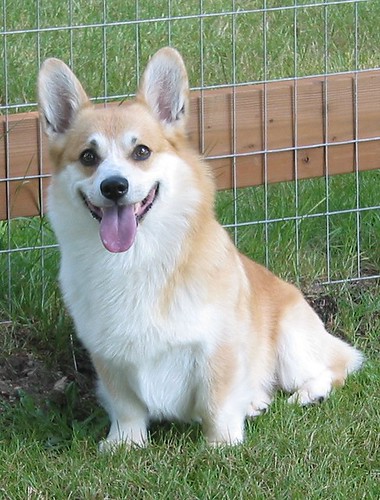
The photo is hosted on flickr.com, but displayed on
ask-leo.com. In fact I’m fairly certain that there’s no copy of that exact
photo on my web server anywhere.
•
Now, before you start uploading photos like crazy, a few important points
need to be made.
-
Read carefully the terms of service of the photo hosting site you’re
planning to use. Some have limits on how they can be used, and if you violate
those terms you can lose your account, and your images, without warning. -
In fact, always assume that you might lose your uploaded images. In other
words, it’s your responsibility to keep your photos in some way, be it on your
hard disk or by copying them somewhere else. And always make sure to
back them up safely. -
Crop and resize before you upload. Photos from digital cameras
these days are huge when displayed on the web. Use an image editing
tool to crop and resize the photo to something that will display properly in
whatever online use you intend for it.


Todays’ newsletter answers question re:fotos that I was looking for an answer to. You now deserve a 2 buck cup of coffee, Leo! Tot zien
Make it 2 extra biscuits and a hug–Jerome is beautiful! (Of course, I also have a Pembroke Welsh corgi and *MAY* be a bit partial)!
You mentioned cropping and resizing images to be displayed on the web. I know how to do this, but I’m not sure what size a picture should be?