Keeping yourself safe from the kids (and others).


Normally, we think of threats as being “out there” on the internet. Sometimes, the threat comes from within our own home.
This article was originally titled “How Do I Protect Myself from My Children?” On reflection, though, it’s not just the kids you need to worry about; it’s just about any device you connect to your network: the computer your friends bring over, the “internet of things”-enabled device you purchase, the smart TV … and yes, sometimes the computer belonging to a child.
The good news is that you can protect yourself. You just have to look at your network a tad differently.
Become a Patron of Ask Leo! and go ad-free!

Local Network Protection
Guest access, if supported by your router, is a great way to protect yourself from Wi-Fi-connected computers you don’t completely trust. Failing that, you might enlist help from your ISP to set up a separate network, or you can cobble together a protected scenario using two routers in sequence. When all else fails — and even when it doesn’t — the software firewall on your computer protects you from all the other devices connected to your network.
Who do you trust?
We need to group the technology in your home into distinct buckets:
- Computers you trust. These are the computers and devices you control and can safely assume are being used by individuals who understand the basics of keeping a computer safe on the internet.
- Computers you don’t trust. These are the computers and devices used by people who are less computer savvy, don’t understand safety, and/or are likely to do things that they shouldn’t, possibly resulting in malware infections.
- Devices you’re unsure of. In recent years, more and more devices are getting connected to our internet to create the so-called “internet of things”. We’re coming to realize these devices are built with security as an afterthought, if at all.
To protect one bucket from the others, we need to split the network. This might be easy if your router supports it, or slightly more difficult if not. On top of that, we also need to talk about how the “internet of things” and software firewalls affect what we do.
Split the network using guest access
One approach is to carve your local network into two: a trusted and an untrusted network.
Routers protect you from the threats that are “out there” on the internet. A more simplistic way to think of it is simply this: one side of a router is trusted — the LAN (Local Area Network) into which you plug in your computers — and the other side, the WAN (Wide Area Network), or internet side, is not.
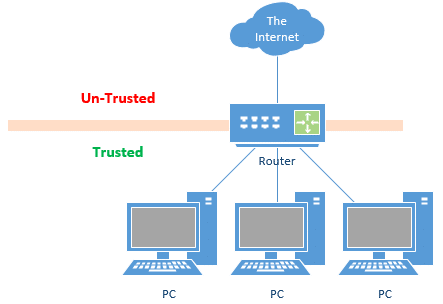
The router protects the trusted side from the untrusted side by preventing incoming connections: only connections that originate from the trusted side can be made across the router.1 In other words, only information your computer asks for comes across the connection. Malicious attempts to get into your computer from out in the wilds of the internet are blocked.
Some modern routers offer guest access to the internet. This creates two local networks isolated from each another.
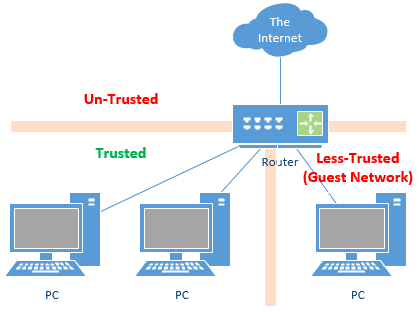
Guest access protects the trusted side from the less-trusted, as no connections can be made between the two and both are protected from the internet.
Unfortunately, guest access is usually restricted to wireless connections. If you have a wired connection, like that of your kid’s computer in their bedroom, you may not have this option.
Split the network by getting a second IP
In the example above, we set up two local networks isolated from one another by virtue of a split that happens at the router. This works well, as the router not only splits the network but allows you to share the single IP address assigned to you by your ISP.
With your ISP’s help, you can set up two distinct networks.
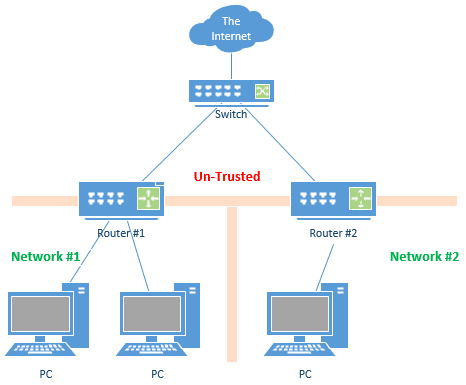
All you need from your ISP is two IP addresses on your single connection. This allows you to use a switch to physically split the connection, and permits each router to have its own distinct IP address. This sets up two completely separate networks that are isolated from one another.
Unfortunately, being able to get multiple IP addresses on a consumer-grade internet connection is rare, and likely to confuse your ISP salesperson.
You can accomplish the same thing without a switch (or the confusion) by purchasing two completely separate internet connections from your ISP, or two separate internet connections from two separate ISPs.
But that seems like (expensive) overkill.
Split the network by using a second router
If your router doesn’t support guest networks, your ISP doesn’t support multiple IP addresses, and you don’t want to pay for a second internet connection, there is a way to jury rig a solution using two routers.
Normally, we plug the WAN side of a router into the internet, but it doesn’t have to be that way. You can plug your router into another router.
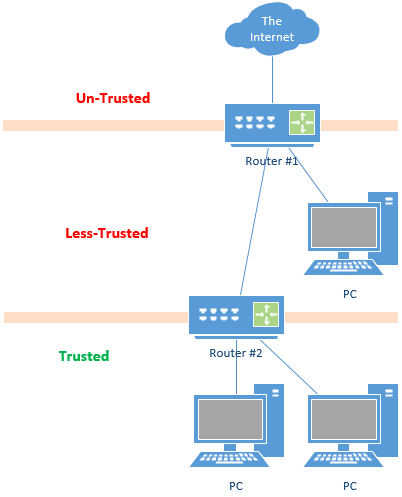
In this case, the internet feeds to router #1, which feeds the less-trusted guest or kids network. The WAN (or “internet”) side of router #2 is connected to the LAN side of router #1. Trusted computers are connected to router #2.
In this diagram, connections can only be established upwards, towards the internet. All the PCs in this diagram connect to the internet. Connections cannot be established downward, meaning that everyone is protected from connections attempting to come in from the internet. More importantly, the less-trusted network cannot connect to the trusted. (In theory, trusted PCs devices would be able to connect to less-trusted devices, but that’s generally impractical for a variety of reasons.)
Internet of things
You wouldn’t expect your fridge or television set to be a security or privacy risk, but now it’s quite possible. Internet-connected appliances are becoming more and more popular, and unfortunately, security seems to be only an afterthought.
The good news is that we’ve yet to hear about IoT devices being used to attack other devices on local networks; to date, attacks have only used such appliances to cause trouble on the public internet. However, it’s easy to imagine future scenarios in which the threat may strike closer to home.
When it comes to internet-connected devices:
- Disconnect them from the internet if the functionality provided isn’t being used or isn’t worth it. Most “smart TVs”, for example, continue to work just fine without being connected.
- If they are going to be connected to the internet, consider treating them as the “less trusted” devices we’ve discussed above. Connect them to your guest network, for example.
- If you must connect them to your trusted network, make sure the other devices sharing the network are appropriately protected.
In most cases, “appropriate protection” takes the form of a firewall.
Firewalls
The computers and devices that share a network are not protected from each other. If your computers are all safely connected to a “trusted” network, they’re still vulnerable to each other. That network relies on trust, and if that trust is violated by accidentally installing malware or doing something else risky, other computers on that network could be exposed.
That’s why almost all PCs now come with a built-in firewall that is enabled by default. This protects each machine from everything else.
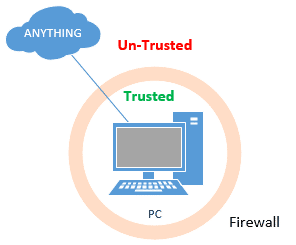
Software firewalls, such as Windows’ own firewall, are good — and have become progressively better with each release of Windows — but they’re still not the same caliber as the firewall provided by a router. You really need both.
Software firewalls are perfect for protecting your machines from one another, however.
Do this
Subscribe to Confident Computing! Less frustration and more confidence, solutions, answers, and tips in your inbox every week.
I'll see you there!
Podcast audio

Related Video


Footnotes & References
1: Even connections that look like they’ve been initiated by an external source (say a software update) are created by software on the PC reaching out to the remote server on the internet.


I also find it useful to install remote-access software (such as TightVNC) which allows me to see what’s happening on the kids’ computers at any time.
Protection against your children is more than just having routers to stop them (or malicious software they accidentally download) from accessing your computer. There are also other legal issues. My ex’s oldest liked surfing for porn and he couldn’t understand that if he went to the wrong site (e.g. child porn) that he could get me into legal trouble using my computer to surf. Most people don’t think of this. Even with what I did to lock down his account, he was still able to surf for porn at times…
The suggestion given if u hav more than one PC.But the better solution for guys like me who have only one PC will be to recommend some parental control softwares.I am bit disappointed with leo’s reply
23-Sep-2008
An issue with those parental control software have recently surfaced : They inspect traffic by «terminate, examine and forward».
The problem is that the last part is almost always done incorrectly, negatively impacting the HTTPS protocol, using deficient encryption and certificate validation, as well of some other failings. This can prevent your browser from detecting that a certificate have been revoked or is invalid.
Most anti-virus also suffer from that problem. Microsoft, Apple, Mozilla, Google and others have reported the issue about 1 year ago to the various anti-virus and monitoring companies, but, there is still no corrective action done.
If you go back to origin of the question it was all about network protection NOT website and surfing protection Hence the LAN & WAN explanations…….WELL Illustrated Leo
What do you do if you need to access shared files across the Parent – Children network? All my Installation files for drivers/software are stored on my Windows Share on my computer (Parents) but it needs to access by all other computer for installing. Same goes for my media (music + anime) that is stored on Parent computer windows share.
Is there simple way to allow access to windows share only under router B (Parents router)? My network internal isn’t really setup for LAN safety, though I already do have 2 routers. I just have LAN connect to one of switch port (LAN) of 2nd router instead of using WAN port. Would nice to do so if I knew easy solution for file sharing.
If you feel you need protection from your kids computer(s), I wouldn’t set up file sharing, but rather look at other alternatives like moving USB drives around (which has risk, as infections can travel) or burning stuff to DVDs.
25-Sep-2008
Might be worth doing an article on the benefits of using Linux for Internet/email/Office doc useage, Leo. IMHO, Ubuntu (and probably other flavors) are ready for prime-time, and by adding ClamAV, you won’t pass on infected email attachments to hapless Windows users.
Couldn’t you accomplish the same thing by assigning static local IP addresses and using two different subnets?
What if the kids computer get infected with spyware? Wouldn’t malware that is Sophisticated enough might be able to use ARP poisoning to route all your traffic (from both routers) through the infected machine and harvest sensitive information. Probably won’t compromise stuff like banking which is encrypted, but certainly it could steal stuff like email passwords that are sent in the clear.
I use this same configuration for my business clients to allow visitors (IE customers or sales reps) access to the Internet, while preventing access to their internal network. Also, some wireless routers now offer a “Guest Wireless” feature that allows access to the Internet, but isolates guests from the “private” network; an option if your kids’, or guests’, computers have WiFi.
I am as naive as you get with tech, and have a BIG problem. I need to make sure everything I use is protected from others that may access the router, etc. My concern is I live with Advanced techies. I’ve see an apple webkit (I have android)on my device. Im the only android user in my home. My photos, notes etc have shown up on my husbands phone- as well as tracking me(I had ALL GPS OFF except 911)
1. Can they pick up my phone signal& get into my phone? I know Google has been used to do that as well- and constantly get alerts from Google& Samsung that my account was breached! Please help! I counsel abuse survivors and their security is of the utmost to me!
2. Ive thought of device w/a hotspot so I can use a printer& computer. Many women are in this situation- any SIMPLE advice would be appreciated.
3. I don’t want router hook up as they can reprogram.
4. Any software you recommend? Does a VPN help with 4G?
Instead of nesting the trusted router inside the guest router, would the same effect of security and safety be achieved by connecting each router’s WAN port to a separate LAN port on the ISP-provided modem (parallel routers instead of nested routers)?
Yes, if you have that option available from the ISP’s modem. Generally if there’s more than one port on the modem it’s not just a modem, but an actual router itself, so you’re still nesting routers.
My wife found out about Riot Vangaurd. Less than 24 hours later we had the two router setup with the gaming PC in the less trusted zone.
My network was recently changed to one of that has a second nested router.
i.e. Internet => Modem/router => router1 => router2
the modem/router “creates” subnet 192.168.1.xx
Router1 “creates subnet: 192.168.175.xx and has an address o both 192.168.1.xx and 192.168.175.xx
Router2 “creates subnet: 192.168.200.xx and has an address o both 192.175.1.xx and 192.168.200.xx
Wireless is not involved in my question, but would get DHCP address in 192.168.175.100 to 192.168.175.130 range.
several computers, 2 printers and a scanner (and other devices) are attached to router1
(all directly attached devices use static addresses in the range of 192.168.175.xx)
four computers are attached to router2, which use static addresess of 192.168.200.xx
The computers attached to router2 have access to the internet, as long as it is NOT an “HTTPS:” connection. HTTP: seems to work, “most of the time”.
The computers on router2 have lost access to the printers attached to router1.
why?
How do i fix this?
You’re “double natting”. Each router is doing it’s job: protecting what’s inside from what’s outside. That means things on either side of a second router will simply not be able to see one another.
Solution: use only one router. Router 1 in your diagram. If you need more connections use a switch or wireless access point. (It’s possible you might be able to turn off the routing functions in router 2, but I can’t say for sure.)
Technically it is probably “triple natting” as the modem has a router in it as well….
The surprise here, was that the computers attached to the 2nd router could not access the printers which were attached to the 1st router.
The second router was added to block the constant chatter that was going on between the devices attached to the 1st router. That part worked. The network attached to the 2nd router now has considerably less “chatter”. Unfortunately if I move the printers to the 2nd router, I suspect that the computers attached to the 1st router will no longer be able to access the printers. So I lose either way. Back to the drawing board I guess. Any suggestions?
Might it work if the routers were in parallel rather then serially connected?
I don’t believe so. If the chatter is a problem I’d look to its source, otherwise I’d STILL put everything on the same router.
Thank you for this article. My network is setup as in “Split the network by using a second router” above, with each router in a different apartment on the same floor, however unfortunately I am in the less-trusted area (because the wan modem/router is in my apartment and my PCs directly connect to it). With reference to the comment by PCM above, I am thinking I should buy a router and install it between the wan modem/router and my PCs. In this scenario (one WAN modem/router (A) and two additional routers, both connected to a LAN ports on A), would the PCs under router B be safe from those under router C and the other way around?
I just found your article “How do I protect users on my network from each other?” and now I believe that yes, having two routers connected to the WAN modem/router is exactly what I need as it should create two networks, with the WAN modem/router only acting as Internet sharing router and each router connected to managing its own LAN….
Yes, the computers behind the routers are protected, so it’s safer to have each apartment, including yours, behind a router. Some routers support 2 LANS by providing a guest login which is separated from the main login.
My refrigerator is Internet capable. What I don’t understand is why I would want to access my fridge to change the temperature when I’m away from home. I turned the WiFi off on it. I think they added that feature just to look cool.
It gets worse. There is a company that now sells an internet connected kitchen water faucet! You get to turn it on and set the water temperature before you walk from the living room to the kitchen.
As ridiculous as that is, it might serve a purpose for the incurably impatient who don’t want to wait for the water to run hot. ;-)
My own problem is a tad different, Leo. My elderly mother and I don’t share a network, we share a computer. I’m reasonably computer savvy; Mom is most definitely not. We each have separate local accounts; but I worry that Mom’ll browse herself into a nest of malware, or download & install the wrong program. How should I deal with this?
One way would be to have her login run a virtual machine on startup and that would greatly reduce the probability of malware affecting the rest of the computer.
If she doesn’t do more than surf the web, do email, and type letters, an even more secure solution is set up a dual boot with Linux and have it default to booting into Linux. If money isn’t a problem, you might consider a Chromebook.
That’s a tough scenario. Mark’s outlined some good ideas, though some are somewhat cumbersome. Local, non-admin accounts are a perfect start if you’re stuck with the same hardware. Regular full backups would be another. Honestly, if it’s a real concern, an inexpensive Chromebook seems like the safest alternative, though I realize that may not be feasible.