OK, I totally made that question up, basing it on what I expect a lot of people to be saying as more and more publishers begin producing content on Kindle – either exclusively, or “exclusively-for-a-while.”
Including myself.
You are most definitely not out of luck. Far from it.
And it’s one of the reasons why I really like the Kindle publishing platform.
Become a Patron of Ask Leo! and go ad-free!
Kindle without Kindle is FREE
I love my Kindle Fire and know many people who share that love. I also loved the previous editions of the Kindle as well.
The big deep dark secret to Kindle, however, is that you don’t need a Kindle device to read Kindle books. All that you really need is an account with Amazon.com.
After that, aside from the cost of the books, everything else that you need is completely free.
What I’m talking about, of course, is the Kindle application:
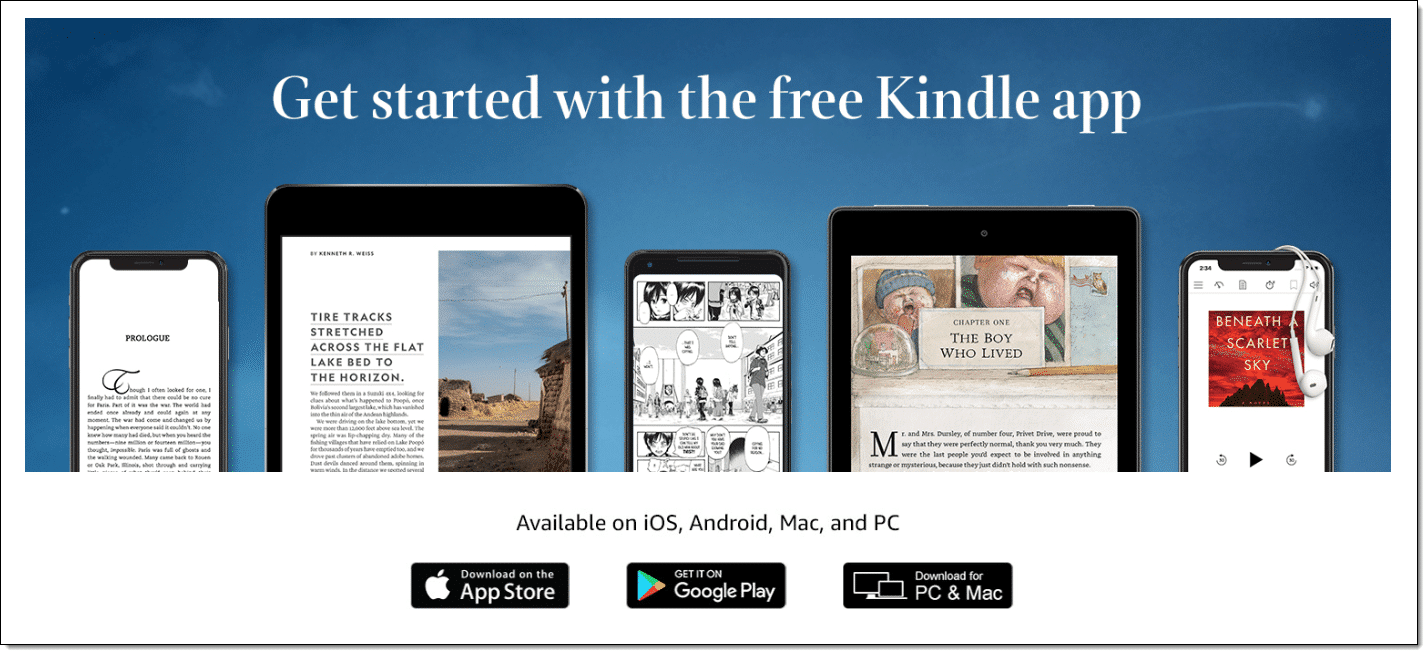
If you have a PC, a Mac, an iPhone, an iPad, or an Android-based phone or tablet, you can download the Kindle application for FREE.
Once installed, that application lets you read any Kindle-based publication that you like.
Multiple devices? No problem!
Most Kindle titles can be downloaded and read on multiple devices that are assigned to the same Amazon account. In my case, that means that I can:
- Read a book on my Kindle Fire
- Continue reading it on my Android-based phone while I’m out and about
- Continue reading it on my Windows PC when I need a break at my desk
“Continue reading”? Yep.
As long as the device that you’re using has internet connectivity, the various devices on which you might be reading a Kindle book will keep themselves in sync. It’s not uncommon for me to open up a book on my phone (an interesting phrase all by itself), only to have it say “looks like you’ve read up to this far on your Kindle Fire – want to just pick up there?”
Can’t forget the cloud!
There’s even a Kindle reader that works in many web browsers without even needing a separate application.
Visit https://read.amazon.com in Edge, Firefox, Chrome, or Safari (including Safari on the iPad), sign in with your Amazon account and you’ll be able to read any of the Kindle books that you’ve purchased right there, in your browser.
Running Chrome is my approach to reading on my Ubuntu Linux boxes – it works great.
Doesn’t buying mean that you download books?
You’re buying a book, but unlike a physical book where you take one copy home, Amazon’s approach is a little different.
Buying a book on Kindle is more like getting a perpetual license to read the book on any device that you own. The “master copy”, if you will, of the book is always kept on Amazon’s own server. Visit the “Manage my Kindle” page at Amazon and you’ll find a list of all the books you’ve purchased along with a menu on each one that allows you to send it to whatever Kindle devices you have registered:
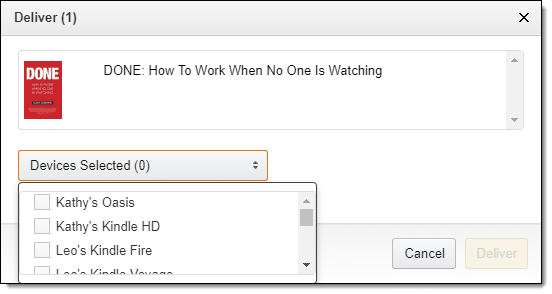
Naturally, you can also visit your online archive from any of your Kindle devices directly and select books that you’ve purchased to download as well.
Just another format
Kindle has become more than just a cool e-reader. Much like PDF, it’s become a file format. With free Kindle readers on just about any platform that you might consider using to read books, there’s just not much of a barrier to use Kindle for all sorts of reading needs.


I love reading Kindle books on my iPod Touch in bed. I also have the Kindle app on my Windows PC which is where I do most of my research/writing, and my Android tablet which I can use when I want more screen real estate and am sitting up so the weight isn’t an issue. But really, reading on the small iPod Touch screen is quite pleasant. The text is clear and readable, and it’s so fast to turn pages with just my thumb, so I can hold it with one hand while lying down.
Love, love, love the Kindle application! I have it on all my devices (iPhone, iPod Touch, desktop and 2 laptops) so I can read anywhere anytime. Plan on getting a Kindle Fire soon. Have also installed it on several friends’ computers. Although I have several other reader apps also installed, I seem to read the most using the Kindle app.
Does anybody have experience buying Kindle books and reading them on the Nook Tablet? Barnes & Noble is a competitor to Amazon, and the Nook is not “pure” Android. So I was wondering…
17-Mar-2012
Leo – Another great feature of the Kindle suite is the loan feature. After reading you can loan anyone with email the book to read for 14 days. As your article states they only need the Kindle app to enjoy. Amazon plays librarian and returns the book to you after 14 days – simple.
Another point: Many public libraries now have e-books for loan in the Kindle format. This means we have another source for free books.
Yes, the Nook Color works just fine with the Kindle app installed.
Just one question about the Kindle platform. If I have accessed a kindle book on a device, is it still accessible if I go somewhere where there is no internet access? In other words, is there any local storage of the book on the device or is reading utterly dependent on being connected to the cloud? Nothing in the article quite explicitly says so.
And an answer for Ben: You’d have to jailbreak the Nook Color. This is one of the easier and safer devices to jailbreak because it will happily boot an alternate OS from a card in its MicroSD slot without destroying the native OS installation.
When you want to go back, just turn the device completely off, remove the MicroSD card, power it back up, and it will reboot back in its native OS. . .
Google “jailbreak Nook Color”.
— Paul
The Kindle app downloads a copy of the book to your device so it is available completely offline.
I have the app on my android tablet and easily continued to read the book while taking a flight across the country.
Firstly, you can no longer borrow e-books from your library. There are, in effect, only five book publishers and they all have reneged on their previous agreements to sell libraries e-books. They are worried about “piracy” by all us potential “pirates” (Arrr matey! Actually what we have here is a form of the misdemeanor shopliflting and not really a felony like piracy.). Hmmm…would it not be easy to scan and OCR a paper version of a book or have a moderately talented hacker cook up a program to OCR a DRMed e-book, page-by-page, from video memory? Anyhoo…secondly, and much more importantly, in addition to learning how to read Kindle-formated books on readers other than a Kindle, how about the obverse: Reading non-Kindle formated e-books on your Kindle? Easy as pie/pi! Just download and install the totally amazing and wonderful Calibre, Open Source e-book management, format-converter, e-book reader, meta-data finder, and backer-upper: http://calibre-ebook.com/. The Kindle “format” is actually a DRMed version of the old MOBI format. So with Calibre (yes there are other ways to do this, such as Zamzar, but Calibre is the way-coolest) you simply convert your – say – Open Source EPUB e-books to MOBI format and then Calibre will load them into your Kindle. Calibre will also automatically download your choice from over 300 on-line publications (I get the AP and BBC newswires every day for free) and convert the HTML to the e-book format of your choice! Who needs a daily newspaper?
Barnes & Noble has a similar PC-based app for the Nook service–free download, multiple OS, etc.
Leo, you wrote:
there’s just not much of a barrier to use Kindle for all sorts of reading needs.
Unless you happen to need speech access because of sight impairment or reading disability, in which case, God help you.
First, in the case of an actual kindle, if the author chooses to disable speech from being used on his/her book, they can do that–why, I don’t know, since the computer synthesized speech hardly matches the voice of a human reader. Also, most of the controls on the kindle, as well as other e-readers, provide no voice guidance for the print-disabled user.
Secondly, the PC for kindle app w/the accessibility plugin is, IMO, a bandaid that Amazon applied in order to address the lawsuits regarding Kindles being used in educational settings, despite being inaccessible to those w/sight impairments. As the accessibility plugin stands now, the available voices suck, & you can’t even review the spelling of a word w/it.
So–if you can see well & have no learning disabilities, ebooks are great–otherwise, the accessibility of these e-readers is somewhere between zip & nil, which is really too bad, because ebooks have the potential to make learning more available to everyone. There’s no reason these platforms should be unusable by anyone, except that these companies hire programmers whose only skill is being able to drop pictorial elements onto a form.
My library experience is different from Chuck Small’s. I borrowed Edmund Morris’s biography of Theodore Roosevelt a few weeks ago from the local public library but I didn’t finish it during the lending period. Yesterday, I checked it out again for my Kindle so I could finish it. Easy. No hassle. Definitely reading it.
Since the Kindle Fire is $199 and the Nook Tablet 8GB with internet access is $199 which would you consider a better deal? I don’t know if Kindle Fire has the same internet access.
Leo,
Thank You! Lately I’ve been seeing all kinds of books that Kindle has, but haven’t wanted to fork over the money for one yet, till prices drop. This is perfect!
I love how life works and how the universe sees what you need and answers what you want if you only keep your eyes open.
Now I’m off to happily download Kindle books to my PC about this glorious universe. :)
@Paul
In order to read a book on your Kindle or other device with the Kindle app, a copy of the book must be downloaded and stored on the device. Then you can go anywhere with it once you have downloaded it. However, if you are not connected to the internet, the sync feature won’t work and you’ll have to manually find your place in the book. This isn’t always easy :-(
I use Kindle for PC all the time, of all the PC based E-readers I like it best for user interface, but others read more formats. I’ve bot over 90 books stored on the hard drive now… ONE I actuall paid for (By Marte Brengle) the rest were free. Many are cookbooks, (Some good) and many of the non-cookbooks look good too.
If you want to read a Kindle-format (.mobi) book on your PC, PDA or smart phone, then try the Mobipocket Reader which you can download at http://www.mobipocket.com/en/downloadsoft/productdetailsreader.asp
Unfortunately, you need to download the file first, which apparently buying a book for the Amazon Kindle Cloud Reader currently does not allow you to do. You can find Kindle-format e-books in many locations: the Mobipocket site (http://www.mobipocket.com/en/HomePage/default.asp?Language=EN), Project Gutenberg (http://www.gutenberg.org/wiki/Main_Page) and 43 Folders (http://www.43folders.com/2008/06/06/free-books-your-amazon-kindle)
I have had a Kindle for about three years and would like to update it to a newer one. I would like to sell my old one eventually, or just give it to someone. How do I deal with Amazon about this, and how can my old Kindle be re-registered to another person?
To John from Detroit:
Marte Brengle ?
Surely not the Marte Brengle of the Vintage Computing Forum (formerly the Commodore Applications Forum) on the CompuServe Information Service…!?!
My jaw drops agape…!!! :)
But I don’t own any device aside from computer. Not quite the thing I want to be holding in my hands as I read in the car, waiting for my wife to come out of the store. And believe me, in the car is where I do the majority of my reading.
Yes, I thought Kindle for PC was very nice, UNTIL, they attempted to force me to accept their new User Agreement, or whatever they are now calling it. I had purchased numerous books, and suddenly without prior notice, when I downloaded the new version of Kindle for PC, my books disappeared and I was no longer allowed access to books I had purchased UNLESS I agreed to, get this, allow them access to all my highlighting, personal notes, etc. in regard to said previously purchased books. I REFUSED, called Amazon to complain and ask for a refund of the books I could no longer read, but as of this date, 14 MAR 2012, to no avail. I’ll buy my books in paper form from now on, and if it that important to me to read them digitally, I’ll scan them into pdf format. If allowing Amazon access to your highlighting, AND PERSONAL NOTES you made in regard to books you paid for, is okay to you, then go for it, but it’s not okay to me! Don’t believe they are doing this, then do the research and READ their legal documents.
@Liz
You can deregister the Kindle and re-register it. Here’s the FAQ Page from Amazon which explains what to do.
You must admit, though, that MOST ebooks are in epub-format, and MOST readers use epub, and that it is a very strange strategy to keep a diferent format for kindle, and to not enable kindle readers to read epubs. I consciously decided against a kindle after studying all the technical information. I would, however, like to buy ebooks from Amazon. It is not smart to sacrifice selling ebooks to me and all the other Non-kindles, just to sell the kindle machine. With the amount I am reading, they would earn more by selling me epubs!
I use the Kindle app for Android on my
Nook Color, (booting from a microSD card
both CM7 & CM9 and 1.4 native in eMMC),
Android Tablet (Honeycomb) and phone
(Gingerbread) with .mobi / .prc (.mobi format
from my Palm) and Kindle Store ebooks.
I’d love for the apps to properly be aware that the newer devices call the internal eMMC user space /sdcard and the real card /sdcard/ext_sd/ so I wouldn’t have to keep syncing the internal and external (kindle and nook ebook files).
Can I use this if I live in Canada?
I have an amazon.com account (US version) in addition to my Canadian Amazon.ca account.
Will it work on iPhone as well as Android?
That would work in any country and on Android and iOS.