What to do when large attachments become a problem.


Email has the convenience factor nailed: add an attachment, press Send, and off it goes. Unfortunately, emails including large files (or several files that add up to be “large” in total) can be blocked, slow, or may simply never make it to their destination at all.
When it comes to large files, we need to look at things a little differently.
Become a Patron of Ask Leo! and go ad-free!

Emailing large files
Exactly what is a “large” email varies depending on your email provider, but most have size limits on what you can send. By far the best alternative is to place the file in a cloud service like Dropbox, OneDrive, Google Drive, or others, and then include a link to the file in your email.
What’s “large”?
There’s no real definition of what it means for a file to be large. Different email services have different definitions of what they allow or disallow. For example:
- Outlook.com considers 20 megabytes the limit.
- Gmail uses 25 megabytes.
- 10 megabytes is also a common limit.
It’s important to note that this is not the size of an attachment, but rather the size of the entire email, including its body and all attachments. If you have several smaller attachments that add up to something over the limit, the result is defined as large.
In addition, the size of an attached file isn’t the size used in the calculation. Because of the way email encodes attachments, the result is approximately 20-40% bigger than the original. Thus if you have a nine-megabyte file, you may find that it adds 12 megabytes to the size of your email message.
Large files were never part of the plan
In “How to Get Email with Attachments Delivered,” I discussed some of the many problems with emailing large attachments.
We think of email as point-to-point: we send, they receive. In reality, that’s not how it works at all. There are several intermediaries responsible for getting messages from point A to point B. An email message can travel across many servers and machines along the way. It’s not something we have control over, and it contributes to the reason large emails are frowned upon, and occasionally even prohibited, by most email providers.
Email was never really meant as a way to transfer large files. The ability to attach files is a convenience, but the way email works just doesn’t make it an efficient way to move large files.
The alternative is very simple: upload the file somewhere and send a link.
Emailing large files
Say I have a file, InternetSafety-v5-Free.pdf, that’s somewhat large, and I want to email it to you. Your first reaction would simply be to attach that file to an email and hit Send.
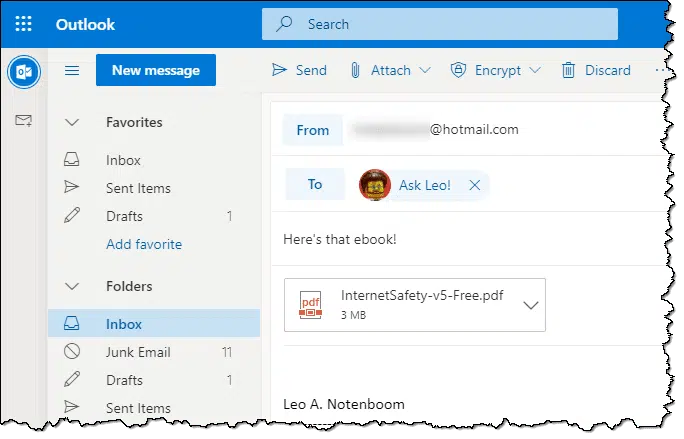
In this example, my “large” file isn’t that large — only three megabytes — and Outlook.com will happily send that message.
If the file is larger, or there are more files making the message too big, the send will fail.
A different approach is to upload the document to a location accessible on the web, and then send a link:
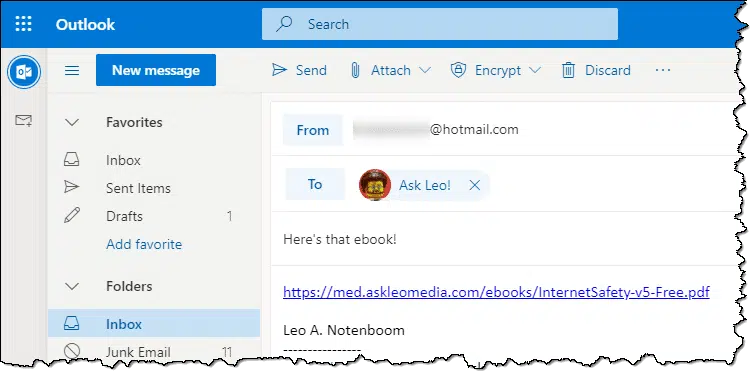
That link is around 50 characters long. Most importantly, it’s much smaller than actually including the document itself, not likely to trip any attachment-related filters, and works with any email service or program.
All your recipient needs to do is click on the link to download the file. Even better, they get to choose whether to download it at all. (This can be very much appreciated on slow or metered connections.)
Upload where?
I know the next question: “You have your own website. Where and how do I upload to someplace on the internet people can see?”
There are many possibilities. One of the easiest is Dropbox.
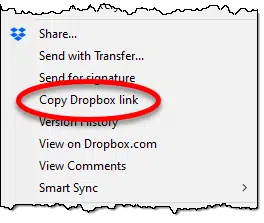
Install Dropbox on your computer (as opposed to simply using it from your web browser). Next, in Windows Explorer, copy the file to be shared into a folder within Dropbox. Right-click that file and click the Dropbox “copy link” item:
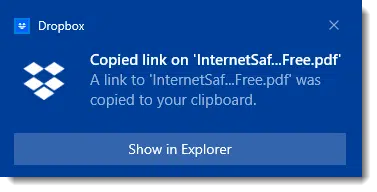
Dropbox places a link in your clipboard:
As part of Dropbox’s normal operation — before you even asked for the link — the file was uploaded to the Dropbox servers. The resulting link is valid anywhere that Dropbox can be reached on the internet. It’ll look something like this:
https://www.dropbox.com/s/ehp50rytl10yrvc/InternetSafety-v5-Free.pdf?dl=0
Note that if you remove the file from your Dropbox folder, it will be removed from the Dropbox servers, and the link will no longer work. That means it’s important to leave the file in your folder until it’s no longer needed elsewhere.
On the other hand, if you update or alter the file in your Dropbox folder, the server copy will be updated as well, and the link will point to your updated copy.
Just remember to give the upload process enough time to actually upload the file from your machine before sharing the link with someone. Depending on the speed of your internet connection and the size of the file, this could take some time.
OneDrive has the same feature. Right-click on the file in your OneDrive folder, click on Share, and you’ll be presented with a dialog presenting some additional options.
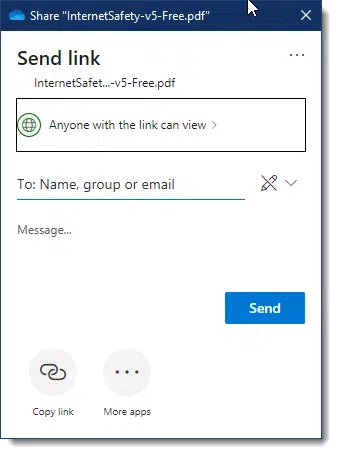
Make sure it says “Anyone with the link can view” (click the right-pointing arrow next to it if it says “edit” to make the change), and then click Copy link. The result will be similar to this:
https://1drv.ms/b/s!AgsM3hkLexJ-ibEzgeKbzzmHril3TQ?e=zakE1K
Not to be left out, Google Drive has the same feature as well. Right-click on the file in your Google Drive folder for a context menu:
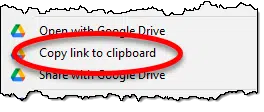
The result will be something like:
https://drive.google.com/file/d/120MxML9ifuQId1eKJc8WdDQHq1iztx9c/view?usp=sharing
Much like OneDrive, clicking the “Share with Google Drive” option instead will expose more options.
Other file-sharing and synchronization services may have similar features.
Other alternative upload locations
If services like Dropbox, OneDrive, or Google Drive aren’t your thing, there are more alternatives.
- You may have some web space courtesy of your ISP. Check with them to see how to access it and how big it is. It’s typically perfect for exactly what I described above, regardless of what types of files you’re passing around.
- If you’re primarily sharing pictures, use a free photo-sharing site like Google Photos, Flickr, or any of a number of other alternatives.
- If you’re primarily sharing videos, use YouTube. If you’re concerned about privacy, you can choose with whom to share your videos.
- If you’re primarily sharing Word, Excel, and PowerPoint documents, consider using the services above anyway. Not only can you import/upload existing documents, but you can edit and collaborate in real time with others.
- If you have your own website, you already have a place to upload files, just as I did in my first example. There’s no need for them to be visible on the site; you can just upload and provide people a link.
If you’re still bent on using email, search for “send large email” or similar terms. You’ll find that there are many services that specialize in this area. If you look closely, though, you may find many, if not most, operate exactly like the file-sharing services mentioned above: separately upload to some repository and then include a link (not an attachment) in your email.
With so many alternatives to using attachments (and so many problems if you do), it seems there’s little reason to continue. With a little bit of research and education, you can send smaller, faster emails that get to the people you intend more reliably. Then they can easily access those nifty photos, videos, documents, or other files you’ve been trying to get to them.
Do this
Subscribe to Confident Computing! Less frustration and more confidence, solutions, answers, and tips in your inbox every week.
I'll see you there!
Podcast audio

Related Video


I use Pando, from Pando.com. I earn nothing from this recommendation but it makes sending large files easy, and make sending a Folder even easier!
It’s simply using an email notification, with a link, to very easily manage peer-to-peer ftp. If the recipient isn’t at home, she/he has 5 days to collect it from the Pando servers. I use it to receive packages of photos that I’ll be posting on client websites.
try http://www.yousendit.com/
It is slow but gets the job done
I looked for a long time and tried many others. The best in my opinion is Dropbox (https://www.getdropbox.com/tour#1).
It is free with lots of storage and all you do is send a URL to the person you want to share with.
I use it often and have had no problems.
Fred
If the file you are sending is extremely large. Like 700 MB or over, perhaps a movie or something else. You may also use torrent. It is specifically made for large files. You just have to download a p2p client like bittorent from http://www.bittorent.com and press create torrent. you than chose the file you want and create a torrent file. you may send the torrent file in the attachment and it is usually only a key kilobytes. then your friend can open the torrent file and download it strait from you. but you also have to make sure that you do not cancel the seeding untill u are shure he has it all. hope this helped, Ben Who
Bit-torrent seems rather over the top for most people I’d say, but still otherwise a valid idea. (Though, wouldn’t you also need to submit the .torrent file to a tracker as well? If using a public tracker, anyone will have access to your file and though using your computer as a private tracker is possible, it’s not the easiest thing in the world to do).
Otherwise, MegaUpload.com will let you upload files of up to 1GB for free without a problem, more if you pay.
And I’ve used MediaFire for years and it’s always worked very well for me. All documents are private by default so no-one can ever access your files without you sending them the link. (Note, it marks them as public in this state though). When you mark the files you upload to MediaFire as private only you can access them when you are signed in regardless of whether someone else has access to the link or not, so don’t set a file to private and then send someone the link.
Yousendit and Upload.sc are both other possible options I’ve used before in the past.
Question for BenWho re Torrent. Will this method handle files with multiple images as well as test ; or is there no difference. ??
Re: FFacer
If I understnad you correctly, it should make no difference regardless of the method you use.
The only advantage of torrents is generally if you are sending the same thing to many people, or if you want to send a folder containing a collection of differing files (though this could alternatively just be zipped up and done though one of the other methods).
Go to http://www.yousendit.com. You can upload any file up to 100 MB in size. Just click on the link at the bottom right (forget about creating a business account). You just plug in the e-mail addresses you want it to go to and select the file from your computer and bingo, it’s uploaded and stored for seven days. The e-mail addresses you’ve provided are sent an e-mail with a link to the stored file for their downloading. It’s simple, easy and has never failed me.
Personally,I get a bit disappointed when any site asks for mine or my friends email address. I just think that they will sell it or spam it, however legitimate the site be. So yousendit.com will not be on my list. I think that uploading to a filesharing service & then sending the link is the best possible approach as suggested by Leo.
Ravi.
Wednesday, 29 October 2008 6:10:p.m.
A relative put me onto GSplit which splits larger files into smaller ones and the recipient can then restitch them together.
Have not used it for a year or two, but when I needed it it worked perfectly.
http://www.gdgsoft.com/gsplit/
Possibly a google search would throw more light on this and other “file splitters”.
As a last resort, you can always do it the Old-Fashioned Way (almost): 1. Save the file to a CD-ROM 2. stick that CD-ROM into one of those CD Mailer envelopes 3. scribble your friend’s address onto it (and preferably your own “Return” address as well) 4. plaster a First-Class postage stamp on it 5. seal it, and (finally) 6. shove the whole schmeer into Ye Olde Publick Mailbox (by which I mean the physical kind that sits on your street corner).
Believe it or not (probably not), that’ll actually WORK!!! 🙂
Another option is File Apartment (http://www.fileapartment.com):
– Up to 1 GB
– Easy to use
– No software to download or registration required
– Free, safe, and secure
My sister and I visit all the time using Windows Live Messenger so that we can see each other. Recently I sent her a 920MB file containing a photoshow with music, while we were talking, and it went through just fine. It took about 20 minutes but when she opened it it was all there.
This site http://www.shipyourdata.com allows you to :
1- upload your files (up to 4Gb)
2- They burn CD DVD or USB Key
3- They mail it within USA or Canada within 12h
When you want your recipient not to download: This is the ticket!
That’s silly! Why don’t you just burn/save to your own CD/DVD/flashdrive and aend it yourself?
I can pretty much guarantee that the amount you spend on postage will be MUCH less than what a company will charge.*
—
*We know they must charge something, because they need to recoup the cost of both the media AND the postage… to say nothing of the hourly wage to whomever transfers your file onto that media!
For sending files of any size you could try Click2Copy.com.
It sends the file directly to the recepient without storing it on any servers. I.e. both parties have to be online during transmission.
It’s free and also supports resuming of broken file transfers.
Nice post. Thanks for sharing.
Below link is a post that provides tutorial on how to send large files through website. I hope that you will find it useful. cheers.
http://www.quertime.com/article/arn-2010-10-02-1-how-to-send-large-files-through-website/
If you’re looking to send large files over the internet you could always try http://www.mailbigfile.com. It’s a free to use service that will allow you to send large files that would normally be too big for a normal e-mail.
Many ISPs give you free webspace, so if you don’t have DropBox or the like, but your ISP gives you space, then save it in your free space and email the link.
Try http://www.wetransfer.com – this one works well too
I have used some of the methods suggested; and also the File Transfer facility on TEAMVIEWER, both with full access to the remote PC; and also the limited, temporary access method.
One question concerning Dropbox & sharing links…If I put documents in the Public file, click on a file within it, then use the “share link” will the person I share it with only be able to open that one document I shared and will have no access to any other files in the Public file? I just want to be sure that if I put personal files in the Public file no one can get to any of them unless I send them that one file through the “share link.” I hope you understand what I’m trying to ask. Thank you.
Brenda:
Anyone knowing the names of any files in the public folder would be able to download those files. If you don’t want any files to be easily available to the public, you can put them in a non-public folder. If you want to be even more secure you can use an encryption program like BoxCryptor.
Are you certain of this? The links shared don’t represent a link into your entire dropbox folder, but rather to a specific file.
Once you have a link to one file in the Dropbox folder you have the name of that folder, and from there it would be possible to guess the names of possible files. For example, I uploaded the files for some school assignments, file names differing by the date. If anybody wanted, they could download any files in this sequence without having been given a link. So unless you give names with the randomness of a password, people might be able to guess some of the file names and download them.
That’s my understanding, yes, you are sending a link to one specific file only.
“Because of the way email encodes attachments, the resulting attachment in email is probably about around 20-40% bigger than the original.”
Wouldn’t base64 encoding necessitate at least 4/3 (~33%) size increase, plus typically another 1/80 (possibly 2/80) for linebreaks, plus of course associated headers (although that’s trivial as filesize gets larger). I’d say 35% is a reasonable estimate, and certainly no less.
This is of course assuming binary attachments. Text attachments can be handled with quoted-printable or similar with lower overhead, but that would typically be in the ~5% range.
I’m surprised nobody has mentioned Skype. It isn’t blazingly fast, but is extremely easy to use if you’re just sending to one recipient who also uses Skype. I don’t think there is any limit to the size of file you can send, and it’s free.
I use “Team Viewer” and have transferred files over 2 Gb with it. it is way faster than any of the others
Some of these file sharing sites seem to force you to join their system or set up an account in order to access the file after you receive the link. That’s one disappointing fact that kept me using email rather than sharing.
However, like most things in the www era, I finally started to use DropBox two months ago. Having accepted my first link, the next option I was faced with was whether to just open an account and view the file on the web, or actually download and install a DropBox folder on my computer. The difference is easy to miss, but I started with web only.
I now have two accounts, the Work one has the DropBox folder downloaded, and the Personal one is only on the web. I actually think there was an older account from another email address a few years ago which I never used after set up because I was still uncomfortable with the concept then.
OMG, I did not know there was so many options. An insurance company I am trying to get a claim out of wants a heap of proof & are having trouble with just opening a 7MG zip file of mine that they assured me they could receive. I have been wondering if space was the issue – with all these options, that insurance company should no longer have a problem, thanks to you all.
I use FTP to get files to and from my system. I have about 4 tb of space on my FTP NAS server. When I need to send (or receive) something form someone I know (and trust), I set the person up with a temporary account and pwd, and create a folder where they can put or take files that are large. If they are not a regular user on my system, I just de-activate their ID and pwd, until they need to get or send something in the future.
Thom,
That sounds like an excellent system. However FTP itself is not that secure. You might want to switch to SFTP. Leo has a great article on that here: http://ask-leo.com/is_my_ftp_program_secure.html
I see people throw around a lot of alternative options, but I found that the best one is actually: http://www.filemail.com/
Proof?
1) Highest free file size limit out there BY FAR – 30 GB
2) No registration needed, you just hit their homepage and send
3) The upload speed seems better for me, though your results may vary 🙂
The size limit is now up to 50 GB. Can’t beat it.
No-Registration Free now has a max transfer size of 5GB. Higher limits are available on paid for subscription plans.
I prefer MyAirBridge (www.myairbridge.com). Totally for free you can send up to 20 GB, with profile even up to 100 GB.
Didn’t see your comment until after I posted mine. I checked out MyAirBridge as a result. The one major difference – other than file size limits – is that MyAirBridge uses an app to do its work (if I understood it correctly). WeTransfer and Pcloud are done using their web site – nothing to install.
For sending large files, I use either WeTransfer.com (free accounts can send up to a 2GB file) or Transfer.pcloud.com (free accounts can send up to a 5GB file for free and you can choose to encrypt your files). After uploading your file, the site sends a link to your recipient(s) who have a week to download the file. Once the file is downloaded, you will receive an email letting you know. Both sites have paid options that allow much larger files to be transferred, as well as other options.
GMAIL: AFTER 25MB LIMIT, ATTACHMENT CONVERTS TO LINK
“You can send up to 25 MB in attachments. If you have more than one attachment, they can’t add up to more than 25 MB. If your file is greater than 25 MB, Gmail automatically adds a Google Drive link in the email instead of including it as an attachment.”
– Copied from: https://support.google.com/mail/answer/6584?hl=en&co=GENIE.Platform%3DDesktop#:~:text=Attachment%20size%20limit,including%20it%20as%20an%20attachment.
CORRECTION TO GMAIL FILE SIZE COMMENT ABOVE:
The Gmail file size comment above does not appear at the above link, but if you search “Gmail file size limit” in Chrome (on 9-7-21), it appears on top, here: https://www.google.com/search?q=does+gmail+have+file+size+limit&rlz=1C1CHBF_enUS926US926&oq=does+gmail+have+file+size+limit&aqs=chrome..69i57j0i22i30j0i390.14928j0j7&sourceid=chrome&ie=UTF-8.
This article offers practical solutions for sending large files via email, covering various methods and tools to make the process smoother. It’s a great resource for anyone struggling with email attachment limits!