This question continues to pop up, even after all this time.
The news is mixed.
The good news is that 10GB is plenty of RAM for 64-bit Windows. By running 32-bit, you’ve only been using, at most, four gigabytes of your memory.
Unfortunately, the path to get there from here isn’t as easy as we might want.
Become a Patron of Ask Leo! and go ad-free!
Current hardware
Almost all PCs sold in the last decade or so are 64-bit capable. Older machines may still have older versions of Windows running on them, and some of them — like yours — may be running 32-bit versions, even though they could run 64-bit.
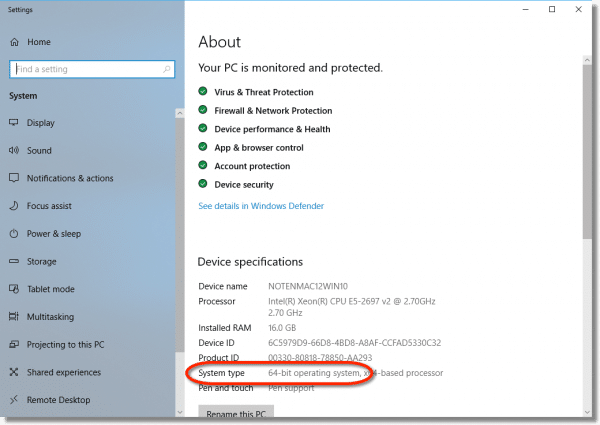
Any new machine purchased today will almost certainly come with the 64-bit version of Windows 10, particularly if it has, or can be upgraded, to more than four gigabytes of RAM. Check your system properties to see which edition you have. In Windows 10, right-click on the Start menu, click on System (in other versions, right-click on Computer/My Computer/My PC in the Start menu), and click on Properties.
There is no “upgrade”
The first and most important thing to realize about upgrading from 32-bit Windows to 64-bit Windows is that regardless of the version or edition of Windows involved (XP/Vista/7/8/10, Home/Pro/Ultimate/Enterprise/Whatever), there is no upgrade installation.
The only way to switch from 32-bit Windows to 64-bit Windows is with a clean install. There is no path for an upgrade that would do things like preserving installed programs and settings. You must start over from scratch.
“Upgrade” steps
Since an “upgrade” from 32 to 64 bits is really a clean install, it boils down to these steps:
- Back up your machine completely. This preserves your data and provides a fallback should anything go wrong.
- Boot from Windows installation media and install the new 64-bit version of Windows from scratch.
- Install and update all of your tools and applications from scratch.
- Update everything, meaning make sure that Windows, as well as your applications, is as updated as possible.
- Restore data from your backup or other sources.
It’s a simple, short list that represents a lot of work.
Why you want to
If you’re running 32-bit Windows, you’re using less than half the 10GB of RAM you have installed. By the very nature of being 32 bit, the 32-bit version of Windows can access at most only four gigabytes of RAM, and typically much less.
64-bit versions are the only versions of Windows that have the ability to use more than four gigabytes of RAM.
Thus, I strongly suggest you move to 64-bit software to take advantage of the hardware you have.
Software compatibility
A lot has been written about compatibility concerns when moving to 64-bits. Most of the concerns are overstated.
The majority, though certainly not all, of software that runs in 32-bit Windows runs in 64-bit Windows. Windows 64-bit has a compatibility layer specifically designed to allow 32-bit software to run.
In my experience, most software just works. Personally, I have never encountered a failure, although I have heard of rare cases where software fails — typically, it’s a failure to run in the latest version of Windows, but occasionally it’s a failure to run specifically in 64-bit Windows.
This is also an opportunity to see if your applications themselves have been updated to run in 64-bit. Just like Windows, applications updated to run in 64-bit Windows will make more efficient use of the hardware and will often run slightly faster.
Next steps
My advice is pretty simple: bite the bullet and upgrade. Do the backup, reformat, and install-from-scratch described above. Plan to spend a little time with it.
But the result should be a nicely working machine that takes advantage of all the RAM you’ve given it.
Do this
Subscribe to Confident Computing! Less frustration and more confidence, solutions, answers, and tips in your inbox every week.
I'll see you there!


You mention that you max out at 8 gig and would like more on your computers. That’s a lot of memory. Under what circumstances could you use that much memory?
Thank you,
Len
10-Jan-2012
I would add that you should locate the 64 bit drivers for your hardware before switching. With any luck, the built in drivers will offer enough functionality to get your network up so you can surf and download the correct drivers directly to the new install, but that is trusting a lot in luck. At a minimum I would try to locate the network card (or wifi) and video drivers…
I ran into one problem with 64 bit software, and it was MS Office 2010, esp Outlook. 64 bit will not sync with my MS based phone, ie Windows Mobile Device Center. A real disappointment in MS. I had to unload the 64 bit version and load the 32 bit version of Office to get everything to work and sync.
I am rather new to computing and went crazy trying to get the newest adobe flash player. A friend gave me a link and it worked to install the flash player on both 32 and 64 bit.
I used PC Mover to go from XP 32 bit to 7 64bit.
It was easy to do and I had only a few minor problems…
Almost all my programs worked fine…
I did upgrade all my drivers before making the move.
I loaded 64 bit Win 7 ultimate on my PC after having run the 32 bit ver for some time. The driver problem was insurmountable and I had so many BSODs from corrupted files and constant (not responding) messages in ALL my software. I gave up and went back to the 32 bit, now my fancy ASUS/AMD Quad core works just fine.
Since you are doing an OS install, now is a GREAT time to consider partitioning the HD. Split the single large C: drive into at least 2 parts: (relatively small) C: for OS and large D: for Data files.
This way, when it inevitably comes time to re-install Windows, you don’t have to worry about losing your data files. This means redirecting the default profile for “documents”, “Desktop”, “favorites” etc folders to the D: drive. It is easy enough to do.
It also allows you to be more selective on your backup strategy. Fewer (weekly/montly# backups for the C: drive, frequent #daily / weekly) incremental backups for the D: drive.
For Office, MS STILL! recommends sticking with 32 bit unless you have a explicit need for 64 bit due to the described lack of 64 bit addons. Specifically, handling files larger than 2GB.
One thing to be aware of – Drivers.
You will need 64 bit drivers for your devices ie
printers.
These might not be available – check the manufacturers web site first.
“64-bit versions are the only versions of Windows that have the ability to use more than four gigabytes of RAM.”
Not strictly true. For example, Windows 2000 Advanced Server, a 32-bit OS, supports 8 GiB (http://en.wikipedia.org/wiki/Windows_2000).
Here’s rather a deep article that suggests the 4 GiB ceiling is, apparently, contrived: http://www.geoffchappell.com/notes/windows/license/memory.htm
10-Jan-2012
Unless I’m missing something, it seems 64 bit software hasn’t caught up with the concept itself. Perhaps a bit overrated at this time.
Having a 64 bit Vista with 4GB ram [AMD dual core], most of my software is for 32 bit. The only difference noticed was occasionally having to install both 64 & 32 bit programs, recommended by the manufacturer. The only issue ever was with Adobe Flash [incompatible with 64 bit systems] and was a big problem and required using a 32 bit browser [Internet Explorer] and still had crashes. A switch to Firefox a year ago, resolved all those issues [somewhat magically]. I haven’t thought about 64/32 bit since.
Hi,
I have 2 pairs of 2GB installed on the computer.
If it is appropriate just to repair one of 2GB with a 4GB? Will there be performance penalty?
11-Jan-2012
I’ve installed win7-64 after running in troubles..
winXP-3 didn’t support my 4G-RAM so I only had a 64-win7
but later I’ve tried to install my fav-games but they wouldn’t
accept only a win32 platform ..( installed but unable to run and an other even not installed )
so running win7-64 is lovely ,but I need now to install win7-32..
Is it possible to have both on a single machine??
Programs that run on W7 32 bit but will not even install on W7 64 bit are, just to name a few:
AutoCad 2000, Filesync (excellent program for keeping data synchronized on mutlple computers on my network), Quicken 2005, Wordperfect 11 —
As my main desktop was upgraded from Winsows-XP, to 7, to 8 to 8.1 to 10, it worked perfectly till one day I got a message that my Windows is not legitimate (or something like that) and I have limited time to get a licensed copy…I paid Microsoft for one (although I initially paid for my initial XP) and have now Windows–10 32 bit.
The question is how to get the license transferred to a new installation on same computer from scratch, using Windows-10 64 bit, without to pay again for a third time to Microsoft>
I have four hard drives and 8 GB Ram in my PC and am willing to buy more RAM if needed.
very nice but possible that software to upgrade 32bit to 64bit