So many Outlooks. So much confusion.


The short answer is: Outlook and Outlook.com are two three different things. They don’t really relate to each other.
They have only three things in common: they’re all related to email, they all have the word “Outlook” in their names, and their icons are similar if not identical.
That’s where the similarity ends. It’s frustrating because people often refer to Outlook when they mean Outlook.com.
Oh, and as of this writing (in September 2023), it’s gotten worse. There are now two Outlook desktop email programs. And, you guessed it, they are completely separate from one another.
Let’s wade into the mess.
Become a Patron of Ask Leo! and go ad-free!

Outlook vs. Outlook vs. Outlook.com
- Outlook is an email program you install on your computer and is part of Microsoft Office / Microsoft 365.
- Outlook for Windows is an email program that will apparently replace the default Mail and Calendar app in Windows 10 and 11 and is beginning to be rolled out in 2023.
- Outlook.com is a website and online email service provided by Microsoft.
- Outlook, Outlook for Windows, and Outlook.com are three completely different things.
Outlook (the program)

Outlook, which I now often refer to as “Microsoft Office Outlook“, is:
- Software you install onto your computer.
- Part of Microsoft Office (aka Microsoft 365), which is a purchased product.
- An email program that downloads your messages to the computer on which it’s installed.
- Able to connect to any email account or service providing POP3 or IMAP interfaces (which is most).
- A fully featured personal information manager (PIM) with address book, calendar, to-do list, and more.
- Extensible, meaning Outlook can be extended via add-ins and macros.
Outlook (the other program)
When running the Mail program in Windows 10 and 11, you may see a notification.

The “Outlook” being referred to by this message is not Microsoft Office’s Outlook, but a completely different Outlook. From what I can see, it’s often referred to as “Windows Outlook“, so that’s how I’ll refer to it.
Windows Outlook is:
- Software you install onto your computer.
- An email program that downloads your messages to the computer on which it’s installed.
- Able to connect to any email account or service providing POP3 or IMAP interfaces (which is most).
- Includes an address book, calendar, and to-do list.
- Free.
You can have both these Outlooks (Microsoft Office Outlook and Windows Outlook) installed on your machine, and both will appear if you search for “Outlook”.
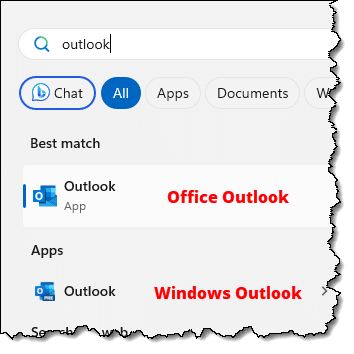
You can even run both at the same time.

As you can see, they appear to be very, very similar. Running them side by side, you can see some differences.
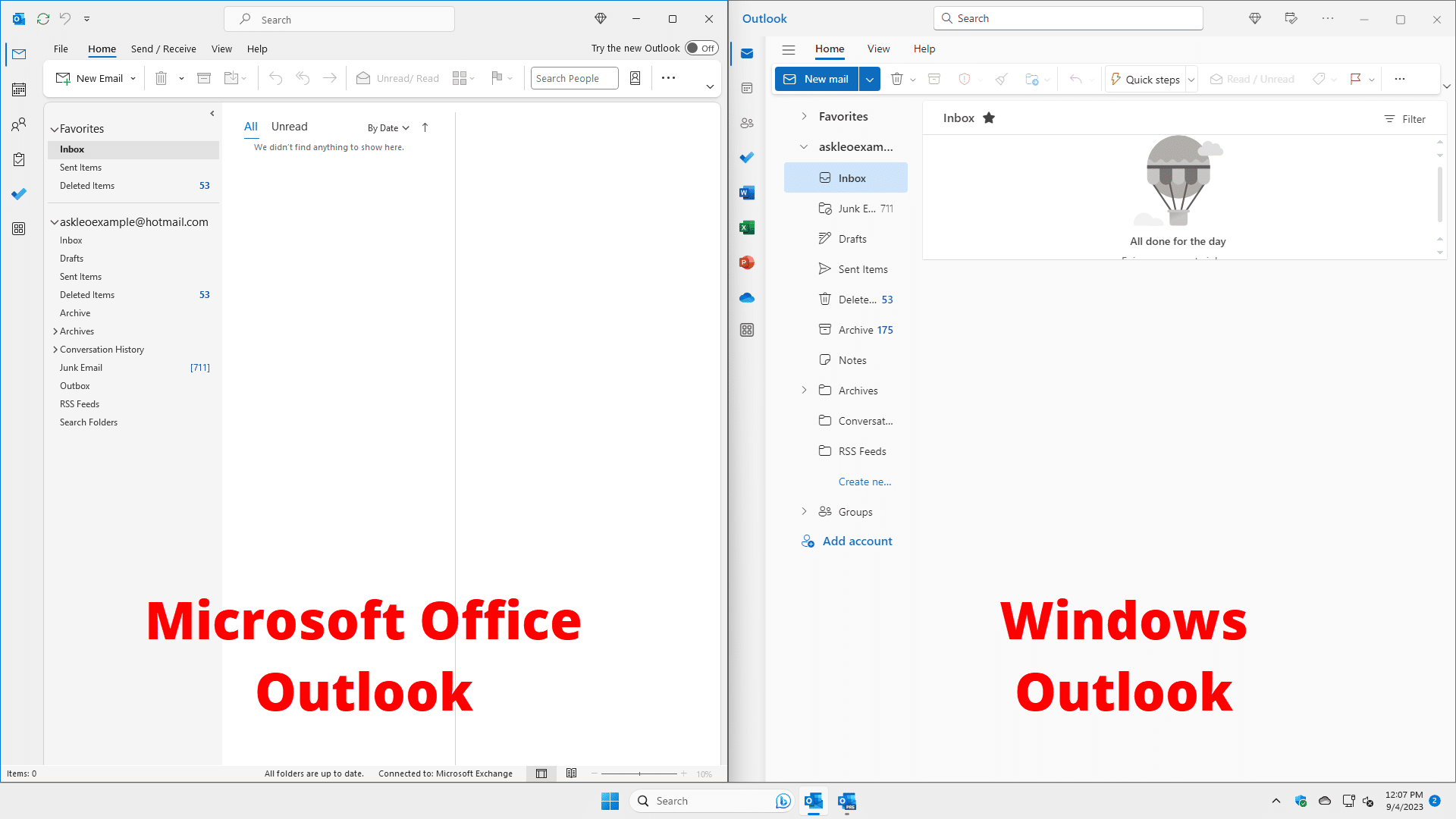
The easiest difference for me to remember is that Microsoft Office Outlook has a File menu and Windows Outlook does not.
Outlook.com (the website)
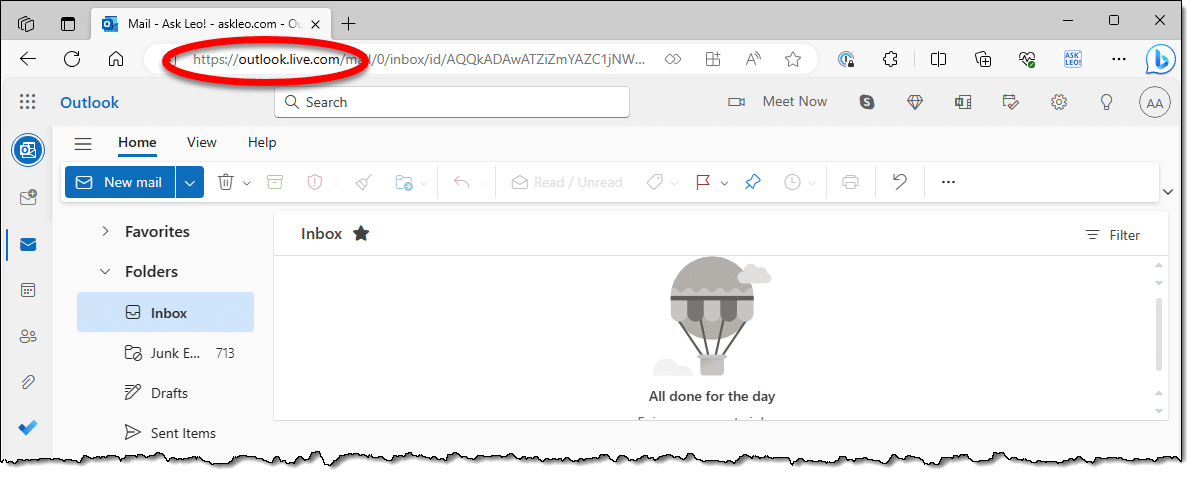
Outlook.com is:
- A website you visit using your web browser, such as Edge, Firefox, Chrome, or any other.
- An email service on which you can create your own free email address ending in outlook.com.
- A replacement for Hotmail.com.
- A web-based user interface used to access only existing Hotmail (and other Microsoft) email accounts.
- Free.
As you can see, Outlook.com doesn’t relate to Outlook other than having a similar appearance to Windows Outlook.
Microsoft Office Outlook and Windows Outlook are email programs you install on your PC; Outlook.com is a website you visit in your browser to access email.
The only thing Outlook.com shares with Outlook is the word “Outlook” (and the icon), which is apparently Microsoft’s attempt to create some kind of generic branding for anything email-related (thoroughly confusing users in the process).
Outlook Express
I have to include Outlook Express for completeness. Even though it’s long, long dead, its memory lingers on.
Outlook Express was:
- A program you installed on your computer.
- Free; it was included on most Windows installations before Windows Vista, and came with Internet Explorer versions 6 and earlier.
- An email program that downloaded your messages to the computer on which it was installed.
- An Internet news reader, as it accessed Usenet newsgroups and other older Internet news servers.
- A contact list manager aimed primarily at managing contacts specifically for mail and news.
- Completely unrelated to Microsoft Office Outlook.
I say “was” because Outlook Express has been DISCONTINUED. Outlook Express was discontinued by Microsoft years ago and wasn’t included in Windows versions beginning with Vista. In fact, Outlook Express will not run on Windows 7 or later.
Based on my experience answering questions and trying to help people with Outlook Express, my position is that it is long past time to move on and select another email program.
Do this
So which Outlook do you want?
Microsoft Office Outlook is a powerful email program targeted at the business environment, email power users, or those who want the additional features it brings. With a lot of support from third-party vendors including things like mobile device synchronization, Outlook is a reasonable choice for the home or casual user.
Windows Outlook looks to be the future of the email program to be included in Windows. It’s free, looks reasonably well-featured, and is likely to improve over time. If your needs are simple and you want a desktop email program, this is a reasonable choice.
Outlook.com is a fine web interface for accessing your Microsoft account-related email. It can be the primary means for accessing your outlook.com, hotmail.com, live.com, msn.com, or any number of other Microsoft-provided email services.
Outlook Express is no longer an option.
Regardless of which Outlook you choose, use it to subscribe to Confident Computing! Less frustration and more confidence, solutions, answers, and tips in your inbox every week.
Podcast audio

Related Video


Footnotes & References
1: Of interest on close inspection is the “try the new Outlook” in Microsoft Office Outlook, which switches you to… Windows Outlook.


Leo, Why not dedicating a few words to the Mail App? The latest version is easy to remember: 16005.12228.20356.0
Leo has recommended the Windows Mail App in a Tip of the Day. It can be just right for someone with basic email needs.
Hi Leo
I just did not understand anything you wrote about ‘Outlook’ and ‘Outlook.com’!
I only know that my Outlook email is names ‘https://outlook.live.com’, but you
did not say anything about this ‘Live’ please enlighten me if possible, thanks.
Kind Regards
Allan
https://outlook.live.com is the same website as https://outlook.com. When you enter https://outlook.com, it redirects to https://outlook.live.com automatically. The URL (website address) is a kind of address forwarder to the real web address which is the IP number. The URL goes through a Domain Name Server (DNS) which is an index connecting the URL to the IP address and sends you to the correct page.
Leo,
Thanks for the explanation BUT, now I am totally confused, as I was going to write you about this before and now with what you just published, it’s time for me to ask what is it that I have: https://outlook.live.com/owa/? I wrote to Outlook asking if what I had was current and, never received a response back from them, assuming that they are not running at peak efficiency due to the Pandemic. Any insight, as to what I have and whether this is current, would be appreciative.
When you visit outlook.com you’re redirected to outlook.live.com — “owa” stands for Outlook Web Access. You have outlook.com.
Hi. I have been with Outlook for years, as I didn’t like the format that Gmail had, so my son set me up with Outlook Express which just simply gives me a column list of all emails- great.
Over the years we have gone from Windows XP to Window 10 and everything continued ok.
I cant remember whether Outlook Express automatically changed to just Outlook or whether my son did the change.
Anyway, I can’t open my latest emails, because Microsoft throws up a window, saying, “too many messages- need to delete some”. When I go to delete some, same window pops up, so I’m totally jammed.
Contacted Microsoft and after a few question, they directed me to their Tech person, and told to join up and subscibe to $70 mth. Pardon – though Outlook was free, or has been all these years. Any ideas.
Outlook Express was an email program which was included in XP. Outlook is not free. It’s a part of Microsoft Office and has to be set up explicitly with your email login credentials to work. So it looks like your son set it up for you. The too many messages, most likely, comes from your email provider and not Outlook, itself, even though the messages appears when you use Outlook. I’d go to my email provider’s website and delete the excess emails there and see if that solves the problem.
I suspect he’s referring to Outlook.com – not Outlook.
I thought he meant Outlook from Office because he mentioned Outlook Express. This is an example of Microsoft’s lack of understanding how to come up with unambiguous names for their products.
My guess is you did not actually contact Microsoft, but someone posing as Microsoft. (Depends on how you found the contact info — there are a lot of scammers.)
It will be VERY important to know EXACTLY what email interface or program you’re using — browser, which one, or email program like “Mail” in Windows 10. Be sure to understand that, because it’ll be the very first question you’re asked. You might also screenshot that “too many messages” message. Here’s how to contact Microsoft Support (be forewarned, options are limited): How Do I Contact Outlook.com Customer Service? Of course you can also reach out to https://askleo.com/ask .
If Microsoft removed the ability to add other email accounts to Outlook.com, does that mean that you also cannot add them to the app which I thought was totally separate from Outlook.com? I have been unable to add new accounts to the Outlook app on my computer for a while now. When it gets to the final phase of the adding process it just hangs on “We’re getting things ready…” and nothing ever happens. No error messages, nothing. I have to cancel the process. However, if I use the mail feature on my Windows 10 machine, it has no problem connecting to the email account. I just want all my emails in ONE app though…
Outlook.com and Outlook, the app, are unrelated. So what happens in one has no bearing on what happens in the other.
Outlook, the app, should support multiple accounts. You might try repairing office, or reinstalling it.
I have an outlook.com address set up by the person who installed Office on my new computer three years ago. I have had a hotmail.com address since the 90s. I have also purchased 365 for the storage and to not risk losing anything I’d done in Word and Excel over the years.
My hotmail.com address is receiving notifications that I will soon be over the storage limit as they combine it with OneDrive and I will have to buy 365 to avoid paying for storage. My outlook.com email address does not receive these notifications. As I said before, I already purchased 365. How do I reconcile the two account so that Microsoft doesn’t double charge me?
Free up space in the account that’s throwing the error. That means deleting things from OneDrive and/or deleting (or downloading) emails with attachments that are adding up to take all the space.
More here: https://askleo.com/why-is-my-outlook-com-email-suddenly-full/
Leo, you wrote:
“…Outlook Express was: An Internet news reader, as it accessed Usenet newsgroups… my position is that it is long past time to move on and select another email program
…”
Excuse me, Leo, but I’m not interested in Outlook Express the E-Mail Program; I’m interested in Outlook Express the Usenet Newsreader.
In other words, I’m in the market for a Usenet Newsreader, not an E-Mail program… and preferably NOT by Microsoft, thank you.
Suggestions? (Preferably free, and for 64-Bit Windows 7 Home Premium.)
There are many newsgroup readers, and Thunderbird can be used as a newsgroup reader.
I usually refer to Microsoft (Office) 365 Outlook as Outlook.exe which is the file name of the program. It’s specific and unambiguous.
In the footnote for this article, Leo mentions the “Try the new Outlook” in the Microsoft 365 Outlook.
I use Microsoft 365 Outlook and just for grins, turned on the the new Outlook. Doing so downloads a preview version of the new Outlook. I cancelled the process when a box opened and noted that the preview does not use the .pst files used by Microsoft 365 Outlook.
This indicates to me that Microsoft wants to keep all emails in the cloud. Or am I missing something?
I have a Microsoft 365 subscription and storage isn’t a problem, but the .pst files are included in my backups of my computer. As Leo says “If it is only in one place, it’s not backed up.”
“Try the new Outlook” is NOT in the Microsoft 365 Outlook. It’s in the default Windows Mail program.
The “new” outlook is Windows Outlook as I describe above. It’s a desktop email program that stores email on your PC however it chooses to.
The only program to my knowledge that reads PST files is the Outlook program that comes with Microsoft Office / Microsoft 365.
From my quick search today:
1) It looks like the free Windows ‘Mail’ client is to be replaced by ‘Outlook for Windows’ [and not ‘Windows Outlook’]
2) It looks like the program is for Windows 11 only
Here’s an easy way to deal with the Outlook confusion. Use Gmail.
Leo – while you’re at it, maybe you can fix the whole Diet Coke, Coke Light, Coke Zero snafu?
For that I even have a partial answer — Diet Coke uses aspartame, and Coke Zero uses sucralose. (No idea about “Coke Light”, which I’ve not heard of.)
Coke Light is the European version of Diet Coke. It is a different formula from Diet Coke, though.
@sam hunt: Yep, my solution too. :)
It really doesn’t matter. Soon Microsoft will change it, rename it, or abandon it. Or create a fourth Outlook.
Hi Leo,
– and we also have, (wait for it)… Outlook Mobile!!!
I was in ‘Outlook Microsoft 365’ and added a new account. The window said ‘Account successfully added’. At the bottom of the window was a check box, “Set up Outlook Mobile on my phone”.
What is this? I was afraid of what might happen so left it unchecked.
Now why would anyone want to use Gmail when you have all these wonderful choices from Microsoft?
Outlook Mobile is a Microsoft email app for Android and IOS.
I updated from Win XP to Win 10 some years ago. I downloaded six email programs. I found none suited my purposes as well as Outlook Express. Luckily, I was able to source an updated version of Outlook Express which runs on all versions of Windows. It is called OE Express. It is similar to Outlook Express but with some improvements.
Interesting name. Outlook Express Express. ;-)
Maybe off topic. But, since Microsoft is sundowning the Mail program and I assume will eventually be *forcing* us to use the “new Outlook” will they first be FIXING it? There is MANY things not included that I use on a regular basis, to the point that if they forced the new Outlook tommorrow I would be VERY quickly installing a new program such as Thunderbird or something else that would replace what they haven’t added to new Outlook yet.
Just an example, when you print a calendar in the old mail program, you have a great many options. You can print it landscape so it looks and feels like a normal calendar. You can print different time spans from 1 day to several days to a week and finally one month. In the new Outlook, there is like three options, landscape is NOT possible. Microsoft tells you to go change your print options, but that doesn’t really work.
The same goes for email and other print aspects. If I can’t print from the email program, I will switch to something that supports it.
They’re not forcing us to use the new Outlook. There’s always Thunderbird an other email programs available. I even have MS 365 which includes the paid full-blown version of Outlook.exe, but I prefer Thunderbird. It has all I need with less bloat.
Maybe bad phrasing on my part forcing us to not use Mail/Calendar anymore and effectively taking that functionality away… since it isn’t in the “new Outlook”. And printing has been removed from MS 365 outlook altogether for a while. Or at least I have been unsuccessful in finding the option. And the reason I haven’t already jumped to Thunderbird is, then I will be tied to a single device for my email. It is really nice to be able to start my email/calendar on my desktop, move to a tablet or phone, then to a laptop, etc. and all the changes follow. With Thunderbird the calendar follows, but the email has to be retouched on each device so, having it on every device means double, triple or quardrupling my workload. And that increases the chances something gets missed because it looks similar to something already handled. Just frustrating to have a solution that works and a company takes it away without replacing it.
You can have your email in multiple places with Thunderbird. I do. The “trick” is to configure the account as IMAP and not POP3.
Or you can use POP3 with the leave mail on server option.
This is very helpful. I have both Microsoft Office Outlook and Windows Outlook (which has ‘New’ on the icon) on my laptop. Does this mean that all the email is downloaded twice, and is therefore taking up twice as much space?
Quite possibly, depending on how things are configured.
Yes. Both programs download the email in different folders and in different formats and the emails are downloaded to both locations. Unless they have large attachments like photos, videos, or music, text emails take up very little space.
Thank you for the clear explanation of these 3 versions of Outlook. It is only recently that I purchased the Microsoft Office 365 subscription service (family version). I am quite happy with it especially the extra cloud storage, although I was initially a little reticent because of the recurrent payment aspect. I have always owned my programs and licenses as standalones. Reading about the different Outlooks here made me wonder are there any differences between the Outlook program that comes with the 365 subscription versus the stand-alone Office Professional 2021 version. I know that the subscription Outlook is updated automatically which is great. However, I did not realize until reading this article and watching the video that even though it is a subscription the Outlook program actually exists on my PC. Foolish me. I thought I was using it on the cloud or some server! (Clearly a senior user) ;-) Thanks.
When you purchase the stand-alone Office Professional, it’s the same programs. The difference is that the MS 365 subscription is continually upgraded to the latest version of Office.
I got a suggestion for the NEW Outlook for Android. I installed it to try it out. I kinda like it so far.
Of course the very best thing you could possibly do with Outlook, Outlook or Outlook, would be to simply never ever use any of them ever again.
Dang ! And here I was thinking there were only two “Outlooks”.
I do hope this is a result of a covert internal contest, in order to find the best way to thoroughly confuse and annoy customers, and make support a nightmare.
Because if it isn’t, IQ has been falling dramatically at Microsoft since the days you worked there.
By the way, isn’t there an extra level of confusion, since Microsoft Office nowadays is a hybrid beast, half online service and half desktop program, and you never know where you are ?
I attribute it to Microsoft not hiring non-geek language specialists to check these things out. Many geeks don’t understand the human computer.
Microsoft Office is a bit similar but the naming isn’t as ambiguous as they are Microsoft Office and Microsoft Office Online.
3 versions + 1 or 2?
Please continue the explanation…. How about the two IOS apps:
“Microsoft Outlook” and “Mail App for Outlook”
my new computer has windows 11 in it; I also set up “windows outlook as instructed; now my “old” version of outlook is hosed up; depending on which icon I choose, I get two different “versions with different presentations of the latest messages available. In other words, setting “credentials for o 11ne, screws up the other ( on my win10/11 machine. I’m definitely confused!
Soooooo. How do I know which Outlook I have. I do have a subscription to Office 365 so I suspect I have the Office Outlook. I have also been able to add my Gmail and AOL email accounts to this Outlook. THe biggest problem I have is trying to use the correct password with my office. IF I DO HAVE THE Office 365 Outlook, do I use the same PW as my Office 365 acount ? I have seen the “box” that says I could switch to the new mail probram that is replacing windows. Is there any need for me to consider this if I am using Office 365 Outlook ? VERY CONFUSING. Thanks for info
If you have MS 365, the Outlook.exe program from MS Office. Were does it ask for a password? The only passwords I can think of are the passwords from your email accounts.
If you have MS-Office Outlook you can ignore that new email program offer.