Annoying you in the process.

No. You have not been hacked.
“From” spoofing means faking the “From:” address on an email to make it look like it came from you. To do it, spammers don’t need access to your account at all. I’d say that 99.99% of the time it has nothing at all to do with your account, which is quite safe.
They only need your email address.
While your email account and your email address are related, they are not the same thing.
Become a Patron of Ask Leo! and go ad-free!

There are several ways a spammer can impersonate your email address and use it in the “From:” line of the email they send. All they need to do is craft an email with your email address listed as the sender and send it. It really is that simple. Your account need not be involved in any way.
Accounts versus addresses
Let me say that again: your email address is one thing, and your email account is another.
- Your email account is what you use to log in and gain access to the email you’ve received. In most cases, it’s also what you use to log in in order to be able to send email.
- Your email address is the information that allows the email system to route messages to your inbox. It’s what you give other people, like I might give you leo@askleo.com.
The two are related only to the extent that email routed to you using your email address is placed into the inbox accessed by your email account.
I have a more detailed article discussing the relationship here: What’s the Difference Between an Email Domain, an Email Account, and an Email Address?
To see how spammers get away with “From” spoofing, let’s look at sending email.
Addresses, accounts, and sending email
Let’s take a quick look at how you create an account in an email program, like the email program that comes with Windows 10. Using “Advanced Setup” for “Internet email”1, we get a dialog asking for a variety of information.

I’ll focus on three key pieces of information you provide.
- Email address — This is the email address that will be displayed on the “From:” line in emails you send. Normally, you would want this to be your email address, but in reality, you can type in whatever you like.
- User name — This, with the Password below it, is what identifies you to the mail service, grants you access to your mailbox for incoming mail, and authorizes you to send email.2
- Send your messages using this name — Called the “display name”, this is the name that will be displayed on the “From:” line in emails you send. Normally you would want this to be your own name, but in reality, you can type in whatever you like.
Very often, email programs display email addresses using both the display name and email address, with the email address in angle brackets:
From: Display name <email address>
This is used when most email programs create your email, and that’s what you’ll then see in the “From:” line.
“From” Spoofing
To send email appearing to be from someone else, all you need to do is create an email account in your favorite email program, and use your own email account information while specifying someone else’s email address and name.
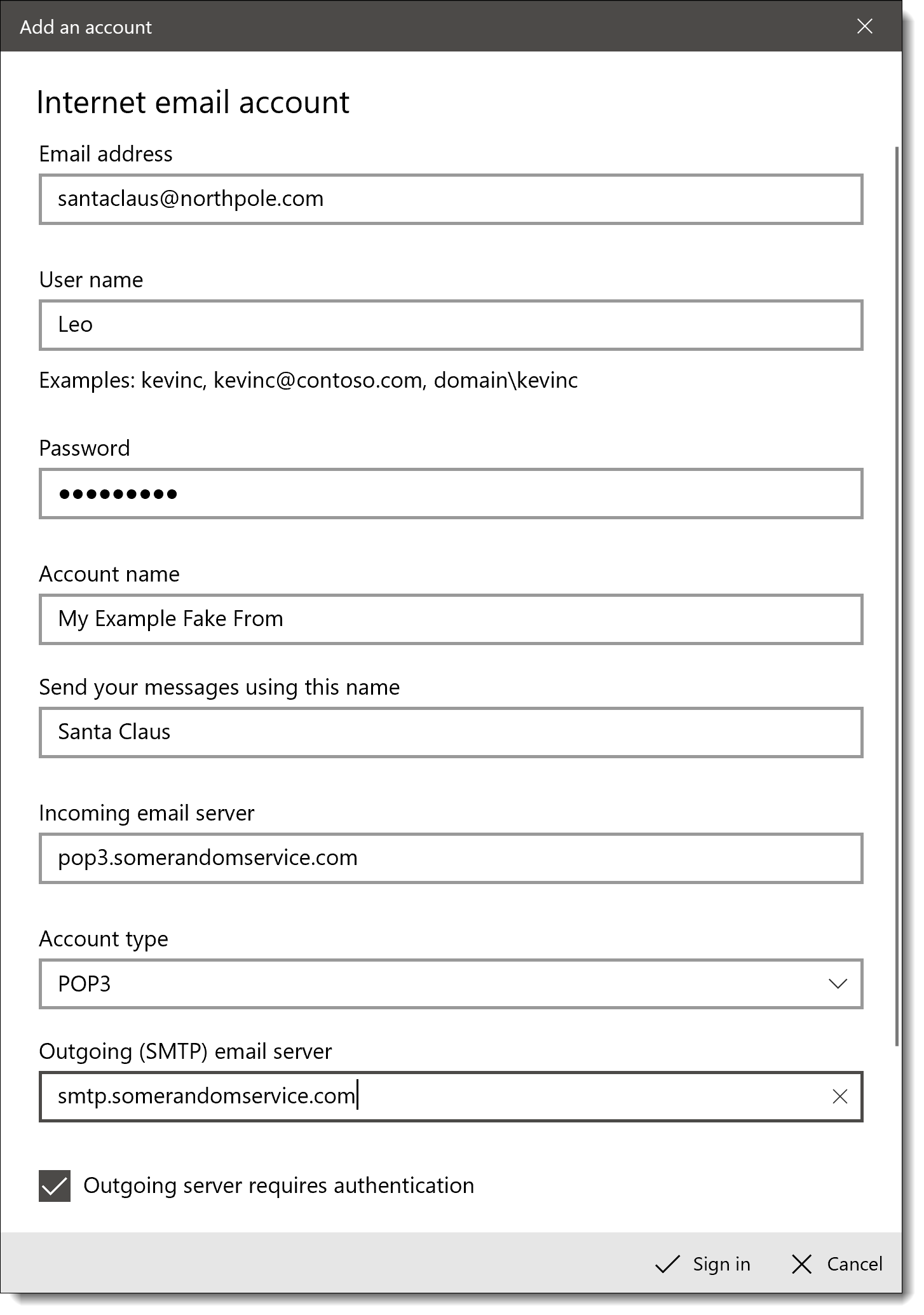
Looking at those same three bits of information:
- Email address — As we said above, it can be whatever you like. In this case, email sent from this account will look like it’s “From:” santaclaus@northpole.com.
- User name — This, with the Password below it, is what identifies you to the mail service, grants you access to your mailbox for incoming mail, and authorizes you to send email. This hasn’t changed.
- Send your messages using this name — Again, this can be whatever you like. In this case, email from this account will appear to come “From:” Santa Claus.
Email sent using this configuration would have a spoofed “From:” address:
From: Santa Claus <santaclaus@northpole.com>
And that — or its equivalent — is exactly what spammers do.
Caveats
Before you try spoofing email from Santa Claus yourself, there are a few catches:
- Your email program might not support it. For example, most web-based email services don’t have a way to specify a different email address to send from, or if they do, they require you to confirm you can access email sent to that address first. However, sometimes you can connect to those same services using a desktop email program, like Microsoft Office Outlook, as I’ve shown above, and configure it to do so.
- Your email service might not support it. Some ISPs check the “From:” address on outgoing email to make sure it hasn’t been spoofed. Unfortunately, with the proliferation of custom domains, this approach is falling out of favor. For example, I might want to use the email account I have with my ISP to send email “From:” my askleo.com email address. The ISP has no way to know whether that’s a legitimate thing, or whether I’m a spammer spoofing that “From:” line.
- It’s probably not anonymous. Yes, you can set the “From:” field to whatever you like, but you should be aware that other email headers (which you don’t normally see) may still identify the account you used to log in when you sent the email. Even if it’s not in the actual email headers, your ISP may well have logs that indicate which account sent the email.
- It might be illegal. Depending on who you try to impersonate, your intent, and the laws in your jurisdiction, it’s possible that misrepresenting yourself in email could run afoul of the law.
Spammers don’t care. They use so-called “botnets” or “zombies” that act more like full-fledged mail servers than mail clients (Microsoft Office Outlook, Thunderbird, and so on). They completely bypass the need to log in by attempting to deliver email directly to the recipient’s email server. It’s pretty close to anonymous as spam is exceedingly difficult to trace back to its origin.
Where’d they get my email address?
So you might be asking yourself: if they didn’t compromise your account, where did they get your email address?
Spammers get email addresses everywhere. Data breaches, public postings, emails forwarded by friends without removing your email address, less-than-reputable companies, some kinds of bulletin board postings, and more.
Basically, spammers get your email address from wherever they can but they don’t need access to your account to do it.
The “From:” spoofing takeaway
There’s nothing special about the “From:” address. It’s just another field which, like the “To:” field, can be set to any value you like. By convention — and sometimes automatically — we set it to our own email address when we send mail, so we get any replies. But there’s nothing that says it has to be that way.
And there’s nothing that forces it to be that way.
Similarly, since it’s just a setting on outgoing email, seeing a particular “From:” address doesn’t imply any relationship to the actual account that would receive email sent to that address. Spammers don’t need access to the account to make it appear in a “From:” line; all they need to do is type it in the account settings. Nothing more.
That spam didn’t really come from that address at all.
Related questions
How do spammers get my email contacts?
Most commonly spammers don’t get your email contacts at all. They simply send enough spam that at some point one or more of your contacts may get spam that is forged to look like it came from you. Occasionally spammers do hack email accounts and collect the contact list, but that’s not as common these days. More common are email addresses and relationships exposed publicly on social media sites and other services where it’s easy to see who your contacts might be by who it is you interact with the most.
How did my email get spoofed?
As a general rule, your email might be spoofed for no reason other than the spammer having a database containing both your email address and name. That’s all they need to make an email look like it came from you.
Can spammers tell if you open an email?
Spammers can tell if you open an email only if you allow images to be viewed in the email, download an attachment included with the email, click a link within the email, or reply to the email. Best practice for spam prevention and personal security is, of course, to do none of those things unless you know the email is legitimate.
Will spam emails eventually stop?
Spam emails will likely never stop. All proposed solutions have issues, the largest being that all email providers need to agree on which solution to adopt. Rather than getting upset about the existence of spam, you’re generally better served by using a good spam filter, and training it to recognize spam arriving in your account. That way spam will continue to arrive, but will be diverted into your spam folder rather than your inbox.
Can someone use my email address without me knowing it?
Anyone can use your email address without you knowing about it. Spammers do it all the time when they forge the “From:” addresses in email. In reality, you might eventually hear about it because of a reply to that forged email, or some other action taken by the recipient, but there’s no requirement and no guarantee. Your email address is probably being used right now in some faked spam message.
Is just opening a spam email dangerous?
In general as long as your email program is configured properly opening a spam message is not dangerous. A proper configuration means that images are not displayed by default, that “return receipt” requests are ignored, and that executable programs included in the body of the message are ignored. It’s also important that you not click on any of the links contained in spam, and do not open any attachment included with spam.
Do this
Subscribe to Confident Computing! Less frustration and more confidence, solutions, answers, and tips in your inbox every week.
I'll see you there!
Podcast audio

Footnotes & References
1: As opposed to specifying a specific provider — like Outlook.com, Gmail or others — from the start. When you specify one of those pre-defined providers, the Mail program already knows most of the settings it needs and doesn’t ask you for them. By configuring a generic “Internet email” account, the Mail program makes no assumptions and asks for all the information it needs.
2: One point of confusion I’m side-stepping is that email addresses are often used as usernames. They are still two distinct things.

Think of the “from” line of an e-mail as nothing more than the return address on a snail-mail envelope. Nothing stops me from writing someone else’s name and address, and the mail will still go through.
I am hoping this little bit of advice will end up on top, to help others with “technologically primitive” friends and relatives.
Often, when “newbies”, (no matter how old they are or how long they’ve had a computer or smartphone) get a cute/funny email, they want to share it. So, what do they do? They SHARE it. With EVERYONE! In doing so, they have unwittingly just sent YOUR email to EVERYONE and the pattern continues…their “Tech-Newb” friend(s) repeat(s) the “friendly offense” and, before you know it, hundreds or even thousands of folks (maybe some not-so-nice ones) have YOUR email and everyone else’s that was “lucky” enough to be part of all this fabulous love of sharing.
My tip is, TELL them…TELL the “Tech-Newb” in your life that, while you “appreciate the sentiment, please, please, PLEASE, do not “share” these things with me”…and if you think they’ll “get” it, by All means, explain why!
I find this is a handy article to share with people: https://askleo.com/why_shouldnt_i_forward_this_email_asking_me_to_forward_to_everyone_i_know/
Or, you could explain to the friend what the Bcc field is for.
Presumably this means I should be careful about adding such spam emails to my spam filter’s list of spam addresses. I do occasionally send emails to myself, and I don’t want to block these.
I get high importance mail from my self, stating “Delivery Status Notification (Failure)” the picture then advertise medicene and link takes me to Canadian Pharmacy. How do I prevent the spamers from doing it to me and how do I stop it?
The best information i have found exactly here. Keep going Thank you
OK, so I completely understand that anyone can write anything in the “from” line, what I need to know is HOW do I block them when the from is my own address that they put in, and not theirs? I send myself emails all the time so I can print on another level of my home (to another imac) so I don’t want to block myself, What I’d like to know is HOW do I find their email? who it REALLY came from and block them and or track them down? I sooo wish I had a program to automatically extract the person’s address and spam them 1000 times over. Anyone write this yet?
28-Sep-2009
Leo
You are wrong the senders email address along with a Domains Abuse email can be seen easily when one looks at the headers of the email.
To do this in Outlook client open the email in full screen mode, then on the file menu area select Properties.
A small box appears which shows the Header information.
In here along with a lot of other information one will find the senders email address. Once found add this to your blocked email spam filter.
That information you’re exposing can be spoofed. Headers are easy to fake as well.
Thank You, Leo! Your explanation was clear.
People that are in MY address book are being sent these emails in batch mode/CC.
Question:
1. Without my password to my account, how do they get access to MY email address list? Some of these addresses are ancient, yet still good.
It is especially annoying to find that these ‘addresses’ and the tag I gave them are being sent to multiple people. I always use BCC to avoid ‘giving out’ addresses, which I consider common courtesy, and hopefully avoids the violation of identity of sorts. I feel like a leper now!
2. When can I hope for this to end? I’m deleting 70 or so notifications daily – in addition to knowing it’s still happening – someone is monitoring this for me.
3. What Email software would you recommend? Or simply avoid HotMail?
Please shorten as necessary.
Thank you
2) You need to regain control of your account first. change your password and everything else.
3) Email software is different from am email service. EMail software: I like Thunderbird. As for email services I avoid free, recommend those with customer service, but if you must go free: Gmail.
04-Sep-2010
In order to completely avoid spammers to send email that looks like you it requires a big improvement over the actual mail protocol.
In Italy (the land of the spoofers) they came out with a new mail protocol called certified mail you can read more about it here:
http://www.openpec.org/eng/index.shtml
This new protocol does not allow spoofing anymore. Unfortunately it’s something that has been adopted only in Italy so far, and I wonder if anyone else in the world will ever feel the need for this. The protocol must be adopted on both sides to work.
I’m actually working for a company that sells this so called certified mail: Poste-Certificate.it – PEC aziende It’s interesting, but very burocratic as everything here.
Hi Leo, what you say is dead on. I get emails to my Spamfighter box all the time which are so called “returns” to me i.e. bounce backs, however I did not send them. As an experiment I set up a “spoof” account on my Thunderbird programme. I used a legit AOL account belonging to me and used a totally false name. I then sent myself an email and sure enough, I got the false name and my AOL email account. The only problem is the ones I get on my Thunderbird programme often end up in the Spamfighter box. Does this mean that my address is being blocked by Spamfighter ?
While on the subject of spammers, be very wary of sites offering to eMail something to some third party. You have no idea of what they are going to do with that eMail address. Even if the site does not sell these addresses to spammers, they may save the addresses and a spammer hacking into their site may get them. Another category of possible spammer farms is that of sending greeting cards. Your are virtually giving them your address book. What will they do with it?? THINK BEFORE YOU DO IT!!!
I went thr’ the article as i am one of the victims of this.I am really worried now as to how to stop this.One thing i noticed is that it sends mail only when i log on using my home wi fi.However ( as i gather from the answers) i try changing all the details in my account.
Hi,
there is currently no way to stop “spoofing”. I have a custom domain name and the spoofer just prefixes my domain name with a random alpha-numeric string and churns out email. No check is ever made to see if this “spoof” address is valid, by that I mean is it a real account that I personally have created for my own use. Whilst this continues to be the case then we are all just victims. In this day and age the corrective measures are not technically challenging to implement but it seems that the technical will to do so isn’t there.
Leo, I recently had a fake email go to my banker in NY asking for a wire transfer. It had my Outlook signature at the bottom just like a real email from me and it also fake copied my director of finance. It went on to say my director would send wiring instructions. I am taking precautions up to and including reinstalling the operating system on all computers to insure any malware or key stroke program is gone but wondering if the hacker actually gained access to my emails in outlook or even worse, to my outlook contact list?
any thoughts?
It could be as simple as having forged an email from some other computer with no access to your computer or account at all. But I’d certainly secure my account regardless.
Nice article.
Another thing they use is “me” in the sender’s address. Yahoo filters my e-mail and blocks them for me with the exception of PC Pitstop and Dave’s Computer tips. They were blocked as well till I allowed them through the first time.
Thanks for caring……….Alan
{website removed}.com keeps spamming me, almost daily, using this header and random user names. I have never ever even been to that site, WHY?!? WHY ME?!?? don’t these jacka$$e$ get that I will NEVER buy whatever from any random email suggestions?? This is why I gave email up for awhile, but then I got a smart phone and it came with email..
sure I can delete everything without opening it, but the sh!t just keeps coming!!
Spam is spam, and once they have your email address, they’ll continue to send spam regardless of what you do or don’t do. Just make sure the adaptive spam filter in your email program or web mail is enabled and mark those mails as spam. Eventually it should learn to identify that kind of email as spam.
Just mark spam as spam and move on with your life. It’s a fact of email life and not really worth getting seriously worked up over.
Okay…so here’s what is confounding me:
Someone has accessed all my email contacts and is sending out spam emails to them, but they aren’t using my actual email address moniker as the “from”. They are using my name as it appears on my Pinterest account, which is completely different than what’s on my email address.
So how is that happening?
They made a copy of your contacts. They are now using their own email server and email account with the “From:” information set to your Pinterest name with your email address.
Hi
So there must be a way to stop this! You wrote to another person “Just move on with their life”
Yes easier said that done. The last couple of days I got thousands and I mean THOUSANDS of emails saying “Delivery Subsystem – Message delivery failure”
And i get the because they looks like the are from me, so when they can’t be delivered they are bouncing back to me! Im getting crazy here. Just while I was writing this I got 223 emails!
Easy to say, “just delete them” yes but I have to go through them all because there could be important emails between them, so please help me here!
Thanks
Klaus
Mark them as spam. That’s the only solution that I’m aware of. Eventually your spam filter should filter them automatically if it’s any good.
I got an email recently that had a different email address as the “From” with my full name – but within the body of message my full name and correct yahoo email address were listed in the signature portion along with “sent from my iPhone.” This is a bit strange since it clearly comes from another email address. The weird thing is that the email was delivered to my work address with my yahoo address within the body. So there is a strange connection. Is this something I should be worried about? Thanks!
That’s really nothing to worry about. It’s an extremely common thing with spam.
This article and your advice is getting out of date. Domain validation on emails are becoming common. Estimates of 20-50% (depending on where you look) are commonly accepted.
https://en.wikipedia.org/wiki/Email_spoofing
Hi,
I am curious about how my contacts are receiving these spoof emails? If only the email address is comprised but not my email account, how are my contacts being affected?
Thanks!
The article you are commenting on explains that.
I understand how the spoofers created an address that is very similar to mine. However, they are sending email to people I corresponded with 3 years ago, most of which are not in my list of contacts. It seems to be a mix of soccer parents and people I worked with at that time. Is it likely they hacked my email account? I appreciate any info you can offer.
Sounds likely. I’d secure the account according to the advice in this article. Email Hacked? 7 Things You Need to do NOW
Hi and thanks for the great article. Just to clarify, if I receive a fake email and I respond will the response go to the
server which sent the fake email or to the actual email address which was faked? Thanks again.
The reply would go to the address which appears in the from field. You’d be able to see where it is sending to when you click reply before you click send to send the message. My question is why would you even want to try?
Depends on how the email was constructed. NEVER REPLY TO FAKE EMAIL. At best it does nothing, and at worst you’ll just get more and more spam.
I’ve hit a road block at understanding the server information. In your example, you write “3popsomerandomservice.com”, but what should I write if I’m trying to set this up? (pranking a good friend)
Thanks
You would need to get that from your email provider. For instance to find it for Gmail you Click on the > Gear > Settings > Fowarding and POP/IMAP, and down at the bottom click on “configuration instructions”. Follow the instructions on that page for Gmail instructions. If you have email from a different service you will need to find their instructions.
I use a service called junkemailfilter.com and use it on my different domain names and email services. It is very adaptive, has good customer service also. It cut our spam that my employees as a whole from close to 1000 total a day down to only 30 to 35 company wide or an average of only 5 a week per person. It might be over kill for a single person but a small business of 20 or so employees the $9.99 a month they charge is well worth it. I liked it so much that I now use it on my personal email as well. Every now and then, I have to look in the spam folder for a legit email, but I only have to mark it legit once. It also can send out an email back to the person who sends it to verify that they are a real person (as opposed to an auto program). I now pay for much less email storage space as a result. Thanks for all the good tips leo, I pass along many of your tips to my family, friends, and employees, you explain this all better than I do.
I have for years been getting Mail System Error – Returned Mail from Mail Administrator, doing my own investigating I found it was being sent from Germany. (I’m in Arizona) Using my translator I found out it was just plain ole spam, of course the first thing I did was change all my passwords, which had no effect because as you said they are just using my email addy to “spoof” a valid address. My ISP was no help and never even offered any suggestions on what to do ,lucky for me I’m a bit of a computer nerd and was able to discover its not a big deal just annoying. I don’t even see anymore cuz I filter these emails to my spam folder. What has been really helpful after so many years of this happening is reading Ask Leo, so thansk for all your help for so many years.
Michael
Hi,
My friend told me only i have been sent spam of his contact list. And he said only he has been in contact with me ” exchanging” messages which is true he does not use it on regular basis. Why only me?
I got spam 5 times or so and then it stoped and havnt happend in 5 years. He’ s facebook was never hacked even if he has the same password because he downloaded the full ip adresses and didnt find anything. Nothing weird with his hotmail back then until now and strange activity or in the send box. I think this most have been a spoof as you talk about. But HOW did they?!
Is it the man in the middle attack? I am confused.
Dear Leo,
Someone created an outlook email account with my name and company name (my signature block on another email- not associated with Microsoft) but they show different phone and email. They have been emailing lots of agents in the US offering them referrals via a link. These people, google, after they are not able to reach me via the number provided, obtain my real phone number and email and ask about the referral. Its driving me crazy. What can I do? Since I did not create the account, I can’t delete it. Microsoft is asking for information I’m not able to provide. Reported to the Federal Trade Commission. I tracked the town where the number seems to be from and contacted the local FBI office for help, but nothing so far. Help!
Unfortunately, short of law enforcement intervention, there’s probably nothing which can be done as free email services like outlook.com offer little or no customer support. From the technical point of view, this is simply their account which happens to use your information. From the legal side, it sounds like identity fraud.
I am not understandig how they spoof friends that actually know each other and changed e mails with each other. We looked at the return path and it was fake. But how?!!!! No others contacts have gotten spam except me :(.
Someone is sending emails from my .com.au account, I changed the password few times and they do it nearly immediately, something else, the emails are coming straight as spam. I have couple of questions.
1. Are this emails reaching my contacts?
2. How can I stop these people?
Thanks
Once a spammer has your email address, there’s nothing you can do to stop them from using it to send spam in your name. It’s so easy for a spammer that they don’t even have to hack into your email account to use your address to do it. It’s as simple for a spammer to spoof your email address as it is for someone to write your home address on an envelope and just as hard to prevent or stop.
I have been having issues with one of the workers I supervise. He thinks I don’t like him. Recently he received a not so nice email with my name as the sender. He was very upset at me. i am getting concerned for my safety at this point. What should I do. My HR manager told me to just let it be, but this is clearly affecting my work environment.
Subject line problem- – I have hundreds of emails arriving with the Subject, not the from, that display my partial email address. The Subject line shows all characters to the left of the @ symbol. For example: (abcdef@xxxx.xxx). I right click on each email received to find the Source. I have been copying the From address of each email I receive and pasting them into a Word document for future reference. The problem: I have been unable to block these emails by creating a rule in my Hotmail account to have Hotmail block all emails received that have ‘abcdef’ in the subject. I create the rule but emails continue to get through. My question: Are the characters that ‘appear’ in the subject the ‘actual’ characters? In other words, is what we see in the subject line always what is actually in the subject line?
Great article, but I still don’t understand one thing. In my case, I am getting emails from someone that looks like coming from a friend. However, the email address is not my friend’s. How does the spammer know what name (my friend’s name) to display when targeting me? Did they hack my email account, so they know who my friends are?
No, it’s unlikely that your account has been hacked. There are many ways that spammers use to determine who’s likely to know who. It’s generally nothing of great concern.
We have somebody who has received porn spam that contains information personal to her environment. They know she has brown hair, a desk, a family picture on the desk, and a blue coat. Have you ever heard of that before?
My feeling is that it’s similar to how psychics work. Make a statistically educated guess, and if you’re right, they’ve amazed you, and if they’re wrong they’ve lost nothing.
That was our thinking, too. Thank you very much for taking the time to respond!
I saw that you had comments to some of my concerns. I’m receiving emails from a person in my contacts list (business email) and when I click on the address is shows up as my contact. Because I didn’t know any better at the time, I responded. These were requests for money transfers and wires.
I, of course, followed up with a phone call and found this was not the person I know. I have the two AOL accounts and the bank, account and routing information they sent can this person be prosecuted?
More than likely they cannot be prosecuted if they are from another country. Sometimes scam rings are local, however, and if that is the case they can be prosecuted if they get caught.
That certainly sounds like a prosecutable crime. It certainly doesn’t hurt to report it to the police. The problem is that the perpetrator would have to be caught, and often these scammers operate in countries with lax law enforcement for cybercrimes.
Leo
My email has been spoofed exactly as you have described it: someone sending emails in my name, from an email address that is not mine. There is one catch however, it is clear that the scammer has gotten my contacts list. Although they are using a different address, they are sending emails in my name to my contacts, in addition to people I don’t know. How does this happen, and what can I do?
That’s generally a sign that your email account has been hacked. Se this articl for details:
https://askleo.com/someones_sending_email_that_looks_like_its_from_me_to_my_contacts_what_can_i_do/
I received an e-mail which looks like this : Bill Gates “” Bill Gates [mailto:{removed}
I’m really sorry for the spam. I added quotation marks around the angle brackets, I hope it will display the field 🙁
Including an email address is not allowed on Ask Leo! and is a bad idea on any website.
I found an email in my husbands spam where he and a woman were emailing each other.he denied ever doing it .is it possible hes telling the truth?
There’s really no way of knowing. If the message was in his spam folder, most likely it was just random spam.In fact, porn spam often makes it look like they are answering an email you sent to get your attention.
We can’t, or won’t, respond to questions that ask us to do something illegal, or ask for help with something that would be illegal or unethical.
https://askleo.com/how_do_i_hack_into_someones_account/
Thank you so much for helping me sort out my problem after receiving some vile and demanding money emails, it really was very upsetting, but being made to understand the workings of it all has truly helped and was appreciated.
I do run a computer club, as a club benefit, for the older folk at my retirement village and will find this info important to share with them.
Many thanks again
Kindness
Venitia
Wonder if you could settle a disagreement I have with my boss re: “From” spoofed email…
Consider a business with a hosted enterprise email solution like Office 365 or even an on-premises Exchange server. With that, the business uses a 3rd party solution for signatures such as Exclaimer! A uniform signature is applied to any email that the business sends after it leaves O365 or Exchange in this scenario. Btw, Exclaimer! offers a ‘cloud service’ version and an ‘application’ version which can be installed on the Exchange server… I am not sure whether the final answer differs whether the signature comes from the cloud or from the Exchange server but am mentioning it for completeness.
Question: Can a “From” spoofed email get the signature applied to itself in order to make it appear more legitimate? Again, does it matter if the signature solution is cloud-based or on premises?
My feeling is that the more savvy spoofers have gotten hold of a legitimate email that has the signature on it and they have made a copy of the signature and are including it in the base “From” spoofed email they are sending. My boss insists that “From” spoofed email CAN / WILL get a 3rd party signature applied to it IF the email is destined TO a recipient in the business’ email domain… that is, to the recipient, it appears a co-worker emailed them but in reality it was “From” spoofed. (Again, and does it matter if the signature is in the cloud or on the on-premises Exchange server receiving said spoofed email.)
It depends on the specifics of the signature, but if it’s the industry standard DKIM, then the whole point is that spammers are not able to correctly sign a spoofed message. The only way to get a correct DKIM is to send the email through the infrastructure associated with the domain.
The recipient is immaterial. Signatures are all about confirming the From/sender.
Nicely explained and great details! Sadly, after more than 10 years, this information is still relevant and is still a problem. I’m all to familiar with email spoofing as I’ve had my own email address receive spoofed emails for years claiming to be from me.
Here’s my question. If I’m getting bounced emails with my business email address in the email address field (the angled brackets when looking at the header) does this hurt my quality score? Will I have a better chance at ending up on blacklists because some scammer/spammer is using my email address? Just today we got a bounce-back from some spammer that used his email address in the User field but our Admin address in the Email Address field.
Recently we’ve been trying to rebuilt our email reputation because of spammers breaking into our email server and using it for nefarious reasons. (As if they’d use it for good?) Many of our marketing emails were going directly into spam folders.
Because spoofing is so rampant I have to believe that the impact on your email address’s reputation is small, if there’s any at all. A compromised server, on the otherhand, will quickly end up on blacklists. But that’s the server (by IP address or name) not the email addresses.
Hallo
I sent an email to my client and a few minutes later i received a spam message with the same subject i had sent the client. does that mean am hacked?
It’s also a possibility that your client was hacked.
If someone sends SPAM with my company name in the “From” address, can this affect the deliverability of my own company emails to ISPs (specifically GMail), even though they are sending from a different domain and IP address?
SPAM:
From: John’s Apple Cart <evalxkh@zpfghtam.us
Actual Email I am trying to get delivered:
From: John's Apple Cart
I have a high “Sender Score” authenticated domain, and am adhering to best sender practices, list hygiene, etc. but my open rates with gmail addresses have been steadily declining all year. Someone recently shared that they have been receiving SPAM from my From address and I’m wondering if it could be contributing to GMail relegating my traffic to the SPAM folder by default.
I meant to add:
Actual Email I am trying to get delivered:
From: John’s Apple Cart
Anyway – the actual email address is being blocked after my “Actual example” but assume the “Actual” version has my correct domain after the Friendly From – My main question is if someone is using my company name in their “Friendly From” – can it affect my reputation and deliverabilty of my actual emails? Thanks!
In general I believe — and certainly hope — that the answer is no. Someone else’s “From:” address shouldn’t have a negative impact on your reputation, just because email security providers know just how simple that is to do.
My email address was used to sent a message to my husbands email address, containing confidential accounts info.
So, I’ve been spoofed but how did they get hold of confidential accounts info
No way to know. Depends on the information, where it was kept, and an assortment of security issues related to all that.
Hi, Leo. My husband just received an email with my maiden name in the “from” field. The address it is from is not mine at all. But I have not used my maiden name in over 13 yrs. should I be worried my identity has been hacked?
Probably not. As the article suggests, this sounds like plain old run of the mill spam.
I’m getting scam, not spam emails from someone and it says it’s to a different email address then mine. The email address it’s to always has a _mod after the .com. How can I prevent this from happening. I’ve never heard of getting a email from anyone that has, _mod after the .com.
Example, My email address is, youwhere@hotmail.com. These scam, not spam emails are going to, youwhere@hotmail.com_mod.
Thanks
It’s still just spam. (Your real address was likely BCC’d.) The only thing you can do is mark as spam and move on.
On my Unix shell account, the headers in the Alpine (successor to Pine) E-Mail program are almost fully configurable.
I’ve gone so far as adding two “Nonsense” headers for the entertainment of “Header Delvers”:
X-Gibberish: The Elephant says, “Tusk, tusk!”.
X-Computer: “Commodore 64 BASIC v2 : 64K RAM System : 38911 BASIC Bytes Free”
…Just for the heck. 🙂