It doesn’t. At least not the way you think.

I stand by that statement. Gmail’s “undo send” is not really an “undo” at all.
It can be helpful, but it’s not what you might think.
Become a Patron of Ask Leo! and go ad-free!

Undo send
“Undo send” is better thought of as a “delay send”: once the delay period has passed, there is no undo. Once email has been sent, it cannot be called back or “undone”.
The “Undo Send” setting
Many email interfaces have added the ability to “undo” sending an email. I’ll use Google Mail as my example.
In your Gmail settings, you’ll find the option for Undo Send.
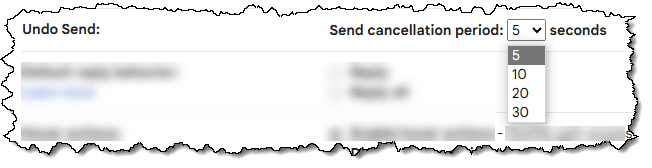
Note that there’s a time limit. The default is 5 seconds, but it can be adjusted up to 30 seconds.
And that time limit is the clue as to what’s really going on here.
“Delay Send”
When you hit Send, Gmail waits for the period of time you set before sending your message.
In other words, your message has not been sent. And as long as it hasn’t actually been sent, you can tell Gmail not to send it.

There is no true “undo”
This all works because Gmail doesn’t actually send your mail for five seconds or however long you’ve configured the delay. It holds on to it before sending it in case you change your mind.
Once that time period has passed and your email has actually been sent, there’s no way to “undo” it or get it back.
Sent is sent.
Caveat corporate
Some corporate email systems — where everyone is on the same mail system, such as Microsoft Exchange — do sometimes have the ability for a true “remove this message from the recipient’s inbox” undo.
But this is not available for internet email or for the average user on the internet.
Do this
Use the feature. It’s kind of handy. Maybe adjust the setting to give yourself a little more time to change your mind.
But realize that it’s only a delay and not a true “undo”. There’s no such thing.
Think before you send.
Want more answers like this one? Subscribe to Confident Computing! Less frustration and more confidence, solutions, answers, and tips in your inbox every week.
Podcast audio

Related Video


My own take is that even 30 seconds is much too short a delay for a “delayed send.” In my mind, E-Mail should never be so close to instantaneous, even though that’s why we love it so much. Far too many tears have been spilled over E-Mail’s instantaneousness (is that even a word?)
Much more useful would be something like a three, or even a five, minute delay — and even then there would still be grief!
I would prefer an UNDO in this form:
1) a HOLD BEFORE SENDING with optional time-setting, and
2) a SEND NOW option
I agree, but I suspect people would be so self confident that they’re done they’d mostly hit “Send Now”. And regret it later.
Amen.
In Outlook I have a rule configured that all emails other than within the organisation are delayed for one minute. I think that delay can actually be longer.
Certainly, automating a delay is useful, but self control and discipline is better. There is rarely a reason to send an email RIGHT NOW. Write the email and save it. A couple of hours later or at the end of the day check the saved emails and see if they are still relevant or need editing. This approach is useful when you’re really mad as hell.
Oh, I try to never, ever send an E-Mail when I’m mad — “as Hell,” or any other way. There’s just too much room for undoable regret there…
Any time I write an email message, after I ‘think’ I’ve finished, I proof-read it to check for typos, content, and clarity. I do the same thing with anything I write, including this post (In fact I just corrected this statement for clarity). I want what I write to make sense to anyone who reads it, and I don’t want to seem illiterate, so when I proof-read what I’ve written, I check for everything mentioned above (typos, content, and clarity). For each paragraph I write, I ask myself “Is that what I wanted to say”, “Is that how I wanted to say it?”, and “Does it make sense?”. While looking for spelling, I also look for tense. For example, if I’m speaking in the past tense, I check that I use was and not is, etc. Each time I make a correction for any reason, I re-read the item from the start, just to make sure what I write is what I want to say and that it is written the way I want to say it. These are then things I do. What you do when writing any message/post is up to you, but I recommend you find a routine that works for you. If you do, you’ll have no need for an Undo/Delay send function in your email service, or anywhere else.
My2Cents,
Ernie (Oldster)
And sometimes, the emailer hits Send before he/she has actually finished editing the email. The undo can be helpful then also.
That is why I always tell my clients to always 1) add attachments 2) enter text 3) enter subject 4) review the email 5) and lastly add the “send to: email addresses.
That’s about the only use for a 5 second delay, when you realize you’ve sent it before finishing the email. For anything else, it’s usually not enough time.
That’s really short. The default 5 seconds is useless. How can you realize you’ve made a mistake, and correct it, in less than 5 seconds ? Even 30 seconds is far too short.
For the feature to be useful, you would need to be able to adjust it to 5 minutes, 10 minutes, 30 minutes or even an hour.
Does anyone’s anger calm down in 30 seconds ? Does anyone realize it’s a bad idea to send a copy to a dozen people after thinking it over for only 30 seconds ?
Agree 10,000%.