Stop what you’re doing.


I think anyone who has used computers for any length of time has been where you are now. I know I have, and more than once.
The answer to your question is “Maybe.” It depends on a lot of things.
Become a Patron of Ask Leo! and go ad-free!

If you accidentally delete a file you want to recover, stop using the disk it’s on to the best of your ability. Check the Windows Recycle Bin to see if it’s there. If not download an undelete utility (using a different computer), and use it to see if it can recover the file. If not, and the file is important, you might then need to consider paid recovery services. You can prevent most cases of file loss just by having regular backups.
Stop — just stop
First — and this is important — stop using the disk that had the file.
To increase the likelihood that the file can be recovered, stop doing things that write to the disk.
Many programs write to the disk as they exit, so leave them running.
Don’t browse the internet, since the browser writes to disk as you browse.
Recycle Bin
First things first: look in the Recycle Bin.
If you deleted the file using Windows File Explorer (or many of the standard Windows controls), the file might not actually be deleted. It may have been moved into the Recycle Bin.
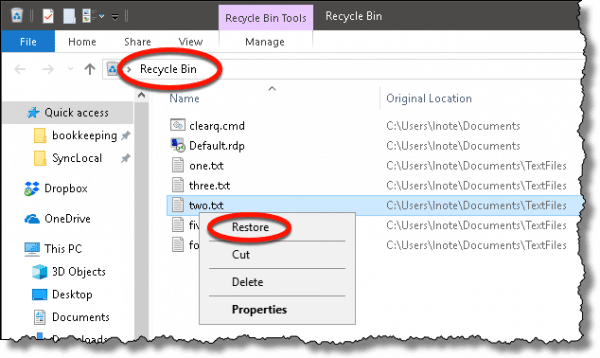
If you find it there, right-click on it and click on Restore. It will be moved back to wherever it was originally. Move it out now, because once the Recycle Bin is emptied, the file is truly deleted, and things get harder.
If your file wasn’t recycled — perhaps because you deleted it in a Command Prompt, some other program deleted it, or you were holding the SHIFT key down when you deleted it in Explorer — this is referred to as a “permanent” delete. However, it might still be recoverable.
Undelete
Deletion does not overwrite the data in your file. All it does is say “OK, this disk space over here, that used to be a file? You can use it for other things now.”
The contents of a file don’t disappear from your hard disk until it’s overwritten by something else. That’s why it’s so important to stop doing things to the disk that contained the file. Any writing to the disk after you’ve “permanently” deleted a file could overwrite its contents.
There are many “undelete” utilities available. A Google search on “undelete files” returns a long list of utilities. I currently recommend Recuva, which will scan your disk and display all the files that can be recovered.
Remember I said don’t write to the disk? Search for and download an undelete utility using a different computer entirely, and use a USB thumb drive or other media to take it to the computer experiencing problems. If you can run it from the USB drive directly, that would be ideal, since installing it writes to the hard disk — which we’re trying hard to avoid.
If you’re lucky and you haven’t written anything to the hard disk since the file was deleted, the undelete utility may be able to recover it for you. If you have been using the disk, then it’s a roll of the dice. It depends on how much has been written to the disk, where on the disk it was written, and where on the disk your now-deleted file used to reside. It might work. It might not.
Big (expensive) guns
There is one last hope, but it’s expensive, time-consuming, and only for the direst of circumstances.
It is sometimes possible, using advanced data recovery techniques, to recover data even after it’s been overwritten. It requires sending your hard drive to a data recovery service, which uses special equipment and techniques.
And you’d write a fairly large check.
There are many factors involved, and it’s not as simple as seen on TV, but it can be done — sometimes.
Prevention is so much easier
My ultimate recommendation? Regular backups.
I have saved hours by recovering a deleted file from my backups.
There are so many ways a regular backup protects you; accidental deletion is just one of them.
Do this
Subscribe to Confident Computing! Less frustration and more confidence, solutions, answers, and tips in your inbox every week.
I'll see you there!


hi leo,
i saved precious pictures of my son a year ago,,,
i opened it to view them,i was playing the video when it stock,i exit it,but then to find out that it was broken,if only i saw earlier that it was broken i could have copied it first,,, up to now i dont know what to feel,,, my knees are weakening everytime i try to open it but still its not there.i hope that you can help me,,, i’ve been searching some ways in the internet but still nothing happen.i cant afford to buy them too.your my only hope.thank you in advance, and thanks also for time you gave me by reading.
hi what i have done is memory in harddisk was less so what ever the data was with me in pendrive i tried to cut and paste it on recyclebin but after words their was nothing in recycle bin nor pendrive so where is the data
i hope you understand what i want to tell
Awful article, u recommend a product which costs $40 when others do the same for free, e.g recuva
@ Adrian:
If you read the article carefully, you’ll see that Leo isn’t recommending any for pay utilities. He clearly said to Google for a good free utility. Recuva is a fine program for that. What you saw was an ad generated by the Ad Server Ask Leo! uses which causes ads to appear related to the topic of the page.
What’s the difference between an ad and your recommendation?
RECUVA worked beautifully. I deleted an entire hard drive. I am not at all computer savy – heance the initial deletion – and it was very easy.
Thanks for the tips
One minor correction: Leo wrote “It is sometimes possible, using advanced data recovery techniques, to recover data even after it’s been overwritten.” Nope – that is impossible, see MHDD Podcast #27. Scott answers just that question about 30 minutes in.
What may be possible, and what Leo may have been referring to is signature scans where a program would looks at all sectors for some character string that was in the lost file; this is the equivalent to the old Norton utilities disk editor for DOS and FAT-formatted disks. It’s a lot harder now with terabyte drives and more complicated disk formatting.
The advanced recovery techniques use several tricks to read the tracks with a little radial offset. Repeat using different offsets, perform some advanced data analysis and statistical magics, and, sometimes, you can recover overwritten data. That work because the drive’s heads can fall slightly off the normal track location depending of the direction and distance it had to travel to reach that particular track.
Another way is to look for the phantom remains of the overwritten files. When you write new data, the previous magnetism from the old data may influence the final magnetization of the media. You need to get the analog reading of the surface to perform this. The drive’s normally can’t give you that and you need to plug the heads into another firmware/hardware set to read the numeric data as an analog stream.
It’s a long process. It’s a difficult process. It get more complicated because you often need to work with the raw data image. It use some expensive hardware that is also expensive to operate. You also need some highly specialized software that cost a lot. You need special formation to effectively use those. The specialists who know how, and have the tools, demand top $ for the job.
Even with all this, recovery is not assured, it just often work. When it work, you may not be able to recover all the content of the recovered files.
If you have an SSD, then, it probably can’t work as there are no physical tracks.
Hi Leo,
I usually tell friends to stop what they were doing, as you said, and then use the keyboard shortcut Ctrl+Z.
Jack
This is the reason I have a complete copy of My Documents on an external hard drive which includes everything personal. Files such as those related to removed programs I never delete but move to a “pending” file on the desktop in case problems show up so they could be added back in. I would never touch any other files on the computer such as any Windows files, much less delete them. And with Registry keys I export them meaning make an external copy before deleting but I don’t recommend anyone touch the registry unless they have a lot of experience with their computer, meaning they have read a lot of books including the big, fat ones from Microsoft written for technicians.
As a matter of curiosity, I did want to ask Leo if, in the case he/she writes about, if their only other computer was a Chromebook it would still be possible to download the utility to the USB via such a machine. My inkling is “yes” since I think you could download a program installer but you just can’t run it.
At any rate good article as always.
I’ve deleted the file from One Drive and it’s not in the Recycle Bin
It’s possibly unrecoverable. That’s why system image backups and daily incremental backups are so important. OneDrive is good for additional backups but can’t be relied upon as a primary backup.
Hi Hope you will be fine. Sir install “Auslogics File Recovery” software and select C-Drive because One Drive folder by default installed in C-Drive and select last deleted dateand recover that file.