Become a Patron of Ask Leo! and go ad-free!
- Click on the Tools menu
- Click on the Options menu item
- Click on the Passwords tab
- Click on the View Saved Passwords button
- In the resulting dialog, click on the Show Passwords button
If you’re like me, you’ll be fairly shocked the first time you do this. Yes, you can set a ‘master password’ to protect your passwords, but the default is not to have one. And anyone who walks by your computer while you’re logged in can do this. For other programs, you need to download a few simple utilities. Specifically, NirSoft has available several Password Recovery Tools. Included are tools that will display the saved passwords for a host of different programs and situations. For example, here’s a screen shot resulting from running the ‘MessenPass’ utility on my machine: 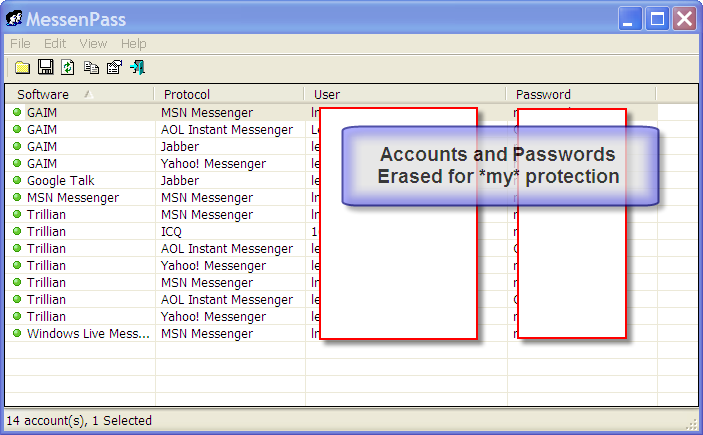 You can see that it lists, for each IM program I run, the service, the account name and the password. While I’ve obfuscated them here in this example for my protection, the account names and passwords are displayed in clear text. I’m not guaranteeing it, of course, since there could be many other things at play, but if you’ve lost a password, and you have ‘Remember’ turned on, there’s a very high likelihood that you can grab one of the utilities from NirSoft, and recover it. It’s certainly one of the first things I would try. Yet Another Word About Security I encourage you to download those tools and play with them on your own machine. Using them, you’ll see how trivially easy it is to recover many passwords that are merely hidden by the ‘remember’ function of so some applications. Now remember: anyone can use them. If you leave your machine logged in, anyone who can walk up to it can insert a USB stick with these tools, and get your saved passwords just as trivially. And while logging out or using a password protected screen saver puts up a barrier, even that barrier, while significant, is not impenetrable. I want to make sure you remember two important things: 1) ‘Remember my password’ is a convenience, and a security risk. Use it with caution. 2) If your machine is not physically secure it is not secure. If someone can walk up to it, insert a disk and reboot it, they can take total control. And that includes recovering your passwords with tools as we’ve seen here. And remember also, that while you’ve just read this article and learned how to recover your remembered password … your ‘friends’ and perhaps those who are not your friends have also read this and learned how to steal your remembered password.


A much safer approach would be to use a password manager like Lastpass to remember you passwords for you. It uses industrial strength encryption to protect your passwords, and protects against somebody sitting down at your computer and seeing your passwords.
Perhaps get a free copy of Roboform at http://www.roboform.com/
I’m actually evaluating Roboform right now.
Roboform will display Internet Explorer cached passwords (only, apparently). That’s yet another security risk, as anyone who can walk up to your machine can install RoboForm and then see those passwords. It’s unclear how/if Roboform handles messenger and other passwords that exist at the time it’s installed.
Once you install it, it WILL display passwords that it maintains for you.
i understand that by using some software such as MessenPass you can see your password in text if someone uses “remember my password”. however, is it possible to recover previous password…the one that you had before your current password. is there a way?
No. Not that I’m aware of.
If the article above didn’t help, the you’re out of luck. If you forget your password and you used a bogus email address, there’s no way to recover. ALWAYS USE A REAL EMAIL ADDRESS THAT ONLY YOU HAVE ACCESS TO.
Right above the button you had to push to submit that comment is this text:
“I cannot recover lost passwords or hacked accounts. “
is there a way to view ALL of your passwords used on a single account over time? because i lost my myspace password and tried several others off the top of my memory while i still had the save password button clicked is there a way to view ALL entered passwords?
—–BEGIN PGP SIGNED MESSAGE—–
Hash: SHA1
No, not that I’m aware of.
Leo
—–BEGIN PGP SIGNATURE—–
Version: GnuPG v1.4.7 (MingW32)
iD8DBQFHfoN7CMEe9B/8oqERAmaFAJ0Qz/XqIf8Ek2+SnpXhKgezkCZ74ACfZh1B
IciNWyKHt1VcRLoPYE1yNcs=
=AOXr
—–END PGP SIGNATURE—–
I use Firefox with a master password, but Opera is my favourite browser (except when it doesn’t display certain web sites as the designers intended). I prefer the way Opera handles passwords, except that I’ve found no way to retrieve a site password when, for example, a web site doesn’t display and I want to switch to Firefox.
Opera’s good with cookies, by the way, in that I can delete them all on exit, except for a few sites that I’ve made exceptions.
I am just putting my two cents in here. I have been a user of RoboForm for a few years. I have a very strong password and I also have a fingerprint reader on my laptop. I rarely forget my passwords but lately have had to change a few due to compliance for complexity for secure websites concerning money. As long as I have 4 of my 10 fingers I can always get into my computer and my passwords. No one else can.
But I do recall your blog about an administrator password disc work around. Is my laptop still secure? I do not know anyone who would have that disc but it’s not impossible. Am I correct?
Thank you, my Internet Guru.
I’m afraid I don’t understand the question. If you’re asking if the admin password can be reset by booting from a CD, yes for BIOS machines, and UEFI machines with secure boot turned off.
Hi Leo and your friends. Well I have been reading all of your sites. And I have to say since yahoo came up with this change your password. I did exactly that. Now I can’t remember my password for nothing. I call the help line they placed me on hold for 1 hour when the guy came on he walked me through 2 steps and hung up on me. I will do some of the downloads I hope I can get my password back. It is very stressful especially when you use it for work. Yahoo wanted everyone to change their password but yet they don’t provide you with help.i wouldn’t have changed if they didn’t ask please help.So far I’m using my other email
All I can recommend is to go through the password recovery / I forgot my password steps that Yahoo! provides.
Gmail is an email account, and your Facebook can be accessed with a tablet using either a browser or the Facebook app. You just have to set up the app or access the account via the browser using the email and password combination.
TOO MUCH security!! There is no such thing as 100% security. The likelihood of someone even trying to access my stuff is almost non-existent.
It just makes things more difficult for me to access my own.
The might find out the secret location of my DIRTY UNDERWEAR!!
What if my fb account is’nt linked to my email and my phone number is’nt showing me my account
You’ll have to go through the recovery process and hope that you set recovery information to be able to get the account back: https://askleo.com/how-do-i-recover-my-hacked-facebook-account/
My Facebook was locked on December 29, 2022. I tried everything to get back in… it said I was locked out, so I got bored with it and left it alone and it popped back open in a couple of months. Something was off though, I couldn’t post to my own timeline, only share stuff…so I went to my passwords and to my surprise that was off too, it was a six digit password, something I never use… so I changed it and Facebook keeps on saying I can’t have complete control unless I know that six digit password which I don’t know.