Living dangerously.
Yes, I bet you do.
It’s not all that obvious that plugging in an unknown USB device can be very dangerous.
It’s one reason I recommend turning off Autoplay.
Become a Patron of Ask Leo! and go ad-free!

Find a thumb drive?
Unknown thumb drives can contain malware designed to run automatically when inserted into your computer. Other devices masquerading as thumb drives can even cause hardware damage. It’s best to resist the temptation and simply throw out any unknown devices you find. Turning off AutoPlay also helps prevent malware spread in case you accidentally connect something malicious.
Malicious thumb drives
I vaguely remember an anecdote about a security test leaving USB thumb drives outside around a corporation, as if left behind mistakenly. Each contained some relatively benign malware that would alert a remote site that the drive had been picked up and inserted.
Something like over 50% of the thumb drives had been plugged in and the malware installed.
The lesson is clear: if you want to infiltrate a random corporation, put malware on several thumb drives and drop them around the company’s headquarters.
If you’re that corporation, you want to make sure your employees are alert to the danger.
So what’s happening here? What is that danger?
AutoPlay is part of it
You’ve probably seen it: when you insert a USB stick, the system may prompt you for what action to take or perform some kind of default action, possibly even running software from the device.
In some cases, AutoPlay happens silently.
So it’s very simple: a malware author creates a USB thumb drive, setting it up to automatically and silently install malware when plugged in. You’d never know until you scanned for malware or, as in your case, things stop working as they should.
But wait — it can get worse.
More malicious that malware?
There are USB devices that look like thumb drives but aren’t. Their intent is to physically destroy as much of your computer as possible.
They do this by containing a battery of some sort. Once connected, they pass an extremely high-voltage pulse through your USB port. Depending on your computer, this can:
- Do nothing.
- Render the USB port inoperable.
- Render all USB ports inoperable.
- Render your entire computer inoperable.
- Cause your computer to catch fire.
The devices aren’t common, but also are not hard to come by.1 Particularly if you have reason to be targeted, they can be a concern.
Solution #1: Resist the temptation
Don’t plug in thumb drives (or any USB or removable device) that you’re not completely certain of. Discard them. It’s just not worth it.
If you must examine their contents and you’re willing to risk the physical destruction I mentioned above, treat them just like risky downloads. Before you do anything, scan the contents for malware.
Solution #2: Turn off AutoPlay
So how do you scan them if you can’t safely plug them in? Turn off AutoPlay. (In Windows 10 and 11, search for “autoplay” in the settings app, and then click on “Turn AutoPlay on or off”.
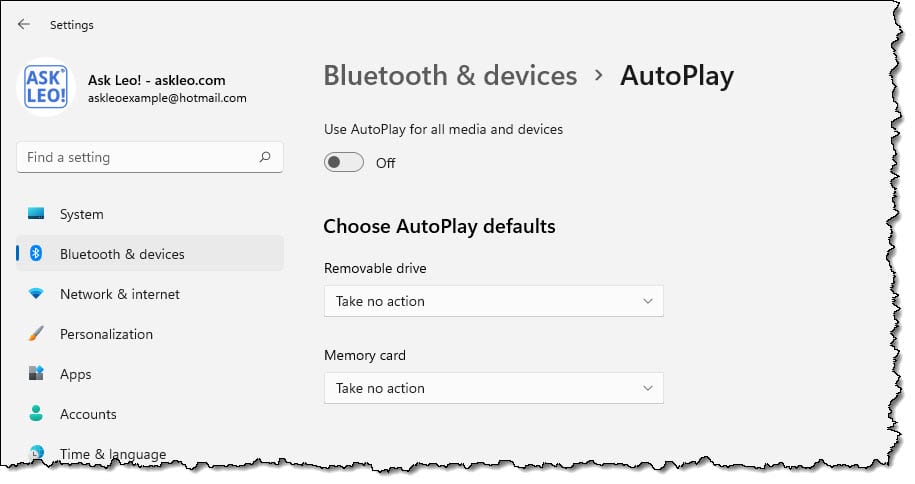
Once you’ve done that, you can safely insert the device and examine its contents or run anti-malware scans.
Assuming, of course, it’s not a hardware-killer.
Do this
My recommendation? It’s not worth the risk. Discard the drive.
They’re cheap and a malware infestation can be pretty expensive; hardware damage even more so.
Assuming you decided to look once you’re satisfied it’s safe, you can do whatever AutoPlay would have done by opening the file “autorun.inf” at the root of the drive in Notepad. If this file exists, the “open=” line tells Windows what program might have been run automatically.
Most of the time that’ll be a setup program, also at the root of the drive.
But as a rule of thumb (no pun intended), I disable AutoPlay on all my drives. Not only do I find it often annoying, but as you can see, there can be significant security risks if you’re not careful.
Podcast audio

Related Video


Footnotes & References
1: I believe I found at least one on Amazon.


Hey Leo,
That autorun article is great. But could you make one on how to disable autorun in Windows Vista for the Vista users.
Thanks Leo and keep up the great work.
Hi Leo,
Unfortunately this question didn’t come early enough to put me on guard. What you’re describing happened to me couple of weeks ago and gave me a Trojan Backdoor.win32.Rbot. Later I found the autorun file on my USB/Mp3. I’ll try to disable autorun as you mentioned.
But CD-ROMS and DVDs are safe, aren’t they? Malware can’t launch from them… or am I mistaken?
Thanks
You are mistaken… very, very mistaken!
Many years ago, I actually created a bunch of autorun CD’s that automatically brought up a HTML page of desired items for an upcoming birthday, and gave them to my various family members.
So I know, for a flat, absolute fact, that autorun CD’s are possible.
(VERY IMPORTANT HINT: I needed to use an “AutoRun.INF” file. Meaning that Leo’s technique for diabling Autorun will work perfaectly well with CD’s, and juat as well as with USB flashdrives.)
Many installation CD/DVDs came with an autorun.inf file which caused it to start the installation process automatically. Very convenient for the technologically challenged, but a potential danger if a disc containing malware had an autorun.inf file to run the malware.
Why would ANYBODY put a USB thumbdrive anywhere NEAR their computer if they didn’t know what was on it??? The scabs that write all these viruses LIVE for people like that!
To “Leo fan”:
Of course malware can be launched from CDs and DVDs, if there is malware on the media.
Use your favorite search engine and look up “sony rootkit” for a rather infamous example.
Great article, Leo. There are some good questions and responses here. I just wanted to add my two cents worth.
It turns out that many people (about 40%) will put an unknown device into their computer, just to see what’s on it. I have the evidence, which I have summarized at my site, The Honey Stick Project, at http://www.honeystickproject.com. The site was inspired by the penetration test you mentioned above, and is intended to raise awareness about the risks of using mobile devices, in general.
The technique I use in the project can be useful for measuring the level of security awareness and safe computing habits in an organization. Please drop by and give me your comments.
One other note: As indicated in one of the related article links above, it is possible for a device to be configured to trick a system into bypassing autorun, depending on your system. I have some notes about this on my site, also.
22-Sep-2008
If your curiosity compels you to examine the contents of a strange flashdrive… disable autorun first! (I mean really disable it, “Ask Leo!” style.)
That usually works, but there are some USB drives that will fry your computer in a flash.
“USB Killer” flash drive can fry your computer’s innards in seconds
Some public libraries check out thumbdrives to their patrons. Apparently they don’t always check to make sure the drive has been wiped clean by the previous user.
In my case the leftover files were benign to me, but the previous user probably wouldn’t be too happy to know his resume and rehab history were left on it for anyone to see!
Moral: make sure the flash drive has been wiped clean before you use it OR return it.
At least Microsoft has finally partially recognised the problem. There’s a fairly recent update that is supposed to disable autoplay for all drives except CDs and DVDs. Mine is disabled anyway, but that should be the default for ALL drives.
Panda Security do a free USB vaccination program which stops autorun on the computer and also prevents usbs from autorunning elsewhere.
http://research.pandasecurity.com/Panda-USB-and-AutoRun-Vaccine/
To view this problem another way, does anyone know of a way of automatically running various protection programs on Flash Drives etc, when such devices are plugged in?
Recently, a college lecturer kindly gave my grand-daughter a Flash Drive to help with her studies.
It wrecked her Laptop and course work.
I took a look at the Flash Drive, it had two Trojans on it, plus a lot of personal files belonging to the lecturer – nothing to do with the study course.
And the college has a major IT/Computing Department!
A protection system kicking in on auto-detect and running appropriate software, would apparently at least reduce such occurrences.
I have an option where I can scan a thumbdrive with my malwere goodies before I open it.
Right click on it and try Properties.
Our local library’s computers have only floppy drives. No USB. I wonder if this article’s premise is the reason. I would think the floppy is just as vulnerable to malware transfer.
16-Mar-2011
You wrote:
“…there was never an “auto-run” applied to floppies…”
Excuse me?! That’s true only if the computer is already running when the floppy is inserted. If the floppy is inserted first, and then the computer turned on, autobooting from the floppy was (and in many cases still is) the default behavior.
That’s quite the nit to pick.
Before the Internet was available to the general public, the principal means of virus propagation was floppy disks. I think over half of the diskettes I checked contained viruses. Either the computers in your library are very old or they don’t realize that diskettes can transfer viruses.
Okay, I don’t mean to flame here, but maybe that’s what it is. What kind of people ask what happens if you push this red button marked Global Nuclear Destruction and then push it? Even 75 years ago, people laughed at The 3 Stooges for using a lit match to check the gasoline level in the tank.
Okay, I just read an item by Randy Cassingham about 4 idiots who heard a warning about the incoming tsunami and ran down to the beach to watch it! I’ll be quiet now. No matter how smart you make the computer, it’s still operated by a human being.
What about using a live CD on a computer without a hard drive, to look at a unknown flash drive? Could the computer still be infected?
16-Mar-2011
I don’t understand your answer to that question on running an from a live CD. If there is no hard drive in the computer, there would be nothing to infect. On the other hand, if you run from a Windows live CD and there IS a hard drive installed, the HDD could get infected.
Leo, you wrote:
“…There are USB devices that look like thumb drives but aren’t. Their intent is to physically destroy as much of your computer as possible… The devices aren’t common, but also are not hard to come by… I believe I found at least one on Amazon.”
You found a fake flashdrive that fries any computer system it is inserted into, for sale on Amazon?!
Wow! Who knew that Amazon had become so malicious?
(In case you missed it, folks, that last sentence was sarcasm. I actually do not believe, for even a jiffy*, that Amazon would sell any such thing, and — frankly — I won’t believe it until Leo actually furnishes the URL. Indeed he’d better be able to supply the URL if he doesn’t want to be liable to Amazon for libel! Really, Leo, you need to be careful about saying things like that. A statement like that — at least to my mind — is so outrageous that it practically requires you to supply us with proof!)
—
*Jiffy = 1/60th second.
I won’t provide the URL because I don’t want to give it any exposure. I was as surprised as you, and I expect that Amazon will remove it in time.
I don’t imagine Amazon sells those destructive drives, but it’s possible a third party might sell one on Amazon until they are caught.
If you find a thumb drive, is there a way to responsibly recycle it?
You can give it to your local electronics recycling center or equivalent in your area.