Worried? That might seem a bit strong, but some concern is certainly reasonable.
The short answer to your question is yes, unless you protect yourself, it’s possible that someone on her computer with less than honorable intent could cause you grief in several ways.
Let’s look at how.
Become a Patron of Ask Leo! and go ad-free!
It’s all about trust
We need to start by understanding exactly what it means to share your internet connection.
One of the reasons using a router is so important is that it provides a firewall between an untrusted network, such as the internet, and a trusted or safe network, such as the local network to which you connect all of your computers.
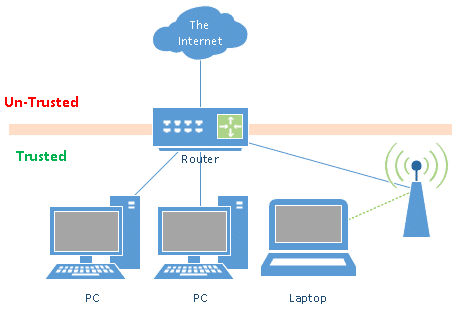
You implicitly trust all the computers connected to your local network on the “trusted” side of the router. You know you’ve taken whatever steps are appropriate to keep them secure, and you understand the expertise and knowledge levels of the users of those computers. The bottom line is a reasonable level of safety associated with those computers being allowed to communicate with each other.
The most important side effect of being able to trust all of the computers on the trusted side of the router is that you don’t need to take a lot of extra steps to protect those computers from each other. The biggest example might be that you probably don’t need to have a firewall enabled on every computer1; the router’s firewall, which protects them all from the un-trusted internet, is enough.
Sharing your internet
By giving your neighbor a password, I assume you mean you are giving her your existing Wi-Fi password and she is connecting using a wireless connection. (The alternative would be to string a cable to her house, and I’m pretty sure you’re not doing that.  )
)
That means her computer is connecting to the trusted side of your router.
This changes the trust dynamic dramatically.
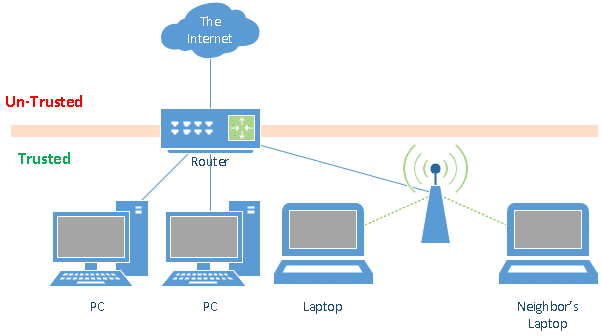
As you’ve said, you don’t really know how much you can trust your neighbor or the other people in her house.
In other words, you just allowed an un-trusted connection into the formerly trusted side of your router.
What could possibly go wrong?
There are several ways this could cause issues for you.
- It could infect your computers with malware.
You don’t know how up-to-date your neighbors are on things like computer security. For all you know, their machines have never been updated, have never run anti-malware software, and are liberally infected with malware. Your computers are potentially vulnerable to threats coming from these poorly maintained computers.
- It could be used to access your computer.
It’s possible your neighbor could access your computers directly. If you have remote desktop enabled, they might be able to log in to your machine.
- It could be used to peek at your data.
A more likely scenario is that your neighbor would be able to access files on your machines using Windows networking. Exactly how much of your computer’s data is visible depends on how you set up your network. In the worst case, it’s conceivable your neighbor could access all files on all of your computers. A more common threat is that your neighbor could access “some” files – where “some” once again depends on your specific network configuration.
- It could get you in trouble.
If your neighbor were to begin downloading copyrighted or illegal material, or performing other illegal activity online, that could be traced back to your internet connection, for which you are likely liable. (Caveat: I am not a lawyer, but it’s my understanding that in most cases you are liable. Seek appropriate counsel if you’re not sure.)
- It could slow you down.
Allowing your neighbor access to your internet may impact your own ability to use it. If they regularly stream lots of video or otherwise use it heavily, you could see your own internet speed slow significantly. If they get blocked or banned from certain sites, it’s possible those blocks could apply to you as well.
What to do?
As I see it, you have four options.
Politely decline
Needless to say, the easiest and safest answer is to politely decline. Perhaps you can explain that you have heard horror stories, and don’t want to put yourself or your neighbor at the risk of experiencing any kind of problem or misunderstanding.
Guest access
If you have a router that supports something called “guest access”, it does some of the network isolation we’re looking for automatically. Simply give your neighbors access to that “guest” network.
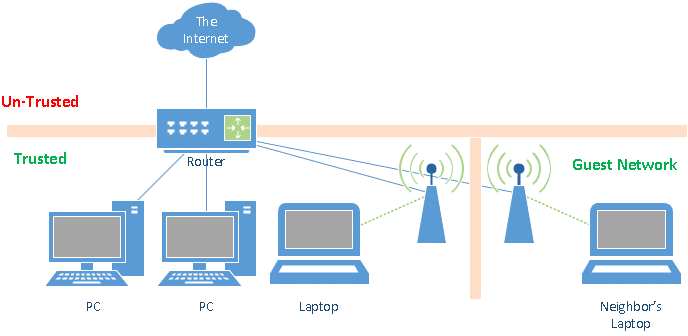
It’s important to realize that this in no way addresses the liability or bandwidth problems. Those still exist. But it can be a safe way to protect your computers from your neighbors’ computers.
A second router
If you don’t have a router that supports guest access, another secure solution is to invest in a second router.
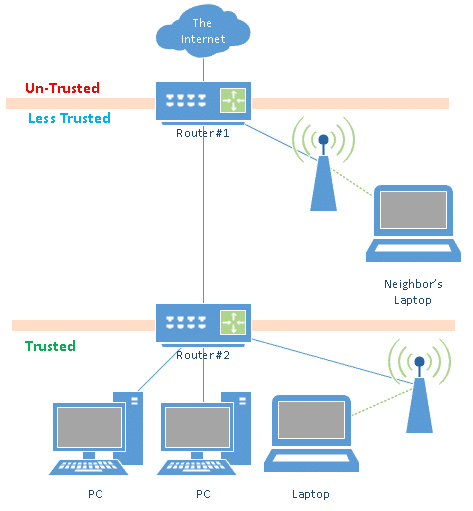
The internet would connect to router #1, and your neighbor would connect to router #1.
Router #2 would be connected to the LAN side of router #1, and all of your computers would be connected to router #2. Router #2 maintains our un-trusted/trusted demarcation, in which all of your computers remain on a trusted local network, and everything untrusted (including both your neighbor and the internet at large) are on the other side of that router.
This can be a bit of work to set up correctly, and, like a guest network, doesn’t address the liability or bandwidth issues. In all honesty, if you were going to get another router anyway, I’d spring for one that includes guest network capabilities and simply replace your existing one.
Direct access
If you want to allow your neighbor to access the internet through your connection without any of the techniques discussed so far, you should at least look to lower your risk. I would make sure to confirm that the firewall is enabled on all of the computers connected to your LAN to protect you from some of the threats of malware or data snooping.
Do this
Subscribe to Confident Computing! Less frustration and more confidence, solutions, answers, and tips in your inbox every week.
I'll see you there!


Note that you might not hove to buy a second router. For example, our wireless router has built-in support for “guest access”. This has a separate SSID (along with separate security and keys), and a separate subnet, and the router keeps the guest part of the connections away from your main network. And you can change the guest access password any time you want, without affecting your main network.
You still have the same issues of them using your ISP’s connection, but it makes for a much easier setup.
04-Sep-2011
Just bought a Netgear N600 Dual Band router at WalMart for $79 that allows you to create a guest network.
One other little thing, the legality. I don’t think that the ISP wants you to be providing a contractually leased connection to people with whom they do not have a contract. Result, the ISP could remove your service and blackball you with other providers.
Most of the time, your ISP don’t really care how you use your connection. Also, they don’t have the capability to detect just what devices are connected to a router. All they can detect, is that your bandwidth use is larger than usual, and there are just to many reasons that it can go up.
my boyfriend has my ip address so he used hid laptop in my home, can he get into my computer from his in another location to spy on me?
When he is at your home, he don’t need to have your IP to connect. Just an ethernet cable or WI-Fi name and password, both of whitch you can change anytime.
Your IP is actually the WAN side of your router, and it may change at the whim of your ISP. It can’t be used to connect to your computer. It can be used to go as far as your router, but no farther than that. Your router is probably set by default to ignore unreconised access.
The LAN side IP is always totally invisible from outside your local network. You can’t use it from elsewhere.
So, unless you’ve taken steps to allow him to access your computer remotely,
Shit just got real
Lol ;-)
The trust actually goes both ways. If you allow your neighbor to share your network, each of you is trusting each of the computers in the other’s home — and any casual user of those computers.
Do they trust you — and anybody who uses your computer? Do you trust them?
Personal boundaries can be hard to maintain. “Uncle Bob, I just want to check my Facebook account.”
@Catherine:
If your BF has access to your wifi, he has access to the other computers on the network. What he might actually see, as Leo said, depends on how you have your network and each PC set up.
Also, there is software available to extend your network, world-wide. He could conceivably,while in range of your wifi, set up a web connection, which is accessible from anywhere. Not likely, but possible. I think what it comes down to is, if you don’t trust your BF, change your wifi password.
Heck, if you don’t trust your BF change your BF
Hi, I have a need for a similar setup as Leo describes in his reply. You state that “it can be a bit of work to set up correctly” can you elaborate? Your solution would fit my needs, but I am having trouble with the specifics of setting up two Linksys WAG200’s. I can either post a new question or supply further info.
08-Sep-2011
If the neighbors ISP goes down, she should contact them, not ask someone to use their passwords. I would never do that, either ask or let it happen. Maybe she needs to get a better ISP. IMHO
If possible, you should set your router to restrict use to specific macids (specific computers). That would prevent your neighbour from giving access to others. You may also have the option, depending on your router, of restricting internet access to specific times of the day.
14-Sep-2011
This concerns how to set up a pair of routers, in serial, as described in “is it safe to share my internet connection . .”.
I have tried to do this with two Linksys routers (different vintages) to provide an open connection for visitors/parents to a small non-profit school. There is some bit of knowledge I don’t have in how to set up the addressing-subnets-address ranges.
Is there a reference somewhere on how to do this? Serial connection of 2 WiFi routers is an elegant solution, except when you can’t find a configuration that works.
Most high technological routers these days have a Wifi guest account, which can be turned on or off just as easy as getting on to google. with that being said upgrade your router it is 2011. I suggest the N300 Netgear in your situation, $80 at best buy. If your looking for a cheap way create a lan, and add ur neighbor and restrict the internet abilities AKA parental controls. create passwords to even access any such information on your computer on the network change password every so often. google windows 7 create a network and do some research :)
14-Dec-2011
Hi Leo,
Thank you for this very value information, I need to ask if my desktop is safe since my second modem didn’t have multi LAN plugs and I had to be creative. My neighbor wanted to share my Wi Fi so I split my phone line using a DSL filter connector and than connected the internet (phone Line) to my basic modem (no wi fi ) and using LAN directly to my desktop. Second, I connected the internet (split phone line) to a Wi Fi Router and gave her the code.
Thanks,
Ron.
my neighbor offered to use his wifi/no password, I’ve been using it a mth.now, but am very leary to download anything as I was told his cost would reflect my use. What all am I able to do on my tablet without extra cost to such a fine neighbor?
Technically, anything you do will affect his cost. Anything you look at (even a small web page) has to be downloaded from the internet and will show up against any limits he has. If you start watching movies, it will be a lot of information downloaded.
@Bella
He’s taking a big risk. You may not abuse the privilege, but anyone could use his unprotected network. You might suggest he password protect his router and share the password with you. As for what you can do to keep costs down, normal Web surfing and email are generally low users of bandwidth unless you receive large attachments such as photos and music. Watching online videos and listening to music can also use a significant amount of bandwidth.
“Since you’ve been able to trust all of the computers on the trusted side of your router up to this point, you probably didn’t bother to put firewalls on each individual computer. As a result, they are potentially vulnerable to a network-based threat coming from your neighbors’ poorly maintained computers.”
Firstly, the computers likely would have a firewall. Windows Firewall has been enabled by default since the days of Windows Vista. Secondly, while it’s theoretically possible to spread over WiFi, it’s not how today’s malware works. Realistically, the chance of it happening is so small as to not be worth worrying about. While there are certainly good reasons not to share your internet connection, this isn’t one of them.
I’ll add too that if it were really the case the malware were to be jumping across WiFi connections, the millions of people that use public hotspots each and every day would be in big, big trouble!
They are.
Oh, phooey. The risks of using public WiFi are greatly overstated.
Even the library tends to have internet access, they get funds from various foundations and even computers to provide it. It may be inconvenient to do but if you are truly in a pinch even the limited time given you is useful if you budget your time wisely and get email, necessary work done and you can avoid time killing stuff like updating your status if you have other things to do.
You are going to get less done, to be sure but then again if your provider is going down frequently or you have equipment failure, why aren’t you learning to repair that or at least why don’t you have backup equipment? Or get a different provider. I don’t know…maybe one is a cable company and the other a telephone company ISP. You can find several options available for service…I used to carry an ISP from the next town years ago on my ISP at an extra charge from my local phone company’s DSL service – now the other provider doesn’t require special services to be used like that.
And I still don’t use wi-fi at all, don’t even have a cellphone. For me that is expensive and I just don’t need my network on the air.
Stuff breaks. If your service is not good enough find different service is what I would tell the neighbor…politely.
NEVER allow anyone whom you do not completely and absolutely trust to access your computers or your personal network! Leo suggested possible liability issues should a neighbor or friend use your IP address (through your network) to download, intentionally or inadvertently, illegal material such as child pornography. As a retired federal prosecutor, I can address this issue. When law enforcement takes down a server which has been providing illegal material, standard practice is to trace all the IP addresses which have downloaded the illegal material. Once the IP addresses have been identified, agents secure, through court-ordered search warrants, the identities and locations of the owners of the IP addresses. The agents then, again with properly authorized warrants, visit the addresses and seize the computers located at those addresses. At that point, your computers are gone for as long as it takes to search and analyze the files and the internet history. You’ll eventually get the machines back, but only after a period of intense anxiety and perhaps some expensive legal fees. As warm as it feels, resist the urge to be a friendly neighbor or helpful friend when it comes to your computers. Unless you completely trust the neighbor, don’t allow him or her to access your network.
“Leo suggested possible liability issues should a neighbor or friend use your IP address (through your network) to download, intentionally or inadvertently, illegal material such as child pornography.” – This is an extremely important point. While you cannot be held legally responsible for the actions of others – assuming you had no knowledge of their actions – criminal or civil proceedings could both make your life extremely miserable and prove very, very costly.
“Unless you completely trust the neighbor, don’t allow him or her to access your network.” – This, of course, is where things become problematic. I mean, how well can you ever really know somebody? And even if you do completely trust your neighbour, do you also completely trust the other members of his or her family?
You have the same problem of downloading child porn or other illegal activities by your spouse or children that you would normally give access to. Many are the parents that are surprised when the police raid their home because of something their child was doing online. And good luck in telling your spouse that you cannot give them access to the network.
However, you have more ability to see what your spouse or children are doing with your internet connection than your neighbor.
One other very important risk remains unnoticed.
LEGAL LIABILITY !!!!!
As soon as you let anyone use your internet-access point, that person will access the internet under the same IP address as you.
Any illegal activity will be traced back to your IP address, resulting in you being the main suspect until proven otherwise.
Illegal activities like e.g. illegal downloading and sharing of music, or even worse things like child porn, or hacking activities.
Sharing your internet access is a lot less attractive when behind bars.
And even when the neighbor is such a nice guy, or girl, they are not very likely to inform you of such activities upfront, when at all.
Actually, it wasn’t “unnoticed” at all. It’s explicitly mentioned in the article you just commented on.
Thinking that all of the computers connected on your side of the router are trusted may not be true if you do not maintain the computers for your spouse or children. My adult children that live at home do not allow me access to their computers and have not since they were teenagers. I have no idea what programs or security they are using. Since I use my computer at church and other sites where I am not sure of their security, I always have the firewall up on my computer.
“Thinking that all of the computers connected on your side of the router are trusted may not be true.” – Indeed. I imagine most people share their internet connection with members of their household and/or with visiting friends and family. The only real risk to doing this is that your connection could be used illegal activities. – which may not be at all unlikely if you share your home with torrenting teenagers. The other issues mentioned by Leo – such as Malware jumping between machines – really aren’t worth worrying about. Those things may be technically/theoretically possible, but they’re extraordinarily unlikely to happen.
Use Steve Gibson’s 3 Dumb Router solution. Hook the neighbor up to the IoT side. Then your trust network is protected.
Some providers use your router, when supplied by the provider, as a “Hot Spot”. The Guest account on the router is set up for this purpose. Cablevision/Optimum/Altice in my area does this (central NJ). You can opt out if you want. Their newest cable modem contains the modem, router, WiFi and links for other services like Netflix. It is how they can have “millions” of hot-spots. My daughter originally had a combo modem/router, but insisted on the separate version and bought her own router. The guest side is turned off. All new customers get the new Altice box and repeaters for other TV’s. It’s not clear if your own modem works. It is supposed to.
I was surprised that a man of your experience suggested someone buys another router because their neighbour indicates there’s has gone down just so they can borrow a paid for facility Maybe they didn’t pay their fees and are free-loading.. Why should anyone go to extra expense just so someone next door can utilise your router at their convenience. Plus the disadvantages legal and otherwise as pointed out by other comments here. I would for my own protection just say NO every time.
Depends on the situation and the relationship with that neighbor, of course. They may not be a freeloader, but instead a dear and trusted friend. You don’t know.
If your neighbor continues to have internet problems, she should address it with her provider and get a reduction on her bill. Since she knows that you have good service, she should switch to your service, Once you give her your password, your “good’ neighbor and her family could drop their service and use your service without a fee, From time to time, she could ask for your password and pretend that her old service was down. How would you know?
There are a lot of apartments in my neighborhood, When we were having router problems, we checked our network connection and saw many secure and not secure networks. One not secure network’s name jumped out at us. The name was the same as a neighbor’s pet. After we told him, he thanked us and secured his network. Today, all networks are secure.
I live in a retirement facility. My buddy gave me his password from his router. I have only a cell phone..so his sharing his password has saved me $$$$. If I print out text, I use the public library computer/printer. He has died recently. I think his family left his router in apartment, as his password still shows up in my settings wifi section. How else would I still have this access? I am asking others living around me if I may use their password
since my buddy has died…..thinking they may send for the router.
I am not in touch with his out of state family……and I really am not a technical person….should I contact the family and see if they left the router in his apt?
That’s not really a technical question. It depends on your relationship with his family. Eventually, they will either remove the router or the ISP account will expire for lack of payment. Either way, it seems you’ll have to find another solution to get Internet access.
My question to Leo, please.
If I surf the internet from my modem only, without using the router, so is this safe to block hackers and spies from the network?
Not very safe. The best protection you can have against hacking is a hardware firewall which is included in routers. If you don’t have a router, be sure you have a good software firewall in place. The firewall which comes with Windows is good, but you’d be much safer if you had a router.
You would be crazy to be the neighbor and accept the deal to use your neighbor’s internet. The neighbor has full visibility of everything you do on the internet. All you have to do is use Wireshark promiscuous mode to monitor all of your neighbor’s traffic. You can manipulate all of the DNS searches and redirect them at will. You can make his computer directly accessible to anyone else on the internet by setting up a DMZ. It is called man in the middle. Even a firewall won’t be able to prevent a DNS redirection attack.
Well people can have different thoughts on this topic some people are conscious about their privacy while others don’t mind helping people around them. I have good terms with my neighbors so that’s why we are actually sharing an internet connection because i am not financially that strong and internet sharing helps me in meeting my expenses. Some people in the comment section are complaining about their internet connections struggling after sharing them with their neighbors. In my case, it works perfectly fine because i was able to identify a connection strong enough to help me with my case. There are certain websites like localcabledeals.com which can be useful in this regard, and I hope these turn out to be useful for the rest of the crowd as well.
Awesome. It’s great to hear a positive story. With caution it can, indeed, work. Most important is that everyone understand the risks.
I never took into account the fact that our computers can get infected with malware when we share a connection with a neighbor. As you said, this can happen if their PCs are not that updated when it comes to security. With that in mind, I will not share it with my neighbor anymore. At first, my plan was to get an internet connection and dividing the bills into two with my neighbor since I am on a limited budget. But it might be risky to do, so I will just get one on my own since I don’t want to lose any important files. {link removed}
I shared my WiFi with my neighbor until I saw his bank statement that he scanned into his computer. I don’t trust him now. I don’t know how I saw this unless he’s seeing in my computer or trying to get my data. I changed my WiFi password. He was supposed to have gotten his own WiFi months ago but apparently lied & is still using mine, because after I changed the password asked if he could use mine again because the cable company messed his up again!
Just buy a commercial grade AP, have neighbor put in some cash for the unit and create his own SSID.
You can then block bit torrent web sites and rate limit his connection
Going out of town for a month, Is it safe to unplug my equipment and will it effect me to get in, in a different area should I want to?? I usually unplug everything in my home except fridge..
Should be ok.
I let my neighbor use my WiFi
Lately I get messages telling me suspicious activity and want info on me to insure it’s me? Is this legal? It’s starting to worry me.
It depends on where the messages are coming from. WHat you can do depends on your own technical expertise, as well as the capabilities of your router. I will say that MOST consumer routers do NOT make this kind of analysis easy at all. I advise against sharing your internet connection unless you completely trust your neighbor. If you don’t trust him enough to ask about the situation, then you don’t trust him enough to share the internet.
Hi is it possible for my neighbors to use my internet without permission? I am on my 3rd router in 1 year my phone co. said it was corrupted! I have changed my password and router name(many of times) and still I think my neighbors keep getting access.
As long as you use WPA2 protection and have a long strong WiFi password, you should be safe.
As long as you have a proper password on your WiFi they should not be able to. I don’t know what “corrupted” means in this context.
“Sharing anything” could end up someone doing illegal stuff towards you, your security, anywhere or with anyone, if they have someone who knows about implant body hackings.. They are used for set ups using your TV set signals to get to your internet use and where about including stalking you anywhere you go driving around and spying on you in malicious or abusive, deliberate ways also!
Now tiny Nano sized implants in your body covertly put in without your permission could do the same thing..it’s called electric harassment now updated for signal catching intervening device hacking your body so they can steal anything, TV signals, Computer signals and data stealing, even accounts… or passwords and then abuse you quietly so no one knows it’s happening!
I read that in: Want to know.com
Someone said it might be happening I central Wisconsin now and it’s happened in Illinois and other places!
Laws need updating in “body implantable” phone like technology….
Sounds like a BS conspiracy theory. See the following article:
Stop Spreading Manure
Sharing internet with your neighbor isn’t illegal. Your available bandwidth would be reduced if you share your internet. You would probably need to setup a separate wi-fi router or setup guest wi-fi system. Thankyou for sharing the information. Thank You So much
It can be against the terms of your contract with your ISP, however.