Do you have physical access to the machine? Can it boot from a CD or USB drive?
Good.
You can’t learn what the passwords are, but you can reset any Windows password on that machine that you like.
And if that doesn’t scare you, I really need to drive home a point.
Become a Patron of Ask Leo! and go ad-free!
Resetting the password
First, let’s walk through what you need to do. The screen shots below are from my Windows 7 machine, but Windows XP, Vista, and 8 are all documented as being supported.
Obligatory caveat. This utility has been around for a while and it has a good reputation. As with any third-party software that’s going to operate on sensitive system areas, however, you are always at risk. Make sure you have a good backup of your machine prior to performing these operations. And of course, you use utilities of this nature entirely at your own risk.
First, download and burn to CD the Offline NT Password and Registry Editor. This is actually a highly customized version of Linux that’s designed to do exactly what the name implies: allow you to examine and edit the password information and registry of a Windows machine. (A USB version is available as well.)
Boot your problematic machine from that CD that you just burned. You’ll end up with something like this on your screen:
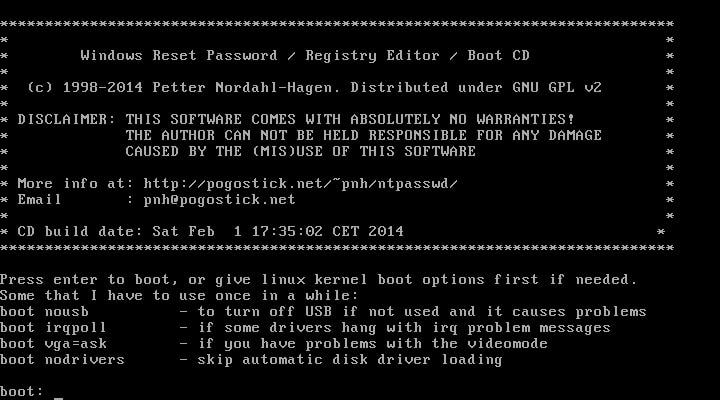
Don’t let all the stark plain text worry you. The process for what we’re doing is actually pretty simple. Typically, you can just press Enter to continue on to the next step. The program boots and then automatically searches your hard disks for Windows installations:
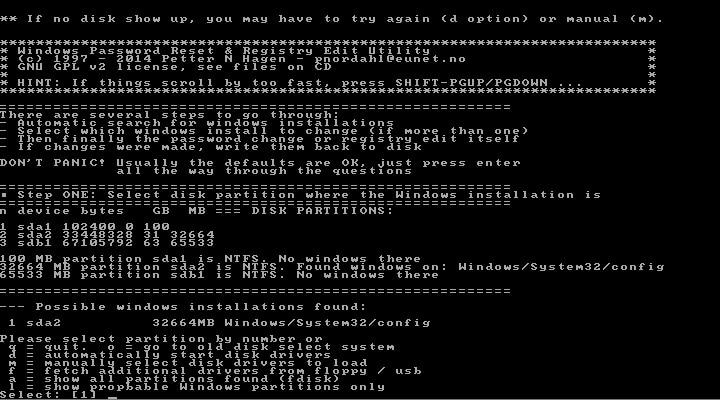
Here’s the relevant portion of that screen enlarged:
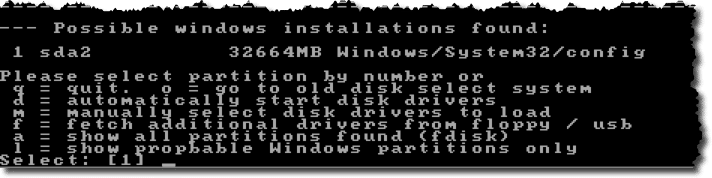
You can see that it has found one installation of Windows. Because it’s the only installation, it’s number one on the list. If your machine has multiple Windows installations, you’ll need to select the proper one. In our case, we can just hit Enter once again as “1” is the default choice.
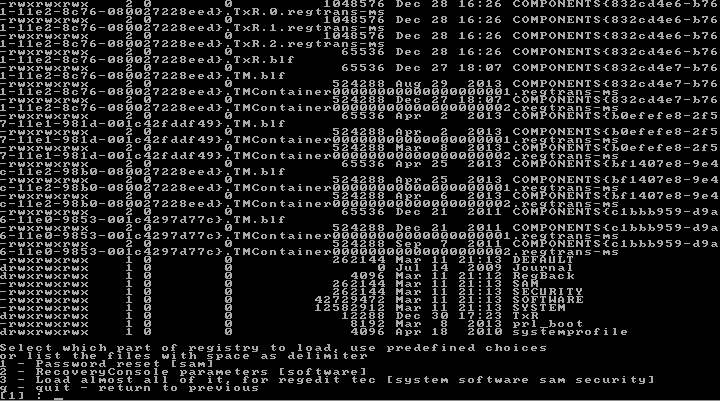
The program lists the contents of the folder containing the Windows registry (you may need to press the space bar on your keyboard once or twice to scroll through the paged listing. Typically, you can simply ignore it).
There are several options. In our case, we’re only concerned about performing a password reset. Once again, we can just press Enter because “1”, Password Reset, is the default.
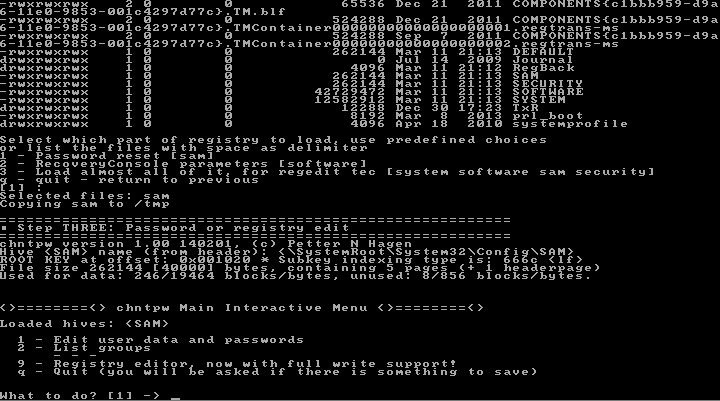
It’s now asking us what we want to do. “Edit user data and passwords” is exactly right and it’s the default once again, so … press Enter.

There are a couple of things worth noting about this step:
- All accounts on the machine are listed. You can see that there are three: Administrator, Guest, and LeoN.
- Two of the accounts have administrative privileges: Administrator and LeoN.
- Two of the accounts are actually disabled: Administrator and Guest.
- Each account is identified by a RID, which is essentially an ID number for that account.
Here you choose on which account you want to act. To select that account, type in the RID number. In this example, the program has selected the RID of the only active account as the default. Once again, we just press Enter.
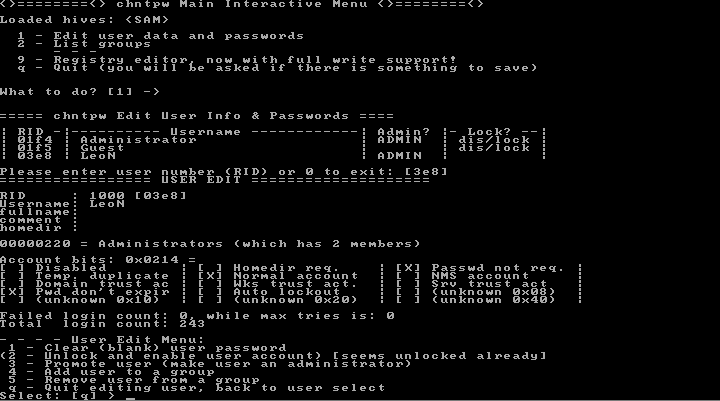
The program displays a summary of account information and then gives us a menu of things to do to that account.
This time, the default is q for quit. Instead, type 1 – to clear the password – followed by Enter. It’ll redraw the screen quickly and present the same menu again. In all of that text, there will be confirmation that it’s done what we need:
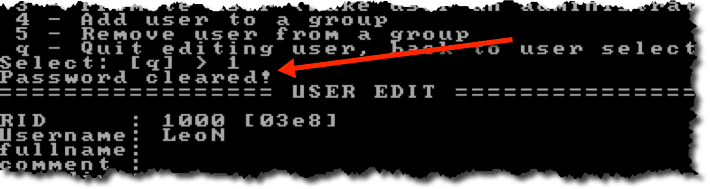
Because we’re done, this time accept the default of q for quit and simply press Enter.
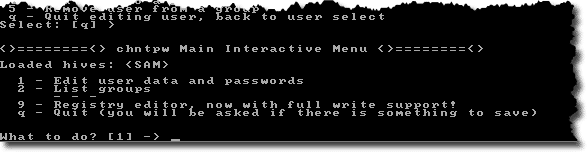
This returns you to the previous menu. Here, you’ll need to type q followed by Enter to quit.
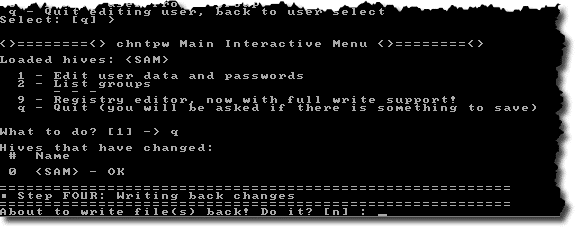
None of the changes that we’ve made have actually been written to disk as of yet. To complete the operation, type y (the default is no) followed by Enter.

You’re done!1 You can now remove the CD and reboot your machine. The account in question has no password. You can now login with that account and set its password to something that you would prefer.
Offline NT Password and Registry Editor
As you’ve probably surmised by the choices that we made and the options that we bypassed, the Offline Editor is a powerful tool for going in and performing all sorts of registry manipulation on Windows machines.
This has only been an overview of one type of operation, addressing the most common request that I encounter.
I recommend that you familiarize yourself with the utility before using it and then review the documentation and FAQ on the website.
The most important lesson of all
So, that was pretty simple, right? OK, maybe a little scary if you’ve never done something like that before. You can see that it’s pretty darned easy. Reboot from CD or USB, press Enter (in most cases) a few times, and *poof* … the account password is cleared and you have access once again.
So easy anyone could do it.
Anyone.
This is where you should be concerned. You need to be aware of this.
Anyone with physical access to your machine can do what I’ve just described.
If you’re in a position where folks with a motive or other random strangers can access your machine, you may want to rethink your physical security. Remember one of the most important security rules of all:
If it’s not physically secure, it’s not secure.
The ability to walk up with a CD and “own” the machine with a reboot and a few keystrokes hopefully makes that pretty clear.


Hi Leo,
I found another way. I logged in as Administrator in Safe Mode and was able to change the password there. Alot easier!
I did download Windows Password Recovery Tool Ultimate 4.1 from http://download.cnet.com/Windows-Password-Recovery-Tool-Ultimate/3000-2092_4-10964595.html to recover lost password efficiently!
I would caution people on this. At least read Leo’s article on download sites first: http://askleo.com/is-it-safe-to-download-from-download-sites/
I didn’t know that this worked with Vista as well – useful to note.
I have found that some times it doesn’t always work and for some reason you need to restart the computer and try it twice (or even three times occasionally) before it finally works. When it doesn’t work it usually seems to give an error message explaining why but I found that restarting the computer and trying again seemed to work if you persevere.
I try to make it harder for anyone to do by password protecting the BIOS and setting the boot order to not allow the CD or removable drives. That way it will be harder and take more time for anyone else to do. If I need to boot from the CD or USB drive I know the password for the BIOS and can quickly alter the boot order to allow CDROM as the first boot device. But always remember to change it back before leaving the machine. You can’t always prevent a determined ‘hacker’, but you can slow them down. Usually they’ll go look for an easier mark.
To Harold Rossi: Defeating BIOS password protection is even faster than the operations described in the article here — a cracker can open up your PC and short-circuit a jumper on the motherboard (or remove the battery from it… there are a few different specs, but all PCs have something like it), which will clear the BIOS password and reset all its settings to the defaults.
The moral holds — if someone with malicious intent has physical access to your PC, the data on it is not safe. Products like TrueCrypt (I think that was the name… the one Leo’s mentioned a few times) will secure your data — for a time. Given enough time, a determined attacker will defeat even those.
In short, if you want your data to be secure, don’t write it down, don’t put it on a computer, and never mention it to anyone. Anything else can be broken.
I have another alternate solution for this issue.
We can also use Windows Password reset disk if created and noot the system through the disk and reset the password.
If no password reset disk then we can boot the system to safe mode and reset the password there.
It will work in Windows 2000, Windows XP and Windows Vista.
—–BEGIN PGP SIGNED MESSAGE—–
Hash: SHA1
Most people don’t make a Windows Password reset disk for
their system, and I believe you must create it before you
need it.
Also, booting into safe mode is great – *if you know the
password*. The whole point here is that you do not know that
password. Booting into safe mode still requires that you log
in. No password, no login.
Leo
—–BEGIN PGP SIGNATURE—–
Version: GnuPG v1.4.7 (MingW32)
iD8DBQFIK3/VCMEe9B/8oqERAtheAJsFJfmdIBlxulKJBjaTwAACJE4PfACfa+jo
MHBD58GbawFyB8m985uxbug=
=RK9n
—–END PGP SIGNATURE—–
is this utility also work with windows xp and win 2003 server etc
Another good solution is to download Ophcrack. This is a self running bootable that actually cracks the password and hands it to you. All within 15 minutes. Everyone should put this in their toolkit – and practice a bit.
As the one gentleman said, bios passwords are pretty easy to get around. Some laptops will have to go back to the factory though, and you’ll be charged a 100.00 or so. Staying away from bios passwords, is a good idea.
Packrat1947
OPH crack only works if the passwords are short enough to be included in the “Rainbow Table” that is included with the disk. A longer password which I believe at the moment is 12 or more characters (might be more by now) would be too long to crack with OPH.
why not “run” control userpasswords2???
Because you need to be logged in to run userpasswords2, that’s why. :(
Try anything you like but, the moral is that man makes it and man can break it (password,code,etc)Lucky for me I was raised B4 computers and still know how to use a pencil and paper.I started with computers (work) back in the DOS days and there has always, and will always be a way to get your so called “secure” info.I NEVER put anything on a computer unless I am willing to let the world see it,this has served me well. Those are my thoughts………thanks.
Miklo
I received a free computer from a Church. Windows XP Pro was requesting an admin password that neither I nor they knew. After several weeks of unsuccessful attempts, I used Offline NT Password and Registry Editor. Within 30 minutes, I had reset the password to BLANK and was able to access Windows. I had tried everything possible and nothing worked until I used this.
The Holy Spirit at work….?
Naw, just Offline NT Password and Registry Editor. :)
Thanks for another great article, Leo. This password tool is the first one i’ve tried that actually works!
lol!
.
dude.. i stuff like walkin’ up to computers and owning them =P
.
i’ve got a live CD version of the linux distro called AUSTRUMI
.
plug in a pen drive..
.
boot it up..
.
copy the SAM and SYSTEM file off..
.
go home and crack it..
.
simple =P
Hi Leo, your the expert I know, but I have found a site online to reset the admin password as long as one has access to another acct, and as long as the acct. is specified as an admin acct. It just seems a whole lot easier and less invasive: “http://tweakxp.com/article37368.aspx”
I’ve used this method and it works great. Works for other accts. as well.
Does the method you advise here benefit those who have lost all access to all acct(s), or is there perhaps a negative with resetting the password via this (tweakxp) method. I do know it negates the user’s settings when the password is changed this way.
Thanks Leo, btw..great site!!!
Pj
The problem that most people face is that they do not have admin access in any form, at which point more drastic measures are called for.
-Leo
this is pure genius…worked like a charm…thanks a million for the anyone and everyone who contributed to this…helped me log into my old computer which i havnt used for years
Sounds interesting and possibly useful. …
However,
1) the site you link to never loads, always gives me ‘timeout’ error (i do not get that error for any other website).
2) the computer that we have lost admin PW to is Dell D400 mini laptop which has NO CD & NO Floppy. But does (according to F2 setup) support USB boot.
3) would simply copying whatever is on that reset ISO (if i can get it from someplace else) to USB drive allow the USB to boot and reset?
Thx for all your good tips n helps.
2) I believe that there was a USB boot image, but I can’t be sure without seeing the site.
3) No, in general I don’t believe that a CD boot image can simply be extracted onto a USB device would work.
12-Dec-2008
I went and bought a $650.00 and locked myself out a month after I had. That was last year, so instead of buying a new start up disk or going to eBay Im going to try this.
************Barry***********
I have an emachine and this doesn’t seem to work. Does anyone know of something that will work on the emachine? TKS in advance. BTW, the computer I was trying to download cd from had trojans and when I got rid of them then I could download.
I download the program, ut it is asking me for a license key before I can get into my passwords. How can I get this key? What key would it want?
Many thanks for this great tool. I used it to successfully reset the Administrator password on my old laptop (Windows XP) that I hadn’t used for sometime. However, I subsequently became “daring” and chose to disable syskey. The result is that no user (including the administrator) can now log on to the computer. Is there anyway I can re-enable syskey or any other way of logging to the computer? Passwords for all users are currently shown to be blank and I cannot change them. Many thanks for your assistance.
Will removing the battery from the motherboard lose all previously set password?
08-Apr-2009
Umm… I have a rather interesting issue. The machine i’m trying to get access to the administrator account for DOES NOT HAVE AN ADMINISTRATOR ACCOUNT! None of the Usernames can be identified as the ADMIN account, not even the account “Administrator”. How do I get one?
I am such a n00b, and can’t figure out how to “boot” my pc with the cd :s Help? :D
Leo,
If the laptop has Encryption Plus Hard Drive software, how do I boot from the CD after authenticating at the Encryption layer?
Thanks.
26-Sep-2009
Leo, your method is similar to Hiren’s Boot CD, which uses a small version of XP. However, for PW reset, no need to boot. It didn’t work. I got all the way to “Success” went through the finish steps it said you’re done and I pulled the CD and rebooted. When the User Choice showed up it still asked for the PW. Usually one simply clicks OK. No dice.
So I tried again and this time couldn’t get out of a loop which got generated because it could not find the right file.
Now his command prompt process is exactly the same as yours. I thought maybe it was corrupt and something missing, but it is the same. I even printed out all the steps to be sure I wasn’t going to screw up but it did.
It would be nice to know what went wrong and be able to set up the computer to not reset the PW!
It finally didn’t matter. Later in the day, I did recall the PW.
Even with both the BIOS and Windows password unknown, couldn’t someone just take oput the hard drive and connect it to another computer, and get all the information in the file system (documents, etc.)?
They could, unless the disk was encrypted.
Typically … YES. This is when whole-disk encryption (sometimes associated with a BIOS password) can help.
Doesn’t UEFI defeat the use of the tool to reset passwords?
My new laptop’s bios updates included one with that and I didn’t even download it.
That’s happened to me with every new device I use or have replaced. No matter what I do to make sure I am the only person who is an administrator and can make changes I am always changed to a user acct or a second profile is added to mine and then there are like 50 other users added that have log in permissions and the computer will deny me access to how the changes were done or give me the rights to change my settings or access my e drives or security info. Why is this happening and what do do to make it stop
Leo, Great article!
I have a friend (on XP Pro) whose HDisk is password protected AND LOST THE PSWD.
Anyway to get around the issue? I tried everything short of reformating the disk (SATA).
Any suggestion?
Thanks a million for any help or advice.
It depends on exactly what tool or technique has password protected the HD I’m afraid. If it’s any good the answer is no.
Leo, Your statement that no system is secure if it is not physically secure reminds me of a similar dialog I had some years ago with an IT person from a large multinational. The small company I provided IT services for was acquired by the multinational. I was asked what the passwords were on some laptops that were being returned to another company which had lent them to the small company. I said I did not know, but it was no problem. A few minutes later, I presented the laptops to the IT specialist, with passwords removed courtesy of Petter Nordahl-Hagen. I got this dropped-jaw response of incredulity that I had removed the passwords so easily. The IT person had apparently lived a sheltered life in the bowels of the multinational. Then I made my statement about security and physical security and handed over my password removal CD.
Great trick! However, after booting from Offline NT Password & Registry Editor it then gives me a message that says:
Loading vmlinuz………
Loading initrd.gz……….
Boot Failed: please change disk and press a key to continue.
I’m not sure what I’m supposed to do in response to this. Eventually I turned to another program – PCUnlocker Live CD and it works.
When I went to pogostick.net Norton blocked access: “This is a known malicious web site. It is recommended that you do NOT visit this site. The detailed report explains the security risks on this site. ” Others have also reported virus after visiting the site.
i have done this whole process and my hard drive was wiped and i was stuck only to run a new OS
This thing that you have explained is absolutely great. It really worked for me.
Thanks a lot Mr.Leo
Thanks worked great
Hi, when I leave my PC idle it goes to sleep mode but when I get back to it it asks for a password. Every time that happens I have to reboot pc to because I didn’t have my windows to ask for a password when rebooting only when my PC is idle. I tried to reset the password but it keeps asking for the current password which I don’t know. Any ideas?
Thanks,
Hussein
That’s either an option in the screen saver, or the sleep options under power management. Look for “require password to resume” or similar wording in those options.
I’ll try but is there a way I can reset it? It requires a current password (that I have forgotten) in order to change the password. Thanks for your fast response.
So I made my screen saver “never” to turn idle or go to sleep. So I don’t have to restart my computer every time. But I still need to find out a way to reset password. But I don’t know my current password. Thanks.
That’s what the article you’re commenting on is all about.
Brilliant program and the step by step instructions with the photos made it even easier.
After trying for hours with another program, I was back into my laptop within minutes.
Best of all? It’s free!
A huge thanks Leo :)
my computer doesn’t turn on but mouse connected to it is on,as I try to turn on the light just blink and goes of what is the problem?
I’d start you here: http://askleo.com/my_computer_lights_up_and_turns_on_but_nothing_happens_why/
I followed the instructions exactly but still could not clear the password. The PC runs Windows 8. I made a bootable USB drive and booted from it. I did select “Clear password” and it reported “Cleared”. Still, the screen did not check “Does not require a password” as yours though it did check “Password never expires” and “No password to power on”. Everything else is exactly the same as yours. So, the PC still asks for a password. I tried a few times without real success though I saw “Cleared” message and *BLANK* under dis/locked column. Any insight? Thanks.
Josh, did you ever find a solution? Same has happened to me. The syskey was disabled ok and I reset the administrator & user passwords to be cleared (shows *BLANK*), and now when booting to XP I’m not prompted for the syskey password, but the user logon name still requires a password. Same when booting to Safe Mode. Both show & both require a password.
Not resolved yet. I may look for another solution.
I think it only works with local account password. There are plenty of sellers selling a pre-loaded CD or USB drive for a small fee to solve the password issue.
I finally bought a tool to reset the password. The seller warns 90% eBay sellers sell tools that can only reset password for LOCAL account.
Have you tried pressing ENTER on an empty (i.e., blank) password entry field?
No, seriously!
The computer will always ask for a password, but that “password” might just be a blank line!!!
Again — I’m serious! (Try it; h*ll, it can’t harm anything…)
I actually got caught by this when we first set up our computer — after setup, I wanted to visit the Administrator account, but couldn’t remember what password I’d assigned to it. I tried several possibilities with no success, but eventually — out of pure desperation — I simply tapped ENTER… and I was in!
Silly me — it turns out I hadn’t set a password for the Administrator account! (I remedied that situation very quickly!!!)
That only worked on older versions of Windows. Microsoft has fixed that vulnerability. I remember going into stores with password protected computers and gaining access to the Administrator account on those machines.
I have windows 7. It only has one user account which would be the admin one as well, I assume.
The problem is that I do remember the password, however the pc forgot how to authenticate it.
If I type in the wrong password then it says that that was the wrong password.
However when I type in the correct password it states that it could not verify the password.
Will the above mentioned steps solve my problem as well??
I can’t guarantee, but I would try. Backup first.
ive forget my password .i cant download anything to my computer if i download anything it will ask me the administrator password ? how can i get it back ?
Read the article you just commented on, please.
Hi Leo,
I get to the point where I select clear (blank) user password but then receive the message
**no NT MD4 hash found. This user probably has a BLANK password!
**no LANMAN hash found either. Try login with no password!
If i then continue out by pressing q I get to step 4 I am not allowed to press y
If I press enter it says
No write! Nothing changed!
I then launch remove flash drive, press ctrl+alt+del
Choose continue loading windows normally
But the password is still present.
Can you offer any insight?? Would be much appreciated!
Very helpful! I had forgot the Administator password on my daughters computer. I know nothing about programing and it only took about thirty minutes from finding your article to having a new password. The majority of that time was spent reading your article and the program information.
Scary how easy and quick it would be for someone who knows what they are doing to take over your computer!
It seems good! This way can reset Windows computer password, but if the gut who don’t know about computer, it is hard. I ever used a program named Windows Password Recovery to reset my Windows 8 laptop! It is effective as well!
Thank you for posting and making your editor simple, logical and user friendly.
I inadvertently downloaded an Adware containing WebProtect, and in my haste activated. My admin password was blank (mistake #1), so it changed my admin password to either random password or worse. It effectively prevented me from digging out the malware. Others programmers have posted the same solution but were more difficult to use. Thanks Leo.
PS- As previous commenters, be extremely wary of downloader sites. I got the Adware from one of these sites, so spent another hour cleaning out adware. I had lost many hours both coping and eventually eradicating the Adware.
ive forget my password or my uncle’s kids changed it .i cant download anything to my computer password. I have a toshiba satellite running Windows 7 and my uncle has a HP running the same. I’ve tried rebooting in safe mode, safe mode with command prompts but I end up on same login screen. I’ve also searched on YouTube for answers as well. What can we do. We do not have another computer to download reset cd. And I don’t know if kindle will download and plug into computer.
If you don’t have a friend with a computer who can burn it for you, you might try a few small computer repair shops and find one who can sell you a copy for a reasonable price. Since it is a Linux CD, there is no copyright issue with making a copy.
Thanks for this solution! It worked for me. I booted from a USB drive, and could see the initial screen, but then it seems to hang/stop in the middle. A was about to give up, and the moment I pulled out the USB drive from the PC and then the rest of the process continued. Thereafter I followed the steps as per instruction.
Worked first time on dell with windows 7 upgrade from vista, clear and easy to follow instructions. Many thanks Leo
Hi Leo, sorry for my ignorance, but, if I reset my password with this method, will I lose my pictures and documents? Again, I don’t understand what you mean by encrypted. Sorry!!
You shouldn’t lose anything with this method of account recovery. The only thing which would change is the password.
Thanks Leo! That worked.
“Do you have physical access to the machine? Can it boot from a CD or USB drive?” Yes to the first, what does the 2nd Q mean?
This is really scary for me……on your original advice I created 3 accounts, Sylvia, Sylvia2 & Guest…..boy, was that time consuming & tricky….I had a guest who tried to print out her flight boarding pass, but everything kept coming up with MY passwords etc….so she gave up. I was no help, I only know things that I DO, not what others do…sigh….so, now I have to have the Admin password & I don’t have it….I have managed without it for 10 years, now I need it to install a particular e-reader, if I buy the e-book I want to read….
Also, if I do use the Sylvia2 account, I had to re-install everything……all the Microsoft stuff, Mbam, Avast etc etc etc, otherwise here I am constantly switching between users whilst working on something, just to get some info, from Word, or saved passwords, & etc…..
So, I guess this means I cannot download my Adobe Reader (E-Pub) programme????
And….the whole thing of creating 3 accounts was a massive waste of time?
I am using Win XP Pro SP3.0 32 bit, Firefox browser, & Microsoft Office Outlook 2003 as my email programme.
Anything you can suggest to help would be gratefully received. I’m not dumb, just annoyed with myself for not doing more courses when I was younger….
Many thanks for your help over the past few years. I have learned so much from you.
Sylvia
Thank you for such a detail and valuable description of the “Offline NT Password and Registry Editor”. After burning the iso image onto a CD, I followed your instructions and was able to reset the administrator password of my wife’s old PC in less than 5 minutes.
One experience that I wish to share is that it is easy to shut down Windows improperly while trying all other efforts to reset user password and the “dirty” bit of the system file will be set. This program will detect such a situation and will offer recommendations. You will have the option to “force” reset of the dirty bit. But it recommends the “safest” way is to shut down Windows twice and retry the program. Do follow this recommendation and the program will not complain again. Then follow Leo’s instruction step by step and in no time you will have the password reset to whatever you specify.
Again, thank you very much Leo and the author of this program. God bless you two.
Hai Leo,
i have secondhand Laptop dell latitude E6400 , using OS is Windows 7 professional , i used Hiren’s bootCD 15.2(usb) I tried this method in Step 1 to Step 3 is fine, after that Chnptw edit user info & passwords
RID Username Admin? lock?
q1f6 Admin *blank*
03e8 administrator *blank*
q1f8 Guest *blank*
RID value have but i forget , how to fix this step , how to clear the administrator password
when i restart computer its show Alt+Ctrl+Delete to logo on ,
please fix this problem i am waiting for your valuable feedback
thanks
Am sitting here giggling. Probly won’t be in an hour when I try to implement it, but Leo, you are STILL terrific.
TY for all you’ve ever done or will ever do.
Sir
My desktop have
possible windows installations fond: 1 sda1
2 sda2
so
your trick not apply
Therefore password is not clear.Pl Help me…………
Superb. Worked like a charm on multiple “admins”, so thank you very much. If it helps the above posters, if you re-run the tool and choose each RID by number. so 03f3, or 1f3d (examples only) then you can clear all passwords for all listed. Also, do option 1 AND 2 to clear password (clear BLANK and Unlock and enable). For the SDA problem, just run the tool on both partitions, repeat the request and it seems to find Windows after 2 or 3 attempts. Leo, great job to point this tool out and the security warnings too.
Samsung mini,with windows 7…….I want to unlock it since have forgotten my password
Read the article you are commenting on. It explains how.
Does this work on WIndows 10 on a Surface Pro?
I don’t know for certain, but right now I assume so – IF you can boot from the CD.
There is no CD drive. Only a USB port on the surface. Is that okay?
It should work with an external DVD drive or a bootable USB thumb drive.
Honestly I’m not sure if the recovery disc will work from USB. (The site should say, or have a technique to make it). Another alternative is that USB external CD drives are very cheap and often handy to have around.
Leo, if I may, I’d like to inform you and everyone else looking for a way to reset/blank/change the windows password. If someone needs to know the how-to’s of it, go to YouTube and look up the video “How to Remove a Windows User Login Password” by GuruBrew (Steve). He explains in great detail how to download the “Offline NT Password & Registry Editor” Tool to a CD as well as to USB thumb drive. For me, using a CD was easier, more understandable. After I had my CD in hand, I then printed out this page above that you, Leo, explain what to expect and what to do. The you tube video also explains what NOT to do. I then took my print out and my CD and went to my son’s laptop “to save the day” for him. I was amazed that the window that came up looked exactly like the one I printed out….from this web page! I was in awe! I just read your notes from you, Leo, and went step-by-step. But the machine I was working on needed to have the password unlocked. And that’s where the info for how-to from the video came in handy. And…botta-bing…botta-boom! I was able to get to the desktop without a password just by pressing Enter. My son was so happy that I had saved him some money by not having to call in a computer tech…and he was proud of me, too. I can’t tell you how proud of myself I am that I actually did this all by myself! And, yes Leo….it was scary. LOL
I just wanna thank you, Leo, and the author of the Password & Registry Editor Tool, and Steve, aka: GuruBrew, the guy that made that informative video for all of your help. OMG….I’m so stoked! :D
Thanks LEO this NT Registry & Password Reset worked exactly like you explained. My 88 year old buddy will be happy as a clam to get his computer back. I will instruct him not to do that again. Now if I have anyone else that has a problem with forgetting their password, I have an EASY fix. Thanks again LEO…keep up the good work. BTW – you’ve got great technical assistants working with you.
Why, yes. Yes I do. :-)
Thanks, I lent my laptop to a friend from out of town, I made a guest account for them and casually set a password for admin. One week later I can’t remember the password and I can’t get on my machine other than as a guest! Thank you.
Leo,
I can’t remember the password for my windows server 2012. I got this password editor but when I get to user selection stage, all I do see is “Administrator and Guest”, I don’t get to see my own user account. Please, what could be wrong?
Thanks in anticipation.
You should be able to access all of your files through the Administrator account, and probably be able to change your user account password logged in as an administrator. I say probably, because it is normally a trivial thing to do, but since you’re having problems with that account, it might not be so simple in that case.
I have tried this method 3 times now. I have a Windows Vista computer with Windows 7 installed. It has not reset the password. On all accounts it says that password is *BLANK*. Any help would be greatly appreciated!!
dell laptop lockked – even with purchased software – it wants the admin permission to make changes. paid software claims to have removed passwords. i can get into the computer – as normal (new) USER, BUT CAN DO NOTHING ADMIN RELATED.
OPHCRACK stalls
kernal panic – not synching: attempted to kill init! exitcode=0x00000009
any ideas?
thanks
Sorry to be such an idiot, but when you say “boot with the CD”, how do you do that? I copied the files onto a CD for my Mother’s computer.
Now when I take it over to her computer, what is the command to boot from the CD. If I turn on the computer, it will automatically boot from her hard drive, right? How do I get it to boot from the CD?
Thank you very much.
The article you are commenting on explains how to create a bootable password reset disc. In order to boot from it, you computer’s BIOS settings have to be set to boot first from CD/DVD. Unfortunately, the process is different for each computer brand, that I can’t explain how to get into the BIOS and set it. You might try just putting the disc in and turning the machine on to see if it boots as many computers default to booting first freom CD/DVD.
Wow, I never realized it was this easy to do this. This *might* have helped me if I had known about it a few months ago when I was locked out of my computer. The reason I say *might* is because I’m not so sure this would actually have worked on my machine since my drive was encrypted with BitLocker (required by work). So I’m guessing that this utility would not have been able to find the registry and make changes.
Any idea if this will work on an encrypted system?
If the disk is encrypted, even if you could change the password, you wouldn’t be able t unlock the data.
Does this tool/method work in Windows 10?
I *believe* so, but have not confirmed.
This is a Local account.
Does this work with Windows 8 and 10 when the password it tied to a email account?
My impression is that it would not work for those type of log-in passwords, but that is why I am asking.
I *believe* so. But I’ve not tried it.
I did not have much luck.
1st Windows 10 version 1607 I get to “Booting to Kernel” and it freezes.
2nd Windows 10 version 1607 I get “Kernel Panic” and it freezes.
3rd Windows 8.1 sez the “System is in Hibernation” (it is not, it is a desktop and I never even hibernate my laptops), so I put it in Hibernate and then deleted the hiberfil.sys file and still got the same message.
4th Windows 8.1 actually sez “Password Cleared” but it is not.
All 4 of these system have ASUS motherboards.
Thank you.
Another solution would be to open the computer case, locate the 3-pin password connector (PSWD) on the motherboard and move the 2-pin jumper plug from pins 2 and 3 to pins 1 and 2. Then, wait 5 seconds (to clear the password) and move the 2-pin jumper plug from pins 1 and 2 to pins 2 and 3 (to enable the password feature). Close the computer case, power up, and then set a new administrator password (if desired).
Instructions for doing this are available in your system’s User Manual (manufacturer’s website). With the computer case open, that’s also a good time to replace the battery (which is alongside the PSWD).
That resets the BIOS password which can also be done by removing power to the system, then removing the CMOS battery for a couple of minutes.
Neither of those solutions work on all machines. Some aren’t resettable.
In fact, there some other free windows password reset tool out there like ntpassword, ophrack or Ubuntu Live CD/Disk.
{potentially spammy link removed}
This has nothing to do with the Microsoft Windows Administrator password. Sounds like it might be for a BIOS password. It’s important to realize that not all computers have this jumper, or even have it exactly as you describe.
You think!
So why not say that in the first place, or why even publish it and lead the Leo readers down Primrose Lane?
The real answer was in the side bar that said go to your email account and change the password there, and then come back and log in to Windows.
Becoming disenchanted with advice on this site. My opinion, of course, but it seems articles are being published to fill up white space.
Thanks
With all the noise about maintaining Windows system security, it is amazing people do not secure physical access to their machines.
Physical access is everything. Aside from the Offline NT Password and Registry Editor, it is also possible to reset the BIOS settings to nullify the system BIOS password (controlling boot access to the BIOS screen). With a screwdriver or nimble fingers, all that can be done within five minutes.
In any case, passwords are created to “keep honest people honest”, as the saying goes. For most users, real security includes lock and key, although “always on” internet connections pose still another security hole, and are a favorite of hackers and state-sponsored probes.
Not imagining myself that important, I nonetheless disconnect the internet cable during day-long periods of system testing. Case in point, my firewall records attempts at port scans and the like, and such activity clutters the log within only days. Not merely routine sweeps from Amazon AWS or Akamai, but persistent probes from individual addresses.
I was also having complications in solving this great myth. I too had installed winxp mce a few days back on my ageing hard drive and on the saving configuration page i restarted the pc. And saw that i gives boot.ini file error and blue screen to follow.
I then tried recovery console and it asks aministrator password, and doesn’t accepts anything neither blank….i wanted to run bootcfg….
Then someone recommended me this live boot password changer by peter norten hangen, and it worked almost like space pc computer system. But upon reaching the Chnptw main interactive system…
it didn;t showed any 1 nor 2 options only q and restart.
So this program seems now saying fixing something…but i do not know what…dirty logfile perhaps.
HI Leo,
I have made a CD, but now am attempting to make a USB. Have installed the program on it but am stalled trying to make it bootable.
In the instructions on there is this command X:syslinux.exe -ma XX:syslinux.exe -ma X:
but get “is not recognized as an internal or external command, operable program or batch file
My searches have not found how to make this USB bootable – do you have a suggestion?
My first comment has duplication of the command – sorry to have not picked that up
hello sir/madam
i have forgotten the password of admin in windows 10 every time that i want to install any software in case of my lesson its asking the password of admin can anyone help me what should i do ….???
Please read the article you just commented on. It has all we have to offer.
Does this tool work on 64-bit computers under Windows 7Home Premium?
I believe so. I do expect it to break/fail some day, should Microsoft consider this a loophole to be closed. (FWIW if the hard disk is encrypted with Bitlocker then I don’t believe this tool will work at all. That may be Microsoft’s position: if it’s that important, use Bitlocker.)
Ive used it on Windows 7 64 bit and it should work on any version since XP with a local login. For computers with a Windows account (outlook.com, hotmail.com, live.com, msn.com) login, you can reset the password by going to outlook.com and resetting your Windows account password. That’s one reason, it can be safer to log in via a Windows account as it’s more difficult to hack the Windows account than the password.
Dear sir anybody hackd my Facebook account and remove gmail address and nambar
Facebook I’d link [links removed]
Never include your email address or Facebook links in a public forum.
We cannot recover hacked accounts, lost or forgotten passwords. Please see this article for more information on your options:
https://askleo.com/would_you_please_recover_my_password_my_account_has_been_hacked_or_ive_forgotten_it/
If this is a Hotmail, MSN.com, Live.com or Outlook.com account, then this article discusses recovery options for the various ways that these accounts can be lost or compromised:
https://askleo.com/what_are_my_lost_hotmail_account_and_password_recovery_options/
If this is a Facebook account then please see:
https://askleo.com/how_do_i_recover_my_facebook_log_in_password/ and/or
https://askleo.com/how-do-i-recover-my-hacked-facebook-account/
Unfortunately, if you no longer have access to the recovery email account or phone number, your account may be lost forever. It’s important to always keep these up to date on your account.
https://askleo.com/a-one-step-way-to-lose-your-account-forever/
Hello I Have a pc I got in a junk sale I some times get old pc’s out of the trash and try to fix them I already had a cd with NT password and it has always worked great but I now have a pc that I ran NT password and now the pc ask for a pin how do I clear that thank you
If the techniques outlined in this article don’t work anymore (there are several reasons that might be) then you’re probably out of luck. Install a new copy of Windows or Linux. (Signing into the existing copy is probably illegal anyway.)