Even after all this time.
I apologize for the slightly coarse language, but sometimes only the right word will do.
Computer networking is way, way, way harder than it should be, and much harder than it could be. Quite honestly, it’s still too frequently beyond the abilities of the average computer user.
Occasionally, it’s beyond me.
Become a Patron of Ask Leo! and go ad-free!

Networking is hard
Networking is harder — much harder — than it should be. If you’re having problems getting your network to work reliably, know that you’re not alone.
The state of networking
This is an update to an editorial — OK, a rant — I first posted nearly 16 years ago.
In the intervening years, not much has improved.
Connecting Windows computers together over a local network remains incredibly difficult for the average user. Making a connection that is both secure and flexible — two concepts inherently at odds with each other — is a common stumbling block.
Heck, making a connection that works at all can be a problem.
No simple solutions
There’s no getting around the fact that networking is very complex. But complex tasks are what we look to computers and technology to simplify for us.
And they are letting us down.
Almost everything impacts networking. Operating system versions, or even variations between flavors (like Windows Home and Pro), can make a difference. Setting consistent workgroup names or log-in credentials can make things easier … or harder. Occasionally, there are obscure Windows settings you may or may not have direct access to change.
Then there’s the hardware: a wide variety of inconsistently-named devices called “access points”, “routers”, and “modems” that, regardless of name, can act as modems, routers, and access points … or not. Add in cabling, wireless protocols, and more, and you’ve got a recipe for confusion that can stymie even the most patient user.
Heaven forbid you want cross-platform
Problems are, of course, multiplied dramatically should you want to connect devices using different platforms. A Mac and a PC? Perhaps. Macs, PCs, and Linux machines? There are still connections I’ve yet to figure out how to make work consistently across all my machines.
With the advent of additional networked devices, including gaming consoles as well as mobile devices and tablets, life continues to get more complex.
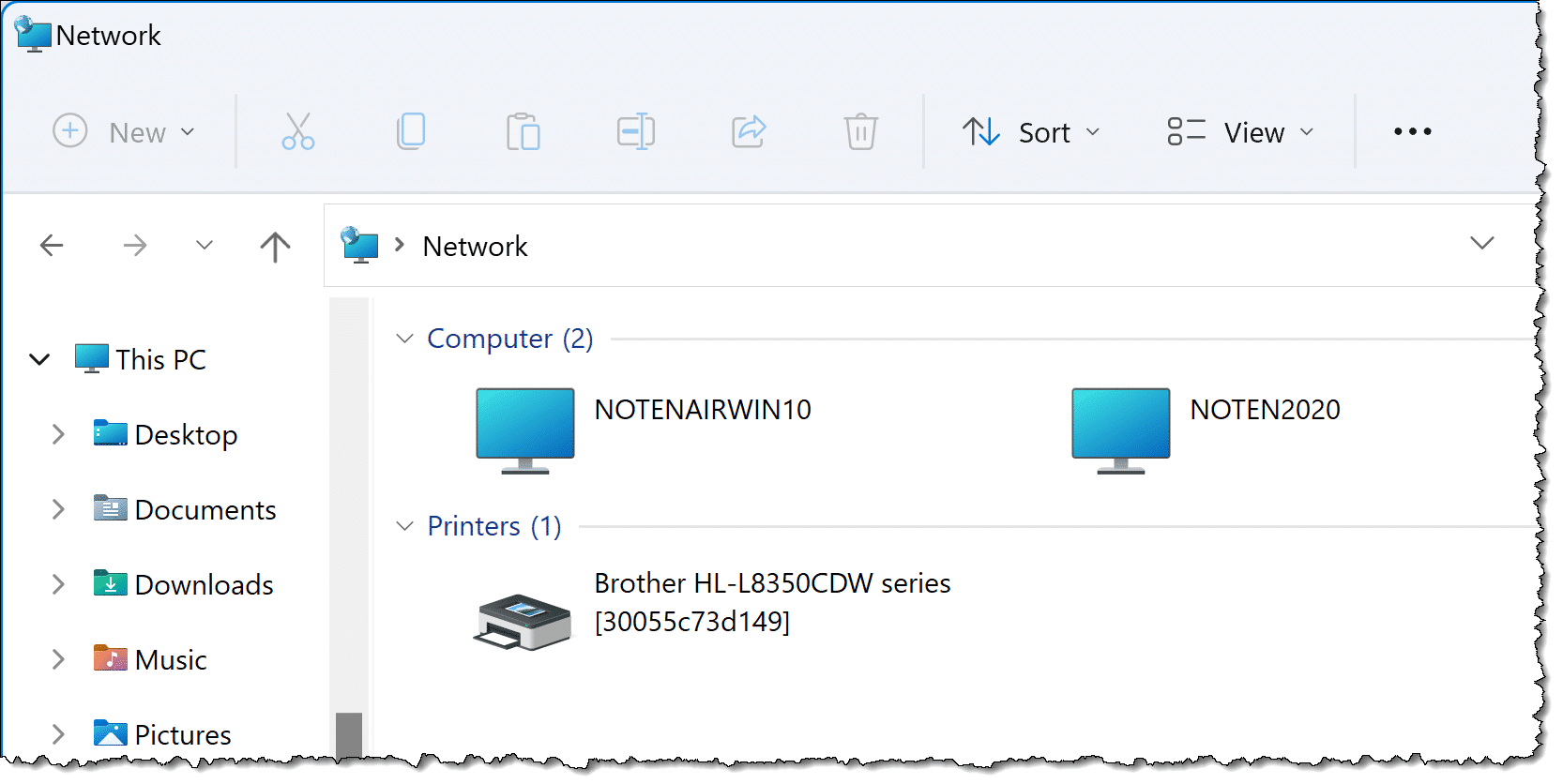
I have many more networked machines that are not shown in the Windows “Network” display. Where are they? No idea. And yet, I can connect … to some of them … even though they’re not shown.
Homegroup was a start
I’ll be honest, I never liked Homegroup. It was never enough, and it made too many assumptions. That being said, it was a solution that worked for many people.
So, while I didn’t like it, I’m frustrated that Microsoft elected to remove the feature from Windows.
I would have preferred continued investment in Homegroup, or something built on it, that would make networking easier for more people in more situations.
Instead, we’re back to old, confusing, obscure networking tools.
There has been some improvement
I don’t want to be all doom-and-gloom. It’s important to recognize that improvements have been made over the last decade.
Wireless networking, for example, was once exceptionally difficult, with little standardization and operating-system support that could be characterized as “bolted on” at best. Today it’s natively supported, and something we assume will just work, at least for direct internet access.
Similarly, I’ve been impressed with recent machine setups where networked printers magically appear as immediately available or are easily installed. That’s a level of simplicity — or at least lack of undue confusion — that works well for what is amazingly complex under the hood.1
So, why do I rant?
Why do I — a normally positive person who’s amazed with technology and all the opportunities it can bring — turn so gloomy when it comes to networking? Why am I going on about how bad things are?
I want you to know you’re not alone.
Networking is hard. It’s complicated. It’s fragile. It’s frustrating. And it’s been that way for a long time.
When it works, it’s powerful, magical, and can be exceptionally enabling.
But for the most part, getting to that point sucks.
And I want you to know that as you bang your head against some networking wall, it’s not you. It’s not your fault. You’re not missing something obvious. It really is that bad.
And it shouldn’t be.
Maybe someday it’ll get better, but I’m not seeing any relief on the horizon.
Do this
Subscribe to Confident Computing! Less frustration and more confidence, solutions, answers, and tips in your inbox every week.
I'll see you there!
Podcast audio

Related Video


Footnotes & References
1: Seriously. Printers, printer drivers, and all that communication is staggeringly complicated.


I agree! It seems that networking software has
become more user friendly in the recent couple of
years, but networking multiple OSs can still be
daunting. We have multiple WinXP systems,
Linux, and Mac computers successfully networked,
but it has taken many, many hours to get them
to a harmonious state. Please take up the task
of explaining, in simple terms, the process(es)
of networking for those of us who are most
interested of USING a network instead of
tinkering. I’ll be eagerly listening.
Networking does suck.
I never know where to turn when things go wrong. When I call up Linksys or D-link or Comcast or Verizon or any of the major company’s “help” lines they only give me very basic advice like “upgrade your router’s firmware” or “make sure you don’t have any viruses” and then they hang up and leave me staring at the same problems I’ve been having for years. DNS servers randomly becoming unavailable… Random computers on my home network locking up everybody else’s connections. Firewall logs that don’t make any sense. Games that suddenly skyrocket to 2000 ping with 70% packet loss. Routers that lock up. That aggrivating little “limited or no networking connectivity” message. I just want it all to work. What’s even more frustrating to me is that I’m the most tech savvy of the 6 people in my residence and the other 5 rely on me to solve their computer problems. When unexplainable things occur on the network I have NOBODY to turn to. Networking issues have driven me to tears more than once… Right now I’m struggling with some sort of network congestion issue without any clue as to what’s going on. I tried googling a few things and found this podcast. It made me feel better knowing that even people that are supposed to know what’s going on struggle with this stuff at times.
What I’d really like to see is a guide that covers more advanced topics involving obscure commands and settings, but still follows a “try this. Now try this. Now try this.” approach instead of confusing me with 15 different things to keep track of at the same time. I need answers and all I ever get is more headaches.
Aaaaaaaarrrrrrrrgggggghhhhhhhh,
Alex Johnson
I just recently learned how to network XP & Vista.
It took me a week to figure out what to do.
The easy step is to go into your router and turn
off the security and let your laptop pick up
the signal and then turn the security back on.
Im still a novice in networking but yeah
at times it can be a real pain to figure out.
Vista????? Tell me not! XP??? OK, perhaps for some specialized applications. Serious users have pretty much abandoned Win7 by now. IF you DO need to use them all together, set up the network with the OLDEST OS first – the newer OS will revert to the old standards thanks to the great feature (of Microsoft OSs) called backwards compatibility. Expecting an older OS to connect to a network using protocols never even dreamed of when they were implemented is asking WAY TOO MUCH. Interconnecting with older AOS or connecting new AOS to older networks will also be challenging for the same reasons.
I DO generally have issues trying to connect my i-phone to my windows 10 network (for file sharing) and connecting Androids for anything other than internet connectivity appears to be a fools errand. That said, it is a lot simpler than the old Novel and early Unix networks (although, apparently, it is easier to connect Windows machines to a ‘Nix network than the other way around). I also ONLY recommend and sell Windows Professional to anyone intending to do any kind of serious networking – Win Home can NOT connect to a domain – PERIOD.
When that comment was written, in 2008, Vista was the latest Window OS available and XP was still fully supported.
I’m in the process of setting up my first home network and so far it has been fairly easy, except for one major (or minor to those who know what to do) stumbling block. I have a Vista Home desktop, XP Pro laptop, Linksys WRT54GL router and Arris cable modem. I can see XP on Vista, but when I try to go to Vista through XP, it wants a user name and password. I never had the pw set up on Vista so I created one, but it won’t accept it.
I’ve tried using various other user names and passwords, such as from passport (hotmail) and I’ve even tried leaving it blank, but it still won’t work. I did notice that after I type it (user name and pw) in and hit enter, it adds the name of my computer, Home-PC, to the user name field. I can turn off password protection in the “Network and Sharing center” but I don’t really want to do that because, obviously, I want protection. I’m wishing now that I would have went with the Vista upgrade, because (among other reasons) I could have simply turned on remote desktop, at least I think.
Another quirk is I can’t see XP in Vista’s network map and I did try to dl the LLTD patch for that protocol but it says I already have it installed. I named the computers different and gave them the same workgroup name. I’ll still keep looking for the answers and if I find them I’ll post them here, but if you (or anyone reading this) can help solve these issues, I’d seriously appreciate it! What’s funny is I don’t even really “need” the computers to network, I mainly just wanted the laptop on the net so I wouldn’t have to sit at my desktop. But, now that I can’t figure this out, it makes me want to do it that much more!
So you most likely have a permission issue connecting from one computer to the other.
So to link your Vista and XP computers you will need to
1. Share the folder you want to connect to on the machine you want to connect. (So Share the folder on Vista so XP can connect)
2. Then you will need to map or connect to that drive to your XP machine
3. This is where it gets tricky the user name on the Vista machine to which you are connecting will be the name of the machine and user name combined e.g. Lets say the Vista computer is called “Vista” and the user name is “Sheryl” the username for connection purposes would be Vista\Sheryl and the password the pass you use to log in to the “Vista” computer
I have 3 networked machines, two running XP SP3, and one running Win 7 Home Premium. I am running a home network, not a Homegroup. If I go into Windows Explorer, my XP machines can see the Win 7 machine in the network and copy files between shared folders, but if I do the same on the Win 7 machine, Explorer does not see the two XP machines at all.
However, if I go to Command prompt on the Win 7 machine, and do a command line file copy from a Win 7 folder to a shared folder on one of the XP machines the copy is successful, so the network connection is obviously working. Any ideas why does Explorer on Win 7 not show the XP machines as part of the network, although the connection is there, else the command line copy between machines would not work. Aaargh, frustrating :)
It has not improved. We are a small business – six PCs, all running Windows 10 Pro. They are all set to the same workgroup, and (as far as we can tell) are basically all set up the same. Each has at least one “shared” folder, and all computers have the same accounts available. There is also a couple of small NAS servers, and a couple of printers. All hardwired into one 1GHz switch.
HOWEVER!!! on any given day it is a pigeon shoot as to which computers can “see” which others. Totally random. Printers are a bit less so, but usually no one computer can see ALL of the printers. Wait a day or so, and try again. Some will be there that weren’t, and some that were there will have vanished. They can all PING each other, but not show up on the list of visible networked devices.
I have deliberately made the system LESS secure, in order to improve things (some). But nothing seems 100 percent. Come on, folks. I am an IT professional, with a homogenous Microsoft Windows network. If I can’t get it to work with a couple of man-month’s effort, then this is NOT progress!
I gave up on Windows XP to Vista to Windows 7 and took a different approach. I dragged anything I wanted to share into the corresponding Public folder and it worked. You can find your Public folder and Public subfolders under your C:\Users\Public folder. That said, using Public folders is not the default and using these folders rather than the default ones can come back to bite you in relation to other software you might be trying to use that is looking for things in the default locations.
Maybe bypass Windows security with a network drive? Any networked computer should be able to access it.
The problem with networking is that it is all a mess. Mixed up with Windows’ neurotic security politics the whole thing is confusing and difficult to overview.
The idea of GUI (Graphic User Interface) was, that the user should not need to be an ingeneer to use a computer, and that is fine – as long as it works. Which it does not… Then comes a double need to be your own computer engineer, and you have a hard time trying to find and understand the concepts being behind. Windows Help comes out with a bunch of weird names, mostly undefined and is a very little help indeed.
What is a Network Bridge? What is DDE share? What is a port? Then some day you get the advice to run cmd (command prompt – oops wasn’t it a GUI?) and type ipconfig /all, and a new set of undefined denotions turn up. What the hell is a DNS-suffix? Subnet mask?? Node type?? IP-routing? wins-proxy?? And the system acts like that is something all folks know what is.
How has communication between computers become like this? I suppose it is a result of lack of planning combined with random ideas and general clumsyness.
We are in a state of confusion and we are happy, when things work despite that we usually don’t know why…
The reason Dropbox is popular is because it bypasses all the Microsofts inept Networking garbage.
Even though this article is stone-old, it’s still very current.
And now that we have Windows 7, add to all this an inexplicable, paranoid security system, and most importantly, an incredibly convoluted, labyrinthesque user interface to the networking subsystem, and even advanced system administrators like myself are completely baffled.
I don’t understand why it’s so difficult for the OS makers to get it right. I use TeamViewer and OneDrive, previously Dropbox, for my home networking and they do the job flawlessly. I used to use a program called Network Magic and it also worked perfectly until Cisco stopped supporting it. Why can’t Microsoft or another third party do it without having to go through the internet?
“… why it’s so difficult for the OS makers to get it right”. One reason is that both Windows and Mac OS networking software is built on top of decades old Unix networking constructs. The problem is not that the underlying networking code old, but the fact that the newer OSs have built layers and layers of code on top of the original Unix code and they are piling on more with every new OS version. Homegroup is one such layer, but as Leo says “… Microsoft elected to remove the feature from future versions of Windows”. Unfortunately, that’s been the history of Windows OS tools and services. Often they are not fully developed and debugged and therefore not reliable. So, MS gives up on them and stops using them, adding to the piles of garbage code collected over decades. I’ll bet that the Homegroup code is never taken out of the Windows OS, but just by-passed, waiting to cause unexpected problems.
You can create a LAN without the internet (i.e. without a cable modem), but you would need a WIRED router (… and don’t bother using a wireless router). You many still have to fiddle with network and security settings and share folders to get data across.
My goodness. I remember Network Magic and it really was magical. Easy to set up and use for what we needed at our house. It was and is a shame that nothing has come close to the simplicity. Thanks for jogging my memory.
I’m pleased you posted this, Leo. It’s a relief to be honest because I always approach networking with trepidation. I did have a period when I could network from my main computer to my back up and a NAS (Stora) giving me a very good means to back up my data. More recently, since Windows 10, the connection to the NAS eludes me and as for networking to other computers I fail, consequently needing to transfer what I need to back up in a manual way using flash drive or external hard drive. For me, I have been through the period in my life when I need to back up all the time thanks to having backups. My use of computers has changed but I have two usable hard drives in the NAS that I know carry almost a Tb of information that if I try to hook them up elsewhere will not survive the process i.e. they would be incompatible because of the Stora formatting – if that is the correct expression. The Stora itself was never easy to use and I found Netgear unhelpful, so going to them has not crossed my mind. Still, that the way it goes…
Hi Leo, at last someone agrees with me. Once upon a time when computers were nice to each other all you had to do was share them and they would end up in windows explorer like another drive. These days we are bombarded with codes which supposedly let you tell one computer that another is a good guy. You get a password to enter from one computer which is entered on the other machine. Probably since it’s inception it has never worked, Win7, 8 and 10 inclusive. I gave up trying and use a big usb drive to swap files from one to another or TeamViewer if I want quick stuff.
I totally agree. My workaround is to use TeamViewer QS when I need to access something from another computer and the network is not cooperating. Also, I use wired connections wherever possible with printers and often print through the network the old fashioned way, by going through the computer that the printer is attached to it. These methods work 100% for me.
Thanks, Leo. You’re absolutely right. I’ve been trying for a couple of weeks now to get my Linux desktop to talk to a printer on my home network… I think I might have a better chance of flying to the moon. I’ve settled for connecting one machine on the network directly to the printer and then sending anything for printing to that machine, logging in to it remotely and printing it off. It really is horrendously complicated and I was on the point of giving up when I read your article. It doesn’t explain what I’m doing wrong – but has at least given me the determination to keep at it a bit longer! So – thank you!
I’ve been dealing with networks since the late 1980s. Remember 3Com? Remember 10Base2? That’s about the time I got into networking — when you had a single, thin coaxial cable running around the entire office, connecting to each and every computer along the way with a BNC T-connector. And don’t forget to make *darn* sure each machine was well-grounded electrically, and that you had a proper terminating resistor at both ends of that cable. Oh, and don’t let it exceed 600 feet in length — you literally had to rearrange the desks in the office to accommodate the network cable-length!
And talk about incompatibility. Oh wow… If you were lucky, the network-driver TSR programs that had to execute when the machine booted up would actually be recognized by your software, so you could actually save your documents to a network store, or print to a network printer. If you were unlucky, it would lock up during the save, and you’d lose all your work. And when Fred in the office across the hall would shut off his computer without first logging out of the network, no matter how many times you told him not to do that, there was about a 1 in 20 chance that he’d just crashed the entire network — or at least everyone downstream from him — and everyone had to save their work (if they could!) and reboot. And, God forbid the power should go out — oh boy. Not a good day when that would happen. Those were the days! ;-)
Networking *still* sucks, to be sure — but it is *so* much easier than it used to be, back in the beginning. WiFi is a freakin’ miracle. Setting it up correctly can be a pain sometimes, but once it *is* set up, it tends to continue working properly. And 99/100 times when it fails, a simple reset of the modem/access point will correct the problem — and if I can teach my 76-year-old mother how to reset her modem/access-point, I’d imagine anyone can learn how to do that.
I agree with you that networking can be made easier — there’s no doubt it still has issues. But when you consider where it started… It’s *so* much easier than it used to be.
This was a great article, and it triggered many good responses.
For me – Homegroups on WinXp with adequate – but high maintenance. As I migrated PCs to Win7 and Win10, the Homegroup concept failed. So I have gone back in time and installed a hardware File Server ala Novell Networks in 1990. Such systems are sold under the acronym NAS (Network Attached Storage.) There are several providers (Synology, QNAP, Western Digital.) I can seamlessly share files to my computers both by 10BaseT wiring and by WiFi. The system will act as a print server, although that is not needed with WiFi enabled printers. It supposedly will serve photos and video to my TV, though I haven’t tried this yet. I can access my data over the Web while I am away from home/office. I expect it will operate seamlessly with my seldom used Ubuntu Linux box.
There was a significant time investment in getting the set up correct. Now it runs transparently. The network computers can all push/pull data to folders on the file server. A limitation is that one computer cannot directly files on another computer. I am putting shared data on the file server, so any connected computer can access it. The shared folders on the file server are mapped in Windows File Explorer, pretty much like the old WinXP Homegroups.
I purchased a unit and two HDDs for less than $600. One HDD units of comparable size are around $300. The HDDs are set up as RAID 1 – simple mirroring. The file server has also been added to my backup protocols. I have 4 PC, a couple of printers, a TiVo, a TV and now the NAS on my LAN .
This is another approach to small networking. While it feels like going back 25 years, so far it has been much more reliable than Windows Homegroups ever was, but at an initial $$ cost.
The only driver for my wifi adapter that has ever worked is the one that was on my laptop when I bought it. The first time there was a driver update the adapter failed. I rolled it back several times to the original driver, but then the driver disappeared. I paid $120 for a technician to repair it, and it worked until I upgraded to Windows 10. I have had to connect that computer with an ethernet cable in order to have a connection, or use an external adapter. My computer manufacturer wasn’t able to provide a driver that works. Very frustrating!
Have you tried going to the adapter manufacturer’s website and downloading the driver?
I agree networking does suck in many ways, some that should be easy to correct. I regularly find 2 instances of some devices supposedly installed on my network. Printers are the worst, I have an HP printer that this happens to regularly and I’ve given up trying to understand why. Sometimes the printer won’t print and when I look at the settings one of the copies of the same printer will work, the other will not. And sometimes the one that won’t print gets set as the default printer. Also Directv receiver shows up multiple times, and how am I supposed to figure out what a “Network Device is”? Or a string of hex numbers for a name? I’d like to find an easy way to print out a list of all devices that are connected to my network with their MAC addresses and IP addresses which should be a no-brainer but doesn’t seem to exist. My Linksys router will show some of this data under Troubleshooting but it’s usually not complete and no way to print it out. Microsoft should provide more information about networking that a non-IT person can understand as most users don’t want to have to get an IT degree just to run a home network.
I agree with this “Networking Sucks” article. I live in a state where the whole house is wireless connected through a wireless router and adapter. I have a smart phone, a laptop and a desktop connected. I do not use Home Group because I don’t like it. The phone and the laptop connect to the network OK, but the desktop is another story. I have to open the IP and the helper together simusetainly or it will not connect to the internet. The system keeps changing the name of the router, the password, the work or home group and the IP. I have spent 5 to 10 minutes trying to coordinate each one to finally connect to the internet. This happens at each startup. My IP keeps telling me, at each startup, that I have limited access to the IP. It’s getting to be very frustrating. Each startup is noted numerically.
Thank you, Leo. Could not agree more. I have several laptops and a desktop and sometimes they work together and sometimes they don’t. And all are the same manufacturer and same version of Windows! It’s so random. I finally totally gave up and just use a thumb drive to pass files. It’s infinitely faster than trying to figure out why the networking isn’t working today that worked yesterday.
I worked in IT for a long time and even though networking is my biggest tech weakness I found corporate computing a lot easier than home computing. I set up my first network (Win NT 4) back in 1997 as a 32-node LAN to teach Windows 95 without much help in one day. It was a breeze I set up and managed other networks between then and 2009 when I retired. After all these years I still haven’t bothered setting up a home network. :-) But I am shopping for NAS hardware.
I hear ya Leo!! Loud and clear. It is one reason why 15-18 years ago I loved my WebTV. Plug it in and it just worked… but I will say you had to figure out a few things, like how to do FTP between websites without a hard drive.
I swear “they” make things complicated on purpose these days. Maybe to sell a service, or inadvertently help hackers… which means more services to combat the hackers.
“Maybe someday it’ll get better …”. Not likely. See my comment from March 2018. To amply on that, there are about 2500 networking protocol documents (RFCs). These all interrelate, overlap, modify each other, and allow for custom exceptions. For networking to be streamlined and easier, someone has to create a brand new protocol from the bottom up. Everyone on the planet and his uncle needs to adopt only this protocol. They all need to swear that they won’t modify it in any way at all. They all need to implement the protocol correctly. That’s everyone, everywhere, in every device, in every software. Without exceptions. Sounds like a great government contract.
Leo, perfect timing on this re-boot of an old topic. Just yesterday, my wife was lamenting that, for reasons unknown to all of humanity, her default printer got switched from ‘her’ printer, to ‘my’ printer. The odd thing was only an hour earlier, she printed a document that went straight to ‘her’ printer. Is that a ‘big deal’… having walk across the room to get her document off of my printer… no, but that’s not the point. Her printer is connected to the network via ethernet, my printer is only wi-fi capable. Her pc is also connected to the network via ethernet (wi-fi is turned off). Crazy for sure. The fix…??? Go back into settings and (again) set ‘her’ printer to be the Default. We’ll see how long that lasts.
In Windows printer settings scroll down and look for this setting:


“Let Windows manage my default printer”
Make sure that’s UNchecked. Checked means Windows will change your default printer from time to time.