Windows 8 has caused a fair amount of excitement on the interwebs and some of it seems to be fairly polarized – there are those who already love it and those who can’t stand it, often without having even seen it in person.
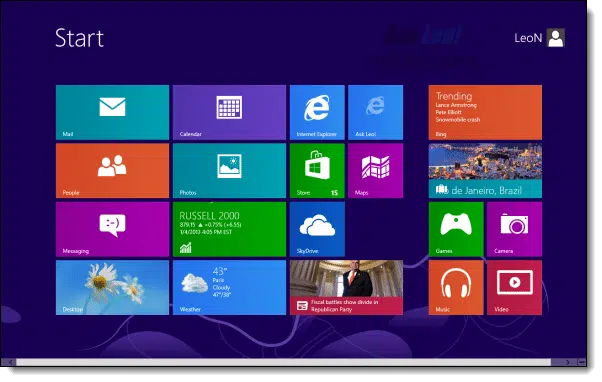
It’s not surprising really because Windows 8 represents a fairly radical change in some of Windows’ most common user interfaces.
Should you upgrade? Well, that gets you my most common answer ever:
It depends.
Become a Patron of Ask Leo! and go ad-free!
System Requirements
Make sure your system meets the minimum requirements for Windows 8 before you even think about it.
Microsoft lists those requirements as:
- Processor: 1 gigahertz (GHz) or faster with support for PAE, NX, and SSE2
- RAM: 1 gigabyte (GB) (32-bit) or 2 GB (64-bit)
- Hard disk space: 16 GB (32-bit) or 20 GB (64-bit)
- Graphics card: Microsoft DirectX 9 graphics device with WDDM driver
To automatically check if your system meets these requirements, you can run Microsoft’s Windows 8 Upgrade Assistant.
If you don’t know of a reason to upgrade, then don’t upgrade.
As with most minimum requirements, they are indeed a minimum. In practice, a faster CPU, more RAM, a larger hard drive and a more powerful graphics card help make the Windows 8 experience something better than “minimum”.
If you hate Windows 7, Windows 8 won’t help
 I’ve already had at least one question asking if Outlook Express would be present in Windows 8.
No.
Windows 8 is most definitely built on Windows 7 and only moves forward from that point.
If you’re a Windows XP user and you’ve reacted negatively to Windows 7 – whether you’re using it or not – Windows 8 isn’t going co change your mind. The types of changes that are present in the Windows XP to 7 transition are still there, with even more in the Windows 8 transition.
Sorry, but if you dislike Windows 7, my bet is that you’ll hate Windows 8.
If you have a tablet or touchscreen PC
Windows 8 is optimized for your device, and it’s an easy and clear recommendation to make: go for it.
Well, backup first, but then go for it.
My gut tells me that you’ll appreciate this version of Windows that, to be honest, was clearly designed for tablets more than it was for PCs. It’ll improve your overall experience and make it worth the upgrade.
If you like the cutting edge
Another reason to upgrade is of course if you like living on the edge. If you want the latest version of whatever, then there’s really nothing that I would say to wave you off of Windows 8.
In many ways, it’s Windows 7 with a flashy new overcoat.
You’re probably the type of person who’s already familiar with the new user interface, or at least the scope of the changes to expect when you get there, and if you’re ready to accept that once again, I say go for it.
Well, once again also, backup first, but then go for it.
Everyone else
My stock answer remains this:
If you don’t know of a reason to upgrade, then don’t upgrade.
In my opinion, Windows 8 isn’t yet bringing with it major changes that make the upgrade compelling for the average PC user. If what you have works for you, then there’s nothing you need to do today. “If it ain’t broke, don’t fix it” and all that.
New machines
Naturally, new machines are coming with Windows 8 pre-installed now. Some manufacturers offer Windows 7 “downgrades”, but many don’t.
So, should you take Windows 8 on a new machine?
In my opinion, yes.
Windows 8 is once again the foundation for the future of Windows. You’re not losing any functionality and certainly nothing comparable to the XP-to-7 change. Choosing Windows 8 and learning its nuances will serve you well into the future.
On the other hand, if the new user interface is something that you just can’t stomach, then there’s nothing wrong with Windows 7. As you’ve seen, I’m not encouraging people to move from it unless they have a reason, and I’ll go so far as to say that today, it’s an equally sold choice for new machines.
If, of course, it’s offered.
What I’m doing
I’ve installed Windows 8 into a virtual machine for testing, playing around with and for being able to research and answer questions on it.
So far, so good.
I expect that when the time comes to do my periodic rebuild of my desktop machine – the machine I use daily and the machine I’m typing on right now, I’ll probably rebuild it with Windows 8.
And any new PCs I happen to get in the near future that come with Windows 8 will stay with Windows 8.

I’ve been waiting for your opinion on this subject. You answered my questions. Thanks
I’ve heard that W8 comes with no Media Player? You have to buy one, or install it as an app?
Also, the availability of apps is limited because MS wants consumers to purchase Their apps. Sounds like another company out there we’re all familiar with?
Makes building a Media PC more difficult and expensive.
Since you used to work for MS Leo, any insight on the reasoning behind this decision on their part?
Windows 8 includes a media player. It does not include Media Center because the software used to decode DVDs required a license for every copy of Windows sold, and most people didn’t use Windows to play DVDs. You can purchase Media Center separately if yo so decide.
Windows 8 runs all Windows apps regardless of where they come from, just like Windows 7 before. There is no change to app availability. What you describe sounds like Windows RT, which is the version of Windows for the current Microsoft Surface tablet and any other tablets based on ARM processors. It does not run existing Windows apps because it’s a completely different processor. All apps for Windows RT come through Microsoft’s store.
Important: Windows RT is NOT NOT NOT Windows 8.
16-Nov-2012
Hi Leo
Being using touch screens now for 6 YEARS. But this just in golf club. But still they cannot in any way compere to a good mouse user. Can ya really imagine all this poking in a home environment
Hi all,
My experience running Windows 8 RTM in a virtual machine has been entirely negative. I am using virtualbox, so other vm software may work better. About 80% of the time, the W8 VM will not even boot. I have had to delete the VM 4-5 times, and attempting to install W8 into the VM fails 50% of the time. This is all beside the fact that I can’t stand the new interface.
I will stay with Windows 7, no thanks to you Microsoft!
16-Nov-2012
Two major complaints I’ve seen so far about Windows 8 are
1) get rid of that idiot Metro screen
2) where the heck is the start button
There are a few free utilities out there that address both problems. The best solution I’ve seen (so far) is a $4.99 app from StarDock called Start8. You can download it and run it free for 30 days. I expect they will be selling a lot of copies.
Tried the upgrade advisor on two old Dell computers running Intel 3.06G HT processors, neither support NX. Too bad.
Haahaa .. That was Funny!! You mean there is No start button? I’ve been trying to read/watch vid’s on this New W-8. I have 2 near new laptops with W-7. Don’t want to upgrade, like Leo said: don’t fix something that ain’t broke. But I’m Very Curious about it!! Between my “Main” / Desktop, and 2 laptops I guess I’ll be adding another Laptop with Windows 8 .. LoL’ !!
After reading all the negative stuff about Windows 8 I hated it before I even laid eyes on it. Last week a friend brought her new laptop over so I could put some shortcuts on the desktop and dump Norton. After a bunch of hair pulling and scratching and cursing I clued in. Oh so this is how it works. And bingo !! There were no more problems. It was fast and worked just great. After playing with it for a few days I’m a little p*ssed at myself for making a judgement before trying it. It’s like driving a somebody elses car you have to learn where they put the controls. (MS. guys should be shot for that one.) lol.
So my question is: should I upgrade if I have Vista? It seems like a great price (for Microsoft) to get past the networking issues that Vista and Windows 7 have. My laptop is Win 7 – my desktop (where all my media files are kept) is on Vista, and I can’t get the two computers to talk at all.
Should I upgrade to Win 8 for that purpose?
16-Nov-2012
@Reverend Jim
I’ve heard good things about Start8, but if you don’t want to spend any money, Classic Shell is free. I’ve been using it since Vista first came out, so I know it’s solid. When you install it and configure it correctly, you may even forget you’re not using Windows 7. In 2 weeks of using Windows 8, the only time I ever use the Metro Screen is to show people what it looks like.
It has other features like restoring the delete button to Windows Explorer and more.
@John Servis
I just checked, and my Windows 8 has Media Player. Actually, it has Apps other versions of Windows don’t have, like a free antivirus, Defender. All of the free Windows Live apps are also available for download.
Rob,
Definitely upgrade your Vista to Windows 8 (or even 7, but the $40 price for 8 is too good to pass up). I’ve been playing with Windows 8 Pro (64-bit) for just a few days and have got to report it is fast, stable, and usable without a touch screen. It recognized our Windows 7 network instantly and it was easy to add it to the networking homegroup. As noted by others, Start8 available from StarDock.com is an excellent add-on that enables you to boot directly into the old desktop, restore the Start button and menus. It’s definitely worth more than the $4.99 you have to pay after the 30-day free trial.
@ Rob re networking Windows 7 and Vista. It is doable without to much difficulty but you need to look it up online. There’s a piece of software you have to download and install from Microsoft on the Vista machine (if memory serves) and then you have to use a work group network rather than the default one, home network I think it is, Windows 7 tries to get you to use on the W7 machine.
I did it well over a year ago so I’m a bit fuzzy on the details, but once I found the guide on how to do it, it was a piece of cake and the networking worked fine ever since. In fact I had a couple XP machines and a Vista machine all networked with my new (at the time) Windows 7 machine.
Search for ‘networking Windows 7 to Vista’ or words to that effect.
I upgraded from vista to win 8 pro, and other than the e-mail, which is a bit disappointing, it’s been pretty good. I have windows media center on vista, and had remote control problems that I just couldn’t resolve. Win 8 media center solved all my problems with the remote, and I noticed a definite improvement in speed in my system over vista. I installed the upgrade version, and didn’t format my drive and do a fresh install. All my files were saved and accessible, except for my e-mails and so far no major problems other than a few minor teething problems with older peripheral devices, that have new software from the vendors that makes them compatible with windows 8. A big improvement over vista, and just enough different from 7 so you know you have new o/s. Highly recommend the upgrade if running vista, especially the price from microsoft.
Based on what I’ve seen and read, I think I’d like Windows 8’s “insides/guts,” but I’d do what I could to dispense with that new Start screen, which many folks call the “Metro interface.”
This may be a stupid question, but here we go: If I were to download files from my online back up backed up with Windows 7 on to a new PC running Windows 8, would that be a problem? Would it work as if the the old OS were installed?
@Per
If you’re talking about data files, no problem. If you’re talking about program files, no way. Unless they are portable programs.
I am an avid reader of your column and love it but I have a question I have upgraded to windows 8 pro from windows 7 and dont really like it or care for it that much I was more happier with win7 ultimate ,my question is is there a way to reverse the process so my original OS is then back on?
18-Nov-2012
@Philip
Unfortunately, the only way to go back to Windows 7 is to back everything up, install Windows 7 and all of your programs from scratch, and then copy your data back to the newly installed Windows 7.
If the reason you don’t like Windows 8 is the Modern (Metro) Interface, there is a small program called ClassicShell which restores the Start Button and can disable the Charms and make it so you never have to see the Modern Interface again if you don’t want to. I use it, and I sometimes forget I’m using Windows 8. You might want to try that before going through all the work of reinstalling Windows 7.
Windows Media Center for Windows 8 is free until the end of January 2013. You can go to http://windows.microsoft.com/en-US/windows-8/feature-packs and request an activation key be emailed to you (only one code per email account – if you have more than one Windows 8 machine, you need a separate email address for each code.)
Hi Leo – Good article and great advice… as always.
I am dual booting Win8 and Win7. I like Win8 myself. Can’t really understand a lot of the negative comments. Especially regarding the so-called “missing” Start button, which is in fact still there, and in the same location. And also the use of terminology such as ‘jarring’ when describing switching between the two environments. In my experience the transition twixt Desktop and Start Screen is smooth, seamless, and nigh on instantaneous.
As with any new & different system, familiarity is a difficult trait to overcome.
Cheers… Jim
Build a system with the worst bits of Win ME and the worst bits of Mac and you have Win 8. I found the transition from XP to & to be very simple and intuitive. I have 8 on my PC, dual booting with Win 7. Win7 is intuitive, 8 isn’t. The Metro interface is annoying and frustrating. If I wanted to type words rather than click an icon to find my programs and files I would have been as well off with DOS or 3.1. I will definitely not recommend Win8 to my customers.
I’ve upgraded my 4 home machines to Win 8.
Two gripes:
(a) I’m OK with losing the ‘Start’ button, but if I start an application from the new Start menu, when I close the program, I would prefer to be returned to the same place (ie the new start menu). Instead, I get dropped into the Desktop. Moving the mouse (on a 24″ monitor) to the top right hand corner is a pain in the ****.
Pressing the Windows key works, but is another unnecessary step….So…I either had to add icons for all the programs to the desktop… or add an ‘old’ style start button. I ended up doing both!
(b) I previously set the Windows Update options to automatically install when I shut the machine down. I can’t figure out how to achieve the same thing in Win 8. The “fully auto” option decided to restart my son’s laptop when he was doing his homework!!!!
Otherwise, the chance to upgrade from Home Edition to Pro for $50 plus the improved security/update aspects of Win8 are (to me)worth the cost…..
I’ve been using Windows 8 for a few weeks now can’t understand the negative comments I’m 53 and if I can get to grips with it well need I say more. I have it on a triple boot system with W7 and Unbuntu 12.10 so have the best of three worlds and can pick which OS I want to use at start up. It did take a little getting used to at first but soon became second nature.
I hate windows 8. I migrated (I cannot suy upgraded) from Windows 7 on 2 of 3 machines. Outlook 2010 now becomes unresponsive and requires a restart at least once a day. Overall performance is sluggish compared to W7. I am inconvenienced when it unilaterally decides to restart. I would actually prefer if it did this when I am NOT working on the computer. I know that one can change this in user permissions but I cannot. Sorry I shifted.
I like windows 7. I loaded windows 8 on one of our laptops and have been playing with it for a few days. I do not like it. I even found a half assed start menu (bundled with daemon tools lite) and it still sucks. Its a downgrade from windows 7 as far as I can see. I do a lot of photo editing in adobe
products on a 27 inch monitor. MIcrosoft has released a piece of crap…a blunder. I would think they would have learned a lesson when they took a bath on windows ME. I’m not computer illiterate either..I build my own machines…overclock and tweak them to specs I prefer. I never thought Id say this but windows 8 makes a Mac look attractive, and I don’t like Macs much.
I hate Windows 8. It sits harmlessly imprisoned on a virtual machine and it will remain there, unused for eternity. If you want bleeding edge, Ubuntu 12.10 is waiting and ready for the average user to really enjoy. At least Linux gives you upwards of a dozen different GUIs that you can load up and switch back and forth at will to see which one you like. Windows shows total disdain for customers. Include me out.
I spent 3 days trying win 8 on a new laptop… I have no hair left. Realy you have to just know where on the screen to click to get out of vidio mode? metro? no start menu? Add for xbox games? I returned the laptop and will move to linix when I get a new computer. I will never use win8 EVER!
If you can still buy that upgrade for $39.95, I recommend it as the best software purchase you can make. It makes no sense to say you like Windows 7, but you hate Windows 8. Using the free program Classic Shell, or just learning a few basic keyboard commands, you can hardly tell the difference between the two systems. And my experience is that Windows 8 runs faster than Windows 7. It definitely boots faster. And it definitely installs faster. I’ve had a few really good experiences with Windows 8. One is that on two of my computers, it was completely unnecessary to save the drivers from earlier installations to install with the new operating system. Windows 8 installed all new working drivers for me. The other good experience was, legal or not, I can take the hard drive with Windows 8 installed on it from one computer to another, and it works just as if I had installed the operating system on the new computer. Windows 8 just installs the drivers for the second machine when you start it up. This is almost the same thing as complete portability of the operating system, plus all your programs, just as DOS was in the old days. I’m not recommending either of the things I just mentioned because it could end up being disastrous for you, but for me, let’s just say I was impressed. My opinion is that Windows 8 is the best thing Microsoft has done in a long time.
I was recently forced to get a new machine, because the effort to save my old machine did not work, but I can get to the complete disk from that machine. Still have the cloning box for the SATA drive and the drive in it…I back up most of my stuff in external hard drives as regular files not a back up program. In fact I got my old Juno email browser, which is uses iExplorer as a part of it to work from a flash drive, did that in Xp sp3 it worked well I liked it. The method I used to do that was to use the Juno setup file to install it to a machine to set registry hooks, but the copy I use is on the flash drive, when I would plug it into Xp and go to the pop up menu I had set as a shortcut pop up from the task bar, I could just follow the pop out menu to the renamed shout cut to the exe on the flash drive Juno and it would run from the flash drive…I found I could do the same thing, sort of in W8. I did the Juno installer, it installed, had to, as admin, set Juno to run as a Xp sp3 program…that worked did the Juno set up to import account and put in connect to web info….got to the point where Juno on the UltraBook would offer to get mail or got to web, closed that one and went to the copy I use on the flash drive and it worked. I had to learn a lot in how W8 works, how to get to stuff, I found I was able to make adjustments, like making the command bars stay where I could see them in iExplorer. I miss the window actions in my specific theme I had in Xp, but I am adjusting the W8 to me okay. I do have a copy of my own wallpaper that I have had since taking the picture. The new machine setup on the existing wireless internet, and the wireless printer with ease…write down the machine names to find the proper drivers to install…Right now I am working in one of a number of open windows on a desktop that has icons for documents, Computer, Recycle bin, and even Control Panel and a bunch of Icons for shortcuts that I have not cleaned off.
The task bar at the bottom has the stuff that is open, sorted by type, maybe I can make a see if I can get a ‘popup’ of similar type to work for a multiple desktop popup like I made in Xp, That way I could turn off the visible icons on the desktop to make it look uncluttered as my desktops get. I have a lot more to explore in this OS, but it does have a lot of things still there, it is figuring out the form. I did plug in my ms trackball and an old keyboard for the long winded comments. I would say W8 will work good enough for me without hunting down the Classic GUI I have used since SE
Toshiba L505 running Windows 7 used to test whether software for my book ’embedded controller forth for the 8051′ would run under 7. It did after upgrading to profesional.
After experiment over, hard disk containing 7 removed from machine. 500 gig disk purchased and windows xp installed to run existing software, like Office 2000. Details posted at
http://www.prosefights.org/toshibal505/toshibal505.htm.
Lenovo G560 running 7 was converted to xp by formatting 7 disk, then installing xp.
Possibility of installing windows xp on windows 8 Lenovo Z580 [Ivy gate] is under investigation.
http://www.prosefights.org/xmas2012/sx160.htm. Replacing disk rather than formatting 8 disk may be a good idea?
I love windows 7 on my desktop computer, it is fast and safe and a pleasure to use. My computer came with an offer from Microsoft that enables me to download windows 8 pro for $14.99 and I haven’t taken advantage of it because of several reasons. And from what I have been reading, Microsoft is not to healthy and Google will pass it up soon and windows won’t be around much longer. Plus I don’t want all that touch crap on my desktop, I know I could change it to what I have now, but why put up with all of that aggravation?.
Great article. Though I’m not inclined to use Windows 8, it’s hard to find a new state-of-the-art laptop without one, so I’ll be looking for a new laptop with a little less reluctance. However, I’m a Linux bigot, and I have read that there are problems, perhaps some of them recently resolved, with dual booting Windows 8 and Linux. Any advice on buying or configuring a Windows 8 box to handle dual booting a Linux distro?
I am going to avoid Windows 8 / 8.1 and anything with the “Metro” interface like the plague. I tested Windows 8 / 8.1 in a virtual machine some time ago and I found that “Metro” was always in the way of my workflow, and so I will never buy a computer preinstalled with Windows now (despite what the author says).
If I were to buy a desktop computer, I would buy components, build it myself and install Windows 7 (and Classic Shell to get back the classic start menu) on it. And if I need a notebook computer then I would get a Macbook Pro or Macbook Air and installed Windows 7 on it if necessary.
Install Classic Shell in Windows 8. You’ll rarely, if ever, need to deal with the Metro interface.
Leo, I know about Classic Shell already. If I were forced to use Windows 8 I would install Classic Shell to “kick out” that “Metro” crap, as you said.
My point is, I won’t use Windows 8 / 8.1 since I am using Windows 7 on my PCs and Windows 8 / 8.1 contains nothing worthwhile over Windows 7 and the lack of the start menu is a huge negative for me (and judging from other commentaries on the internet I believe I am not alone). In such a case why should I even pay to “upgrade”?
And since Windows 8 / 8.1 is worthless for me I find no reason to buy computers preinstalled with Windows (most likely is 8 / 8.1) nowadays, no matter how good they might be.
I agree that if you’re happy with Windows 7 there is no reason to upgrade to Windows 8.
However actively avoiding new machines because they come with Windows 8 preinstalled seems silly when just putting Classic Shell on it would give you 90% of what you are looking for.
Leo, I think I have already said this before, but I will repeat : if I need a new PC, I won’t buy computers preinstalled with Windows but will choose suitable components, build it and install Windows 7 myself, thus avoiding Windows 8 / 8.1.
And if I need a new notebook, it will definitely be a Macbook Air or Macbook Pro (which runs OSX 10.9 Mavericks at this point) and not one that is preinstalled with Windows 8 / 8.1. If I need to run Windows (XP / 7) on them I can always use VMware Fusion to do so.
Either way I won’t be forced to use Windows 8 / 8.1 and I will stay away from them. I won’t shred a tear when they finally die.
A side note : Actually I am not that impressed with Windows 7 either. More or less I have been forced into it since I need support for newer hardware such as hard disks with capacities larger than 2TB.
The one thing I most dislike about Windows 7 is its inability to remember folder positions and sizes. When I previously use Windows XP (and Windows Vista occasionally, no joke), I always set each folder to open in its own window (it was the way I always used Windows in the past and it will be the way I use Windows in the future). Windows XP and Vista can remember each folder’s position and size which is very convenient for me, but Microsoft took way this simple functionality in Windows 7 for no good reason. I was so mad about this when I first installed Windows 7 that I almost immediately removed it and went back to Windows XP.
Eventually I found a small free utility called Shell Folder Fix that brought back this much-needed functionality in Windows 7 for me. And now Windows 7 is acceptable to me. Unfortunately the author of this little gem has not showed up for some time and the program has not been updated. I tested it with Windows 8 / 8.1 in a virtual machine some time ago and it seemed to work most of the time.
If Shell Folder Fix fails with future versions of Windows then I may have to find a replacement for it when I eventually need to upgrade (which won’t be until 2020, I believe, when Windows 7 support supposedly will end).
I’ve been around since Windows 2.0, so I’ve seen a lot of changes. I am a long-time a devotee of XP (Windows 5, thank you very much); and only abandoned it when support went away. I’ve also used Vista (the worst OS EVER!); abd I’m currently using Windows 7. I found the transition from XP to Win7 much more natural and intuitive that XP-to-Vista. I only have experience with one Windows 8.1 machine, and truly hated it until installing Classic Shell. I’m still not a fanboy, but at least it’s usable for my needs!
I had to laugh at some of the comments here, especially from those who haven’t used Windows 8. I wonder if the authors would say the same things now, or if they would have made those comments if they had been better informed.
One thing that really frustrated me when Windows 8 was released was the polarisation between those who loved it and those who didn’t. It was impossible to find a balanced review that covered the questions I was asking, and most personal opinions were of the “It’s great; if you don’t like it get over it” and “I can’t stand it; there’s nothing good about it” variety.
I used Windows XP for several years. I found it easy to use and I liked it. My laptop (new in 2010) came with Windows 7 Pro. I admit I don’t use it often, but I’m still struggling with 7, and I don’t enjoy using it.
Windows 8 is a dream compared to 7. Following a disastrous experience with a preview edition of 8 I decided that the only way to get answers to my questions was to take the risk and install it, which I did towards the end of 2012. I loved it from the start (pardon the pun), and changing over was the best thing I ever did. I reckon it’s the best OS Microsoft has released so far. As someone commented above, “It makes no sense to say you like Windows 7, but you hate Windows 8. Using the free program Classic Shell, or just learning a few basic keyboard commands, you can hardly tell the difference between the two systems.”
The start screen is the biggest change, but I really liked it once I got used to it, and I can’t understand the commenter who claimed that it gets in the way. You don’t need to use it – you can stay in desktop mode if you want to. In fact, I think the changes MS made in 8.1 and the 8.1 service pack took it backwards. In pandering to the “Where’s my start button” brigade they took away some of the uniqueness of Windows 8. I have tried numerous Start menu replacements, including Classic Shell. I’ve rejected each one and returned to native Windows 8 because once I was used to it I found it easier to use.
Like one of the commenters above, before I installed 8 I wondered why should I have to go back to typing commands instead of using the mouse and menu to find what I want? In practice it’s easy, but you don’t have to do much typing. You can use keyboard shortcuts (for example, Windows key+E starts Windows Explorer – much faster than drilling through the menu to the default location for Explorer; pressing the Windows key alone toggles between desktop mode and the start screen or between apps if you have any of those open) or you can put tiles on the Start screen for the programs you use most often. Tiles can be grouped, moved around, resized or deleted.
Networking and hardware installation are a breeze in Windows 8, and I’ve had only minor frustrations with it. A very few programs don’t work properly (in fact, I can think of only one of mine and that’s a game, so not critical), and there’s a whole new world of apps to explore :).
For me, Windows 8 is enjoyable and much easier to use than Windows 7 or even XP (I’ve never used Vista, so can’t comment on that). I admit I’m a bit of a geek, but I’m 64 and never used a computer until I was in my thirties, so I’m not a member of the generation that has grown up with modern technology; if I can embrace something new, there’s hope for others :).
Actually almost all of the shortcuts available for Windows 8 are also available for Windows 7. But the Windows 8 interface makes you feel more comfortable using these shortcuts and the search. In Windows 8, I hit the Windows key or click on the lower left hand corner and start typing. This theoretically should work with Windows 7, but the search wasn’t as responsive as with 8 so I never got comfortable with using it in 7 or XP. But what sold me on 8 was the startup time. Windows 7 took up to 7 minutes to get responsive where 8 is ready for work after about 2 minutes.
Should I upgrade from windows vista home premium to windows 7 or windows 8 and then to windows 10? Is it worth it? And can it be done?
It can be done, but there’s probably no advantage in doing that, because you’d need to pay to get Windows 7 or 8.1, and you’d still have to perform the clean install to update from Vista to 7 or 8. So, if you want Windows 10, it would probably be easier to purchase and install it directly. The only advantage I can think of for the intermediate upgrade is that you might be able to get a pre-owned version cheaper, but then you run the risk of getting a non-legitimate version.
There are too many unknowns. Your best bet would be to see if your computer can even run Windows 10, as a start: https://go.askleo.com/win10spec