I was wondering if I should run the Disk Cleanup utility and select the Compress Old Files option to use Windows File Compression. It is currently taking up 14372KB of space. Should I compress old files?
While you’re only asking about the Disk Cleanup utility, I’m going to talk about Windows File Compression in more general terms. Using file compression to save space is nothing new, even when it’s native in the file system used by Windows. Whether or not it makes sense to use isn’t necessarily a slam dunk.
In fact, without knowing more, I get to use all three of my favorite answers:
Yes.
No.
It depends.
After you’ve finishing beating your head against the computer, read on, and I’ll explain why I say all three. We’ll also discover that later versions of Windows itself have made a not-too-subtle suggestion as well.
Become a Patron of Ask Leo! and go ad-free!
Windows File Compression
Windows File Compression is a part of the NTFS file system. When enabled, it automatically compresses files to take up less space on the disk. Seems simple enough, right?
As a gross oversimplification, compression means replacing one representation of data with another that takes up less space. For example, the 10 character string “**********” (10 asterisks) might be replaced with three characters – “10*” – meaning “ten asterisks”. When decompressed, the “10*” would get transformed back into “**********”.
Now, of course, there are complications. For example, we need a way to make sure that if there’s actually a “10*” in the data before compression, we don’t try to turn it into “**********” on decompression.
Suffice it to say that real compression algorithms are exceptionally complex technologies, bordering on an art form.
Compression pros and cons
If good compression can “makes things smaller,” what’s the catch?
In my opinion, there are two big ones.
Compression is work. One thing that all compression algorithms share is that they require calculation. That means when you compress or decompress a file on your computer, your CPU needs to do more work than if the file were not compressed. Different algorithms have different calculation characteristics. Some require a great deal of CPU processing to compress the data, while the decompression can be lightning fast. Others compress comparatively poorly, but take less time to do it.
Compressing files that are already compressed doesn’t help. A file that has already been compressed by a reasonably good compression algorithm will typically not compress well if you try to compress it again with another. In fact, in the worst case, “compressing” a compressed file can even make it bigger. Many files you use every day are already compressed. Typically, audio, video, and image formats are already using compression algorithms as part of the file format. MP3, JPEG, MPG, and similar file types are all already compressed and typically do not benefit much, if at all, from attempts to compress them further.
When to Compress
I’d consider the following:
- If the files you’re considering compressing are used infrequently, they might be candidates. The “old files” from a disk cleanup utility probably fall into this category.
- If the files you’re considering compressing aren’t already compressed, it could make sense. There’s no way for me to know what files disk cleanup is pointing you towards, so I can’t say how this might apply to you.
- If you have a powerful enough CPU, you might be able to compress files used more frequently and not notice. I definitely wouldn’t compress files I use frequently on an older machine. It can slow down your machine as the CPU gets more involved in every disk access.
- Realize that compressed files and compressed file systems are much harder to recover in the event of a crash. Make sure you’re appropriately backed up.
My advice? In general, I wouldn’t bother.
On average, compression may recover only about 50% of the space used by files you compress. Maybe. If you’re really running into space problems, you should probably start instead by looking at exactly what is on your hard disk. What’s taking up all that space? If there’s nothing that you can remove or otherwise manage, you’re probably better off upgrading your hard disk or adding a hard disk to your system.
On the other hand, if you can’t afford a hard drive, or one can’t be added or upgraded for some reason, compression might be a viable option as a last resort; in fact, it might be the only option.
I have no compressed file systems on any of the computers I run. I’ve done so in the past only on laptops, where adding or replacing a hard drive just wasn’t in the cards for me, and only after other options didn’t free up enough space.
Compressing files with Windows File Compression
You don’t need to use the Disk Cleanup Utility to compress files – you can make choices yourself and pick and choose which files or folders of files you want to compress.
You can compress an individual file, but that’s not really all that useful, so I’ll show you how to compress (and then decompress) an entire folder.
In Windows Explorer, right-click the folder and click Properties. Here, I’ve right-clicked on a folder named “cygwin” which contains several subfolders of a number of utility programs.
You can see the disk space that’s taken up by the folder and everything it contains. (“Size” represents the actual data stored in all the files, while “Size on Disk” represents the amount of disk space allocated to those files figuring in all the filesystem overhead.)
Click the Advanced… button.
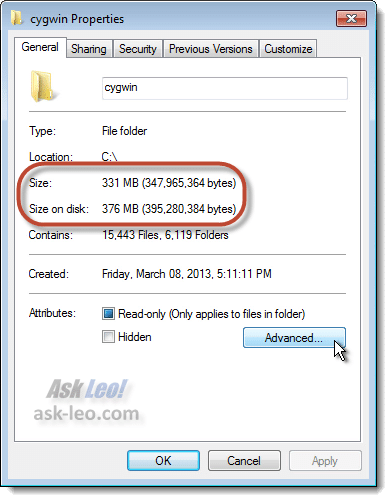
You can see the disk space that’s taken up by the folder and everything it contains. (“Size” represents the actual data stored in all the files, while “Size on Disk” represents the amount of disk space allocated to those files figuring in all the filesystem overhead.)
Check the box labeled “Compress contents to save disk space,” and then click OK.
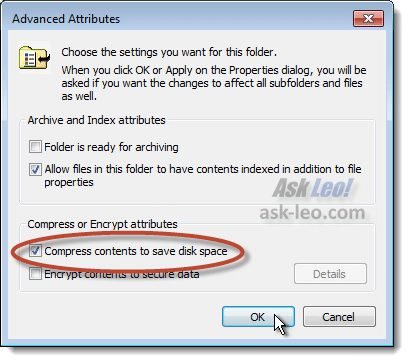
You’ll then be presented with a confirmation dialog.
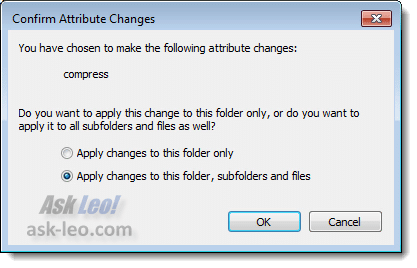
Because we want to make the change to this folder and everything it contains, make sure that Apply changes to this folder, subfolders and files is selected, and click OK.
Windows will then proceed to compress the files on disk. This can take some time, depending on the number of files involved and the speed of your computer. My example above took a little over five minutes. Here’s the Properties dialog after the compression:
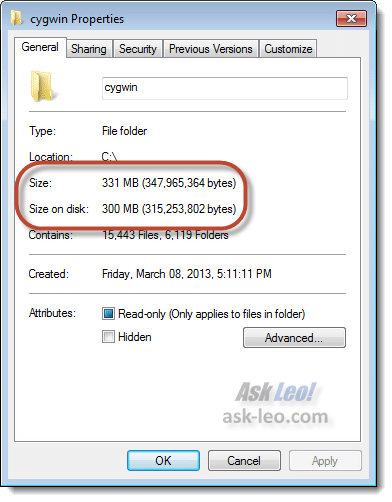
You can see that the files contain exactly the same amount of information, but take up less space on the disk. In this case, my net disk space saving is a little over 20%. Remember, your results will vary depending on the types of files being compressed and how compressed they already are.
Other than disk space and possible performance impacts, nothing changes. You continue to use the files exactly as before they were compressed. That’s the beauty of Windows File Compression – it’s built in and transparent to all the applications that use the files.
Decompressing files compressed with Windows File Compression
To decompress files that you or some other process previously compressed, just repeat the steps above, but make sure that the box labeled Compress contents to save disk space is unchecked.
It’s just that simple.
Where’s the Compress Old File option in Windows 7?
If you’ve fired up the Disk Cleanup tool in Windows 7, you may have noticed something.
Here’s the tool in Windows XP:
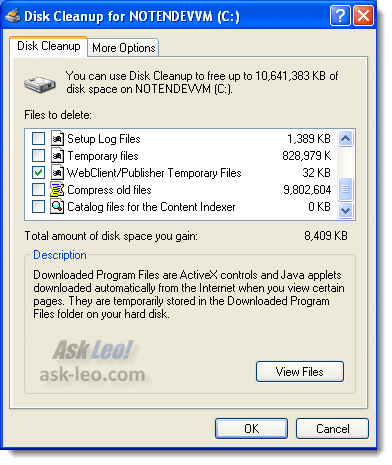
And here’s the tool in Windows 7:
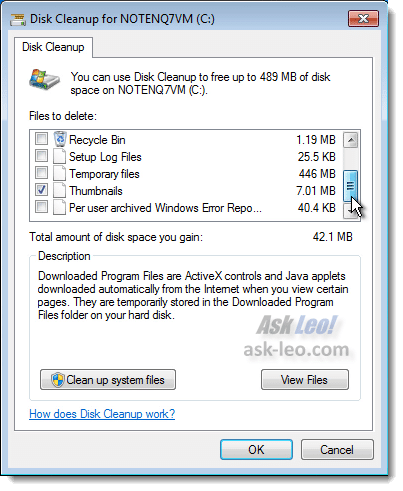
I haven’t shown all the possible options in either, but something’s missing.
It’s the option to Compress old files in Windows 7.
If you want to use disk compression in Windows 7, you’ll need to do it manually.
Personally, I take this as a somewhat passive sign from Microsoft that they didn’t think much of the feature either.

I have at least one good use for NTFS compression: Virtual Machines with Virtual hard drive images. Although the more advanced virtualisation programs have “dymanically expanding” hard drive formats where the image file only takes up the amount of used space on the Hard Drive, I sometimes like to use “raw” image files so that they can be accessed by more than one program.
These raw image files take up exactly the amount of space that they need, including any free space. This means that if I have a 30Gb virtual hard drive, with only 10Gb content on it, the image file will still take up 30Gb unless I NTFS compress it (in which case it takes up a little under 10Gb).
The effect on the VM? I’m kinda unsure. I suppose using a compressed image file might slow down hard drive access a bit, but I wouldn’t have thought it would be too drastic. If there is a good way to scientifically test this I’d be interested to see.
I am using NTFS on my current PC and have file the compression tab unchecked on all my hard disk’s but when i did a disk clean up, i wound up with alot of files/folders with blue names (compresed).
Now that is causing crash’s and slowdowns on my computer.
my question is how to undo what windows decided to do on its self?
Defrag it first, Compression files will be fragmented a lot, but after defrag, the performance test will be great.
Hi, recently I’ve tried compressing files with the already installed application on Windows (WinZip). However, on my computer, the most it compresses of anything is maybe 10 kb, which obviously is pretty useless. I’ve tried using some other program I downloaded but it had the same result. But, when I use another computer, it compresses up to 50% of the file’s size. And I haven’t been using the files you mentioned as already compressed (mp3, jpg).
The article was good. (I also wanted to know about saving file space, and this helped!)
“I am using NTFS on my current PC and have file the compression tab unchecked on all my hard disk’s but when i did a disk clean up, i wound up with alot of files/folders with blue names (compresed).
Now that is causing crash’s and slowdowns on my computer.
my question is how to undo what windows decided to do on its self?” go to start-run-type cmd- in the command prompt type compact /u /s /a /q /i that should uncompress every file on ur disc but u have to re-compress those files u want compressed.
Good morning.
I can no longer open some of my photos ( a lot actually). I click on them and it says no view possible, even though they finish .jpg as they should. I believe I compressed these files when I did my last disk clean and therefore my current situation.
Could you tell me if I have indeed done what I think, or if not what you think, and if I have compressed all of these images, how to uncompress them.
I am on Windows XP Pro.
Thank you in advance,
Vladimir
Your answer helped me decide not to compress the old files in disk cleanup, but I was disinclined to do so because my really quite new computer takes a very long time to measure the ‘compress old files’ space and then a long time to do the actual compression. Does this point to some big problem with my old files , like a corruption or something?
Thank you, Jon, for the instructions on how to decompress all your files that windows did without your permission. I have now changed the setting to NOT allow that, but it was a nightmare trying to fix everything by hand until I saw you post. Your instructions worked, although I am obviously not as computer literate as you and it took a while for me to figure out exactly what to do for my situation. THANK YOU SO VERY MUCH, Leo and Jon!!! Donna in Texas
Is there a way to uncompress all the files that you compressed in a disk clean up, without having to go through and uncheck the box in the actual files properties menu? I noticed that after compressing them in Windows XP the compressed files are now blue. I did notice that once I did it, all the files that got compressed are now in blue font, when you look at them in the folders. That freaked me out a little. However, when you right click on the file, go to properties, then go down to “advanced” in the general tab, it has a check box for compressing the file. If you uncheck it, I guess it decompresses it, because it turns back to black font. Is there a way to do this for all the files like this, without having to do them individually? Thanks for your help, dude.
—–BEGIN PGP SIGNED MESSAGE—–
Hash: SHA1
You can select multiple files at once – hold down CTRL as you click on files to
add them one at a time, or hold down shift to select all files between the
first on you click on and the second. Or type CTRL+A to select all files. Then
right click on the multiple files and select properties. If you select a
folder, it’ll ask if you want the change to be applied to all files in
subfolders as well.
Leo
—–BEGIN PGP SIGNATURE—–
Version: GnuPG v1.4.7 (MingW32)
iD8DBQFGxPdMCMEe9B/8oqERApQxAJwMfACRY3GcBXwWQAjbH4YLrOGxzgCghd8T
hBfN07gMzrC9ybk9iNAZB7g=
=Lmmj
—–END PGP SIGNATURE—–
I have accidently compress alarge amount of my XP PRO NTFS drive. How do I undo the compression without going to each individual file and reseting its properties?
rgards
Martin B
Martin-
You can use the ‘compact’ command in DOS. Open command prompt and type:
compact /u /s:C: /a /q /i
This will uncompress the entire C drive.
To uncompress a specific directory type:
compact /u /s:C:[folder] /a /q /i
i am trying to uncompress my compressed old files from a disk cleanup, and used the following instructions:
You can use the ‘compact’ command in DOS. Open command prompt and type:
compact /u /s:C: /a /q /i
This will uncompress the entire C drive.
To uncompress a specific directory type:
compact /u /s:C:[folder] /a /q /i
however, i am getting the following error:
‘compact’ is not recognized as an internal or external command, operable program or batch file.
any suggestions?
– sheri
—–BEGIN PGP SIGNED MESSAGE—–
Hash: SHA1
Should be in c:windowssystem32compact.exe in Windows XP.
Leo
—–BEGIN PGP SIGNATURE—–
Version: GnuPG v1.4.7 (MingW32)
iD8DBQFHvF98CMEe9B/8oqERAqUQAJ0QGeLmoR8SUx3Xw0qYp0aE++bwDQCeJIyG
u+Qu6xDUFaVIf7DfJMIKjKM=
=nA+a
—–END PGP SIGNATURE—–
great newsletter/website. here’s my problem; removing items from drive C does not give me extra space! in fact, I LOSE space! can you please talk me thru this prob/tired paying local techs, who dont get the job done. please reply to my e-mail address. any help much appreciated. one more thing; i’m a writer, not a puter whiz, just know and use the basics. thnx
—–BEGIN PGP SIGNED MESSAGE—–
Hash: SHA1
It depends on which files you’re attempting to delete and
exactly how you’re deleting them. I’d first make sure that
you empty your recyle bin (right click on it and click on
“Empty”) to reclaim the space.
Leo
—–BEGIN PGP SIGNATURE—–
Version: GnuPG v1.4.7 (MingW32)
iD8DBQFIA1bOCMEe9B/8oqERAtJAAJ95eyw56oHQTOcA37nXbGci2wCu6ACffy4Y
6LlmFCGC/HnDAfhZJLfTEUM=
=3aJS
—–END PGP SIGNATURE—–
I want to uncompress all of the files that disk cleanup compressed; how exactly can I do this for all files on my C drive – I have XP Windows operating system. Previous comments were not explicit and exacting for XP.
Andrew you are a lifesaver :) Thanks bro.
To decompress the entire drive, should I use SAFE MODE and:-
DOS command “compact /u /s:C: /a /q /i”; or
Windows C: properties and check the box to
“Compress drive to save Disc space” and click Apply,
and then UNcheck the box and Apply then OK ?
I am using pre-installed Windows XP Home edition with SP2 + SP3, and have no installation disc.
When Disc Cleanup compressed files Windows File Protection refused to trust Windows own utility, and validated all registered dlls etc., and dumped uncompressed copies into dllcache, and gave me excessive grief, demanding that I give it the non-existent installation disc.
I assume W.F.P. will also complain about decompressing files, which is why I want to use SAFE MODE to avoid W.F.P. involvement.
C: Windows properties has the Disc Cleanup option, and it also shows
“Used Space 7,825,747,968”.
Windows Explorer, selecting the entire contents of C: and showing all the hidden/system/etc things reports
Size : 7.38 GB (7,933,352,967 bytes)
Size on Disc: 6.49 GB (6,979,273,055 bytes)
This seems to omit
7,825,747,968 – 6,979,273,055 = 846,474,913 bytes.
About 500 Mbytes are in my daughter’s profile which is hidden from me, so another 346 MBytes are other things that Windows will not let me see.
Both Windows and DOS hide 10% of all files, so I fear that both the DOS command, or selecting the entire contents Windows will show me, will only decompress the 90% I can see, and to decompress the other 10% I need to use “(C:) Properties”
I would greatly appreciate your advice upon this.
Would you please advise on the safest methods.
My greatest fear is that Windows defragmentation will blow a fuse and give me perpetual BSODs. I use Acronis Trueimage and am happy to restore upon any errors – so long as I dont have the trauma of a broken system and need to use the recovery console.
Regards
Alan Borer.
I would like to know if there is a way to defrag without compacting files. I have over 67% disk space available abd would like to avoind compression since it will needlessly slow down file access. Thanks for your help!
19-Sep-2009
Please let me know what is the difference between disk compression and disk defragmenting.
How often should each be run(on a PC and also on a laptop)?
I am using windows XP operating system on both.
What happens if you have already compressed the files with disk cleanup? How difficult and what problems might one encounter by uncompressing? I believe this has happened on the work computer (windows xp and disk cleanup) and I believe it has cost us a lot in speed. If I just uncheck compress files in disk cleanup could that cause problems using those files?
05-Jan-2010
I used windows disc tools to compressed 11GB of data and it slowed slowed my PC, defrage went from 2 minutes to 50 minutes, write from 60MB/S to 15MB/S,it was like a virus, everything took forever, I uncompressed and the speed came right back to normal, I’ll never touch that again
How do I DE-Compress a drive that has been compressed.
22-Apr-2010
One thing you are neglecting with this comment is that compression is a good way to get extra SPEED out of some operations — specifically, those that read heavily or write a lot of small files.
With our build system — which moves about 500 meg of small files — turning on disk compression on the build target directory increases speed about 6%, and turning on disk compression on the build source directory increases speed by a futher 13%. That’s nearly 20% with a right click; and this is on an SSD!
Other operations that have seen speedups are local database operations, Firefox rendering speed and Photoshop scratch disk access.
The long and short of modern computing is that we usually have more much more idle processor time than idle IO bandwidth when performing IO operations.
Just don’t compress your root directory. It’ll let you — then your machine won’t boot. Spoken from XPerience.
I don’t want compressed files, and the option to compress is unchecked. But, when I go back and see old files, they are always compressed. I have even manually chose properties on idividual folders and uncompressed them and subfolders and files, only to come back and they are compressed again. Is it a poltergeist. xp pro sp3
Tom Kelly, to uncompress your compressed files, do the following.
1. Go to the folder or disk you want uncompressed and open its properties where you can see the checkbox for compression (your post tells me that you know where this is, so I haven’t written verbose steps for this).
Note: To uncompress everything on the drive, select the desired drive.
2. Check the box and click Apply.
Note: This will NOT compress anything! Please continue.
3. Select “Apply changes to C: only” and press OK. (Or, in place of C:, “this folder”.)
Note: This will only compress the files directly inside the selected item. It will NOT compress any folders or any files inside folders.
4. Uncheck the box and click Apply.
5. Ensure “Apply changes to C:, subfolders and files” is selected and press OK.
6. Wait for completion.
7. (Optional) Enjoy.
I think the use of compressed files is appropriate for backups. I’m currently doing incremental backups of an internal 500GB drive with an external 500GB drive. The incremental backup runs as a scheduled task at 1AM and has run out of space on the external drive. I am not concerned about the performance once the initial backup is run.
I am just trying the compression for the first time and it’s saying it will take 3 days to compress the files on my backup that I have now. If there is adequate space savings, I could put off another hard drive purchase for a year or so with minimal effort on my part.
Thanks, but I said the option IS unchecked–for the drive, and I apply to all the subfolders which doesn’t work. That is why I said I manually click ALL files because the folder compress properties IS unchecked. But, even when I manually decompress individual files, I come back days later, and there are some compressed files, and I check folder properties which is still unchecked. The only reason I know they are compressed is the text is BLUE and uncompressed is black. Maybe THAT is wrong, and they really are uncompressed???
Hi,
I have run into trouble. I compressed a large amount of data on my PC, but unfortunately it crashed.
I was able to recover all the data but I am unable to read any of the file and get to see an error that it is a unrecognized format.
Its close to 3GB important data, any means I can recover it.
regards
I use this option recently on my pc , and no real effect on performance.
i compressed files not knowing it would shut me out of my computer I get this on reboot ngdbr is compressed novice with computer
help please
What can I do?? when I try to turn on my computer before I started on the screen appears”;;; Btrnmgt is compressed’. I don’t know how to majs my computer start or even turn it on!??? What can I do? V v
07-Feb-2012
Hi Leo, I compressed my files when trying to free up space on my C drive, then decided I had made a mistake. I have uncompressed all the files and folders, but when I create and/or save any new docs, pics, or anything – they come up as ‘compressed’ in blue. I have looked on my ‘C drive’ in ‘Computer’, but the compress box is unchecked. How do I undo this compression, please? I am using Win7 – 32 bit.
Thanks. Susie Kay
Leo,
How can I Decompress my entire drive from Dos?
I recall compressing my other computers also. The entire system doesn’t seem to respond well. Pop ups occur asking whether you want to “yes to all”. It doesn’t finish the job either. Normally it would take 6 Hours. When I try to uncompress, errors appear on the screen. Desktop fonts appear to be blurry and minimized. You can’t uncompress it either. My suggestion, DO NOT compress your files. They do little of nothing to save disk space. Your modern computer already has 100x’s the disk space left. If your computer is slow, check your processor (cpu). Type CTRL+ALT+Delete. Then click on Performance. Check the activity. If spikes show higher than 80%, there’s lots of usage.
One more thing I failed to mention. There’s a Task Manager Option before Clicking Performance. My Bad.
Leo, does compressing pictures or audio files make them suffer any loss of quality (in the same way as converting, for example, a .png as a .jpg) ? – which example I take to be irreversible. Many thanks and Season’s Greetings to you – David
23-Dec-2012
@David
.MP3 compression causes the music to suffer loss. .FLAC (Free Lossless Audio Compression) as you can see from its name doesn’t cause it to lose quality.
Many thanks, Leo and also thanks to Mark Jacobs. (Loss of quality in audio is such a touchy subject. So much depends on the original – vinyl records, for example, and presumably most radio signals always had to be ‘compressed’ though not in the same way. A friend of mine swears that minidiscs are inferior though I’ve always been happy with mine…)
“My advice? Don’t bother. Compression on average will probably recover only about 50% of the space used by files you compress. If you’re really running into space problems that have you looking at this, you’re probably better off adding a hard drive to your system.”
I find that a rather ignorant comment that’s clearly based on personal circumstances. I wouldn’t like to give a dime to every person out there in the USA who can’t afford a new hard drive right now. There is nothing wrong with compression, it’s used everywhere, even in data transmission. Data compression on a hard drive can be very useful for those people who want to extend the life of their data or backup drive (I wouldn’t advice it for the OS partition). Performance isn’t so much an issue anymore like it used to be, because the author ignores the fact how powerful modern processors have become.
The article is an example of how people are pushed into upgrades that they don’t really need. Heck, you’ll be surprised how many people don’t need that new drive after an assessment of the data on that drive by an experienced end user or professional.
Be VERY, VERY careful with Windows file compression – if you compress the C drive (or wherever your boot log lives), you have lost Windows !!!
My friend did this in Vista. and the only way I found to get it back was to re-install from a repair/recovery disc. I tried taking the hard drive out and plugging into my pc with a disk caddy, but still no joy. Happens so frequently that Dell have a thread on their help forums solely for this problem !
Are Windows compressed files readable through other operating systems. For example, if my computer breaks and I remove the hard drive, will the files be readable connected to my linux computer?
Or say a Compressed file is saved in Dropbox, will I be able to open it using an appropriate Linux or Android App for that file type?
Thanks again Leo!
No, a Windows compressed hard disk will only be readable by Windows, I’m afraid.
Dropbox works fine, however. The compression happens underneath DropBox, so all dropbox sees are the “real” uncompressed files like any application. It’s those uncompressed real files that it uploads and shares with the other Dropbox applications you might have running on other platforms. Compression happens at the low-level disk so applications are completely unaware of it.
Thanks Leo
Thanks for the info, reading this article allowed me to make an informed decision. In terms of deciding to compress or not compress files this article just got to the point which is what I wanted. So even though the hard drive on my laptop is filling up I’m just going to leave all of the files uncompressed. To get back some hard drive space I moved all of the $NtUninstallKB*$ files to a portable hard drive. I got back about 500 MB of hard drive space. Better than nothing.
Hi, thanks for this article I read some Microsoft “info” about it and it didn’t help, mind you it never does, such a useless corporation. I tried to compress a few video files so I could email them to my sis, first with Winzip then with Windows 7 and it barely made any difference, but at least now I know why. I realize I could put the files on Dropbox or Drive but my sis wouldn’t know how to use those, alas I guess I can’t send them to her. Forgot to mention they compressed from 7.24gb to 7.23gb hehe
If you send a DropBox link to someone, they don’t have to know how to use DropBox. If you include a DropBox link in an email, simply clicking on that link should automatically download them to her computer in most cases. Of course, she’ll have to know where to find them, but you should be able to explain that to her.
The most common example of compressed files that should not be compressed are the new “x-files” format introduced in Office 2007. All of the x-files are already compressed.
One of the common problems with compressing compressed files is that there is the potential to INCREASE the resulting file size due to “compression artifacts”.
An easy way of describing file compression is that you are “trading CPU cycles for disk space”. It takes additional use of the CPU to convert the file into compressed format in order to save space on a HD that is running out of space.
I use some general rules to decide which folders to compress:
– do NOT compress C:\Windows or C:\System folders used by Windows.
– do NOT compress application folders for frequently used applications
– DO compress subfoldes for applications that are rarely used
– DO compress subfolders that are rarely used, ie help system files, support for other languages that you don’t use
File and disk compression are is very risky features. As you can see above, it is often IMPOSSIBLE to decompress these files. The smallest single bit error can destroy a file beyond any possible recovery.
Windows file compression is another Microsoft “feature” that one should NEVER use.
Disk space is dirt cheap these days. Instead of risky compression, simply add more disk space.
Hi,
I have a unique scenario, something that most of us will face at some point of time. I had the good fortune of having my 2TB HDD crash on me. So I have kinda partial access to it, very slow access, system freezes up when I try to get data. I thought of getting another 3 TB hdd, and I have an old 1TB lying around. I was thinking of copying all files to 3 GB which should take forever and then using a compressed 1 GB volume to backup all valuable data so it may save upto 2-3 GB of data as most of files should achieve good compression.
Now with ZFS, SDFS and NTFS, I read somewhere today that NTFS does automatic de-duplication, so internally it stores only one copy. Another feature I read was that it does not compress already compressed files. Now both these articles were under Windows 8 platform, I have an old XP, so will this work if I format to NTFS and set it as a compressed volume ? Should I take up another option ? Kindly share your experience if you have tried something similar, I don’t want to spend a lot on RAID 0-1, or pay a lot for having to secure some files. Let me know if NTFS compressed disc is a good option..
Thanks in Advance !
Warm Regards,
Ruben.
As I recall some file types are already compressed and therefore do not benefit from further compression by windows. I think .jpg files fall into this category. Are there other common files types that won’t really benefit from further windows compression? ??.pdf, ??.png, ?MS Office files .doc, docx
Here’s an article that explains compression in photographs: https://askleo.com/can_i_zip_my_pictures_or_mp3_files_to_save_space/
It varies, but many, many types are now compressed including almost all music/audio files, almost all image files, almost all video files. “.doc” is not, but “.docx” is in fact a “zip” file, which is compressed. I’m sure the list is longer.
A good reason to compress data on a system drive is when you are tyring to burn a copy of it’s image on a single Blu-ray disk; and so you just have to go under a 25 GB
Compression is great if you know what you’re doing. I have OCD, so I go around compressing things.
– files infrequently used
– large files
– large compressions
Best files for compression are actually executables. So programs I rarely use, I compress them, you can get up to 70-80% compression with those. Other files such as documentations that comes with programs in adobe or window docs are great too. So sometimes I compress a whole program folder, other times selective folders, and even at times specific files in a program.
Overall even the little ones add up. I can free up 5-10 GBs by selective compression without any loss on a typical 100GB, that’s only 10%. At best I saved up to 25%, you’re looking at 25GB saving.
A bit late for comment perhaps but I compressed my Win7 (32) C: drive and find it excellent, gaining 17Gb. It seems faster in many things too. Patrick
Very nice explanation! I was first introduced with file compression when I ran across this guide: http://www.winzip.com/learn/file-compression.html and learned how everything works, but I wanted to learn more and I came to the right place. Thank you very much for explaining :)
Some point that are very important to understand NTFS native compresion.
NTFS compression will never ever make a file to take more space since on that case it stores that file on uncompressed mode.
NTFS compression never ever compress folders, only put on their attributes a mark to compress by default all new things inside it.
NTFS compression works in a very bad way, it causes a lot of fragmentation by how it has been implemented.
When a new file is written in NTFS compressed mode: It waits for a full chunk of 64KiB, the compress it, and it writes the compressed data on a 64KiB multiply position, no matter how much it has been compressed… that makes a lot of holes in middle of the file and file be in a lot of fragments.
Some people say that they also has verified that the file is first written on uncompressed mode, then compressed and re-writed (i have no hardware to do such tests)… i think that was on old NTFS versions, since i do a test (write it uncompressed and take the time it took, delete it, write it compressed and took the time, last one is lower than first one, so the afirmation it first writes uncompressed and then re-writes must be wrong, at least on NTFS version 5).
But i had done the test to write it on an empty NTFS in uncompressed mode… just only one chunk (no fragmentation)… delete it (also another test with re-format) and write it on compressed mode… a lot of chunks, each at a 64KiB multiply position… in other words… first byte of each 64KiB chunk is placed where it would be if not compressed.
In other words:
0 to 64KiB-1 compressed in less than 4KiB -> Position X writen with less than 4KiB
64KiB to 128KiB-1 compressed in less than 4KiB -> Position X+64KiB writen with less than 4KiB (a hole of 60KiB is left between theese two chunks)
128KiB to 192KiB-1 compressed in more than 4KiB -> Position X+128KiB writen with more than 4KiB (a hole of less than 60KiB is left between theese two chunks)
…and so on…
Just as a point: file size and disk size for a non compressed file may not be the same, since file is stored on chunks, each of a fixed size (aka, clusters), so last cluster may be not used at 100%, but it can not hold any other file part.
So i recomend to defrag each file just after it is written (if NTFS compression is on)… that way all such holes will be used and file may get as contiguos as possible… well, to be true, the fle will go to a different partition place.
So considering SSD life (never use a defrag on it)… using NTFS compression can be a really bad idea.
See why: accessing metadata of where file is stored is much more time consuming if file is in a million of fragments that just only one, also metadata takes more space on highly fragmented files than unfragmented ones.
But the couter-part: Some files must reside unfragmented (some ISOs, VHD/VHDX, etc), so for them there is no option other than defrag them.
So my conclusion is the next: Never ever use more than 40% of partition size, said in another way, allways let at least the 60% to be free…. and analyze fragmentation only where you need it (per day, prior to use it, after boot, etc), the rest only after 8*7*4 hours (224) of intense writes… and if no SSD and NTFS compression is ON, defrag as soon as each file is written (so copy only file by file, not in a row).
Why on the hell there is not an option “paste & defrag” on windows? or better said… why on the hell it leaves such holes when NTFS compression is on?
Ah, yes, NTFS compression is only available for 4KiB cluster NTFS partitions… so it knows how to increment write pointer (the actual number of used 4KiB clusters) but not, it does not use such counter, it uses the source counter for destiny counter, so it leave gaps between 64KiB chunks if they can gain at least 4KiB when compressed.
Oh, yes, each 64KiB chunk is compressed indepently of the rest, so if there is not a gain of 4KiB/64KiB (6.25%) the 64KiB is written uncompressed.
Hope some things get clear by knowing how badly NTFS compression had been implemented.
Probably Microsoft removed “compress old files”, because that stupid program did compress even OS files in C:\WINDOWS, which made the OS slower to boot, and probably in other situations too. Should have excluded C:\WINDOWS and “C:\Program Files”, at the very least.
One thing the article mentions is that already compressed file would only compress a little and possibly even get larger. On my computer and probably most people’s computers, the vast majority of occupied space is taken up by already compressed files ie pictures, music, video, and PDF files which are already compressed. If you compress the files which can be compressed, in most cases, you probably wouldn’t save a significant amount of space. 25 years ago, I used to use file compression and save a lot of space, but now, I doubt if I’d save one gigabyte out of 250 GB on my SSD. My solution is to keep most of my pictures, music, and video files on an external drive.
Windows automatically compressed some of my video files due to low disk space. I worry that quality has been affected. Does Uncompressing restore any losses in file quality, if any is even lost?
Thanks.
Windows disk compression is lossless — meaning that it does not affect video quality AT ALL.