Dealing with an unintentionally empty inbox?
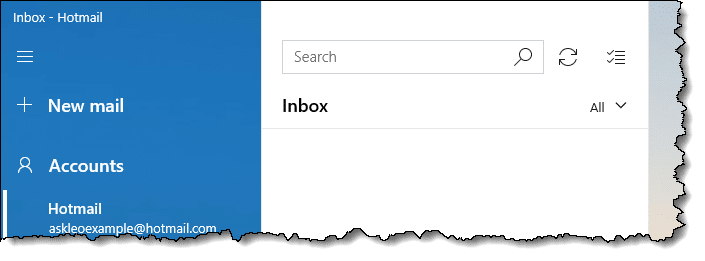
The contents of my inbox disappeared! Can I recover?
I get this question occasionally for several email programs and services.
Depending on exactly what happened, your mail — like the truth — may still be out there.
Become a Patron of Ask Leo! and go ad-free!

Email disappeared!
The most common cause of disappearing email is an accidental filter or view setting. Check those settings first. Then check your trash for accidentally deleted email and your spam folder for accidentally flagged email. Finally, for online accounts and accounts connected via IMAP, check in with your email provider in case something went wrong at their end or they can help.
Check your filters and view
This is probably the most common cause of the panic. In a nutshell, a view or filter was applied to the inbox that hides everything.
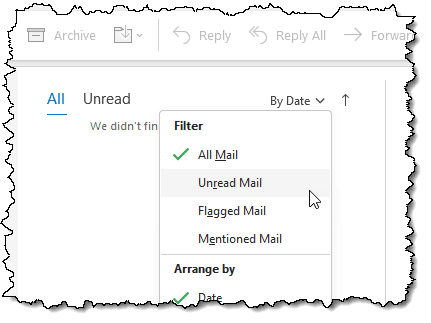
For example, if you filter to show only unread mail and you have no unread mail, your inbox will appear empty because all of the email you’ve already seen will be hidden.
The example above shows the setting for Microsoft Office Outlook, found at the top right of the message list. In other email programs or websites, look for menus or options relating to “view” or “filter” — it’s not uncommon to find that you’ve accidentally told your email program to hide all the messages you expected to be there.
Check the trash or recycle bin
CTRL+A followed by the DEL key is a two-keystroke way to delete everything in your inbox. I’m not saying you did this on purpose, but it’s possible to accidentally delete items.
That’s why the Recycle Bin and Trash folders exist.
Check the contents of those folders for your missing email. You may need to look carefully, as it may be intermingled with other items you intended to delete.
Check spam or junk folders
This hasn’t happened in a while, but I have seen email programs misfire and suddenly not only start delivering all email to the spam (or junk) folder, but actually move all existing inbox email there as well.
Needless to say, it’s frustrating when it happens, but at least there’s a possibility your email is there and recoverable.
Check with your email provider
When all else fails, check with your email provider.
Particularly for online email or for email programs configured to use IMAP to access your online email, if something goes wrong at the provider it can manifest in a variety of ways, including a suddenly empty inbox. Hopefully, they’ll be able to provide some guidance, and ideally, a backup.
Do this
Don’t panic. 
There are several things to investigate. As I said, in my experience, it’s often just an accidental view or filter setting that is easily fixed.
This should also serve as a reminder that things can go wrong. If your email is important (and for most people it really is), back up your email on a regular basis.
Also, subscribe to Confident Computing! Less frustration and more confidence, solutions, answers, and tips in your inbox every week.


On two occasions, both on Office XP Professional with MS Outlook 2002 client with an Exchange server, we have had users to suddenly lose mail from their Inbox and the mail has not been deleted, nor is it in the Deleted folder or any other folder. All messages are being viewed and no other folders have lost any mail.
Any ideas on what has happened?
My problem is disappearing inbox and folder material. I’ll sign on and everything is empty, although my address book is not affected. I am using Juno 5.0 with Windows 98 and a dial-up connection. I have used the “SFC” feature to check for corrupt files. Any ideas on why this happening?
Unfortunately I have zero experience with Juno, and a quick scan of their on-line help doesn’t have a quick answer. You didn’t indicate how you are reading your email — via a web interface, or using some mail program. If the later, which program are you using?
Leo
This morning I logged into the system and started my email (outlook express). Strange thing: i got the welcome screen of outlook express and the leftside inbox icon showed that I received 2 new emails, so I opened the inbox, but no mail at all was shown. even the counters in the bottom bar showed 0 and 0.
Other maps and contacts where unaffected.
Note: i started outlook express, while a private folder named ‘doorstuur’ was selected. i use to close with inbox selected, except this time….
Hi, it just happened to me that my Outlook Express crashed in middle of receiving an email. I closed the program and re-opened, but no emails were in Inbox. No other folder nor the Address Book was affected. I looked in Identities folder and the Inbox file is still there, still having its 300 MB. However, all my attempts to get those emails out of the file failed. What should I do?!
Thanks for help.
Josef
H. Hoefnagel: I’d check to make sure that the view is set properly. In the English version it’s View, Current View, and then make sure “Show All Messages” is selected. I’m guessing you’re using the Dutch version, but I don’t know the menu names in that one.
Leo
Josef: If you’ve tried the various suggestions in this article, then I’m not sure exactly where to send you. There are outlook express repair tools out there, but they aren’t free. I’ve never used one, so can’t really recommend one over the other. I know at least one will let you download and try it out to see if it will work before you buy. If it’s worth it to you, perhaps that is a route to take.
Leo
Sorry for the delay. I don’t know the correct terminology since I am a user, not a technician. I would guess, however, that I am using a Web interface since I have Juno software on my computer and click on the Juno icon to assess either my e-mail or the Web.
Don Gard
My recommendation is to get in touch with Juno technical support. My *guess* is that your email is stored on their server, and perhaps you exceeded some limit, or encountered som other Juno-specific issue. Let me know what they have to say.
One of my clients, running W2k Pro, rebooted his machine and, when he double-click on the Outlook icon, it welcomed him as a new user. All traces of the original profile were gone! He logs on to only one profile. Any ideas? He wants me to recover the data sonce (needless to say) he hadn’t done a backup recently (March 20).
Thanks.
If it welcomed him as a new user it really sounds more like he logged into Windows XP with a different user account. Certainly scanning the disk for pst’s and ost’s might help you locate the email.
Good luck!
I have already contacted Juno’s automated tech support (phone support is $2.95 a minute) and was informed that my problem is not something they are doing and is not “Juno-specific.” They suggested that I must have “corrupted” files on my computer and, as I said, I have checked for that.
Don Gard
I too was having the disappearing messages problem and a colleague of mine sent me the information above and the light finally went on. I went to the View menu and the setting had changed to delete read messages. I changed the option and not only did the problem go away, I instantly had all my msgs. back. Happiness is having this problem resolved. Paul
I have Windows XP. My identity deleted itself. I can get to my documents and folders through another identity, but I can’t access my e-mail folders, how can I recover my address book and e mails?
Do you mean Outlook Express Identity, or Windows XP User Account? If the later, what email program are you using?
Archive file loosing items. Autoarchive set up correctly. Sent items are showing all items but inbox not showing items after 01 Sept 2003. View, Settings set to Messages so this should show all. Would be grateful for any suggestions.
something else to watch out for with “dissapearing mail”
outlook(2002) rules are smart enough to recognise when a folders been moved to a different location within your PST or mailbox and will continue to deliver them to that folder.
wether the user is aware they’ve moved that folder or not.
the lesson ? always make sure they check subfolders!
I meant the Windows XP identity, and I am using Outlook Express.
For the record, “Windows XP identity” is the wrong term, it’s a “Windows XP account” or user account. It seems picky, I know, but using the correct terminology avoids a lot of misunderstanding when trying to diagnose or discuss problems and other computer behaviour.
My recommendation is that you use Start->Search->For Files or Folders.. and attempt to locate any files that end in “*.dbx”. One set of those will be the email from your current account, and I expect you’ll find another set in a directory underneath “Documents and Settings” that has the name of that deleted account somewhere in its path. Once you’ve located them, you should be able to use Outlook Express’s import functionality to import the email from those files into your own.
Hope that helps.
Changed my network that i log onto, thus a different user account, need to recover the email files, what are the inbox, outbox, ect stored as and where with outlook? can i just copy those files into the new user account for winXP and the messages will be in the correct place?
Ok, I found my user account in Documents and Settings. How can I get it back to the welcome screen?
Thanks.
Ryan: do a file search for *.pst for the outlook mail store for your old account. Once you find it, you can copy it somewhere else and open it as an additional PST in Outlook.
Phaedra: well, you probably can’t. A lot of things happen under the hood when an account gets deleted that make it extremely difficult to restore. My recommendation stands for copying out the contents of the email folders you find there by using outlook express’s import into yoru current account.
Thanks, Leo. I figured it out. I went into “Administrative Tools,” by clicking around until I found it, and found users and groups in there, I found my account and opened it. It had been “locked out” somehow. So, I un-checked the box, and everything was just as it had been. My User Account is now back on the welcome screen, and Outlook Express works great! Thanks for the help.
Hi Leo,
I have a strange problem with Outlook Express since the last 4-5 days. When I click the Send/Receive button. It shows 3 New emails inbox but when I click the inbox to read the messages & the messages just seem to disappear.
Another thing which I notice when I click the Send/Receive, the task bar shows that It
Ok, I’ve come to find that the standard show all messages view is actually hiding messages in Outlook Express 6… Something has messed up with the views… I’ve found a “copy of show all messages” that actually shows them when selected…
To change the views use menu View->Current View then select a view type… you can check what the views are really doing by selecting menu View->Current View->Define View…
Now you can read something here:
“OLEXP: Your Messages Disappear If the View Is Set to Show All Messages,” at http://support.microsoft.com/default.aspx?scid=kb;en-us;314421&Product=oex is the Microsoft Knowledge Base article that documents the problem and their recommended corrective action.
I just hope it would solve some of the problems listed here…
Here’s a bizzare one… Recently I had my boyfriend clean up his outlook 2k so we wouldn’t have another episode requiring me to resort to using a hex program to destroy the .pst & then use the repair tool to get outlook to open (BTW – there is a patch for getting past the 2mg limit).
So when he finished deleting, all of his files where there. He hit a different folder (maybe an internal folder) & thats when he saw his most important folder disappear (it was open, so seeing several customer names disappear made an impression on him).
He didn’t mention the missing folder to me, & I spent some time cleaning up his hard drive because it was a bit sluggish. So, this is why I think that it was overwritten by compacting & defraging.
I have tried everything I can think of to reclaim the folder. I have looked in every possible folder & I have used several different programs to reclaim the lost data.
Has anyone heard of folders disappearing for no apparent reason. & where would they go inside of outlook?
I’ve also tried looking at his old archives & the info isn’t there.
Thanks,
I had messages in inbox & sent items folders. Unluckily hard disk had problems. I can boot & load windows from 2nd hard disk ( drive d). But now running outlook express does not show messages when I ran outlook expesss from drive C.
The contents & files on drive c are generally accessible(.) How can I look for those messages ie which file / directory?
I’d search for “.dbx” files on the old C: drive, and then import them into your the new instance of OE.
Hey:
I recently archived a bunch of folders at work…
Now, some of them are empty. The .pst indicates there’s 57MG in the file…so something is in there…
The folder was set to archive all items prior to 7/1/04.
My first step would be to go to rightclick on the top folder representing that pst in the folder let, select propertiesm click on “Folder Size” and see which folders wthin the .pst are taking the space.
how do i compress the pst file to get it on disk
why u may ask to view it on a new laptop the old as well as new
This article discusses how to compress your folders: http://ask-leo.com/000126.html – but a network connection, or writing to a CD-ROM, is probably the best way to transfer your PST.
Hi Leo! I deleted my Outlook Express and downloaded some old vertion… Would be nice to find a site to download full vertion for free. If you know where, I would be very greatfull to you for giving me this link. Now I am trying to setup my outlook express for all my hotmail mail, but I don’t know the server name. Do you know what I must type into server box and into incoming and outgoing boxes? Thanks a lot!
Mike
[email address removed]
Hi,
Yesterday my pc was crashed, now I recovered back but unable to see the last 2-7 days messages, those messages are important so please let me know how to recover my messages.
Thank you,
Regards,
mukesh patel
Mike: old versions are addressed in this article: http://ask-leo.com/000106.html
When setting up for hotmail, it’s important to specify it as a “HTML” type of mail service.
Mukesh: what operating system and what mail program are you using?
Hello Leo,
Yesterday I set up Outlook Express 6.0 to synchronize with my hotmail account. Synchronized entire inbox and closed down Outlook. Later connected over internet directly to my hotmail account and deleted all messages there.
Today opened Outlook and all local messages were gone, have these local ones now been deleted with the synchronisation?
Any idea?
Regards,
Nanko
My understanding is that outlook express really just provides a window onto the files stored within Hotmail. Delete at hotmail, and they’re gone from Outlook. Messages you want to keep should be copied to a local folder in outlook express.
Hello Loe
Without taking backup of inbox i delete my mails from the outexpress and also deleted items.
so how would i recover those mailbox again.
In short: you wouldn’t. If you’ve deleted from both places, and haven’t been taking backups, there’s little chance of recovey.
hai.some one hak my yahoo id password and i dont rememnber the information of my acount e.g.date of birth etc. what i do to get my stolen id and pasword .my id niceman495 pls help me.or you chang the pasword of my hacked id and send me back.
Hi Leo
This is Asif .I recently had a problem that i couldn’t access any mails from outlook.the message blinks is “Loading….” plz do the needful waiting for reply at the earliest.
Dear Leo,
I use Outlook Ezpress 6, Windows XP home, Office XP, will ALL updates installed. Twice in last 6 months, mails disappeared from my inbox only (not from sent or other folders). Not all mails but about 6 months of my most recent mails. This has happened twice. There is not problem in opening of Express, or other e-mails; only these most recent mails disappeared. Both times, this was after a crash. Can you please help?
It happened to me. Try it yourself. Create a dummy email folder in outlook express (I am running XP). Put some old emails in there. Now try renaming the folder to a folder that already exists i.e. sent items or inbox and when you click another folder and return, all your messages have disappeared. They are not in the deleted folder or the recycle bin. I have not changed identities. They have just vanished. Can someone help please.
Ray
ATTENTION: FYI – Emails disappearing from Hotmail Inboxes (like all of them) upon login or upon refresh is NOT a problem with your browser, or Outlook or Outlook Express. If your emails were there an hour ago and currently have dissappeared (and you didn’t delete them) then it is a problem with Hotmail itself. If your Emails have disappeared from the browser (IE,Netscape,FireFox, etc) view of your Hotmail account then gauranteed they have disappeared from your Outlook or Outlook Express clients as well.
The reason they will have disappeared from Outlook/Outlook Express is because those Email clients are sync’d with the Hotmail servers. If you are logged into your Oulook/Outlook Express all day long, then your Inbox/Junk/Drafts/Sent Messages folders are continuously being sync’d with the Hotmail Servers. If Hotmail has a problem (database loss, server down, etc) and your Outlook/Express Hotmail folders are in the process of getting sync’d then you will most likely see all of your Inbox emails (and other saved emails) disappear.
It does not matter if you have been logged in all day long, or are logging in for the first time that day – your Inbox messages will be gone if the Hotmail Servers or Databases are having this seemingly perpetual problem. This has happened in the past and it seems it is happening with more and more frequency in recent months.
There is nothing you have done to cause this and there is nothing you can do to recover them on your own. But fear not, Hotmail will eventually get it corrected and suddenly all of your emails will return. Even a few new ones.
Hotmail stores login information, email counters, address books, etc in a different databases then the actual emails themselves. Thus is why you will see your Inbox say you have (10) new messages yet when you go to your Inbox you don’t see the 10 new messages, nor do you see any of your other messages that were previously in your Inbox. You must understand that the actual email Databases are HUGE, beyond your comprehension of physical data storage space. We are talking Pentabits of information spread across several dozen clusters of servers. When a cluster goes down, or a database gets corrupted or the server processor(s) gets bogged down ….(or..or….or….or…the list can go on) – then temporarily, the databases that serve up/list your emails become unavailable and thus you see an EMPTY inbox folder.
Currently, my personal hotmail account is empty, yet this morning before I left for work it had over 240 email messages. Sometime between 9am and 10:15am certain systems went down at Microsoft causing my emails to dissappear. This is the 7th time this has happened in the last 3 weeks and probably the 25th time its happened in the last 3 years. But they always come back – highly incovnenient but there is little, well nothing, you can do about it. The best way to project yourself is to use Outlook/Outlook Express and create a folder outside of the Hotmail Folder section – then move your Hotmail Inbox Emails to that folder. If you create the folder under the Hotmail Section then that means you are still storing your emails on the Hotmail Servers – you are not storing them locally. If you create the folder outside of the Hotmail subfolders, then you will be saving them locally.
Dear Leo,
I have a prob in outlook express 6.(i.e)If we click to draft,sent item, etc and again if we click inbox the content of the inbox disappears.
The content of the inbox appears once we restart the pc. But again it disappears if we select sent item,etc and come back.
Creating an new identity and we import also the inbox is not importing.
Pl help me in this prob.
I am using outlook express 6. I encountered a problem today that shook me. I checked my mail in the morning and closed the application. I again opened the outlook after some time and all the emails of year 2005 vanished. I checked everything but couldnt find it. Everything else of the year 2005 were there (in sent items, deleted files) but none of the 2005 mails are there. Kindly help me with this one
Regards
Mansoor
I am using the latest version of OE and I had a bunch of emils in my inbox this morning. When I got home, my computer was frozen, I restarted and my inbox was empty. Tried extracting the contents of inbox.dbx with dbxtract, but it was empty too. This sucks, it appears that I cannot recover my inbox, but I find comfort that I am apparantly not alone. At least I know that now, my important emails will have message rules guiding them to the proper folder to prevent this loss from happening again.
my hotmail goes straight into the trash can instead of inbox can you tell me why
A reader alerted me to one idea, so here’s a new article: http://ask-leo.com/why_is_my_email_being_immediately_deleted.html
When trying to log onto my hotmail I receive the following message:
What Can I Do!!???
Account Temporarily Unavailable
We apologize, but your account is temporarily unavailable. This delay does not affect the entire site or result from any problem specific with your account however the server that holds your account information is temporarily unavailable. We do not expect this delay to last much longer, so please continue to check our site for your account status.
We will do our best to make your account available as quickly as possible. We appreciate your support, and sincerely apologize for the inconvenience.
I’d wait for the problem to clear up, like the error message indicates.
Geeeze…today is June 10th 2005…
I was checking my email on outlook express v6 this morning and all my emails were gone from my inbox…there were some left in my sent forlder from a certain date back…my email system seems to be working fine …I have recieved mails since then and they are in my inbox…What could have happened to my mail….I have made sure there were no rules and have done extensive searches in my hard disk for any trace of them…nada….
has anyone resolved this problem or have a clue as to what this is? please help, I am so worrie that some one hijaked them….
Juan
I recently decided to ‘trial’ Peoplepc internet, and when I loaded the software from the trial disk it overrode my existing Outlook Express files and I’ve lost a years worth of emails/addresses, etc that I recieved through my Verizon account. I’ve looked at identities and accounts in the Outlook Express files and verizon seems to have disappeared. I just did a files search looking for .dbx files but found nothing. I’ve looked in the recycle bin and nothing… Did I just not say yes at the right moment during downloading peoplepc. or has anyone else had this problem? Any ideas where else to look? Heidi
Dear Leo
I run OE6 on 98SE. I suddenly lost all my emails from all my folders. I also lost all the folders, other than the defaults, as well as all my message rules. My mail accounts are still there and OE seems to be now running normally given what I’ve lost.
The dbx folders (including non-default folders I created) are still there in the Store Folder under the maintainance tab. But if I try to import them I get a message reading: “The specified message store could not be opened. It may be in use by Outlook Express.” and “No message could be found in this folder or another application is running that has the required files open. Please select another folder or try closing applications that may have files open.”
I don’t have any other applications open which would obviously use email files. I tried copying the dbx folders to another folder but had the same messages when I tried opening the files from that folder.
I’ve tried all the View options mentioned in this thread without result.
I used to run McAfee but haven’t for some time and I think that all parts have been removed – I understand that can sometimes cause problems. I now run AVG anti-virus and a Zone Alarm firewall. I’d be extremely grateful for any help,
Best Wishes
John
None of these suggestions work. I tried to “compress” my Outlook (5.0.6 for Mac) and lost the last 7 days worth of emails as well as many of my Address book contacts. The strange thing is that it seemed to “revert” back to an older address book (everything I had added was gone, everything I had removed a year or so ago was back!) I only have one identity, so that’s not the problem.
I am facing a problem of Missing mails. exchange log says mails recevied from external world and delivered to the respective users. but the user not received the mails and sender also doesn’t get a NDR mail. I am not able to locate mail on the exchange sever 2003 also.
Anu suggestions pls
very very urgent
Typically it’s over agressive spam filtering on the recipient end. This article may help: http://ask-leo.com/why_am_i_not_getting_the_email_i_signed_up_for.html
my problem is that ia can no more get access to my inbox…. do help please very very urgent!!!
Try this article: http://ask-leo.com/how_do_i_resolve_my_msn_hotmail_sign_in_problems.html
I see questions but few answers. I was sorting emails when computer crashed (Win98SE). Had to nd task and go back to find inbox empty of all emails except most current 3.
My problem is I have deleted my profile.
I can recover all my emails but all of my email accounts are missing. Is there a quick way to recover them without going through the add email process please ?
You didn’t say what mail program you use, so there’s no way to answer for sure.
In general, the answer’s no, but check with your email program’s vendor as well if you can.
Something I have found helpful under Windows XP is to check the disk for errors. The OE Inbox seems particularly prone to getting hit by file inconsistencies, even under NTFS.
To do this you need to open My Computer, right-click the C: disk, select Properties then the Tools tab and click on Check Now. Tick the option that says Automatically Fix File System Errors and then click Start. It will tell you that it cannot run and give you the option to run the check when the system next starts up. Click Yes, then shutdown/restart the computer. During the startup it should run a disk check and tidy up any inconsistencies. Sorry this is so convoluted, but I have not been able to find a more direct way of doing this.
when someone sends me an email it arrives but the there is no text in the body of the email.
I can see who it is from what time it was sent ect but that is all.
any ideas?
Is that true for all mail, or just from some people? ANd what mail program do you use?
OK I’ll try to give detail, even if it may just appear significant and be coincidental.
The only different thing I did was do a scan with “spybot search and rescue” which I hadn’t done before on this hard drive (new as of about a couple of months) It found somethings for which deletion was recommended… I complied.
The next time I went to my outlook express (not immediately after) there was nothing in my inbox. But my delete-box and my sent-box were still complete, so I figured that it had just been my inbox. That was about a week ago.
I have many other folders and went into one of them tonight and lo and behold, it was empty too! I checked them all and found only 2 (of 22) of the additional folders and sub-folders still had their contents. Which is even stranger! Why were some spared???
I’m miffed. Was it my doing? Yesterday my antivirus program (antivir) detected something [TR/Java-ClassLdr.C]which I deleted but this was after the fact. Or was it?
What d’ya think?
ard
Overnight, a lot (about one third) of my emails disappeared from my Inbox in Outlook Express. No rhyme or reason as far as what date (five from yesterday alone) and they are nowhere to be found. Some of them date back as far as 2003. I had a tech guy here this morning who was flummoxed and rang another two who had never heard of it either. I’ve checked the event viewer to see if there was a problem, that’s all fine. Nothing else touched in any of the other nine or ten folders I’ve got. The backup only went as far as June…and of those I reimported, most say “Outlook Express encountered an unexpected problem while displaying this message. Check your computer for low memory or low disk space and try again.” As my memory and disk space is fine…I’m at a loss. The whole folder is about 300mb, so falls within what’s acceptable in size.
It’s not been archived, nor did the folder disappear… just some 250 or so emails vanished. I’ve had pc’s for many years and always used OE – never had a problem like this. Any help as to what might have happened would really be appreciated!!
Cheers
Heather
Regarding “Another very easy trap to fall into that might cause messages “disappear” is to simply have an improper view applied.”
How very true. After a few years of running OL, and more than a decade of running OE, I had no idea of what the problem may be. Applying the above solution fixed the problem of not seeing any messages in the most important folder I keep. I had given up trying to find the solution.
Thank you!
Hi
Messages in my “Sent” Folder disappeared but not all of them – I still have a message sent today and messages from 2004 until Feb 2005. Everything from Feb 2005 until yesterday disappeared. Any ideawhat happened? I haven’t made any backups – I was going to do it today :-( I would appreciate if you could help me. Thanks a lot !
The last time I used my email account was just before Christmas. Upon logging in today 12/02/07 I was greeted with: ‘Congratulations, your account has bee reserved for you’. I continued only to be directed to a new account. I need my old one. It got lots of stuff for my university course. I’ll die if I can’t get my old or recover the contents of my mailbox.
I’ve read your answers but none exactly addressed my problem. I use the university’s network computers and I can log in from anywhere which means searching hard drives is out of the question. I suppose things are saved on uni’s server? If so, how do I go about recovering my stuff?
I’m sure I’ve been given a new account; what happened to the old one?
—–BEGIN PGP SIGNED MESSAGE—–
Hash: SHA1
MOST free email providers will remove account after some period of
inactivity.
If this is for your Hotmail account, then you want this article:
http://ask-leo.com/messages_deleted_on_hotmail_can_i_get_them_back_somehow.html
If this is some kind of email account provided by the university, then
you need to contact the university’s IT department, or whereever you got
the account from.
Leo
—–BEGIN PGP SIGNATURE—–
Version: GnuPG v1.4.6 (MingW32)
iD8DBQFF0LRaCMEe9B/8oqERAuVGAJ96UQBPV6qchT7csnQeG6ZLSFUgGQCeOfSF
uX/dBJJ+xqENMMOXd7EMIJ4=
=patl
—–END PGP SIGNATURE—–
Tonight I downloaded 45 new messages (POP3) to Outlook Express, but when I clicked the link to view my inbox they all disappeared (along with every message in my inbox that was dated later than 9/26/2005).
This is not a problem with view. I’ll double check the settings and try some of the recovery methods that you suggest.
I had a similar problem – my OE inbox simply disappeared. I just managed to get into the folder (which was hidden) and find the file, which obviously went over the 2gb limit, causing this problem. What I want to know is this – how do I get these e-mails from the inbox.dbx file when I can’t open the file because it’s too big?
Thanks
I just encountered this problem as well. I tried everything from recreating the account to detect and repair, scanning for viruses and reinstalling Office 2003. Email was just not there but if i did a search for a peice of email it was right there in the inbox just was not showing up, invisible. I was able to resolve this problem by doing the most simplest thing. Clicking on the Received header bar. all my email came back. Not sure why but this is a true story.
Hi Leo,
I have a problem to the one that Kathleen had.
I am unable to see any mails in my inbox from Novembr 26,2006 to April 17, 2007.
Today, I had opened my outlook express…and could see the indicator of the unread mails increasing in my inbox.
As I clicked on the ‘view mails’link….all mails in my inbox from the last 5 months just vanished.
I continue to get my mails and can see all mails before and after the above mentioned dates.
Any suggestion to recover my mails?
I have tried importing it from ‘inbox.dbx’. …but I haven’t got the missing emails.
All my views etc are correctly enabled.
Thanks
Savio
Read the piece at the top (very informative) but still have almost exactly the same specific prob as immediately above. After on brief problems today displaying content of e-mails, suddenly there’s no e-mails between May of last year and today at all, though plenty before that still left. I DID have a ton in the Inbox and had started to weed out all the useless e-mails recently. I do remember that this happened on an old desktop years ago, but not sure how I got them back. I’m currently running Windows XP / Outlook express. ANY and ALL assist gratefully received.
Further to my e-mail earlier this evening and combining the info in the original post at the top with info from some colleagues, I managed to restore everything. I located the dbx folders (by using the normal search facility with ‘advanced’ to make sure I saw the ‘hidden’ files). Sure enough there had been a new file created called Inbox.bak (the missing e-mail section created during a spontaneous compacting). To get the missing e-mails baack, I simply renamed the Inbox.bak file as Inbox.dbx AFTER renaming the ‘current’/new Inbox.dbx as something else (effectively just swapping the two files back). Hope that info helps anyone findign this.
I have read and unread amounts that show on the bottom of my inbox in my Microsoft Outlook. They have disappeared. How do I get this feature back?
Hi,
Frequently I do face problem in my outlook express and MS Outlook. Suddenly my all mails goes disappear. and no new mails can download in inbox. then I have to remoove all folders from identities then I can download but by old mails never recovered. Its happening always there is any ristriction of no of emails in a single identities. Kinldy help me.
With respect to the contents of the inbox disappearing on Outlook Express you can go to views Views >> Current View >> Hide Read Messages I had activated this accidently, causing my inbox contents to disappear. Easily resolved.
Hi I had the same problem with outlook express and used Mike’s solution above which worked. Thanks very much. It seems that outlook express has a maximum storage limit and then starts a new folder. The old folder is still in the hidden files. So I just renamed as in Mike’s solution. I have an older version of outlook express so the folders were just called Inbox and Inbox (1). I had to rename Inbox as Inbox (1) having changed the name of Inbox (1) first of all so It would not delete any of the files. I then set to work to delete much of my old Inbox should the maximum be reached again.
OK, i found my inbox.dbx file, its 347767k and the only one on my c:, no other inbox anywhere , even when serached for as inbox.*.
But suddenly my inbox only shows the most recent 39 emails!
I tryed importing the inbox.bdx into another computers outlook express folder and it only imported 39 messages for this 347767k file!
Is there some way to read all the messages that are in this .dbx file again, i have emails for over 2 years in there, some email addresses i can’t get anymore are in this folder.
I tryes all the stuff in the comments above and nothing has worked for me.
HELP LEO!
thanks
Many thanks to the “Ask-Leo” website and John Mosby’s info concerning restoring Outlook Express e-mail messages. I thought I’d lost a year’s worth of saved e-mail’s. I patiently used his directions, and after locating the *.bak and *.dbx, using ‘search files’, with the advanced option of finding ‘hidden files’, was able to find and restore my Inbox and messages. I think I’ll save the older messages to a back-up file now, or never use ‘compact messages’ again! The information provided here was much easier to find and follow than the Microsoft support website. Again, many thanks. :)
When I opened Outlook Express today, every file in my inbox was missing, except for the two new e-mails which I received today. I checked to make sure that I was using the proper identity. I tried using the OE-Mail Recovery utility from the internet, but it would only retrieve the two new e-mails. When I found the Inbox.dbx file, it was only 137 kb. Do you have any ideas on how I could possibly recover my 3 years of lost e-mail?
Thank you!
My messages from over a week ago suddenly started disappearing! I turned out I had somehow made the view “7 days.” When I unchecked it, they all reappeared.
Please help. I’m using Outlook 2002, and my file size is 1.5 mg, not 2.0 and after about 3 minutes of starting Outlook, none of my folders are accesible – I get a gray screen that says folder can not be found. I can exit out, and go back in, and all is OK for a 3 or so minutes and then the same thing happens.
Please help.
Today I decided that I would use Outlook on my local computer to access my Outlook account from work. I am running Outlook 2003 on XP at home and we are running Exchange Server 2003 at work. I set up a new email account and put in the server information and my account info. Everything seemed to be working fine until I noticed that email was appearing on my home computer, but disappearing from my work computer. It only seemed to have happened to my “inbox” and not the other folders. The rest of the folders are duplicated on both machines as I intended. Does anyone have any clues as to how this happened and how I can recover my inbox at work.
Thanks,
Swish
The Archive folder in Outlook 2003 was set up on an XP machine but it displays above the inbox folder for about 5 seconds then disapears. How can I resolve this problem?
I recently had the contents of my OE 6 INBOX disappear, my personal OE 6 folders and contents were still intact. The 222mb Inbox.dbx file was located in the identities folder as expected, however a new dbx file emerged “Inbox (1).dbx”. I closed OE, deleted the “Inbox (1).dbx” file, renamed the old “Inbox.dbx” file to “Inbox (1).dbx” and reopened OE to find my Inbox contents were back. Saved money not having to go to third party software to recover.
please help, i have been missing my new messages from December 2, 2007 onwards, i can see that i have new messages and the outlook is downloading it, but when i check my inbox, theres nothing new, no new message is in my inbox, i try the solution in this forum but it doesnt’ work for me, please, kindly help me
– Jeff
—–BEGIN PGP SIGNED MESSAGE—–
Hash: SHA1
Perhaps check your junk mail folder?
Leo
—–BEGIN PGP SIGNATURE—–
Version: GnuPG v1.4.7 (MingW32)
iD8DBQFHgniICMEe9B/8oqERAq9qAJ9O9a6LeEFiMRfe37L3bEIp7QRAQACfb7zn
n65HhNnUpvcyVZI1MhWPJ8U=
=Xi1D
—–END PGP SIGNATURE—–
I have lost part of my inbox messages. Everything from 3/26/07 to this morning 1/8/08, 7:21 am. OE was open but gave an error when I tried to “send/receive”. So, I closed the program to start fresh and got the “compact to save space” message and I unfortunately said ok to that. When I reopened OE I was missing the large block of messages. I have searched and found the .dbx files and location for the stored messages, etc. I have been unable import any new messages by renaming files etc. I also searched for inbox.bak files and didn’t find any. I also tried restoring my system to yesterday. Are there any other suggestions?? Thank you very much.
Hi Leo,
I’ve read through every comment on this article, and none of them have proven useful to my situation.
This morning I restarted my computer when it froze during the download of an email in Microsoft Outlook Express 6. When the restart was completed, I opened Outlook Express to find that none of my existing subfolders in my inbox were there, and I have none of my received emails at all. All of the deleted, sent, and draft messages are here, but nothing else.
I am the only user of my computer, and therefore the only identity in Outlook Express is my own. I ran the “search” application for any .dbx file extensions in the computer, and nothing was found.
Not to sound whiny, but all of the information I’ve received about school trips I’ve been planning to Europe is missing, as are all scholarship and university information I’ve kept for my students to access. Close to 1’000 other emails were deleted as well, though those emails were of slightly less importance.
If there is any way to retrieve these lost emails, I am certainly eager to try it.
Thank you,
Jessica.
My inbox desappeared, but sent items and deleted items are still there.
It happend after a small rectangular window poped up ofering to compact the outlook express and free disc space. I clicked OK, the compactification started, and after that I lost the inbox.
I can receive new e-mails.
What can I do to recover the old e-mails?
Hi – this exact same thing happened to me – I booted up and my inbox was empty and all the folders within my inbox – all the emails I have ever received and wanted to keep. Eventually, I think we found them in the Recycle Bin – we clicked on ‘Restore All’ – they have come out of the Recycle Bin but not appeared anywhere else and we can’t find them anywhere? How can such a terrible thing happen so easily? Sent, Archive etc are all still there. Thanks
Hello Leo, Before I begin let me say that I am a layman but a great robot in that I am able to follow directions very well, with that said, yesterday morning I was cleaning out spam and junk mail from all my email addresses in my Outlook 2003. While I was doing it somehow I must have deleted the stuff in my Outlook AOL inbox, as well as the AOL inbox online. There are some vitally important emails that I haven’t answered in there yet. And before you ask I pretty much purged my deleted messages. I think it’s still on the hard drive somewhere. I checked the recycle bin and no luck. I went on line to AOL mail, and tried to undelete recently deleted, no luck. So far I can’t find it. How can one recover this file/folder? What about a restore point hiding somewhere in my computer.
I have not yet rebooted since this happened, ironically I begin my day by rebooting to help speed up my turtle of a computer. I also have not purged anything since this incident. Help!
I was setting up a new machine running Vista – usually I use Outlook Web Access but on my desktop was an icon for outlook – I clicked on it and followed the setup directions and now all my email is in this outlook on the local machine not on OWA. is there a way I can get the outlook on my computer back to OWA? I travel around alot so OWA works best – any thoughts? Thanks
I am having similar problems.I use Windows XP with Outlook Express as my e-mail handler.The last 2 times the computer has asked me if I wanted to compact files to free up disc space I have said yes.First time I lost all messages in my inbox from 5/11/2008 to 6/29/2008.Last night I lost all messages in my inbox from 6/30/2008 to 9/4/2008.Before the last 2 times the compaction process has given me no problems.I noticed that the small window said “compressing” then after that another small window said “deleting”.No other folders were affected.Inbox.dbx file does not contain the missing messages.Archive folder does not contain the missing messages.Recycle bin had a Inbox.bak file of 528,000kb modified 9/4/2008 at 12:15 am, exactly when this happened but right clicking to restore it produced no results in Outlook Express.I am happy others are having this exact problem because maybe someone can figure out what is going on.It is apparently a recent problem and is perhaps Microsoft related?I am running Norton anti-virus.I will be happy to supply any additional information required to solve this problem but I have pursued the possible solutions detailed at the beginning of this page to no avail.I am not missing any folders,just messages. Thanks
our inbox contents also disappeared (Outlook/ Vista) and I found another ‘bar’ underneath the standard column headings which said:
Contents none (26 items)
I tried to highlight this to copy it and then a +/- sign appeared and so did the contents of the mailbox. I could then click the +/- sign to make the contents appear and disappear at will. Now I’ve left the mailbox alone for 10 minutes or so and the ‘Contents’ bar has totally disappeared.
No idea why it appeared in the first place and no idea why it disappeared. but this may help someone else with lost mailbox contents.
Pamela
Hi
Can you let me know, as to how can I solve the problem of missing emails from the Inbox, what I forsee is the Inbox has the maximum capacity of 2 GB, that is the reason. How do I recover the mails, I can see them in the D drive in Inbox but cannot open from there.
rgds
Mahesh
I have compact my mails on outlook express. Now i dont have mails on the .dbx files. I want to extract to my cpmpacted files. Now what should i do to restore my mails?
I have a similar problem with messages in my inbox disappearing. I use Windows Mail and have Windows Vista. I have had this computer for over a year, but this problem started about 3 months ago. For example, I will get 10 new emails, I open them all, but a few of them I want to keep and reply to, but first I needed to look at some emails in another folder. If I click on any other folder or close my email, when I return to my inbox to reply, all of the emails are gone. I have no idea where they went. However if I right click on the inbox and then click on properties, it tells me that there are 337 emails in my inbox, but in my inbox there is NONE, ZERO, NADA, so what is going on? It is like when my emails disappear they go into another inbox and have just been accumulating, because I can’t get to this other inbox. I know this sounds strange, but it is a fact and is EXTREMELY ANNOYING. I have had several what I consider computer people and they couldn’t figure it out either. Can you or anyone help me?
Thanks,
Rebecca Roberts
I was able to find an Inbox.bak in my recycle bin, restored this file, rename my current inbox.dbx to inbox2.dbx and renamed inbox.bak to inbox.dbx. Launched outlook express and my inbox was restored to when a compression was last run. Luckily for me I only lost todays mails.
Kim
My email inbox messages disappeared after a window popped u and asked me if I wanted to compact my messages; just the inbox messages were gone; not the sent or deleted. I use outlook express XP
I use MS outlook 2007. I have created a separat pst file where I move my emails from my default pst file.
the problem is after I move my emails from my default pst file into the created/attached pst file, the emails are removed after sometimes. However I can see the number emails and folder size is correct but I don’t simply see emails :(. your help will be very appreciated :).
best,
Swah
Upon manually compacting ,using windows Xp,my entire In -box ran off somewhere and has got lost.New emails still come through to my inbox but the “old” just seem lost.Any ideas?.I run AVG anti virus
Thanks Kim
I have a lot of email in my inbox. I want to keep the old email, but I don’t want to show it in the inbox. What should I do?
Hi, it just happened to me that my Outlook Express crashed in middle of receiving an email. I closed the program and re-opened, but no emails were in Inbox. No other folder nor the Address Book was affected. I looked in Identities folder and the Inbox file is still there, still having its 300 MB. However, all my attempts to get those emails out of the file failed. What should I do?!
The biggest setback here is that I do not have any bak files in my system as the were deleted off the system.
OE 6 was compacting files when power went out and computer went off. When I next opened OE, all emails in the Inbox from 5/28/09 thru 7/1/09 are missing. Anyone know any way I can recover these emails?
Is there a “recover my inbox contents… for dummies??” I don’t speak computer swaheelie and don’t understand what you are talking about. Is there a simple version to recover my lost inbox…??
Hi, it just happened to me that my Outlook Express crashed in middle of receiving an email. I closed the program and re-opened, but no emails were in Inbox.
Thank you for this post. For the last week my emails in my inbox have been disspaearing. Thanks to your post I’ve just changed my View and all of a sudden I have hundreds of emails back in the inbox! Yay! Thank you again :)
If I delete an older work email account from Outlook, will I lose the folder & the emails?
Should I move the folders first to another location?
the problem with exchange server inbox is very genera. this may arrive due of error in exchange server. By using recover exchange server user can recover the Inbox problems easily. All Inbox errors are eradicated by by using the above software.
I have a problem my outlook express inbox.dbx file got to big and now it won’t display my inbox emails when i open outlook express. How can I fix this problem?? Please help…
Move the inbox.bak and folders.dbx to another folder. Rename the inbox.bak to inbox.dbx. Then open OE and use the File->Import to import messaged from the moved inbox.dbx. The folders.dbx is important because it points to the inbox.dbx and other folders. If this fails use software available at http://www.mail-repair.com to recover missing messages.
Outlook Express inbox gradually displayed fewer messages. Each time I looked there were fewer – down to 47 then 38, 32, 21 . . . . . 11, 9 . . . 3, 2, 1 then none.
They disappeared in date order – towards the end I could only see emails received last September.
But the files are still there because when I use the Outlook Express Search program and type in the sender and email title then it finds it and displays it.
I ran a Norton full scan that took more than four hours but after removing six cookies it found no threats.
I need help here
Peter Chapman
hi, my outlook has disappeared. it says that problem occured try restarting or reinstall. When i look under the profile it is blank and wants me to add a new one. I dont want to do this as i want to recover my old emails – any ideas??
I have an email account at work, and its on my laptop, however I took my laptop to be repaired and the company deleted everything on my computer therefore my email account had been deleted. I put the email account back on again, but all my previous emails/folders aren’t there anymore!!! Can i get them back?
When I installed outlook express using a microsoft exchange account, express pulled all of the e-mails in my exchange inbox and they disappeared from my outlook account which I have set up on another computer. I found where the emails were stored by express and the .dbx file (which I copied, but the outlook computer does not see because it is looking for .iaf files) and was able to export them manually, but I can’t import them manually as emails. They become attachments. I don’t have outlook installed on the same computer that I am using for outlook express, so I could not use the export function to move the emails back to the exchange server. Is there something else I can do to fix this problem? I need to have the emails in my outlook account. If there is a way to save the .dbx or move it to an outlook folder, instructions would be greatly appreciated. Thank you.
Noelle V:
I had a user with this same issue after he setup Outlook Express rather than Outlook by mistake.
We resolved this by re-setting up Outlook (Control Panel -> Mail -> Email Accounts -> New) and adding the Exchange server/user and then importing the Outlook Exchange account into Outlook during the setup process. This repopulated the Exchange inbox and resolved the issue.
Hope this helps.
please i am puzzled to why mails in my inbox always disappear and i find it all in ms outlook.How can i do to send them back in my box?
how do get back an inbox from my outlook express mail which was lost during back up.and the system also was formated and re instlled to new one. when i reture back the email the indox was not there……
my November mails disappeared from my inbox and I cannot see the mails that appear to be downloading accoriding to the pop up. Fortunately I can read the mail on the server but this is not convenient as my address book is not there and I have hundreds of folders realting to individuals, projects and interests.
Any suggestions? I have tried using the DBX search and all the mail seems to come up but I cannot do anything about getting them to go to my Inbox
I lost my inbox mail from 6/19/10 to 1/17/11. I was checking my mail when a box came up that said “compacting inbox” with a “cancel” option. I hit cancel as I did nit want to wait and that is when I lost the in box e mails. Any suggestions would be appreciated.
01-Feb-2011
I have 2 PCs viewing the same Exchange Mailbox. If PC1 has the mailbox open then the inbox messages are automatically deleted from PC2. If we close Outlook on PC1 the inbox messages stay on PC2. This happens even if the messages aren’t read. Using Outlook 2010.
Hello.
Can you please tell me how to recover my Yahoo mails from Inbox?
I have just entered on my Yahoo mail account and I realized that all my Inbox mails are gone! I did not delete them, they simply dissapeared!
Please tell me what to do. I am disperate! Those mails were very important to me!
Thank you!
07-Mar-2011
I have the same problem as Monica at the same time. All my inbox thru Yahoo mail disappeared. I called att, my supporter, and they say I can’t get them back. Did something happen that Monica and I had the same problem?
07-Mar-2011
my mails on Yahoo keep getting deleted even before I’ve read them!
12-Mar-2011
My issue is the same as the previous poster. Outlook express has been asking to “Compact” my messages and I finally said yes yesterday(3/17/11), when I started outlook express today, I noticed that I am missing every message from my inbox since 6/16/10.
Again any suggestions that would help would be greatly appreciated. Will probably migrate to another mail program due to this, but would really like to get some of the missing mail back.
18-Mar-2011
I don’t know what to do about my missing emails that disappeared. My son told me to look in Outlook office and there I found them. Even while I was in Outlook, I was receiving emails from Yahoo as if I was transferring them. How do I stop this, I only want to use Yahoo!
24-Mar-2011
I have compacted my email in the past & lost months of important stuff so I know always to cancel when asked to compact but today outlook express was acting strange way slow & then I got multiples of the same email. And a message on some things that the message has not been downloaded from outlook express so I clicked out of it all together thinking it needed a time out & when I opened it again I lost over 1500 emails that were way important……all of my Leo newsletters & other way important things too…. alot of things I meant to get back to. My brother set up my email & I have Yahoo plus which I pay for yearly for it to come through Outlook Express…… from what I have read I guess Yahoo may be the problem too….I am ready to move……. Guess I will never get them back so I just needed to vent a bit with people that know this feeling of helplessness.
I wanted to answer a few of my emails and somehow every email that I received after April 12th has disappeared from my inbox. I did not, nor do I know if it is possible to delete anything enmass, and everything I have consciously deleted since April 24 is still in that delete box. I have checked every box and every sub-folder, So how can I lose so many emails into the ether? What could have happened? Can you guess? I even lost some emails with photos that I wanted to copy to the hard drive.
@Gail. You haven’t mentioned how you access your emails. Without knowing which email program you use or if you access your emails through a web interface, it is impossible to assess what might be your problem. If you use an email program, a way to prevent losing emails would be to select the “Leave mail on server” option under account settings. In that case all of your emails remained backed up on your email provider’s server.
I need to recover my deleted emails from outlook express i found a program you had mentioned once i cannot remember it.. can you please help.. before its too late Thankyou
i use microsoft outlook. i had a large number of emails stored in my archives in box. yesterday i inadvertantly moved the inbox in the archives to somewhere else. i did not realise that i had it pinned to mouse and my partner noticed that i had it moving upwards towards other folders. i have not lost the ‘inbox’ that was in my archives. there were about 9,000 emails in that folder and i do need them. it was my record of some data that i had sent last year. can you assist please?
Does anyone have any recommendations?
– I can see all my folders.
– When I open some folders, the e-mails within them seem to have disappeared.
– The only way to access the e-mails is then to search for them by subject, sender, etc – so I know that they haven’t truly disappeared.
My IT dept. has been working on this for weeks with no success – they’ve upgraded my memory, updated me to Outlook 2010 – but it’s still happening, seemingly at random.
Any suggestions would be welcome!
Hello Leo, Last week the past 4 months of emails disappeared from my Outlook Express Inbox [other email folders not affected]. The messages are still on my ISP’s webmail page but won’t download to my pc Inbox – although the message bottom right of the screen says they’re downloading and the machine makes the “new mail” sound at frequent intervals. Have found some .dbx files on my hard drive but unable to import them to OE as the “import” function seems to be for when you want to transfer emails from a different email client. My ISP says the messages should download and a corrupt email is the problem but, if so, it must be one of the emails that’s disappeared. I don’t use McAfee. What if I download another copy of Outlook Express? Will I lose the emails that I still have? Oh the complexity is giving me a headache!
@Erica
Instead of downloading another copy of OE, I suggest you<b
download Thunderbird. Microsoft no longer supports OE and
Thunderbird is a much safer alternative. If the emails are
still on the server, you should be able to download them
without any problem. Be sure you have the box checked to
"Leave Mail on Server" if you want them to stay on your email provider's server. Or you can also use IMAP to accomplish that.<
http://ask-leo.com/why_outlook_express_must_die.html
Thank you very much for your reply Mark. Much appreciated. Best wishes, Erica
If the emails in your inbox seem to have disappeared, before trying all kinds of complicated things, check the selection in your View Menu. It would have saved me hours, if I had gone there first.
Hi Mark
Today I lost 5 months of emails in my inbox on outlook express. I am unsure but I’m thinking one of my sales staff clicked the compact files button when prompted as its been coming up lately. Looking at the past comments, your suggestion would be to do a search for .dbx files? And if they are there import them back in? Is this correct? Appreciate any help you can give me.
Greg
lost all my e-mail and spam can you fix it for me? I don’t know a lot of computer stuff, can’t understandr computer stuff I’m a disabled veteran of war my memories comes and goed please help me
Thursday evening when closing down I was offered the (6 monthly?) compact e-mail messages which I have used before. I run Outlook Express. I no longer use McAfee, just Mircosoft Security Essentials. All seemed to go fine, I carried on locking up my premises, came back and computer had shut down normally. In the morning I find I have lost all my current inbox messages but have those from 24/09/2011 and right back to 2008. Searched for *.dbx files but cannot locate any. Can you help please?
Kind regards. Eric
@Eric
That’s a common problem with OE losing emails when the files are compacted.
Unfortunately Ask-Leo! is no longer addressing many questions about Outlook Express. It’s known to have many problems that will not be resolved because Microsoft has discontinued all support for it. We now recommend that you move to a different email program.
I’d strongly suggest you read this article for more information:
Why Outlook Express Must die
All the existing articles on Ask Leo! about Outlook Express can be found here:
Outlook Express
I would like to know where did outlook come from? It just came rushing like a whirlwind while I was on my computer. I don’t like it; my email is always moving. How could I change back to the old system or whatever it is called.
Leo,
All opened emails disappeared from Microsoft mail inbox…
One of your possible remedies fixed my issue in seconds.
Thanks a bunch,
I hope you are happy
PEACE!
Billy
As I recall I sent a e-mail to you yesterday 11/02/14. I received an answer to that e-mail; however I may have accidently deleted it. It was about the Bailey Switch Yard at North Platte, Nebraska. Can you help me retrieve that e-mail?
Sincerely,
Harold Piggott
My deleted items “view” was set to unread messages, so my mail that had been read didn’t show up. Once I changed the view to messages, my missing emails appeared. Leo, thank you for your article which identified my problem.
It configured email account on Yahoo to Outlook on my Mac which seems to be working but unfortunately I now can not see my Yahoo inbox on my ipad or iPhone any more. My folders are still visible and accessible on my iPad and iPhone but not in Outlook on my Mac. all I want to do is stop using Outlook and get my emails back, any suggestions?
Hi Leo. Just a week ago today. I accidently deleted all my emails from outlook express 6. I did last week…even tho I was having problems or issues with OE. I went in the outlook folder where all my folders are at. I right clicked the inbox(which had over 2m mbps) Right now about 7kmps.. 0pen with internet explorer. I’m an infant on the computer. How do I retrieve my mail if possible? 1,500 mails? I had OE for almost 12 years.
Dear Leo, I would very much appreciate your insight. I am an experienced user but I cannot understand this. On opening outlook 2013 on Windows 7 home computer, I find that all emails from 13/12/14 until 8/4/15 (UK dates) have gone, in every folder. It’s like a chunk of my life has been removed. 116 days of sent, received, filed in folders, deleted emails have gone. No folder or archive contains any email in those dates. I download my emails from my BT mail service, so I’m not using exchange or the like. I’ve checked filters etc., run repair, which may or may not have been a good thing, but I made a back up .pst. Would you have any thoughts you could share, I’ve never seen anything like it.
With regard to my previous comment above. I have just restored my .pst file from February, and it is the same all emails since the 13/12/15 are gone. I use Outlook daily, receive 50 ish emails per day. How can the emails from this period be missing from the backup copy too? This makes no sense. You would think that outlook is filtering out the messages, but if so it is doing it in every folder, and I don’t know how it is achieving this. Have you ever seen anything like this?
I logged in my Hotmail account yesterday and it turn out that it is outlook.com now, I read a message that stated that all my information was just transferred to this new account including e-mails messages. when I opened my inbox I only have 21 messages and 0 from my old and original messages. Does windows number have anything to do with it or is it something else that I need to do to recover my messages? I’m willing to do anything to get my messages back.
I happened to refresh my laptop and most of the apps were removed including Outlook express and hence all the mails. Is there any way I can recover them?
It’s hard to say – it depends on how you “refreshed” the laptop. (There’s no common definition for what “refresh” means.) Ideally you’ll have had a backup taken prior to the refresh.
Hello! I’ve tried to trash one email and all my emails disappeared! Can I recover them from somewhere? First, I thought it is a problem with my iPhone, but I logged in from my laptop and still my inbox is empty! Can you help me, please? Thank you
I accidentally erased my in box. I need to receive my mail and respond. Unfortunately, I do not have the knowledge to regain it. Please help me. PLEASE
If the instructions in this article don’t work for you, it may not be recoverable.
I really didn’t do anything that I do not do regularly: I pulled a message from my Outlook.com In box to a folder. Suddenly all messages safe for ten of them were invisible. I say invisible because (1) when I search for one by name of sender or so, they will appear (I cannot, however, now pull them to another folder), and (2) the “important” messages (the ones with that little red flag) are all there. So what happened – the “Deleted” folder is not a solution (and seemingly not the problem either)??
Baffled, and hoping for help!
Volker
I have yahoo mail I purchased polar express tickets several weeks ago and received a confirmation on my email account. Today I wanted to send the confirmation to my daughter and I cannot find it in inbox, trash or spam! Please help
sir
gud evening
this evening my mail to some imp data is missing how can that data replaced plz tell me sir
this my carrier ki samdhinchinadhi
Contact your carrier / email service provider.
I am using Gmail, and all my “Primary” emails have disappeared! Both on my PC and my iPhone. The 2 secondary tabs are intact as well as a secondary Gmail account. The PC account was empty when I opened it, while the iPhone account was populated when I opened it, then emptied as I watched. What happened? What can I do to recover? I sent a test email to the affected account and I did receive it.
Sounds like the emails from your Primary folder have been deleted or moved. Use your computer and try looking in spam and trash to see if the emails are there. There is also the possibility that they were moved into a folder in some way. A real easy way to find things would be to remember something that has been sent to you recently and do a search. Gmail has the best search function and I use it all the time to find things.
The reason you saw everything on your phone, and then it disappeared, is because your phone is using IMAP so it opened up, and then synced with the server
I hope this is the right venue.
I have yahoo mail pro. Upon opening it last week I lost all of my inbox mail. I found a lot of it in Trash box. I have a 2nd email reader Thunderbird, nothing affected it. The yahoo account has cleared my inbox several times a day. Any clue or suggestions. I run Windows 10.
If you have Yahoo! Mail Pro … you’re paying for it? I’d absolutely contact Yahoo! support in that case.
I just spent 2 hours composing an e-mail and when I click on Send it totally disappears. This is the second time it has happened this week. I’m still on Microsoft 7 and have had no problems over the years. However, I notice that my e-mail screen has been updated and it took me a while to get used to it, but I am pleased with the improvement. Where do these e-mails go and how can I retrieve them. This is totally frustrating. Hope you can help and there is no charge for your info.
I’d have to know what email program or interface you were using. There are many possibilities. (Taking a guess: look for a “Drafts” folder and see if it’s in there.)
About 20 emails in the INBOX folder on my mail.aol.com account suddenly disappeared. I looked in all the folders–SENT, TRASH, etc–and they were nowhere to be found.
I emailed HELP at aol and described my problem. About 24 hours later I rec’d an email saying they had been recovered, since AOL keeps backup of trash for some time.
Only 1 problem: the recovered emails were indeed from my TRASH folder, and NOT the inbox from which they disappeared! IOW, the idiots at AOL misread my email (or it was read entirely by computer).
I’m using mail.aol.com in the latest version of Firefox on my Windows 10 desktop, My email address is [xxx.yyy]@verizon.net. My email was originally with Verizon, but a few years ago Verizon stopped processing emails and turned me over to AOL.
In the past few months AOL has become noticably less reliable, and takes more time to respond to clicks. I’ve begun switching my email over to a company I KNOW is more reliable.
It’s too late for what happened but not too late to prevent future loss. Emails should be backed up.Thunderbird makes it easy.
My local installed thunderbird lost all of my emails after an update…
So I installed an older version of TB and restored a not-so-recent backup :-(
I’m not updating TB any longer. Perhaps one day. And ONLY after a backup
Wow! These old comments are bringing back memories of the bad old days.
Juno! Dial up! Windows 98! Golly!