The memory used when you don’t have enough memory.

It’s a setting, and I’ll show you where it lives.
That you’re running out is concerning. There may be a different solution that would serve you better.
Become a Patron of Ask Leo! and go ad-free!

Virtual memory settings
Virtual memory settings are buried in:
- Settings -> About (right-click Start button and click on System)
- Advanced system settings
- Advanced tab
- Performance: Settings…
- Advanced tab
- Virtual memory: Change…
Exactly what you want to change the settings to depends on the problem you’re experiencing, but more often than not it’s a sign that you’re asking too much of your system or that it has too little RAM.
Virtual memory?
Virtual memory is disk space used when your computer doesn’t have enough memory (RAM) to do whatever you’ve asked it to do. Since disks are slower than RAM, this comes at a performance cost.
If your computer runs out of RAM, it’ll start to use virtual memory. If you run completely out of both RAM and virtual memory applications will begin to crash, or display “out of memory” errors.
For more details about exactly what victual memory is, see What is Virtual Memory?
Locating virtual memory settings
Right-click on the Start menu and click on System.
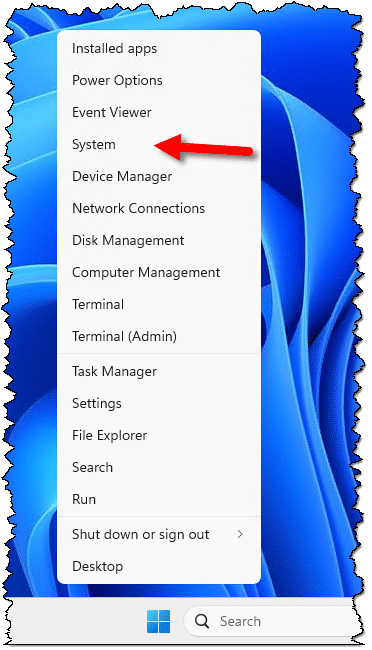
In the resulting “System > About” window, click on Advanced system settings.

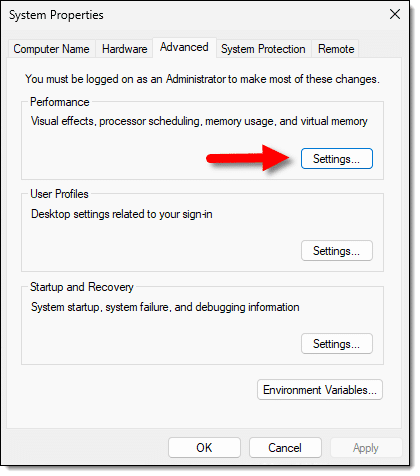
In the Advanced tab of the resulting “System Properties” dialog, click on the Settings… button in the Performance section.
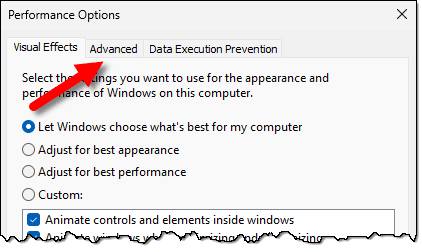
In the resulting “Performance Options” dialog, click on the Advanced tab.
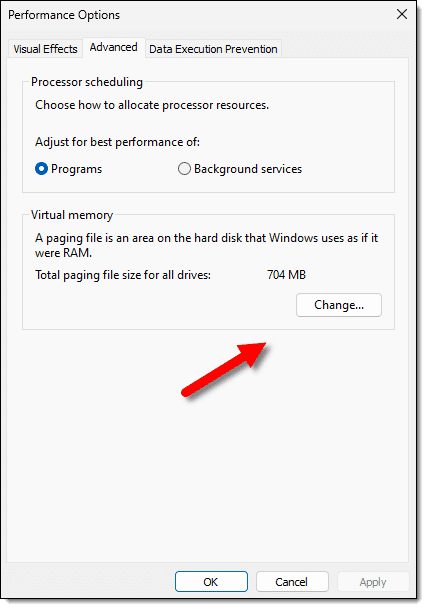
In the Advanced tab, click on the Change… button in the Virtual memory section.
Finally, you’ll have reached the virtual memory settings.
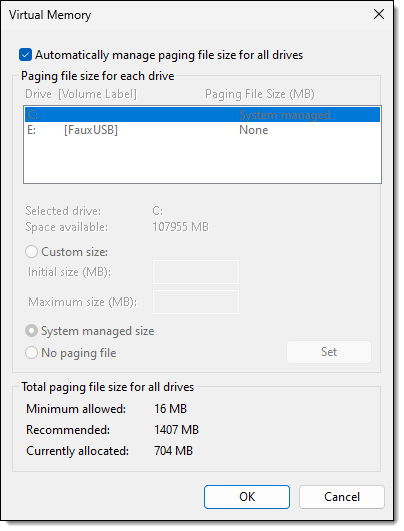
Changing virtual memory settings
As you can see above, the default is to allow Windows to “automatically manage” the paging file(s) across all appropriate devices. This is typically the best option.
If you uncheck that setting, you can make changes to each individual drive on your system.
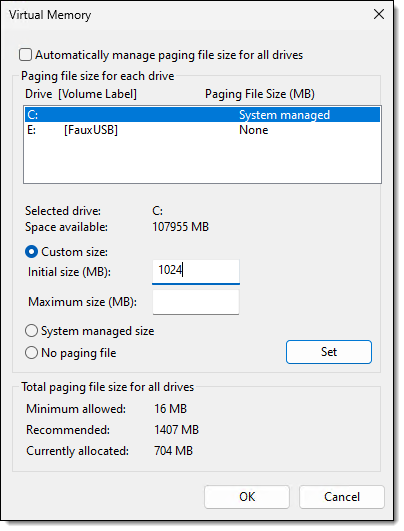
In this example, I’ve:
- Selected the C: drive
- Clicked on “Custom size”
- Entered a size of 1024 MB (aka 1 gigabyte)
Clicking on Set would make change. You can see that my choice of 1024MB is larger than the currently allocated number of 704MB in the lower pane.
You can also choose to have paging files on multiple drives, or no paging file at all.
What to set
What I can’t tell you is what to set this value to.
In an ideal world, letting the system manage the paging file drive would be plenty. But if you’re running into trouble specifically due to insufficient virtual memory, setting a larger value may help.
Honestly, in an ideal world, you wouldn’t need virtual memory at all, and that’s typically what I do by selecting “No paging file”. My machine has more than enough RAM, so not having a paging file reduces some system overhead, and allows me to free up the disk space that would otherwise be used.
Do this
Virtual memory is used most often when you don’t have enough RAM installed in your system to do what you’re asking your system to do. Virtual memory is used to make it “look like” your machine has more RAM than it does, at a cost of often significantly reduced performance.
If you run out of virtual memory, then your machine really doesn’t have enough resources to do what you’re trying to do. Rather than increasing virtual memory, I’d seriously consider either:
- Adding more RAM to your machine, if it supports it.
- Doing less. By that, I mean running fewer programs simultaneously, having fewer browser tabs open, and just generally not trying to do as much on your machine at the same time. (“How Do I Tell Which Program Is Using So Much Memory?” may help you identify the biggest offenders.)
The latter can be as simple as closing programs when you’re done using them.
Subscribe to Confident Computing! Less frustration and more confidence, solutions, answers, and tips in your inbox every week.
Podcast audio

Related Video


The best course of action here is to open your Task Manager and locate the processes which consume a big amount of system resources. In some cases, these are some buggy programs (programmers often forget to free the objects:)) or just a hanging game (Counter Strike for exapmle). The easyest way is to kill all the related processes and threads. Righ-click the selected process and then click “End process tree”. This will kill all the related threads and will free the virtual memory.
how can i adjust virtual memory setting for better performance of faster browsing and fast pc speed?
The rule of thumb I use for a low end machine (say less than 1 gig of RAM) is to have twice as much virtual memory as you have RAM. For a high end machine (1gig or more), I set VM size to the size of RAM.
Regardless VM is always slower than RAM. If you really need speed, the best thing you can do is add more RAM.
I have heard that Microsoft’s Security patches require that the virtual memory should be in a “systems managed” state or you create a risk of killing the application that is using most of the systems resources. Have you experienced or heard anything concerning this? Thanks, ~Rob
Never heard of such a thing. If you find more information on it, I’d love to hear.
My inlaws computer crashed and required windows xp to be reinstalled. Upon completion of the installation the computer is not caught in a rebooting loop and only shows the black screen with the running bar for windowes xp, but does not enter into the program before rebooting. the error message that pops up, as best i can read in its breifness, is about there not being enough virutal memory or paging file…. Will buying more memory fix this or what do i need to do. Thank you in advance for your assistance.
It’s unlikely that more RAM will help.
I read a great technique on the Langa List for those messages that flash by too quickly … use a digital camera that can take short videos, or a digital camcorder, and record the screen as the problem happens. Then, step through the video a frame at a time around when it happens, and you can often get a good picture of the message.
In the mean time, if it is virtual memory related, I’d try booting in safe mode, or the recovery console, and making sure that there’s enough disk space.
your article has been very informative. thank you. Where axactly can I locate my settings to change them?and what do you suggest to set?
I went to control panel, but where axactly?
well i have this program which alows me to defrag the ram and also this program called Release Ram. It says that i have 870 ram free and -7 VM. And on all other programs it has said that VM is free.
While i play games like guild wars and error occurs and says that it cannot read the memory or something, i also cant save documents on microsoft word. i have no idea why it says i have -7 VM PLEASE HELP ME
Defragging RAM and “releasing” RAM products are, by and large, ineffective and a waste of money. Windows already manages memory for you and deals with such issues transparently. I would completely ignore whatever those tools are telling you, and focus instead, on the *specific* error message you get from applications that are failing.
beth-if you are still lost: to get to systems, when you are in control panel, you have to first click on ‘performance and maitenance’
James what Leo said is right, your programs to defrag RAM and etc, are bogus and you crashing has many a number of things to do with your computer and not just memory, if you are running an XP machine you need to make sure the program is made for windows XP, many problems will occur if XP doesnt like the game. Also your -7VM i think that means u have 7MB allocated from your Hard Drive to Virtual MEmory, at least thats what i gather, i would try increasing its paging file(depending on the ammount of space u have free on your Hard Drive) to about 20MB and try it again. If this lets it play a little better then increase the paging file more i would say to 4% of your total HD space. IF this does not work try uninstalling the game and defragging your HD and reinstalling. btw Leo Article was very informative, Thank you.
I’ve tryed optimizing my virtual memory. Adjusting my settings apparantly did not work because I have checked and it states I have 0 mb space left for driver E (virtual memory). What can I do. Please reply by emailing me at [Email Address Removed].
Sounds like your disk drive is full. Can’t make the VM file bigger if there’s no room for it. Free up some space on that drive, or use a different drive.
I am running WIN 2000. I just ghosted my HDD to a new one. When I put the new drive in and tried to boot from it, before it starts windows, I get a message “Your system has no paging file or the file is too small”. It then explains how to go into control panel and change it. However, when I close the message box, it comes back to it. I can never get into windows to change anything. It does the same thing in Safe Mode. I’m stuck!. Is there any other way to get in and make the changes?
I am having a similar problem…can anyone help?
The computer is a Dell Dimension 9150. It has an Intel Pentium D 830 (3 GHz) processor with dual core technology. We have 1 GB DDR2 SDRAM at 533 MHz and a 250 GB Serial ATA Hard Drive. We are running Windows XP Professional version 5.5. We also have Adobe Creative Suite 2 installed.
Each time the computer reboots there is a Virtual Memory Error that reads “Your system has no paging file, or the paging file is too small.”
I have gone to System in the Control Panel and manually put in the initial and maximum amounts – but they do not stay. After rebooting the computer the same error message comes up again.
Also, I made sure I was logged in as an administrator before making any changes so I do not believe it is a permissions problem.
After trying to change the settings unsuccessfully a number of times, I called Dell. They suggested we swap out the RAM. They sent us a replacement. I swapped it with the other, but it didn’t help either. The virtual memory settings will still not change.
i am the engr to a very big cafe, i just changed all the operating sys on all our sys to win 2000 ands the problem since them has being our systems are slow and always freezing then when booting it comes up with the message your system is low on virtual memory windows is trying to increase your virtual memory during this memory requirements for some of your application may be denied what can i do?
Most of the advice given for Windows XP applies to Windows 2000. Windows XP is really just “the next version” of Windows 2000 (like Windows Vista will be the next version of Windows XP). Naturally there are differences, but in general if the settings, such as virtual memory, appear to be in the same place using the same wording, then chances are the same concepts will apply. It’s certainly a good place to start.
Thy this:
http://support.microsoft.com/?scid=kb;en-us;837869
i have a celeron 2.8ghz cpu and 192mbs of ram on my pc i keep getting virtual memory problems.i also have system mechanic and it is always giving me poor readings on my ram its dropping as low as 30mb. everytime i defrag it it just keeps dropping all the time back to 30mbs. can you please help do i have dodgy ram or something
Defrag has nothing to do with memory or with disk space – defrag is about keeping your hard disk performing well.
I’d have to know what you mean by “I keep getting virtual memory problems”. What problems? What are you doing when they happen?
I just went to http://www.fastr-pc.net to download the program designed to speed my virtual memory up…naturally the “free” version was unable to fix the problem but apparently if I buy the “registered version” all the problems can be fixed…great website….
I’m always VERY skeptical of these types of tools … please report back after you’ve run it to let us know if it actually did anything. Many do not.
I can only hope that this answer hasn’t been mentioned already, and I forgot where I found it in the first place, but it works GREAT.
1. Do you have any junk hard drives laying around? Even two gigs and 5400 revolutions will do–install the sucker as a secondary. If you increase the virtual memory on the same disk as the OS, you are simply causing the resources for the single disk to work twice as hard, partitioned or not.
2. THEN go to ‘Control Panel>System>Advanced>Performance Settings>Advanced>Virtual Memory–then press Change.
3. Keep C:/ highlighted, and mark ‘no Pagefile’. Then hit ‘Set’.
4. Now, highlight D:/ right below it (or whatever your cheap-ass old drive is lettered), select ‘Custom Size’, and enter two numbers: One for Initial Size, another for Maximum Size. these (for some absurd reason) seem to work better if they’re in increments of 256, 512, etc. Fill it up, with the low number being 2/3rds of the high. mebbe leave a little room on the disk for back-up. Hit set again, and restart I’m at 1536, with a max of 2048, running all the Adobe CS2 software on a crappy five year old Compaq 1.3 GHZ Socket 370 POS, with the max memory of 512 installed, and it never hangs anymore. It runs like it has at least a Gig of memory installed.
What is the Difference between VGA Driver & Display Driver?
VGA is a type of Display.
Thanks,
Leo
http://support.microsoft.com/kb/308417 is the link to help you understand adjusting your virtual memory. It says that whatever your RAM is (say 256) then multiply that by 1.5 to get your minimum and multiply that figure by 3 to get your maximum.
Hi, I stumbled across this page via Google and just started having this problem. I recently installed the Program Prevx 2 the individual program.
Each time I do a file scan I get an Error message that my xpsp2 , 1gig is running low on virtual memory.
I mailed Prevx support and was told:
1. regedit and find key “KKEY_LOCAL_MACHINE\SOFTWARE\Microsoft\Windows\CurrentVersion\Run and to look for references to PrevxOne or Prevx2 file and delete the key.
2. Clear down Prevx2 local database to aid memory consumption (deleting files-reboot the computer and after startup immediately shutdown Prevx2
-delete all the *.dat files in the folder:
c:\documents and settings\all users\application data\prevx\*.dat
I am not sure what step 2 is all about and would appreciate lay persons jargon on what files, where they are and what this all means.
I hope that I am not making an error in posting this comment in this topic, if so I do apologize.
I would really appreciate correction if I have committed an error in posting this and advice as to how I should post this.
Thank you for your time.
i just bought a new laptop, i have 4gb of ddr2 ram, a 2.4ghz amd duo proc. and 320 gb of space on my hd. the computer is already fast, but im just wondering what an appropriate number is to use under virtual memory settings where it says initial size (mb) and maximum size(mb), to speed it up even more.
There is no recommended setting. It depends on how you use your computer. What aplications and how many. I actually run one computer with NO virtual memory, since it has lots of RAM and I never need to push outside of that.
24-Nov-2008
sir i have 40 gb hard disk and 512 mb ram im using windows xp,would like to know what are the best settings of virtual memory for my pc please tell me thanks
19-Aug-2010
Hi, I have 128MB RAM AND 40GB hard disk, would like to know what are the best settings of virtual memory for my PC. And another problem is my PC is going into off mode after sometime without my intervention.Please suggest me some troubleshooting techniques and what to do.
If by “off mode” you mean that the computer is turning itself off, that’s usually a sign of overheating: My computer has started to shut down randomly, could it be the fan?
21-Aug-2010
I would just like to add that because the computer often adds and removes info from the page files in virtual memory, they are constantly growing and shrinking. Such process can cause files to become fragmented hence, slowing down the machine. By managing virtual memory settings, we can optimize performance of the computer and be able to use the RAM and virtual memory in the most efficient way.
Shorter answer is described in zdnet article, alsot the tools how to measure the usage of virtual memory:
http://www.zdnet.com/blog/bott/windows-7-memory-usage-whats-the-best-way-to-measure/1786
For understanding what is virtual memory and how it works, for me is the best description given by Mrk Russonivich (it’s also mentioned in Zdnet’s article):
http://blogs.technet.com/b/markrussinovich/archive/2008/11/17/3155406.aspx
Both of these also kick the butt of the urban myth of virtual memory = 1,5*amount of RAM or 1,2* or 1,25* etc