
The problem, of course, is that everyone’s Startup list is different.
Which programs start automatically depends on your computer, the hardware installed, the software installed, the programs you run, and the features you enable.
It can get really confusing really fast. It can also impact your computer’s performance.
Become a Patron of Ask Leo! and go ad-free!

The answer differs from machine to machine. Use Task Manager’s Startup tab to search for information about the items that start automatically when you boot up by right-clicking on the item and selecting “Search online”. Using a combination of the information you uncover and the item’s location on your machine, you can make informed decisions on what should remain.
Task Manager
Task Manager’s Startup tab replaces the old msconfig tool in prior versions of Windows.
Run Task Manager by right-clicking the clock in the taskbar and clicking on Task Manager.
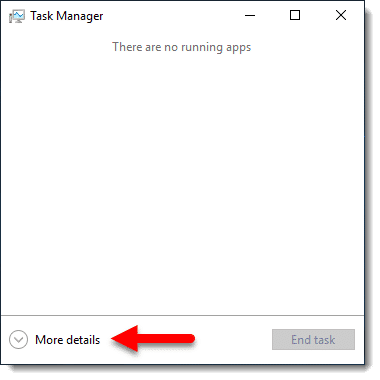
By default, it comes up with a simple display. If present, click More details in Task Manager’s default display to expose the Startup tab.
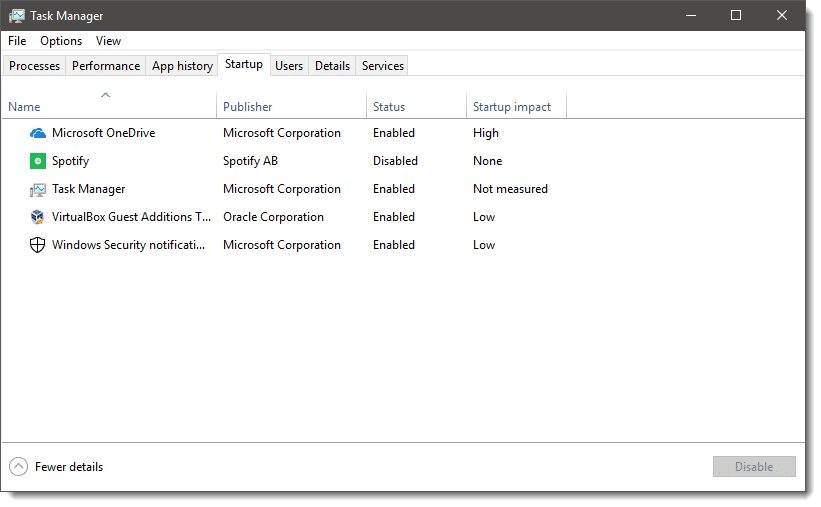
Task Manager includes a little more information than msconfig did — most notably the “Startup impact” column.
In the example above, a relatively clean Windows 10, we have five start-up entries:
- Microsoft OneDrive: the synchronization software for OneDrive.
- Spotify: a pre-installed program that came with Windows 10.
- Task Manager: Task manager is itself configured to run automatically (something I do).
- VirtualBox Guest Additions: a part of the VirtualBox software I use to run different versions of Windows and other operating systems.
- Windows Security Notifications: the application responsible for the small shield icon in the notification area of the toolbar.
A more complex example is my laptop.
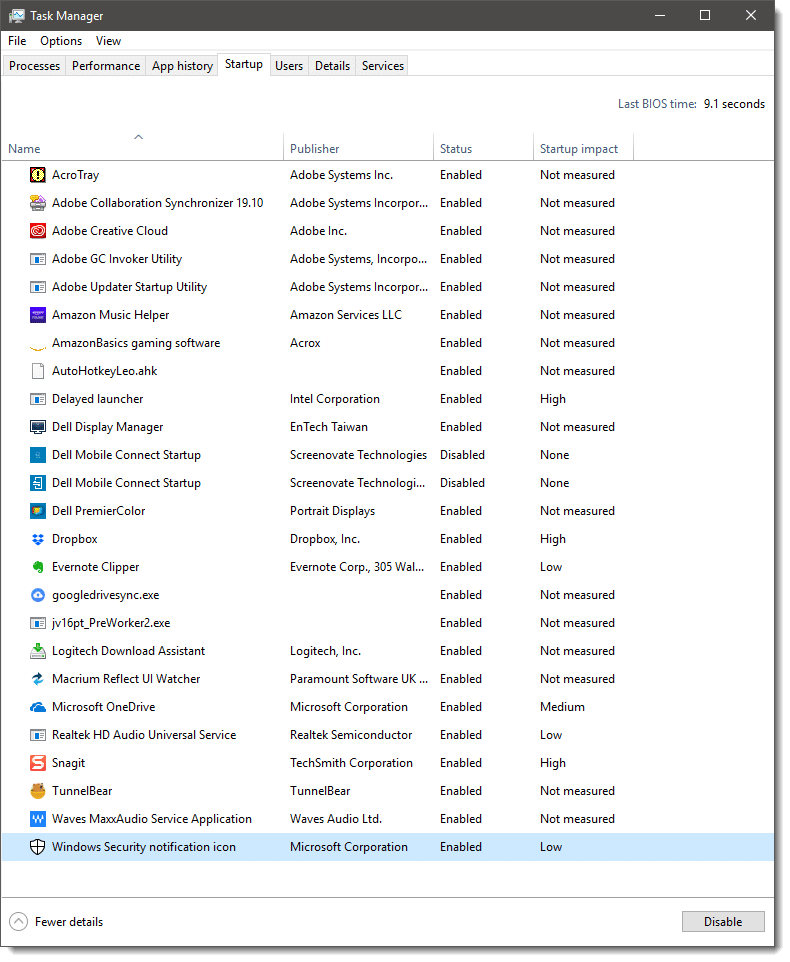
You can see it’s a much lengthier list of programs, all of which start when I log in to my machine.
How do we figure out which ones we need to start automatically, and which we can safely disable?
Detective work
Many of the items in the Startup list are obviously related to software you’ll recognize.
For the rest, right-click on the item and you’ll find there’s a handy “Search online” link.
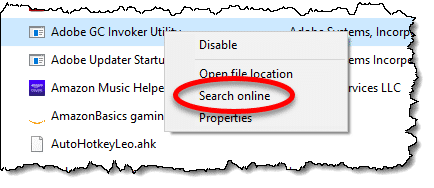
Click that, and a webpage will open searching for the named item.1 For many items, this will give you clues as to what the item is for and why you might want it to run automatically.
However…
Search can be misleading, so I have to advise you to bring some skepticism to the table as well. In the example above — Adobe GC Invoker Utility — several search results indicated it was malware! In my case, it is not; it’s a component of Adobe software I have installed. Reading the information returned by the search, I learned:
- It is not necessary to have it start at Startup.
- Malware does occasionally disguise itself as this program. The location of the file is important.
File location
For many (though not all) items in the Startup list, the right-click list also includes an item called “Open file location”. Click on that, and Windows File Explorer will open to the location on your hard disk containing that file.
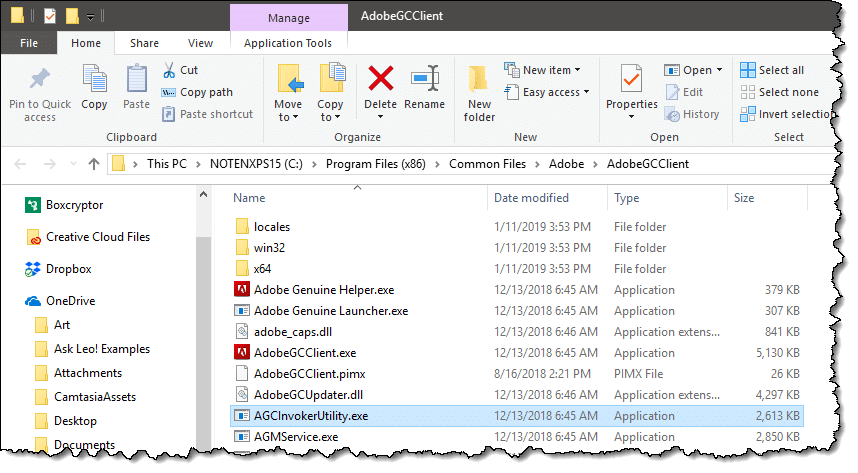
In my case, the location is exactly as expected:
C:\Program Files (x86)\Common Files\Adobe\AdobeGCClient
Malware trying to disguise itself as this program is often placed elsewhere.
Even if you’re not worried about malware, the location of the file will often tell you what it’s for, or at least what it’s associated with. In this example, even without having performed a search, the file location tells me that the file is related to the Adobe software installed on my machine.
This detective work is not always conclusive, but in most cases, it’ll get you what you need: an understanding of what the startup entry is related to.
But can I disable it?
This is a question I can’t answer, at least not for every entry you’ll find in your startup list.
As we saw above, research tells me I could disable Adobe GC Invoker Utility if I wanted to.2
The answer for each item in your startup list will depend on what you find, what you care about, and what your research tells you.
What I can say is this: disabling startup items in Task Manager’s list is relatively safe. At worst, something you care about will stop working. The fix is easy: re-enable it and reboot.
Task Manager is just the beginning
Task Manager’s startup list only includes certain classes of startup tasks — those most commonly affected by your installed software and configuration.
Autoruns, a free tool by SysInternals.com, is significantly geekier and much more complete. If you’re diagnosing a suspected problem, the items listed in Autoruns are also worth investigating.
Caution: unlike Task Manager’s list, you can make your system unbootable using Autoruns. Make absolutely certain you have a system image backup before you go that route.
Is it worth it?
Sometimes people look at the Startup list to improve their system’s boot time, and occasionally its performance thereafter. As you can see, however, truly analyzing all of your startup entries can be a time-consuming effort.
Alternatives that might be more effective include:
- Uninstall software you don’t need. This will remove any associated startup utilities as well.
- Replace an older hard drive with a Solid State Drive (SSD) to speed things up.
- If you’re not going to replace it, defrag that older hard drive.
- Add RAM if your machine is tight on RAM usage and has capacity for more.
Generally, utilities advertised to improve boot speed — particularly registry cleaners — do not have significant impact.
Do this
Subscribe to Confident Computing! Less frustration and more confidence, solutions, answers, and tips in your inbox every week.
I'll see you there!
Podcast audio

Related Video


Anoher excellent tool is HijackThis!.
The “problem” with HijackThis (which I agree is an excellent tool) is that it’s perhaps the geekiest of all. It really takes someone familiar with it to interpret the results. That being said, there is a support forum for exactly that. This link will take you the site providing HijackThis: http://ask-leo.com/d-hijackthis
Hi, I have removed all but “systray” or something simular on all my computers without any problems, so far. I don’t know how much faster it makes my computer, but it has not hurt any of them yet.
Win Patrol is a step up from msconfig and it is free. The program identifies and monitors the association of every entry and offers suggestions regarding the selected item. Also, for a small fee, by contribution, you can upgrade to a more robust version. Have been a happy user for years.
Don’t forget:
Antivirus and protection tools also runs on startup.
If you disable them you may be opening several doors to virus, adware and spyware
that was the worst answer ever – how about reccommeding a website that tells ou each .exe, what it is, what it does and define what the user can do with it such as… http://www.startup.networktechs.com/search.php … instead of some long meaningless answer that really didn’t answer anything!
The “Start-Up List” (http://www.sysinfo.org/startuplist.php) is an informative site that is very helpful in determining which programs can be unchecked in the MSconfig start-ups applications. Just write down a list of the items that you are unsure of … enter the questioned item in the search bar at this site and read the results.
All you have to do is go to this website and it lists everything alphabetically and you click on the name of the file and it tells you whether you can or can’t: http://www.tasklist.org/tasklist_u.html
I disable everything from starting with Windows that I don’t need running all the time. The good news is, as Leo said, “disabling startup items in Task Manager’s list is relatively safe”. If you find you needed a program running all the time, you can simply run it manually and then re-enable it in the Startup Tab. One exception to this is your antimalware program which you need running all the time, but you won’t see any impact until you get hit with malware. On the plus side, though, Windows will warn you that you don’t have an antimalware tool running.
One cool thing about the “more details/fewer details” switch. It remembers what you chose the last time and keeps that setting when you open that task manager again.
Sometimes I use Mark Russinovich’s Autoruns for Windows (https://docs.microsoft.com/en-us/sysinternals/downloads/autoruns). I like it’s interface because it’s easy to see what has been unchecked. I will mention that the interface might be a bit daunting for some, but I normally pay attention to the “/run” sections to tell me what’s running at startup.
Leo recommends Autoruns from SysInternals.com in the article.