There are several ways to look at a link (both in email and on webpages) before you click on it to make sure it is what it claims to be.
There are several ways to hide where links go as well. But the good news is, the most common approaches are the simplest to detect.
So let’s go about disrobing those cloaked links.
Become a Patron of Ask Leo! and go ad-free!
The anatomy of a link
First, a little refresher on what a link really is. There are two parts: the part you see, and the part you don’t. For example, if I give you this link:
The part you see is “Ask Leo!“. The part you don’t see is the URL that link takes you to, called the target: “https://askleo.com“. To get just a little geeky for a moment, that link is actually encoded in HTML like this:
<a href="https://askleo.com">Ask Leo!</a>
In HTML, you can see exactly how both parts, seen and unseen, are encoded.
Now take a look at this example:
That looks like a link to eBay, doesn’t it? Here’s how it’s really encoded:
<a href="http://buyleoalatte.com">www.ebay.com</a>
The part you see is “www.ebay.com“, but the target you don’t see is something else entirely … it’s “http://buyleoalatte.com“. So when you click on that example link that looks like it’ll take you to eBay, it will instead take you to buyleoalatte.com.
This is a fundamental component of phishing: making it look like you’re going one place when instead you’re taken somewhere else entirely: usually (though not with our example) with malicious intent, to a site that looks just like the one we expect, except that it’s not.
Hovering
Hovering your mouse pointer over a questionable link is one way to determine its validity. All that means is you move the mouse pointer over the link, but don’t click.
Using the example above:
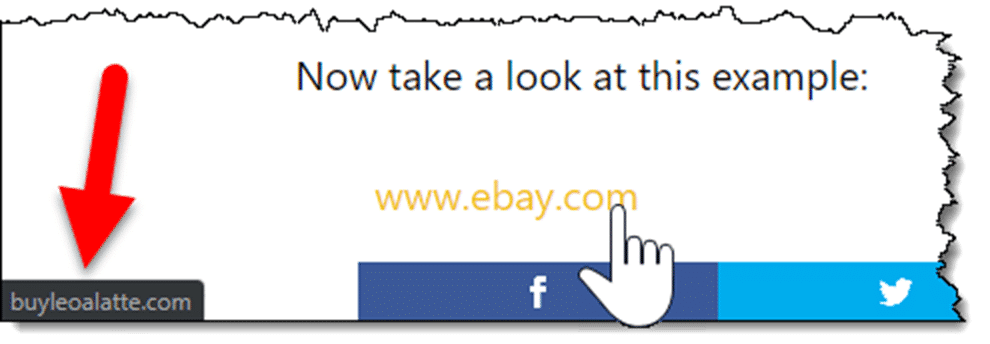
Using Google Chrome, I’ve moved the mouse pointer over the “www.ebay.com” link, at which point Chrome changes the mouse pointer to a pointing finger. The target is displayed in the lower left of Chrome’s window.
Most browsers show you the target of the link somewhere near the bottom of the window.
In this case, you can see that my mouse pointer is hovering over the link that says “www.ebay.com”, but Chrome is showing you the URL you’ll really be taken to: buyleoalatte.com.
This isn’t just about webpages and web browsers. Email often contains links, and that’s where a lot of these scams happen.
If you view your email in a web browser — say by visiting outlook.com or gmail.com — everything I’ve described above should work for the links displayed in messages. If you’re using an email program, like Thunderbird, Microsoft Office’s Outlook, or others, most behave just like web browsers: if you hover the mouse over a suspect link, somewhere it’ll display the true destination of the link — most likely in the status line at the bottom of the email program’s window.
Copy/Paste
Another excellent approach to validating a suspicious link is to use copy/paste.
Rather than just hovering over it, right click on the link you’re uncertain of.
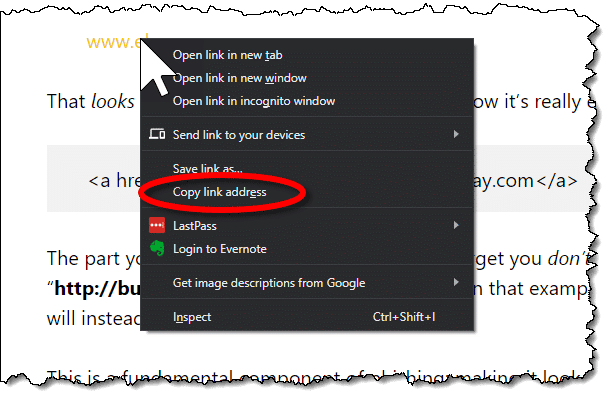
In the resulting pop-up menu, click on “Copy link address”, or the equivalent in your browser or email program. This copies the target — the part you don’t see — to the clipboard.
Now, right-click on the address bar in your browser.
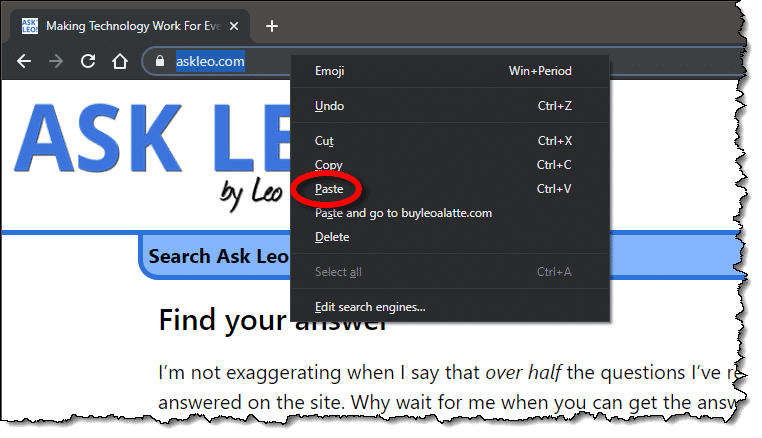
Click Paste (not “Paste and go”, if that’s available) to paste in whatever was copied.
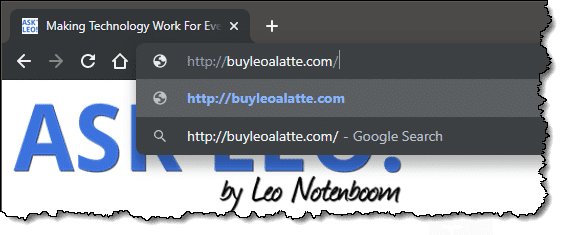
You can now see what was pasted. This is the true target or destination: the part you normally don’t see, and the site you would have been taken to had you blindly clicked the link.
In this example, it’s fairly obvious this link wasn’t going to take you to eBay at all, but to some other site.
After pasting, if it’s a link you want to go to, just press Enter. If not, press ESC and it’ll be erased from the address bar.
You can, if you prefer, paste that URL wherever you like. Pasting it into Notepad is one common option, so that you can see exactly what the destination truly is without risking accidentally going there in the browser.
Dealing with mismatches
All this is to get you information from which you can make a decision. It doesn’t mean that every time things don’t match it’s a scam or something nefarious.
Here’s one example of my own:
That looks like a link to the Amazon Kindle, and if you click on it, that’s exactly where you’ll land: the Kindle product page on Amazon.com.
However, if you hover over that link using the techniques we’ve discussed here, you’ll see it actually goes to “https://go.askleo.com/kindle“.
So what’s the deal?
If you’ve ever used a service like tinyurl.com or bit.ly to make an excessively long URL into something shorter, this is the same idea. I have my own private equivalent of a bit.ly. In these cases, there’s a database that maps a short URL or token (like “kindle” in my case) to the original longer URL.
When you go to the shorter URL, the service automatically and transparently redirects you to the longer destination URL.
So in this case, these two are identical:
Hover over each and you’ll see that they’re quite different, but click through and you’ll end up at the same place.
I point all this out because it’s extremely common to do this, particularly in newsletters and other legitimate marketing mails. Links are often routed through third-party services, not just for shortening. Additional uses include:
- Counting clicks. For example, I can tell that in the last 30 days that “kindle” link has been clicked on five times. This lets me know how popular it is.
- Adding information such as affiliate codes. The links above include my Amazon affiliate code, which tells Amazon where the link came from. Should you purchase a Kindle, I’ll get a small reward. (More about this in my affiliate disclosure.)
- Tracking clicks. More than just counting, information can be used to track which links were clicked on by whom. This is most common in the email newsletter business, where redirection links — such as the ubiquitous clicks.aweber.com provided by my email service — can determine which recipients clicked on which link, or who opened a newsletter.
What’s legitimate?
It’s not always easy to tell what is or is not a legitimate link or an attempt to fool you. I’d claim, though, that majority of the time it’s not hard.
Suspicious signs include:
- Obvious misdirection. If the “part you see” looks like a URL or domain name like “www.ebay.com”, then the destination, the “part you don’t see”, should probably match.
- Links to IP addresses. If the destination is an IP address (something that has only numbers like this: http://67.227.211.203), don’t trust it. Legitimate sites always have names in text.
- Links to foreign domains. With all due respect to the legitimate businesses in those countries, destination links to domains that end in “.ru”, “.cn” (Russia and China, respectively), and others should be suspect. Certainly if you don’t expect to be taken to a website in a foreign country, this should raise a red flag.
There are others, but those are the most common.
And again, any one of those doesn’t mean the link is a scam, it just means that it fits the characteristics of links that are. It means you should pay a little more attention before clicking through.
Do this
Subscribe to Confident Computing! Less frustration and more confidence, solutions, answers, and tips in your inbox every week.
I'll see you there!


Just remember, the information displayed in the status bar when hovering can be replaced with JavaScript. For example, it’s possible to have “www.ebay.com” appear in the status bar while hovering, yet still go to the phisher’s site.
Using the right-click and “copy shortcut”, “copy link location”, or whatever your browser calls it, is more accurate.
Absolutely.
The good news is that it’s rarely used, and if in email many email clients don’t
run the javascript, rendering that technique useless.
But you’re quite right, it can be done.
Leo
…And in some mail clients which do run Javascript, Javascript can be turned off. :)
Another red flag is when the “part you don’t see” ends with an executable file such as “card.exe”. This is the case with a Hallmark e-card phishing email that’s been appearing in my inbox for several months. Basically, never click on a URL that ends in “.exe”.
Hi Leo
How does this work on a touchscreen tablet, please? Sorry if this is a dumb question.
Farther down, I answer this question with regards to my Kindle Fire HD8, (which is a tablet); hopefully the same advice (or something similar) will apply.
Hope this helps! :)
No, that’s a great question! It … varies. Sometimes long-pressing a link will, instead, show you where it goes. Or offer you a copy option so you can paste it elsewhere before going to it. If there’s still a mouse pointer (as there might be on a touchscreen laptop or tablet) you can often move the pointer over the link without clicking on it as well.
O.K., two things:
(1) On a Kindle (how serendipitous! — I’m using a Year-2016, 6th-Generation Amazon Kindle Fire HD8), the equivalent action to a “hover,” is to “hold” on a link (i.e., place your finger or stylus on the link, don’t move, and wait a few seconds). A “pop-up” menu, similar to this article’s second illustration, should appear, except that above all the available options, in a slightly smaller font, will be the link’s actual target.
(2) Leo, you used a link of:
https://www.amazon.com/dp/B07FKR6KXF?tag=askleo-20
Please be informed that Amazon also has their own link abbreviator! The “short form” for the above link, is:
amzn.com/B07FKR6KXF
The only two disadvantages I’m aware of are (a) the target is not “https,” and (b) the target is not “AmazonSmile.”
But it most surely does take you directly to whatever product the ASIN represents!
My links also go through my own (go.askleo.com) so that I can count how many times they’re clicked. Not something I can do (easily) with anyone else’s shortener.
In Firefox and Thunderbird, it says Copy link location instead of Copy link address when you right-click on the link.
Is it possible (on a Windows 11 PC) to completely disable the “display URL when hovering over hyperlink” in websites? I am frustrated because the URL is always displayed over the horizontal scroll bar at the bottom of browser window making it difficult to navigate around websites, especially those that contain many ads and popups. For some reason, this has become a problem in both Microsoft Edge and Chrome only in the past couple months.
Not that I’m aware of. It’s an important security feature.