What it looks like when https does its job.

This message appears when I try to access my email account.
The problem is not yours to fix; it’s a problem with the website.
You still need to be careful, though.
Let’s look at https connections and what you should do when faced with messages like this.
Become a Patron of Ask Leo! and go ad-free!

Your connection is not private
This message results when https determines there’s something wrong with the security information for the website you’re connecting to. Most typically it’s an expired security certificate, but it can also be a spoofed website attempting to fool you into handing over private information. It’s nothing you can fix, but it is something you need to watch for and understand.
Https certificates
The https protocol uses what are called security certificates, or just certificates, as a kind of positive identification for a website.
In many ways, it’s similar to a driver’s license.
A driver’s license has three components:
- Process: A driver’s license must be obtained from an issuing authority, like a Department of Motor Vehicles or Department of Licensing. The process includes documenting your identity as well as proving you have the skills to drive.
- ID: A driver’s license is used to prove you are who you say you are.
- Functionality: A driver’s license gives you permission to drive a particular kind of motor vehicle.
A certificate for an https website has three similar components:
- Process: A certificate must be obtained from an issuing authority. The process includes proving you own the website for which the certificate will be issued.
- ID: A certificate is used to prove that the website is the website it claims to be.
- Functionality: A certificate is used to encrypt the data visitors send to and receive from the site.
A driver’s license is typically a physical card issued after you pay a fee, provide documentation, and pass a driving test. A security certificate is a blob of encrypted data issued after you pay a fee,1 provide documentation, and pass an identity verification test.
Errors
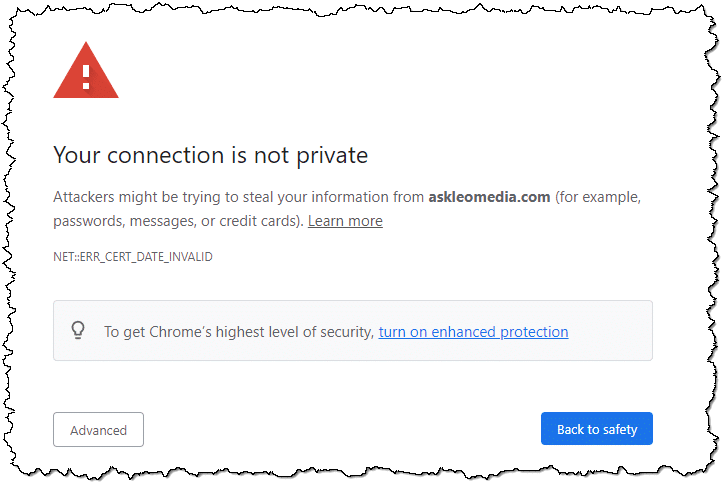
Here’s an example of one type of error that we’re talking about, as displayed in Google Chrome (Edge, Brave, and other Chromium-based browsers are similar):
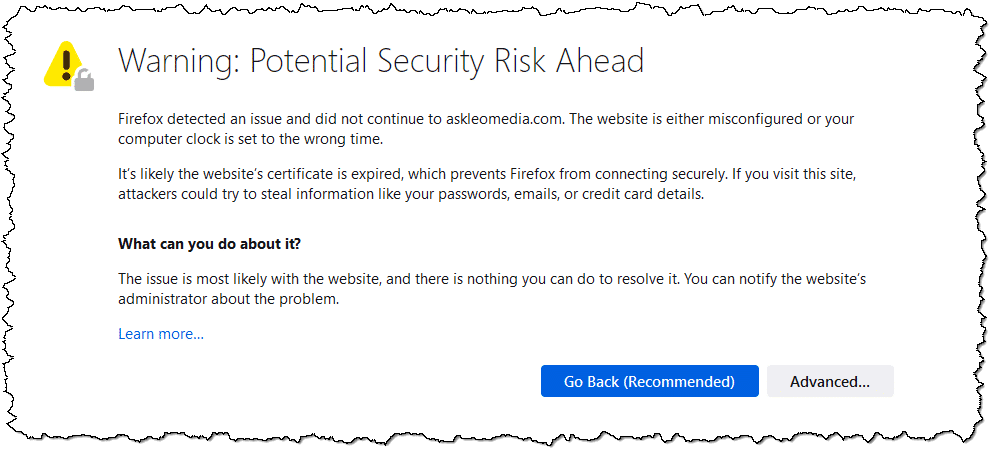
Here’s the same in Firefox:
These days, browsers make these errors look big and scary, even making it difficult to proceed if you don’t know what you’re doing. (Hint: you start by clicking on Advanced.) And yes, sometimes you do want to proceed anyway — but only if you’re certain.
You can reproduce this error by going to https://askleomedia.com.
Possibilities
There is something wrong with the security certificate. So far, that’s all we know. That means either:
- The site may not be the site we think it is, and we could be about to hand over sensitive information to an imposter.
- The site may not be able to handle encryption properly, meaning that the connection could be viewed by someone snooping in on the connection.
Or, it could mean nothing but an administrative oversight.
The trick is knowing which is which.
Most common by far: expired certificates
Like driver’s licenses, security certificates come with an expiration date. Typically, they’re only valid for from one to three years. If the website owner fails to renew a certificate before it expires, that’s an error, just like driving with an expired license would be.
This is perhaps the most common certificate error we see on a regular basis. It’s the error you see in the examples above.
- NET::ERR_CERT_DATE_INVALID is just a geeky error code that says “Error, the certificate date is invalid.” Chromium-based browsers generally report this.
- “It’s likely the website’s certificate is expired” is Firefox’s clearer explanation of the problem.
It’s an unfortunate oversight when it happens, but it’s usually corrected quickly. I know, because I’ve made this error myself.2  It’s typically safe to ignore the error as long as the expiration date is relatively recent.3
As a side note: this error can occur if your computer’s clock is set wrong. You’d likely see the problem on every https site you visit if this were the problem.
Misconfigured certificates
This one bugs me because it shows that the website owner doesn’t know how to configure their own server.
“biz.askleo.com” and “askleo.com” are two different sites, and typically require two different security certificates. Most importantly, a certificate issued for “askleo.com” will not validate “biz.askleo.com” — an error will result. Think of it as trying to use a driver’s license from someone else who happens to have the same last name as you, but a different first name — it’s not valid.
And yet I see it all the time. The website owner will try to do exactly that, and it won’t work. There are solutions, of course.4 This situation is generally benign, and you can usually safely ignore the error, but still.
As a side note, “www.” is so commonly optional that certificates issued for the base name — askleo.com, for example — also validate the “www.” version of the domain.
The wrong domain
In the askleomedia.com example I use above, the server returns a valid certificate for the correct domain; it’s just expired.
If the certificate indicates that it’s been issued for a completely different domain, that’s a different problem.
Yes, it could be a misconfiguration. There are a variety of ways that can happen. However, whenever the server responds with the wrong domain name for a secure connection, you need to pay attention. It’s like carrying your friend’s driver’s license instead of your own. Not cool.
It ain’t right, and you should walk away.
Self-signed certificates
Official certificates must be purchased. Unofficial certificates — so-called “self-signed” certificates — can be generated by just about anyone with a server. They’re “self-signed” because rather than being cryptographically signed by a trusted authority, you sign it yourself. That’s sort of like making your own driver’s license out of cardboard and crayon.
This is not uncommon among server geeks such as myself, because we’re more interested in the encryption of the connection, not authentication.
So unless you’re a server geek or know that’s what you’re expecting, this type of error should be treated like the next: do not proceed.
Usually harmless
Most of the time, https connection problems are oversights and omissions on the part of the server administrator. As I mentioned, the most common is that the administrator of the server failed to update their certificate. You might contact them and let them know.
The problem, of course, is knowing whether or not this is a simple oversight or a malicious interception. The whole point of security certificates is to detect those errors because they may indicate various forms of server compromise, or even a compromise of your own computer or internet connection. Hence the error message’s focus on privacy.
If your computer thinks it’s going to https://yourbank.com, but due to malware on your machine it’s being directed to a hacker’s computer overseas instead, https security certificate error messages will tell you, just like looking at someone’s driver’s license photo tells you whether the person you’re looking at really is who they say they are.
When in doubt, take the safe route. You should not continue. Instead, double-check that you’ve typed in the correct domain name or URL, and perhaps contact the site owner via other means to determine what’s happening.
Do this
Subscribe to Confident Computing! Less frustration and more confidence, solutions, answers, and tips in your inbox every week.
I'll see you there!
Podcast audio

Related Video


Footnotes & References
1: There are now also free alternatives.
2: I’ve also forgotten to renew my driver’s license in the past. 🙂
3: Though finding the expiration date takes understanding how to examine the certificate. While that can be done using your web browser, it’s not something I’m covering here.
4: Either a separately purchased and issued certificate for each subdomain, or what’s called a “wildcard” certificate, which covers any and all subdomains on the parent domain. I’ve elected to use the latter with *.askleo.com.


I have this same error message, but it’s for major sites that certainly aren’t having a certificate problem (like facebook and ebay). HOw can I simply turn this option off on my computer. I have searched for many answers on computer so far and have tried the following things: Changed Advanced Internet options, lowered security filters, turned off phishing filters, installed the security certificates of the websites that have the error, and added URL’s to the “trusted sites” list. None of this has changed anything. And, after each change, I have closed the broswer and restarted it. nothing… Help!
07-Dec-2008
If it happens every site you go to, check your date and time on your computer. If your computer’s date is off by a certain amount of time, usually I have seen 1 year. In other words if today is 12/7/08 and your computer shows 12/7/07 you will see this error, for nearly every web site you go to.
I had that exact problem with a computer that had a flat CMOS battery, causing it to lose the time settings every time it was turned off
I get this certificate error when i connect remotely to access my Exchange mail on my own 2003 server. I can’t figure out what certificate it’s talking about
I have another question regarding security certificates. It concerns a button that I see (when I view it in MSIE6.0) on the certificate, labelled “Install Certificate”. Why is this button there? I mean, clearly, the certificate works just fine without having been installed (else the web page would fail). Is there any value to installing a web certificate? Is there any case where this would be appropriate???
10-Dec-2008
hi leo ,
i read the problem which is faced by other when the access to the desire website because i also face the same problem , now i have one double will this problem prevent to install any new software for eg , i am trying to install the new version of yahoo messanger 9 but i cant do so , can u help me out …
I tried to get on this website i usually go on quiet regular. I sign in but it keeps saying i am having a certificate problem. I couldn’t understand what it meant. Somehow i’ve done something with the URL. So now its coming up: The requested URL/login/was not found. How do i sort this problem? I would be grateful if you could help me because i don’t have a clue? And i need to get back on this site.
I ask Google for information. It shows options but won’t open any of the sites. Little blue bar showing opening website doesn’t move
I get it on a select few…and in order to help a neice with a governement website (child support) I tried to find out why she gets this same error.
I get it too and my system is totally different than hers.
But also neither of us have trouble with the site when we use anything other than IE.
To me the problem is IE related whether its something I can fix or not.
Solution: Dont use IE if you get this error.
I use both Safari & Firefox often for this reason alone.
Its also one of the top reasons (that and UAC) that I will go Linux or OSX on my next computers.
my daughter trying get on facebook and bebo, it is saying security certicate and wont let her sigh in, whats could be the problem
Posted by: Rachel at December 6, 2008 8:12 PM
I changed the date on my computer and WOW! that fixed the certificate problem for me. It’s an old post but, Thank you Rachel.
I have that problem on our Company’s webmail exchange server (“not issued by trusted authority” and “issued for a different website’s address”) I have talked to our IT dept. and they can not (or don’t want to) change that.
I have tried adding the domain to my trusted sites and to my intranet sites, all to no avail. Surely it must be possible to bypass this for ONE site????????
I have also tried group policy editor, but did not find any suitable option.
It is really ridiculous that I have to click this link every time I need to access my work email! This needs an easy workaround by Microsoft especially for those IT workers who need to access their Intranet stuff remotely.
thankyou my comp was dated back to 2002
i dont know why but ive changed it and
hope everything is going to be ok
I get a certificate error for EVERY website I try to visit. Does this mean my computer has been hijacked?
You were soooo right i changed the date on my comp. becaouse it was dated to last year and now i can log into were i coudnt before yay!! thanx Leo.
Leo I love your column. However the phrase: “…but there is enough in place should I want one, that it will currently cause that error.” is not very clear. Why will the browser sometimes go automatically to https even though you type http?
Thanks!
Ok i read this article, but i am still confused. I’m sorry i am not very good with computers. I had no idea what a cookie was until today. :/ Everytime i try to log into [Site Removed] it says that ‘The security certificate presented by this website has expired or is not yet valid.’ You mentioned that above, but how do i fix this problem? I tried enabling my cookie and when i try to log into my account on DA it says that the cookie used to remember my password and username (which were correct) was not remembered. How do I make it remember the cookie? How do i validate the security certificate? I’m so confused. Please help. >_
24-Apr-2010
I am getting the error message you show, when visiting web sites I know are safe, and that I had no problem with a few days ago.
If I visit them on a different pc, no problem, and the support people at the sites cannot replicate my problems.
So what can I do about this?
They are https sites, btw.
Thank you.
I have read the article – check my clock & still have the problem. My wife has a laptop & we share the same SP via the same modem & she has no problem. I have checked with the website & they assure me the certificate is up to date & valid. I tried to subscribe to your RSS feed but failed. Any other suggestions. Thanks
check u r date and time and also anti virus is update to to the date because some malwares are blocked that security setting file
reset the host file in the systems
go in to youi date and time on the task bar and make sure the date, especially the year, is right!
i could solve the problem.
change date & time settings
i want to thank you very much on the information posted. I had let a friend use my laptop and when it was return. It was not working as given after reading your posted inregards to website certificate it was a minor thing the computer date was really off.
thank you.just change in time and date helped me
I agree with Leo that it is almost always the website’s problem, not you or your computer. But, I have found (as many have mentioned) that if the date and time is wrong in your computer, the website certificate’s date won’t show as valid. What I didn’t see anyone say is that if your computer’s date and/or time is incorrect, (aside from you changing it, or a ‘sloppy’ installation of Windows), most likely your CMOS battery is going bad. This is usually a little ‘watch’ battery on your motherboard. In a desktop PC it’s easy to just replace for about $4 from anywhere that sells batteries, just make sure you get the same ‘model number’ battery as there may be a difference in voltage. In a laptop, it is most likely a watch battery, but some use a tiny capsule or disk-shaped battery soldered to the motherboard – these require professional replacement.
hello, friends.
I ‘am tarun, i have a problem. that is – whenever i start my pc, message appears – ” Date & time wrong ” what should i do… ?
solution of this problem is very important for me……..
THANXXX……
@Tarun
The most common cause of having to set the Date and Time on startup is the CMOS battery.
http://ask-leo.com/why_does_my_clock_reset_on_every_poweron.html
i have the above problem each time i go to check my email the message comes up when i open the page “there is a problem with the security certificat….what should i do
I have a bb curve 9300 and it has a few certificate4 not trusted,should I delete them in my options/security settings.don’t know anything about internet workings at all really and also why does it say everytime I goto my gmail,press to redirect you,should I delete these not trusted and then change my email add password.thank you for your time.
check ur system clock a wrong time or date will give a certificate conflict
yaaaa..same problem for me too…but i solved it by adjusting my date and time settings in pc …..Now ,the pages are opening as usual….Thanks for the appropriate answers above…
for d past three days i cudnt browse on my pc..bt d connecion is active.i cud also used d same connection to browse on my fone.tanks…as soon as i change d date setting it worked perfectly
I just started to get that certificate error msg on my Windows Vista, IE9, each time I visit to a trusted website face page xfininity. I don’t get the same msg when using my Windows 8.1 portable?
The time on my computer is right and I am on firefox it wont wok but internet explorer and google chrome work with facebook but firefox wont any ideas what i can do
I used chrome and accidently signed in to my outlook email account on a site where the https had a red strike to it and I clicked enter before I realised. I signed out immediatly and used explorer to sign in to my account which had the https in green but now my inbox is wiped out except for 15 messages from one person.
Have I completely messed up my email account?
You may have used a phishing site to sign in. If so, use the steps in this article to secure your account: https://askleo.com/email_hacked_7_things_you_need_to_do_now/
Strangely enough, though, a few days ago I noticed that outlook.com (actually mail.live.com) had a certificate error. It struck me as pretty funny that Microsoft had messed up their certificates! They fixed it straight away. So you may have just seen that on the same day I did.
Even the big guys get it wrong sometimes. Oops Instagram Forgot to Renew its SSL Certificate
Hello Mr. Leo, as u can see my name is Satarra, and this is very important my shcool laptop is going through this same issue and the time and date is correct what does this mean, why is my internet keep doing this, it has been doing this ever since the beginning if the year please help ASAP
Read the article you are commenting on. It answers your question.
my problem is the user valid tried up to date
I have an issue with a security certificate. I think a hacker is using this for no good. Theit on my facebook and everything I do. Their hacking everything on my account and using my account ad theirs?? Blowing up my data plan. How do I get rid of it or them? Thanx, judy snyder
The article says that the computer user can do nothing about an invalid security certificate. I suppose that there is something the user can do to force the web site to provide a fresh copy of the certificate — possibly also invalid, but at least it will be fresh.
Use the “Clear SSL State” option on the Content tab of the Internet Properties applet in the Windows Control Panel. According to this Windows XP article (https://support.microsoft.com/en-us/kb/290345):
“If you click Clear SSL State on the Content tab in the Internet Options dialog box, you can remove all client authentication certificates from the Secure Sockets Layer (SSL) cache.
In an SSL session (using https://), when a server asks for a certificate to verify that you are who you say you are, the chosen certificate is saved in a cache. The chosen certificate can remain in the cache until you restart your computer. Clicking the Clear SSL State button removes all certificates from the cache without having to restart your computer.”
I think this means that to remove the local cache of SSL certificates, you can either reboot the computer or Clear the SSL State. Is this still correct in later versions of Windows? (There is such an option in my Windows 8.1 installation).
Also, does clearing the SSL state in the Internet Options applet affect other browsers such as Google Chrome?
Hoping to get an answer to some questions:
1. Is clearing the SSL state the same as rebooting the computer?
2. Does clearing the SSL state still apply to modern versions of Windows?
3. Does clearing the SSL state apply to browsers other then Internet Explorer? In other words, do all browsers use the same certificates on your computer?
Thanks!
1. No.
2. If the option is present, then yes.
3. Depends on the browsers, but typically no. (Some use the Windows SSL infrastructure, some use their own.)
Thank you, Leo.
really good article …thank you…so much…i understand now better about certificates….
my problem with Certificates happens when I use my Samsung Galaxy Smart Phone trying to access my “News & Weather” App. 90% of the websites providing the stories are well-known and reputeable. What should I do?
And don’t forget to check the date and time on your computer. If they are wrong, that too can cause certificate errors.
I wish there was a way to turn it off for certain websites. I get it trying to logon to the guest network at my work with my personal computer.
On my Android smartphone, when I get the Chrome message, it unfortunately does not let me go forward. I often get it at public wifi networks, which is a real pain.
Sometimes it’s as easy as removing the https:// from the address bar and replacing it with http://. Often the website is fine and doesn’t have a secure shell – but the links that go there are wrong. For instance, Leo’s site “Heroicstories.org” does not have a security certificate. If you try to go there with an https:// you will get an error, if you go with http:// you will go to the page just fine.
Even if you think you have, if you have the computer unplugged for a long time the watch battery on the board that keeps your settings when the computer is turned off then the chances are somewhat good that you need to replace it as the battery may be too weak.
You’re going to get a warning message when you are either booting up or Windows may tell you itself but yes, if you do forget it will make a difference. We have had this happen once or twice in a forums site context and the member’s posts were way off the date.
I have been having quite a few issues with Yahoo in regarding ceftificate errors but they have a lot of problems in general, in my opinion lately.
I have two theoretically identical computers, one at work and one at home. The clock and date function on the home machine is wonky; it stops a few minutes after re-setting. Some time later, a day or three, when I try get on a trusted website, it makes with the duff certificate message. I re-set the date & time and all is well. I copy my work files, take them home on a memory stick and load them up. When I work on them and save the files, without first re-setting the date & time, it saves them on the date & time that the clock stopped.
I go to work and, on Friday, say, I try to over-write the older Thursday work file with the newer-but-older-dated file. It asks if I want to over-write the file saved on Thursday (?) with the file saved on Tuesday; I stop and scratch my head. Thinks; I forgot to copy my newer Thursday work file when I finished it on Thursday evening at home. Well, no, I didn’t. I thought it was my brain stem, but it is possibly a battery problem. However, if I leave the computer running for some hours it still loses time. Mmmm. Some bug may have developed in that XP installation and stopped the clock function, but I can’t face a full re-installation of my XP. I lost the will to live last time.
When accessed via Chrome, this site, a patient portal for the doctors of the University of California at San Diego,
https://myucsdchart.ucsd.edu/inside.asp?
has had a red X over the padlock and the https crossed out ever since I registered many months ago (it also shows as not secure after logging in). I reported this to a representative and suggested the site’s certificate might not be up to date, but the rep simply offered to relay the message to tech support. That was four months ago, and nothing has changed.
Clicking to view Elements and reading the content of various tabs, I see:
“This page is insecure (broken HTTPS)” and “The certificate for this site expires in 2017 or later, and the certificate chain contains a certificate signed using SHA-1.”
Wiki says of SHA-1:
“SHA [Secure Hash Algorithm]-1 is no longer considered secure against well-funded opponents.”
Makes me wonder how well-funded someone would need to be to hack in and get lots and lots of patients’ medical records and other private info.
SB
I’ve had some success — depending on the responsiveness of the site administrators — with reporting results of a Qualys SSL Server Test. Paste the offending URL into this web page and request the free test.
https://www.ssllabs.com/ssltest/
The results are in a new page whose URL can be sent to the site administrators.
I ran the UCSD address thru the ssllabs test which generated a very thorough report which, as far as I can interpret, said the site is secure. I wonder, then, why Google Chrome still shows it as not secure.
I’m also having a certificate problem, with Comcast Bill Pay. Using IE, FF or Chrome, all basically say “Your connection not secure’ or words to that effect. I contacted Comcast but in the end, no answer. So I opened the Security information using Snap-In (Win 7) and was not able to identify any Comcast Certificate. Since Comcast denies problems at this point and all three browsers won’t connect, I assumed it was my computer. Now to further complicate the issue, I have absolutely no problems on the other computer connected to the internet with a common connection. So, it seems to be me. I did run the Certificate check on the alternate computer but told me nothing as far as I can see.
So why bother, I suppose. Well, this nags me. I’m supposed to be the computer guy here and I haven’t a clue
Here’s the error message on FF:
SSL_ERROR_NO_CYPHER_OVERLAP
Certificate errors can occur when you system clock is not set to the correct time.
The entire issue of “certificates” misses a vital point. Most users don’t have the time or inclination to bother with the issue.
We normally receive far more emails every day than we can deal with and the intricacies of things like “certificates” are not worth the time and energy to fathom. If the industry can’t figure out a simpler way to reach its customers then they are missing a huge part of their market.
Definitely – the end user is always an important point in any security venture.
I have a related question – on all the newest askleo pages I am getting the shield error? in the address bar (Chrome). This says the page is trying to load scripts from unauthenticated sources. I don’t tell it to load them because there is nothing missing from the page as far as I can tell. I suspect this had to do with ads but am just curious.
I’m not seeing this. Can you tell me what version of Windows you’re running? And what page, specifically, have you seen the error on?
I was using Win 7 and have upgraded to 10. I have seen it in both versions – if I open the newsletter in the web browser it is not there but I usually open the newsletter in the mail and then go to each article and it does appear there on each and every article. It was not on the store site nor on the forum site. It is not on the glossary site either nor on the site for business. Hope this helps.
Fascinating. What browser please?
Chrome Version 51.0.2704.106 m
Latest version
Two things: on the pages where this happens, is there an image of my signature in a comment? The “Leo” graphic is getting loaded via http not https.
Second thing: could you get me the exact wording of the error message you’re seeing? The signature alone shouldn’t be enough to cause a popup message.
Third thing (of two, I know :-) – this one’s harder, and optional) On the address bar, immediately to the left of the https://askleo…. is an icon that is usually green indicating that there’s a good https connection. In your case it should be some other color. Click on that and you’ll get a message that includes a “Details” link. Click on “details” and a new pane with a bunch of geeky stuff should open. Can you shoot me a screen shot of that pane? (leo at askleo.com) https://askleo.com/screenshot for how to, if you’re not familiar. The pane should also have an “x” in the upper right to close it. I think I know what’s happening – and in fact if it goes away by the time you see this perhaps I was able to resolve it.
Thanks!
I am sorry I wrote a reply and perhaps did not hit the post button. I was on Win 7 and have upgraded to 10 and seen it on both. It is not appearing on the store, business, glossary or forum sites. If I try to view the newsletter in the browser it does not appear there either. I usually open the newsletter in mail and then go to the specific articles and it is appearing in each and every one of them.
Hope this helps.
Today (7/18/16), there is no shield. This page (reloaded) does not have a green https while the article about upgrading to Win 10 does and it also has the lock symbol while the others have the generic file symbol. There is no signature on any of the articles and the porn spam article does not have a green https. I am sending a screen shot of the details you asked for but since the shield is gone I cannot send a shot of the error message from that and I cannot see it anywhere else so I am sorry. When I originally got the message, I tried to get a screen shot with the snipping tool but it did not work.
Thanks and here you go.
Hey guy I have a problem with my pc I cant access my emails or download slides on the moodle.it says there is a problem with website security certificate. Please help because my pc is now useless since I cant do anything from it.
As a previous network admin, the single most prevalent problem discovered when a user received a “certificate expired” message was that the date/time on their computer was incorrect.
Look there first for a solution to your certificate expiration errors.
mike
HOW MUCH DOES ALL THIS COST, ON FIXED INCOME AND I HAVE TRIED A LOT OF DIFFERENT THINGS THAT COST AND THEY WERE NOT WORTH THE INK IT COST TO PUT IN
So, after all this “driver licence” B.S., what do I do to gain access to the site that I am trying to log onto?
Depends on the site. I also don’t know why you mention driver’s licenses at all. Has nothing to do with the article you’re commenting on.
Leo: I am seeing this comment on the article: “What Does “There is a problem with this website’s security certificate” Mean…,” so that would explain the driver’s license comment (don’t know why Donald is annoyed though).
Donald: the browser should give you an option to continue anyway, so you can click that link to continue.
The article covers that and notes that for CHROME, you should be able to click “Advanced.”
If you don’t see any link, and it’s worth the risk, you can try another browser.
I am having problem with a site called thee now I use to watch it all the time now it tells me my device does not support this content I watch it from my samsung galaxy 3 tablet it is also my mobile phone can you help me sort this problem out
One possible reason not mentioned is your browser. Browser settings for handling certificates are convoluted and different for each browser. You may get a certificate error on one browser but not on another (for the same website). Certificate settings can go awry and get confused. Corruption due to stale cookies and other assorted data saved by the browser can cause a certificate problem. Clearing the browser cache may help. Another possible problem is accessing a site using http instead of https. Other factors may include firewall or anti-malware software stopping some piece of the website handshaking or browser extensions. In any case, a browser gives you the option to “accept the risk” and continue to the site.